No fluff. Just the config that works.
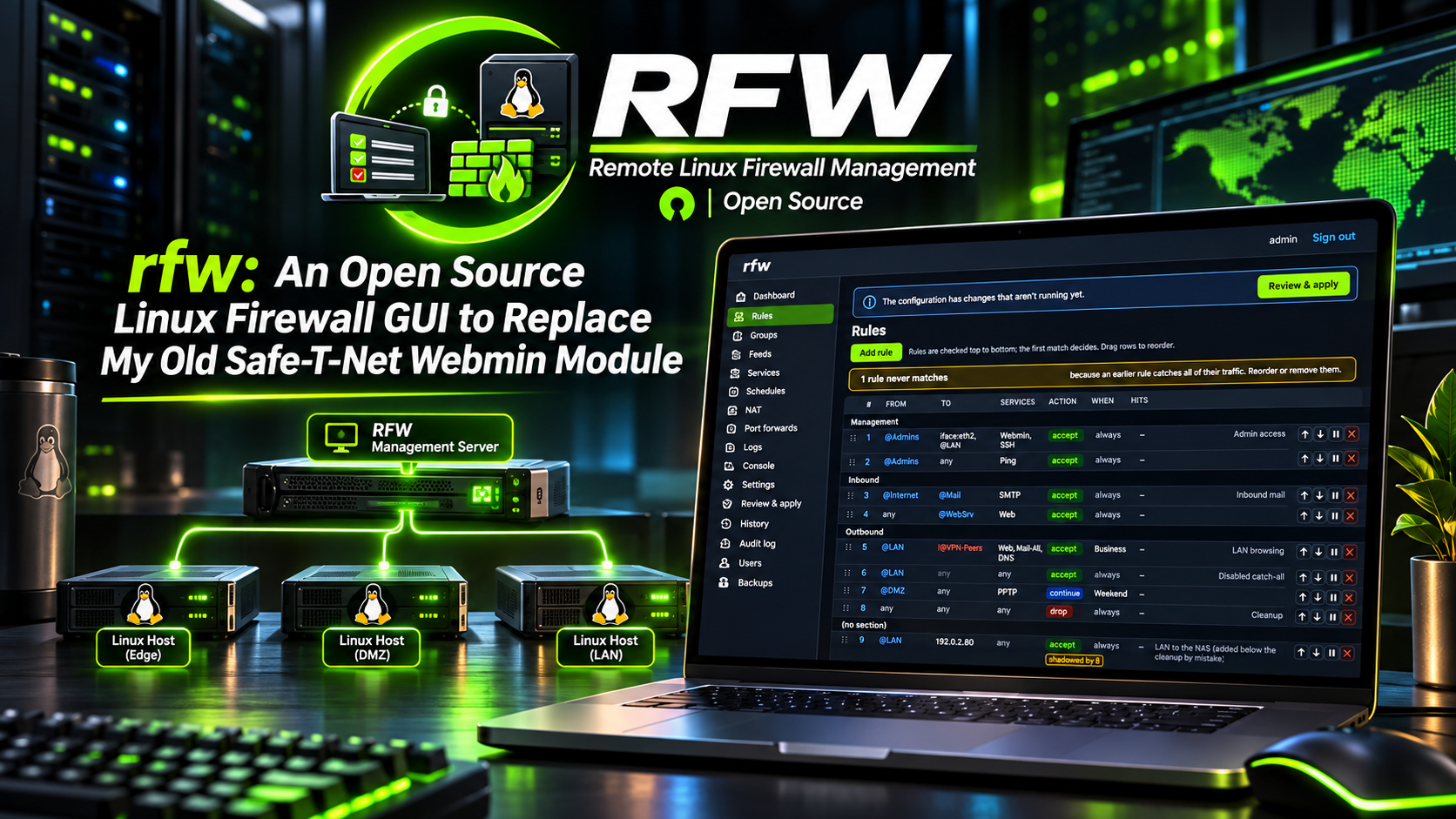
Safe-T-Net is retired. rfw is its open source replacement: a Linux firewall GUI in one Rust binary, built on nftables, with commit-confirmed rollback and anti-lockout management hosts.
Executive Summary
For years I ran my Linux gateways with Safe-T-Net, my old Webmin firewall module built on the ITsecur Simple Firewall Creator (itsecur-firewall v2.61). It was the easiest way I knew to manage iptables: named host groups, services and schedules feeding an ordered rule table. Then the whole stack it sat on (Perl, Webmin, iptables) aged out, and the module went unmaintained with it.
So I rebuilt it. rfw is an open source Linux firewall GUI written in Rust. It keeps the Safe-T-Net workflow, swaps the foundation for nftables, and ships as a single binary with its own HTTPS web interface. No Webmin, no Perl, no iptables. The repository at infosecmonkey/rfw is going public, and I want people to break it.
| Item | Details |
|---|---|
| Objective | Install rfw, migrate an existing Safe-T-Net rule base, apply rules safely with automatic rollback, and lock in anti-lockout access |
| Target audience | Linux admins, homelab builders and network engineers who run a Linux box as a gateway and want a GUI without a separate management server |
| Version | 0.2.0 (first tagged release), plus the management-hosts change on main |
| License model | Open source, GitHub repo infosecmonkey/rfw |
Figure 1: rfw: Remote Linux Firewall Management, open source
Why a New Linux Firewall GUI
rfw is not a fork with a fresh coat of paint. It is the same mental model on modern plumbing:
- One TOML file (
/etc/rfw/rfw.toml) is the source of truth. Easy to read, diff and keep in git. Every GUI change is saved there and earlier versions are kept. - nftables output lands in its own table (
table inet rfw) and is replaced in one atomic transaction. Docker and libvirt tables are left alone. - Commit-confirmed apply. Every apply rolls back on its own unless you confirm it, and the rollback runs under systemd, so it fires even if your SSH session dies.
- Direct import of the old module config:
rfw import /etc/webmin/itsecur-firewall. The installer finds it and imports it automatically. - 200+ built-in services carried over from the original catalog. One of them,
Citrix-ICABrowse, had a formatting bug that made the old module silently skip it. That is fixed. - About 15,000 lines of Rust (axum, maud, rustls, SQLite, argon2id) with no runtime dependencies beyond
nftandip.
Practitioner note: Atomic replacement is the big win over the old iptables scripts. A bash script of iptables commands leaves the firewall half configured while it runs. nftables builds the new ruleset alongside the old one and swaps it in one step.
Prerequisites and Architecture
Assumed knowledge
- Comfortable with SSH, sudo and systemd on Linux
- Basic firewall concepts: ordered rules, first match wins, NAT, port forwards
- Optional: you ran Safe-T-Net or the ITsecur module before and have its config directory
Lab requirements
- A Linux box acting as the gateway (x86_64 or arm64) with
nftandipavailable and systemd - A Mac or PC with a browser and SSH. Nothing else to install on the client side
- Lab addressing in this post: WAN
198.18.0.2/24(gateway198.18.0.1), LAN10.0.0.1/24on the firewall, admin workstation10.0.10.5 - Console or out-of-band access the first time you apply rules. The rollback is good. A console is better
How it fits together
Everything runs on the Linux gateway. Your laptop is just a browser over an SSH tunnel. This is the Ubiquiti or pfSense model, not a separate manager like FortiManager.
Figure 2: rfw architecture: one binary on the gateway, a browser on your laptop
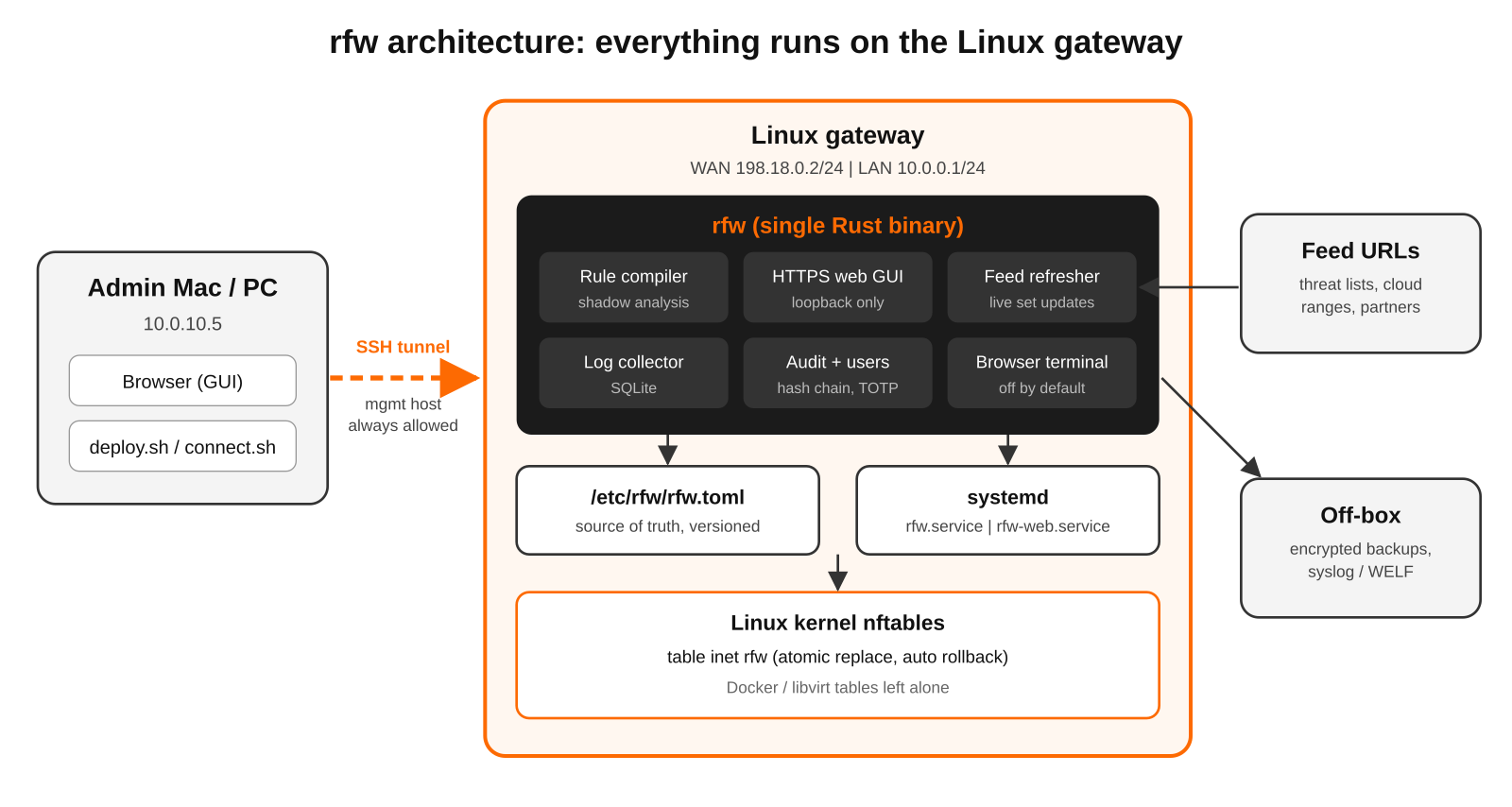
| Component | Role |
|---|---|
rfw binary |
Rule compiler, web GUI, log collector, feed refresher and browser terminal in one process |
rfw.service |
Loads the last confirmed ruleset at boot |
rfw-web.service |
Runs the HTTPS GUI, bound to loopback by default |
/etc/rfw/rfw.toml |
Single source of truth for rules, objects, NAT, feeds and settings |
table inet rfw |
rfw’s own nftables table, replaced atomically on apply |
| SQLite | Packet log storage, search and retention |
deploy.sh / connect.sh |
Mac-side scripts to install, upgrade and reopen the tunnel |
Feature tour
| Area | What you get |
|---|---|
| Rule base | Ordered table, first match decides: from, to, services, action (accept, drop, reject, continue), logging, schedule, sections |
| Objects | Nested host and network groups, services (ports, ranges, ICMP types, protocols, service groups), schedules |
| Addresses | Hosts, networks, ranges, @groups, iface:eth0, firewall, hostnames, and ! to negate any of them |
| NAT | Masquerade, static 1:1, network-to-network, NAT exclusions, port forwards |
| Protection | SYN-flood rate limiting, new TCP without SYN, SYN+FIN, invalid state, fragments, anti-spoofing |
| IP versions | Full IPv4 and IPv6 |
| Packet logs | Search, saved searches, live view, CSV and WELF export, syslog forwarding, retention |
| Access control | Per-area view and change permissions, admin/operator/viewer presets, TOTP two-factor |
| Audit | Hash-chained log of every change, sign-in, apply, terminal session and backup |
| Backups | ChaCha20-Poly1305 encrypted, scheduled, with an off-box hook (scp, rclone, S3 tools, email) |
Step-by-Step: Deploy rfw and Migrate from Safe-T-Net
Step 1: Deploy from your Mac in one command
Goal: Get the binary, services and GUI onto the gateway without hand-copying anything.
Action: Run deploy.sh from the repo against the firewall. It detects the architecture, downloads and verifies the matching release, copies it over, runs the installer with sudo, adds your Mac as a management host, then opens an SSH tunnel and the GUI in your browser.
git clone https://github.com/infosecmonkey/rfw.git
cd rfw
dist/deploy.sh <admin-user>@10.0.0.1 --install-deps --tunnel
Safe by default: The installer never applies firewall rules. You review and apply them yourself, with the rollback as a safety net. Running the installer again upgrades in place.
GUI verification: your browser opens to the rfw sign-in page over the tunnel. The certificate is self-signed, so compare the fingerprint the installer printed before you accept it. Later, reopen the tunnel and GUI with:
dist/connect.sh <admin-user>@10.0.0.1Step 2: Migrate your Safe-T-Net rule base
Goal: Bring every group, service, schedule and rule over from the old Webmin module.
Action: The installer imports the old config automatically if it finds it. To run the import yourself, or re-run it against a copied config directory, point rfw import at it.
sudo rfw import /etc/webmin/itsecur-firewall -o /etc/rfw/rfw.tomlGUI verification: open Rules, Groups and Services and confirm your objects came across with their names and order intact. Because the result is one TOML file, you can also read it straight from the shell and commit it to git.
Step 3: Lock in management hosts before you touch rules
Goal: Make sure your admin workstation can always reach SSH and the GUI, no matter what rule you write next.
Action: List your admin addresses and the management ports. These hosts get an allow that sits ahead of every user rule, protection check and hand-written raw rule, for the firewall’s replies too, and port forwards cannot redirect it.
sudo rfw mgmt add 10.0.10.5 10.0.10.0/28
sudo rfw mgmt ports 22,8443- Only plain addresses, networks and ranges are accepted. No groups or feeds (they can change without you noticing) and never
0.0.0.0/0. - Management hosts can only be changed on the box (config file or CLI), so a stolen web session cannot add its own address.
deploy.shalready added the Mac you deployed from.
GUI verification: management hosts show in Settings as read-only. That is by design.
Step 4: Validate and analyze the rule base
Goal: Catch dead rules before they hit the kernel, especially after an import.
Action: Run rfw check to validate the config, including shadow warnings, and rfw analyze for the full shadowed and redundant list.
rfw check
rfw analyze
A shadowed rule looks like this:
$ rfw analyze
shadowed rule 9 by rule 8 rule 9 (accept) never matches: rule 8 drops all of its traffic first| Finding | Meaning | What to do |
|---|---|---|
| Shadowed | An earlier rule with a different action catches all of this rule’s traffic, so its intent is silently overridden | Move the rule above the broader one, or narrow the earlier rule |
| Redundant | An earlier rule with the same action already catches all of its traffic | Delete it |
The analyzer understands nested groups, address and port ranges, negation, schedules, disabled and continue rules, and whether “any” includes the firewall itself. It is conservative: it only reports what it can prove, and it checks rules in pairs, so a rule covered by a combination of several earlier rules is not flagged.
GUI verification: affected rules carry a badge in the rules table (for example “shadowed by 8”, with the reason on hover), and the dashboard shows a count.
Step 5: Apply with commit-confirmed rollback
Goal: Push the ruleset to the kernel without risking a lockout.
Action: Review the diff, apply, then confirm. If you do not confirm in time (because the change cut you off, say), the previous ruleset comes back on its own, static NAT addresses included.
rfw diff
sudo rfw apply
rfw confirm
The rollback timer runs under systemd, not in your shell, so it still fires if your SSH session or the web server dies mid-change.
GUI verification: Review and Apply shows the same diff with Apply, Confirm and Roll back buttons. History keeps every config version so you can compare or restore any of them.
Step 6: Add an external threat feed
Goal: Block known-bad networks from a published list, the same idea as FortiGate external connectors or Palo Alto EDLs.
Action: Add a [[feeds]] block to /etc/rfw/rfw.toml (or use the Feeds page) and reference it in a rule like any group.
[[feeds]]
name = "spamhaus-drop"
url = "https://www.spamhaus.org/drop/drop.txt"
kind = "ip"            # or "domain"
refresh_minutes = 60

[[rules]]
id = 1
from = ["@spamhaus-drop"]
action = "drop"
Then apply once (Step 5) so the rule exists, and pull the feed now instead of waiting for the timer:
rfw feeds update
rfw feeds list- Common formats are accepted as is: comments, extra columns, CSV, ranges, hosts-file lines. Lines that do not parse are skipped and counted.
- Entries are merged into the fewest networks and loaded into nftables sets. Refreshes update the running firewall in place, with no apply or rollback cycle.
- If a download fails, the previous list stays in use and the error is shown.
- Limits: 32 MB per download, 200,000 networks, 2,000 domains per refresh. Loopback addresses are never included.
GUI verification: the Feeds page shows each list with its entry count, last refresh and any error.
Step 7: Add users, turn on two-factor, verify the audit trail
Goal: Give people the access they need and nothing more, and prove nobody edited the history.
Action: Create users with a preset role, enroll TOTP from the GUI with any authenticator app, and verify the hash-chained audit log.
sudo rfw user add alice --role operator
rfw audit verify
GUI verification: Users shows per-area view and change permissions (admin, operator and viewer presets, or a custom list). Each user enrolls two-factor with a QR code, and codes are single-use. Audit log lists every change, sign-in, apply, terminal session and backup.
Optional: the browser terminal
The Console page always gives you an Open in Terminal button (an ssh:// link) and the ssh command to copy. There is also a real terminal in the browser (xterm.js over a WebSocket), and it is deliberately hard to reach:
- Off by default, and only switchable in the config file, never from the GUI, a restored backup or an old config version
- Needs the admin-only console permission and, by default, two-factor sign-in
- Starts at the system’s own login prompt, so a stolen web session still faces a system password
- Same-origin and CSRF checks, at most four sessions, a time limit, and every session start and end goes to the audit log
Verification and Validation
Run these on the gateway after your first confirmed apply:
systemctl status rfw rfw-web
sudo nft list table inet rfw
rfw check
rfw feeds list
rfw audit verify| Command | Expected success result |
|---|---|
systemctl status rfw rfw-web |
Both units active. rfw loaded the confirmed ruleset, rfw-web is serving the GUI |
sudo nft list table inet rfw |
Your rules, sets and NAT in rfw’s own table. Other tables (Docker, libvirt) still present and untouched |
rfw check |
Config validates with no errors. Any shadow warnings are ones you have reviewed |
rfw feeds list |
Each feed shows entries loaded and no download error |
rfw audit verify |
The chain verifies, meaning no entry was edited or removed |
Then test the anti-lockout path for real. From 10.0.10.5, SSH to the firewall and open the GUI tunnel. From a host that is not a management host, confirm your rules block what they should. The project’s CI does exactly this inside a network namespace: a management host gets through a drop-everything ruleset with real packets while other hosts are blocked.
Troubleshooting and Gotchas
1. The GUI will not load
Cause: by default rfw-web listens only on the firewall’s loopback address. Browsing to the LAN IP will never work until you change that, and you should not need to.
systemctl status rfw-web
journalctl -u rfw-web -n 50
dist/connect.sh <admin-user>@10.0.0.1
Fix: reach it through the SSH tunnel (connect.sh does it for you). If the tunnel opens but the page fails, the journal for rfw-web will say why.
2. My change applied, then quietly disappeared
Cause: that is the rollback doing its job. You applied and did not run rfw confirm in time, so the previous ruleset came back.
journalctl -u rfw -n 50
rfw diff
Fix: check the journal to confirm it was a timed rollback, review the diff, apply again and confirm. If the change genuinely cut you off, add your workstation as a management host (Step 3) before you retry.
3. A feed shows an error or never loads
Cause: the download failed, the URL moved, or the list is over the safety limits. rfw keeps the last good list in use, so the firewall is not left open, but the list goes stale.
rfw feeds list
curl -sI https://www.spamhaus.org/drop/drop.txt
rfw feeds update
Fix: test the URL from the gateway itself, not your laptop. Do not crank the refresh interval down either. Spamhaus asks that automated DROP downloads be at least an hour apart and says once a day is usually enough, so refresh_minutes = 60 is the floor, not a starting point.
Know the limits: Management hosts protect you from rfw’s own rules, not from other firewall tools on the same box or devices upstream. If something else is dropping your SSH, rfw cannot save you.
Honest Status and a Call for Testers
Here is where it stands. About 90 automated tests run on every push. A CI job loads real rulesets into the Linux kernel in a throwaway network namespace and checks that the kernel accepts them, that unconfirmed changes roll back, that confirm, decline, stop and boot work, that static NAT addresses come and go, and that feeds load and refresh live. Another job runs the real installer on a systemd host and upgrades in place.
What it has not done yet is run on a production firewall with live traffic. That is where you come in.
- Run
deploy.shagainst a real box (a lab VM or a spare gateway, not your only way into the house) - Import your old Safe-T-Net or ITsecur config and tell me what did not come across cleanly
- Try the browser terminal under systemd and tell me where it fights you
- Throw your ugliest rule base at
rfw analyzeand report false positives or misses
File issues at github.com/infosecmonkey/rfw. Note that the management-hosts change is on main but not yet in a tagged release, so build from main if you want it. On the roadmap (ideas, not commitments): .deb and .rpm packages, a hosted apt/dnf repository, and a Homebrew formula for the Mac-side deploy and connect tools.
Quick Reference
rfw import /etc/webmin/itsecur-firewall -o /etc/rfw/rfw.toml   # migrate
rfw check                     # validate, including shadow warnings
rfw analyze                   # shadowed and redundant rules
rfw diff                      # what an apply would change
sudo rfw apply                # apply with automatic rollback
rfw confirm                   # keep the change
rfw feeds update              # refresh external lists now
sudo rfw mgmt add 10.0.10.5   # anti-lockout host
sudo rfw user add alice --role operator
rfw audit verify              # check the audit log is intact
Sources
- nftables wiki: Atomic rule replacement
- Spamhaus FAQ: Do Not Route or Peer (DROP), including fetch frequency
No fluff. Just the config that works.