
If you've spent any time configuring user authentication on... Full Story
By Manny Fernandez
November 10, 2026

CVE-2026-98432 Mitigation on FortiGate: Blocking the Linux Kernel TCP Use-After-Free (FG-IR-26-188)
FortiGuard PSIRT · FG-IR-26-188 · CVE-2026-98432
No fluff. Just the config that works.
Executive Summary
Objective: put working CVE-2026-98432 mitigation in place on FortiGate and on the Linux servers behind it while Fortinet finishes its product investigation under FortiGuard PSIRT advisory FG-IR-26-188. You will drop IPv4 packets that carry IP options in the FortiGate NPU, make sure the FortiGuard virtual patch can actually see your server traffic, shrink the attack surface on the Fortinet appliances themselves, and stop the trigger on each Linux host until a fixed kernel is running.
Target audience: FortiGate administrators, Fortinet partners and SEs, and Linux or platform teams who own internet-facing TCP services.
Heads up: This is a compensating-control guide. As of November 10, 2026, Fortinet lists its affected products as under investigation and has not published fixed firmware for this CVE. Every control below buys time. None of them replaces a patched kernel or fixed firmware.
FG-IR-26-188 at a Glance
| Field | Detail |
|---|---|
| Advisory | FG-IR-26-188: Linux kernel RCE CVE-2026-98432 |
| CVE | CVE-2026-98432 |
| Severity | Critical, CVSS v3 9.8 (network, no authentication, no user interaction) |
| Bug class | Use-after-free (race condition) in the Linux IPv4 TCP handshake |
| Trigger | A TCP SYN carrying IPv4 options (Record Route or Timestamp) plus a retransmitted SYN that loses the race |
| Published / updated | November 2, 2026 / November 7, 2026 (IPS package info added) |
| Fortinet product status | Under investigation, including FortiOS, FortiProxy, FortiManager, FortiAnalyzer, FortiClient EMS, FortiAuthenticator, FortiPAM, FortiWeb and FortiEDR. No fixed builds listed yet |
| Virtual patch | Linux.Kernel.tcp_v4_syn_recv_sock.Use.After.Free. in FMWP database update 26.113 |
| Known exploited | No, per the advisory. Not in CISA KEV as of November 7 |
What CVE-2026-98432 Actually Breaks
When a Linux server accepts a TCP connection, the kernel parks the half-open connection in a request socket. If the client’s SYN carried IPv4 options, the kernel stores them with that request so it can echo them in the SYN-ACK. When the handshake completes, tcp_v4_syn_recv_sock() hands that options buffer to the new child socket without copying it.
Meanwhile, another CPU can be processing a retransmitted SYN for the same connection and building a fresh SYN-ACK from the same buffer, protected only by RCU. If the child socket dies first, inet_sock_destruct() frees the options with a plain kfree() instead of waiting for an RCU grace period, and ip_options_build() reads freed memory. A second path exists when request-socket migration is enabled (net.ipv4.tcp_migrate_req=1 or a reuseport migration BPF program).
The upstream fix, commit e3f33b0a1d89, switches both destructors to kfree_rcu(). Per Akamai’s analysis of CVE-2026-98432, the bug has been there since Linux 4.4, the fixed stable releases are 5.10.272, 5.15.223, 6.1.190, 6.6.159, 6.12.113, 6.18.56 and 7.2.10, and IPv6 is not affected by the main path.
Why it got a 9.8: the researcher who reported it (from Anthropic) later disclosed a working remote root exploit against a server with a Multipath TCP (MPTCP) listener. That exploit has not been released. The Go team also flagged that Go 1.24 and later turn on MPTCP for Linux listening sockets by default, which puts a lot of ordinary services in the interesting category. A lost race just fails one handshake, so an attacker can keep trying.
Why this lands on a Fortinet shop twice
- The appliances. Fortinet builds on Linux, and its advisory puts most of the portfolio under investigation. Until Fortinet publishes an affected and fixed matrix, treat every reachable TCP listener on a Fortinet box as potentially in scope.
- The servers behind them. Every Linux web server, VPN concentrator, Kubernetes node and reverse proxy you publish through a VIP is in scope until its distro kernel is patched and rebooted.
The good news is the trigger. It needs IPv4 options in the SYN, and almost no legitimate internet traffic uses them. Your FortiGate already sits in the path and can drop them in hardware before they reach anything.
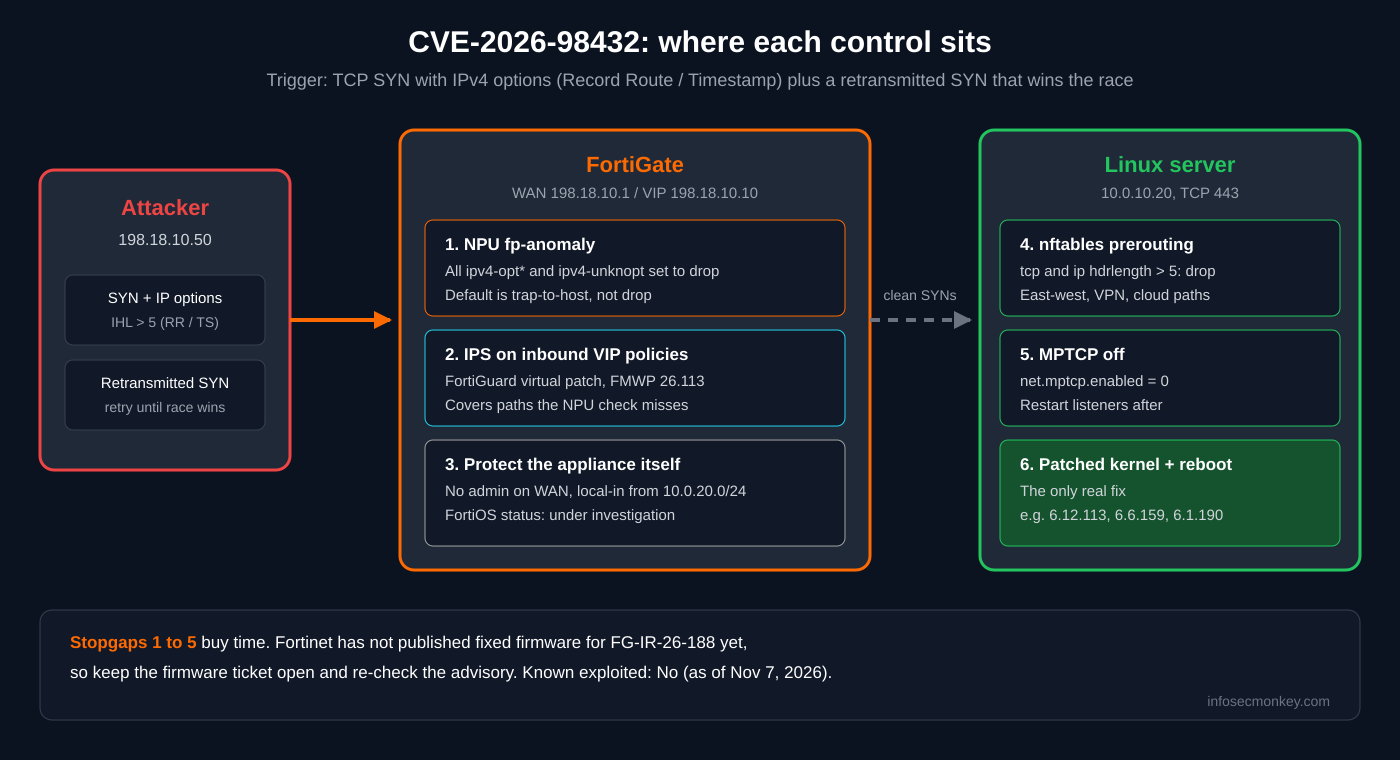
Figure 1: Where each CVE-2026-98432 control sits in the path
Prerequisites and Architecture
Assumed knowledge: FortiOS CLI, firewall policies and VIPs, IPS sensors, basic Linux administration with root, and what an IPv4 header looks like (the IHL field counts 4-byte words, so 5 means no options).
| Component | Lab value | Role |
|---|---|---|
| FortiGate (SoC4 with NP6XLite) | FortiOS 7.4.x, 7.6.x or 8.0.x | Edge firewall, NPU anomaly drop, IPS |
| WAN / VIP | 198.18.10.1 / VIP 198.18.10.10 | Published HTTPS service |
| Linux web server | 10.0.10.20 on 10.0.10.0/24 | Protected TCP listener on 443 |
| Test client | 198.18.10.50 with nmap (nping) | Sends SYNs with and without IP options |
| Admin workstation | 10.0.20.0/24 | Trusted management source |
Note: Fortinet’s November 5 staff technical tip covers FortiOS 7.4.x, 7.6.x and 8.0.x and demonstrates the NPU control on an NP6XLite. Other NPU families use a different config tree (shown below). FortiGate VMs have no NPU, so they rely on the virtual patch and the host controls.
Step-by-Step CVE-2026-98432 Mitigation
Step 1: Inventory the FortiGate and its NPU
Goal: know your model, build and NPU family before touching anything, and record HA peers so both units get the same change.
Action: pull the system and hardware status. The ASIC line tells you which config tree applies in Step 2.
get system status
get hardware status
get system ha status
GUI verification: Dashboard > Status shows the model and firmware. Note them in your change ticket next to the FG-IR-26-188 reference.
Step 2: Drop every IPv4 option type in the NPU
Goal: stop SYNs carrying IP options at line rate, before they reach the FortiGate’s own TCP stack or any server behind it.
Action: set every IPv4 option anomaly to drop. The default for each one is trap-to-host, which forwards the packet to the CPU instead of discarding it (see the FortiOS 7.4.2 CLI reference for config system npu). Fortinet’s guidance is to drop all of them, including unknown options, not just Record Route and Timestamp.
NP6XLite (the platform in Fortinet’s technical tip):
config system np6xlite
    edit "np6xlite_0"
        config fp-anomaly
            set ipv4-optrr drop
            set ipv4-opttimestamp drop
            set ipv4-optssrr drop
            set ipv4-optlsrr drop
            set ipv4-optstream drop
            set ipv4-optsecurity drop
            set ipv4-unknopt drop
        end
    next
end
Models that use the global NPU tree (for example NP7 platforms) carry the same option names under config system npu:
config system npu
    config fp-anomaly
        set ipv4-optrr drop
        set ipv4-opttimestamp drop
        set ipv4-optssrr drop
        set ipv4-optlsrr drop
        set ipv4-optstream drop
        set ipv4-optsecurity drop
        set ipv4-unknopt drop
    end
end
On NP6 models, the same config fp-anomaly block lives under config system np6, once per processor (edit np6_0, edit np6_1 and so on). Run config system np6xlite, config system np6 or config system npu followed by ? to see which tree your model accepts.
GUI verification: there is no GUI page for NPU anomaly settings. Confirm with show system np6xlite (or show system npu) and check that all seven options read drop.
Heads up: This drops IPv4 options for all protocols on that NPU, not just TCP. If anything you route depends on IP options (CIPSO security labels, or multicast and other control traffic that sets Router Alert), test before you roll it fleet-wide. Rollback is setting the options back to trap-to-host.
Step 3: Get the FortiGuard virtual patch onto the traffic path
Goal: have the named virtual patch, Linux.Kernel.tcp_v4_syn_recv_sock.Use.After.Free., inspect traffic to your Linux servers. The November 7 revision of the advisory lists it in FMWP database update 26.113.
Action: force a FortiGuard update, confirm the package versions, and make sure every inbound server policy actually runs IPS. A signature that never sees the session protects nothing.
execute update-now
diagnose autoupdate versions
config ips sensor
edit "linux-servers-inbound"
set comment "FG-IR-26-188 / CVE-2026-98432"
config entries
edit 1
set location server
set os Linux
set severity medium high critical
set status enable
set action block
next
end
next
end
config firewall policy
edit <inbound-vip-policy-id>
set utm-status enable
set ips-sensor "linux-servers-inbound"
next
endGUI verification: System > FortiGuard shows the database versions. Security Profiles > Intrusion Prevention shows the sensor, and the inbound VIP policy lists it under Security Profiles.
Note: The advisory names the database update, not a FortiOS menu path or an engine compatibility matrix. Confirm with FortiGuard or your SE which package your specific product consumes, and keep the NPU drop in place regardless. They cover different failure modes.
Step 4: Shrink what can reach the Fortinet appliances
Goal: while FortiOS, FortiManager, FortiAnalyzer and the rest are under investigation, reduce the number of TCP listeners an attacker can send a SYN to.
Action: remove admin access from internet-facing interfaces, pin admins to trusted hosts, and back it with a local-in policy that only allows management from your admin subnet.
config system interface
    edit "wan1"
        set allowaccess ping
    next
end

config firewall address
    edit "admin-net"
        set subnet 10.0.20.0 255.255.255.0
    next
end

config firewall local-in-policy
    edit 1
        set intf "any"
        set srcaddr "admin-net"
        set dstaddr "all"
        set service "HTTPS" "SSH"
        set schedule "always"
        set action accept
    next
    edit 2
        set intf "any"
        set srcaddr "all"
        set dstaddr "all"
        set service "HTTPS" "SSH"
        set schedule "always"
        set action deny
    next
end
Do the same on FortiManager, FortiAnalyzer and FortiAuthenticator: management only from the admin network, nothing exposed to the internet that does not need to be. Keep VPN listeners (IKE, SSL VPN) out of the deny unless you mean to.
GUI verification: Network > Interfaces shows only PING on wan1. Policy and Objects > Local In Policy (enable it under System > Feature Visibility if hidden) shows both entries.
Step 5: Stop the trigger on every Linux host
Goal: protect each Linux server on its own, because traffic does not always cross the NPU (east-west, VPN, cloud, containers).
Action: check the kernel and the MPTCP exposure, drop IPv4 TCP packets carrying IP options in nftables prerouting, and turn MPTCP off where you do not need it. The nftables rule is the one Mattias Geniar’s CVE-2026-98432 kernel guide documents; the sysctl checks come from Akamai.
# 1. What are we running, and is MPTCP in play?
uname -r
sudo sysctl net.mptcp.enabled net.ipv4.tcp_migrate_req
sudo ss -Mlnp

# 2. Drop IPv4 TCP packets with IP options (IHL greater than 5)
sudo nft add table ip cve_2026_98432
sudo nft add chain ip cve_2026_98432 pre '{ type filter hook prerouting priority -300; }'
sudo nft add rule ip cve_2026_98432 pre meta l4proto tcp ip hdrlength gt 5 counter drop

# 3. Make it survive a reboot
sudo sh -c 'nft list table ip cve_2026_98432 >> /etc/nftables.conf'
sudo systemctl enable nftables
# 4. Turn off MPTCP and request migration, now and at boot
sudo tee /etc/sysctl.d/99-cve-2026-98432.conf <<'EOF'
net.mptcp.enabled = 0
net.ipv4.tcp_migrate_req = 0
EOF
sudo sysctl --system
# MPTCP off only affects new sockets: restart your listeners
sudo systemctl restart nginx# 5. The real fix: patched distro kernel, then reboot into it
sudo apt update; sudo apt full-upgrade -y # Debian / Ubuntu
sudo dnf upgrade --refresh -y 'kernel*' # RHEL family
sudo reboot
uname -rVerification in the distro: compare uname -r against your distribution’s security tracker, not only the upstream version list. Enterprise kernels backport fixes under older-looking version numbers.
Verification and Validation
From the test client, send one plain SYN and one SYN carrying a Record Route option to the published service.
# Plain SYN: should get a SYN-ACK
sudo nping --tcp -p 443 --flags syn -c 3 198.18.10.10

# SYN with IPv4 Record Route option: should get nothing back
sudo nping --tcp -p 443 --flags syn -c 3 --ip-options R 198.18.10.10
Expected result: the plain probe reports SYN-ACK replies. The option-carrying probe reports no replies at all.
On the FortiGate, check the NPU anomaly counters, then confirm the sniffer never sees the option-carrying packets (the NPU drops them before the CPU, so silence is success):
diagnose npu np6xlite anomaly-drop
diagnose sniffer packet any 'tcp and ip[0] & 0x0f > 5' 4 10 l
On the Linux host, the nftables counter should move when traffic reaches it on a path the FortiGate does not cover:
sudo nft list table ip cve_2026_98432
sudo tcpdump -ni any 'tcp[tcpflags] & tcp-syn != 0 and ip[0] & 0x0f > 5'
Expected nftables output:
table ip cve_2026_98432 {
    chain pre {
        type filter hook prerouting priority raw; policy accept;
        meta l4proto tcp ip hdrlength > 5 counter packets 3 bytes 300 drop
    }
}
Troubleshooting and Gotchas
1. The NPU drop does nothing for your traffic
Anomaly checks run on the NPU the packets actually cross. A FortiGate VM, a software switch, traffic between ports on different processors, or a session that never touches the NPU path will not be filtered. Likewise, IP options inside an IPsec or SSL VPN tunnel ride in the inner packet, which the outer-header check never sees. Fix: rely on the virtual patch with IPS on that policy, and the host nftables rule, for anything that does not cross the NPU. Use diagnose sniffer packet on the ingress interface to see whether option-carrying SYNs still show up on the CPU.
2. Something broke after Step 2
Because the NPU setting is not limited to TCP, the first thing to suspect is traffic that legitimately sets IP options: CIPSO-labelled networks, and multicast or other control protocols that use Router Alert. Fix: set ipv4-unknopt (and only that, first) back to trap-to-host and retest. If it was Record Route or Timestamp, find the application; nothing on the open internet should need them.
3. MPTCP is “off” but the listener still shows up
Setting net.mptcp.enabled = 0 only applies to sockets created afterward, and it is per network namespace. Fix: restart the service, set the sysctl inside each container or pod namespace too, then confirm with ss -Mlnp. Remember that MPTCP was only the exploit’s setup; the bug itself is in plain IPv4 TCP, so the option drop and the kernel patch still matter.
Note: Bridged container traffic can bypass a host prerouting hook. Put the same drop rule on the node, the CNI, or the firewall in front of the cluster.
Bottom Line
- Drop all IPv4 options in the FortiGate NPU today. It is a one-block change with almost no legitimate traffic on the other side.
- Make sure the FMWP 26.113 virtual patch is actually inspecting your server-facing sessions.
- Lock management on every Fortinet appliance to an admin network until Fortinet publishes fixed builds for FG-IR-26-188.
- Patch and reboot every Linux host. The nftables rule and MPTCP sysctl are a bridge, not a fix.
- Keep the firmware ticket open and re-check the advisory. Fortinet’s affected and fixed matrix is still pending.
Sources
- Fortinet PSIRT advisory FG-IR-26-188: Linux kernel RCE CVE-2026-98432
- Root Access Guy: Fortinet adds virtual patch for CVE-2026-98432 (FMWP 26.113 and NPU technical tip summary)
- Akamai Security Intelligence Group: CVE-2026-98432, a remote use-after-free in the Linux kernel’s TCP stack
- Mattias Geniar: CVE-2026-98432, which Linux kernels are still vulnerable (nftables mitigation)
- Fortinet FortiOS 7.4.2 CLI reference: config system npu, fp-anomaly options
Facts in this post reflect the advisory as of November 10, 2026. Check FG-IR-26-188 for the current affected and fixed matrix before you close anything.
Recent posts
-

-

DNS is one of those technologies that quietly underpins... Full Story
-

BGP issues on FortiGate firewalls usually trace back to... Full Story
-

Every time your laptop talks to your router, a... Full Story
-

If you've spent any time configuring NAT on a... Full Story
-

If you have spent any time configuring firewall policies... Full Story
-

High availability on FortiGate is one of those features... Full Story
-

If you've configured SD-WAN on a FortiGate, you've almost... Full Story
-

FortiLink is the management protocol that turns a FortiSwitch... Full Story
-

FortiSwitches are pretty rock solid from Mean Time Between... Full Story
-

This is a quicky tip. Have you ever gone... Full Story
-

DNS is one of those quiet pieces of internet... Full Story
-

This article is an updated version of the previous... Full Story
-

You will add ns2 as a secondary (slave) BIND9... Full Story
-

In the process of deploying my lab, I needed... Full Story
-

RFC 8805, used to be known as Self-Correcting IP... Full Story
-

Years back, I wrote an article about certificate pinning. ... Full Story
-

FortiGates have the ability to send alerts to Microsoft... Full Story
-

In this post, I am going to walk through... Full Story
-

Troubleshooting VoIP on a FortiGate can feel like trying... Full Story
-

Prior to FortiOS 7.0, there were three commands to... Full Story
-

In this post, I am going to go over... Full Story
-

What we are going to do: We are going... Full Story
-

Choosing between FGCP (FortiGate Clustering Protocol) and FGSP (FortiGate... Full Story
-

Creating a VLAN on macOS (The "Pro" Move) A... Full Story
-

This blog post explores the logic behind how macOS... Full Story
-

Pretty Fly for a Wi-Fi Tell My Wi-Fi Love... Full Story
-

Part of my daily gig is creating BoMs (Bill-of-Materials)... Full Story
-

ICMP introduces several security risks, but careful filtering, rate... Full Story
-

The command diag debug application dhcps -1 enables full... Full Story
-

In the world of FortiOS, execute tac report is... Full Story
-

LLDP; What is it The Link Layer Discovery Protocol... Full Story
-

What it actually does When you run diagnose fdsm... Full Story
-

Monkey Bites are bite-sized, high-impact security insights designed for... Full Story
-

I have run macOS in macOS with Parallels but... Full Story
-

Don't be confused with my other FortiNAC posts where... Full Story
-

This is the third session in a multi-part article... Full Story
-

Today I was configuring key-based authentication on a FortiGate... Full Story
-

Netcat, often called the "Swiss Army knife" of networking,... Full Story
-

At its core, IEEE 802.1X is a network layer... Full Story
-

In case you did not see the previous FortiNAC... Full Story
-

This is our 5th session where we are going... Full Story
-

Now that we have Wireshark installed and somewhat configured,... Full Story
-

The Philosophy of Packet Analysis Troubleshooting isn't about looking... Full Story
-

InfoSecMonkey Practitioner Guide Advanced Audit Policy, command line capture,... Full Story
-

No fluff. Just the config that works. Fortinet's November... Full Story
-

FortiGuard PSIRT · FG-IR-26-188 · CVE-2026-98432 No fluff. Just... Full Story