
NO FLUFF. JUST THE CONFIG THAT WORKS.
Every engineer types tail -f within a week of touching a Linux box, and most stop learning the tail command right there. That is a shame, because the version on your Linux server, the one on your Mac, the one baked into your Alpine container, and the PowerShell equivalent on Windows all behave differently, and the differences bite at the worst moment: in the middle of an incident, when your log goes quiet because it rotated and tail -f never noticed.
Objective: know every tail option that matters, which platform supports which flag, and a set of lesser-known tricks that make tail a real troubleshooting tool instead of a reflex.
Target audience: network and security engineers, sysadmins, and SOC analysts who live in log files, whether those logs sit on a Linux syslog collector receiving FortiGate traffic, a macOS laptop, a BusyBox appliance, or a Windows server.
Prerequisites and Platform Matrix
Assumed knowledge: basic shell navigation and pipes. Lab requirements: any Linux host (Ubuntu 24.04 used here), a Mac, and a Windows 10 or 11 box with PowerShell. Examples use 10.0.0.0/16 for internal hosts.
There is no single tail. There are at least four implementations you will meet in the field:
| Platform | Implementation | Follow by name (-F) | Notable extras |
|---|---|---|---|
| Linux (Ubuntu, RHEL, Debian) | GNU coreutils | Yes | --pid, --retry, -z, size suffixes, inotify |
| macOS, FreeBSD | BSD tail | Yes | -r reverse output, -b 512-byte blocks |
| Alpine, OpenWrt, embedded, slim containers | BusyBox applet | Yes, if built with FEATURE_FANCY_TAIL | -s sleep interval, small and simple |
| Windows PowerShell | Get-Content -Tail -Wait |
No equivalent | Polls once per second, -Head, -Encoding |
| Windows via WSL or Git Bash | GNU coreutils | Yes | Same as Linux |
Not sure which one you have? Ask it:
tail --version | head -1          # GNU prints: tail (GNU coreutils) 9.4
readlink -f "$(command -v tail)"  # BusyBox shows: /bin/busybox
man tail | tail -n 3              # BSD man pages end with a macOS or BSD footer
tail command options reference
Defaults are the same everywhere: with no options, tail prints the last 10 lines of each file, or of standard input when no file is given.
| Option | What it does | GNU | BSD/macOS | BusyBox |
|---|---|---|---|---|
-n N |
Last N lines (default 10) | Yes | Yes | Yes |
-n +N |
Start at line N and print the rest | Yes | Yes | Yes |
-c N / -c +N |
Last N bytes, or start at byte N | Yes | Yes | Yes |
-b N |
Count in 512-byte blocks | Via b suffix |
Yes | Via b suffix |
-f |
Keep reading as the file grows | Yes | Yes | Yes |
-F |
Follow by name and retry, survives rotation | Yes | Yes | Fancy build |
--follow=name|descriptor |
Choose what -f tracks | Yes | No | No |
--retry |
Keep trying to open an inaccessible file | Yes | No | No |
--pid=PID |
Exit when the writing process ends | Yes | No | No |
-s SEC |
Seconds between polls | Yes | No | Fancy build |
--max-unchanged-stats=N |
Recheck inode after N quiet polls | Yes | No | No |
-q / -v |
Never / always print ==> file <== headers |
Yes | Yes | Fancy build |
-z |
NUL-delimited records instead of lines | Yes | No | No |
-r |
Reverse line order | No (use tac) |
Yes | No |
--debug |
Show which follow method is in use | Recent releases | No | No |
Size suffixes: GNU accepts suffixes on -n and -c: K is 1024 and KB is 1000, M is 1024 squared and MB is 1000 squared, and b is 512. So tail -c 1M and tail -c 1MB are not the same amount. BusyBox accepts lowercase b, k, and m.
Step-by-Step: Using tail Like a Practitioner
Step 1: Read the end of one or many files
Goal: Pull the most recent entries without opening a 2 GB log in an editor.
Action: Use -n for lines or -c for bytes. Give several files and tail labels each one with a header.
tail -n 50 /var/log/syslog
tail -c 2K /var/log/auth.log           # last 2048 bytes
tail -n 3 /var/log/syslog /var/log/auth.log
Verification: With more than one file you should see ==> /var/log/syslog <== above each block. Add -q to drop the headers or -v to force one even for a single file.
Step 2: Start from a position with the plus sign
Goal: Skip a header row or a fixed-size preamble.
Action: A leading + flips tail from counting from the end to counting from the start. -n +2 means start at line 2.
tail -n +2 users.csv > users-noheader.csv
tail -c +513 disk.img > payload.bin    # skip the first 512 bytes
Verification: head -n 1 users-noheader.csv should now show your first data row, not the column names.
Step 3: Follow a live log
Goal: Watch events as they are written, for example FortiGate traffic logs arriving on a syslog collector.
Action: Use -f, and when you filter the stream, make every stage line buffered or you will stare at a blank screen.
tail -f /var/log/fortigate/traffic.log | grep --line-buffered 'action="deny"'
tail -f app.log | stdbuf -oL cut -d' ' -f1-4 | grep --line-buffered ERROR
Verification: Generate a matching event (a blocked ping from 10.0.1.25, for example) and confirm it appears within a second. Press Control+C to stop.
Step 4: Survive log rotation with -F
Goal: Keep following the log after logrotate renames it at midnight.
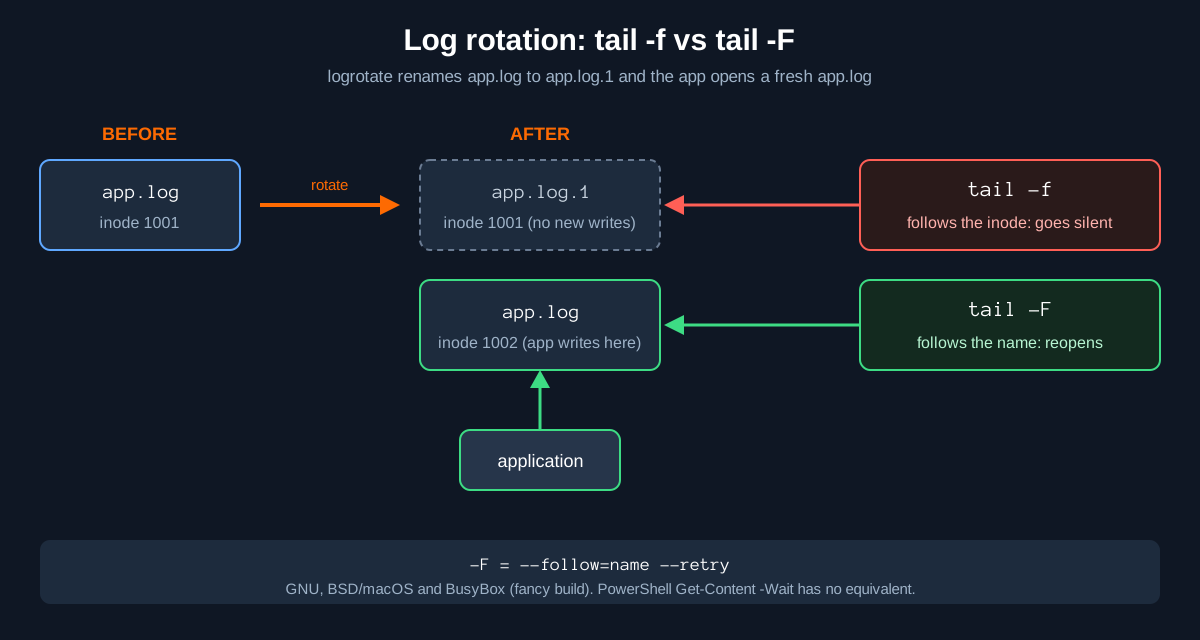
Action: Plain -f follows the file descriptor, which means the inode. After rotation that inode is app.log.1, so your terminal goes quiet while the app writes to a brand new app.log. -F is --follow=name --retry: it watches the name and reopens it.
tail -F /var/log/app.log
# equivalent long form on GNU:
tail --follow=name --retry /var/log/app.log
Verification: Rotate the file (mv app.log app.log.1; touch app.log) and tail reports has been replaced; following new file or has appeared; following new file, then keeps streaming.
Figure 1: tail -f follows the inode, tail -F follows the name
Step 5: Stop automatically when the writer stops
Goal: Watch a build, a backup, or a packet capture log and have tail exit on its own.
Action: GNU --pid checks the process periodically and exits shortly after it ends. For a hard ceiling, wrap tail in timeout.
./long-backup.sh > backup.log 2>&1 &
tail -f backup.log --pid=$!

timeout 60 tail -F /var/log/syslog     # watch for one minute, then exit
Verification: When the backup finishes, tail returns you to the prompt without Control+C. echo $? after the timeout example returns 124.
Step 6: Do the same on Windows with PowerShell
Goal: Tail a log on a Windows server where there is no tail binary.
Action: Get-Content has -Tail (alias -Last) and -Wait. -Wait checks the file once per second. Pipe to Select-String to filter like grep.
Get-Content -Path C:\Logs\app.log -Tail 20 -Wait
gc .\app.log -Tail 0 -Wait | Select-String 'ERROR'
Get-Content .\app.log -Head 5         # the head equivalent
Verification: New lines appear roughly a second after they are written. Deleting the file raises a non-terminating error and ends the wait.
Less-Known tail Tips and Tricks
This is the section to bookmark. None of these are exotic, but most engineers have never seen half of them.
1. Only show new lines, skip the backlog
-n 0 prints nothing from the existing file and then starts following. Perfect when you only care about what happens after you press Enter.
tail -n 0 -F /var/log/auth.log2. Check whether a file ends with a newline
Some tools silently drop the last line of a file that has no trailing newline. tail -c 1 returns the final byte.
tail -c 1 config.txt | od -c           # 0000000  \n  means it ends cleanly
[ -z "$(tail -c 1 config.txt)" ] && echo "ends with newline"
3. Reverse a file on macOS with tail -r
BSD tail has -r, which prints lines in reverse order. With no count it reverses the whole file, so it doubles as tac on a Mac. On Linux, use tac. Watch the semantics: with -r, the count means how much to print, not where to start.
tail -r ~/Library/Logs/install.log | head    # newest first on macOS
tail -r -n 5 file.txt                        # last 5 lines, newest first
tac /var/log/syslog | head                   # Linux equivalent
4. Print exactly line N
head -n 20 access.log | tail -n 1Fast to type and works on every platform. sed -n 20p does the same, but the head and tail pair is easier to remember under pressure.
5. Follow many logs in one window
Give tail a glob and it interleaves the files with a header every time the source changes. Combine with -F so each one survives rotation independently.
tail -F /var/log/nginx/*.log /var/log/fortigate/*.log6. Highlight matches without hiding the rest
The |$ alternative matches every line, so nothing is filtered out, but only the real keywords get colored.
tail -F app.log | grep --line-buffered --color=always -E 'ERROR|deny|$'7. Tail a remote box over SSH
Run tail on the syslog collector and filter locally. Use -t if you want Control+C to kill the remote tail cleanly.
ssh -t manny@10.0.10.5 'tail -F /var/log/fortigate/traffic.log' \
  | grep --line-buffered 10.0.1.25
8. The newest files in a directory, NUL-safe
GNU -z makes tail work on NUL-delimited records, so file names with spaces or newlines cannot break your pipeline.
find /var/log -type f -printf '%T@ %p\0' | sort -zn | tail -z -n 5 | tr '\0' '\n'9. The hidden GNU options
GNU coreutils carries two options marked do not document in the source. They take three dashes on the command line because the internal name already starts with a dash:
tail ---disable-inotify -f app.log     # force polling instead of inotify
tail ---presume-input-pipe -n 5 file   # testing only, forces the slow path
---disable-inotify is handy when you suspect inotify is the problem, for example on a mount where change events never arrive. ---presume-input-pipe exists for the coreutils test suite. Undocumented means unsupported, so keep them out of production scripts.
10. See which follow method tail picked
Recent GNU releases add --debug, which prints the follow implementation (inotify or polling) to stderr. Older builds, including the coreutils 9.4 on Ubuntu 24.04, reject it.
tail --debug -F /var/log/syslog11. Keep a container alive
A classic Docker and Kubernetes debugging trick: a command that never exits and costs nothing.
docker run -d --name debug alpine tail -f /dev/null12. Scroll back without losing the follow
less +F follows like tail -f. Press Control+C to stop following and scroll or search, then press Shift+F to resume. Great for incidents where you need to look back for a moment.
less +F /var/log/syslog13. The tail you already use under another name
journalctl -f -n 50 -u nginx           # systemd journal
docker logs -f --tail 50 web           # containers
kubectl logs -f --tail=50 deploy/api   # Kubernetes
Verification and Validation
Prove the -f versus -F difference to yourself in under a minute. Open two terminals in an empty directory.
# Terminal 1: a writer that logs a line every second
while true; do date '+%T tick' >> app.log; sleep 1; done

# Terminal 2: follow by descriptor
tail -f app.log

# Terminal 3 (or pause terminal 2 and repeat with -F): rotate the log
mv app.log app.log.1
Expected result with `-f`: the ticks stop the moment you rotate, even though terminal 1 keeps writing to the new app.log. Expected result with `-F`: tail prints a notice and the ticks continue:
10:04:58 tick
tail: 'app.log' has become inaccessible: No such file or directory
tail: 'app.log' has appeared;  following new file
10:05:00 tick
Confirm the inode swap with ls -li app.log*. The number on app.log.1 is the one tail -f is still holding open.
Troubleshooting and Gotchas
Gotcha 1: tail -f went silent after midnight
Symptom: the application is clearly logging, but your terminal shows nothing new. Cause: log rotation, and -f is following the old inode.
ls -li /var/log/app.log*               # compare inode numbers
sudo lsof -p "$(pgrep -n tail)" | grep app.log
Fix: use tail -F. If lsof shows tail holding app.log.1 or a (deleted) file, that confirms it.
Gotcha 2: the pipeline shows nothing
Symptom: tail -f log | grep x | awk ... prints nothing for minutes. Cause: grep and friends switch to block buffering when their output is a pipe. Fix: line buffer every stage except the last.
tail -f log | grep --line-buffered x | stdbuf -oL awk '{print $1}'Gotcha 3: inotify resources exhausted
Symptom: GNU tail prints inotify resources exhausted and then inotify cannot be used, reverting to polling. It still works, but slower. This happens on busy hosts where IDEs, container runtimes and log shippers have eaten the watch budget.
sysctl fs.inotify.max_user_watches fs.inotify.max_user_instances
sudo sysctl -w fs.inotify.max_user_instances=512
echo 'fs.inotify.max_user_instances=512' | sudo tee /etc/sysctl.d/90-inotify.conf
Gotcha 4: -f does nothing on a pipe, and PowerShell has no -F
cat file | tail -f will not follow anything: GNU ignores -f when standard input is a pipe. Give tail the file name instead. On Windows, Get-Content -Wait is documented to stop when the file is deleted and says nothing about following a rotated file, so do not assume it behaves like -F. Rerun the command after rotation, or use GNU tail from WSL or Git Bash.
Gotcha 5: obsolete syntax in old scripts
Scripts written decades ago use tail -20 or tail +20. GNU still accepts the obsolete form only when it does not conflict with standard usage, and the manual recommends -n and -c in scripts. Rewrite them as tail -n 20 and tail -n +20.
Sources
- GNU Coreutils manual: tail invocation
- macOS tail(1) man page (Xcode man pages mirror)
- Microsoft Learn: Get-Content (PowerShell)
- GNU coreutils source: src/tail.c (hidden options and inotify fallback)
- BusyBox command help: tail applet
- BusyBox source mirror: coreutils/tail.c (FEATURE_FANCY_TAIL options)
- InfoSecMonkey: Useful Linux Commands
InfoSecMonkey. No fluff. Just the config that works.