No fluff. Just the config that works. | Updated November 18, 2026
Objective: Java4Shell CVE-2026-114938 is a critical memory corruption bug in the OpenJDK Base64 decoder that researchers turned into pre-authentication remote code execution against Jira, Jenkins, Keycloak and more. This guide shows you how to find every exposed JVM, patch it, apply a working stopgap when you cannot patch today, and add network and detection layers around the servers that matter most.
Target audience: Linux and platform admins, security engineers, and anyone who owns a Java app on x86 servers. Fortinet shops get a dedicated section on what FortiGate can and cannot do for you right now.
-XX:-UseBASE64Intrinsics, then restart or recreate it. ARM64 hosts and standard Java 8 and 11 are not affected.What Is Java4Shell CVE-2026-114938?
Java4Shell (CVE-2026-114938) is a heap out-of-bounds write in the hardware-accelerated Base64 decoder that the HotSpot JVM uses on x86-64. It was found by Quang Luong of Calif and published on November 17, 2026, the same day Oracle and the OpenJDK Vulnerability Group shipped fixes. Upwind notes the details leaked before the patch was out, which is why the disclosure and the fix landed together.
The scoring is split. Oracle rates it 8.1 under CVSS 3.1 with high attack complexity, while Calif rates it 9.2 under CVSS 4.0 (Tenable FAQ). Treat it as critical anyway: no credentials, network reachable, and a working PoC trigger is public.
The root cause in one paragraph
On CPUs with AVX-512 VBMI, HotSpot decodes Base64 with a vectorized intrinsic. When the input ends in = padding, the routine miscalculates the store mask for the final chunk. The computed output length underflows to -1 or -2, the bit math turns that into an all-ones mask, and a VMOVDQU8 store writes a full 64 bytes. Calif’s example: a 65-character input gets a 50-byte array, the store starts at offset 48, and 62 bytes land past the end of the array. Java then rejects the input as invalid, but the heap is already corrupted.
That gives an attacker both a heap write and, in some flows, a Heartbleed-style heap read. Calif chained it to code execution on real products.
Who has been shown to be exploitable
| Impact | Applications (non-exhaustive, per Calif) |
|---|---|
| Pre-auth RCE, default config | Keycloak, Atlassian Jira, Atlassian Confluence, JFrog Artifactory, Jenkins, PingFederate |
| Post-auth RCE | Apache Kafka broker, Apache Solr, Elasticsearch, Gerrit, Spinnaker |
| Sample apps | Apache Struts and Spring Boot test applications |
| Client side | A Java program that connects over TLS to a malicious server (shared by samczsun) |
The client-side case matters: a Java service that never listens on the internet can still be hit if it makes outbound TLS connections to a server an attacker controls.
Exploitation status as of November 18, 2026
- No in-the-wild exploitation reported yet, and the CVE is not in CISA KEV (Tenable).
- Calif published only a safe reproducer that triggers the bug without taking over the host. Product-specific exploit chains are being held back for now.
- Kevin Breen of Immersive says he built a working, application-specific exploit (not released).
- Calif says AI did a lot of the heavy lifting: about an hour to find the bug with Codex, about two more hours to a first working exploit, under $200 in tokens. Expect others to reproduce this fast.
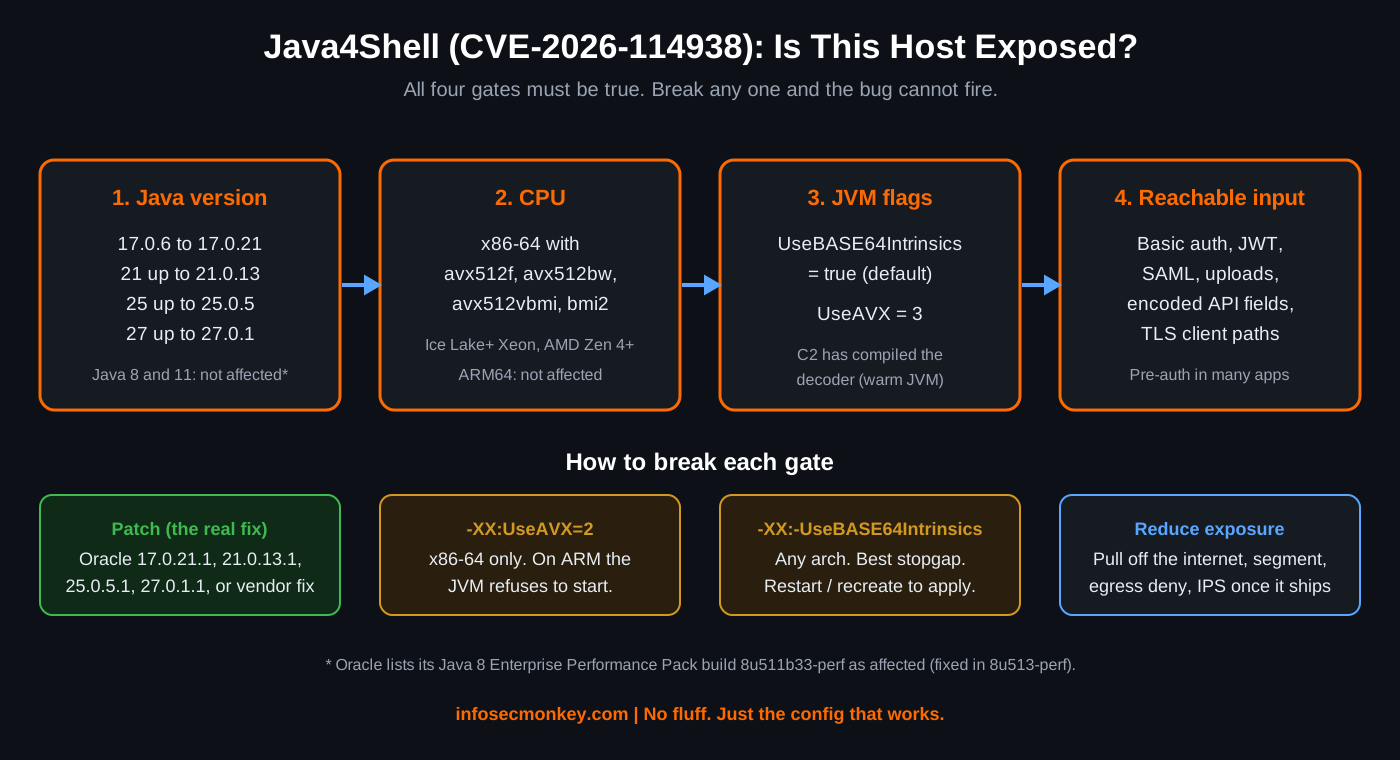
Figure 1: The four Java4Shell exposure gates and how to break each one
Prerequisites and Architecture
Assumed knowledge: basic Linux shell, systemd, and how your Java apps are launched (package, bundled runtime, or container). For the Fortinet section, FortiOS CLI basics.
Lab used in this guide: the Java server segment is 10.0.20.0/24, users sit on 10.0.10.0/24, and the internet edge uses 198.18.0.0/15.
| Component | Role | Notes |
|---|---|---|
| Linux host (x86-64) | Runs one or more JVMs | Ubuntu 24.04 or RHEL family, examples use both |
| OpenJDK / Oracle Java | Vulnerable runtime | 17.0.6 and later, 21, 25, 27 lines |
| jcmd | Inspect running JVMs | Ships with the JDK. JRE-only images may not have it |
| Docker / Kubernetes | Containerized Java | Runtime lives in the image, not on the node |
| FortiGate | Edge and segmentation | IPS, SSL inspection, egress control |
Affected and fixed versions
| Java line | Affected | Fixed (Oracle build) |
|---|---|---|
| Java 8 (standard) | Not affected | N/A |
| Java 8 Enterprise Performance Pack | 8u511b33-perf | 8u513-perf |
| Java 11 | Not affected | N/A |
| Java 17 | 17.0.6 to 17.0.21 (17.0.0 to 17.0.5 not affected) | 17.0.21.1 |
| Java 21 | Up to 21.0.13 | 21.0.13.1 |
| Java 25 | Up to 25.0.5 | 25.0.5.1 |
| Java 27 | Up to 27.0.1 | 27.0.1.1 |
Corretto, Temurin, Microsoft Build of OpenJDK, Azul Zulu, BellSoft Liberica, SAP SapMachine, Red Hat OpenJDK and Oracle GraalVM all carry the same code. Upwind confirmed Temurin 17.0.21, 21.0.13 and 25.0.5 as vulnerable in their lab. Take the fixed build number from each vendor, not from the Oracle table above (Upwind).
The four exposure gates
A host is exposed only when all four are true: an affected Java version, an x86-64 CPU with avx512f, avx512bw, avx512vbmi and bmi2, the Base64 intrinsic enabled (the default, with UseAVX at 3), and a code path that feeds attacker input to the decoder. The JIT must also have warmed up enough for C2 to compile the decoder, which any busy server does on its own. Affected CPUs include Intel Xeon Ice Lake, Sapphire Rapids, Emerald Rapids and Granite Rapids, and AMD Zen 4 or newer. The same container image can be vulnerable on one node and safe on the next.
Step-by-Step: Find and Fix Java4Shell
Step 1: Check the CPU
Goal: Know whether the vulnerable decoder path can even run on this host.
Action: Look for all four CPU flags. If any one is missing, this host cannot hit the bug (patch anyway, workloads move).
grep -m1 '^flags' /proc/cpuinfo | tr ' ' '\n' | grep -E '^(avx512f|avx512bw|avx512vbmi|bmi2)$'Verification: Four lines back (avx512bw, avx512f, avx512vbmi, bmi2, in CPU order) means the path is live. Fewer than four means it is not. On ARM64 there is no flags line at all, and ARM64 is not affected.
Step 2: Inventory every running JVM, not just the one in your PATH
Goal: Find the real runtime behind every Java process, including bundled runtimes that the OS package manager will never update.
Action: java -version only tells you about the JVM in your shell’s PATH. Ask each process instead.
ps -C java -o pid,cmd
sudo ls -l /proc/<pid>/exe
sudo jcmd <pid> VM.version
To sweep a box for installed runtimes that are not running right now, read the release file that ships in every JDK and JRE:
sudo find / -xdev -type f -name release -path '*j*' 2>/dev/null | xargs grep -H '^JAVA_VERSION=' 2>/dev/nullOr drop this triage script on each host. It checks the CPU and then walks every running java process:
#!/usr/bin/env bash
# java4shell-check.sh: quick Linux host triage for CVE-2026-114938
# Run with sudo so jcmd can attach to JVMs owned by other users.
flags=$(grep -m1 '^flags' /proc/cpuinfo)
cpu=yes
for f in avx512f avx512bw avx512vbmi bmi2; do
  echo "$flags" | grep -qw "$f" || cpu=no
done
echo "CPU has the AVX-512 VBMI decoder path: $cpu"
for pid in $(pgrep -x java); do
  exe=$(readlink -f /proc/$pid/exe)
  ver=$("$exe" -version 2>&1 | head -1)
  off=$(jcmd "$pid" VM.flags 2>/dev/null | tr ' ' '\n' | grep -c -- '-XX:-UseBASE64Intrinsics')
  echo "PID $pid | $exe | $ver | intrinsic disabled: $off"
done
Verification: Any line showing a vulnerable version, with the CPU check at yes and intrinsic disabled: 0, is a host to fix first.
Step 3: Confirm the intrinsic is actually on
Goal: Prove the last software gate. Both values ship enabled by default on supported CPUs.
java -XX:+PrintFlagsFinal -version 2>/dev/null | grep -E ' (UseAVX|UseBASE64Intrinsics) '
sudo jcmd <pid> VM.flags | tr ' ' '\n' | grep -E 'UseAVX|BASE64'
Verification: UseAVX = 3 and UseBASE64Intrinsics = true on an affected version means exposed. The jcmd line only prints flags that differ from defaults, so empty output there means the defaults (vulnerable) are in effect.
Step 4: Patch
Goal: Remove the bug. Everything else in this guide is a stopgap.
Action: Move to the fixed build from your vendor, then restart every JVM. A patched package on disk does nothing for a process that is still running the old library.
# Ubuntu / Debian: check whether the fixed package has landed
apt-cache madison openjdk-21-jre-headless
zgrep -c 114938 /usr/share/doc/openjdk-21-jre-headless/changelog.Debian.gz
sudo apt-get update && sudo apt-get install --only-upgrade openjdk-21-jre-headless openjdk-17-jre-headless

# RHEL / Rocky / Alma
rpm -q java-21-openjdk java-25-openjdk
dnf updateinfo list --cve CVE-2026-114938
sudo dnf upgrade java-21-openjdk java-25-openjdk
As of November 18, ComputingForGeeks reported that Ubuntu 24.04 had not yet shipped fixed openjdk packages. If zgrep returns 0, the fix is not in your package yet: go straight to Step 5.
Containers: rebuild the image on a patched base, push it, and redeploy. Running containers keep the old runtime until they are recreated. Bundled runtimes (Jira, Confluence, Jenkins installers, Keycloak distributions, Artifactory, PingFederate) need the vendor’s updated bundle or a manual runtime swap per the vendor’s guidance.
Verification: sudo jcmd <pid> VM.version on every restarted process reports the fixed build.
Step 5: Apply the stopgap when you cannot patch today
Goal: Turn off the vulnerable code path until the patch lands.
Action: Add -XX:-UseBASE64Intrinsics. Upwind reports it works on every architecture and held on every affected version they tested. Java falls back to the plain Base64 code, which is slower but correct. The easiest way to reach every JVM a service launches is JAVA_TOOL_OPTIONS.
# systemd service
sudo systemctl edit myapp.service
#   [Service]
#   Environment="JAVA_TOOL_OPTIONS=-XX:-UseBASE64Intrinsics"
sudo systemctl restart myapp.service

# Docker: recreate, do not just restart
docker run -d --name myapp -e JAVA_TOOL_OPTIONS="-XX:-UseBASE64Intrinsics" registry.lab.local/myapp:1.4

# Kubernetes: this triggers a rolling restart
kubectl set env deployment/myapp JAVA_TOOL_OPTIONS="-XX:-UseBASE64Intrinsics"
If an app already sets JAVA_TOOL_OPTIONS, append the flag to the existing value instead of replacing it. The alternative, -XX:UseAVX=2, disables AVX-512 entirely. It also works on x86-64, but costs more performance and prevents the JVM from starting on ARM, so it is a bad fit for mixed fleets.
Verification: The process log shows Picked up JAVA_TOOL_OPTIONS: -XX:-UseBASE64Intrinsics at startup, and the flag check shows where it came from:
java -XX:+PrintFlagsFinal -version 2>/dev/null | grep UseBASE64Intrinsics
     bool UseBASE64Intrinsics      = false      {product} {environment}
{command line} or {environment} both prove the flag took effect. {default} with true means it did not.
Step 6: Add Fortinet layers around the Java tier
Goal: Buy time and cut off the payoff of a successful exploit, while patching is in flight.
Be clear about what a firewall can do here. As of November 18, 2026, I could not find a FortiGuard IPS signature or Outbreak Alert for CVE-2026-114938. Check the FortiGuard Outbreak Alerts page and your IPS release notes. When a signature ships, it only sees the payload if the traffic is decrypted, so the Java apps behind your FortiGate need deep SSL inspection (or a FortiWeb or FortiADC terminating TLS in front of them).
Action A: confirm the IPS database is current, and block the signature once it exists.
diagnose autoupdate versions | grep -A 3 -i attack
execute update-now

config ips sensor
    edit "java-servers"
        config entries
            edit 1
                set rule <signature-id>
                set status enable
                set action block
            next
        end
    next
end
Action B: kill the callback. RCE is only half an attack. The exploit still needs to pull a second stage or open a reverse shell. Java servers rarely need to reach arbitrary internet hosts, so give them default-deny egress with explicit exceptions for the repositories and APIs they actually use.
config firewall address
    edit "NET-JAVA-SERVERS"
        set subnet 10.0.20.0 255.255.255.0
    next
end
config firewall policy
    edit 0
        set name "java-egress-allowed"
        set srcintf "port3"
        set dstintf "port1"
        set srcaddr "NET-JAVA-SERVERS"
        set dstaddr "GRP-JAVA-APPROVED-DEST"
        set action accept
        set schedule "always"
        set service "HTTPS"
        set utm-status enable
        set ips-sensor "java-servers"
        set logtraffic all
    next
    edit 0
        set name "java-egress-deny"
        set srcintf "port3"
        set dstintf "port1"
        set srcaddr "NET-JAVA-SERVERS"
        set dstaddr "all"
        set action deny
        set schedule "always"
        set service "ALL"
        set logtraffic all
    next
end
GRP-JAVA-APPROVED-DEST is an address group you build from the package mirrors, repositories and partner APIs your Java servers legitimately call. Place the deny below the allow, and remember the client-side variant: if a Java service makes outbound TLS calls, an egress allow-list also limits which servers can hand it a malicious response.
Action C: reduce who can reach the decoder. Pull admin consoles (Jenkins, Artifactory, Keycloak admin) off the internet or put them behind ZTNA, and restrict inbound VIPs to the source ranges that need them.
GUI verification: Log and Report, Forward Traffic, filter on source 10.0.20.0/24 and action Deny. Anything new here after the change is either a missing allow-list entry or something you want to investigate.
Step 7: Hunt for attempts
Goal: Catch failed or noisy exploitation. Heap grooming is fragile and latency-sensitive, so attackers often crash the JVM a few times before it works.
- JVM crash files: a crashed HotSpot JVM writes
hs_err_pid<pid>.logto its working directory. - Syslog and journal: “A fatal error has been detected by the Java Runtime Environment” and
SIGSEGVlines that mentionlibjvm. A crash frame in Base64 orStubRoutinescode should be treated as a possible exploitation attempt (ThreatDefence). - Process tree: Java spawning
sh,bash,curl,wget,nc,cmd.exe,powershell.exeorcertutil.exe. Baseline first, since build tools and schedulers do this legitimately. - New outbound destinations from Java processes compared with a 30-day baseline.
sudo find / -xdev -name 'hs_err_pid*.log' -mtime -7 2>/dev/null
sudo journalctl --since "7 days ago" | grep -E 'fatal error has been detected by the Java Runtime|SIGSEGV.*libjvm'
sudo grep -l -E 'base64|Base64|StubRoutines' $(sudo find / -xdev -name 'hs_err_pid*.log' -mtime -7 2>/dev/null) 2>/dev/null
If you find a hit, preserve the crash log, application and access logs, and a memory image if you can, before you restart anything. Then review child processes, new files, cron entries and outbound connections from the time of the first crash.
Verification and Validation
Run this on each fixed host. A clean result looks like one of the two outputs below.
sudo bash java4shell-check.shExpected after patching:
CPU has the AVX-512 VBMI decoder path: yes
PID 2214 | /usr/lib/jvm/java-21-openjdk-amd64/bin/java | openjdk version "21.0.13.1" ... | intrinsic disabled: 0
Expected with the stopgap in place (not yet patched):
CPU has the AVX-512 VBMI decoder path: yes
PID 3107 | /opt/atlassian/jira/jre/bin/java | openjdk version "17.0.21" ... | intrinsic disabled: 1
If you want to prove the bug on a lab box, Calif publishes a safe reproducer that triggers the corruption without taking control of the host. It tells you whether a given Java build and CPU reproduce the bug, not whether a specific application is reachable. Run it only on systems you own, never on production.
Priority order while you work through the fleet: internet-facing Java on x86 (SSO, API gateways, anything taking Basic auth, JWT or SAML), then products with a bundled runtime, then container images on a vulnerable base, then internal services that process outside input.
Troubleshooting and Gotchas
The JVM will not start after adding a flag
Two common causes. -XX:UseAVX=2 on an ARM host fails at startup, because ARM builds do not recognize it. And -XX:DisableIntrinsic=_base64_decodeBlock on its own also stops the JVM from starting. Use -XX:-UseBASE64Intrinsics, which is safe on every architecture.
journalctl -u myapp.service -n 30 --no-pager
uname -m    # aarch64 means do not use UseAVX
The OS package is patched, but the app is still vulnerable
The app is almost certainly running its own bundled runtime, or it never restarted. Compare the path behind the process with the package path.
sudo readlink -f /proc/<pid>/exe
ps -o lstart= -p <pid>    # started before the patch? restart it
The workaround flag is not showing up
docker restart does not apply a new environment variable, and a launcher script can overwrite JAVA_TOOL_OPTIONS with its own value. Recreate the container or pod, then check the live process, not a new test JVM.
sudo jcmd <pid> VM.flags | tr ' ' '\n' | grep BASE64
sudo cat /proc/<pid>/environ | tr '\0' '\n' | grep JAVA_TOOL_OPTIONS
Empty output from the first command means the running JVM still has the intrinsic on.
Sources
- Calif: Java4Shell (CVE-2026-114938) technical write-up
- Tenable: Java4Shell (CVE-2026-114938) frequently asked questions
- Upwind: Java4Shell, what we know now and what comes next
- ComputingForGeeks: find and patch JVMs vulnerable to CVE-2026-114938
- ThreatDefence: Java4Shell checks and hunting guidance
- FortiGuard Outbreak Alerts
- InfoSecMonkey – Anatomy of a RCE
InfoSecMonkey | No fluff. Just the config that works.