
No fluff. Just the config that works.
| Objective | Find exposed Apache Roller servers, close the pre-auth XML-RPC deserialization path today, virtual patch it on the FortiGate, and hunt for signs you were already hit. |
| Target audience | Linux and Tomcat admins running Roller, security engineers, and FortiGate admins protecting a published Roller site. |
| Severity | CVSS 3.1 9.8 Critical, unauthenticated RCE, confirmed exploited in the wild by Apache. |
| Fix | Upgrade to Apache Roller 6.1.7 (6.1.6 is the minimum for this CVE; 6.1.7 also fixes CVE-2026-123374). |
Executive Summary: Apache Roller CVE-2026-129448
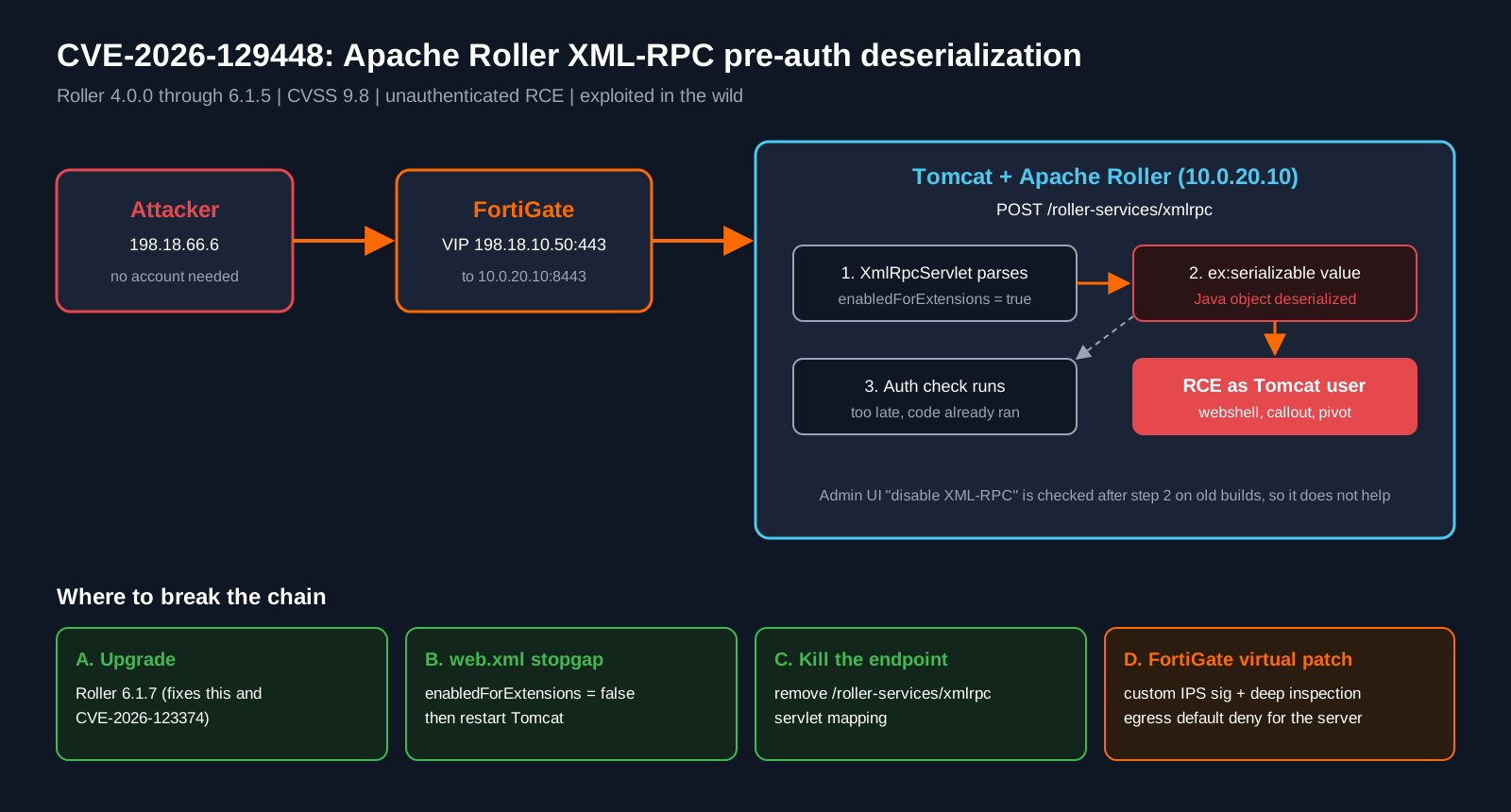
Apache Roller CVE-2026-129448 is a pre-authentication deserialization bug in the Roller XML-RPC endpoint, /roller-services/xmlrpc. The servlet accepts Apache XML-RPC vendor extension types and deserializes them while it parses the request, before Roller ever checks who is asking. Send the right serialized Java object and you get code execution as the Tomcat service account. No login, no user interaction, no special configuration.
Apache first published this bug in September as CVE-2026-82384, but that record only listed Roller 6.1.5. On November 17, 2026 Apache issued CVE-2026-129448 to cover the same flaw in Roller 4.0.0 through 6.1.4 and stated it is being actively exploited (OpenCVE record). If you read the September advisory, saw “6.1.5 only” and moved on because you run 6.1.3, this one is for you.
Warning: Disabling XML-RPC in the Roller admin UI does NOT protect older builds. The servlet is mapped unconditionally and the deserialization happens before that setting is checked. You must change web.xml, remove the mapping, or upgrade.
The CVE pair at a glance
| CVE | Affected | CVSS | Status | Fix |
|---|---|---|---|---|
| CVE-2026-129448 | Roller 4.0.0 through 6.1.4 | 9.8 | Exploited in the wild (per Apache) | 6.1.6 or later |
| CVE-2026-82384 | Roller 6.1.5 | 9.8 | Same bug, original record | 6.1.6 or later |
| CVE-2026-123374 | Roller 4.0 through 6.1.6 | 9.8 | Related: XML-RPC client deserializes ping responses | 6.1.7 |
That third row matters. CVE-2026-123374 is the client side of the same story: when Roller sends a weblog update ping, its XML-RPC client deserializes Java objects in the ping target’s response. 6.1.6 does not fix it. Go straight to 6.1.7.
Figure 1: Attack flow and the four places to break the chain
Prerequisites and Architecture
Assumed knowledge
- Comfortable on a Linux shell with sudo, and with Tomcat directory layout (
$CATALINA_BASE/webapps,conf,logs). - Basic FortiGate policy, VIP and IPS sensor configuration.
- Change control approval to restart Tomcat. Every mitigation below needs a restart.
Lab and reference environment
| Component | Role | Address |
|---|---|---|
| Attacker / test client | Internet host used for verification | 198.18.66.6 |
| FortiGate | Edge firewall, VIP plus IPS sensor | WAN 198.18.10.1, VIP 198.18.10.50:443 |
| Roller server | Ubuntu, Tomcat, Apache Roller | 10.0.20.10:8443 |
| Admin workstation | SSH to Roller, GUI to FortiGate | 10.0.10.25 |
Paths below use <CATALINA_BASE> for your Tomcat base (often /opt/tomcat or /var/lib/tomcat10), <roller-context> for the deployed app folder (often roller or ROOT) and <tomcat-service> for the systemd unit. Swap in your values.
Step-by-Step Implementation
Step 1: Find out if you are exposed
Goal: Confirm the Roller version and whether the XML-RPC endpoint answers from outside.
Action: Check the version in the Roller admin pages, your theme footer, or your deployment records. Anything from 4.0.0 through 6.1.6 needs work (6.1.6 still carries CVE-2026-123374). Then probe the endpoint with a harmless system.listMethods call from an outside host.
# Run from OUTSIDE your network (or the lab test client)
curl -sk -o /dev/null -w "%{http_code}\n" \
  -X POST https://<roller-host>/roller-services/xmlrpc \
  -H "Content-Type: text/xml" \
  --data '<?xml version="1.0"?><methodCall><methodName>system.listMethods</methodName></methodCall>'
Verification: A 200 means the servlet is reachable from the internet. A 404 means the mapping is gone or a proxy is not forwarding it. A connection reset with a FortiGate IPS log means your virtual patch (Step 4) is already catching it.
Step 2: Apply the web.xml stopgap (enabledForExtensions = false)
Goal: Stop the XML-RPC parser from accepting vendor extension types, which is the door the serialized object walks through.
Action: Back up web.xml, find the XML-RPC servlet’s enabledForExtensions init parameter, set it to false, and restart Tomcat.
cd <CATALINA_BASE>/webapps/<roller-context>/WEB-INF
sudo cp -p web.xml web.xml.bak-$(date +%F)

# See the current value and its surrounding servlet block
grep -n -B4 -A2 'enabledForExtensions' web.xml
The block looks similar to this. Your servlet name and line numbers may differ, so edit your own file rather than pasting this one:
<init-param>
    <param-name>enabledForExtensions</param-name>
    <param-value>false</param-value>   <!-- was true -->
</init-param>
# Option A: edit by hand, change true to false on the enabledForExtensions param
sudo nano web.xml
# Option B: one-liner, flips the param-value line right after the param-name
sudo sed -i '/enabledForExtensions/{n;s/true/false/}' web.xml
sudo systemctl restart <tomcat-service>
sudo systemctl status <tomcat-service> --no-pager | head -5Verification: grep -A1 enabledForExtensions web.xml shows false, Tomcat is active (running), and your blog still loads. Normal XML-RPC clients keep working because standard posting calls do not use extension types.
Step 3: Or remove the XML-RPC servlet mapping entirely
Goal: Make /roller-services/xmlrpc return 404 so nothing reaches the parser at all.
Action: If nobody posts with MarsEdit, Windows Live Writer style clients, or scripted XML-RPC, comment out the servlet-mapping for the XML-RPC servlet and restart.
grep -n -B2 -A3 'roller-services/xmlrpc' web.xml<!-- Disabled for CVE-2026-129448 until upgrade
<servlet-mapping>
<servlet-name>XmlRpcServlet</servlet-name>
<url-pattern>/roller-services/xmlrpc</url-pattern>
</servlet-mapping>
-->sudo systemctl restart <tomcat-service>Verification: Rerun the Step 1 probe. Expect 404. Desktop blogging clients will now fail, and some show confusing errors instead of a clean “endpoint not found”, so warn your authors.
Step 4: Virtual patch on the FortiGate
Goal: Block exploit traffic at the edge while you schedule the upgrade, and catch anyone probing for it.
Action: Create a custom IPS signature that matches a POST to the XML-RPC URI carrying the serializable extension element, add it to an IPS sensor with action block, and apply that sensor to the inbound VIP policy. At the time of writing I found no Roller-specific FortiGuard IPS signature, so search the FortiGuard Threat Encyclopedia first and switch to the official signature when it ships.
config ips custom
    edit "Roller.XMLRPC.Ext.Deser"
        set signature "F-SBID( --name \"Roller.XMLRPC.Ext.Deser\"; --protocol tcp; --service HTTP; --flow from_client; --pattern \"/roller-services/xmlrpc\"; --context uri; --no_case; --pattern \"serializable\"; --context body; --no_case; )"
        set comment "CVE-2026-129448 virtual patch"
    next
end

show full-configuration ips custom "Roller.XMLRPC.Ext.Deser" | grep rule-id
Use the rule-id the FortiGate assigned in the sensor:
config ips sensor
    edit "roller-vpatch"
        config entries
            edit 1
                set rule <rule-id>
                set status enable
                set action block
                set log-packet enable
            next
        end
    next
end

config firewall policy
    edit <roller-vip-policy-id>
        set utm-status enable
        set ips-sensor "roller-vpatch"
        set ssl-ssh-profile "<inbound-deep-inspection-profile>"
    next
end
If no one uses XML-RPC at all, a stricter variant drops the body pattern and blocks every request to the URI. That is the network version of Step 3.
GUI Verification: Security Profiles > IPS Signatures shows the custom signature. Policy & Objects > Firewall Policy shows the IPS sensor and an SSL inspection profile with deep inspection (Protecting SSL Server, with the site certificate uploaded) on the Roller VIP policy.
Tip: Pin the server’s egress too. A Roller box has no reason to open new outbound connections to the internet except for update pings, so a default deny outbound policy for 10.0.20.10 turns a successful exploit into a dead callback.
Step 5: Upgrade to Roller 6.1.7
Goal: Remove the vulnerable code instead of hiding it.
Action: Download 6.1.7 from the Apache Roller site, back up the database and your customized themes, deploy the new WAR, and re-check web.xml. The fix (pull request 171) disables the extension types and makes the servlet reject requests when XML-RPC is turned off (SecurityOnline write-up).
sudo systemctl stop <tomcat-service>
sudo cp -a <CATALINA_BASE>/webapps/<roller-context> /root/roller-backup-$(date +%F)
# deploy the 6.1.7 WAR per your normal process, then
sudo systemctl start <tomcat-service>
grep -A1 enabledForExtensions <CATALINA_BASE>/webapps/<roller-context>/WEB-INF/web.xml
Verification: The admin pages report 6.1.7 and the Step 1 probe behaves as expected for your XML-RPC choice.
Verification and Validation
Fire a benign test at your own VIP from the outside client. The base64 value is two zero bytes, not a gadget chain, so it cannot execute anything. It only exists to trip the signature.
curl -sk -X POST https://198.18.10.50/roller-services/xmlrpc \
  -H "Content-Type: text/xml" \
  --data '<?xml version="1.0"?><methodCall><methodName>test</methodName><params><param><value><ex:serializable xmlns:ex="http://ws.apache.org/xmlrpc/namespaces/extensions">AAA=</ex:serializable></value></param></params></methodCall>'
Expected success output: curl reports Connection reset by peer or an empty reply, and the FortiGate logs the hit:
execute log filter category 4
execute log filter field attack "Roller.XMLRPC.Ext.Deser"
execute log display

1: date=2026-11-18 time=08:14:02 type="utm" subtype="ips" level="alert"
   attack="Roller.XMLRPC.Ext.Deser" action="dropped"
   srcip=198.18.66.6 dstip=10.0.20.10 dstport=8443 service="HTTPS"
Then hunt for signs you were hit before the fix. Apache has not published IOCs, so look for behavior:
# Who has been POSTing to XML-RPC, and how often
sudo grep -h 'POST /roller-services/xmlrpc' <CATALINA_BASE>/logs/localhost_access_log.* \
  | awk '{print $1}' | sort | uniq -c | sort -rn | head -20

# Child processes spawned by the Tomcat JVM (shells, curl, wget are bad news)
ps -ef --forest | grep -A4 '[j]ava.*catalina'

# Outbound connections owned by Java
sudo ss -tnp state established | grep java

# Recently dropped JSP or class files in the webapps tree
sudo find <CATALINA_BASE>/webapps -type f \( -name '*.jsp' -o -name '*.class' \) -mtime -60 -ls
Large XML-RPC POST bodies from addresses that are not your authors, a Java process with a sh child, or a JSP you did not deploy all mean treat the box as compromised: isolate, image, rebuild, and rotate the database and admin credentials.
Troubleshooting and Gotchas
1. Redeploying the WAR silently undoes your web.xml fix
Tomcat unpacks roller.war over the exploded folder when the WAR is newer or autoDeploy kicks in. Your hand edit to WEB-INF/web.xml is gone and nobody notices. After any deploy, re-check:
grep -A1 enabledForExtensions <CATALINA_BASE>/webapps/<roller-context>/WEB-INF/web.xml
grep -c 'roller-services/xmlrpc' <CATALINA_BASE>/webapps/<roller-context>/WEB-INF/web.xml
Fix: make the change inside the WAR you deploy, or better, upgrade so there is nothing to patch.
2. The IPS signature never fires on HTTPS
Certificate inspection only sees the TLS handshake, not the URI or body. If the test in Verification gets a normal HTTP response and no log, the FortiGate is blind.
show firewall policy <roller-vip-policy-id> | grep -E "ssl-ssh-profile|ips-sensor"
show firewall ssl-ssh-profile "<inbound-deep-inspection-profile>" | grep -E "inspect-all|server-cert"
Fix: use an inbound deep inspection profile with the site certificate (server protection mode), or terminate TLS on a FortiWeb or reverse proxy in front of Roller so the signature sees cleartext.
3. “Not in KEV” does not mean “not exploited”
At publication the CVE is not in the CISA KEV catalog and the CISA ADP enrichment still scores exploitation as none, while Apache’s own description says it is being exploited (OpenCVE record). If your patch SLA keys off KEV, this one slips through. Treat the vendor statement as the trigger, and expect KEV to catch up.
Sources
- OpenCVE record for CVE-2026-129448 (description, affected range, mitigations, CISA ADP data)
- Apache Roller advisory for CVE-2026-82384 on oss-security (original 6.1.5 record)
- Rapid7 entry for CVE-2026-123374 (XML-RPC client deserialization, fixed in 6.1.7)
- SecurityOnline: CVE-2026-129448 Apache Roller RCE actively exploited
- WindowsForum: CVE-2026-129448 Apache Roller RCE under active exploitation
- Mallory: Apache warns of active exploitation of Roller XML-RPC RCE
- Apache Roller project site (downloads and release notes)
InfoSecMonkey | No fluff. Just the config that works.