A CVSS 10.0 unauthenticated RCE in the GitLab CI/CD regular expression compiler, now on the CISA KEV list. Which build actually fixes it, what to do if you cannot patch tonight, and how to tell if someone already tried.
Executive Summary
GitLab CVE-2026-97229 is an integer overflow (CWE-190) in the regular expression compiler that GitLab CI/CD uses to evaluate rules in a pipeline configuration. GitLab rates it CVSS 10.0 and says that under certain conditions an unauthenticated user can run arbitrary code on the GitLab server. Fixes shipped on October 12, 2026, Rapid7 published a working proof of concept the next day, and on October 29 CISA added it to the Known Exploited Vulnerabilities catalog with a federal due date of November 1. Alpine Linux has already published a timeline of an attacker hammering its public GitLab instance with this exact bug.
The patch story is messier than the headline, which is why this post exists. Three traps are catching teams that think they are done:
- 19.3.4 is not the fix. GitLab’s advisory now lists 19.3.5 as the fixed 19.3 build. Alpine upgraded to 19.3.4 and stayed exposed.
- The October 12 builds are already stale. On October 21 GitLab fixed CVE-2026-110264, a second CVSS 10.0 regex overflow from the same researcher that reaches back to GitLab 7.0. 19.4.2, 19.3.5 and 19.2.8 are vulnerable to it.
- The bug lives in Ruby, not GitLab. GitLab’s fix is a patch to the Onigmo regex engine inside the Ruby it bundles. If you run GitLab on your own Ruby (source installs, custom or distro images), upgrading GitLab alone does nothing.
Objective: get every self-managed GitLab instance onto a build that closes both regex RCEs, apply stopgaps where you cannot patch tonight, and hunt for signs that someone got there first.
Target audience: GitLab administrators, platform and DevOps engineers, and the security teams who own CI/CD as part of the software supply chain.
| Item | Detail |
|---|---|
| CVE | CVE-2026-97229, CWE-190 integer overflow or wraparound |
| CVSS 3.1 | 10.0, AV:N/AC:L/PR:N/UI:N/S:C/C:H/I:H/A:H |
| Affected | GitLab CE/EE 19.2 before 19.2.8, 19.3 before 19.3.5, 19.4 before 19.4.2 (self-managed, all install types) |
| Not affected | GitLab.com and GitLab Dedicated (patched by GitLab) |
| Reported by | joaxcar via the GitLab HackerOne program |
| Public PoC | Rapid7, October 13, 2026 |
| Exploitation | CISA KEV, added October 29, 2026, federal due date November 1, 2026 |
| Exposure | Censys counted 25,766 hosts and 79,224 web properties on affected versions (October 13) |
| Fix to deploy now | 19.5.1, 19.4.3 or 19.3.6 or later (closes CVE-2026-97229 and CVE-2026-110264) |
How the GitLab CVE-2026-97229 Attack Works
You do not need exploit internals to patch, but you do need them to hunt, so here is the defender-level version of Rapid7’s technical analysis. No payloads, just the moving parts.
Figure 1: The CVE-2026-97229 attack chain and where each control breaks it
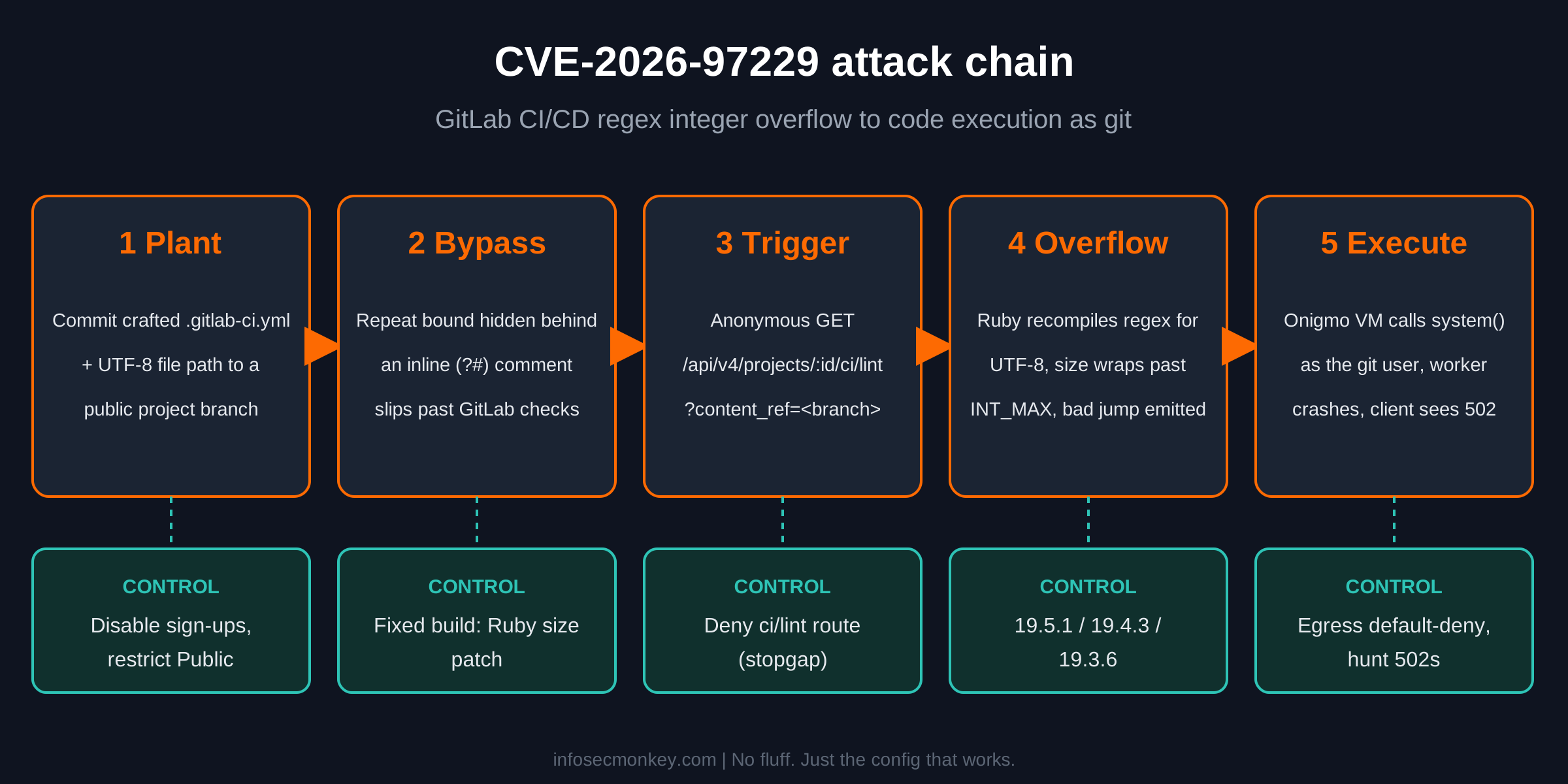
- Plant the config. The attacker commits a
.gitlab-ci.ymlwith a craftedrules:exists:regexppattern, plus a file whose path contains four-byte UTF-8 characters, to a branch of a public project. On instances that allow self-registration and project creation, a throwaway account is all this takes. - Slip past the guards. GitLab checks the pattern’s length, repeat bounds and compiled size. The PoC hides a large repeat count behind an inline regex comment, so GitLab’s scanner sees small numbers while Onigmo reads a bound of 57,805.
- Trigger without a login. An anonymous
GET /api/v4/projects/<id>/ci/lint?content_ref=<ref>makes GitLab lint that branch. Public visibility satisfies the read check, so no credentials are needed for this step. - Recompile and overflow. Matching the pattern against the UTF-8 path forces Ruby to recompile it for UTF-8. The program size crosses
INT_MAX, wraps negative, passes the “small enough” check, and the compiler emits a jump that lands in attacker-controlled bytes. - Execute. Those bytes steer the regex VM into calling
system(). The command runs as thegitOS user inside a Puma worker, which then crashes. Workhorse returns HTTP 502 to the attacker, who reads the result over a callback.
Unauthenticated, with an asterisk. The trigger needs no login, but Rapid7’s route needs write access to a public project first. Do not read that as “we disabled sign-ups, we are fine.” GitLab’s own detection list includes a GraphQL ciLint variant, the reporter’s original path is still private, and Rapid7 says the undisclosed route may differ. Treat it as pre-auth until you are on a fixed build.
Code execution as git on a GitLab server means every repository, every CI/CD variable and secret, runner registration tokens, and a launch point into whatever your pipelines deploy to. It is the same chain covered in Anatomy of a Remote Code Execution Attack: delivery, trigger, callback, post-exploitation.
Prerequisites and Architecture
Assumed knowledge: Linux administration, GitLab Omnibus (gitlab-ctl, gitlab-rake, gitlab-rails), and basic log analysis.
Lab used for the examples: a single-node GitLab EE Omnibus server on Ubuntu, internal address 10.0.20.10, published to the internet as 198.18.20.10 behind a firewall. Swap in your hostname wherever you see gitlab.example.com.
| Component | Lab value | Role |
|---|---|---|
| GitLab EE Omnibus | 10.0.20.10 (published as 198.18.20.10) | Target instance, starting on 19.4.1 |
| Admin workstation | 10.0.10.50 | SSH and API access |
| Edge firewall / reverse proxy | 198.18.20.1 | Publishes HTTPS 443 to GitLab |
| Admin personal access token | <admin-token> |
API checks (scope read_api is enough) |
| Backup target | /var/opt/gitlab/backups |
Pre-upgrade backup |
Step-by-Step Implementation
Step 1: Find every instance and its exact build
Goal: know precisely what you run. The fixed build is one patch digit away from a vulnerable one, so “19.3” is not an answer.
Action: check the Rails version file, the package, or the container image on each instance.
# Omnibus (Ubuntu, Debian, RHEL)
sudo cat /opt/gitlab/embedded/service/gitlab-rails/VERSION
dpkg -l | grep -E 'gitlab-(ce|ee)'        # Debian and Ubuntu
rpm -qa | grep -E 'gitlab-(ce|ee)'        # RHEL, Rocky, Alma

# Docker
docker exec <container> cat /opt/gitlab/embedded/service/gitlab-rails/VERSION

# Helm (check the APP VERSION column)
helm list -n <gitlab-namespace>
GUI Verification: sign in as an administrator, open Admin Area > Overview > Dashboard, and read the GitLab version in the Components panel. The Help page (/help) shows it too.
Step 2: Pick the right target version
Goal: land on a build that closes both regex RCEs, not just the one in the headline.
Action: find your branch below and upgrade to the right-hand column (or anything newer on that branch).
| Your branch | Fixes only CVE-2026-97229 | Deploy this (fixes 97229 and 110264) |
|---|---|---|
| 19.5 | Not affected | 19.5.1 or later |
| 19.4 | 19.4.2 | 19.4.3 or later |
| 19.3 | 19.3.5 (not 19.3.4) | 19.3.6 or later |
| 19.2 | 19.2.8 | 19.2.9 (critical fix only, plan a move to 19.3.6+) |
| 19.1 / 19.0 | Not affected | 19.1.9 / 19.0.10 (critical fix only) |
| 7.0 to 18.11 | Not affected | 18.11.13 (critical fix only), older lines have no fix |
The backport builds (19.2.9, 19.1.9, 19.0.10, 18.11.13) carry only the CVE-2026-110264 fix. The other eleven fixes in that release, including an account takeover through OmniAuth-to-LDAP auto-linking (CVE-2026-15723), need 19.3.6, 19.4.3 or 19.5.1.
GUI Verification: none yet. Note the target per instance in your change ticket, along with whether the jump crosses a required upgrade stop.
Step 3: Apply stopgaps if you cannot patch tonight
Goal: shrink the exposure Rapid7 demonstrated while you schedule the maintenance window. None of this fixes the compiler, and none of it touches CVE-2026-110264.
Action A: close the door on throwaway accounts and new public projects.
# Stop open self-registration
sudo gitlab-rails runner 'ApplicationSetting.current.update!(signup_enabled: false)'

# Stop non-admins from creating new Public projects
sudo gitlab-rails runner 'ApplicationSetting.current.update!(restricted_visibility_levels: [Gitlab::VisibilityLevel::PUBLIC])'

# Count the public projects that already exist (they stay public)
sudo gitlab-rails runner 'puts Project.where(visibility_level: Gitlab::VisibilityLevel::PUBLIC).count'
Restricting the Public level only blocks new public projects. Review the existing ones and switch anything that does not need anonymous access to Internal or Private.
Action B: deny the REST lint route at the bundled NGINX. Add one line to /etc/gitlab/gitlab.rb and reconfigure.
# /etc/gitlab/gitlab.rb
nginx['custom_gitlab_server_config'] = "location ~ ^/api/v4/projects/.+/ci/lint$ { return 403; }\n"
sudo gitlab-ctl reconfigureUse .+ rather than [^/]+ in the regex. NGINX matches locations against the decoded URI, so a project ID sent as group%2Fproject arrives with a real slash in it. This block breaks any tooling that lints through the REST API, and it does not cover the GraphQL ciLint path, so remove it once you are patched.
If GitLab sits behind a FortiGate, FortiWeb or another reverse proxy, the same deny can live at the edge instead. While you are there, check that the GitLab host has an egress default-deny: a blocked callback is the difference between a log line and an incident.
GUI Verification: in Admin Area > Settings > General, expand Sign-up restrictions and confirm Sign-up enabled is cleared, then expand Visibility and access controls and confirm Public is checked under Restricted visibility levels.
Step 4: Back up and upgrade
Goal: move to the target build with a rollback path.
Action: take a backup, copy the two files backups do not include, then install the pinned version. Pinning matters: a plain apt-get upgrade can jump a 19.4 server straight to 19.5.
sudo gitlab-backup create SKIP=artifacts,registry
sudo cp /etc/gitlab/gitlab.rb /etc/gitlab/gitlab-secrets.json /root/

# Ubuntu / Debian (EE shown, use gitlab-ce=19.4.3-ce.0 for CE)
sudo apt-get update
sudo apt-get install -y gitlab-ee=19.4.3-ee.0

# RHEL / Rocky / Alma
sudo dnf install -y gitlab-ee-19.4.3-ee.0.el9
# Docker Compose: set the pinned tag in compose.yaml
# image: gitlab/gitlab-ee:19.4.3-ee.0
docker compose pull
docker compose up -d19.4.3 and 19.3.6 include database migrations, so a single-node server stays down until they finish. Multi-node deployments can use GitLab’s zero-downtime upgrade procedure.
GUI Verification: once the login page returns, the Components panel on the Admin dashboard shows the new version.
Step 5: Check the Ruby underneath (custom builds only)
Goal: confirm the interpreter is patched when GitLab does not ship its own.
Action: official Omnibus packages and official images carry GitLab’s patched Ruby, and the version string will not change, so trust the GitLab build number there. For source installs and custom or distribution images, check the interpreter GitLab actually runs.
sudo -u git -H bash -lc 'ruby -v'
# CVE-2026-97229 needs Ruby 3.3.13, 3.4.12, 4.0.9 or later
For CVE-2026-110264, confirm with your image or distribution maintainer that the Ruby regexp repeat ID overflow patch is included. If you cannot get a straight answer, move to an official GitLab image.
GUI Verification: not applicable. This is a shell-only check.
Verification and Validation
Run these after the upgrade. Each one has a clear pass condition.
# 1. Version is on the target build
sudo cat /opt/gitlab/embedded/service/gitlab-rails/VERSION
# Expected: 19.4.3-ee (or your branch's target)

# 2. Every service is up
sudo gitlab-ctl status
# Expected: every line starts with "run:"

# 3. Application health
sudo gitlab-rake gitlab:check SANITIZE=true
# Expected: no red "no" results

# 4. The temporary lint block (if you added it) answers 403
curl -s -o /dev/null -w '%{http_code}\n' "https://gitlab.example.com/api/v4/projects/1/ci/lint?content_ref=main"
# Expected: 403

# 5. Sign-up and visibility settings stuck
curl -s --header "PRIVATE-TOKEN: <admin-token>" https://gitlab.example.com/api/v4/application/settings | jq '{signup_enabled, restricted_visibility_levels}'
# Expected: "signup_enabled": false and "restricted_visibility_levels": ["public"]
Once you are on a fixed build, decide deliberately whether to keep sign-ups and public projects restricted, and remove the NGINX lint block so API linting works again.
Hunt for Exploitation
With the bug on the KEV list and a public PoC, patching closes the door but does not tell you whether someone walked through it. GitLab published six detections for this CVE in its open-source TLDR framework (linked from the GitLab advisory). These manual checks cover the same ground.
# Lint requests that killed a worker (several seconds, then 502)
sudo grep -h 'ci/lint' /var/log/gitlab/gitlab-workhorse/current | grep -E '"status":502|badgateway'

# Puma worker crashes with the regex matcher in the trace
sudo grep -l 'regexp_matcher' /var/log/gitlab/puma/*.log

# Accounts created since the fix shipped
sudo gitlab-rails runner 'User.where("created_at > ?", Time.utc(2026,10,12)).find_each { |u| puts [u.username, u.email, u.created_at].join(" ") }'

# Public projects created since the fix shipped
sudo gitlab-rails runner 'Project.where(visibility_level: Gitlab::VisibilityLevel::PUBLIC).where("created_at > ?", Time.utc(2026,10,12)).find_each { |p| puts [p.full_path, p.creator&.username, p.created_at].join(" ") }'

# Shells or download tools holding network sockets
sudo ss -tnp state established | grep -E 'users:\(\("(sh|bash|curl|wget|python3?|nc)"'
Rapid7 also notes a jump of roughly 2 GiB in worker memory during an attempt. A brand-new account that owns a new public project, followed by lint requests that 502, is the pattern to escalate.
If you find hits, do what Alpine did: treat the server as compromised even without proof of code execution. A successful run leaves little behind, and Alpine had no outbound connection logs to prove a negative. Rebuild from known-good, then rotate admin passwords and personal access tokens, CI/CD variables and secrets, runner tokens, deploy keys, and any cloud credentials your pipelines can reach.
If you have been following the 2026 run of parser bugs that turn into shells, the response playbook here is the same one from Node2Shell and PHP2Shell: patch, narrow the trigger, and log egress.
Troubleshooting and Gotchas
“We patched on October 12 and the scanner still flags us”
Two possible causes. If the 19.3 line is involved, check for 19.3.4: GitLab later named 19.3.5 as the fixed build and Alpine got caught on exactly this. Otherwise your scanner is probably flagging CVE-2026-110264, which 19.4.2, 19.3.5 and 19.2.8 do not fix.
sudo cat /opt/gitlab/embedded/service/gitlab-rails/VERSION
# 19.3.4 or anything from the October 12 release: upgrade to 19.3.6 / 19.4.3 / 19.5.1
Fix: go straight to the October 21 builds from Step 2.
Upgraded GitLab, still vulnerable (custom Ruby)
Alpine moved to GitLab 19.3.6 on October 22 and was still exposed because its image used an unpatched distribution Ruby. The GitLab version string was current; the interpreter was not.
sudo -u git -H bash -lc 'ruby -v'Fix: upgrade the interpreter to Ruby 3.3.13, 3.4.12, 4.0.9 or later (or your distribution’s patched build), restart GitLab, or move to an official GitLab image.
Upgrade stalls or GitLab will not start afterwards
19.4.3 and 19.3.6 run database migrations before GitLab starts, and jumping across minor versions can skip a required upgrade stop.
sudo gitlab-ctl tail
sudo gitlab-rake db:migrate:status | grep -w down
Fix: let pending migrations finish (sudo gitlab-rake db:migrate), and if you skipped a required stop, step through it with GitLab’s upgrade path guidance before going to the target build.
The NGINX lint block does nothing
Usual causes: gitlab-ctl reconfigure was never run, the regex used [^/]+ and missed a URL-encoded project path, or GitLab is published by a separate proxy that never sends the request to the bundled NGINX.
sudo grep -n 'ci/lint' /var/opt/gitlab/nginx/conf/gitlab-http.conf
curl -s -o /dev/null -w '%{http_code}\n' "https://gitlab.example.com/api/v4/projects/group%2Fproject/ci/lint?content_ref=main"
Fix: reconfigure, use the .+ pattern, or put the deny on the proxy that actually terminates the traffic. Remember it never covered GraphQL, so it is a speed bump, not a patch.
Timeline
| Date (2026) | Event |
|---|---|
| October 12 | GitLab ships 19.4.2, 19.3.x and 19.2.8 for CVE-2026-97229 |
| October 13 | Rapid7 PoC and Censys exposure count (25,766 hosts) |
| October 20 to 21 | Attacker repeatedly crashes Alpine Linux’s GitLab with crafted CI configs |
| October 21 | GitLab fixes CVE-2026-110264 (19.5.1, 19.4.3, 19.3.6 plus backports) |
| October 23 | Upstream Ruby ships the CVE-2026-97229 fix (3.3.13, 3.4.12, 4.0.9) |
| October 29 | CISA adds CVE-2026-97229 to KEV, federal due date November 1 |
Sources
- GitLab Critical Patch Release: 19.4.2, 19.3.5, 19.2.8 (CVE-2026-97229 advisory)
- GitLab Critical Patch Release: 19.5.1, 19.4.3, 19.3.6, 19.2.9, 19.1.9, 19.0.10, 18.11.13 (CVE-2026-110264)
- Rapid7: CVE-2026-97229 Critical Unauthenticated Remote Code Execution in GitLab
- Rapid7 Analysis: GitLab CI/CD Regex Integer Overflow (CVE-2026-97229) technical write-up
- Censys Oct 13 Advisory: GitLab CI/CD Remote Code Execution [CVE-2026-97229]
- GBHackers: CISA Confirms Active Exploitation of GitLab Vulnerability CVE-2026-97229
- DEV Community: GitLab Was Patched, the Server Was Still Vulnerable (Alpine Linux incident timeline)
InfoSecMonkey | No fluff. Just the config that works.