
If you've spent any time configuring user authentication on... Full Story
By Manny Fernandez
October 24, 2026

PHP2Shell (CVE-2026-109618, CVE-2026-109619): Mitigating the PHP RCE with Fortinet
InfoSecMonkey Threat Response
October 24, 2026 | No fluff. Just the config that works.
Executive Summary
PHP2Shell is the name for two engine-level PHP flaws, CVE-2026-109618 and CVE-2026-109619, that let an unauthenticated attacker run code on a PHP server, in some setups before a single line of application code executes. Both score 9.2 on CVSS 4.0, exploitation attempts started before disclosure, and the bugs sit in PHP itself, so WordPress, Magento, Drupal and every other PHP app inherit them. This post is a PHP2Shell Fortinet mitigation playbook: patch and restart correctly, apply PHP’s interim settings, turn on the FortiGate IPS and FortiWeb signatures FortiGuard already shipped, and contain the server if something gets through.
| Item | Detail |
|---|---|
| Objective | Patch every PHP runtime that serves web traffic, then layer FortiGuard IPS and FortiWeb signatures, PHP’s interim settings, and egress containment to cover the gap. |
| Target audience | Firewall and security engineers, SOC analysts, and web or hosting teams running PHP behind Fortinet gear. |
| Products | FortiGate (FortiOS 7.4 / 7.6), FortiWeb, FortiAnalyzer, FortiEDR (optional). FortiOS, FortiWeb, FortiManager and FortiAnalyzer are not affected themselves (FG-IR-26-186). |
| Time to deploy | About 45 minutes for the Fortinet controls. Patching time depends on how many PHP stacks you run. |
Heads up: Patching PHP and restarting every worker is the fix. The signatures in this post are virtual patching: they buy time against known exploit shapes, and attackers reshape requests. If you read the Node2Shell post this week, the playbook will feel familiar, with one big difference: PHP2Shell is already seeing exploitation attempts.
What PHP2Shell Is (60-Second Version)
| Field | Value |
|---|---|
| CVEs | CVE-2026-109618 (out-of-memory corruption) and CVE-2026-109619 (stale global state, a use-after-free) |
| Severity | CVSS 4.0 9.2 for both. Early circulating scores of 10.0 were wrong, per the PHP Foundation. |
| Fixed in | PHP 8.5.12, 8.4.27, 8.3.36, 8.2.35 |
| No official release | 7.4 through 8.1 get minimal source backports only. 7.3 and older (including PHP 5) get nothing. The vulnerable code dates back to PHP 5.4.0 (2012). |
| SAPIs affected | All of them: PHP-FPM, Apache mod_php, php-cgi, FrankenPHP, LiteSpeed. mod_php carries the highest demonstrated risk. |
| Auth required | None. Network reachability is enough. |
| Related | CVE-2026-109619’s upload-progress path got a follow-up, CVE-2026-115560, disclosed October 23 with a temporary config mitigation. |
| Exploitation | Amazon saw an attempt on October 17, four days before disclosure. Cloudflare reported early attacks on October 21. Some researchers found public PoCs fail on a default install, and widespread exploitation is not independently confirmed. Not on CISA KEV as of October 23; CISA issued an alert urging immediate patching. |
How it works, short version. CVE-2026-109618: PHP uses longjmp() to bail out when it runs out of memory. If that happens while it is inserting form data into a hash table, the counters are already bumped but the bucket never gets written. Request shutdown then treats the half-built bucket as valid, and attacker-controlled leftover bytes steer cleanup code. This all happens during request parsing, before your application runs, so app-level auth and input filtering never get a vote. The same flaw can leak worker memory (passwords, tokens, keys from other requests) in a PHPSESSID response cookie.
CVE-2026-109619: a fatal error or late shutdown diagnostic leaves worker-wide state pointing at freed memory, and the next request handled by that same worker uses it. The confirmed paths are session upload progress, which is on by default and runs even if your code never calls session_start(), and fatal-error backtraces on PHP 8.5.
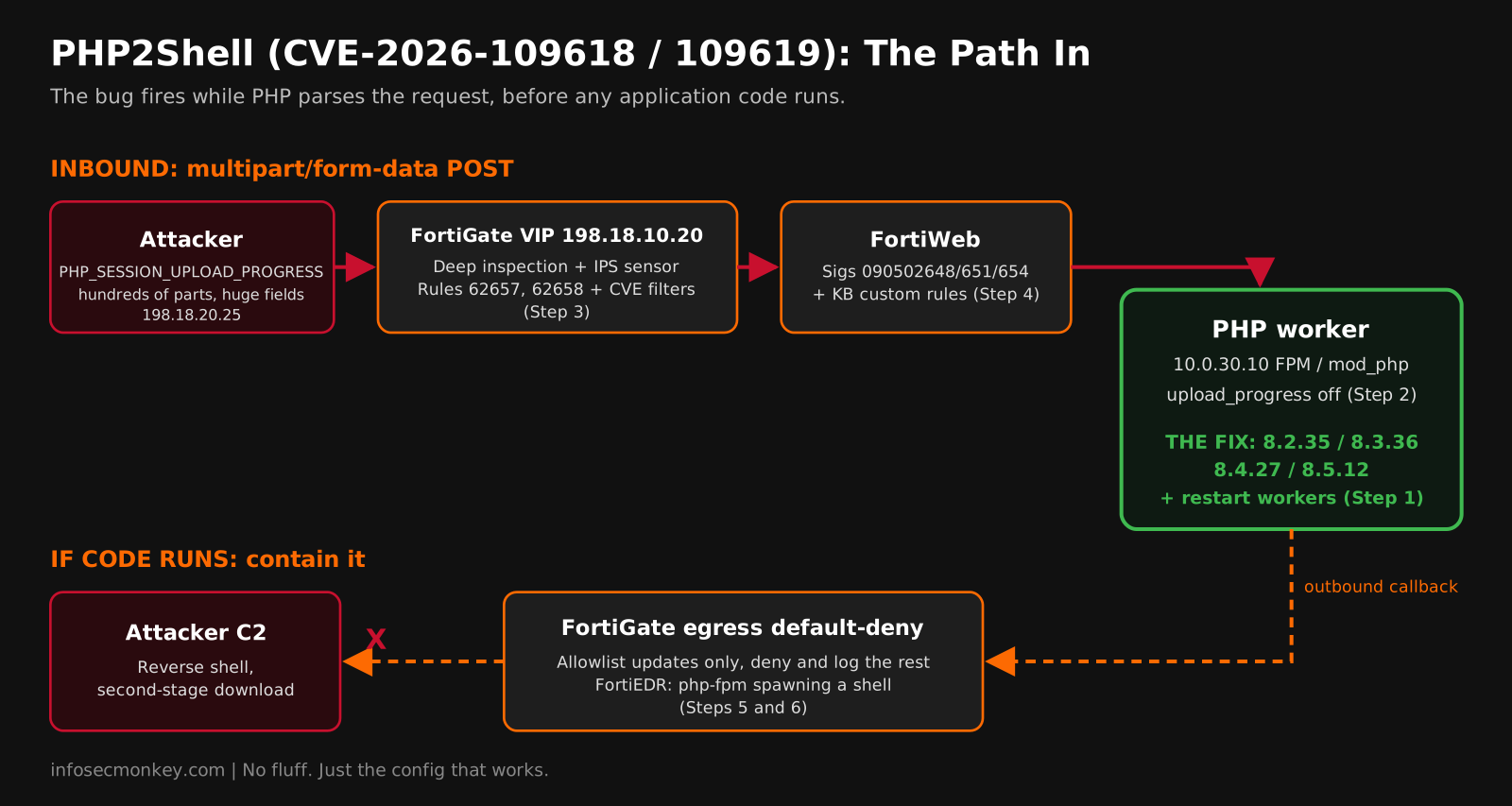
Every known trigger arrives as a multipart/form-data POST (or, for the memory-exhaustion path, a form POST with an enormous field name). That is good news for defenders: it gives IPS and WAF something concrete to look at.
Figure 1: Where each Fortinet control sits on the PHP2Shell path
Prerequisites and Architecture
Assumed knowledge: FortiGate firewall policies, VIPs, IPS sensors and SSL inspection profiles; FortiWeb server policies and signature management; Linux package management and PHP-FPM or Apache administration.
Licensing and versions: FortiGate IPS needs an active FortiGuard IPS subscription with Attack Definitions 37.317 or later. FortiWeb needs signature build 0.00438 or later. The optional OT Virtual Patching feed needs a separate FortiGuard OT Security Service license.
| Component | Role | Lab addressing |
|---|---|---|
| FortiGate (FortiOS 7.4.x / 7.6.x) | Edge firewall, IPS, SSL inspection, egress control | port1 WAN 198.18.10.1/24, port4 web LAN 10.0.30.1/24 |
VIP VIP-php-web |
Publishes the PHP site | 198.18.10.20:443 to 10.0.30.10:443 |
| PHP web servers | Apache + PHP-FPM 8.3 (WordPress in the lab) | 10.0.30.0/24 |
| FortiWeb (optional) | Reverse proxy and WAF in front of the site | Inline between FortiGate and 10.0.30.10 |
| FortiAnalyzer | Log correlation and alerting | 10.0.0.50 |
| Test client | Sends a harmless trigger-shaped request for validation | 198.18.20.25 |
PHP2Shell Fortinet Mitigation: Step-by-Step
Step 1: Find Every PHP Runtime That Serves Web Traffic, Patch It, and Restart
Goal: Get every web-facing PHP SAPI onto a fixed build and make sure the running workers actually load it.
Action: Check the SAPI that serves requests, not just the CLI. They are often different builds, and containers bundle their own.
bash
# The CLI version can lie about what serves your site
php -v
php-fpm8.3 -v                               # RHEL family: php-fpm -v
apachectl -M 2>/dev/null | grep -i php      # is mod_php loaded?

# Ask the web SAPI itself, then delete the probe
echo '<?php echo PHP_VERSION, " ", PHP_SAPI;' | sudo tee /var/www/html/v.php
curl -s http://127.0.0.1/v.php ; echo ; sudo rm -f /var/www/html/v.php

# Containers carry their own PHP
for img in $(docker image ls --format '{{.Repository}}:{{.Tag}}' \
             | grep -v '<none>'); do
  v=$(docker run --rm --entrypoint php "$img" -v 2>/dev/null | head -1) \
    && echo "$img $v"
done
bash
# Debian / Ubuntu packages: distro backports often keep the old version string
sudo apt update && sudo apt install --only-upgrade 'php8.3*'
apt changelog php8.3-common 2>/dev/null | grep -m4 -E 'CVE-2026-10961[89]'

# Restart EVERY worker, or the old code keeps running
sudo systemctl restart php8.3-fpm apache2

# Docker: pin the fixed tag and rebuild
FROM php:8.3.36-fpm-bookworm
GUI Verification: FortiGuard pushed vulnerability coverage (DB 2.00052) to FortiClient EMS, FortiCNAPP and FortiEDR, so filter those consoles for CVE-2026-109618 and CVE-2026-109619 to catch hosts and images your scripts missed. Re-run the web SAPI probe after the restart: a completed package update alone does not prove the fix is live.
Step 2: Apply PHP’s Interim Settings
Goal: Close the confirmed upload-progress and backtrace paths on anything you cannot patch today.
Action: Set these where applications cannot override them (the FPM pool or the server-wide ini), then restart workers.
config
; /etc/php/8.3/fpm/pool.d/www.conf  (php_admin_* cannot be changed by the app)
php_admin_flag[session.upload_progress.enabled] = off

; PHP 8.5 only, same pool file
php_admin_flag[fatal_error_backtraces] = off

; mod_php: /etc/php/8.3/apache2/conf.d/99-php2shell.ini
session.upload_progress.enabled = 0
bash
sudo systemctl restart php8.3-fpm apache2
php-fpm8.3 -i 2>/dev/null | grep -E 'session.upload_progress.enabled'
PHP also lists memory_limit=-1 as a mitigation for CVE-2026-109618, but only paired with hard request-size limits at the proxy and a container or cgroup memory cap. Without those, you trade an RCE for an easy denial of service. Treat it as an emergency lever, not a default.
Heads up: These settings cover specific attack paths, not the bugs. PHP says only patching fixes them, and watchTowr reports ini-only mitigation is not enough. Disabling upload progress does break upload progress bars in apps that rely on it, so tell the app owners.
GUI Verification: None on the Fortinet side. Confirm on the host with the grep above, or with ini_get('session.upload_progress.enabled') in a throwaway probe like Step 1.
Step 3: Turn On the FortiGuard IPS Signatures on FortiGate
Goal: Block known PHP2Shell exploit traffic at the edge with the signatures FortiGuard already published.
Action: Update the IPS package, confirm the version, and add both signatures to a sensor with action block. They default to pass, so they do nothing until you change that.
| CVE | FortiGate IPS signature | Rule ID |
|---|---|---|
| CVE-2026-109618 | PHP.longjmp.Remote.Code.Execution |
62657 |
| CVE-2026-109619 | PHP.stale.global.state.Remote.Code.Execution |
62658 |
FortiOS CLI
execute update-ips
diagnose autoupdate versions | grep Attack -A 7
FortiOS CLI
config ips sensor
    edit "PHP2Shell-Protect"
        set comment "CVE-2026-109618 / 109619 plus high/critical server sigs"
        set extended-log enable
        config entries
            edit 1
                set rule 62657 62658
                set status enable
                set action block
                set log-packet enable
            next
            edit 2
                set cve "cve-2026-109618"
                set action block
            next
            edit 3
                set cve "cve-2026-109619"
                set action block
            next
            edit 4
                set cve "cve-2026-115560"
                set action block
            next
            edit 5
                set location server
                set severity high critical
                set status enable
                set action block
            next
        end
    next
end
Entry 1 pins the two known signatures. Entries 2 to 4 are CVE filters that auto-include anything FortiGuard tags with these CVEs later, including CVE-2026-115560. Attach the sensor to the inbound VIP policy with deep inspection, or IPS never sees inside the TLS:
FortiOS CLI
config firewall ssl-ssh-profile
    edit "protect-php-web"
        config https
            set ports 443
            set status deep-inspection
        end
        set server-cert-mode replace
        set server-cert "php-web-cert"
    next
end

config firewall vip
    edit "VIP-php-web"
        set extip 198.18.10.20
        set mappedip "10.0.30.10"
        set extintf "port1"
        set portforward enable
        set extport 443
        set mappedport 443
    next
end

config firewall policy
    edit 0
        set name "IN-php-web"
        set srcintf "port1"
        set dstintf "port4"
        set srcaddr "all"
        set dstaddr "VIP-php-web"
        set action accept
        set schedule "always"
        set service "HTTPS"
        set utm-status enable
        set ssl-ssh-profile "protect-php-web"
        set ips-sensor "PHP2Shell-Protect"
        set logtraffic all
    next
end
If you hold the FortiGuard OT Security Service license, the same signatures exist in the OT Virtual Patch feed (entries 10009977 and 10009978, package 37.316 or later) and can go in a Virtual Patching profile instead.
GUI Verification: System > FortiGuard shows Attack Definitions 37.317 or later. Security Profiles > IPS Signatures lists both signatures. Security Profiles > Intrusion Prevention > PHP2Shell-Protect shows them with action Block, and the policy shows the IPS and SSL inspection icons.
Step 4: Enforce the FortiWeb Signatures (If It Fronts the Site)
Goal: Stop PHP2Shell requests at the WAF before PHP ever parses them.
Action: Update to signature build 0.00438 or later and override the default Alert Only action so the new signatures actually block.
- Go to System > Config > FortiGuard and click Update Now. Confirm the Signature Build Number is 0.00438 or later (
execute update-now, thenget system upd-db-versionfrom the CLI). - On the Signature Update Management tab, override the action for the new signatures from Alert Only to deny.
- Confirm signatures 090502648, 090502651 and 090502654 under Known Exploits > Signatures for Common Web Applications, and that the signature policy is in the Web Protection Profile on the site’s server policy.
If you cannot use the FortiGuard signatures, Fortinet’s KB publishes custom protection rules. The most targeted one flags a multipart body that carries a PHP_SESSION_UPLOAD_PROGRESS field:
FortiWeb CLI
config waf custom-protection-rule
    edit "php2shell_HandlerMismatch"
        set action alert_deny
        config meet-condition
            edit 1
                set request-target REQUEST_HEADERS
                set expression "multipart\\/form-data"
            next
            edit 2
                set request-target REQUEST_RAW_BODY
                set expression "Content-Disposition[^\\r\\n]+\"PHP_SESSION_UPLOAD_PROGRESS"
            next
        end
    next
end
The full KB set adds rules for session injection, multipart bombs and chunked-encoding memory exhaustion, grouped under a php2shell custom protection group. Copy them from the KB in the references rather than retyping them, and test before you enforce.
GUI Verification: Log & Report > Attack Log shows hits against the 0905026xx signatures or the php2shell custom rules with action Deny.
Step 5: Contain the Server with Egress Default-Deny
Goal: If code does run, stop the callback, the second-stage download, and the reverse shell.
Action: Web servers rarely need to start outbound connections. Allow only what they need, deny and log the rest, and inspect what is allowed.
FortiOS CLI
config firewall address
    edit "NET-php-web"
        set subnet 10.0.30.0 255.255.255.0
    next
    edit "fqdn-wp-updates"
        set type fqdn
        set fqdn "api.wordpress.org"
    next
    edit "fqdn-deb-mirror"
        set type fqdn
        set fqdn "deb.debian.org"
    next
end

config firewall addrgrp
    edit "GRP-php-egress-allowed"
        set member "fqdn-wp-updates" "fqdn-deb-mirror"
    next
end

config firewall policy
    edit 0
        set name "OUT-php-allowlist"
        set srcintf "port4"
        set dstintf "port1"
        set srcaddr "NET-php-web"
        set dstaddr "GRP-php-egress-allowed"
        set action accept
        set schedule "always"
        set service "HTTP" "HTTPS"
        set utm-status enable
        set ssl-ssh-profile "deep-inspection"
        set ips-sensor "default"
        set nat enable
        set logtraffic all
    next
    edit 0
        set name "OUT-php-deny"
        set srcintf "port4"
        set dstintf "port1"
        set srcaddr "NET-php-web"
        set dstaddr "all"
        set action deny
        set schedule "always"
        set service "ALL"
        set logtraffic all
    next
end
A deny hit on OUT-php-deny from a web server that normally sits quiet is one of the highest-signal alerts you can build for this campaign.
GUI Verification: Policy & Objects > Firewall Policy: OUT-php-allowlist sits above OUT-php-deny and above any older broad outbound rule for 10.0.30.0/24. Use move <id> before <id> if something shadows it.
Step 6: Hunt for Attempts and Compromise, Back to October 17
Goal: Find out whether anyone already got in. Patching does not evict an attacker.
Action: Check IPS and WAF hits, PHP and Apache error logs, and process and file activity, starting from October 17, 2026.
FortiOS CLI
# FortiGate: PHP2Shell IPS hits
execute log filter reset
execute log filter category 4
execute log filter field attack PHP.longjmp.Remote.Code.Execution
execute log display
bash
# CVE-2026-109618 tell: memory exhausted during request init ("Unknown on line 0")
sudo grep -h "Allowed memory size" \
  /var/log/php*-fpm.log /var/log/apache2/error.log* \
  | grep "Unknown on line 0" | tail -20

# Worker segfaults can mean failed address guessing
sudo grep -h "AH00052" /var/log/apache2/error.log* | tail -20

# New PHP files in the web root since October 17
sudo find /var/www -name '*.php' -newermt 2026-10-17 -ls- FortiAnalyzer: FortiGuard shipped PHP2Shell Outbreak Detection (DB 4.00003) and a PHP2Shell IOC tag, so check the Outbreak Alerts view, then build an event handler on IPS logs for rule 62657 or 62658 and on FortiWeb attack logs.
- FortiEDR or your EDR: alert on
php-fpm,apache2orhttpdspawningsh,bash,curl,wgetorpython. That is the most direct evidence of execution. - Request patterns: multipart POSTs with
PHP_SESSION_UPLOAD_PROGRESSorPHPSESSIDas form fields, hundreds of parts, deeply bracket-nested field names,<?phpor|O:inside filenames, and unusually long or percent-encodedPHPSESSIDvalues in responses. - If you find something: preserve logs, config snapshots and suspicious files before you change anything, then check for new cron jobs and new accounts tied to the web user.
Verification and Validation
1. The web SAPI is fixed. Re-run the Step 1 probe after the restart:
expected output
$ curl -s http://127.0.0.1/v.php
8.3.36 fpm-fcgi
2. Interim settings are live on anything not yet patched:
expected output
$ php-fpm8.3 -i 2>/dev/null | grep session.upload_progress.enabled
session.upload_progress.enabled => Off => Off
3. FortiGate is current and enforcing:
expected output
FGT # diagnose autoupdate versions | grep Attack -A 7
Attack Definitions
---------
Version: 37.00317
...
FGT # show ips sensor PHP2Shell-Protect
4. The WAF reacts to a trigger-shaped request. This harmless multipart POST only carries the field name the KB rule looks for. It is not an exploit, so it validates the FortiWeb custom rule (and any field-name based detection), not the FortiGuard exploit signatures:
bash
curl -sk -o /dev/null -w '%{http_code}\n' https://198.18.10.20/ \
  -F 'PHP_SESSION_UPLOAD_PROGRESS=probe' \
-F 'file=@/etc/hostname'| Control | Expected result |
|---|---|
FortiWeb custom rule php2shell_HandlerMismatch |
HTTP 403 and an Attack Log entry with action Deny. |
| FortiGuard IPS / FortiWeb signatures | Usually no hit on this probe. They match exploit structure, not a single field name, which is exactly why you do not test them with real exploit code on production. |
| Nothing in front of PHP | HTTP 200. Your site is relying entirely on the patch. |
5. Egress is closed. From a web server:
expected output
curl -sS -m 5 -o /dev/null https://example.org ; echo "exit=$?"
exit=28
Troubleshooting and Gotchas
1. The signatures are installed but nothing blocks
Cause: three usual suspects. The FortiGate signatures default to pass and the FortiWeb signatures default to Alert Only. The IPS package only updates when a sensor is applied to at least one policy, so a lab box can sit on an old package. Or the policy runs certificate inspection, so IPS never sees the HTTPS body.
FortiOS CLI
diagnose autoupdate versions | grep Attack -A 7
show ips sensor PHP2Shell-Protect
show firewall policy <policy-id>
Fix: set the entry action to block, override Signature Update Management on FortiWeb, and use a server-cert-mode replace profile on the VIP policy.
2. Patched packages, still vulnerable workers
Cause: PHP-FPM and Apache keep the old code in memory until restarted, the CLI and web SAPI are different builds, or a container image was never rebuilt. Distro backports also keep the old version string, which confuses scanners in the other direction.
Fix: restart every worker, verify with the web SAPI probe rather than php -v, rebuild images from a fixed tag, and read the package changelog for the CVE IDs when the version number did not move.
3. End-of-life PHP you cannot upgrade this week
Cause: 7.3 and older will never get a fix, and 7.4 through 8.1 only get source backports. The official Docker php images get no fix for 8.1 or older.
Fix: check your distro or LTS vendor for backported packages first. Until then, stack every layer: Step 2 settings, IPS and WAF in block mode, egress default-deny, and restrict access to known sources or put the site behind ZTNA or a VPN. CERT-EU and the UK NCSC both recommend taking it off the internet if you cannot mitigate in time.
4. Upload features break after the change
Cause: session.upload_progress.enabled=0 kills upload progress reporting, and the FortiWeb custom rules can catch legitimate large multipart forms. Fix: run the custom rules in alert mode first, scope exceptions to specific URLs rather than turning rules off, and patch the backend behind any exception first.
References
- FortiGuard Outbreak Alert: PHP2Shell
- Fortinet Community: Using the FortiGate to protect against CVE-2026-109618 and CVE-2026-109619
- Fortinet Community: How to block PHP2Shell on FortiWeb
- Fortinet Blog: Understanding PHP2Shell and reducing risk while you patch
- Datadog Security Labs: PHP2Shell detection, analysis, and remediation
- Tenable: PHP2Shell FAQ
- watchTowr: PHP2Shell exploited
- Sansec: PHP2Shell research and timeline
- InfoSecMonkey: Node2Shell Fortinet mitigation
Recent posts
-

-

DNS is one of those technologies that quietly underpins... Full Story
-

BGP issues on FortiGate firewalls usually trace back to... Full Story
-

Every time your laptop talks to your router, a... Full Story
-

If you've spent any time configuring NAT on a... Full Story
-

If you have spent any time configuring firewall policies... Full Story
-

High availability on FortiGate is one of those features... Full Story
-

If you've configured SD-WAN on a FortiGate, you've almost... Full Story
-

FortiLink is the management protocol that turns a FortiSwitch... Full Story
-

FortiSwitches are pretty rock solid from Mean Time Between... Full Story
-

This is a quicky tip. Have you ever gone... Full Story
-

DNS is one of those quiet pieces of internet... Full Story
-

This article is an updated version of the previous... Full Story
-

You will add ns2 as a secondary (slave) BIND9... Full Story
-

In the process of deploying my lab, I needed... Full Story
-

RFC 8805, used to be known as Self-Correcting IP... Full Story
-

Years back, I wrote an article about certificate pinning. ... Full Story
-

FortiGates have the ability to send alerts to Microsoft... Full Story
-

In this post, I am going to walk through... Full Story
-

Troubleshooting VoIP on a FortiGate can feel like trying... Full Story
-

Prior to FortiOS 7.0, there were three commands to... Full Story
-

In this post, I am going to go over... Full Story
-

What we are going to do: We are going... Full Story
-

Choosing between FGCP (FortiGate Clustering Protocol) and FGSP (FortiGate... Full Story
-

Creating a VLAN on macOS (The "Pro" Move) A... Full Story
-

This blog post explores the logic behind how macOS... Full Story
-

Pretty Fly for a Wi-Fi Tell My Wi-Fi Love... Full Story
-

Part of my daily gig is creating BoMs (Bill-of-Materials)... Full Story
-

ICMP introduces several security risks, but careful filtering, rate... Full Story
-

The command diag debug application dhcps -1 enables full... Full Story
-

In the world of FortiOS, execute tac report is... Full Story
-

LLDP; What is it The Link Layer Discovery Protocol... Full Story
-

What it actually does When you run diagnose fdsm... Full Story
-

Monkey Bites are bite-sized, high-impact security insights designed for... Full Story
-

I have run macOS in macOS with Parallels but... Full Story
-

Don't be confused with my other FortiNAC posts where... Full Story
-

This is the third session in a multi-part article... Full Story
-

Today I was configuring key-based authentication on a FortiGate... Full Story
-

Netcat, often called the "Swiss Army knife" of networking,... Full Story
-

At its core, IEEE 802.1X is a network layer... Full Story
-

In case you did not see the previous FortiNAC... Full Story
-

This is our 5th session where we are going... Full Story
-

Now that we have Wireshark installed and somewhat configured,... Full Story
-

The Philosophy of Packet Analysis Troubleshooting isn't about looking... Full Story
-

InfoSecMonkey Threat Response October 24, 2026 | No fluff.... Full Story
-

InfoSecMonkey Threat Response October 24, 2026 | No fluff.... Full Story
-

Plus what you actually get with FortiCare Essential, Premium... Full Story