
If you've spent any time configuring user authentication on... Full Story
By Manny Fernandez
October 26, 2026
RFC2136 Dynamic DNS on Ubuntu: Deploy BIND9 with TSIG-Secured Updates
Objective: Build an authoritative BIND9 server on Ubuntu that accepts RFC2136 dynamic DNS updates, signed with TSIG keys and scoped per client with update-policy, then wire in nsupdate, certbot DNS-01 and FortiGate DHCP.
Target audience: Network and security engineers, sysadmins and homelab builders who want DHCP, ACME or automation tools to write DNS records without anyone hand-editing zone files.
Platform: Ubuntu 24.04 LTS Server with BIND 9.18 from the Ubuntu archive. The named.conf syntax used here is unchanged in BIND 9.20.
Time to complete: About 30 minutes
Executive Summary
RFC2136 dynamic DNS lets a client add, change or delete records on a live authoritative server with a single DNS UPDATE message, instead of someone editing a zone file and reloading. It is the protocol behind DHCP-to-DNS registration, the dns-rfc2136 plugin for Let’s Encrypt DNS-01 challenges, Kubernetes external-dns, and plenty of homegrown automation.
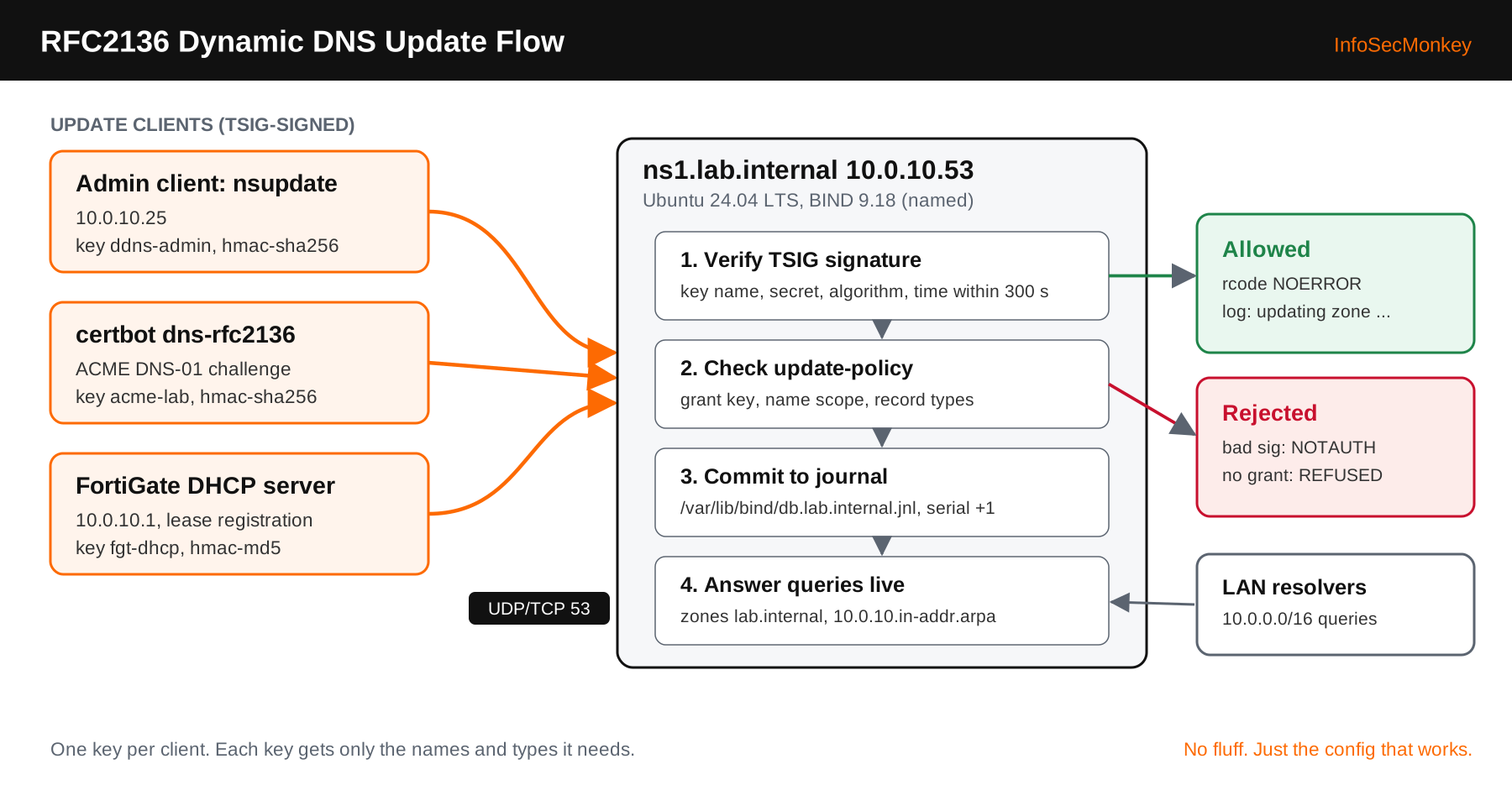
The protocol is easy. Doing it safely is where most guides stop short. An open allow-update with an IP ACL lets anything on that subnet rewrite your zone. This build does it the right way: every update is signed with a TSIG key (RFC 8945), each key gets its own update-policy rule that limits which names and record types it can touch, and the zone files live where AppArmor lets BIND write its journal.
By the end you will have ns1.lab.internal answering for a forward and a reverse zone, an admin key that can manage anything, a certbot key that can only write one TXT record, and a FortiGate DHCP key that can only register client A, TXT and PTR records.
Prerequisites and Architecture
Assumed knowledge
- Comfortable on the Ubuntu shell with sudo and a text editor
- DNS basics: zones, SOA, NS, A, PTR and TXT records, TTLs
- Optional: FortiGate DHCP server configuration if you follow Step 9b
Lab requirements
- One Ubuntu 24.04 LTS Server VM (1 vCPU, 1 GB RAM, 10 GB disk is plenty) with a static IP
- One Linux client with
nsupdate(packagebind9-dnsutils) to send test updates - Accurate time on every host that signs updates. TSIG rejects messages more than 300 seconds off.
- Optional: a FortiGate serving DHCP on the same LAN, and a domain you control for public ACME certificates
Components
| Component | Role | Address / value |
|---|---|---|
ns1.lab.internal |
Ubuntu 24.04, BIND 9.18, authoritative and internal recursive | 10.0.10.53 |
Forward zone |
Dynamic zone, file in /var/lib/bind | lab.internal |
Reverse zone |
PTR records for 10.0.10.0/24 | 10.0.10.in-addr.arpa |
Admin client |
Runs nsupdate with the ddns-admin key | 10.0.10.25 |
FortiGate (FGT) |
DHCP server for the LAN, registers leases | 10.0.10.1 |
Upstream resolvers |
Forwarders for recursion (placeholders, use yours) | 198.18.53.53, 198.18.53.54 |
TSIG keys |
ddns-admin (hmac-sha256), acme-lab (hmac-sha256), fgt-dhcp (hmac-md5) | /etc/bind/keys/ |
Why .internal?
ICANN reserved the .internal TLD for private use in 2024, so it will never collide with a public name. Swap in your own zone name everywhere you see lab.internal.
Step-by-Step Implementation: RFC2136 Dynamic DNS on BIND9
Step 1: Prepare the host
GoalStatic addressing, a real hostname and synced time, because TSIG signatures carry a timestamp.
ActionSet the hostname, confirm the static IP from your netplan file, and make sure time sync is active.
sudo hostnamectl set-hostname ns1
ip -4 addr show | grep 10.0.10.53
timedatectl status | grep -E "synchronized|NTP service"
# If NTP is inactive:
sudo apt install -y chrony && sudo systemctl enable --now chronyVerifytimedatectl shows System clock synchronized: yes.
Step 2: Install BIND9
GoalInstall the server, the config checkers and the client tools.
sudo apt update
sudo apt install -y bind9 bind9-utils bind9-dnsutils
named -v
systemctl status named --no-pagerVerifynamed -v prints BIND 9.18.x-Ubuntu and the named service is active. On Ubuntu, bind9.service is an alias for named.service.
Step 3: Generate the TSIG keys
GoalOne key per client so you can scope and revoke each independently.
Actiontsig-keygen writes a ready-to-include key block. Use hmac-sha256 for anything that supports it. The FortiGate DHCP DDNS client signs with HMAC-MD5, so it gets its own MD5 key that we lock down tightly in Step 5.
sudo mkdir -p /etc/bind/keys
sudo tsig-keygen -a hmac-sha256 ddns-admin | sudo tee /etc/bind/keys/ddns-admin.key
sudo tsig-keygen -a hmac-sha256 acme-lab   | sudo tee /etc/bind/keys/acme-lab.key
sudo tsig-keygen -a hmac-md5    fgt-dhcp   | sudo tee /etc/bind/keys/fgt-dhcp.key
sudo chown -R root:bind /etc/bind/keys
sudo chmod 750 /etc/bind/keys && sudo chmod 640 /etc/bind/keys/*.key
Each file looks like this. The secret is what clients need, so treat these files like passwords:
key "ddns-admin" {
        algorithm hmac-sha256;
        secret "<BASE64_SECRET>";
};Verifysudo ls -l /etc/bind/keys shows three files owned root:bind with mode -rw-r-----.
Step 4: Configure server options
GoalAuthoritative for our zones, recursive only for the internal LAN, no zone transfers, no open resolver.
ActionReplace /etc/bind/named.conf.options with the following.
acl "trusted" {
        10.0.0.0/16;
        127.0.0.1;
};

options {
        directory "/var/cache/bind";

        listen-on { 127.0.0.1; 10.0.10.53; };
        listen-on-v6 { none; };

        recursion yes;
        allow-recursion { trusted; };
        allow-query { trusted; };
        allow-transfer { none; };

        forwarders { 198.18.53.53; 198.18.53.54; };
        dnssec-validation auto;
        minimal-responses yes;
};Verifysudo named-checkconf returns nothing. Silence means valid.
Step 5: Define the zones and update-policy
GoalDeclare both zones as dynamic and give each key the smallest set of permissions it needs.
ActionReplace /etc/bind/named.conf.local with the following. Note the zone files point at /var/lib/bind, not /etc/bind.
include "/etc/bind/keys/ddns-admin.key";
include "/etc/bind/keys/acme-lab.key";
include "/etc/bind/keys/fgt-dhcp.key";

zone "lab.internal" {
        type primary;
        file "/var/lib/bind/db.lab.internal";
        update-policy {
                grant ddns-admin zonesub ANY;
                grant acme-lab name _acme-challenge.lab.internal. TXT;
                grant fgt-dhcp wildcard *.lab.internal. A TXT DHCID;
        };
};

zone "10.0.10.in-addr.arpa" {
        type primary;
        file "/var/lib/bind/db.10.0.10";
        update-policy {
                grant ddns-admin zonesub PTR;
                grant fgt-dhcp zonesub PTR;
        };
};| Rule | What it allows |
|---|---|
grant ddns-admin zonesub ANY |
Any record type at any name in the zone, including the apex. Your break-glass admin key. |
grant acme-lab name _acme-challenge.lab.internal. TXT |
Only TXT records at exactly that one name. A leaked certbot key cannot touch anything else. |
grant fgt-dhcp wildcard *.lab.internal. A TXT DHCID |
A, TXT and DHCID at any single-label host under the zone, but not the apex, so the DHCP key cannot rewrite SOA or NS. |
grant ... zonesub PTR (reverse zone) |
PTR records only, anywhere in the reverse zone. |
Skip allow-update
allow-update { 10.0.10.0/24; }; works, but it trusts a source IP and grants full write access to every record. update-policy and allow-update are mutually exclusive in a zone, and update-policy is the one you want.
Verifysudo named-checkconf is silent. Save the stricter named-checkconf -z for after Step 6, once the zone files exist.
Step 6: Create the zone files
GoalSeed each zone with SOA, NS and the name server’s own records. Everything else arrives by RFC2136.
sudo tee /var/lib/bind/db.lab.internal >/dev/null <<'EOF'
$TTL 3600
@   IN SOA ns1.lab.internal. hostmaster.lab.internal. (
        2026101901 ; serial
        3600       ; refresh
        900        ; retry
        1209600    ; expire
        300 )      ; negative cache TTL
    IN NS  ns1.lab.internal.
ns1 IN A   10.0.10.53
fgt IN A   10.0.10.1
EOF

sudo tee /var/lib/bind/db.10.0.10 >/dev/null <<'EOF'
$TTL 3600
@   IN SOA ns1.lab.internal. hostmaster.lab.internal. (
        2026101901 3600 900 1209600 300 )
    IN NS  ns1.lab.internal.
53  IN PTR ns1.lab.internal.
1   IN PTR fgt.lab.internal.
EOF

sudo chown bind:bind /var/lib/bind/db.*VerifyBoth checks print OK with the loaded serial:
sudo named-checkzone lab.internal /var/lib/bind/db.lab.internal
sudo named-checkzone 10.0.10.in-addr.arpa /var/lib/bind/db.10.0.10
Step 7: Start BIND and open the firewall
GoalLoad the zones and allow DNS from the internal range only. Updates use both UDP and TCP 53.
sudo named-checkconf -z
sudo systemctl restart named
sudo systemctl enable named
sudo ufw allow OpenSSH
sudo ufw allow from 10.0.0.0/16 to any port 53 proto udp
sudo ufw allow from 10.0.0.0/16 to any port 53 proto tcp
sudo ufw enable
sudo rndc status | grep -E "zones|server is up"Verifydig @10.0.10.53 ns1.lab.internal +short from the client returns 10.0.10.53.
Step 8: Send your first RFC2136 update with nsupdate
GoalProve the full path: signed update, policy check, journal write, live answer.
ActionCopy ddns-admin.key to the client (scp it, then chmod 600). Each send can only touch one zone, so the A record and the PTR record go in separate batches.
nsupdate -k ~/ddns-admin.key <<'EOF'
server 10.0.10.53
zone lab.internal
update delete app01.lab.internal. A
update add app01.lab.internal. 300 A 10.0.10.25
send
zone 10.0.10.in-addr.arpa
update add 25.10.0.10.in-addr.arpa. 300 PTR app01.lab.internal.
send
EOF
A successful nsupdate prints nothing. Add -d when you want to see the status: NOERROR reply. The update delete line first makes the batch idempotent, so rerunning it replaces the old address instead of adding a second one.
VerifyOn ns1, the log shows the signed client, the key name and the change:
sudo journalctl -u named --since "5 min ago" | grep -i updating
# client @0x... 10.0.10.25#41877/key ddns-admin: updating zone
#   'lab.internal/IN': adding an RR at 'app01.lab.internal' A 10.0.10.25
Step 9a: Let’s Encrypt DNS-01 with certbot-dns-rfc2136
GoalIssue certificates, including wildcards, without opening port 80, using the narrowly scoped acme-lab key.
ActionThis only works for a publicly delegated zone, because Let’s Encrypt must resolve _acme-challenge from the internet. Point the plugin at the server that is authoritative for your public zone, and adjust the name rule in update-policy to match it.
sudo apt install -y certbot python3-certbot-dns-rfc2136
sudo tee /etc/letsencrypt/rfc2136.ini >/dev/null <<'EOF'
dns_rfc2136_server = 10.0.10.53
dns_rfc2136_port = 53
dns_rfc2136_name = acme-lab
dns_rfc2136_secret = <BASE64_SECRET_FROM_acme-lab.key>
dns_rfc2136_algorithm = HMAC-SHA256
EOF
sudo chmod 600 /etc/letsencrypt/rfc2136.ini
sudo certbot certonly --dns-rfc2136 \
  --dns-rfc2136-credentials /etc/letsencrypt/rfc2136.ini \
  --dns-rfc2136-propagation-seconds 30 \
-d "<YOUR_PUBLIC_ZONE>" -d "*.<YOUR_PUBLIC_ZONE>"Verifycertbot reports Successfully received certificate, and the named log shows acme-lab adding then deleting a TXT at _acme-challenge.
Step 9b: FortiGate DHCP registers leases in BIND
GoalEvery DHCP client on the FortiGate LAN gets a forward A record and a PTR automatically.
ActionThe FortiGate DHCP DDNS client signs with HMAC-MD5, which is why fgt-dhcp is an MD5 key and why its update-policy is limited to host A, TXT, DHCID and PTR records. The key name on the FortiGate must match the BIND key name exactly. Option names vary slightly by FortiOS build, so confirm with set ? under the DHCP server.
config system dhcp server
    edit 1
        set ddns-update enable
        set ddns-update-override enable
        set ddns-server-ip 10.0.10.53
        set ddns-zone "lab.internal"
        set ddns-auth tsig
        set ddns-keyname "fgt-dhcp"
        set ddns-key "<BASE64_SECRET_FROM_fgt-dhcp.key>"
        set ddns-ttl 300
    next
end
GUI VerificationThe DDNS options are CLI driven. In the GUI, confirm the DHCP server is enabled on the LAN interface under Network > Interfaces, and watch new leases in the DHCP monitor (Dashboard > Network > DHCP in FortiOS 7.x). Then renew a lease on a client (sudo dhclient -r && sudo dhclient or ipconfig /renew) and query BIND for its hostname.
Step 10: Day-two operations: journals, freeze and thaw
GoalKnow where dynamic changes live and how to hand-edit a dynamic zone without corrupting it.
BIND writes every accepted update to db.lab.internal.jnl first and merges it into the zone file roughly every 15 minutes. If you edit the zone file while a journal exists, BIND either refuses to load the zone or overwrites your edit. Always freeze first:
# See pending changes
sudo named-journalprint /var/lib/bind/db.lab.internal.jnl
# Flush the journal into the file and pause updates
sudo rndc freeze lab.internal
# Edit, bump the serial, validate
sudoedit /var/lib/bind/db.lab.internal
sudo named-checkzone lab.internal /var/lib/bind/db.lab.internal
# Reload and accept updates again
sudo rndc thaw lab.internalVerifysudo rndc zonestatus lab.internal shows dynamic: yes and frozen: no after the thaw.
Verification and Validation
Run these from the admin client. Each one should match the expected output before you call the build done.
| Test | Command | Expected result |
|---|---|---|
Forward lookup |
dig @10.0.10.53 app01.lab.internal A +short |
10.0.10.25 |
Reverse lookup |
dig @10.0.10.53 -x 10.0.10.25 +short |
app01.lab.internal. |
Serial bumped |
dig @10.0.10.53 lab.internal SOA +short |
Serial higher than 2026101901 |
Policy denial |
nsupdate with acme-lab adding an A record |
update failed: REFUSED |
Bad key |
nsupdate with a wrong secret |
tsig verify failure / NOTAUTH |
No open resolver |
dig @10.0.10.53 example.com from outside 10.0.0.0/16 |
status: REFUSED |
The policy denial test matters most. It proves a stolen certbot key cannot hijack a host record:
nsupdate -k ~/acme-lab.key <<'EOF'
server 10.0.10.53
zone lab.internal
update add evil.lab.internal. 60 A 198.18.66.66
send
EOF
# update failed: REFUSED
# ns1 log: update 'lab.internal/IN' denied
Troubleshooting and Gotchas
1. Update returns SERVFAIL and the log says permission denied on the .jnl file
The zone file lives in /etc/bind. Ubuntu’s AppArmor profile for named only allows writes under /var/lib/bind and /var/cache/bind, and the bind user cannot create a journal next to a root-owned file.
sudo journalctl -u named | grep -iE "jnl|permission denied"
sudo dmesg | grep -i apparmor | grep named
# Fix: move the zone, fix ownership, update the file path, restart
sudo mv /etc/bind/db.lab.internal /var/lib/bind/
sudo chown bind:bind /var/lib/bind/db.lab.internal
2. BADTIME or tsig verify failure with a key you know is right
TSIG signatures include a timestamp with a 300 second fudge window. A VM that resumed from a snapshot or a FortiGate without NTP will fail every update even with the correct secret. Also check that the key name and algorithm match on both ends: fgt-dhcp with hmac-md5 is not the same key as fgt-dhcp with hmac-sha256.
date -u; ssh ns1 date -u          # compare clocks
chronyc tracking | grep "System time"
sudo journalctl -u named | grep -iE "tsig|badtime|badkey"
3. REFUSED even though the key verifies
The signature is fine but update-policy does not match. The usual causes: the name in a grant rule is missing its trailing dot, the record type is not listed (DHCP clients often send TXT or DHCID alongside A), or the update was sent to the wrong zone. nsupdate also returns NOTZONE if one batch mixes names from the forward and reverse zones.
sudo journalctl -u named | grep -E "denied|NOTZONE"
nsupdate -d -k ~/ddns-admin.key   # debug shows the zone and rcode
sudo named-checkconf -p | sed -n '/update-policy/,/};/p'
Wrap-Up
You now have an RFC2136 dynamic DNS server that only accepts signed updates, gives every client the least privilege it needs, and survives restarts and hand edits. From here, add a secondary server with TSIG-signed zone transfers, or point Kubernetes external-dns at the same ddns-admin style key with its own scoped policy.
InfoSecMonkey. No fluff. Just the config that works.
Recent posts
-

-

DNS is one of those technologies that quietly underpins... Full Story
-

BGP issues on FortiGate firewalls usually trace back to... Full Story
-

Every time your laptop talks to your router, a... Full Story
-

If you've spent any time configuring NAT on a... Full Story
-

If you have spent any time configuring firewall policies... Full Story
-

High availability on FortiGate is one of those features... Full Story
-

If you've configured SD-WAN on a FortiGate, you've almost... Full Story
-

FortiLink is the management protocol that turns a FortiSwitch... Full Story
-

FortiSwitches are pretty rock solid from Mean Time Between... Full Story
-

This is a quicky tip. Have you ever gone... Full Story
-

DNS is one of those quiet pieces of internet... Full Story
-

This article is an updated version of the previous... Full Story
-

You will add ns2 as a secondary (slave) BIND9... Full Story
-

In the process of deploying my lab, I needed... Full Story
-

RFC 8805, used to be known as Self-Correcting IP... Full Story
-

Years back, I wrote an article about certificate pinning. ... Full Story
-

FortiGates have the ability to send alerts to Microsoft... Full Story
-

In this post, I am going to walk through... Full Story
-

Troubleshooting VoIP on a FortiGate can feel like trying... Full Story
-

Prior to FortiOS 7.0, there were three commands to... Full Story
-

In this post, I am going to go over... Full Story
-

What we are going to do: We are going... Full Story
-

Choosing between FGCP (FortiGate Clustering Protocol) and FGSP (FortiGate... Full Story
-

Creating a VLAN on macOS (The "Pro" Move) A... Full Story
-

This blog post explores the logic behind how macOS... Full Story
-

Pretty Fly for a Wi-Fi Tell My Wi-Fi Love... Full Story
-

Part of my daily gig is creating BoMs (Bill-of-Materials)... Full Story
-

ICMP introduces several security risks, but careful filtering, rate... Full Story
-

The command diag debug application dhcps -1 enables full... Full Story
-

In the world of FortiOS, execute tac report is... Full Story
-

LLDP; What is it The Link Layer Discovery Protocol... Full Story
-

What it actually does When you run diagnose fdsm... Full Story
-

Monkey Bites are bite-sized, high-impact security insights designed for... Full Story
-

I have run macOS in macOS with Parallels but... Full Story
-

Don't be confused with my other FortiNAC posts where... Full Story
-

This is the third session in a multi-part article... Full Story
-

Today I was configuring key-based authentication on a FortiGate... Full Story
-

Netcat, often called the "Swiss Army knife" of networking,... Full Story
-

At its core, IEEE 802.1X is a network layer... Full Story
-

In case you did not see the previous FortiNAC... Full Story
-

This is our 5th session where we are going... Full Story
-

Now that we have Wireshark installed and somewhat configured,... Full Story
-

The Philosophy of Packet Analysis Troubleshooting isn't about looking... Full Story
-

InfoSecMonkey Threat Response October 24, 2026 | No fluff.... Full Story
-

InfoSecMonkey Threat Response October 24, 2026 | No fluff.... Full Story
-

Objective: Build an authoritative BIND9 server on Ubuntu that... Full Story