
If you've spent any time configuring user authentication on... Full Story
By Manny Fernandez
October 26, 2026
CVE-2026-0322 PAN-OS Management Interface RCE: Patch, Lock Down, Hunt
CVE-2026-0322 PAN-OS Management Interface RCE: Patch, Lock Down, Hunt
InfoSecMonkey | CVE Response | October 26, 2026 | No fluff. Just the config that works.
EXECUTIVE SUMMARY
Objective: Get every PA-Series, VM-Series and Panorama box off a vulnerable PAN-OS build, take the management interface off untrusted networks, and hunt for signs that someone already used CVE-2026-0322 against you.
Target audience: Firewall admins, SOC analysts and incident responders who run or defend Palo Alto Networks PAN-OS, plus SEs and consultants advising customers who do.
Severity: CVSS 4.0 8.6 (High), CWE-94 code injection, exploited in the wild, on the CISA KEV list since October 14, 2026.
CVE-2026-0322 PAN-OS is an authenticated remote code execution flaw in the PAN-OS management interface. Anyone holding admin credentials who can reach that interface over the network can inject code that runs as root on the firewall or Panorama. Palo Alto Networks disclosed it on October 14, 2026, reported “very limited exploitation” against management interfaces, and CISA added it to the Known Exploited Vulnerabilities catalog the same day with a federal due date of October 17. That deadline is behind us. If you have not patched yet, this post is your runbook.
No workaround exists
Upgrading is the only fix. Restricting management access lowers the risk and the Threat Prevention signatures add limited coverage, but neither replaces the upgrade.
What CVE-2026-0322 PAN-OS Actually Is
| Field | Value |
|---|---|
| CVE | CVE-2026-0322 |
| Vendor / product | Palo Alto Networks PAN-OS |
| Weakness | CWE-94, Improper Control of Generation of Code (code injection) |
| CVSS 4.0 | 8.6 High when the management interface is reachable from the internet, 8.5 when access is limited to a jump box |
| Vector | AV:N / AC:L / AT:N / PR:H / UI:N / VC:H / VI:H / VA:H |
| Impact | Arbitrary code execution as root on the management plane |
| Affected platforms | PA-Series and VM-Series firewalls, Panorama (virtual and M-Series) |
| Not affected | Cloud NGFW, Prisma Access |
| Affected branches | PAN-OS 10.2, 11.1, 11.2, 12.1, 12.2 |
| Exploitation | Confirmed, very limited, targeting the management interface |
| CISA KEV | Added October 14, 2026, federal due date October 17, 2026 |
| Public PoC | None documented at the time of writing |
| Discovery | Found internally at Palo Alto Networks, credited to Suraj Siddharudh |
The PR:H in the vector is why the score is 8.6 and not 9.x: the attacker needs a valid admin login first. Do not let that lull you. Admin credentials leak through phishing, password reuse, stolen browser sessions and the early stages of almost every intrusion. This bug is the step that turns a stolen login into full operating system control of a perimeter device. No special feature configuration is required for a device to be vulnerable, and Palo Alto names internet-exposed management as the highest-risk deployment.
Figure 1: Exposed management versus jump-box-only management, and why a compromised Panorama is the worst case.
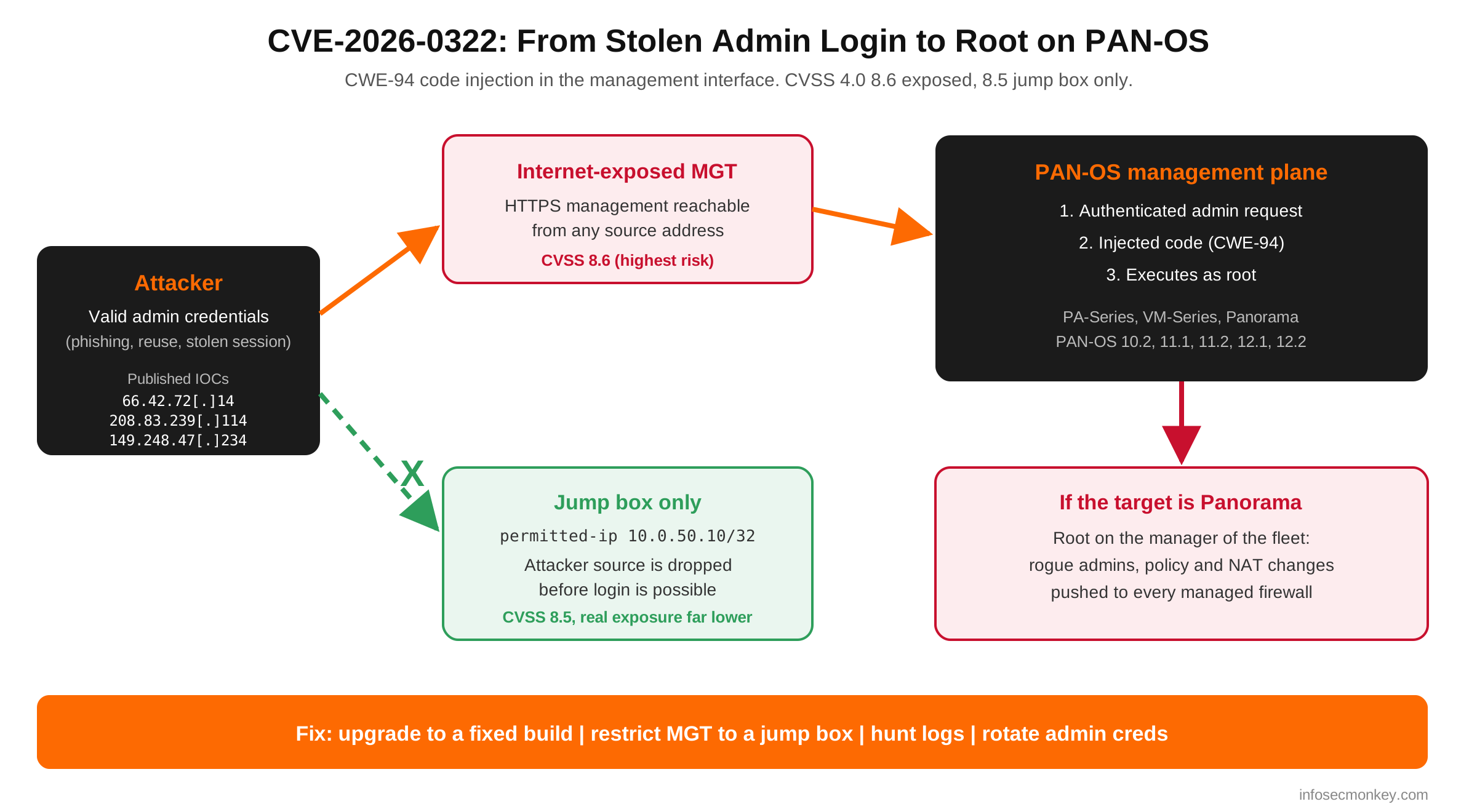
Panorama deserves special attention. Root on a firewall is bad. Root on the Panorama that pushes policy to your entire estate is a fleet-wide problem, because an attacker there can stage configuration changes for every managed device.
Prerequisites and Architecture
Assumed knowledge
- PAN-OS operational and configure mode CLI, commit workflow
- Panorama device management and software deployment
- Basic incident response: evidence before change, credential rotation
Lab and example addressing
| Component | Example value | Role |
|---|---|---|
| PA firewall MGT interface | 10.0.50.1 | Out-of-band management port |
| Panorama | 10.0.50.5 | Central management, software pushes |
| Admin jump box | 10.0.50.10/32 | The only host allowed to manage the estate |
| Management subnet | 10.0.50.0/24 | Dedicated OOB network |
| Untrusted test host | 198.18.20.50 | Used to prove the lockdown works |
| Published IOCs | 66.42.72[.]14, 208.83.239[.]114, 149.248.47[.]234 | Source IPs tied to exploit attempts |
Order of operations
If you suspect a box was already hit, collect evidence (Step 1) before you patch. An upgrade reboots the device and wipes volatile state you may need later.
Step-by-Step Remediation
Step 1: Inventory versions and preserve evidence
Goal: Know exactly which boxes are vulnerable and capture a baseline before anything changes.
Action: Pull the software version on every firewall and Panorama, list who is logged in, and export the running config and a tech support file from anything internet-exposed.
PAN-OS CLI (operational mode)
show system info | match sw-version
show system info | match app-version
show admins
show admins all
show config running

# Off-box tech support bundle for forensics
scp export tech-support to <USER>@10.0.50.10:/evidence/
Panorama CLI: list managed devices and versions
show devices connectedGUI Verification: Dashboard > General Information shows Software Version. On Panorama, Panorama > Managed Devices > Summary lists every device and its PAN-OS build. Device > Support > Generate Tech Support File is the GUI path for the bundle.
Step 2: Take the management interface off untrusted networks
Goal: Shrink the attack surface right now, before the maintenance window. An attacker with stolen credentials cannot exploit an interface they cannot reach.
Action: Restrict the MGT port with permitted-ip to the jump box, and audit every interface management profile so no dataplane interface on an untrusted zone answers HTTPS, SSH or other management services.
PAN-OS CLI (configure mode): restrict MGT to the jump box
configure
set deviceconfig system permitted-ip 10.0.50.10/32
set deviceconfig system service disable-http yes
set deviceconfig system service disable-telnet yes
commit
PAN-OS CLI (configure mode): audit and lock interface management profiles
show network profiles interface-management-profile

# For any profile that must stay, pin it to the jump box
set network profiles interface-management-profile <PROF> permitted-ip 10.0.50.10/32
commit
Do not lock yourself out
Run this from the jump box itself or keep a console session open. If you manage the device from a different address than the one you permit, the commit will cut your own session.
GUI Verification: Device > Setup > Interfaces > Management lists Permitted IP Addresses and enabled services. Network > Network Profiles > Interface Mgmt shows every profile; check which interfaces each is attached to under Network > Interfaces > Advanced.
Step 3: Upgrade to a fixed build on your maintenance line
Goal: Remove the vulnerable code.
Action: Pick the fixed hotfix on the maintenance release you already run (for example 11.1.6 moves to 11.1.6-h39), not a random jump across branches. Upgrade Panorama first, then firewalls. In HA pairs, upgrade the passive peer, fail over, then upgrade the other.
| Branch | Vulnerable | Fixed builds |
|---|---|---|
| PAN-OS 12.2 | Earlier than 12.2.4 | 12.2.4 and later |
| PAN-OS 12.1 | Earlier than 12.1.10-h2 | 12.1.4-h12, 12.1.7-h8, 12.1.10-h2 |
| PAN-OS 11.2 | Earlier than 11.2.16 | 11.2.4-h22, 11.2.7-h21, 11.2.10-h15, 11.2.13-h3, 11.2.16 |
| PAN-OS 11.1 | Earlier than 11.1.16-h3 | 11.1.4-h37, 11.1.6-h39, 11.1.7-h11, 11.1.10-h35, 11.1.13-h15, 11.1.16-h3 |
| PAN-OS 10.2 | Earlier than 10.2.18-h12 | 10.2.7-h38, 10.2.10-h41, 10.2.13-h26, 10.2.16-h11, 10.2.18-h12 |
| Unsupported releases | All | Move to a supported fixed release |
Builds on a given maintenance line that are lower than the listed hotfix are vulnerable. Always confirm against the live advisory before you schedule, since Palo Alto updates the table as new hotfixes ship.
PAN-OS CLI: download, install, reboot (standalone device)
request system software check
request system software download version <FIXED-BUILD>
show jobs all
request system software install version <FIXED-BUILD>
request restart system
GUI Verification: Device > Software shows the fixed build as Currently Installed after the reboot. For fleets, Panorama > Device Deployment > Software lets you push the image to managed firewalls in stages.
Step 4: Turn on the Threat Prevention signatures (where they apply)
Goal: Add a detection layer for boxes you cannot patch tonight, with eyes open about what it covers.
Action: Customers with a Threat Prevention subscription can use Threat IDs 510046 and 510047, delivered in Applications and Threats content 9159-10287 and later. Palo Alto calls this coverage limited, and it only works when management traffic is routed through a dataplane interface, the inbound management certificate has been replaced, and that traffic is decrypted and inspected with a Threat Prevention profile attached.
PAN-OS CLI: update content and confirm the signatures exist
request content upgrade check
request content upgrade download latest
request content upgrade install version latest
show threat id 510046
show threat id 510047
GUI Verification: Device > Dynamic Updates shows the installed Applications and Threats version. Objects > Security Profiles > Vulnerability Protection > Exceptions lets you search the two Threat IDs and confirm the action is reset-both or block.
Step 5: Hunt for prior exploitation
Goal: Find out whether anyone used the bug before you closed the door.
Action: Search system and config logs for the published IOCs, admin logins from unexpected sources, new admin accounts, and commits nobody on your team owns. Then look at the management plane itself for processes and files that do not belong.
PAN-OS CLI: search logs for IOCs and admin activity
show log system direction equal backward | match 66.42.72.14
show log system direction equal backward | match 208.83.239.114
show log system direction equal backward | match 149.248.47.234

show log system direction equal backward | match auth-success
show log config direction equal backward

show system resources
Work this list for every device, with extra care on Panorama:
- Successful admin logins from addresses outside your management subnet or jump box
- Admin accounts you did not create, or changes to admin roles and authentication profiles
- Commits at odd hours or by accounts that do not normally touch firewall config
- Added permitted-ip entries, service routes, NAT or security rules that open a path out
- Unexpected root processes or new outbound connections from the management plane
- On Panorama, config pushes to managed devices that no change ticket explains
GUI Verification: Monitor > Logs > System (filter on auth events) and Monitor > Logs > Configuration. On Panorama, Panorama > Monitor > Logs > Configuration and the Commit and Push history. Diff the Step 1 running config against a known-good backup to catch quiet additions.
No hits is not a clean bill of health
The three IPs are what Palo Alto observed. A different actor will use different infrastructure. Treat the IOC search as one input, and lean on the behavioral checks above.
Step 6: Rotate credentials and harden admin access
Goal: Close the precondition. The bug needs admin creds, so make stolen ones worthless.
Action: Rotate every local admin password and API key, remove admin accounts nobody uses, and move management authentication to SAML or RADIUS with MFA. Rotate after patching and evidence capture, so an attacker on the box cannot capture the new secrets.
PAN-OS CLI (configure mode): review admins and auth profiles
configure
show mgt-config users
show shared authentication-profile
delete mgt-config users <UNUSED-ADMIN>
commit
GUI Verification: Device > Administrators lists every account with its role and authentication profile. Device > Authentication Profile shows which profiles enforce MFA.
Optional: Block the IOCs at your edge
If the PAN-OS management network sits behind another firewall, or you simply want the published IOCs blocked everywhere, drop them at the edge. A FortiGate example, with a matching deny at the top of the policy table:
FortiOS CLI: IOC address group and deny policy
config firewall address
    edit "CVE0322-IOC1"
        set subnet 66.42.72.14 255.255.255.255
    next
    edit "CVE0322-IOC2"
        set subnet 208.83.239.114 255.255.255.255
    next
    edit "CVE0322-IOC3"
        set subnet 149.248.47.234 255.255.255.255
    next
end
config firewall addrgrp
    edit "CVE-2026-0322-IOCs"
        set member "CVE0322-IOC1" "CVE0322-IOC2" "CVE0322-IOC3"
    next
end
config firewall policy
    edit 0
        set name "Block-CVE-2026-0322-IOCs"
        set srcintf "<WAN-PORT>"
        set dstintf "any"
        set srcaddr "CVE-2026-0322-IOCs"
        set dstaddr "all"
        set action deny
        set schedule "always"
        set service "ALL"
        set logtraffic all
    next
end
Move the new policy to the top with the GUI (Policy & Objects > Firewall Policy, drag it first) or move <ID> before <FIRST-ID> in the policy table. Remember this is a speed bump against known infrastructure, not a fix.
Verification and Validation
Prove the fix and the lockdown, do not assume them. In the examples, 198.18.10.1 stands for the public address that used to expose management (a NAT, or a dataplane interface with a management profile).
On each device: confirm the build
show system info | match sw-versionExpected success output
sw-version: <FIXED-BUILD>From the untrusted host 198.18.20.50: management must not answer
curl -k -m 5 https://198.18.10.1/
nc -vz -w 5 198.18.10.1 443
nc -vz -w 5 198.18.10.1 22
Expected success output
curl: (28) Connection timed out after 5001 milliseconds
nc: connect to 198.18.10.1 port 443 (tcp) timed out
nc: connect to 198.18.10.1 port 22 (tcp) timed out
From the jump box 10.0.50.10: management must still work
ssh admin@10.0.50.1
configure
show deviceconfig system permitted-ip
You want three green lights: every device on a fixed build, management unreachable from anywhere except the jump box, and a hunt that turned up nothing unexplained. Any one missing means you are not done.
Troubleshooting and Gotchas
1. Patching does not evict an attacker
If Step 5 found evidence of exploitation, the upgrade closes the hole but does not prove the box is clean. Root access means persistence could live in places an upgrade does not touch. Isolate the device, keep the tech support bundle and config exports, open a case with Palo Alto TAC, and ask directly whether a factory reset and clean reimage is recommended for your case. Treat every credential and key that lived on that device as exposed.
Before you rebuild: grab the evidence
scp export tech-support to <USER>@10.0.50.10:/evidence/
scp export configuration from running-config.xml to <USER>@10.0.50.10:/evidence/
2. The signatures are not protecting your MGT port
Threat IDs 510046 and 510047 only see traffic that crosses the dataplane, gets decrypted, and hits a Threat Prevention profile. Admins browsing to the dedicated MGT port never touch the dataplane, so the signatures see nothing. Check where your management traffic actually lands before you count this as coverage.
Confirm which interfaces carry management services
show interface management
show network profiles interface-management-profile
3. Upgrade order and version mismatches
Panorama must run the same or a newer PAN-OS release than the firewalls it manages, so upgrade Panorama first or the push will fail. In HA, upgrade the passive peer first and confirm it is healthy before you fail over. And pick the fixed hotfix on your current maintenance line: jumping from 11.1.6 to 11.1.16-h3 to fix one CVE drags in every other change in between.
Check HA state and job progress during the upgrade
show high-availability state
show jobs all
Bottom Line
CVE-2026-0322 is a credentialed bug, but it lands on the one device class attackers love most: the perimeter firewall and the manager that controls all of them. Patch to a fixed build on your line, make the management interface reachable only from a jump box, hunt for prior use, and rotate credentials. The management-plane lesson is the same one PAN-OS admins have heard all year: if the internet can reach your management interface, the next bug will find it too.
References
- Palo Alto Networks advisory: security.paloaltonetworks.com/CVE-2026-0322
- NVD: nvd.nist.gov/vuln/detail/CVE-2026-0322
- CISA Known Exploited Vulnerabilities catalog: cisa.gov/known-exploited-vulnerabilities-catalog
- SOC Prime analysis, Kudelski Security Research, Qualys ThreatPROTECT and Cyber Kendra coverage (October 2026)
Recent posts
-

-

DNS is one of those technologies that quietly underpins... Full Story
-

BGP issues on FortiGate firewalls usually trace back to... Full Story
-

Every time your laptop talks to your router, a... Full Story
-

If you've spent any time configuring NAT on a... Full Story
-

If you have spent any time configuring firewall policies... Full Story
-

High availability on FortiGate is one of those features... Full Story
-

If you've configured SD-WAN on a FortiGate, you've almost... Full Story
-

FortiLink is the management protocol that turns a FortiSwitch... Full Story
-

FortiSwitches are pretty rock solid from Mean Time Between... Full Story
-

This is a quicky tip. Have you ever gone... Full Story
-

DNS is one of those quiet pieces of internet... Full Story
-

This article is an updated version of the previous... Full Story
-

You will add ns2 as a secondary (slave) BIND9... Full Story
-

In the process of deploying my lab, I needed... Full Story
-

RFC 8805, used to be known as Self-Correcting IP... Full Story
-

Years back, I wrote an article about certificate pinning. ... Full Story
-

FortiGates have the ability to send alerts to Microsoft... Full Story
-

In this post, I am going to walk through... Full Story
-

Troubleshooting VoIP on a FortiGate can feel like trying... Full Story
-

Prior to FortiOS 7.0, there were three commands to... Full Story
-

In this post, I am going to go over... Full Story
-

What we are going to do: We are going... Full Story
-

Choosing between FGCP (FortiGate Clustering Protocol) and FGSP (FortiGate... Full Story
-

Creating a VLAN on macOS (The "Pro" Move) A... Full Story
-

This blog post explores the logic behind how macOS... Full Story
-

Pretty Fly for a Wi-Fi Tell My Wi-Fi Love... Full Story
-

Part of my daily gig is creating BoMs (Bill-of-Materials)... Full Story
-

ICMP introduces several security risks, but careful filtering, rate... Full Story
-

The command diag debug application dhcps -1 enables full... Full Story
-

In the world of FortiOS, execute tac report is... Full Story
-

LLDP; What is it The Link Layer Discovery Protocol... Full Story
-

What it actually does When you run diagnose fdsm... Full Story
-

Monkey Bites are bite-sized, high-impact security insights designed for... Full Story
-

I have run macOS in macOS with Parallels but... Full Story
-

Don't be confused with my other FortiNAC posts where... Full Story
-

This is the third session in a multi-part article... Full Story
-

Today I was configuring key-based authentication on a FortiGate... Full Story
-

Netcat, often called the "Swiss Army knife" of networking,... Full Story
-

At its core, IEEE 802.1X is a network layer... Full Story
-

In case you did not see the previous FortiNAC... Full Story
-

This is our 5th session where we are going... Full Story
-

Now that we have Wireshark installed and somewhat configured,... Full Story
-

The Philosophy of Packet Analysis Troubleshooting isn't about looking... Full Story
-

CVE-2026-0322 PAN-OS Management Interface RCE: Patch, Lock Down, Hunt... Full Story
-

InfoSecMonkey Threat Response October 24, 2026 | No fluff.... Full Story
-

InfoSecMonkey Threat Response October 24, 2026 | No fluff.... Full Story