
If you've spent any time configuring user authentication on... Full Story
By Manny Fernandez
October 20, 2026
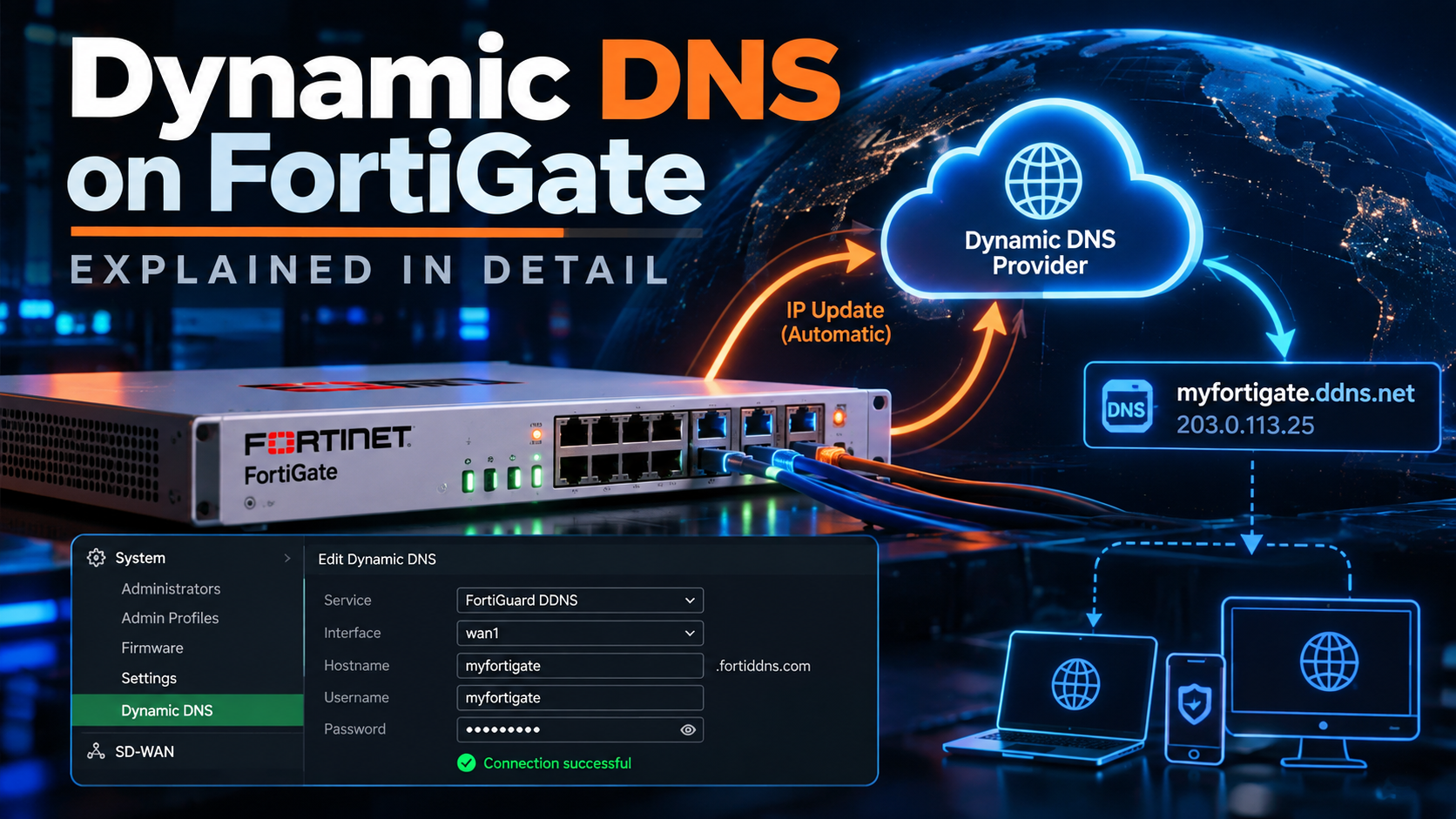
FortiGate DDNS: `config system ddns` Actionable Configuration
FortiGate DDNS: config system ddns Explained
No fluff. Just the config that works.
FortiGate DDNS keeps a stable hostname pointed at a WAN link whose public IP keeps changing. This guide covers every option under config system ddns, the dynamic DNS providers FortiOS supports, and working configs for FortiGuard DDNS, No-IP, and your own RFC 2136 server, plus the CGNAT trap that no setting can fix.
Executive summary
Objective: Explain what config system ddns does, walk through every option, list the DDNS services FortiOS supports natively, and give working configurations for FortiGuard DDNS, third-party providers, and a self-hosted RFC 2136 server.
Target audience: FortiGate administrators running branch, SOHO, or lab firewalls on dynamic WAN addressing (DHCP or PPPoE) who need a stable hostname for IPsec peers, SSL/IPsec remote access, or remote management.
Tested against: FortiOS 7.0 through 7.6 CLI syntax. Option lists shift slightly between builds, so always confirm on your box with set ddns-server ?.
What FortiGate DDNS does
Most branch and home WAN links get their public IP from the ISP via DHCP or PPPoE, and that address changes whenever the lease or session turns over. Anything pointed at the raw IP (a remote IPsec gateway, a FortiClient profile, an admin bookmark) breaks the moment it changes.
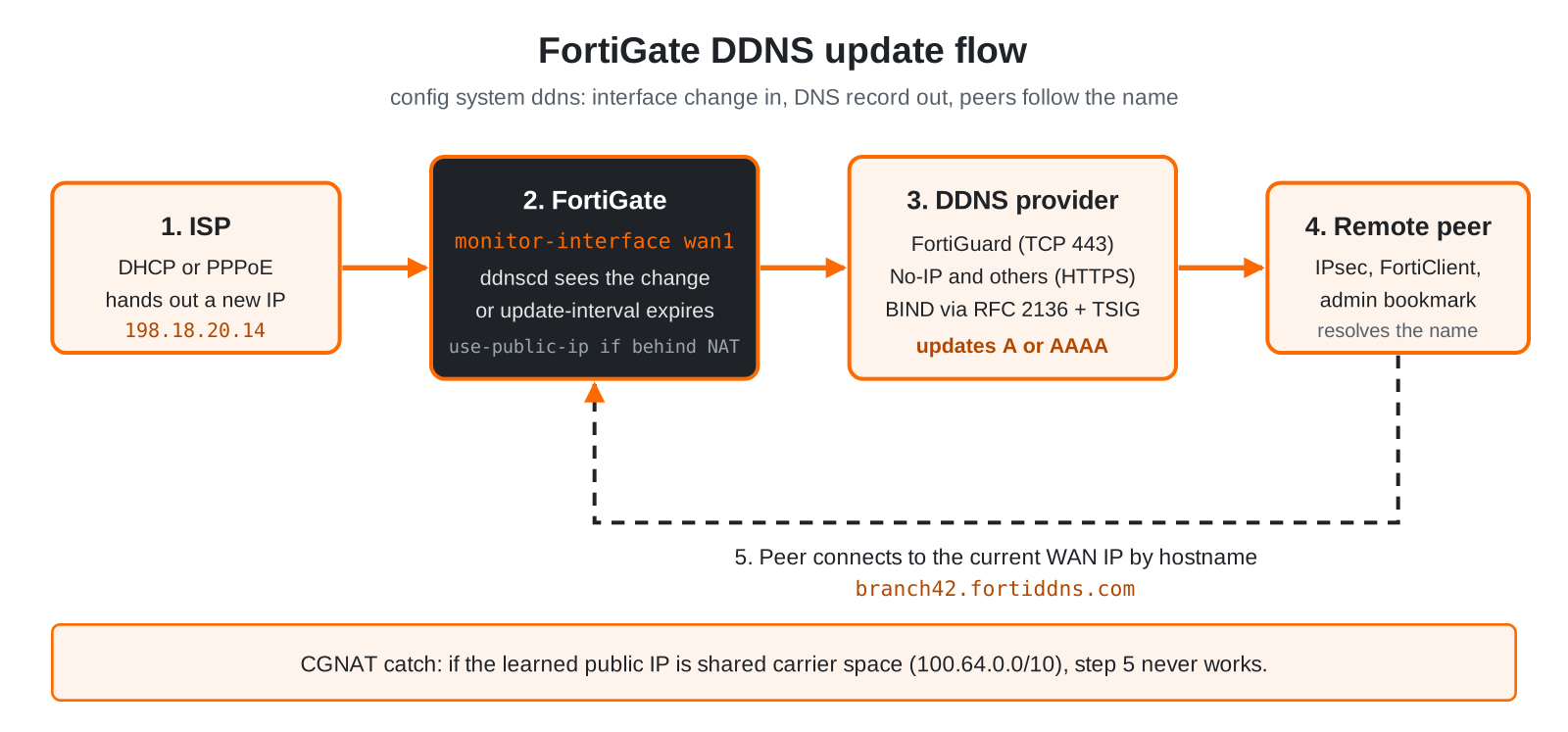
config system ddns fixes that by turning the FortiGate into a DDNS client. Each entry binds a monitored interface to a DDNS provider and a hostname. The ddnscd daemon watches that interface, and whenever its address changes (or the update interval expires) it pushes the new IP to the provider, which updates the A or AAAA record. Remote peers then reference the hostname instead of the IP.
- One entry per interface/hostname pair. Dual-WAN sites get two entries, each with its own hostname.
- Table limits: 16, 32, and 64 entries on entry-level, mid-range, and high-end models respectively.
- NAT mode only. DDNS is not supported when the FortiGate (or VDOM) runs in transparent mode.
- No license required for FortiGuard DDNS itself, but the FortiGate must reach FortiGuard.
Do not confuse it with DHCP DDNS. The set ddns-update options under config system dhcp server register DHCP client hostnames in an internal DNS zone. config system ddns publishes the FortiGate’s own WAN address. Different daemons, different jobs.
Prerequisites and architecture
Assumed knowledge: FortiOS CLI basics, DNS record types (A, AAAA, TTL), and basic NAT concepts.
Lab addressing: 198.18.0.0/15 stands in for public/transit IPs and 10.0.0.0/16 for internal LANs, per the InfoSecMonkey lab convention.
| Component | Role | Example |
|---|---|---|
| FortiGate (NAT mode) | DDNS client, runs ddnscd |
FortiOS 7.4.x, wan1 on DHCP |
| Monitored interface | Source of the address to publish | wan1 = 198.18.20.14/24 |
| DDNS provider | Hosts the zone and accepts updates | FortiGuard, No-IP, or your own BIND |
| Hostname | Stable name remote peers use | branch42.fortiddns.com |
| Upstream NAT (optional) | ISP modem or CGNAT in front of the FortiGate | WAN = 192.168.1.2, real public IP lives upstream |
Full syntax
config system ddns
    edit <ddnsid>
        set ddns-server {FortiGuardDDNS | genericDDNS | noip.com | dyndns.org | dyns.net |
                         tzo.com | vavic.com | dipdns.net | now.net.cn | dhs.org | easydns.com}
        set addr-type {ipv4 | ipv6}
        set server-type {ipv4 | ipv6}
        set ddns-server-addr <ip-or-fqdn> [<ip-or-fqdn> ...]
        set ddns-zone <zone>
        set ddns-ttl <60-86400>
        set ddns-auth {disable | tsig}
        set ddns-keyname <tsig-key-name>
        set ddns-key <base64-tsig-secret>
        set ddns-domain <fqdn>
        set ddns-username <user>
        set ddns-sn <string>
        set ddns-password <password>
        set use-public-ip {enable | disable}
        set update-interval <60-2592000>
        set clear-text {enable | disable}
        set ssl-certificate <local-cert>
        set monitor-interface <interface> [<interface> ...]
    next
end
The CLI only exposes the fields that make sense for the chosen ddns-server. Set the provider first, then set ? to see what is left.
Parameter reference
| Parameter | What it does | Default / range | Used by |
|---|---|---|---|
ddns-server |
Selects the DDNS provider. Drives which other fields appear. | none | All |
monitor-interface |
Interface whose address change triggers an update. Required. | none | All |
ddns-domain |
The FQDN to update, for example branch42.fortiddns.com. |
none | All except pure RFC 2136 zone-only setups |
addr-type |
Which address family of the interface to publish (A vs. AAAA). | ipv4 |
All |
server-type |
Address family used to reach the DDNS server itself. | ipv4 |
All |
use-public-ip |
Publish the public IP as seen from the internet instead of the interface IP. Essential when the FortiGate sits behind upstream NAT. | disable |
FortiGuardDDNS and most providers |
update-interval |
Forces a periodic refresh even without an address change. 0 keeps the daemon default. |
0 (60 to 2592000 s) |
All |
ddns-username / ddns-password |
Account credentials for HTTP-based providers. | none | noip.com, dyndns.org, easydns.com, and similar |
ddns-sn |
Provider-assigned serial/account string for services that require one. | none | Provider-specific |
clear-text |
Allows the update over unencrypted HTTP. Leave disabled. | disable |
HTTP-based providers |
ssl-certificate |
Local certificate presented on the TLS connection to the provider. | Fortinet_Factory |
HTTPS-based providers |
ddns-server-addr |
One or more IPs/FQDNs of your own DNS server. Replaced the older single-value ddns-server-ip. |
none | genericDDNS |
ddns-zone |
Zone that holds the record, for example dyn.example.net. |
none | genericDDNS |
ddns-ttl |
TTL written on the updated record. | 300 (60 to 86400 s) |
genericDDNS |
ddns-auth |
Enables TSIG signing of the RFC 2136 update. | disable |
genericDDNS |
ddns-keyname / ddns-key |
TSIG key name and base64 secret. Must match the server exactly. | none | genericDDNS with ddns-auth tsig |
bound-ip |
Legacy field. Not present on current 7.x builds; ignore it if you see it in an old backup. | none | Older FortiOS only |
Supported DDNS services
This is the provider list FortiOS 7.x exposes under set ddns-server. Several entries are legacy services that have been rebranded, restricted to paid tiers, or are region-specific, so confirm your provider is still live before you build on it.
ddns-server value |
Provider / endpoint | Auth fields | Practitioner notes |
|---|---|---|---|
FortiGuardDDNS |
Fortinet FortiGuard. Domains: fortiddns.com, fortidyndns.com, float-zone.com |
None (tied to the FortiGate serial) | Free, no subscription needed. Only option configurable in the GUI. First-come hostnames. |
genericDDNS |
Any RFC 2136 dynamic-update DNS server (BIND, PowerDNS, Windows DNS) | Optional TSIG key | Best choice when you own the zone. Your domain, your TTL, no third party. |
noip.com |
No-IP | Username + password | Free tier requires periodic hostname confirmation on the No-IP side. |
dyndns.org |
Dyn (members.dyndns.org, dnsalias.com) | Username + password | Legacy. Free tier ended years ago; now an Oracle-owned paid service. |
easydns.com |
easyDNS | Username + update token | Paid DNS host with a DynDNS-compatible API. |
dyns.net |
DyNS (www.dyns.net) | Username + password | Legacy provider. Verify availability. |
tzo.com |
TZO | Username + key | Legacy. TZO was folded into Dyn. |
dhs.org |
DHS International | Username + password | Legacy provider. Verify availability. |
vavic.com |
Vavic | Username + password | Legacy provider. Verify availability. |
dipdns.net |
DIPDNS | Username + password | Legacy, China-region provider. |
now.net.cn |
NOW.cn | Username + password | China-region provider. |
Bottom line: In production, pick FortiGuardDDNS for zero-effort branch naming or genericDDNS against a zone you control. The rest of the list is mostly legacy compatibility.
Step-by-step implementation
Step 1: FortiGuard DDNS (IPv4)
Goal: Publish wan1 as branch42.fortiddns.com with no third-party account.
Action: Pick one of the three FortiGuard domains and a unique label. Names are first-come, so a generic label like office will already be taken.
config system ddns
    edit 1
        set ddns-server FortiGuardDDNS
        set server-type ipv4
        set addr-type ipv4
        set ddns-domain "branch42.fortiddns.com"
        set monitor-interface "wan1"
    next
end
GUI verification: Network > DNS. The entry appears in the Dynamic DNS table with the interface, server, and unique location. On 1000-series and higher, VMs, or when the FortiGate is not using FortiGuard DNS, the GUI option is hidden and CLI is the only path.
Step 2: Behind an ISP modem or upstream NAT
Goal: Publish the real public IP when wan1 holds a private address such as 192.168.1.2 from an ISP gateway.
Action: Enable use-public-ip. The FortiGate learns its internet-facing address from the provider instead of reading it off the interface.
config system ddns
    edit 1
        set use-public-ip enable
    next
end
Verification: Confirm the address the FortiGate believes is public with diagnose sys waninfo.
CGNAT warning: If the learned public address is shared carrier space (100.64.0.0/10) or the upstream is carrier-grade NAT, DDNS will happily publish an IP that inbound traffic can never reach. DDNS does not fix CGNAT; you need a real public IP or an outbound-initiated design.
Step 3: FortiGuard DDNS (IPv6)
Goal: Publish the IPv6 address of wan1 as an AAAA record.
config system ddns
    edit 2
        set ddns-server FortiGuardDDNS
        set server-type ipv6
        set addr-type ipv6
        set ddns-domain "branch42-v6.float-zone.com"
        set monitor-interface "wan1"
    next
end
GUI verification: Run diagnose test application ddnscd 3 and confirm ddns_ip6 is populated.
Step 4: Third-party provider (No-IP)
Goal: Keep an existing No-IP hostname current from the FortiGate.
config system ddns
    edit 3
        set ddns-server noip.com
        set ddns-domain "branch42.ddns.net"
        set ddns-username "<noip-username>"
        set ddns-password "<noip-password-or-ddns-key>"
        set monitor-interface "wan1"
        set use-public-ip enable
        set clear-text disable
    next
end
GUI verification: Third-party entries are CLI-only. Check the hostname’s last update time in the provider portal and resolve it externally.
Step 5: Your own DNS server (genericDDNS, RFC 2136 + TSIG)
Goal: Update fw-branch42.dyn.example.net on your own BIND server at 198.18.10.53, signed with TSIG.
Action (DNS side): Generate a key and allow it to update the zone.
# On the BIND server
tsig-keygen -a hmac-sha256 fgt-branch42 > /etc/bind/fgt-branch42.key

# named.conf
include "/etc/bind/fgt-branch42.key";
zone "dyn.example.net" {
    type primary;
    file "/var/lib/bind/dyn.example.net.zone";
    update-policy {
        grant fgt-branch42 name fw-branch42.dyn.example.net. A AAAA;
    };
};
Action (FortiGate side): Paste the base64 secret from the generated key file into ddns-key.
config system ddns
    edit 4
        set ddns-server genericDDNS
        set server-type ipv4
        set ddns-server-addr "198.18.10.53"
        set ddns-zone "dyn.example.net"
        set ddns-domain "fw-branch42.dyn.example.net"
        set ddns-ttl 60
        set ddns-auth tsig
        set ddns-keyname "fgt-branch42"
        set ddns-key "<base64-secret-from-key-file>"
        set monitor-interface "wan1"
    next
end
GUI verification: None. Watch /var/log/syslog (or journalctl -u named) on the BIND side for the accepted update, then dig the record.
Why update-policy with name: It limits the key to exactly one record. A leaked FortiGate config then cannot be used to rewrite the rest of your zone.
Step 6: Dual WAN
Goal: Give each ISP link its own hostname so IPsec peers or SD-WAN overlays can target either path.
config system ddns
    edit 1
        set ddns-server FortiGuardDDNS
        set ddns-domain "branch42-isp1.fortiddns.com"
        set monitor-interface "wan1"
    next
    edit 5
        set ddns-server FortiGuardDDNS
        set ddns-domain "branch42-isp2.fortiddns.com"
        set monitor-interface "wan2"
    next
end
Avoid pointing one hostname at two interfaces. Whichever link updated last wins, and the record flaps.
Verification and validation
Show the running config
show system ddns
get system ddns
Check FortiGuard DDNS reachability
diagnose test application ddnscd 3
Expected success output: a non-zero ddns_ip, svr_num=1, and three domains listed.
FortiDDNS status:
ddns_ip=208.91.113.230, ddns_ip6=::, ddns_port=443 svr_num=1 domain_num=3
svr[0]= 208.91.113.230
domain[0]= fortiddns.com
domain[1]= fortidyndns.com
domain[2]= float-zone.com
Failure signature: ddns_ip=0.0.0.0 ... svr_num=0 domain_num=0 means the FortiGate cannot reach the FortiGuard DDNS service.
Watch the daemon in real time
diagnose debug reset
diagnose debug console timestamp enable
diagnose debug application ddnscd -1
diagnose debug enable

# bounce the WAN or wait for the interval, then stop:
diagnose debug disable
diagnose debug reset
Confirm from outside
dig +short branch42.fortiddns.com A
dig +short branch42-v6.float-zone.com AAAA
dig @198.18.10.53 fw-branch42.dyn.example.net A +norecurse
The answer should match diagnose sys waninfo (for use-public-ip) or the interface address in get system interface physical wan1.
Troubleshooting and gotchas
1. FortiGuard DDNS server unreachable (ddns_ip=0.0.0.0)
Cause: The FortiGate cannot resolve or reach the FortiGuard DDNS service on TCP 443, usually because the default route points somewhere unexpected (SD-WAN rule, VPN, local-out steering) or FortiGuard DNS is not reachable.
Diagnose: diagnose test application ddnscd 3, then execute ping service.fortiguard.net (general FortiGuard reachability), get router info routing-table details for the egress path, and diagnose debug application ddnscd -1.
Resolve: Fix FortiGuard reachability first. If needed, pin the server and port, and add a static route for that IP out the correct WAN.
config system fortiguard
    set ddns-server-ip <fortiguard-ddns-ip>
    set ddns-server-port 443
end
2. Record updates but points at a private or wrong IP
Cause: use-public-ip is disabled while the FortiGate sits behind NAT, or it is enabled on a CGNAT circuit.
Diagnose: Compare diagnose sys waninfo with the interface IP and with dig from outside.
Resolve: Enable use-public-ip behind a modem. On CGNAT, get a static or public IP from the ISP; no DDNS setting fixes it.
3. genericDDNS update refused
Cause: TSIG mismatch (name, algorithm, or secret), clock skew greater than the TSIG fudge window, or update-policy does not grant the record.
Diagnose: Run the ddnscd debug on the FortiGate and read the BIND log for REFUSED or BADSIG/BADTIME. Check execute time against the DNS server.
Resolve: Copy the key name and secret exactly, configure NTP on both ends, and widen update-policy only as far as the single record.
4. Other gotchas worth knowing
- Hostname already taken on FortiGuard: the update fails silently from a user’s point of view. Use a site code or serial fragment in the label.
- Stale answers after a change: resolvers honor the old TTL. Keep DDNS TTLs short (60 to 300 s) and remember that FortiGuard controls its own TTL.
- HA clusters: the config syncs, and only the primary sends updates. After failover, the new primary publishes its own WAN address.
- VDOMs: DDNS is configured per VDOM. The monitored interface must belong to that VDOM, and that VDOM needs a working route to the provider.
clear-text enablesends credentials over HTTP. There is no good reason to turn it on today.
Quick reference
| Task | Command |
|---|---|
| List configured entries | show system ddns |
| List supported providers on this build | config system ddns > edit 1 > set ddns-server ? |
| FortiGuard DDNS status | diagnose test application ddnscd 3 |
| Live daemon debug | diagnose debug application ddnscd -1 + diagnose debug enable |
| What the FortiGate thinks its public IP is | diagnose sys waninfo |
| Pin FortiGuard DDNS server | config system fortiguard > set ddns-server-ip / set ddns-server-port |
Recent posts
-

-

DNS is one of those technologies that quietly underpins... Full Story
-

BGP issues on FortiGate firewalls usually trace back to... Full Story
-

Every time your laptop talks to your router, a... Full Story
-

If you've spent any time configuring NAT on a... Full Story
-

If you have spent any time configuring firewall policies... Full Story
-

High availability on FortiGate is one of those features... Full Story
-

If you've configured SD-WAN on a FortiGate, you've almost... Full Story
-

FortiLink is the management protocol that turns a FortiSwitch... Full Story
-

FortiSwitches are pretty rock solid from Mean Time Between... Full Story
-

This is a quicky tip. Have you ever gone... Full Story
-

DNS is one of those quiet pieces of internet... Full Story
-

This article is an updated version of the previous... Full Story
-

You will add ns2 as a secondary (slave) BIND9... Full Story
-

In the process of deploying my lab, I needed... Full Story
-

RFC 8805, used to be known as Self-Correcting IP... Full Story
-

Years back, I wrote an article about certificate pinning. ... Full Story
-

FortiGates have the ability to send alerts to Microsoft... Full Story
-

In this post, I am going to walk through... Full Story
-

Troubleshooting VoIP on a FortiGate can feel like trying... Full Story
-

Prior to FortiOS 7.0, there were three commands to... Full Story
-

In this post, I am going to go over... Full Story
-

What we are going to do: We are going... Full Story
-

Choosing between FGCP (FortiGate Clustering Protocol) and FGSP (FortiGate... Full Story
-

Creating a VLAN on macOS (The "Pro" Move) A... Full Story
-

This blog post explores the logic behind how macOS... Full Story
-

Pretty Fly for a Wi-Fi Tell My Wi-Fi Love... Full Story
-

Part of my daily gig is creating BoMs (Bill-of-Materials)... Full Story
-

ICMP introduces several security risks, but careful filtering, rate... Full Story
-

The command diag debug application dhcps -1 enables full... Full Story
-

In the world of FortiOS, execute tac report is... Full Story
-

LLDP; What is it The Link Layer Discovery Protocol... Full Story
-

What it actually does When you run diagnose fdsm... Full Story
-

Monkey Bites are bite-sized, high-impact security insights designed for... Full Story
-

I have run macOS in macOS with Parallels but... Full Story
-

Don't be confused with my other FortiNAC posts where... Full Story
-

This is the third session in a multi-part article... Full Story
-

Today I was configuring key-based authentication on a FortiGate... Full Story
-

Netcat, often called the "Swiss Army knife" of networking,... Full Story
-

At its core, IEEE 802.1X is a network layer... Full Story
-

In case you did not see the previous FortiNAC... Full Story
-

This is our 5th session where we are going... Full Story
-

Now that we have Wireshark installed and somewhat configured,... Full Story
-

The Philosophy of Packet Analysis Troubleshooting isn't about looking... Full Story
-

No fluff. Just the config that works. Executive Summary... Full Story
-

FortiGate DDNS: config system ddns Explained No fluff. Just... Full Story
-

Executive Summary Objective: Get you from zero to writing... Full Story