
If you've spent any time configuring user authentication on... Full Story
By Manny Fernandez
October 20, 2026

Anatomy of an XSS Attack: What It Is, How It Works, and How to Stop It
A practitioner’s breakdown of cross-site scripting: the five attack stages, the three flavors, a break-it-and-fix-it lab, and a layered defense playbook.
Executive Summary
Cross-Site Scripting (XSS) is the vulnerability that refuses to die. In MITRE’s 2025 CWE Top 25, CWE-79 (Cross-Site Scripting) held the number one spot for the second year running, and the OWASP Top 10:2025 folds it into A05:2025 Injection, where it accounts for more than 30,000 CVEs on its own. If you build, test, or defend web applications, XSS is not a legacy bug class. It is the most reported web weakness on the planet.
This post dissects an XSS attack end to end: what it is, the five stages an attacker moves through, the three main flavors, why injection context matters more than the payload, a hands-on lab you can break and then fix, and a layered defense playbook that actually holds up.
| Item | Detail |
|---|---|
| Objective | Understand how XSS works mechanically, reproduce it safely in a lab, and implement layered defenses (encoding, safe DOM APIs, sanitization, CSP, Trusted Types, cookie hardening, WAF). |
| Target audience | Security engineers, AppSec and pen testers, web developers, and network/security practitioners who own a WAF or reverse proxy in front of web apps. |
| Difficulty | Intermediate |
| Time to complete lab | About 30 minutes |
Prerequisites and Lab Architecture
Everything in the hands-on sections runs on a single workstation against your own localhost. Only test applications you own or are explicitly authorized to assess. Firing XSS payloads at someone else’s site is unauthorized testing, full stop.
Assumed knowledge
- Basic HTML and JavaScript (tags, attributes, the DOM)
- How HTTP requests, responses, headers, and cookies work
- Comfort running commands in a terminal
Lab components
| Component | Purpose | Notes |
|---|---|---|
| Python 3.10+ with Flask | Hosts the deliberately vulnerable app | pip install flask |
| Modern browser (Chrome, Edge, Firefox) | Executes payloads, shows DevTools | Use a separate browser profile for testing |
| curl | Inspects raw responses and headers | Preinstalled on macOS and most Linux distros |
| Burp Suite Community or ZAP (optional) | Intercepting proxy for deeper testing | Burp’s DOM Invader is excellent for DOM XSS |
What Is Cross-Site Scripting?
XSS happens when an application takes data an attacker controls and places it into a page without neutralizing it for the context it lands in. The victim’s browser receives that page, cannot tell which bytes came from the developer and which came from the attacker, and executes the attacker’s code as if the site itself wrote it.
That last point is the whole game. Browsers enforce the Same-Origin Policy (SOP): script from https://evil.example cannot read cookies, DOM, or API responses from https://bank.example. XSS does not break SOP. It sidesteps it by getting the attacker’s script delivered from the trusted origin. Once it runs inside https://bank.example, it has every privilege a legitimate script on that page has.
Mental model
XSS is not a server compromise. The server is the delivery vehicle; the victim’s browser session is the target. Anything the logged-in user can do in that tab, the injected script can do too.
Why it is still number one
- Every template, every sink. Modern apps render user data in hundreds of places: HTML, attributes, inline JS, URLs, Markdown, rich text editors, and client-side frameworks.
- Frameworks help, but escape hatches exist.
dangerouslySetInnerHTML,v-html,|safe, andinnerHTMLreintroduce the bug the framework was protecting you from. - Client-side rendering moved the bug. DOM-based XSS never touches the server, so server-side scanners and some WAF deployments never see it.
- Low barrier, high volume. It is easy to find and easy to report, which is exactly why the CVE count is so large.
The Anatomy: Five Stages of an XSS Attack
Strip away the payload trivia and every XSS attack follows the same kill chain. Defenders who understand the stages can place controls at more than one of them.
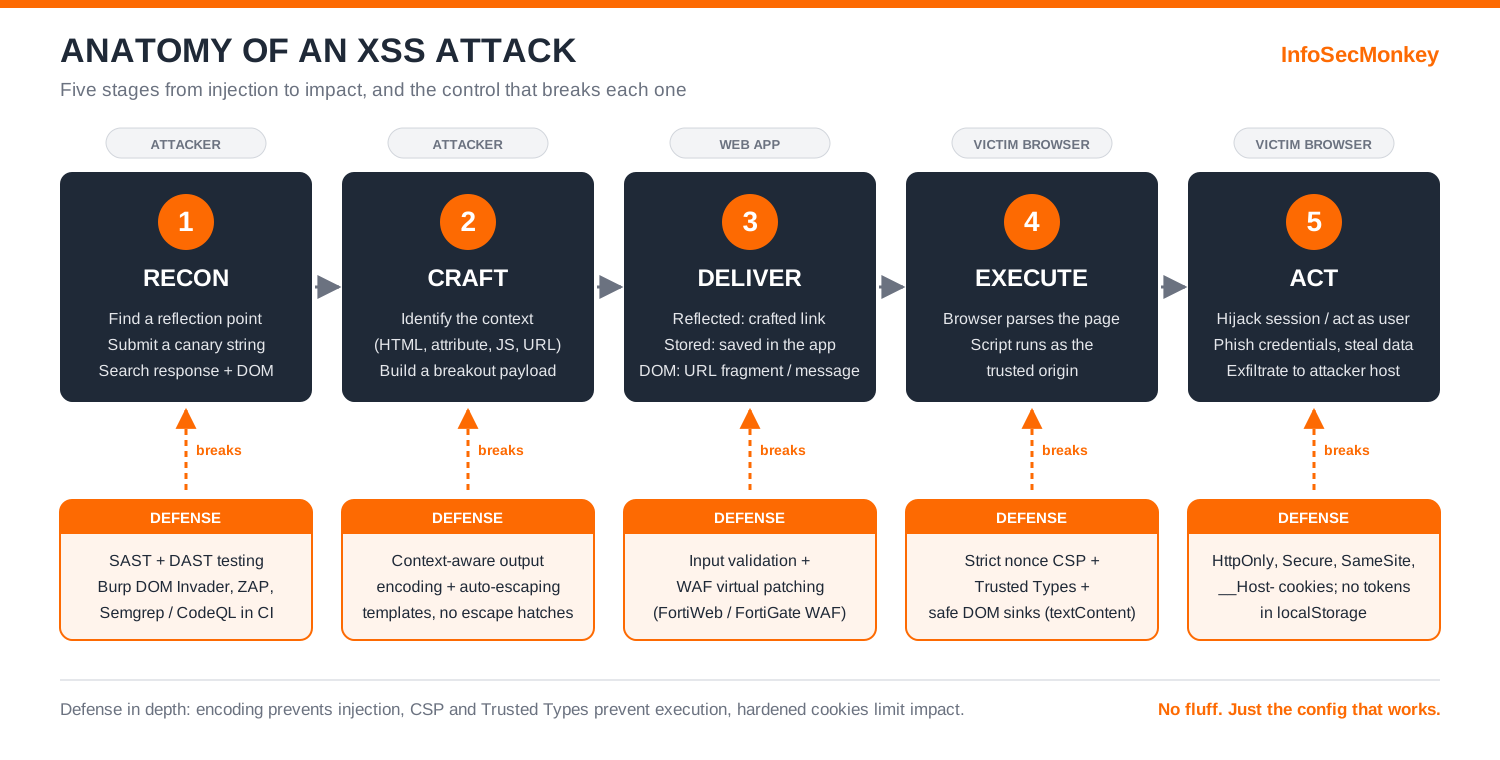
Stage 1: Recon (find a reflection point)
The attacker hunts for anywhere input comes back out: search boxes, error messages, profile fields, comment threads, URL parameters, #fragment values read by JavaScript, file names, HTTP headers echoed into admin dashboards. The classic technique is a canary: submit a unique, harmless string such as zq7canary and search the response and the live DOM for it.
Stage 2: Context analysis and payload crafting
Finding the canary tells the attacker where it landed. Is it between tags? Inside a quoted attribute? Inside a JavaScript string? Inside an href? Each context has different characters that break out of it, so the payload is built for the context, not copied from a list. More on this in the contexts section below.
Stage 3: Delivery
How the payload reaches the victim depends on the flavor. Reflected XSS rides in a crafted link sent by email, chat, or QR code. Stored XSS is planted once in the database and served to everyone who views the page. DOM-based XSS often hides in a URL fragment that never even leaves the browser.
Stage 4: Execution in the victim’s origin
The browser parses the response, hits the injected markup or the unsafe DOM write, and runs the script with the full authority of the vulnerable origin. No exploit of the browser itself is needed. The browser is working exactly as designed.
Stage 5: Action on objectives
A pop-up proves the bug exists. Real attackers want impact. Typical objectives include:
- Session hijacking: read session tokens from
document.cookieorlocalStorageand send them to an attacker-controlled host (blocked for cookies flaggedHttpOnly, but not for tokens kept in web storage). - Acting as the user: silently call the app’s own APIs to change the account email, add an admin, approve a transfer, or create API keys. The browser attaches the user’s cookies automatically, and the request comes from the real origin, so CSRF tokens can simply be read from the page.
- Credential harvesting: overwrite the page with a pixel-perfect fake login form or hook existing forms to capture keystrokes.
- Data theft: scrape anything rendered in the DOM: PII, messages, internal records.
- Pivoting: if the victim is an administrator viewing a stored payload in a back-office panel (blind XSS), the attacker inherits admin privileges.
- Worming: stored XSS on a social or collaboration platform can post itself into every viewer’s profile, as the 2005 Samy worm famously did to MySpace.
The Three Flavors of XSS
| Type | Where the payload lives | Delivery | Who sees it | Server sees payload? |
|---|---|---|---|---|
| Reflected (non-persistent) | In the request (query string, form field, header) and echoed straight back | Victim clicks a crafted link | Whoever opens the link | Yes |
| Stored (persistent) | Saved in the app’s data store (comments, profiles, tickets, logs) | Victim simply views the page | Every viewer, often admins | Yes |
| DOM-based | Read from a browser source (location, document.referrer, postMessage, web storage) by client-side JS |
Crafted link or message | Whoever triggers the client code | Often no (fragments are never sent) |
Variants worth knowing
- Blind XSS: a stored payload that fires somewhere the attacker cannot see, such as an internal log viewer or support console. Testers use callback payloads to learn when and where it executed.
- Mutation XSS (mXSS): markup that looks harmless to a sanitizer but is rewritten by the browser’s HTML parser into something executable. This is why you keep sanitizer libraries current and never edit HTML after sanitizing it.
- Self-XSS: only fires when the victim pastes code into their own console or field. Low severity alone, but it can chain with CSRF or social engineering.
Context Is Everything: Where Input Lands
The single most important idea in XSS defense: there is no universal “escape” function. The characters that are dangerous depend on where the data is placed. HTML-encoding a value and then dropping it into a JavaScript string or an href does not make it safe.
| Context | Example template | How an attacker breaks out | Correct defense |
|---|---|---|---|
| HTML body | <p>Hello USER</p> |
Injects new tags such as <img src=x onerror=...> |
HTML entity encode < > & " ' |
| Quoted HTML attribute | <input value="USER"> |
Closes the quote with " and adds an event handler |
Attribute encode and always quote attributes |
| Unquoted attribute | <input value=USER> |
A space starts a new attribute | Never use unquoted attributes |
| JavaScript string | <script>var u='USER';</script> |
Closes the string with ', or closes the block with </script> |
Avoid. Pass data via a JSON data- attribute or JSON endpoint |
| URL / href | <a href="USER"> |
Uses the javascript: scheme |
Allowlist https: (and mailto: if needed), then URL encode |
| CSS | <div style="color:USER"> |
Injects expressions or url() loads |
Never place untrusted input in CSS; use fixed classes |
Practitioner tip
When you review code, do not ask “is this input escaped?” Ask “is this input escaped for the exact context it is rendered in?” That question finds the bugs the first one misses.
Hands-On Lab: Break It, Then Fix It
This lab walks the five stages against an app you run locally. It uses the standard proof-of-concept payload alert(document.domain), which proves script execution in a specific origin without doing anything harmful.
Step 1: Build the vulnerable app
Goal: stand up a minimal Flask app with a reflected XSS bug and a DOM-based XSS bug.
Action: create a project folder, install Flask, and save the following as app.py.
Terminal
mkdir xss-lab && cd xss-lab
python3 -m venv .venv && source .venv/bin/activate
pip install flask
app.py (vulnerable)
from flask import Flask, request

app = Flask(__name__)

# VULNERABLE: user input is concatenated straight into HTML
@app.route("/search")
def search():
    q = request.args.get("q", "")
    return f"<h1>Results for: {q}</h1><p>No results found.</p>"

# VULNERABLE: client-side code writes a URL parameter with innerHTML
@app.route("/welcome")
def welcome():
    return """
<div id="greet"></div>
<script>
  const name = new URLSearchParams(location.search).get("name") || "guest";
  document.getElementById("greet").innerHTML = "Hello " + name;
</script>"""

if __name__ == "__main__":
    app.run(host="127.0.0.1", port=5000, debug=False)
Terminal
python3 app.pyVerification: browse to http://127.0.0.1:5000/search?q=test and confirm the page reads “Results for: test”.
Step 2: Recon with a canary
Goal: prove input is reflected without encoding (Stage 1 and Stage 2).
Action: send a canary wrapped in a harmless tag and look at the raw response.
Terminal
curl -s "http://127.0.0.1:5000/search?q=%3Cb%3Ezq7canary%3C%2Fb%3E"Expected output (vulnerable)
<h1>Results for: <b>zq7canary</b></h1><p>No results found.</p>The <b> tag came back as live markup, not as <b>. The input lands in an HTML body context with no encoding. That is a confirmed injection point.
Step 3: Prove execution (reflected)
Goal: demonstrate script execution in the app’s origin (Stages 3 and 4).
Action: open this URL in your test browser:
Browser address bar
http://127.0.0.1:5000/search?q=<img src=x onerror=alert(document.domain)>Result: an alert box shows 127.0.0.1. The image fails to load, the onerror handler fires, and JavaScript runs inside your app’s origin. In a real attack, that link would be shortened and sent to a victim.
Step 4: Prove execution (DOM-based)
Goal: show that client-side code can be the vulnerable component.
Action: open:
Browser address bar
http://127.0.0.1:5000/welcome?name=<img src=x onerror=alert(document.domain)>Gotcha: why <script> does not fire here
A <script> tag inserted via innerHTML is parsed but never executed. That is a browser rule, not a defense. Event-handler payloads like onerror still execute, which is why “we tested with a script tag and nothing happened” is not proof of safety.
Also try moving the payload into the fragment with a small change to the code (location.hash). The server log will show a request for /welcome with no payload at all, because fragments are never sent to the server. This is why server-side logging and some WAF deployments are blind to DOM XSS.
Step 5: Fix the reflected bug with output encoding
Goal: neutralize input for the HTML context.
Action: the best fix is to let a template engine with auto-escaping render the page. Jinja2 (Flask’s default) escapes {{ }} output automatically in .html templates. For a one-file lab, render_template_string with autoescaping enabled is equivalent:
app.py (fixed /search)
from flask import Flask, request, render_template_string

app = Flask(__name__)
# Autoescape is the default for .html templates; force it for string templates
app.jinja_env.autoescape = True

SEARCH_TPL = "<h1>Results for: {{ q }}</h1><p>No results found.</p>"

@app.route("/search")
def search():
    q = request.args.get("q", "")
    return render_template_string(SEARCH_TPL, q=q)
Verification: rerun the canary.
Terminal
curl -s "http://127.0.0.1:5000/search?q=%3Cb%3Ezq7canary%3C%2Fb%3E"Expected output (fixed)
<h1>Results for: <b>zq7canary</b></h1><p>No results found.</p>Step 6: Fix the DOM bug with a safe sink
Goal: stop treating data as markup in the browser.
Action: replace innerHTML with textContent, which always inserts text, never HTML.
welcome (fixed)
<div id="greet"></div>
<script>
  const name = new URLSearchParams(location.search).get("name") || "guest";
  document.getElementById("greet").textContent = "Hello " + name;
</script>
Verification: reload the Step 4 URL. The page now literally displays the payload text and no alert fires.
Step 7: Add a strict Content Security Policy
Goal: add a safety net so that even if a future bug slips through, injected script does not run.
Action: generate a fresh random nonce per response and only allow scripts that carry it.
app.py (CSP)
import secrets
from flask import g

@app.before_request
def make_nonce():
    g.csp_nonce = secrets.token_urlsafe(16)

@app.after_request
def set_security_headers(resp):
    resp.headers["Content-Security-Policy"] = (
        f"script-src 'nonce-{g.csp_nonce}' 'strict-dynamic'; "
        "object-src 'none'; base-uri 'none'; frame-ancestors 'self'"
    )
    resp.headers["X-Content-Type-Options"] = "nosniff"
    return resp

# In templates, legitimate scripts must carry the nonce:
# <script nonce="{{ g.csp_nonce }}"> ... </script>
Verification: temporarily revert Step 5 so the reflected bug is back, then reload the Step 3 URL. No alert fires, and DevTools Console logs a CSP violation for the inline event handler. The bug still exists, but it can no longer execute. Put the fix back afterward. CSP is a seatbelt, not a replacement for encoding.
Defense Best Practices: The Layered Playbook
No single control stops every XSS. The goal is defense in depth: prevent the injection, and if one slips through, prevent the execution, and if that fails, limit the blast radius.
1. Contextual output encoding (primary control)
Encode data at output time, for the context it lands in. Use your framework’s auto-escaping templates by default and treat every escape hatch as a code-review red flag.
| Framework / engine | Safe by default | Escape hatch to audit |
|---|---|---|
| React | {value} in JSX |
dangerouslySetInnerHTML, href={userUrl} |
| Angular | Interpolation and property binding | bypassSecurityTrustHtml and related bypass methods |
| Vue | {{ value }} |
v-html |
| Jinja2 / Flask | {{ value }} in .html templates |
|safe, Markup(), autoescape false |
| Django | {{ value }} |
|safe, mark_safe(), {% autoescape off %} |
| Handlebars | {{value}} |
Triple-stash {{{value}}} |
| Rails ERB | <%= value %> |
raw, html_safe, <%== %> |
Note that even safe-by-default frameworks do not validate URL schemes everywhere. A user-controlled href set to javascript: is a recurring bug. Allowlist https: (and mailto: if required) before rendering links.
2. Use safe DOM APIs on the client
| Dangerous sink | Safe alternative |
|---|---|
element.innerHTML = data |
element.textContent = data |
outerHTML, insertAdjacentHTML, document.write |
createElement + textContent + append |
eval(data), new Function(data) |
JSON.parse(data) for data; never execute strings |
setTimeout("string"), setInterval("string") |
Pass a function reference instead |
el.setAttribute("on...", data), el.href = data |
addEventListener; validate URL scheme before assigning |
jQuery $(data), .html(data) |
.text(data) |
3. Sanitize when you truly must render HTML
Rich text editors, Markdown, and email bodies need real HTML. Encoding would break them, so sanitize with a maintained allowlist sanitizer instead of writing your own regex.
Client-side sanitization with DOMPurify
import DOMPurify from "dompurify";

// Sanitize as the LAST step, then insert immediately.
// Never modify the string afterward.
const clean = DOMPurify.sanitize(untrustedHtml, {
  ALLOWED_TAGS: ["b", "i", "em", "strong", "a", "p",
                 "ul", "ol", "li", "code", "pre"],
  ALLOWED_ATTR: ["href"]
});
container.innerHTML = clean;
Server-side options include nh3 for Python (bindings to the Rust ammonia sanitizer; the older bleach library is deprecated) and the OWASP Java HTML Sanitizer. Keep sanitizers patched: mutation XSS bypasses are found and fixed regularly.
4. Deploy a strict, nonce-based Content Security Policy
CSP tells the browser which scripts are allowed to run. A strict policy blocks inline event handlers and injected <script> tags even when an encoding bug exists.
Recommended strict CSP
Content-Security-Policy:
  script-src 'nonce-R4nd0mPerResponse' 'strict-dynamic';
  object-src 'none';
  base-uri 'none';
  frame-ancestors 'self';
report-to csp-endpoint- Nonces must be random and unique per response. A static nonce is a known value and defeats the policy.
- **Avoid
'unsafe-inline'and'unsafe-eval'.** Either one largely cancels XSS protection. - Prefer nonces or hashes over host allowlists. Allowlisted CDNs often host JSONP endpoints or script gadgets that attackers can abuse.
- Roll out in report-only mode first with
Content-Security-Policy-Report-Only, fix what breaks, then enforce.
5. Lock down DOM sinks with Trusted Types
Trusted Types make dangerous sinks such as innerHTML refuse plain strings, so only values produced by an approved policy (for example, one that runs DOMPurify) can reach them. It turns DOM XSS from a code-review problem into a browser-enforced rule.
Enforce Trusted Types
Content-Security-Policy:
  require-trusted-types-for 'script';
  trusted-types default dompurify
Support started in Chromium-based browsers and has been spreading to other engines; check current browser compatibility before relying on it as your only DOM control, and deploy it report-only first.
6. Harden cookies and tokens to shrink the blast radius
Hardened session cookie
Set-Cookie: __Host-session=abc123; Path=/; Secure; HttpOnly; SameSite=Lax| Attribute | What it does against XSS |
|---|---|
HttpOnly |
JavaScript cannot read the cookie, so document.cookie theft fails. It does not stop the script from making authenticated requests as the user. |
Secure |
Cookie only travels over HTTPS. |
SameSite=Lax or Strict |
Limits cross-site sending; mainly a CSRF control, but it reduces chaining options. |
__Host- prefix |
Forces Secure, Path=/, and no Domain, preventing subdomain cookie tossing. |
Avoid keeping long-lived session or refresh tokens in localStorage. Any script running in the origin, including injected script, can read it.
7. Validate input as defense in depth
Input validation is not an XSS fix on its own, because many legitimate inputs contain <, ', or &. It is still valuable: enforce types (integers stay integers), allowlist enumerations, cap lengths, and reject unexpected URL schemes. Every value you constrain is one less place an encoding mistake can hurt you.
8. Set supporting headers correctly
- **
X-Content-Type-Options: nosniff** stops browsers from MIME-sniffing an uploaded text file or JSON response into executable HTML or script. - **Correct
Content-Typewith charset** (for example,text/html; charset=utf-8) prevents charset-confusion tricks. API endpoints should returnapplication/json, nevertext/html. - **
X-XSS-Protectionis deprecated.** Modern browsers removed the XSS auditor. Set it to0or omit it, and rely on CSP instead.
9. Put a WAF in front as virtual patching
A web application firewall such as FortiWeb, or the Web Application Firewall security profile on FortiGate, inspects requests for XSS signatures and blocks known payload patterns. It is the fastest way to reduce exposure for a vulnerable app you cannot patch today.
- On FortiGate, enable the Cross Site Scripting signature classes in a WAF profile under Security Profiles > Web Application Firewall, set the action to Block with logging, and apply it to the firewall policy or VIP that fronts the app.
- The WAF profile requires proxy-based inspection, and HTTPS traffic needs deep (full SSL) inspection or a server-side SSL offload/VIP so the WAF can see the payload.
- Run in monitor mode first, review logs for false positives, then switch to block.
- Remember the limits: WAFs miss DOM XSS carried in fragments, context-specific encodings, and novel bypasses. A WAF buys time; it does not replace fixing the code.
10. Test continuously
- DAST: Burp Suite (with DOM Invader for DOM sources and sinks) and ZAP for automated and manual testing.
- SAST: Semgrep or CodeQL rules that flag dangerous sinks (
innerHTML,dangerouslySetInnerHTML,|safe,eval) in pull requests. - CSP review: Google’s CSP Evaluator to catch weak policies, plus
report-tomonitoring so violations in production reach your SIEM. - Bug bounty or pen test coverage for stored and blind XSS in admin and support tooling, which automated scanners rarely reach.
Verification and Validation
Use these checks against your own application (replace app.example.com with your hostname) to confirm the controls are actually in place.
Check security headers
Terminal
curl -sI https://app.example.com/ \
  | grep -iE "content-security-policy|x-content-type-options|set-cookie"
Expected success output
content-security-policy: script-src 'nonce-Qm9yX2ZpeGVk...' 'strict-dynamic';
  object-src 'none'; base-uri 'none'
x-content-type-options: nosniff
set-cookie: __Host-session=...; Path=/; Secure; HttpOnly; SameSite=Lax
Run the command twice. The nonce value must change on every response. If it is identical, the nonce is static and the policy is bypassable.
Check that reflections are encoded
Terminal
curl -s "https://app.example.com/search?q=%3Cb%3Ezq7canary%3C%2Fb%3E" \
  | grep -o ".\{0,20\}zq7canary.\{0,20\}"
Expected success output
<b>zq7canary</b>Any result showing a raw <b>zq7canary</b> means the parameter is reflected unencoded.
Check HttpOnly in the browser
Log in, open DevTools Console, and run document.cookie. The session cookie must not appear in the output. Then check Application > Cookies to confirm the HttpOnly and Secure columns are ticked.
Troubleshooting and Gotchas
Gotcha 1: CSP is deployed but does nothing
Symptom: a CSP header exists, yet a pen tester still pops an alert.
Diagnosis: look for 'unsafe-inline', 'unsafe-eval', wildcards like https: or *, a missing object-src 'none', a missing base-uri, or a static nonce. Paste the policy into CSP Evaluator.
Terminal
curl -sI https://app.example.com/ | grep -i content-security-policyResolution: move to a nonce-based policy with 'strict-dynamic', remove unsafe-* keywords, refactor inline event handlers (onclick="...") into addEventListener calls, and generate the nonce per response.
Gotcha 2: Encoded for the wrong context
Symptom: the code clearly HTML-encodes input, but XSS still fires.
Diagnosis: find the canary in the rendered page source and identify its context. HTML encoding inside a <script> block, an onclick attribute, or an href does not stop javascript: URLs or string breakouts. Double encoding and decoding in different layers (for example, a URL-decoded value later inserted via innerHTML) is another common cause.
Resolution: stop building JavaScript or URLs from strings. Pass data as JSON in a data- attribute and read it with JSON.parse, validate URL schemes against an allowlist, and encode once, at output, for the final context.
Gotcha 3: Sanitized HTML that still executes
Symptom: content passes through a sanitizer but executes in the browser.
Diagnosis: check whether the code modifies the HTML after sanitizing (string replacements, Markdown rendering after sanitization, template concatenation) or whether the sanitizer version is outdated. Both create mutation XSS opportunities.
Terminal
npm ls dompurifyResolution: render Markdown first, sanitize the final HTML last, insert it immediately, and keep the sanitizer on its latest release. Pair it with Trusted Types so only sanitized values can reach innerHTML.
Quick Reference: XSS Defense Cheat Sheet
| Layer | Control | Stops or limits |
|---|---|---|
| Code (server) | Auto-escaping templates, context-aware encoding | Reflected and stored XSS |
| Code (client) | textContent, no eval, no innerHTML with data |
DOM-based XSS |
| Rich content | DOMPurify, nh3, OWASP Java HTML Sanitizer | XSS through user-supplied HTML |
| Browser policy | Strict nonce-based CSP | Execution of injected script |
| Browser policy | Trusted Types | Unsafe writes to DOM sinks |
| Session | HttpOnly, Secure, SameSite, __Host- cookies |
Session token theft |
| Transport/headers | nosniff, correct Content-Type |
MIME-sniffing and charset tricks |
| Perimeter | FortiWeb or FortiGate WAF profile | Known payload patterns (virtual patching) |
| Process | SAST, DAST, CSP reporting, pen testing | Regressions and blind XSS |
Final Thoughts
XSS is simple to describe and stubborn to eliminate because it lives wherever data meets markup, and modern apps have thousands of those seams. The winning pattern is consistent: encode for context by default, keep data out of executable sinks, sanitize only when you must, and then back it up with a strict CSP, Trusted Types, and hardened cookies so a single missed spot does not become an account takeover. Put a WAF in front for virtual patching, but fix the code.
No fluff. Just the config that works.
References
- MITRE, 2025 CWE Top 25 Most Dangerous Software Weaknesses: https://cwe.mitre.org/top25/archive/2025/2025_cwe_top25.html
- OWASP Top 10:2025, A05 Injection: https://owasp.org/Top10/2025/A05_2025-Injection/
- OWASP Cross Site Scripting Prevention Cheat Sheet: https://cheatsheetseries.owasp.org/cheatsheets/Cross_Site_Scripting_Prevention_Cheat_Sheet.html
- OWASP DOM based XSS Prevention Cheat Sheet: https://cheatsheetseries.owasp.org/cheatsheets/DOM_based_XSS_Prevention_Cheat_Sheet.html
- MDN, Content Security Policy: https://developer.mozilla.org/en-US/docs/Web/HTTP/CSP
- MDN, Trusted Types API: https://developer.mozilla.org/en-US/docs/Web/API/Trusted_Types_API
- DOMPurify: https://github.com/cure53/DOMPurify
- Google CSP Evaluator: https://csp-evaluator.withgoogle.com/
Recent posts
-

-

DNS is one of those technologies that quietly underpins... Full Story
-

BGP issues on FortiGate firewalls usually trace back to... Full Story
-

Every time your laptop talks to your router, a... Full Story
-

If you've spent any time configuring NAT on a... Full Story
-

If you have spent any time configuring firewall policies... Full Story
-

High availability on FortiGate is one of those features... Full Story
-

If you've configured SD-WAN on a FortiGate, you've almost... Full Story
-

FortiLink is the management protocol that turns a FortiSwitch... Full Story
-

FortiSwitches are pretty rock solid from Mean Time Between... Full Story
-

This is a quicky tip. Have you ever gone... Full Story
-

DNS is one of those quiet pieces of internet... Full Story
-

This article is an updated version of the previous... Full Story
-

You will add ns2 as a secondary (slave) BIND9... Full Story
-

In the process of deploying my lab, I needed... Full Story
-

RFC 8805, used to be known as Self-Correcting IP... Full Story
-

Years back, I wrote an article about certificate pinning. ... Full Story
-

FortiGates have the ability to send alerts to Microsoft... Full Story
-

In this post, I am going to walk through... Full Story
-

Troubleshooting VoIP on a FortiGate can feel like trying... Full Story
-

Prior to FortiOS 7.0, there were three commands to... Full Story
-

In this post, I am going to go over... Full Story
-

What we are going to do: We are going... Full Story
-

Choosing between FGCP (FortiGate Clustering Protocol) and FGSP (FortiGate... Full Story
-

Creating a VLAN on macOS (The "Pro" Move) A... Full Story
-

This blog post explores the logic behind how macOS... Full Story
-

Pretty Fly for a Wi-Fi Tell My Wi-Fi Love... Full Story
-

Part of my daily gig is creating BoMs (Bill-of-Materials)... Full Story
-

ICMP introduces several security risks, but careful filtering, rate... Full Story
-

The command diag debug application dhcps -1 enables full... Full Story
-

In the world of FortiOS, execute tac report is... Full Story
-

LLDP; What is it The Link Layer Discovery Protocol... Full Story
-

What it actually does When you run diagnose fdsm... Full Story
-

Monkey Bites are bite-sized, high-impact security insights designed for... Full Story
-

I have run macOS in macOS with Parallels but... Full Story
-

Don't be confused with my other FortiNAC posts where... Full Story
-

This is the third session in a multi-part article... Full Story
-

Today I was configuring key-based authentication on a FortiGate... Full Story
-

Netcat, often called the "Swiss Army knife" of networking,... Full Story
-

At its core, IEEE 802.1X is a network layer... Full Story
-

In case you did not see the previous FortiNAC... Full Story
-

This is our 5th session where we are going... Full Story
-

Now that we have Wireshark installed and somewhat configured,... Full Story
-

The Philosophy of Packet Analysis Troubleshooting isn't about looking... Full Story
-

No fluff. Just the config that works. Executive Summary... Full Story
-

FortiGate DDNS: config system ddns Explained No fluff. Just... Full Story
-

Executive Summary Objective: Get you from zero to writing... Full Story