
If you've spent any time configuring user authentication on... Full Story
By Manny Fernandez
October 21, 2026
Cisco Duo MFA for FortiGate Remote Access VPN: SAML and RADIUS on IKEv2
No fluff. Just the config that works.
Executive Summary
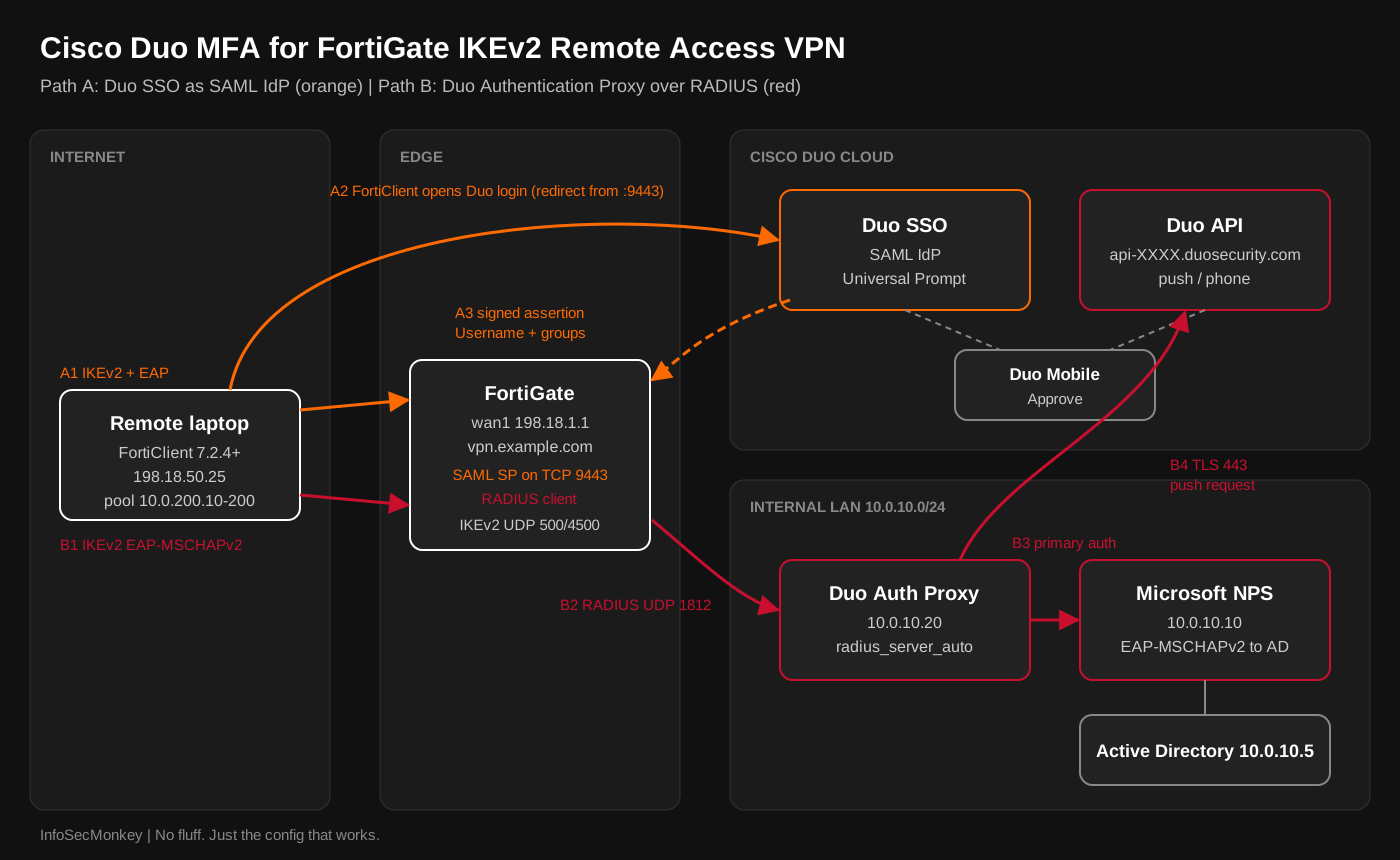
Objective: Put Cisco Duo in front of FortiGate remote access VPN so every FortiClient connection requires a second factor. This guide builds the Duo FortiGate VPN integration two ways on an IKEv2 dial-up tunnel: Duo Single Sign-On as a SAML identity provider (the recommended path), and the Duo Authentication Proxy as a RADIUS server (the path for teams that cannot use SAML yet).
Target audience: FortiGate administrators, Fortinet and Cisco Duo partners, and security engineers migrating remote access off SSL VPN tunnel mode.
Why this matters now: Most Duo and FortiGate write-ups still describe SSL VPN tunnel mode. FortiOS 7.6.3 removed SSL VPN tunnel mode on every FortiGate model, and the setting does not survive the upgrade. Remote access with FortiClient is now an IPsec IKEv2 dial-up tunnel, and IKEv2 authenticates users with EAP. That one change decides which Duo integration works and which one quietly fails.
| Path | How Duo is reached | Best for | Hard requirements |
|---|---|---|---|
| A: Duo SSO (SAML) | FortiGate is the SAML SP, Duo SSO is the IdP | New builds, Universal Prompt, device trust policy | FortiClient 7.2.4+ (IKEv2 only), Duo SSO with an authentication source |
| B: Duo Authentication Proxy (RADIUS) | FortiGate relays EAP to the proxy, proxy calls Duo | Shops without SAML, existing NPS | Upstream RADIUS (NPS) that supports EAP-MSCHAPv2, force_message_authenticator=true |
Prerequisites and Architecture
Assumed knowledge
- FortiGate dial-up IPsec basics: phase 1, phase 2, mode config, firewall policy
- SAML vocabulary: IdP, SP, entity ID, ACS URL, assertion attributes
- RADIUS basics: shared secrets, Access-Request, Access-Challenge, Access-Accept
- Cisco Duo Admin Panel navigation and user enrollment
Lab requirements
- FortiGate on FortiOS 7.6.3 or later (7.4.x also supports IKEv2 SAML, but this guide assumes SSL VPN tunnel mode is gone)
- FortiClient 7.2.4 or later on Windows or macOS; 7.2.5 or 7.4.1 or later if you want the external browser for SAML
- A public FQDN (
vpn.example.com) that resolves to the FortiGate WAN, plus a certificate for it from a CA the clients trust - Cisco Duo account with Duo Single Sign-On enabled (Path A) or a Windows or Linux host for the Duo Authentication Proxy (Path B)
- Active Directory with a VPN users group; Microsoft NPS for Path B
- Users pre-enrolled in Duo (directory sync or CSV import). The RADIUS path has no inline enrollment.
Lab topology
| Component | Role | Address |
|---|---|---|
FortiGate wan1 |
IKEv2 responder, SAML SP, RADIUS client | 198.18.1.1 (vpn.example.com) |
FortiGate lan |
Internal gateway | 10.0.10.1/24 |
| Domain controller | Active Directory, DNS | 10.0.10.5 |
| Microsoft NPS | Primary auth for Path B (EAP-MSCHAPv2) | 10.0.10.10 |
| Duo Authentication Proxy | RADIUS server for Path B, outbound TLS 443 to Duo | 10.0.10.20 |
| Duo SSO / Duo cloud | SAML IdP (Path A), MFA service (both paths) | api-XXXXXXXX.duosecurity.com |
| Remote laptop | FortiClient IKEv2 dial-up client | 198.18.50.25 |
| VPN client pool | Mode config range | 10.0.200.10 to 10.0.200.200 |
Choosing a path
| Question | Path A: SAML | Path B: RADIUS |
|---|---|---|
| Duo prompt the user sees | Duo Universal Prompt in a browser window | Automatic push or phone call to the first device |
| Passcodes and factor selection | Yes, chosen in the prompt | Push or phone only; password,123456 concatenation does not work with MS-CHAPv2 |
| Duo device and network policy | Full Duo SSO policy engine | Limited to what the RADIUS app supports |
| Extra infrastructure | None on premises | Duo proxy host plus NPS |
| FortiGate group mapping | SAML groups attribute matched in a user group |
One RADIUS group, or Filter-Id passed through from NPS |
| Main failure mode | Port, certificate, or attribute name mismatch | EAP method mismatch, RADIUS timeout |
If you are starting a Duo FortiGate VPN build clean, use Path A. Path B exists because plenty of environments already run NPS and the Duo proxy for other RADIUS apps.
Path A: Duo SSO as the SAML IdP
Step 1: Create the Fortinet FortiGate application in Duo
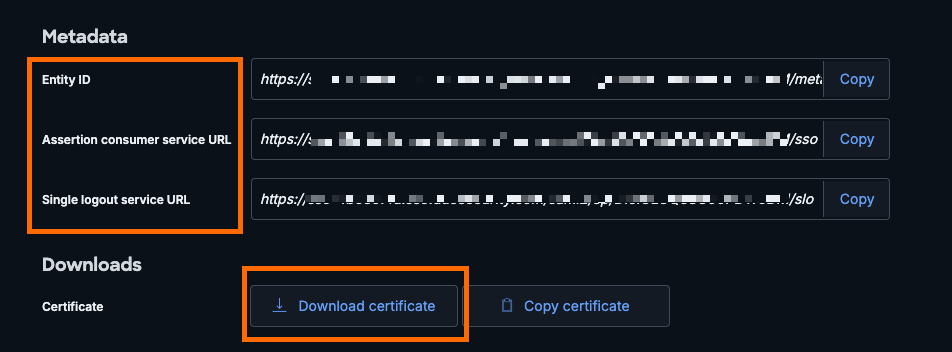
Goal: Get the IdP metadata (entity ID, SSO URL, SLO URL, signing certificate) that the FortiGate needs for the Duo FortiGate VPN SAML login.
Action:
- In the Duo Admin Panel confirm Duo Single Sign-On has a working authentication source (Active Directory, a SAML IdP, or Duo Directory).
- Go to Applications > Application Catalog, find Fortinet FortiGate with the SSO label, and click Add.
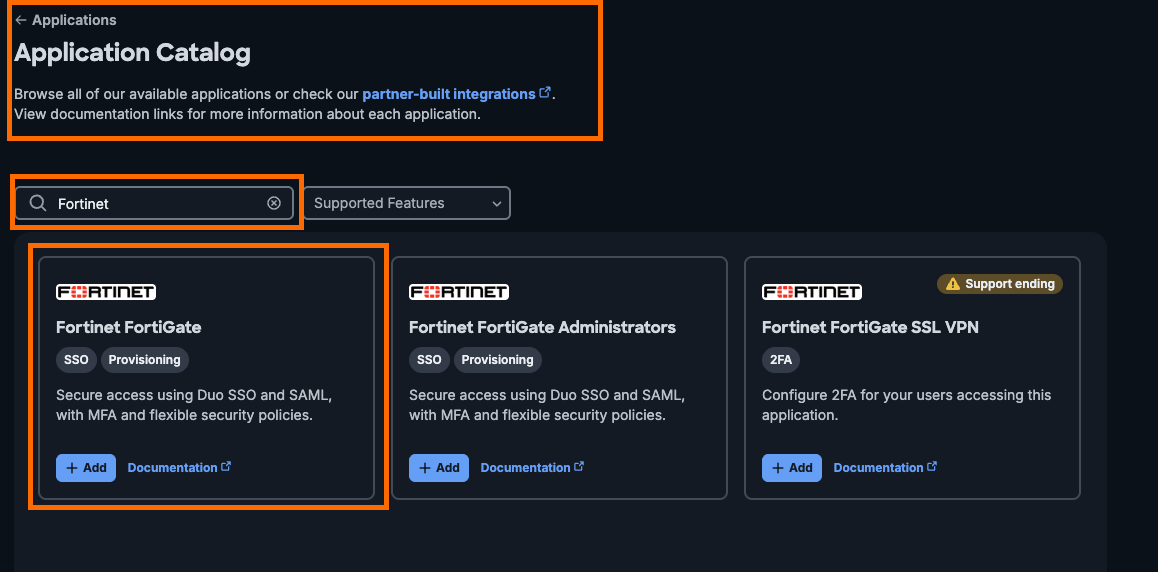
Cisco Duo Application Catalog with the Fortinet FortiGate SSO application - Download the Duo signing certificate and keep the page open. You will paste the FortiGate SP URLs back here in Step 3.
- Leave Username as the user attribute and groups as the group attribute. Both names are case-sensitive and must match the FortiGate exactly.
- Under group mapping, map your Duo or directory group (for example
VPN-Users) to the Fortinet group nameduo-vpn-users. The FortiGate only ever sees the Fortinet group name, never the Duo or AD group name. - Under User access, grant the application to the VPN group. Nobody can log in until this is set.
- Turn on the Universal Prompt for the application.
GUI verification: The application page shows an Entity ID, Single Sign-On URL, and Single Log-Out URL in the form https://sso-xxxxxxxx.sso.duosecurity.com/saml2/sp/<APP_ID>/....
Step 2: Import the Duo certificate and set the SAML port
Goal: Give the FortiGate the IdP certificate and a dedicated TCP port where FortiClient starts the SAML exchange.
Action: Import the Duo certificate under System > Certificates > Create/Import > Remote Certificate. It lands as REMOTE_Cert_N; rename references below to match.
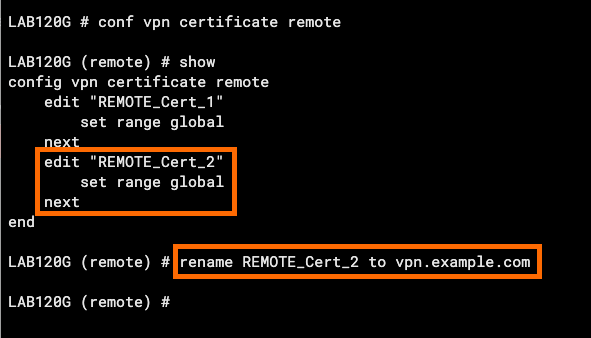
Then set the IKE SAML port and the certificate the FortiGate presents on it.
config system global
    set auth-ike-saml-port 9443
end
config user setting
    set auth-cert "vpn.example.com"
end
auth-ike-saml-port defaults to 1001. Pick a port that does not collide with admin-sport, any VIP, or ike-tcp-port if you run IKE over TCP. The auth-cert must be a certificate whose CN or SAN is vpn.example.com and that chains to a CA the clients trust.
GUI verification: System > Certificates shows the Duo certificate under Remote Certificate and your VPN certificate under Local Certificate.
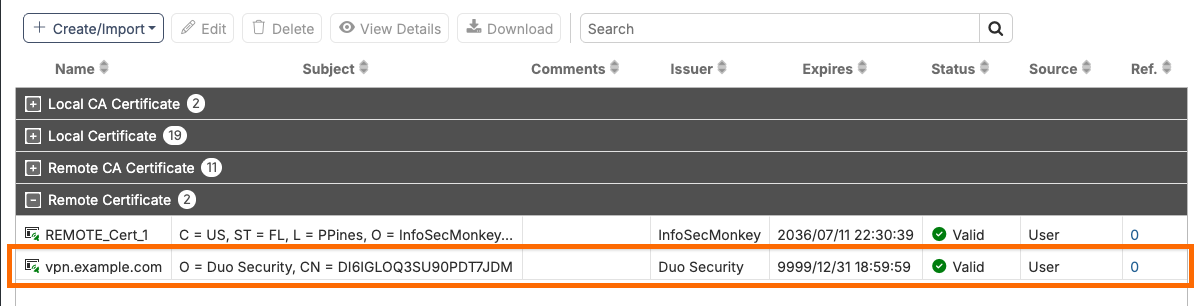
Step 3: Create the SAML server object
Goal: Define the FortiGate as SAML SP and point it at Duo.
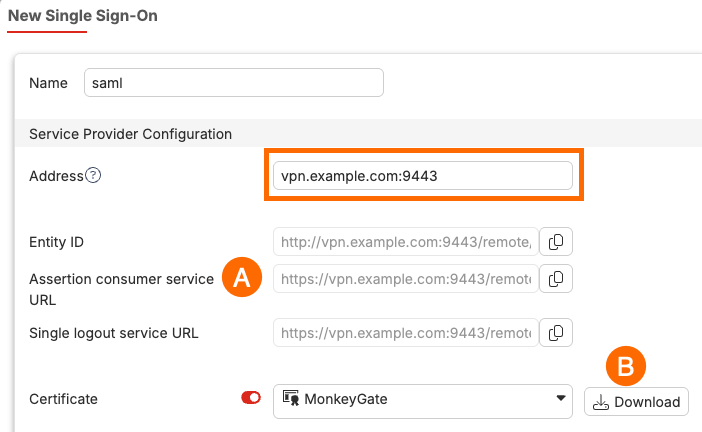
Action: Go to User & Authentication > Single Sign-On > Create New, or use the CLI. The SP address must include the SAML port.
config user saml
    edit "Duo-IPsec-SAML"
        set cert "vpn.example.com"
        set entity-id "http://vpn.example.com:9443/remote/saml/metadata/"
        set single-sign-on-url "https://vpn.example.com:9443/remote/saml/login"
        set single-logout-url "https://vpn.example.com:9443/remote/saml/logout"
        set idp-entity-id "https://sso-xxxxxxxx.sso.duosecurity.com/saml2/sp/<APP_ID>/metadata"
        set idp-single-sign-on-url "https://sso-xxxxxxxx.sso.duosecurity.com/saml2/sp/<APP_ID>/sso"
        set idp-single-logout-url "https://sso-xxxxxxxx.sso.duosecurity.com/saml2/sp/<APP_ID>/slo"
        set idp-cert "REMOTE_Cert_1"
        set user-name "Username"
        set group-name "groups"
        set digest-method sha256
    next
end
Copy the generated SP Entity ID and Assertion Consumer Service URL (the login URL) into the Duo application, set Duo’s signature algorithm to match digest-method, and save the Duo application.
GUI verification: Reopen the Single Sign-On object. The SP URLs show :9443, and the IdP fields match the Duo application page character for character.
Step 4: Bind the SAML server to the WAN interface
Goal: Tell the authentication daemon which interface listens for FortiClient SAML requests.
config system interface
    edit "wan1"
        set ike-saml-server "Duo-IPsec-SAML"
    next
end
GUI verification: show system interface wan1 lists set ike-saml-server "Duo-IPsec-SAML".
Step 5: Create the user group with a Duo group match
Goal: Only users that Duo asserts in duo-vpn-users get through the policy.
config user group
    edit "Duo-VPN-Users"
        set member "Duo-IPsec-SAML"
        config match
            edit 1
                set server-name "Duo-IPsec-SAML"
                set group-name "duo-vpn-users"
            next
        end
    next
end
GUI verification: User & Authentication > User Groups shows Duo-VPN-Users with the SAML server as a remote group and duo-vpn-users as the group match.
Step 6: Build the IKEv2 dial-up tunnel
Goal: An IKEv2 tunnel with EAP enabled. SAML runs inside the EAP exchange, so eap enable and send-request are required.
config vpn ipsec phase1-interface
    edit "RA-Duo"
        set type dynamic
        set interface "wan1"
        set ike-version 2
        set peertype any
        set net-device disable
        set mode-cfg enable
        set proposal aes256gcm-prfsha384 aes256-sha256
        set dhgrp 20 14
        set dpd on-idle
        set eap enable
        set eap-identity send-request
        set ipv4-start-ip 10.0.200.10
        set ipv4-end-ip 10.0.200.200
        set ipv4-netmask 255.255.255.0
        set ipv4-dns-server1 10.0.10.5
        set ipv4-split-include "LAN-10.0.10.0"
        set psksecret <GROUP_PSK>
    next
end
config vpn ipsec phase2-interface
    edit "RA-Duo-P2"
        set phase1name "RA-Duo"
        set proposal aes256gcm aes256-sha256
        set dhgrp 20 14
    next
end
Notice there is no authusrgrp. The Duo group is enforced on the firewall policy in Step 7. Fortinet calls out that setting a group in both places on a SAML tunnel causes a conflict, so pick one, and the policy is the more flexible choice.
The PSK only authenticates the gateway to the client. Duo authenticates the user. If you also want to prove the device, add set eap-cert-auth enable with certificates issued to managed endpoints, as covered in FortiGate IPsec remote access VPN with computer certificate pinning.
GUI verification: VPN > VPN Tunnels lists RA-Duo as a dial-up tunnel with no active peers yet.
Step 7: Firewall policy
config firewall address
    edit "LAN-10.0.10.0"
        set subnet 10.0.10.0 255.255.255.0
    next
end
config firewall policy
    edit 0
        set name "RA-Duo-to-LAN"
        set srcintf "RA-Duo"
        set dstintf "lan"
        set action accept
        set srcaddr "all"
        set dstaddr "LAN-10.0.10.0"
        set schedule "always"
        set service "ALL"
        set groups "Duo-VPN-Users"
        set nat disable
        set logtraffic all
    next
end
GUI verification: Policy & Objects > Firewall Policy shows the policy with Duo-VPN-Users in the source column.
Step 8: FortiClient profile
Goal: A FortiClient IPsec profile that starts SAML on the right port.
Action: Create a new IPsec VPN connection:
- Remote Gateway:
vpn.example.com - Authentication Method: Pre-shared Key, same value as
<GROUP_PSK> - Advanced: IKE Version 2, Mode Config enabled, proposals and DH groups matching phase 1 and phase 2
- Enable Single Sign On (SSO) for VPN Tunnel, then Customize port
9443 - Optional: Use external browser as user-agent for SAML user authentication (needs FortiOS 7.6.1+ and FortiClient 7.2.5 or 7.4.1+, Linux 7.4.3+)
For fleets, push the same settings from FortiClient EMS instead of touching every laptop.
GUI verification: Clicking SAML Login opens the Duo Universal Prompt instead of a username and password box.
Path B: Duo Authentication Proxy over RADIUS
Why the RADIUS path needs NPS on IKEv2
Read this before you copy the old Duo FortiGate VPN instructions written for SSL VPN. FortiClient authenticates IKEv2 users with EAP-MSCHAPv2 by default, and the FortiGate relays those EAP packets to the RADIUS server (the packet-level walkthrough is in FortiGate IKEv2 Remote Access with EAP: What Actually Happens on the Wire). The Duo Authentication Proxy supports MS-CHAPv2 only when its primary authenticator is another RADIUS server ([radius_client]), not when it binds to Active Directory directly ([ad_client]). The common SSL VPN recipe of ad_client plus PAP breaks on IKEv2 with the proxy log line Can not proxy Radius Requests to the primary authenticator. Try using PAP.
So the chain is: FortiClient (EAP-MSCHAPv2) to FortiGate to Duo proxy to NPS (EAP-MSCHAPv2 against AD), and only after NPS accepts does the proxy send the Duo push.
Note: FortiClient 7.4.3 and later can use EAP-TTLS with an inner PAP for IKEv2 (see 802.1X EAP protocols explained for how TTLS differs from MSCHAPv2). That helps with LDAP on the FortiGate, but when the user group is RADIUS, the TTLS tunnel is relayed to the RADIUS server, and the Duo proxy does not terminate EAP-TTLS. Stay with NPS and EAP-MSCHAPv2 for this path.
Step B1: Create the RADIUS application in Duo
Goal: Get an integration key, secret key, and API hostname for the proxy.
Action: Applications > Application Catalog, add Fortinet FortiGate SSL VPN with the 2FA label (the RADIUS Automatic Push variant). Copy the integration key, secret key, and API hostname. Grant user access to the VPN group.
GUI verification: The application details page shows all three values. Treat the secret key like a password.
Step B2: Configure NPS for the Duo proxy
Goal: NPS accepts requests from the proxy and authenticates with EAP-MSCHAPv2.
Action:
- In NPS, add a RADIUS Client for the Duo proxy at
10.0.10.20with shared secret<NPS_SECRET>. - Create a Network Policy with a condition on the VPN users group. Under Constraints > Authentication Methods, add Microsoft: Secured password (EAP-MSCHAP v2) and keep MS-CHAP-v2 checked.
- Optional: return a
Filter-Idwith the FortiGate group name if you want group-based policies.
GUI verification: The NPS event log (Event ID 6272) shows “granted access” for a test user once the proxy is running.
Step B3: Configure the Duo Authentication Proxy
Goal: The proxy listens for the FortiGate, runs primary auth at NPS, then calls Duo.
Action: Install the current proxy (Windows Server 2016+, RHEL 8+, Ubuntu 22.04+, Debian 12+), then replace authproxy.cfg (/opt/duoauthproxy/conf/authproxy.cfg on Linux).
[radius_client]
host=10.0.10.10
secret=<NPS_SECRET>
pass_through_all=true

[radius_server_auto]
ikey=<DUO_IKEY>
skey=<DUO_SKEY>
api_host=api-XXXXXXXX.duosecurity.com
radius_ip_1=10.0.10.1
radius_secret_1=<FGT_SECRET>
client=radius_client
port=1812
failmode=secure
force_message_authenticator=trueradius_ip_1is the FortiGate address the proxy sees. Check where the request sources from (lanhere) or setsource-ipon the FortiGate.failmode=securerejects logins when Duo is unreachable.safelets users in on primary auth alone. For VPN, secure is the right default; document the break-glass plan instead.force_message_authenticator=trueis required for FortiOS 7.2.10, 7.4.5, and later, which validate Message-Authenticator on replies after the BlastRADIUS fixes.
Start and check it:
sudo /opt/duoauthproxy/bin/authproxyctl restart
sudo /opt/duoauthproxy/bin/authproxyctl status
sudo /opt/duoauthproxy/bin/authproxy_connectivity_tool
GUI verification: The connectivity tool reports that it can reach Duo and the RADIUS client, and the application shows the proxy in the Authentication Proxy dashboard.
Step B4: Add the RADIUS server and raise the timeout on the FortiGate
Goal: The FortiGate waits long enough for a human to tap Approve.
config user radius
    edit "Duo-Proxy"
        set server "10.0.10.20"
        set secret <FGT_SECRET>
        set require-message-authenticator enable
        set source-ip "10.0.10.1"
    next
end
config system global
    set remoteauthtimeout 60
end
config user group
    edit "Duo-RADIUS-VPN"
        set member "Duo-Proxy"
    next
end
If RADIUS Access-Challenge and Access-Accept are fuzzy, read RADIUS Deep Dive: What Actually Happens After You Click Connect first. The FortiGate default remote auth timeout is 5 seconds. That is fine for a passcode and fatal for a push. Duo recommends at least 60.
GUI verification: User & Authentication > RADIUS Servers > Duo-Proxy > Test Connectivity returns Successful.
Step B5: Tunnel and policy for the RADIUS path
Use the Step 6 tunnel with one change: put the RADIUS group on phase 1 so EAP knows where to send the user.
config vpn ipsec phase1-interface
    edit "RA-Duo"
        set eap enable
        set eap-identity send-request
        set authusrgrp "Duo-RADIUS-VPN"
    next
end
Point the Step 7 policy at Duo-RADIUS-VPN instead of Duo-VPN-Users. In FortiClient, use the same IPsec profile without SSO and with EAP set to prompt for username and password.
Note: Running Agentless VPN (the renamed SSL VPN web mode) on a model that still has it? That flow uses PAP, so the classic
ad_client plus PAP proxy config works there. The NPS requirement is specific to IKEv2 EAP.Verification and Validation
1. Confirm the SAML listener and certificate
diagnose sys tcpsock | grep 9443Expected: a listening socket on 0.0.0.0:9443. From a client, browsing to https://vpn.example.com:9443/remote/saml/login should present the vpn.example.com certificate without a warning.
2. Watch a SAML login end to end
diagnose debug reset
diagnose debug console timestamp enable
diagnose debug application samld -1
diagnose debug application fnbamd -1
diagnose debug application eap_proxy -1
diagnose vpn ike log filter rem-addr4 198.18.50.25
diagnose debug application ike -1
diagnose debug enable
Success looks like this (trimmed; exact wording varies by FortiOS build):
samld_send_common_reply [...]: Attr: 10, 30, 'Username' 'jdoe'
samld_send_common_reply [...]: Attr: 10, 28, 'groups' 'duo-vpn-users'
ike 0:RA-Duo:12: responder received EAP msg
ike 0:RA-Duo:12: EAP 3317 result FNBAM_SUCCESS
ike 0:RA-Duo_0:12: added IPv4 mode config 10.0.200.10
Stop the debug when done:
diagnose debug disable
diagnose debug reset
3. Test the RADIUS path from the FortiGate
diagnose test authserver radius Duo-Proxy pap jdoe '<PASSWORD>'Expected: the phone gets a push, and after Approve the CLI prints authenticate 'jdoe' against 'pap' succeeded. This test uses PAP, so it proves reachability, the secret, and Duo, but not EAP-MSCHAPv2. Only a real FortiClient login exercises the EAP path.
4. Confirm the tunnel and the user
get vpn ipsec tunnel summary
diagnose vpn ike gateway list name RA-Duo_0
diagnose firewall auth list
Expected: RA-Duo_0 up with selectors, the gateway entry shows the EAP user name, and the auth list shows jdoe from 10.0.200.10 in Duo-VPN-Users (or Duo-RADIUS-VPN).
5. Check the Duo side
In the Duo Admin Panel Reports > Authentication Log, filter by the Duo FortiGate VPN application. A good login shows the user, the factor (Duo Push or Verified Push), the access device IP of 198.18.50.25, and Result: Granted.
Troubleshooting and Gotchas
Gotcha 1: Push times out before the user can approve
Symptom: RADIUS path fails after about 5 seconds; the Duo log shows a push that was approved too late, or FortiClient reports a credential error.
Fix: set remoteauthtimeout 60 under config system global. If FortiClient still gives up, raise its connection timeout through EMS. Confirm with diagnose debug application fnbamd -1 that the request is not being retried to a second server mid-push.
Gotcha 2: SAML window shows 403, a certificate warning, or never opens
Causes and fixes:
- Port collision:
auth-ike-saml-portequalsadmin-sport, a VIP port, orike-tcp-port. In FortiOS 7.6.1 and later the SAML service also listens onike-tcp-port, so keep the two different. - Certificate:
auth-certdoes not match the FQDN in the FortiClient profile, or the CA is not in the client trust store. FortiClient reports Server Certificate Invalid. - Embedded browser: The FortiClient embedded browser returns HTTP 403 or cannot complete a Duo method that needs the OS (security keys, passkeys, device health). Turn on the external browser option.
Debug with diagnose debug application samld -1 and look for the request arriving at all. If nothing shows, it is a port, policy, or certificate problem, not Duo.
Gotcha 3: Duo approves, FortiGate still denies
Symptom: Duo log says Granted, FortiClient fails, samld shows a successful assertion.
Causes and fixes:
- The
groupsvalue Duo sends does not matchset group-name "duo-vpn-users"in the user group. The match is exact and case-sensitive, and it uses the Fortinet group name from the Duo mapping, not the AD group name. user-nameorgroup-nameattribute names inconfig user samldo not match Duo (Username,groups).- A group set in both
authusrgrpand the firewall policy on a SAML tunnel. Remove one.
Gotcha 4: RADIUS path fails at primary authentication
Symptom: Proxy log shows Can not proxy Radius Requests to the primary authenticator. Try using PAP, or the FortiGate logs Error validating radius rsp.
Fixes:
- The proxy is using
[ad_client]. IKEv2 EAP-MSCHAPv2 needs[radius_client]pointing at NPS with EAP-MSCHAPv2 allowed. - Message-Authenticator validation: add
force_message_authenticator=trueto[radius_server_auto]and keep the proxy current. - Users trying
password,123456on this path: concatenated passcodes are not supported with MS-CHAPv2. Switch those users to Path A or rely on push.
Duo FortiGate VPN Wrap-Up
With SSL VPN tunnel mode gone in FortiOS 7.6.3, the Duo FortiGate VPN integration lives on IKEv2. Duo SSO over SAML is the clean build: no on-premises proxy, the Universal Prompt, and Duo policy on every login. The Duo Authentication Proxy still works over RADIUS, but only with an upstream RADIUS server that speaks EAP-MSCHAPv2 and a FortiGate that waits long enough for the push.
References
- Duo: Fortinet FortiGate SSL VPN and FortiClient with RADIUS Automatic Push
- Duo: Single Sign-On for Fortinet FortiGate
- Fortinet: SAML-based authentication for FortiClient remote access dial-up IPsec VPN clients
- Fortinet Community: Configuring IPsec VPN IKEv2 with Duo SAML
- Fortinet Community: IKEv2 dial-up IPsec with RADIUS and FortiClient
Recent posts
-

-

DNS is one of those technologies that quietly underpins... Full Story
-

BGP issues on FortiGate firewalls usually trace back to... Full Story
-

Every time your laptop talks to your router, a... Full Story
-

If you've spent any time configuring NAT on a... Full Story
-

If you have spent any time configuring firewall policies... Full Story
-

High availability on FortiGate is one of those features... Full Story
-

If you've configured SD-WAN on a FortiGate, you've almost... Full Story
-

FortiLink is the management protocol that turns a FortiSwitch... Full Story
-

FortiSwitches are pretty rock solid from Mean Time Between... Full Story
-

This is a quicky tip. Have you ever gone... Full Story
-

DNS is one of those quiet pieces of internet... Full Story
-

This article is an updated version of the previous... Full Story
-

You will add ns2 as a secondary (slave) BIND9... Full Story
-

In the process of deploying my lab, I needed... Full Story
-

RFC 8805, used to be known as Self-Correcting IP... Full Story
-

Years back, I wrote an article about certificate pinning. ... Full Story
-

FortiGates have the ability to send alerts to Microsoft... Full Story
-

In this post, I am going to walk through... Full Story
-

Troubleshooting VoIP on a FortiGate can feel like trying... Full Story
-

Prior to FortiOS 7.0, there were three commands to... Full Story
-

In this post, I am going to go over... Full Story
-

What we are going to do: We are going... Full Story
-

Choosing between FGCP (FortiGate Clustering Protocol) and FGSP (FortiGate... Full Story
-

Creating a VLAN on macOS (The "Pro" Move) A... Full Story
-

This blog post explores the logic behind how macOS... Full Story
-

Pretty Fly for a Wi-Fi Tell My Wi-Fi Love... Full Story
-

Part of my daily gig is creating BoMs (Bill-of-Materials)... Full Story
-

ICMP introduces several security risks, but careful filtering, rate... Full Story
-

The command diag debug application dhcps -1 enables full... Full Story
-

In the world of FortiOS, execute tac report is... Full Story
-

LLDP; What is it The Link Layer Discovery Protocol... Full Story
-

What it actually does When you run diagnose fdsm... Full Story
-

Monkey Bites are bite-sized, high-impact security insights designed for... Full Story
-

I have run macOS in macOS with Parallels but... Full Story
-

Don't be confused with my other FortiNAC posts where... Full Story
-

This is the third session in a multi-part article... Full Story
-

Today I was configuring key-based authentication on a FortiGate... Full Story
-

Netcat, often called the "Swiss Army knife" of networking,... Full Story
-

At its core, IEEE 802.1X is a network layer... Full Story
-

In case you did not see the previous FortiNAC... Full Story
-

This is our 5th session where we are going... Full Story
-

Now that we have Wireshark installed and somewhat configured,... Full Story
-

The Philosophy of Packet Analysis Troubleshooting isn't about looking... Full Story
-

No fluff. Just the config that works. Executive Summary... Full Story
-

FortiGate DDNS: config system ddns Explained No fluff. Just... Full Story
-

Executive Summary Objective: Get you from zero to writing... Full Story