

If you've spent any time configuring user authentication on... Full Story
By Manny Fernandez
March 31, 2026
FortiGate IPsec Remote Access VPN with Computer Certificate Pinning
Years back, I wrote an article about certificate pinning. Although I had updated that one, from an even older one, I decided it needed a makeover. We will be using a FortiGate 120G In my lab, with FortiAuthenticator 8.0.2 and macOS Tahoe 26.4. FortiAuthenticator will be our CA, FortiGate will be our VPN termination point and the macOS will be the client running FortiClient 7.4.4.
The use case is as follows. You have a customer that wants to ensure that ONLY devices owned by them, are allowed to connect to the VPN. We will explore a couple of options here. One of them will be certificate-based with machine certificate and the other will be user-based certificates with an LDAP back end for EAP authentication (XAuth is deprecated when using IKEv2.).
Lets get started.
FortiAuthenticator: Creating certificates
Create CA Server
We are going to need to generate three certificates, a CA certificate, a certificate for the FortiGate and a certificate for the workstation. We will do this in FortiAuthenticator
Go to Certificate Management — > Certificate Authority — > Loca CAs.
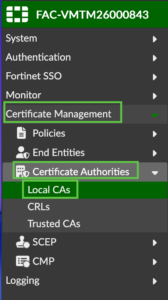
Now Create New
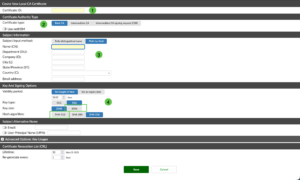
Fill out the information based on your environment
- Name of the CA server
- Ensure it is
Root CA(That is the default) - Fill in the pertinent information
- Change the key length and hashing algorithm (see below)
4096‑bit RSA and SHA‑512 provide higher theoretical security margins than 2048‑bit RSA and SHA‑256, but both 2048/SHA‑256 and 4096/SHA‑512 are currently considered secure for typical enterprise lifetimes.
4096‑bit RSA operations are significantly slower and heavier on CPU than 2048‑bit, which can impact TLS handshakes or large‑scale auth workloads on your FortiAuthenticator and clients.
Once you create the CA, you will need to export the cert
Creating the FortiGate Certificate
Next we will create a certificate for the FortiGate.
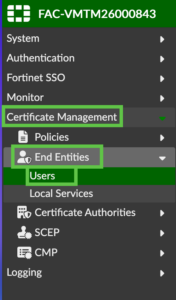
Go to Certificate Management — > End Entities — > Users
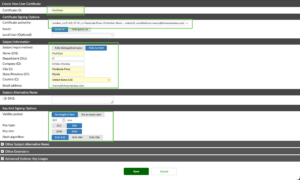
Ensure that the CA drop down shows the correct CA server.

Creating the Machine Certificate
Now we will create the machine certificate

Go to Create New and fill in the information. Ensure you add a UPN under the Other Subject Alternative Name
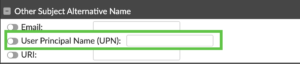
Export this certificate and key as well.
Installing the Certificates on the FortiGate
Installing on the FortiGate
There are two certificates you need to install on the FortiGate; the Local Certificate (in my example MonkeyGate) and the CA certificate.
Local Certificate
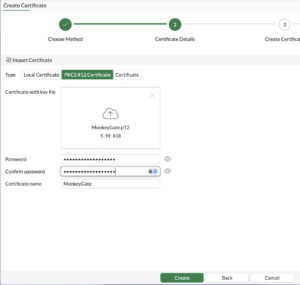
Installing the CA as a remote CA certificate
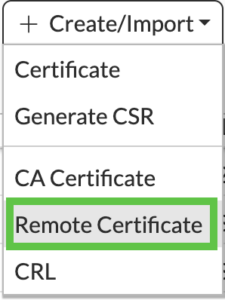
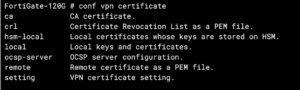
I recommend you change the name of the certificate by running the following command
config vpn certificate ca
rename %current-name% to %new-name%
end
You can do the same for the Local, CA, and Remote.
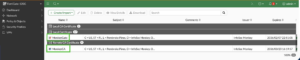
Once completed, you should have 2 certificates, One under Remote CA Certificates and the other under Local Certificate.
Peers and Peer-Groups
We are now going to configure Peers and Peer-Groups.
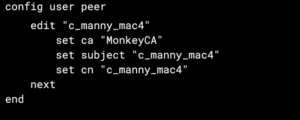
You want to make sure you set ca to the CA certificate you imported.
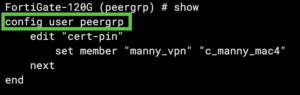
You will need a peergrp even if you only have 1 user because the VPN config will only use a peeergrp.
config user peergrp
edit "cert-pin"
set member "manny_vpn" "c_manny_mac4"
next
end
Configure VPN
In your operational remote access VPN , make the following changes. If you need to set up the remote access VPN, see this article. Although it is for SAML, I walk you through the configuration.
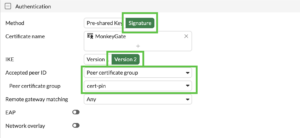
You want to make sure you use the Certificate Name of the Certificate you imported above. On Accepted Peer ID choose Peer Certificate group
Installing Certificate on macOS
With exported certificates you will need to import the certificates on the macOS device as well as any device you might have.
Copy the files to the machine in question. If you want to make the certificates non-exportable, which I highly recommend especially with the use case described, import the certificate from the command line.
security import /path/to/cert.p12 -k ~/Library/Keychains/login.keychain -x
Alternatively, you can import the certificate by double-clicking the file while on the macOS device.
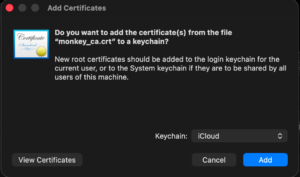
Installing Certificate on Windows
You can either launch MMC from the Windows device, or you can double click on the certificate file itself. If the certificate is not installed, it will show the Install Certificate button on the bottom.
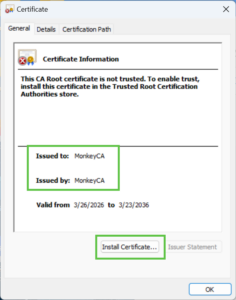
When you install the various certificates, you will need to put the CA certificate in the Trusted Root Certificate Authorities store.
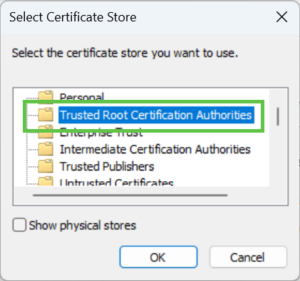
The FortiGate certificate and the device certificate you be installed in the Personal store.
FortiClient Setup – Windows
On you FortiClient VPN either create a new connection or modify the existing,
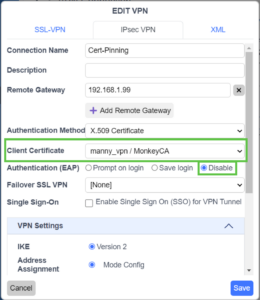
Under the Authentication Method choose X.509 Certificate
Under Client Certificate choose your user certificate.
Authentication EAP in this configuration should be set to Disable
FortiClient Setup – macOS
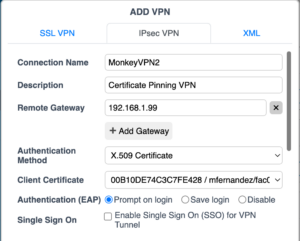
On macOS, when you attempt the first connection using the certificates, it will prompt you for the administrative password.
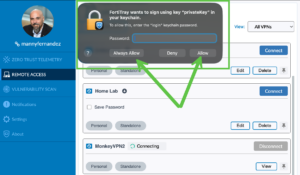
You can choose Always Allow or Allow
In macOS, choosing Always Allow grants the app permanent access to a certificate in your keychain, suppressing future pop-ups until the certificate expires or is revoked. Selecting Allow grants temporary access, meaning the prompt will reappear, often on every app launch or network reconnection, which can become frequent with VPNs.
Next I will integrate LDAP as an additional authentication using EAP since X-Auth is deprecated when using IKE v2
Hope this helps.
Recent posts
-

-

DNS is one of those technologies that quietly underpins... Full Story
-

BGP issues on FortiGate firewalls usually trace back to... Full Story
-

Every time your laptop talks to your router, a... Full Story
-

If you've spent any time configuring NAT on a... Full Story
-

If you have spent any time configuring firewall policies... Full Story
-

High availability on FortiGate is one of those features... Full Story
-

If you've configured SD-WAN on a FortiGate, you've almost... Full Story
-

FortiLink is the management protocol that turns a FortiSwitch... Full Story
-

FortiSwitches are pretty rock solid from Mean Time Between... Full Story
-

This is a quicky tip. Have you ever gone... Full Story
-

DNS is one of those quiet pieces of internet... Full Story
-

This article is an updated version of the previous... Full Story
-

You will add ns2 as a secondary (slave) BIND9... Full Story
-

In the process of deploying my lab, I needed... Full Story
-

RFC 8805, used to be known as Self-Correcting IP... Full Story
-

Years back, I wrote an article about certificate pinning. ... Full Story
-

FortiGates have the ability to send alerts to Microsoft... Full Story
-

In this post, I am going to walk through... Full Story
-

Troubleshooting VoIP on a FortiGate can feel like trying... Full Story
-

Prior to FortiOS 7.0, there were three commands to... Full Story
-

In this post, I am going to go over... Full Story
-

What we are going to do: We are going... Full Story
-

Choosing between FGCP (FortiGate Clustering Protocol) and FGSP (FortiGate... Full Story
-

Creating a VLAN on macOS (The "Pro" Move) A... Full Story
-

This blog post explores the logic behind how macOS... Full Story
-

Pretty Fly for a Wi-Fi Tell My Wi-Fi Love... Full Story
-

Part of my daily gig is creating BoMs (Bill-of-Materials)... Full Story
-

ICMP introduces several security risks, but careful filtering, rate... Full Story
-

The command diag debug application dhcps -1 enables full... Full Story
-

In the world of FortiOS, execute tac report is... Full Story
-

LLDP; What is it The Link Layer Discovery Protocol... Full Story
-

What it actually does When you run diagnose fdsm... Full Story
-

Monkey Bites are bite-sized, high-impact security insights designed for... Full Story
-

I have run macOS in macOS with Parallels but... Full Story
-

Don't be confused with my other FortiNAC posts where... Full Story
-

This is the third session in a multi-part article... Full Story
-

Today I was configuring key-based authentication on a FortiGate... Full Story
-

Netcat, often called the "Swiss Army knife" of networking,... Full Story
-

At its core, IEEE 802.1X is a network layer... Full Story
-

In case you did not see the previous FortiNAC... Full Story
-

This is our 5th session where we are going... Full Story
-

Now that we have Wireshark installed and somewhat configured,... Full Story
-

The Philosophy of Packet Analysis Troubleshooting isn't about looking... Full Story
-

For those that may not know, Fortinet has a... Full Story
-

Executive Summary Objective: Deploy logcheck on a Debian or... Full Story
-

Ettercap in 2026: ARP Poisoning, DNS Spoofing, and Content... Full Story