
If you've spent any time configuring user authentication on... Full Story
By Manny Fernandez
March 23, 2026
FortiGate WiFi Guest Portal using FortiAuthenticator
What we are going to do: We are going to configure a User, Group, and Guest Portal on the FortiAuthenticator and then Configure an SSID, RADIUS server and group, and firewall policies on the FortiGate.
Deploying a guest portal using FortiAuthenticator (FAC) as the external captive portal for FortiGate (FGT) and FortiAPs is an industry-standard way to provide secure, trackable, and professional guest Wi-Fi.
This guide outlines the three-phase configuration required for a functional “External Captive Portal” setup.
FortiAuthenticator (The Portal & RADIUS Side)
The FAC acts as the web server for the portal and the RADIUS server to validate users.
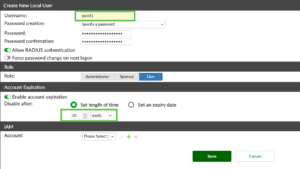
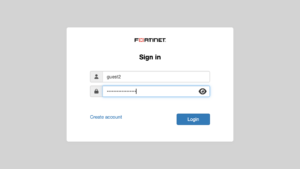
Create a Local User
* Go to Authentication > User Management > Local User.
* Create a new user (e.g., guest1).
* (Optional) Set an Account expiry if you want guest accounts to self-delete after a set time.
Create a Guest User Group
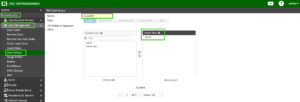
* Go to Authentication > User Management > User Groups.
* Create a new group (e.g., Guest_Users) with the type Local.
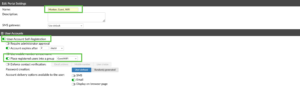
Configure the Guest Portal
* Go to Authentication > Guest Portals > Portals.
* Select New and name it Guest_Wifi_Portal. (or something similar)
* Registration: Enable “User self-registration” if you want guests to sign up themselves. Ensure “Place required users into a group” is set to your GuestWiFi group.
* Customization: Use the Theme and Layout tabs to add your company logo and “Terms of Service.”
Register FortiGate as a RADIUS Client
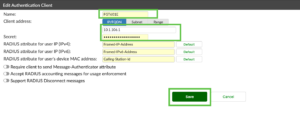
* Go to Authentication > RADIUS Service > Clients.
* Click Create New.
* Name: %name%
* IP Address: The IP of the FortiGate (specifically the interface facing the FAC).
* Secret: Create a strong shared secret (you will need this for the FGT side).
Create a RADIUS Policy
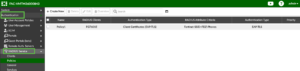
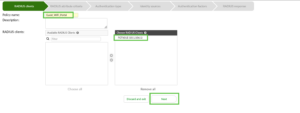
* Go to Authentication > RADIUS Service > Policies.
* Click Create New.
* RADIUS Clients: Select the FortiGate client created in above.
* Authentication Type: Select Password/OTP (or MAC-based if doing MAB).
* Identity Source: Select the %group% group.
Create an Access Point
Not to be confused with Wireless Access Point, Access Point here defines the specific network devices (like
FortiGates or FortiAPs) that redirect users to a captive portal. They act as an identification mechanism, associating incoming authentication requests with specific portal policies based on IP address, subnet, or hostname.
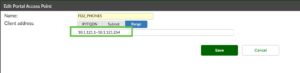
* Go to Authentication > Portals > Access Points.
* Click Create New.
* IP/Name: Name it and create a range of IPs covering the SSID subnets.
Create Portal Policy
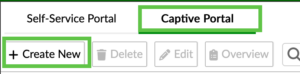
* Go to Authentication > Portals > Policies > Captive Portal.
* Click Create New.
* IP/Name: Name it and choose the Portal you created from the drop down next to Portal:
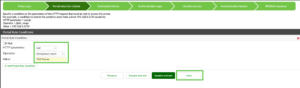
* Change HTTP parameter to ssid .
* Change Operator: to [string]exact_match
* Under Value: add the SSID from your FortiGate firewall FDZ-Phones then Next.
* Under Access Points: add your Access Point (in my case FDZ_Phones).
* Hit Next
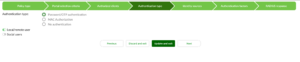
* Hit Next
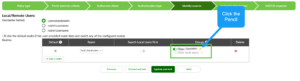
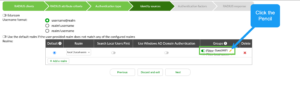
* Go to Groups tab and tick the Filter button.
* Click on the pencil and choose your group GuestWiFi .
* Click Next until you are done.
FortiGate (The Gateway Side)
The FortiGate manages the wireless traffic and redirects users to the FAC.
Add FortiAuthenticator as a RADIUS Server
* Go to User & Authentication > RADIUS Servers.
* Click Create New.
* IP/Name: IP of your FortiAuthenticator.
* Secret: Must match the secret set in FAC Phase 1, Step 3.
* Click Test Connectivity to ensure they can talk.
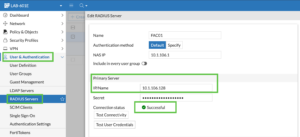
Create a User Group on FortiGate
* Go to User & Authentication > User Groups.
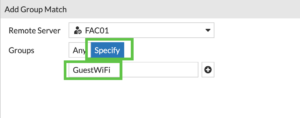
* Create a group (e.g., FAC_Guest_Group).
* Add the RADIUS server you just created to the Remote Groups section.
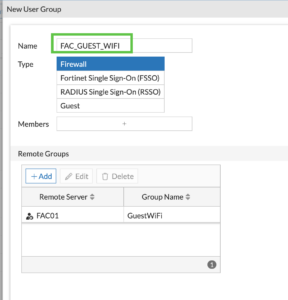
Configure the Guest SSID
* Go to WiFi and Switch Controller > SSIDs.
* Click Create New > SSID.
* Address: Set a subnet (e.g., 10.10.10.1/24) and enable DHCP.
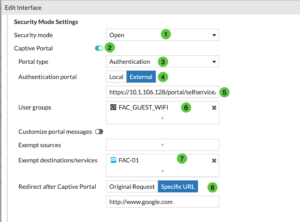
* Security Mode: Select Captive Portal.
* Portal Type: Select External.
* URL: Enter the FAC portal URL (found in FAC Portal settings, e.g., https://<FAC-IP>/portal/).
* User Groups: Select your FAC_Guest_Group.
Walled Garden (Exemptions)
In the SSID settings, look for Exempt Destinations/Services. You must add the IP of the FortiAuthenticator here so guests can reach the portal page before they are authenticated.

FortiAP & Policy (The Access Side)
The FortiGate manages the wireless traffic and redirects users to the FAC.
- Should be Open as you want them to connect to the portal.
- Enable Captive Portal
- Portal Type – This can be authentication,
Assign the SSID to the AP (If Applicable)
* Go to WiFi and Switch Controller > Managed FortiAPs.
* Ensure your AP is authorized.
* Edit the FortiAP Profile being used by your AP and ensure the new Guest SSID is selected under the Radio frequencies (Manual or Tunnel mode).
Create the Firewall Policy
You need a policy to allow traffic from the Guest SSID to the Internet after they log in.
* Go to Policy & Objects > Firewall Policy.
* Incoming Interface: Guest SSID.
* Outgoing Interface: Your WAN interface.
* Source: all (and select the FAC_GUEST_WIFI group to enforce authentication).
* Destination: all.
* Service: DNS, HTTP, HTTPS.
* NAT: Enabled. (If you are using Central SNAT configure your NAT there)

You want to ensure that you allow HTTPS from the SSID to the FortiAuthenticator and DNS to whatever your DHCP is handing out. Additionally, you want to have a policy that permits Internet access once authenticated. For Internet access, you want to add the RADIUS user group to the policy. For the HTTPS policy, the user will not be authenticated yet so it will need to be all or the Subnet address object for the SSID.
Important Troubleshooting Tips
* DNS is Key: Guests must be able to resolve the FQDN of the FortiAuthenticator. If using a hostname for the portal, ensure the Guest DHCP provides a DNS server that can resolve it.
* HTTPS Certificates: If the FAC uses a self-signed certificate, guests will see a “Privacy Warning.” For a production environment, install a public SSL certificate (like Let’s Encrypt) on the FortiAuthenticator.
* RADIUS Accounting: Enable RADIUS accounting on the FortiGate SSID and FAC to ensure session timeouts work correctly.
Recent posts
-

-

DNS is one of those technologies that quietly underpins... Full Story
-

BGP issues on FortiGate firewalls usually trace back to... Full Story
-

Every time your laptop talks to your router, a... Full Story
-

If you've spent any time configuring NAT on a... Full Story
-

If you have spent any time configuring firewall policies... Full Story
-

High availability on FortiGate is one of those features... Full Story
-

If you've configured SD-WAN on a FortiGate, you've almost... Full Story
-

FortiLink is the management protocol that turns a FortiSwitch... Full Story
-

FortiSwitches are pretty rock solid from Mean Time Between... Full Story
-

This is a quicky tip. Have you ever gone... Full Story
-

DNS is one of those quiet pieces of internet... Full Story
-

This article is an updated version of the previous... Full Story
-

You will add ns2 as a secondary (slave) BIND9... Full Story
-

In the process of deploying my lab, I needed... Full Story
-

RFC 8805, used to be known as Self-Correcting IP... Full Story
-

Years back, I wrote an article about certificate pinning. ... Full Story
-

FortiGates have the ability to send alerts to Microsoft... Full Story
-

In this post, I am going to walk through... Full Story
-

Troubleshooting VoIP on a FortiGate can feel like trying... Full Story
-

Prior to FortiOS 7.0, there were three commands to... Full Story
-

In this post, I am going to go over... Full Story
-

What we are going to do: We are going... Full Story
-

Choosing between FGCP (FortiGate Clustering Protocol) and FGSP (FortiGate... Full Story
-

Creating a VLAN on macOS (The "Pro" Move) A... Full Story
-

This blog post explores the logic behind how macOS... Full Story
-

Pretty Fly for a Wi-Fi Tell My Wi-Fi Love... Full Story
-

Part of my daily gig is creating BoMs (Bill-of-Materials)... Full Story
-

ICMP introduces several security risks, but careful filtering, rate... Full Story
-

The command diag debug application dhcps -1 enables full... Full Story
-

In the world of FortiOS, execute tac report is... Full Story
-

LLDP; What is it The Link Layer Discovery Protocol... Full Story
-

What it actually does When you run diagnose fdsm... Full Story
-

Monkey Bites are bite-sized, high-impact security insights designed for... Full Story
-

I have run macOS in macOS with Parallels but... Full Story
-

Don't be confused with my other FortiNAC posts where... Full Story
-

This is the third session in a multi-part article... Full Story
-

Today I was configuring key-based authentication on a FortiGate... Full Story
-

Netcat, often called the "Swiss Army knife" of networking,... Full Story
-

At its core, IEEE 802.1X is a network layer... Full Story
-

In case you did not see the previous FortiNAC... Full Story
-

This is our 5th session where we are going... Full Story
-

Now that we have Wireshark installed and somewhat configured,... Full Story
-

The Philosophy of Packet Analysis Troubleshooting isn't about looking... Full Story
-

For those that may not know, Fortinet has a... Full Story
-

Executive Summary Objective: Deploy logcheck on a Debian or... Full Story
-

Ettercap in 2026: ARP Poisoning, DNS Spoofing, and Content... Full Story