
If you've spent any time configuring user authentication on... Full Story
By Manny Fernandez
November 5, 2026

SonicWall GMS Vulnerability CVE-2026-109593: Unpatched, End of Life, and What to Do Now
INFOSECMONKEY | CVE BRIEF | NO FLUFF. JUST THE CONFIG THAT WORKS.
Executive Summary
On November 3, 2026, SonicWall published advisory SNWLID-2026-0019 for two new flaws in its Global Management System (GMS), the console many shops still use to push policy to fleets of SonicWall firewalls. The headline SonicWall GMS vulnerability is CVE-2026-109593 (CVSS 9.1): an unauthenticated attacker with network access can read internal GMS files. The second, CVE-2026-109594 (CVSS 6.8), is a post-authentication SQL injection that can expose or alter the GMS database.
Here is the part that matters: there will be no patch. GMS reached end of support on September 30, 2026, and SonicWall’s only remedy is migrating to Network Security Manager (NSM). If you still run GMS 9.5.2 or earlier, every instance you own is vulnerable today and will stay that way.
| Item | Detail |
|---|---|
| Advisory | SNWLID-2026-0019, published November 3, 2026 |
| CVE-2026-109593 | Unauthenticated internal file read, CVSS 9.1, AV:N/AC:L/PR:N/UI:N |
| CVE-2026-109594 | Authenticated (high privilege) SQL injection, CVSS 6.8 |
| Affected | GMS 9.5.2 and earlier (Virtual Appliance and Windows) |
| Fix | None. Product is EOL. Vendor says migrate to NSM |
| Exploited? | No public reports or PoC as of November 5, 2026; not in CISA KEV |
| Credit | Pentest-Tools.com researchers |
Objective: find every GMS instance you have, shrink its reachable surface to the few hosts that truly need it, rotate what it may have leaked, and get a dated migration plan on the books.
Target audience: firewall and network admins, MSPs managing SonicWall fleets, and SecOps teams who own vulnerability response for management-plane systems.
Why an EOL Management Console Is a Big Deal
A management console is a vault of keys. GMS knows how to log in to, configure, and pull logs from every firewall it manages. SonicWall has not said which files CVE-2026-109593 can reach, and the CVE record classifies the root cause as a component that fails open rather than failing securely. Either way, a pre-auth file read on the box that holds your fleet’s management data is the kind of bug that turns one compromised server into a compromised perimeter.
The two flaws have not been published as a chain, but the math is easy: if the file read exposes an admin credential, the high-privilege requirement on CVE-2026-109594 stops being a barrier. Do not let the 6.8 score slow you down.
Context also matters. SonicWall products have been a steady target in 2026, with multiple SMA1000 zero-days exploited this year, including October’s CVSS 10.0 CVE-2026-102255. GMS itself got a six-CVE patch set on August 11, 2026, including two critical unauthenticated RCEs (CVE-2026-66145 and CVE-2026-66147) fixed in 9.5.2. That was the last fix train. Anything found from here on is permanent.
Prerequisites and Architecture
Assumed knowledge: basic Nmap usage, FortiOS CLI for address objects and firewall policy, and admin access to your GMS console.
Lab and example addressing (swap in your own values):
| Component | Example value | Role |
|---|---|---|
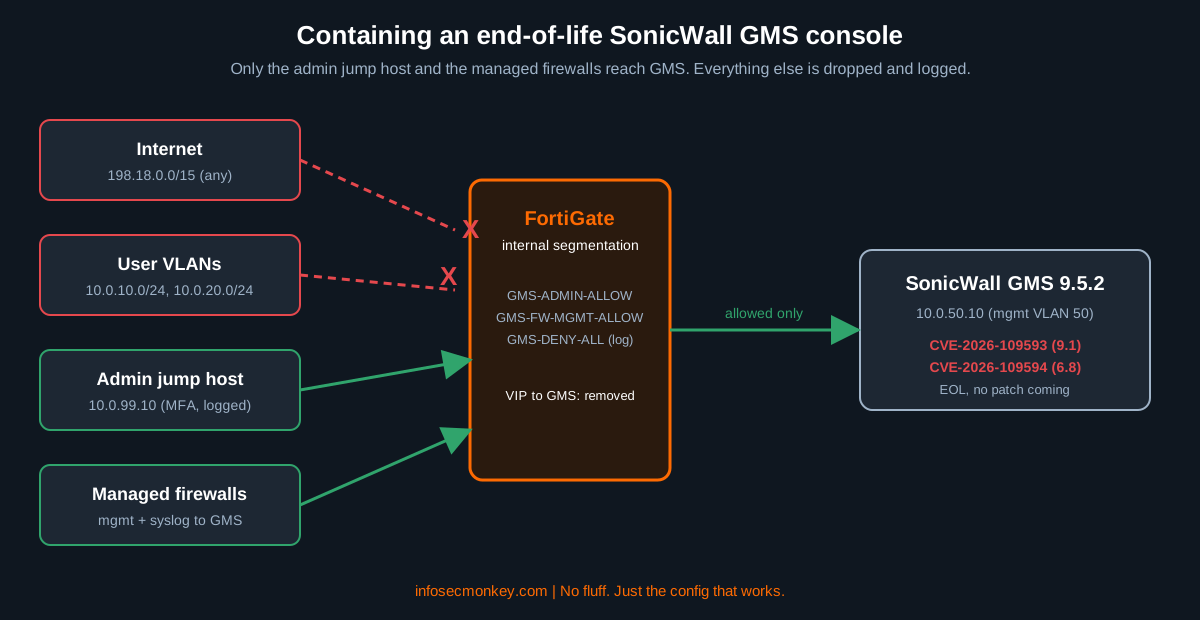
| SonicWall GMS 9.5.2 | 10.0.50.10 (VLAN 50, port mgmt) |
Vulnerable console being contained |
| Admin jump host | 10.0.99.10 | Only workstation allowed to the GMS UI |
| Managed SonicWall firewalls | 10.0.200.0/24 (mgmt IPs) | Need to keep reporting to GMS until cutover |
| User VLANs | 10.0.10.0/24, 10.0.20.0/24 | Must not reach GMS |
| Public / transit | 198.18.10.10 (old VIP to GMS) | Must be removed |
| FortiGate | Internal segmentation firewall | Enforces the allow list and logs drops |
| NSM 3.0 On-Prem or SaaS | Target platform | Migration destination |
Figure 1: Containment layout for an end-of-life GMS server
Step-by-Step: Containing the SonicWall GMS Vulnerability
Step 1: Inventory every GMS instance
Goal: know exactly how many GMS servers exist, including the forgotten DR box and the one an MSP stood up years ago.
Action: check your CMDB, then sweep management VLANs for web consoles and confirm each one in the UI. GMS shows its version under Help, then About.
# Sweep management ranges for web consoles, grab titles and certs
nmap -Pn -p 80,443 --open -sV --script http-title,ssl-cert \
  10.0.50.0/24 10.0.99.0/24 -oA gms-inventory

# Pull just the hosts whose title or cert mentions GMS
grep -iE "gms|global management" gms-inventory.nmap
GUI verification: log in to each hit and record hostname, version, and build. Anything at 9.5.2 or below is in scope, which today means every GMS on Earth.
Step 2: Kill internet exposure first
Goal: confirm no GMS interface is reachable from the internet. CVE-2026-109593 needs only network access, so a public listener is the worst case.
Action: look for any VIP or port forward that lands on the GMS IP, delete it, then test from outside.
# Find any VIP pointing at the GMS server
show firewall vip | grep -f 10.0.50.10

# Remove it (and the policy that used it first)
config firewall vip
    delete "VIP-GMS-HTTPS"
end

# From an outside host or your external scanner
nmap -Pn -p 80,443 198.18.10.10
GUI verification: Policy and Objects, then Virtual IPs, should show no object referencing 10.0.50.10. The outside Nmap result should read filtered or closed.
Step 3: Build an allow list on the FortiGate
Goal: only the admin jump host and the managed firewalls can reach GMS. Everything else is dropped and logged so you can see who is knocking.
Action: create objects, then three policies in this order. Use the services your GMS actually needs for firewall management and logging; check current sessions before you lock it down.
config firewall address
    edit "GMS-SERVER"
        set subnet 10.0.50.10 255.255.255.255
    next
    edit "ADMIN-JUMP"
        set subnet 10.0.99.10 255.255.255.255
    next
    edit "SNWL-MANAGED-FW"
        set subnet 10.0.200.0 255.255.255.0
    next
end

config firewall policy
    edit 0
        set name "GMS-ADMIN-ALLOW"
        set srcintf "admin"
        set dstintf "mgmt"
        set srcaddr "ADMIN-JUMP"
        set dstaddr "GMS-SERVER"
        set action accept
        set schedule "always"
        set service "HTTPS" "SSH"
        set logtraffic all
    next
    edit 0
        set name "GMS-FW-MGMT-ALLOW"
        set srcintf "fw-mgmt"
        set dstintf "mgmt"
        set srcaddr "SNWL-MANAGED-FW"
        set dstaddr "GMS-SERVER"
        set action accept
        set schedule "always"
        set service "HTTPS" "SYSLOG"
        set logtraffic all
    next
    edit 0
        set name "GMS-DENY-ALL"
        set srcintf "any"
        set dstintf "mgmt"
        set srcaddr "all"
        set dstaddr "GMS-SERVER"
        set action deny
        set schedule "always"
        set service "ALL"
        set logtraffic all
    next
end
GUI verification: in Policy and Objects, then Firewall Policy, the two allow rules must sit above GMS-DENY-ALL. If a broad rule higher up already permits users into the management VLAN, move these three above it.
Step 4: Audit accounts and rotate secrets
Goal: limit what CVE-2026-109594 can do and assume anything GMS stored may already be exposed if it was ever reachable from untrusted networks.
Action:
- Remove unused GMS admin and domain accounts; require long, unique passwords on the rest.
- Rotate the credentials and shared secrets GMS uses to manage each firewall.
- Rotate any directory (LDAP/RADIUS) bind accounts and SNMP communities GMS knows about.
- Review managed firewall configs for changes nobody can explain.
GUI verification: the GMS user list should match a short, named roster you can defend in an audit.
Step 5: Watch the box until it is gone
Goal: catch probing early. No PoC exists yet, but the SMA1000 timeline shows how fast that changes for SonicWall gear.
Action: forward GMS web server logs to your SIEM, alert on unusual file paths and new admin sessions, and alert on any hit against GMS-DENY-ALL.
# FortiGate: show recent denies toward the GMS server
execute log filter category 0
execute log filter field dstip 10.0.50.10
execute log filter field action deny
execute log display
A clean log review does not prove the server is clean, especially if logging was thin before November 3.
Step 6: Migrate to NSM on a fixed date
Goal: retire GMS. This is the only vendor-endorsed fix.
Action: SonicWall’s transition guide uses a GMS Transition Snapshot that NSM On-Prem imports:
- In GMS (super admin), open GMS Transition and click Generate.
- Download the snapshot from the Available Transition Snapshot list.
- In NSM, go to System, then Settings, then GMS Transition, and click Upload. Enter the GMS super admin credentials and the GMS primary console IP, then pick the file.
- Click Import and watch the GMS Transition Status section.
Read the requirements and limitations before you start: the workflow moves all managed firewalls at once, and historical reports and logs stay in GMS (NSM adds GMS as an external analytics agent). Per the transition FAQ, configuration does not carry over to NSM SaaS, and only firewalls with active support are eligible.
GUI verification: every firewall shows as managed in NSM, and GMS no longer pushes changes. Then power GMS off and set a decommission date for the disk.
Verification and Validation
Run these from each vantage point. The expected result is in the comment.
# From a user VLAN host (expect: 443/tcp filtered)
nmap -Pn -p 443 10.0.50.10

# From the admin jump host (expect: 443/tcp open)
nmap -Pn -p 443 10.0.50.10

# From the internet (expect: filtered or closed)
nmap -Pn -p 80,443 198.18.10.10

# On the FortiGate: only jump host and managed firewall sessions should appear
diagnose sys session filter clear
diagnose sys session filter dst 10.0.50.10
diagnose sys session list | grep -E "src=|policy_id"
Success looks like: user VLAN and internet scans return filtered, the jump host sees open, and every session to 10.0.50.10 maps to policy GMS-ADMIN-ALLOW or GMS-FW-MGMT-ALLOW.
Troubleshooting and Gotchas
Managed firewalls go gray in GMS after the lockdown
You blocked a flow GMS still needs. Check deny logs for source IPs in the firewall management range and the ports they hit, then add those services to GMS-FW-MGMT-ALLOW rather than loosening the deny.
diagnose debug flow filter addr 10.0.50.10
diagnose debug flow show function-name enable
diagnose debug flow trace start 20
diagnose debug enable
# ...reproduce, then:
diagnose debug disable
NSM snapshot upload fails
SonicWall’s upload procedure requires the GMS server to be reachable from NSM. Add the NSM address to GMS-ADMIN-ALLOW for the migration window only, then remove it.
Some firewalls did not show up in NSM
Firewalls without active support are not eligible for transition, and unused GMS node licenses do not move. Check support status per serial number before cutover day, not during it.
Bottom Line
CVE-2026-109593 is a critical, unauthenticated SonicWall GMS vulnerability that will never be patched. Treat GMS like any other unsupported system: no internet exposure, a tight allow list, rotated secrets, monitoring, and a cutover date with a name next to it. If you are already re-platforming management, now is the time to evaluate whatever central manager fits your fleet, whether that is NSM or something else entirely.
Sources
- SonicWall PSIRT advisory SNWLID-2026-0019 (CVE-2026-109593, CVE-2026-109594)
- BleepingComputer: SonicWall warns of unpatched flaws in end-of-life GMS software
- SOCRadar: SonicWall GMS Flaws Unpatched After End of Life
- IT-Connect: SonicWall GMS, Two Flaws Including a Critical One Will Never Be Fixed
- VulDB entry for CVE-2026-109593
- OffSeq Radar entry for CVE-2026-109594
- SonicWall GMS EOL Announcement
- SonicWall GMS End of Life and NSM Transition FAQ
- SonicWall GMS 9.5 Migration Guide: Creating the GMS Snapshot
- SonicWall GMS 9.5 Migration Guide: Uploading Snapshot to NSM
- SonicWall GMS 9.5 Migration Guide: Requirements and Limitations
- SonicWall Product Notice: GMS affected by multiple vulnerabilities (August 2026)
Recent posts
-

-

DNS is one of those technologies that quietly underpins... Full Story
-

BGP issues on FortiGate firewalls usually trace back to... Full Story
-

Every time your laptop talks to your router, a... Full Story
-

If you've spent any time configuring NAT on a... Full Story
-

If you have spent any time configuring firewall policies... Full Story
-

High availability on FortiGate is one of those features... Full Story
-

If you've configured SD-WAN on a FortiGate, you've almost... Full Story
-

FortiLink is the management protocol that turns a FortiSwitch... Full Story
-

FortiSwitches are pretty rock solid from Mean Time Between... Full Story
-

This is a quicky tip. Have you ever gone... Full Story
-

DNS is one of those quiet pieces of internet... Full Story
-

This article is an updated version of the previous... Full Story
-

You will add ns2 as a secondary (slave) BIND9... Full Story
-

In the process of deploying my lab, I needed... Full Story
-

RFC 8805, used to be known as Self-Correcting IP... Full Story
-

Years back, I wrote an article about certificate pinning. ... Full Story
-

FortiGates have the ability to send alerts to Microsoft... Full Story
-

In this post, I am going to walk through... Full Story
-

Troubleshooting VoIP on a FortiGate can feel like trying... Full Story
-

Prior to FortiOS 7.0, there were three commands to... Full Story
-

In this post, I am going to go over... Full Story
-

What we are going to do: We are going... Full Story
-

Choosing between FGCP (FortiGate Clustering Protocol) and FGSP (FortiGate... Full Story
-

Creating a VLAN on macOS (The "Pro" Move) A... Full Story
-

This blog post explores the logic behind how macOS... Full Story
-

Pretty Fly for a Wi-Fi Tell My Wi-Fi Love... Full Story
-

Part of my daily gig is creating BoMs (Bill-of-Materials)... Full Story
-

ICMP introduces several security risks, but careful filtering, rate... Full Story
-

The command diag debug application dhcps -1 enables full... Full Story
-

In the world of FortiOS, execute tac report is... Full Story
-

LLDP; What is it The Link Layer Discovery Protocol... Full Story
-

What it actually does When you run diagnose fdsm... Full Story
-

Monkey Bites are bite-sized, high-impact security insights designed for... Full Story
-

I have run macOS in macOS with Parallels but... Full Story
-

Don't be confused with my other FortiNAC posts where... Full Story
-

This is the third session in a multi-part article... Full Story
-

Today I was configuring key-based authentication on a FortiGate... Full Story
-

Netcat, often called the "Swiss Army knife" of networking,... Full Story
-

At its core, IEEE 802.1X is a network layer... Full Story
-

In case you did not see the previous FortiNAC... Full Story
-

This is our 5th session where we are going... Full Story
-

Now that we have Wireshark installed and somewhat configured,... Full Story
-

The Philosophy of Packet Analysis Troubleshooting isn't about looking... Full Story
-

INFOSECMONKEY | CVE BRIEF | NO FLUFF. JUST THE... Full Story
-

APT CVE-2026-109518: How a Download Retry Lets an Attacker... Full Story
-

Managing Windows Firewall from the Command Line: netsh, PowerShell... Full Story