
If you've spent any time configuring user authentication on... Full Story
By Manny Fernandez
November 5, 2026
APT CVE-2026-109518: How a Download Retry Lets an Attacker Swap a Verified Package for Root
APT CVE-2026-109518: How a Download Retry Lets an Attacker Swap a Verified Package for Root
No fluff. Just the config that works.
Executive Summary
APT CVE-2026-109518 is a verification bypass in APT, the package manager behind apt, apt-get, aptitude and the graphical software tools on Debian, Ubuntu and their derivatives. An attacker who can tamper with plain HTTP traffic between a host and its package mirror can get APT to install a package that never passed signature verification. Package scripts run as root, so the end state is root code execution.
Fixes shipped on November 4, 2026 from the APT developers, Debian (DSA-6607-1, DLA-4880-1) and Canonical (USN-8996-1). Canonical scores it CVSS 4.0 7.7 (High); the APT maintainers call it critical. As of November 5, 2026 there is no reported exploitation, no public proof of concept, and it is not in the CISA KEV catalog.
Objective: find every exposed Debian and Ubuntu host, patch APT without opening the very window you are trying to close, move mirrors to HTTPS, and lock down where your Linux servers are allowed to pull packages from.
Target audience: Linux admins, DevOps and platform teams running CI runners or Docker builds, and network engineers who own the egress path to package mirrors.
Prerequisites and Architecture
Assumed knowledge: basic APT usage, sudo, reading /etc/apt/sources.list, and (for the network section) FortiGate firewall policy CLI.
Lab requirements: any Debian 12/13 or Ubuntu 22.04/24.04/26.04 host. The optional network section uses a FortiGate with the Linux server LAN on 10.0.20.0/24 and the WAN on the 198.18.0.0/15 transit range.
| Component | Role in this flaw |
|---|---|
| APT HTTP method | Downloads .deb files over plain HTTP, resumes partial downloads, follows redirects |
| Release / InRelease file | Signed index that carries the expected hash of every package |
| Acquire::Retries | How many times APT retries a failed download (default 3 since APT 2.3.2) |
| dpkg | Installs the package as root and runs its preinst and postinst scripts |
| Mirror, proxy or cache | Anything on the HTTP path that could answer APT’s requests |
Why plain HTTP was supposed to be fine
APT does not trust the connection, it trusts signatures. The repository signs its Release file, the Release file lists the hash of every package, and APT refuses any download whose hash does not match. That design is why most Debian and Ubuntu mirrors still serve packages over port 80. CVE-2026-109518 does not break the signature or the hash check. Both still run and both still pass. The problem is that the file dpkg installs is no longer the file APT checked.
How the swap works
Figure 1: APT CVE-2026-109518 attack flow: redirect merge, forced retry, swap after verify, dpkg runs payload as root
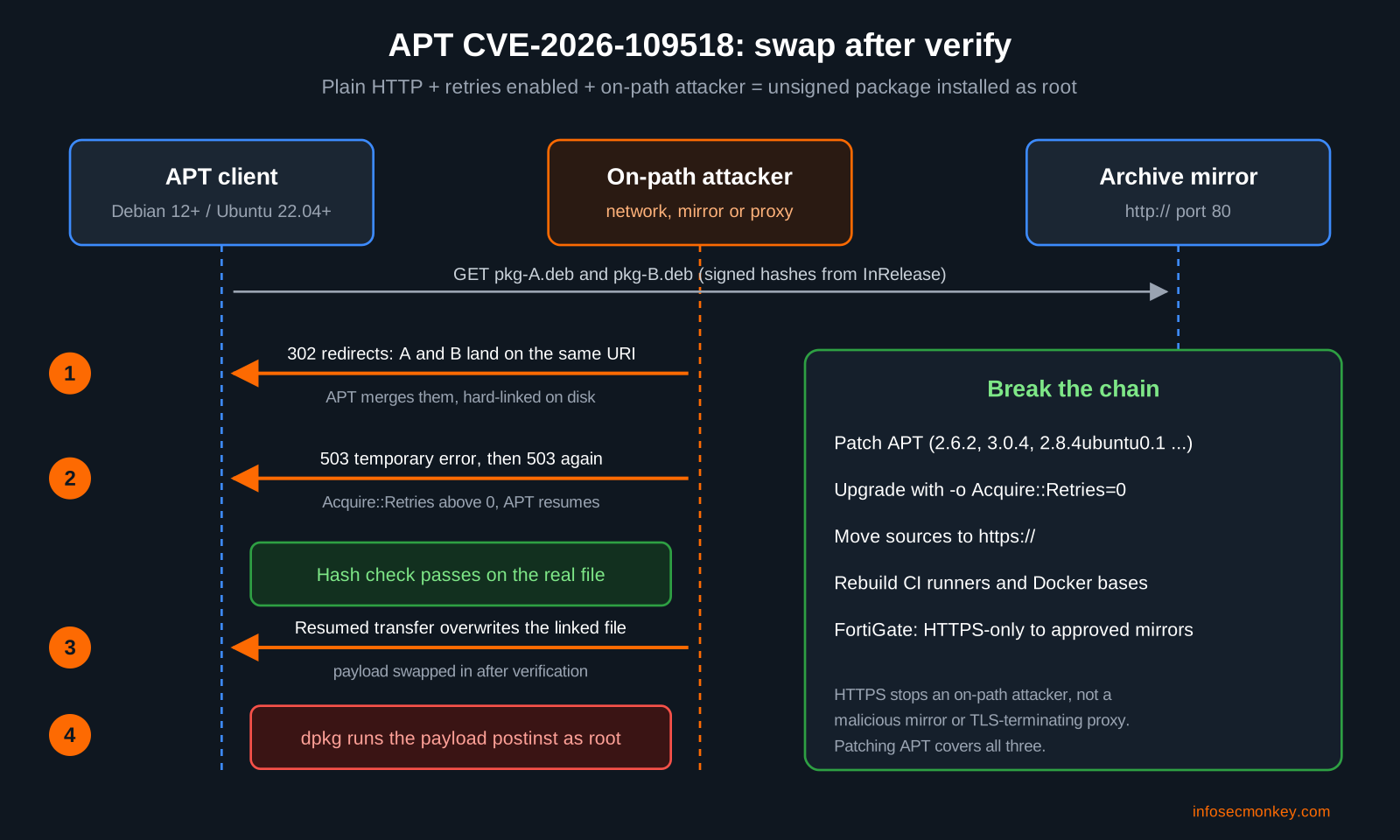
The Debian and Ubuntu advisories describe three moves, and researcher Max Justicz (who also found the 2019 APT redirect bug, CVE-2019-3462) chained them together:
- Merge two downloads. The attacker answers two different package requests with HTTP redirects that land on the same URI. APT treats them as one download and links them on disk with a hard link.
- Force a retry. The attacker replies with ordinary temporary server errors. APT, configured to retry, resumes the transfer instead of starting over.
- Swap after the check. APT mishandles the hard link during the resume. The file passes its hash check, then the resumed transfer overwrites it with the attacker’s payload. dpkg installs the payload and runs its postinst as root.
This is a classic time-of-check to time-of-use bug. Debian’s update also fixes several unrelated out-of-bounds access issues in APT.
Who is actually exposed
All three conditions must line up:
- On-path HTTP control. A compromised or flat network, a malicious or compromised mirror, or a proxy or package cache that can rewrite responses.
- Retries enabled. Any non-zero
Acquire::Retries. That is the default on Debian 12 and later and Ubuntu 22.04 LTS and later. Older releases (Debian 11, Ubuntu 20.04 and earlier) default to zero, but CI scripts and Dockerfiles often raise it to ride out flaky mirrors. - A package download. Any
apt install,apt upgradeor unattended upgrade that fetches a .deb.
Not affected: sources served over HTTPS (against an on-path attacker), FTP sources, and snap packages. HTTPS does not save you from a malicious mirror or a TLS-terminating proxy, so patching APT is still required.
Fixed versions
| Release | Fixed APT version | Advisory |
|---|---|---|
| Debian 12 bookworm | 2.6.2 | DLA-4880-1 |
| Debian 13 trixie | 3.0.4 | DSA-6607-1 |
| Debian unstable sid | 3.3.6 | Debian tracker |
| Ubuntu 26.10 | 3.3.3ubuntu0.1 | USN-8996-1 |
| Ubuntu 26.04 LTS | 3.2.1ubuntu0.1 | USN-8996-1 |
| Ubuntu 24.04 LTS | 2.8.4ubuntu0.1 | USN-8996-1 |
| Ubuntu 22.04 LTS | 2.4.15ubuntu0.1 | USN-8996-1 |
| Ubuntu 20.04 LTS | 2.0.12+esm1 (Ubuntu Pro) | USN-8996-1 |
| Ubuntu 18.04 LTS | 1.6.19+esm1 (Ubuntu Pro) | USN-8996-1 |
| Ubuntu 16.04 / 14.04 LTS | 1.2.36+esm1 / 1.0.1ubuntu2.24+esm4 (Pro Legacy) | USN-8996-1 |
Debian testing (forky) was still listed as vulnerable at 3.3.5 on the Debian tracker when this was written and picks up the fix as 3.3.6 migrates from unstable. Debian 11 bullseye is past the end of its LTS support; it is only exposed if retries were raised, and it is overdue for an upgrade anyway.
Step-by-Step: Fixing APT CVE-2026-109518
Step 1: Find out if a host is exposed
Goal: know the installed APT version, the retry setting, and whether any source still uses plain HTTP.
Action: run these three checks on each host (or push them through your config management).
# 1. Installed APT build (compare against the fixed versions table)
apt list --installed '?source-package(^apt$)'
# 2. Effective retry setting (no output means the built-in default applies)
apt-config dump | grep -i 'Acquire::Retries'
# 3. Any sources still on plain HTTP
grep -rnE 'http://' /etc/apt/sources.list /etc/apt/sources.list.d/ 2>/dev/nullVerification: a host is exposed when the APT version is below the fixed build, retries are non-zero (or unset on Debian 12+ / Ubuntu 22.04+), and at least one source is http://.
Step 2: Patch APT with retries turned off
Goal: install the fixed APT without giving an attacker the retry they need during the upgrade itself.
Action: the command that installs the fixed APT runs on the vulnerable APT. Canonical recommends turning retries off for that one run, which blocks both an on-path attacker and a malicious mirror.
# Preferred: full upgrade with retries disabled for this run only
sudo apt update && sudo apt upgrade -o Acquire::Retries=0
# If you cannot upgrade everything, target APT alone
sudo apt update && sudo apt install -o Acquire::Retries=0 --only-upgrade '?source-package(^apt$)'On Debian you can also use sudo apt-get install -o Acquire::Retries=0 --only-upgrade apt. If a flaky mirror makes the run fail, rerun it; do not raise retries.
Ubuntu’s unattended-upgrades will pick up the fix within 24 hours on most installs, but that run uses the vulnerable APT and your normal retry setting. On any host whose network path you do not fully trust, patch by hand with retries off.
Verification: rerun the version check from Step 1 and confirm the fix is listed in the package changelog.
apt list --installed '?source-package(^apt$)'
zgrep -c 'CVE-2026-109518' /usr/share/doc/apt/changelog.Debian.gzA count of 1 or more means the installed build carries the fix.
Step 3: Move your sources to HTTPS
Goal: remove the on-path attacker’s foothold for this bug and the next one like it.
Action: on Ubuntu, Canonical’s one-liner rewrites archive, security and ports URLs to HTTPS in both the classic .list and the deb822 .sources formats. It only touches official Ubuntu hosts, so check any third-party repos by hand.
sudo sed -Ei 's!http://((([a-z]+\.)?archive|security|ports)\.ubuntu\.com)!https://\1!' \
/etc/apt/sources.list /etc/apt/sources.list.d/*.list /etc/apt/sources.list.d/*.sources
sudo apt updateOn Debian, point sources at https://deb.debian.org/debian and https://deb.debian.org/debian-security. A deb822 example for trixie:
sudo tee /etc/apt/sources.list.d/debian.sources > /dev/null <<'EOF'
Types: deb
URIs: https://deb.debian.org/debian
Suites: trixie trixie-updates
Components: main
Signed-By: /usr/share/keyrings/debian-archive-keyring.gpg
Types: deb
URIs: https://deb.debian.org/debian-security
Suites: trixie-security
Components: main
Signed-By: /usr/share/keyrings/debian-archive-keyring.gpg
EOF
sudo apt updateVerification: apt update completes with no errors and every Get: line shows https://. Some community and country mirrors do not offer HTTPS; if apt update fails, switch that host to a mirror that does.
Step 4: Fix CI runners and Docker images
Goal: stop ephemeral builders from booting the old APT every time.
Action: patching a running runner does nothing if the next one boots from the old image. Rebuild runner images and container bases, and until the base images carry the fixed APT, disable retries before the first apt-get.
# Dockerfile: before any other apt-get line
RUN echo 'Acquire::Retries "0";' > /etc/apt/apt.conf.d/99-no-retries \
&& apt-get update \
&& apt-get install -y --only-upgrade apt# GitHub Actions: before any step that installs packages
- name: Disable apt retries (CVE-2026-109518)
run: echo 'Acquire::Retries "0";' | sudo tee /etc/apt/apt.conf.d/99-no-retriesRebuild with docker build --pull --no-cache so you do not reuse a cached layer that still holds the old APT, then check the APT version inside the finished image. The trade-off: with retries off, a flaky mirror fails the job instead of retrying. That is a fair price until your images are rebuilt.
Verification: docker run --rm <image> apt list --installed '?source-package(^apt$)' shows the fixed build.
Step 5: Lock down the network path with FortiGate
Goal: make sure Linux servers can only reach approved mirrors, and only over HTTPS once Step 3 is done. This is defense in depth, not a replacement for the patch.
Action: create FQDN objects for the mirrors you use, group them, allow HTTPS only, and log anything that still tries port 80.
config firewall address
edit "net-linux-servers"
set subnet 10.0.20.0 255.255.255.0
next
edit "fqdn-ubuntu-archive"
set type fqdn
set fqdn "archive.ubuntu.com"
next
edit "fqdn-ubuntu-security"
set type fqdn
set fqdn "security.ubuntu.com"
next
edit "fqdn-debian-deb"
set type fqdn
set fqdn "deb.debian.org"
next
end
config firewall addrgrp
edit "grp-apt-mirrors"
set member "fqdn-ubuntu-archive" "fqdn-ubuntu-security" "fqdn-debian-deb"
next
end
config firewall policy
edit 0
set name "linux-apt-https-only"
set srcintf "port2"
set dstintf "wan1"
set srcaddr "net-linux-servers"
set dstaddr "grp-apt-mirrors"
set action accept
set schedule "always"
set service "HTTPS"
set nat enable
set logtraffic all
next
edit 0
set name "linux-apt-http-block"
set srcintf "port2"
set dstintf "wan1"
set srcaddr "net-linux-servers"
set dstaddr "grp-apt-mirrors"
set action deny
set schedule "always"
set service "HTTP"
set logtraffic all
next
endTwo things to watch. First, if you run deep SSL inspection on this policy, the FortiGate becomes a TLS-terminating proxy on the path, which is exactly the case HTTPS cannot protect against; patch APT regardless, and consider exempting the mirror group from deep inspection. Second, an internal apt-cacher or Artifactory proxy moves the problem rather than removing it: patch every client behind it, and use HTTPS on both the client-to-cache and cache-to-upstream legs.
GUI Verification: Policy and Objects, Firewall Policy, confirm both policies sit above any broader Linux egress rule. Then Log and Report, Forward Traffic, filter on source 10.0.20.0/24 and destination port 80 to find hosts that still use HTTP sources.
Verification and Validation
Run this on each host after patching. All four lines should come back clean.
apt list --installed '?source-package(^apt$)'
zgrep -c 'CVE-2026-109518' /usr/share/doc/apt/changelog.Debian.gz
grep -rnE 'http://' /etc/apt/sources.list /etc/apt/sources.list.d/ 2>/dev/null | wc -l
sudo apt update 2>&1 | grep -c '^Err'Expected success output on an Ubuntu 24.04 host:
apt/noble-updates,noble-security,now 2.8.4ubuntu0.1 amd64 [installed]
libapt-pkg6.0t64/noble-updates,noble-security,now 2.8.4ubuntu0.1 amd64 [installed]
1
0
0That reads as: fixed build installed for every binary from the apt source package, the changelog carries the CVE fix, zero HTTP sources left, and apt update finished with no errors over HTTPS.
Troubleshooting and Gotchas
Gotcha 1: apt update fails right after switching to HTTPS
Symptom: Err: lines or certificate errors on one source after Step 3.
Diagnose:
sudo apt update 2>&1 | grep -E '^(Err|W:|E:)'Fix: the mirror does not support HTTPS. Point that source at archive.ubuntu.com, security.ubuntu.com or deb.debian.org, or a regional mirror that offers TLS. On minimal images missing CA certificates, run apt install ca-certificates (with retries off) before switching.
Gotcha 2: the version looks old but the host is patched
Symptom: apt --version shows a number that does not match the table.
Diagnose:
apt-cache policy apt
zgrep -m3 'CVE-2026-109518' /usr/share/doc/apt/changelog.Debian.gzFix: trust the package version from apt-cache policy and the changelog, not the banner. Ubuntu Pro builds for 20.04 and older carry +esm suffixes and only appear once the host is attached to Ubuntu Pro (pro status).
Gotcha 3: you patched the hosts, but new builds are still vulnerable
Symptom: fresh CI jobs or containers still report the old APT.
Diagnose:
docker run --rm <image> apt list --installed '?source-package(^apt$)'
grep -rn 'Acquire::Retries' Dockerfile .github/ 2>/dev/nullFix: rebuild with --pull --no-cache, update runner base images, and remove any hard-coded Acquire::Retries values above zero until the bases ship the fixed APT. Look for postinst scripts that call curl, wget, bash or base64 in recent install logs (/var/log/apt/term.log) on build hosts that sat on untrusted networks.
Sources
- Canonical: CVE-2026-109518 APT vulnerability fixes available
- Ubuntu Security Notice USN-8996-1: APT vulnerability
- Debian Security Tracker: CVE-2026-109518
- Phoronix: Debian’s APT affected by man-in-the-middle attack for arbitrary code execution as root
- StepSecurity: CVE-2026-109518 apt flaw lets attackers swap packages after verification
- ThreatDefence: CVE-2026-109518 in Debian and Ubuntu APT, patching and hunting
- Rescana: Debian and Ubuntu APT CVE-2026-109518 package swap to root
Recent posts
-

-

DNS is one of those technologies that quietly underpins... Full Story
-

BGP issues on FortiGate firewalls usually trace back to... Full Story
-

Every time your laptop talks to your router, a... Full Story
-

If you've spent any time configuring NAT on a... Full Story
-

If you have spent any time configuring firewall policies... Full Story
-

High availability on FortiGate is one of those features... Full Story
-

If you've configured SD-WAN on a FortiGate, you've almost... Full Story
-

FortiLink is the management protocol that turns a FortiSwitch... Full Story
-

FortiSwitches are pretty rock solid from Mean Time Between... Full Story
-

This is a quicky tip. Have you ever gone... Full Story
-

DNS is one of those quiet pieces of internet... Full Story
-

This article is an updated version of the previous... Full Story
-

You will add ns2 as a secondary (slave) BIND9... Full Story
-

In the process of deploying my lab, I needed... Full Story
-

RFC 8805, used to be known as Self-Correcting IP... Full Story
-

Years back, I wrote an article about certificate pinning. ... Full Story
-

FortiGates have the ability to send alerts to Microsoft... Full Story
-

In this post, I am going to walk through... Full Story
-

Troubleshooting VoIP on a FortiGate can feel like trying... Full Story
-

Prior to FortiOS 7.0, there were three commands to... Full Story
-

In this post, I am going to go over... Full Story
-

What we are going to do: We are going... Full Story
-

Choosing between FGCP (FortiGate Clustering Protocol) and FGSP (FortiGate... Full Story
-

Creating a VLAN on macOS (The "Pro" Move) A... Full Story
-

This blog post explores the logic behind how macOS... Full Story
-

Pretty Fly for a Wi-Fi Tell My Wi-Fi Love... Full Story
-

Part of my daily gig is creating BoMs (Bill-of-Materials)... Full Story
-

ICMP introduces several security risks, but careful filtering, rate... Full Story
-

The command diag debug application dhcps -1 enables full... Full Story
-

In the world of FortiOS, execute tac report is... Full Story
-

LLDP; What is it The Link Layer Discovery Protocol... Full Story
-

What it actually does When you run diagnose fdsm... Full Story
-

Monkey Bites are bite-sized, high-impact security insights designed for... Full Story
-

I have run macOS in macOS with Parallels but... Full Story
-

Don't be confused with my other FortiNAC posts where... Full Story
-

This is the third session in a multi-part article... Full Story
-

Today I was configuring key-based authentication on a FortiGate... Full Story
-

Netcat, often called the "Swiss Army knife" of networking,... Full Story
-

At its core, IEEE 802.1X is a network layer... Full Story
-

In case you did not see the previous FortiNAC... Full Story
-

This is our 5th session where we are going... Full Story
-

Now that we have Wireshark installed and somewhat configured,... Full Story
-

The Philosophy of Packet Analysis Troubleshooting isn't about looking... Full Story
-

APT CVE-2026-109518: How a Download Retry Lets an Attacker... Full Story
-

Managing Windows Firewall from the Command Line: netsh, PowerShell... Full Story
-

Chrome CVE-2026-106378: Patching the macOS Sandbox Escape No fluff.... Full Story