
If you've spent any time configuring user authentication on... Full Story
By Manny Fernandez
October 24, 2026
Node2Shell (CVE-2026-111497): Mitigating the Node.js Brotli RCE with Fortinet
InfoSecMonkey Threat Response
October 24, 2026 | No fluff. Just the config that works.
Executive Summary
Node2Shell is the name Imperva’s Red Team gave to CVE-2026-111497, an out-of-bounds write in the Brotli decoder that is compiled into the Node.js runtime. One malformed compressed stream can hang or crash a service, leak memory, and under the right conditions run attacker code. This post is a Node2Shell Fortinet mitigation playbook: what the bug is, exactly where you are exposed, and the FortiGate, FortiWeb, and egress controls that shrink your exposure while you patch.
| Item | Detail |
|---|---|
| Objective | Patch every vulnerable runtime, then layer FortiGate IPS, an interim custom signature, FortiWeb rules, and egress allowlisting to cover the gap. |
| Target audience | Firewall and security engineers, SOC analysts, and platform teams running Node.js, Bun, or Electron workloads behind Fortinet gear. |
| Products | FortiGate (FortiOS 7.4 / 7.6), FortiWeb, FortiAnalyzer, FortiEDR (optional). |
| Time to deploy | About 60 minutes for the Fortinet controls. Patching time depends on your release pipeline. |
Heads up: Patching the runtime is the fix. Every Fortinet control in this post buys time and visibility, and none of them replaces upgrading Node.js. Think of it as virtual patching: the same approach I use to shield the FortiGate management interface until a firmware upgrade lands. The researchers and Vercel say the same thing about their own WAF rules.
What Node2Shell Is (60-Second Version)
| Field | Value |
|---|---|
| CVE | CVE-2026-111497 (also circulating as HTTP2Shell) |
| Bug class | Out-of-bounds write (CWE-787) in Google Brotli c/dec/decode.c, versions 1.0.3 through 1.2.0 |
| Severity | Node.js rates it High. The CVE record scores it 9.2 on CVSS 4.0. |
| Disclosed | October 21, 2026, in a Node.js security release that fixed 10 CVEs |
| Fixed in | Node.js 22.23.4, 24.22.1, 26.12.1. Bun 1.4.4. Brotli 1.0.10, 1.1.1, 1.2.1 |
| No fix coming | Node.js 20, 21, 23, 25 and every other end-of-life line |
| Auth required | None. One request, or one response your server fetches, is enough. |
| Exploitation | Public PoCs exist. Imperva ran code on the official Node.js 24.22.0 Linux arm64 image, though it took several attempts. No in-the-wild attacks reported and not on CISA KEV as of October 23, 2026. |
The root cause is small. A Brotli stream declares how many block types each chunk contains. A malicious stream claims one type, then asks to switch to another. The decoder should reject that impossible switch, but the vulnerable code treated the rejection like a request for more input, kept going with mismatched bookkeeping, and wrote past the end of its own buffer into its own state. The bug went in back in February 2018 and shipped in every Node.js release that has supported Brotli.
The detail that matters for defenders: Node.js ships its own copy of Brotli inside the binary. Patching the operating system’s libbrotli package does not patch Node.js, and an npm audit will not flag it because it is not an npm package.
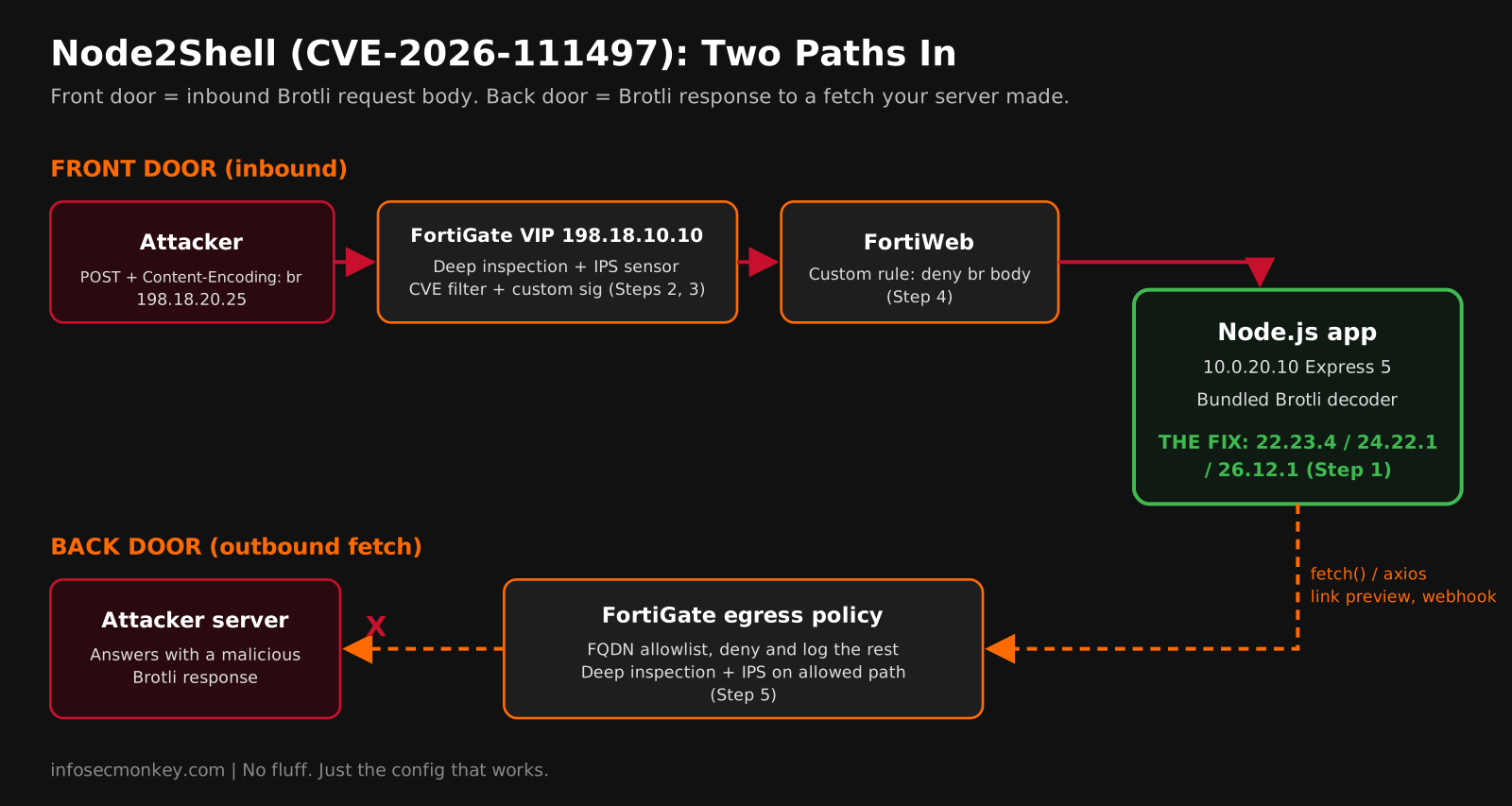
The Front Door and the Back Door
Node2Shell reaches the decoder from two directions, and they need different controls.
| Path | How the payload arrives | Common triggers |
|---|---|---|
| Front door (inbound) | A client sends a request body with Content-Encoding: br, and middleware decompresses it. |
Express 5, body-parser 2.x, Koa. A plain app.use(express.json()) is enough on a vulnerable runtime. |
| Back door (outbound) | Your server fetches a URL, and the remote server answers with a malicious Brotli response. | Built-in fetch(), axios, got, SuperAgent, Next.js server-side fetches, link previews, webhooks, crawlers. |
| Direct use | Code calls the decompressor itself. | node:zlib Brotli functions on uploaded or stored data. |
A bare http.createServer() does not decode a Brotli body just by receiving it. The danger is the framework default you never chose. The back door is the nastier one: built-in fetch() decompresses any Brotli response a server sends, even when your request never asked for Brotli, and an inbound WAF never sees that traffic at all.
Figure 1: Where each Fortinet control sits on the two Node2Shell paths
Prerequisites and Architecture
Assumed knowledge: FortiGate firewall policies, VIPs, IPS sensors, and SSL inspection profiles; basic Docker or Kubernetes commands; how your Node.js apps are built and deployed.
Licensing: IPS signatures require an active FortiGuard IPS subscription. FortiWeb signature updates require its own FortiGuard service.
| Component | Role | Lab addressing |
|---|---|---|
| FortiGate (FortiOS 7.4.x / 7.6.x) | Edge firewall, IPS, SSL inspection, egress control | port1 WAN 198.18.10.1/24, port3 app LAN 10.0.20.1/24 |
VIP VIP-node-app |
Publishes the Node.js API | 198.18.10.10:443 to 10.0.20.10:443 |
| Node.js API servers | Express 5 app on Node.js 24.x | 10.0.20.0/24 |
| Fetcher segment (optional) | Services that must fetch arbitrary URLs | 10.0.21.0/24 |
| FortiWeb (optional) | Reverse proxy and WAF in front of the API | Inline between FortiGate and 10.0.20.10 |
| FortiAnalyzer | Log correlation and alerting | 10.0.0.50 |
| Test client | Generates a benign Brotli body for validation | 198.18.20.25 |
Node2Shell Fortinet Mitigation: Step-by-Step
Step 1: Find and Patch Every Vulnerable Runtime
Goal: Get every Node.js, Bun, and Electron runtime you operate onto a fixed release, including the ones hiding in container images.
Action: Inventory versions on hosts, images, and clusters. Anything below 22.23.4, 24.22.1, or 26.12.1 (or any EOL line) is vulnerable.
bash
# Fixed releases: 22.23.4, 24.22.1, 26.12.1 (Bun: 1.4.4)
node -v

# Check every local image, not just the host
for img in $(docker image ls --format '{{.Repository}}:{{.Tag}}' \
             | grep -v '<none>'); do
  v=$(docker run --rm --entrypoint node "$img" -v 2>/dev/null) && echo "$img $v"
done

# Kubernetes: list the images actually running
kubectl get pods -A \
  -o jsonpath='{range .items[*]}{range .spec.containers[*]}{.image}{"\n"}{end}{end}' \
  | sort -u
bash
# Hosts managed with nvm
nvm install 24.22.1 && nvm alias default 24.22.1

# Dockerfile: pin the fixed tag, then REBUILD (old builds keep the bug)
FROM node:24.22.1-bookworm-slim

# Distro-packaged Node on Debian links the system Brotli library: patch that too
apt list --installed 2>/dev/null | grep -i brotli

# Python services that decode Brotli (Brotli / brotlicffi on PyPI) are affected too
pip install --upgrade brotli brotlicffi
GUI Verification: If you run FortiCNAPP, filter container image vulnerability findings for CVE-2026-111497 to catch images your scripts missed. For developer laptops running Electron apps, review FortiClient EMS vulnerability results. Electron v45.0.0 still bundled the vulnerable Node.js 24.22.0 as of October 23.
Step 2: Build an IPS Sensor That Auto-Includes CVE-2026-111497 Signatures
Goal: Have FortiGate block any FortiGuard IPS signature tagged with this CVE the moment it lands in your signature package, with no further edits.
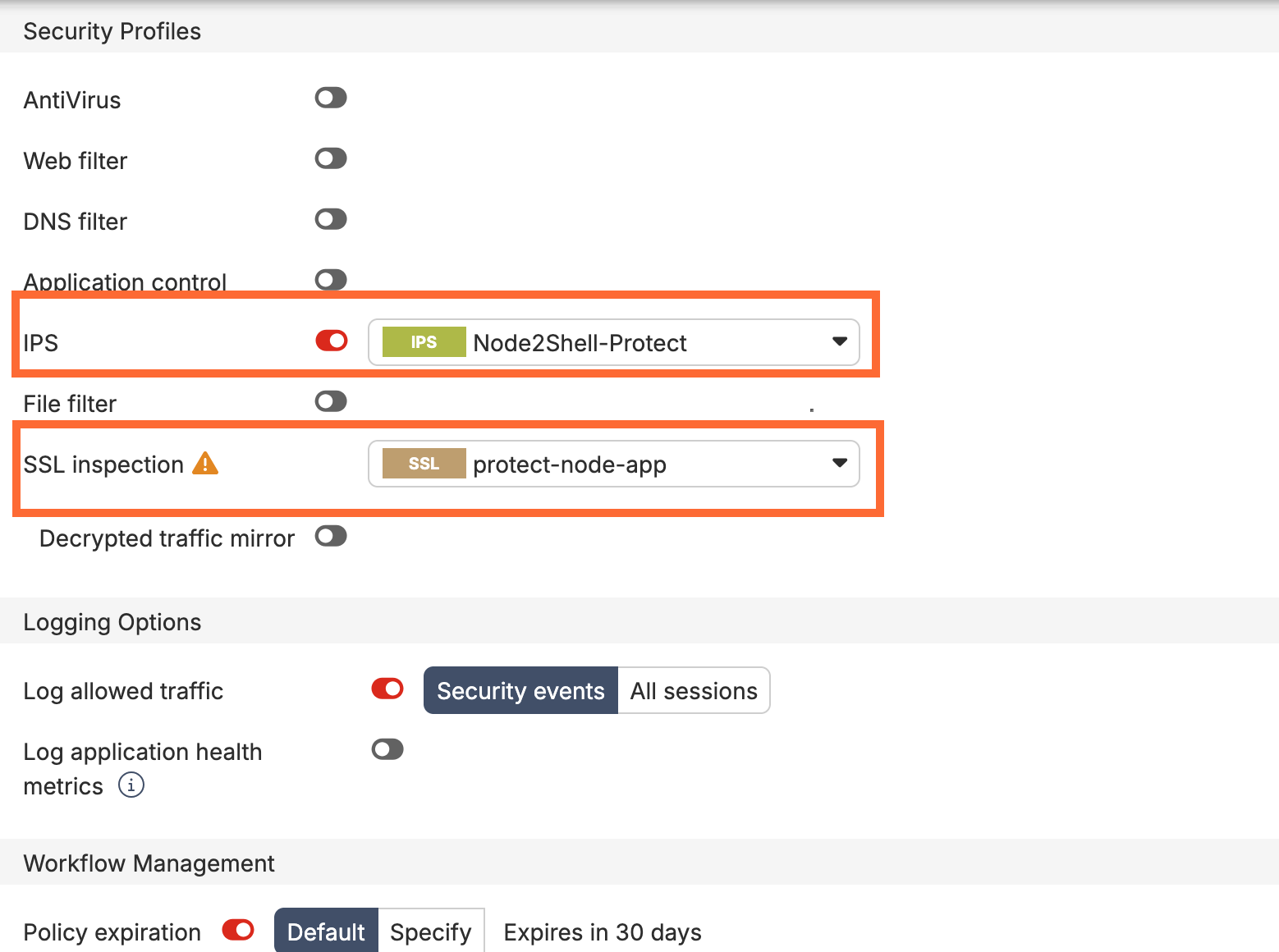
Action: Create a sensor with a CVE filter entry, then attach it to the inbound VIP policy with deep inspection so IPS can see inside HTTPS.
FortiOS CLI
config ips sensor
    edit "Node2Shell-Protect"
        set comment "CVE-2026-111497 plus high/critical server sigs"
        set extended-log enable
        config entries
            edit 1
                set cve "cve-2026-111497"
                set status enable
                set action block
                set log-packet enable
            next
            edit 2
                set location server
                set severity high critical
                set status enable
                set action block
            next
        end
    next
end
FortiOS CLI
config firewall ssl-ssh-profile
    edit "protect-node-app"
        config https
            set ports 443
            set status deep-inspection
        end
        set server-cert-mode replace
        set server-cert "node-app-cert"
    next
end

config firewall vip
    edit "VIP-node-app"
        set extip 198.18.10.10
        set mappedip "10.0.20.10"
        set extintf "port1"
        set portforward enable
        set extport 443
        set mappedport 443
    next
end

config firewall policy
    edit 0
        set name "IN-node-app"
        set srcintf "port1"
        set dstintf "port3"
        set srcaddr "all"
        set dstaddr "VIP-node-app"
        set action accept
        set schedule "always"
        set service "HTTPS"
        set utm-status enable
        set ssl-ssh-profile "protect-node-app"
        set ips-sensor "Node2Shell-Protect"
        set logtraffic all
    next
end
Heads up: A CVE filter only matches signatures that exist. Before you count on entry 1, search the FortiGuard Encyclopedia for CVE-2026-111497 and confirm a signature is published and present in your installed IPS package (get system fortiguard-service status). Until then, Step 3 is your inbound coverage.
GUI Verification: Security Profiles > Intrusion Prevention > Node2Shell-Protect. The CVE entry appears under IPS Signatures and Filters. Policy & Objects > Firewall Policy shows the IPS and SSL inspection icons on IN-node-app.
Figure 2: IPS sensor Node2Shell-Protect
Security Profiles > Intrusion Prevention. The CVE filter entry and the high/critical server entry, both set to Block.
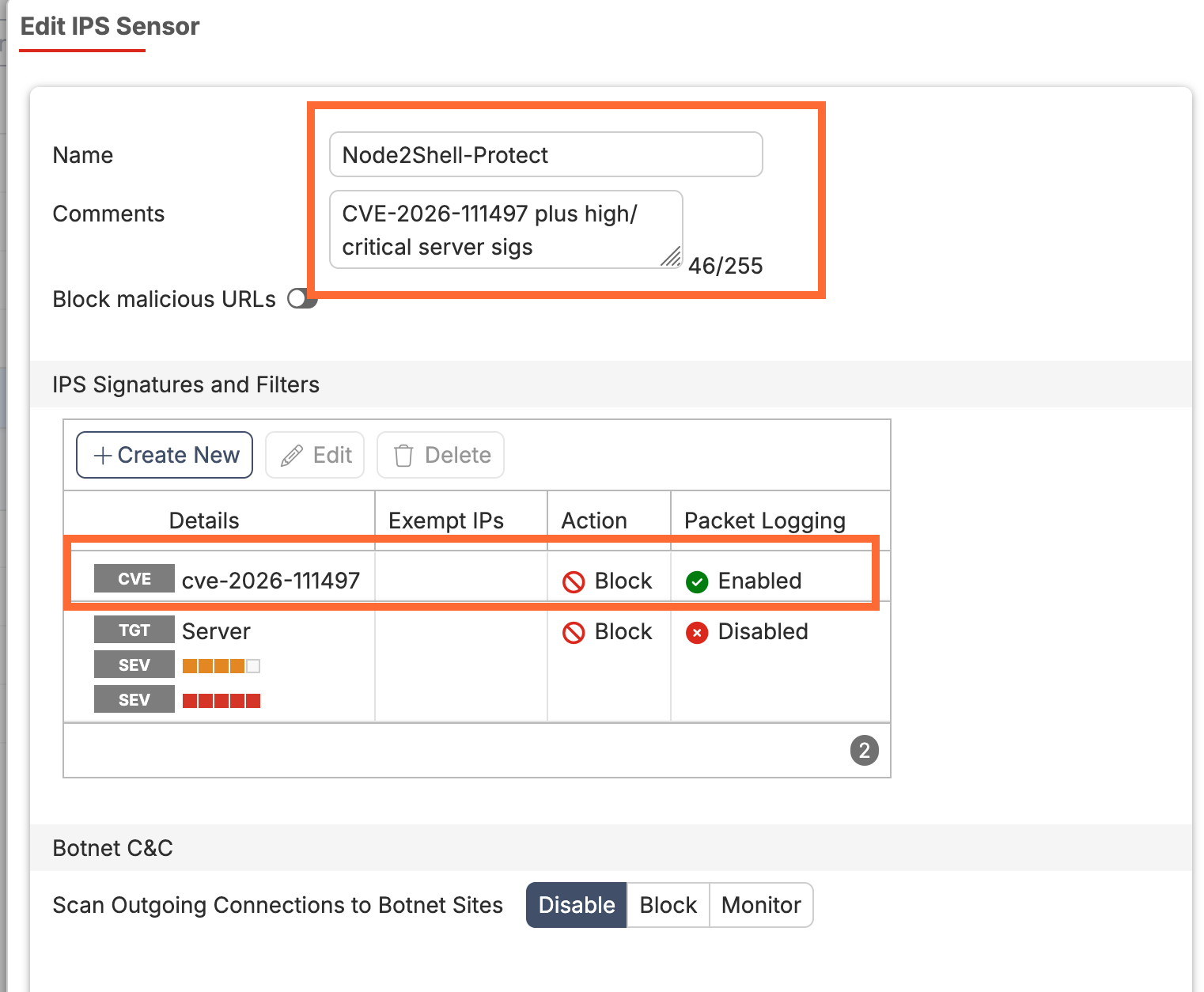
Figure 3: SSL/SSH inspection profile protect-node-app
Security Profiles > SSL/SSH Inspection. Protecting SSL Server mode with the app certificate, so IPS can read inside HTTPS.
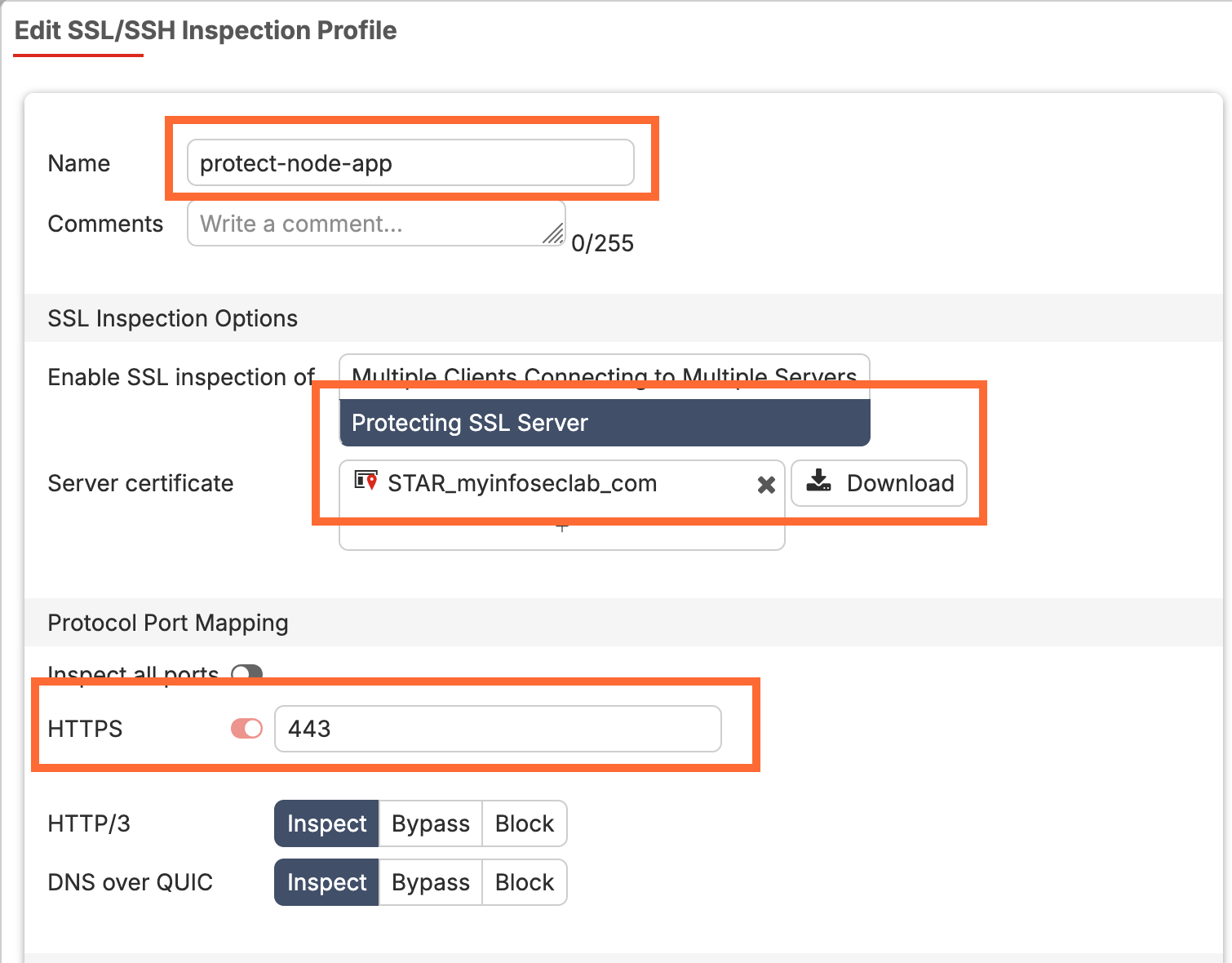
Figure 4: Inbound firewall policy IN-node-app
Policy & Objects > Firewall Policy. The VIP policy with the IPS sensor and SSL inspection profile attached.
Step 3: Add an Interim Custom Signature for Brotli Request Bodies
Goal: Block (or at least log) inbound requests that declare a Brotli-compressed body, which very few legitimate clients send.
Action: Create a custom IPS signature that matches Content-Encoding: br on the client-to-server side only. Response-side Brotli is everywhere and must not be touched.
FortiOS CLI
config ips custom
    edit "Node2Shell.Brotli.Request"
        set signature "F-SBID( --name \"Node2Shell.Brotli.Request\"; --protocol tcp; --service HTTP; --flow from_client; --pattern \"content-encoding\"; --context header; --no_case; --pattern \"br\"; --context header; --no_case; --distance 0; --within 12; )"
        set comment "Interim: Brotli request bodies to Node apps"
    next
end
Add it to the sensor in monitor mode first. In the GUI: edit Node2Shell-Protect, click Add Signatures, set Type to Signature, search for Node2Shell.Brotli.Request, select it, and set the action to Monitor. The CLI equivalent uses the rule ID the GUI shows for your custom signature:
FortiOS CLI
config ips sensor
    edit "Node2Shell-Protect"
        config entries
            edit 3
                set rule <custom-sig-rule-id>
                set status enable
                set action pass
                set log enable
                set log-packet enable
            next
        end
    next
end
GUI Verification: After a day of clean logs (no legitimate clients hitting it), change entry 3 to set action block. Log & Report > Security Events > Intrusion Prevention shows hits with Attack Name Node2Shell.Brotli.Request.
Step 4: Enforce the Same Rule on FortiWeb (If It Fronts the App)
Goal: Reject Brotli-encoded request bodies at the WAF before they ever reach Express or Koa.
Action: Build a custom rule that matches the request header and denies it.
- Go to Web Protection > Advanced Protection > Custom Rule and click Create New. Name it
Node2Shell-br-body, Action Alert & Deny, Severity High. - Add a filter of type HTTP Header. Header name
Content-Encoding, value as a case-insensitive regular expression:(^|,)\s*br\s*($|,). - Add the rule to a Custom Policy, then attach that policy to the Web Protection Profile used by the server policy for the Node.js API.
- Confirm FortiWeb signature updates are current and check its signature release notes for CVE-2026-111497 coverage.
GUI Verification: Log & Report > Attack Log shows Node2Shell-br-body hits with action Deny. Menu labels shift between FortiWeb releases, so look for the Custom Rule and Custom Policy objects if the path differs.
Step 5: Close the Back Door with Egress Allowlisting and Outbound Inspection
Goal: Stop app servers from fetching responses from servers an attacker controls, and inspect what they do fetch.
Action: Allow only named destinations from the app segment, deny and log everything else, and run deep inspection plus IPS on the allowed path.
FortiOS CLI
config firewall address
    edit "NET-node-apps"
        set subnet 10.0.20.0 255.255.255.0
    next
    edit "fqdn-api-payments"
        set type fqdn
        set fqdn "api.payments.example.com"
    next
    edit "fqdn-npm-registry"
        set type fqdn
        set fqdn "registry.npmjs.org"
    next
end

config firewall addrgrp
    edit "GRP-node-egress-allowed"
        set member "fqdn-api-payments" "fqdn-npm-registry"
    next
end

config firewall policy
    edit 0
        set name "OUT-node-allowlist"
        set srcintf "port3"
        set dstintf "port1"
        set srcaddr "NET-node-apps"
        set dstaddr "GRP-node-egress-allowed"
        set action accept
        set schedule "always"
        set service "HTTPS"
        set utm-status enable
        set ssl-ssh-profile "deep-inspection"
        set ips-sensor "Node2Shell-Protect"
        set nat enable
        set logtraffic all
    next
    edit 0
        set name "OUT-node-deny"
        set srcintf "port3"
        set dstintf "port1"
        set srcaddr "NET-node-apps"
        set dstaddr "all"
        set action deny
        set schedule "always"
        set service "ALL"
        set logtraffic all
    next
end
Deep inspection on outbound traffic means the Node.js process must trust the FortiGate CA. Node.js does not read the OS trust store by default, so point it at the CA explicitly:
config
# systemd unit or Dockerfile
Environment=NODE_EXTRA_CA_CERTS=/etc/ssl/certs/fortigate-ca.pem
ENV NODE_EXTRA_CA_CERTS=/etc/ssl/certs/fortigate-ca.pem
Services that genuinely must fetch arbitrary URLs (link previews, customer webhooks, crawlers, server-side rendering of outside content) cannot be allowlisted. Move them to their own segment such as 10.0.21.0/24, give them no route to internal systems, and keep deep inspection and IPS on their egress. These are your highest-risk Node2Shell targets, so patch them first.
GUI Verification: Policy & Objects > Firewall Policy: OUT-node-allowlist sits above OUT-node-deny and above any older broad outbound rule for 10.0.20.0/24. Use move <id> before <id> in the CLI if an existing rule shadows it.
Step 6: Detect Exploitation Attempts and Crashes
Goal: Spot attempts and the side effects of a failed or successful one.
Action: Watch IPS and WAF hits, decompression crashes, and Node.js spawning things it never should.
CLI
# FortiGate: recent IPS hits for the interim signature
execute log filter reset
execute log filter category 4
execute log filter field attack Node2Shell.Brotli.Request
execute log display

# Kubernetes: pods restarting more than usual can mean decoder crashes
kubectl get pods -A --sort-by='.status.containerStatuses[0].restartCount' | tail -15- FortiAnalyzer: build an event handler on IPS logs where the CVE field contains
CVE-2026-111497or the attack name isNode2Shell.Brotli.Request, and on FortiWeb attack logs forNode2Shell-br-body. - FortiEDR or your EDR: alert on a
nodeprocess spawningsh,bash,curl, orwget, or writing new files outside its app directory. Code execution through the decoder ends with the Node.js process doing something it was never coded to do. - App telemetry: an unexpected Node.js process exit during decompression is a lead worth chasing, though a crash alone does not prove an attack. One public PoC pins the decoder at 100% CPU with an 86-byte stream, so watch for CPU-stuck workers too.
Verification and Validation
1. Runtime is fixed. Run on every host and image you inventoried:
expected output
$ node -v
v24.22.1
2. Front door control fires. From the test client, send a harmless Brotli body. This proves the control, not the exploit:
bash
echo '{"probe":"benign"}' | brotli -c > probe.br
curl -sk -o /dev/null -w '%{http_code}\n' -X POST https://198.18.10.10/api/echo \
  -H 'Content-Type: application/json' \
  -H 'Content-Encoding: br' \
--data-binary @probe.br| Mode | Expected result |
|---|---|
Monitor (action pass) |
The app answers normally and FortiGate logs attack="Node2Shell.Brotli.Request" action="detected". |
Block (action block) |
curl prints 000 (connection reset) and the log shows action="dropped". |
| FortiWeb rule | HTTP 403 block page and an Attack Log entry for Node2Shell-br-body. |
3. Back door is closed. From an app server in 10.0.20.0/24:
expected output
# Not on the allowlist: should time out
curl -sS -m 5 -o /dev/null https://example.org ; echo "exit=$?"
exit=28

# On the allowlist: should succeed
curl -sS -o /dev/null -w '%{http_code}\n' https://registry.npmjs.org
200
On FortiGate, the denied attempt shows in Log & Report > Forward Traffic with policy OUT-node-deny. To watch it live:
FortiOS CLI
diagnose sniffer packet any 'host 10.0.20.10 and port 443' 4 10Troubleshooting and Gotchas
1. IPS sees nothing because the traffic is encrypted
Symptom: the benign probe gets a normal response in block mode and no IPS log appears. Cause: the policy is running certificate inspection, or the SSL profile does not cover the right port. Without deep inspection, IPS cannot read the Content-Encoding header inside TLS.
FortiOS CLI
show firewall policy <policy-id>
show firewall ssl-ssh-profile protect-node-app
diagnose ips session status
Fix: use a server-cert-mode replace profile with the app’s real certificate on inbound VIPs. On outbound, use deep inspection and set NODE_EXTRA_CA_CERTS on the app, or fetches fail with SELF_SIGNED_CERT_IN_CHAIN or UNABLE_TO_GET_ISSUER_CERT_LOCALLY.
2. “We blocked Brotli at the edge, so we are safe”
Symptom: the inbound rules are in place, but a link-preview or webhook service still runs a vulnerable runtime. Cause: inbound controls only cover the front door. The back door is a response to a request your own server made, and a signature has nothing readable to match inside a compressed body anyway.
Fix: patch first, enforce Step 5 egress allowlisting, and isolate any service that must fetch arbitrary URLs. If you use axios, its automatic decompression can be switched off as a stopgap. Built-in fetch() offers no such switch, so upgrading is the only fix there.
3. Patched OS, still vulnerable app
Symptom: the vulnerability scanner keeps flagging hosts you already updated. Cause: Node.js and Bun carry their own Brotli copy, so apt upgrade libbrotli1 does nothing for them. Container images built before October 21 to 22, 2026 keep the bug until rebuilt, and EOL lines (20, 21, 23, 25) will never be fixed. Debian’s distro nodejs package is the reverse case: it links the system library, so it stays exposed until that package is fixed.
bash
docker run --rm --entrypoint node <image> -v
docker image inspect <image> --format '{{.Created}}'
dpkg -l | grep -i brotli
Fix: rebuild images from a fixed base tag, migrate EOL apps to 22 or 24, and track your distro’s Brotli package separately.
4. The custom signature blocks a legitimate client
Symptom: a mobile app or SDK that compresses uploads starts failing after you switch entry 3 to block. Fix: stay in monitor mode until the logs are clean, then exempt that client with a separate policy above IN-node-app that uses a sensor without the custom signature, scoped to its source addresses. Patch the backend behind that exemption first.
References
- Imperva: Node2Shell, From Brotli Data to Remote Code Execution
- Miggo: Inside Node2Shell, the Eight-Year-Old Bug in Node.js’s Brotli Decoder
- Node.js v22.23.4 security release notes
- Debian Security Tracker: CVE-2026-111497
- HeroDevs: CVE-2026-111497 and EOL Node.js risk
- Aikido: Python packages affected by the same Brotli flaw
- Fortinet Docs: IPS signature filter options (CVE pattern)
InfoSecMonkey | No fluff. Just the config that works.
Recent posts
-

-

DNS is one of those technologies that quietly underpins... Full Story
-

BGP issues on FortiGate firewalls usually trace back to... Full Story
-

Every time your laptop talks to your router, a... Full Story
-

If you've spent any time configuring NAT on a... Full Story
-

If you have spent any time configuring firewall policies... Full Story
-

High availability on FortiGate is one of those features... Full Story
-

If you've configured SD-WAN on a FortiGate, you've almost... Full Story
-

FortiLink is the management protocol that turns a FortiSwitch... Full Story
-

FortiSwitches are pretty rock solid from Mean Time Between... Full Story
-

This is a quicky tip. Have you ever gone... Full Story
-

DNS is one of those quiet pieces of internet... Full Story
-

This article is an updated version of the previous... Full Story
-

You will add ns2 as a secondary (slave) BIND9... Full Story
-

In the process of deploying my lab, I needed... Full Story
-

RFC 8805, used to be known as Self-Correcting IP... Full Story
-

Years back, I wrote an article about certificate pinning. ... Full Story
-

FortiGates have the ability to send alerts to Microsoft... Full Story
-

In this post, I am going to walk through... Full Story
-

Troubleshooting VoIP on a FortiGate can feel like trying... Full Story
-

Prior to FortiOS 7.0, there were three commands to... Full Story
-

In this post, I am going to go over... Full Story
-

What we are going to do: We are going... Full Story
-

Choosing between FGCP (FortiGate Clustering Protocol) and FGSP (FortiGate... Full Story
-

Creating a VLAN on macOS (The "Pro" Move) A... Full Story
-

This blog post explores the logic behind how macOS... Full Story
-

Pretty Fly for a Wi-Fi Tell My Wi-Fi Love... Full Story
-

Part of my daily gig is creating BoMs (Bill-of-Materials)... Full Story
-

ICMP introduces several security risks, but careful filtering, rate... Full Story
-

The command diag debug application dhcps -1 enables full... Full Story
-

In the world of FortiOS, execute tac report is... Full Story
-

LLDP; What is it The Link Layer Discovery Protocol... Full Story
-

What it actually does When you run diagnose fdsm... Full Story
-

Monkey Bites are bite-sized, high-impact security insights designed for... Full Story
-

I have run macOS in macOS with Parallels but... Full Story
-

Don't be confused with my other FortiNAC posts where... Full Story
-

This is the third session in a multi-part article... Full Story
-

Today I was configuring key-based authentication on a FortiGate... Full Story
-

Netcat, often called the "Swiss Army knife" of networking,... Full Story
-

At its core, IEEE 802.1X is a network layer... Full Story
-

In case you did not see the previous FortiNAC... Full Story
-

This is our 5th session where we are going... Full Story
-

Now that we have Wireshark installed and somewhat configured,... Full Story
-

The Philosophy of Packet Analysis Troubleshooting isn't about looking... Full Story
-

InfoSecMonkey Threat Response October 24, 2026 | No fluff.... Full Story
-

InfoSecMonkey Threat Response October 24, 2026 | No fluff.... Full Story
-

Plus what you actually get with FortiCare Essential, Premium... Full Story