
If you've spent any time configuring user authentication on... Full Story
By Manny Fernandez
November 11, 2026
FortiGate IPAM vs DHCP: Differences, Overlap, and What to Check Before You Turn IPAM On
FortiGate IPAM vs DHCP: Differences, Overlap, and What to Check Before You Turn IPAM On
No fluff. Just the config that works.
FortiGate IPAM vs DHCP is one of those comparisons that sounds like a turf war but is really a stack. DHCP hands a host address to a client inside one subnet. IPAM hands the subnet itself to a FortiGate interface, and then drives the DHCP server on that interface. Turn IPAM on without knowing that, and it can quietly take ownership of LAN interfaces you thought were static.
Objective: explain what each feature does on FortiOS, when one beats the other, exactly where they overlap, and the checks to run before you flip config system ipam to enable on a production FortiGate.
Target audience: FortiGate admins and SEs running more than a handful of sites in a Security Fabric, or anyone who just saw an interface marked “Managed by IPAM” and wondered why.
Short answer: DHCP answers “which address does this laptop get?” IPAM answers “which /24 does this branch LAN get?” On an IPAM-managed interface, IPAM picks the subnet, sets the interface IP, and builds the DHCP server range for you.
Prerequisites and Architecture
Assumed knowledge: FortiGate interface roles, the built-in DHCP server (config system dhcp server), and basic Security Fabric root and downstream concepts.
Lab requirements: two or three FortiGates (VMs are fine) on FortiOS 7.4.x, 7.6.x, or 8.0.x. One acts as the Fabric root and IPAM server, the others join as downstream devices. Upstream and transit links use 198.18.0.0/15, internal LANs come from 10.0.0.0/16.
| Component | Role in this lab | Addressing |
|---|---|---|
| FGT-HQ | Security Fabric root and IPAM server | WAN 198.18.0.1/24, HQ LAN 10.0.1.1/24 (static) |
| FGT-BR1 | Downstream FortiGate, branch 1 | WAN 198.18.1.2/24, port5 from IPAM |
| FGT-BR2 | Downstream FortiGate, branch 2 | WAN 198.18.2.2/24, port5 from IPAM |
| IPAM pool | branch-pool on FGT-HQ | 10.0.0.0/16, 10.0.0.0/20 excluded for HQ statics |
| Clients | DHCP clients on each branch LAN | Leases from each branch port5 DHCP server |
Figure 1: IPAM owns the subnet, DHCP owns the host address
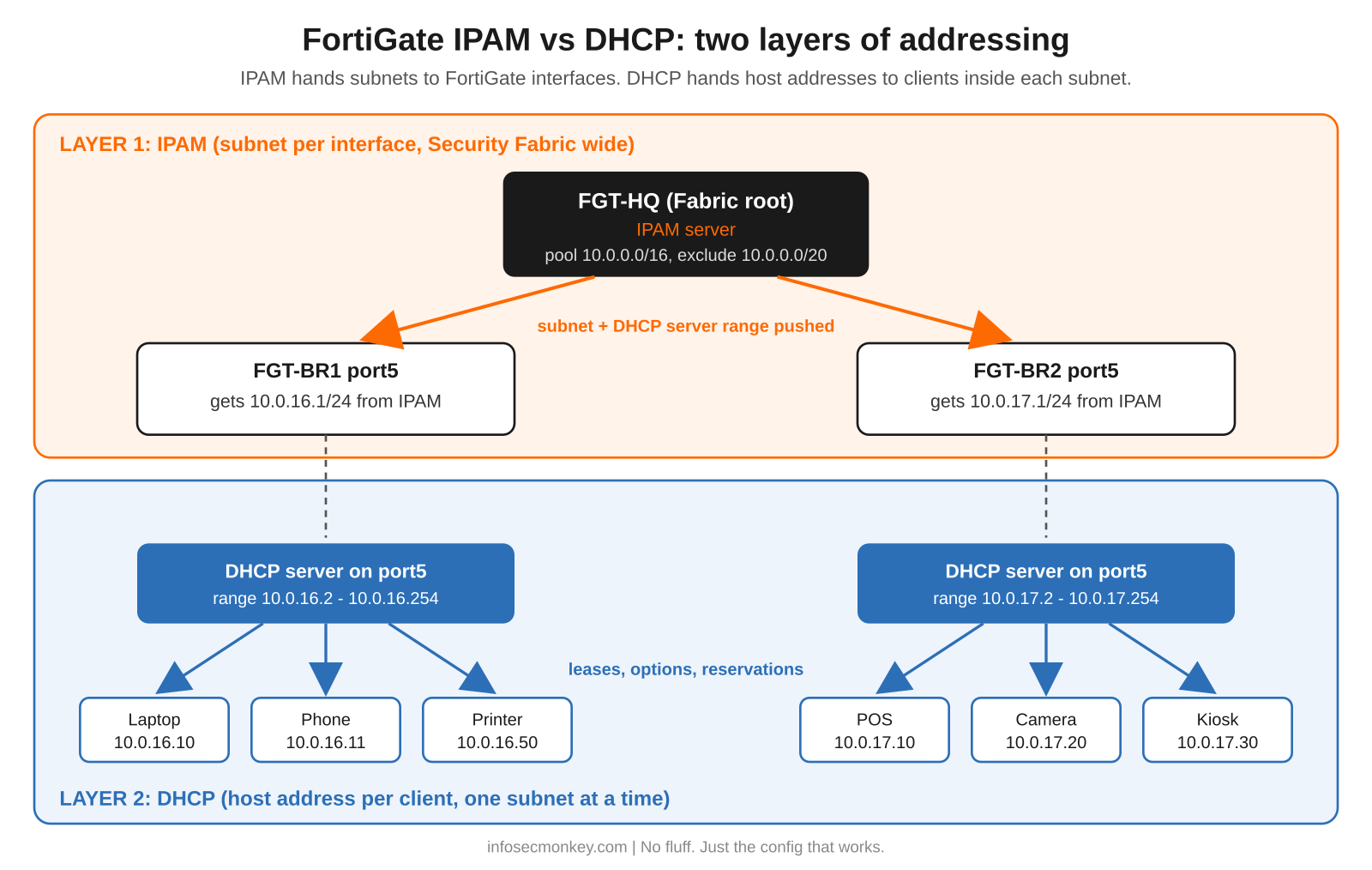
Keep the picture in mind for the rest of the post: IPAM works on the top layer (who owns which subnet across the Fabric), DHCP works on the bottom layer (who gets which host address inside a subnet). The overlap is the dashed line, where IPAM writes the DHCP server config for the interfaces it manages.
FortiGate IPAM vs DHCP: Side by Side
| DHCP server | IPAM | |
|---|---|---|
| What it allocates | One host address per client, inside one subnet | One subnet per FortiGate interface, out of a pool |
| Who receives it | Endpoints: laptops, phones, printers, APs | FortiGate interfaces: LAN, VLAN, SSID, FortiExtender LAN extension |
| Where it is configured | Per interface on every FortiGate | Standalone FortiGate or the Security Fabric root only |
| On the wire | Standard DHCP (DISCOVER, OFFER, REQUEST, ACK) | Nothing client facing; FortiGates sync over the Fabric |
| Conflict view | Only its own range and lease table | Every managed interface across the Fabric, with conflict markers |
| Default state | Commonly enabled on LAN interfaces | status disable until you enable it |
| Main CLI | config system dhcp server |
config system ipam, plus ip-managed-by-fortiipam per interface |
| Main diagnostics | execute dhcp lease-list |
diagnose sys ipam list entries |
Feature history matters here because the defaults moved under people’s feet:
- FortiOS 6.4: FortiIPAM started as a FortiGuard cloud service that assigned subnets so addresses would not overlap inside a Security Fabric (Assign a subnet with the FortiIPAM service, FortiOS 6.4.5).
- FortiOS 7.0 and later: IPAM runs locally, with a standalone FortiGate or the Fabric root acting as the IPAM server (Configure IPAM locally on the FortiGate).
- FortiOS 7.2.1: multiple pools and IPAM rules (Assign multiple IP pools and subnets using IPAM Rules 7.2.1).
- FortiOS 7.4.1: manage options for LAN role, SSID, and FortiExtender LAN extension interfaces, plus conflict detection and resolution (IPAM enhancements 7.4.1).
- FortiOS 8.0: DHCP templates, so IPAM-built DHCP servers can inherit reusable settings (IPAM DHCP templates).
Benefits of One Over the Other
Where plain DHCP wins
- Predictable addressing. You chose the subnet, so your address objects, routes, VIPs, IPsec selectors, and documentation stay correct forever.
- Full control of DHCP options. DNS, NTP, domain, option 66 or 150 for phones, reservations by MAC, lease time. Nothing rewrites them.
- No Fabric dependency. Works the same on a lone FortiGate 40F or a 200-site estate managed by FortiManager templates.
- Plays well with an external source of truth. If NetBox, Infoblox, or a spreadsheet already owns your IP plan, a second allocator on the firewall is a second opinion you did not ask for.
Where IPAM wins
- No overlapping branch subnets. The root hands out non-overlapping blocks from one pool, which is the whole point when sites will be meshed with SD-WAN or ADVPN later.
- Zero-touch LANs. New downstream FortiGates, SSIDs, and FortiExtender LAN extensions can get an address and a working DHCP server without anyone typing a subnet.
- One view of the pool.
diagnose sys ipam list entriesandlist subnetsshow who has what and what is still free. - Conflict detection. IPAM flags managed interfaces that overlap, and can reallocate them for you.
Rule of thumb
Use IPAM when you have many Fabric-connected FortiGates and you care more about “never overlap” than “this branch is always 10.0.16.0/24.” Stay with hand-built DHCP when the subnet is referenced all over the config, when another system already owns the IP plan, or when it is a single site. Many shops do both: static, documented subnets for HQ and data center, IPAM for the long tail of small branches and pop-up sites.
Where IPAM and DHCP Overlap
They overlap in exactly one place: an IPAM-managed interface. On that interface, FortiOS sets the interface IP from the pool and turns on the DHCP server, with the address range populated by IPAM (Configure IPAM locally on the FortiGate). The specifics:
- IPAM rules carry a
dhcpflag. Withset dhcp enable, the DHCP server is turned on for matching interfaces. With it disabled, IPAM ignores the current DHCP server settings on those interfaces (Configuring IPAM, FortiOS 7.6). - Recent builds ship a LAN rule with DHCP on. On FortiOS 7.6.1 the default IPAM config includes a
default-poolof 172.31.0.0/16, alan-poolof 192.168.0.0/16, and arole-lanrule for every device and interface with role lan anddhcp enable(Fortinet Community: LAN interfaces reported as managed by IPAM after 7.6.1). - The Fabric uplink can be a DHCP client. Fortinet’s own examples have the root act as the DHCP server and the downstream FortiGate pull its Fabric-facing address by DHCP before it joins.
- FortiOS 8.0 DHCP templates let an IPAM rule point at a reusable DHCP template, and a template marked as a Fabric object is inherited by downstream FortiGates (IPAM DHCP templates).
Where they do not overlap: IPAM never talks to clients. Leases, reservations, options, and DHCP relay are still DHCP’s job. If an interface relays DHCP to a Windows or Infoblox server, keep IPAM off that interface.
Step-by-Step: Turning On IPAM Without Renumbering Your LAN
Step 1: Audit what IPAM would match
Goal: know which interfaces IPAM could grab before it is enabled.
Action: on the standalone FortiGate or Fabric root, look at the current IPAM pools and rules (they exist even while status is disabled), then list LAN-role interfaces.
show full-configuration system ipam
show system interface | grep -f "set role lan"
show system dhcp server
GUI verification: Network > IPAM > IPAM Settings, IPAM Rules, and IPAM Subnets tabs. Note any rule matching * interfaces with role lan.
Step 2: Pin the interfaces IPAM must never touch
Goal: exempt static, documented LANs before any global setting can claim them.
Action: set the per-interface override. Options are enable, disable, and inherit-global (the default).
config system interface
    edit "<hq_lan_interface>"
        set ip-managed-by-fortiipam disable
    next
end
GUI verification: Network > Interfaces, edit the interface, Addressing mode shows Manual, not Auto-Managed by IPAM.
Step 3: Set the manage options explicitly, then enable
Goal: only the interfaces you choose get addresses from IPAM.
Action: turn the broad manage options and auto conflict resolution off, define a pool with an exclusion for existing statics, add one narrow rule, and enable status last. Syntax below is FortiOS 7.4 and 7.6; FortiOS 8.0 renames the tables to config pool and config rule, so check with ? on your build.
config system ipam
    set manage-lan-addresses disable
    set manage-lan-extension-addresses disable
    set manage-ssid-addresses disable
    set automatic-conflict-resolution disable
    config pools
        edit "branch-pool"
            set subnet 10.0.0.0 255.255.0.0
            config exclude
                edit 1
                    set exclude-subnet 10.0.0.0 255.255.240.0
                next
            end
        next
    end
    config rules
        edit "branch-lan"
            set device "*"
            set interface "port5"
            set pool "branch-pool"
            set dhcp enable
        next
    end
    set status enable
end
GUI verification: Network > IPAM > IPAM Settings shows Status enabled with Interfaces with LAN role, FortiAP SSIDs, and FortiExtender LAN extensions toggled off.
Step 4: Enroll one branch interface
Goal: prove the flow on a single downstream interface.
Action: on FGT-BR1, mark port5 as managed and request a /24 (256 addresses).
config system interface
    edit "port5"
        set role lan
        set ip-managed-by-fortiipam enable
        set managed-subnetwork-size 256
    next
end
GUI verification: Network > Interfaces > port5 shows Addressing mode Auto-Managed by IPAM, an address from branch-pool such as 10.0.16.1/24, and DHCP Server enabled with the range filled in.
Step 5: Confirm the DHCP server IPAM built
Goal: check that the overlap layer actually landed.
Action: inspect the DHCP server on the branch and add back any options IPAM did not set (DNS, NTP, reservations).
show system dhcp server
execute dhcp lease-list port5
GUI verification: Dashboard > Network > DHCP widget, or Network > Interfaces > port5 > DHCP Server, shows leases in the IPAM subnet.
Verification and Validation
Run these on the IPAM server (standalone or Fabric root):
diagnose sys ipam list entries
diagnose sys ipam list subnets
diagnose sys ipam largest-available-subnet
Expected success output looks like this, with one entry per managed interface and a flag column that stays clean when nothing conflicts:
IPAM Entries: (sn, vdom, interface, subnet/mask, flag)
  FGVMBR1000000001 root port5 10.0.16.1/24 0
  FGVMBR2000000002 root port5 10.0.17.1/24 0

IPAM free subnets: (subnet/mask)
  10.0.18.0/23
  10.0.20.0/22
  10.0.24.0/21
  10.0.32.0/19
  10.0.64.0/18
  10.0.128.0/17
On the branch, execute dhcp lease-list port5 should show clients with addresses inside 10.0.16.0/24. If the entry flag shows C, IPAM has detected a conflict on that interface; see gotcha 3 below.
What to Be Careful With When Turning On IPAM
1. Defaults changed between releases, and the docs do not agree
The FortiOS 7.4.1 and 8.0 admin guides say all manage options are disabled by default (IPAM manage options), while the FortiOS 8.0 CLI reference lists manage-lan-addresses as enable by default (config system ipam, FortiOS 8.0 CLI). Upgrades also matter: after moving to 7.6.1, the GUI marked LAN interfaces in 172.31.0.0/16 or 192.168.0.0/16 as managed by IPAM even with IPAM disabled, and blocked DHCP address assignment rules in the GUI; that was fixed in 7.6.3 under bug 1110827 (Fortinet Community).
Fix: never rely on defaults. Set the manage options yourself and verify:
show full-configuration system ipam | grep manage
config system ipam
    set manage-lan-addresses disable
end
2. A LAN role is enough to get claimed
When the manage options are enabled, Fabric FortiGates with an interface set to the LAN role, a vap-switch SSID, or a lan-extension interface receive an IPAM address with no interface-level configuration (Configure IPAM locally on the FortiGate). If that address differs from what was there, everything that pointed at the old subnet breaks: static address objects, VIPs, static routes, IPsec phase 2 selectors, BGP network statements, and DHCP reservations.
Fix: pin known LANs with set ip-managed-by-fortiipam disable (Step 2), and on IPAM-managed interfaces reference the auto-created interface subnet address object instead of a hard-coded subnet.
3. Auto conflict resolution changes addresses on its own
With automatic-conflict-resolution enable, IPAM periodically checks every interface and requests a new address for an IPAM-managed interface that conflicts (Configuring IPAM, FortiOS 7.6). Great in a lab, surprising at 2 AM in production. require-subnet-match can also reassign subnets so requested and actual sizes match.
Fix: leave auto resolution off until the estate is clean, watch for the C flag, and use Reallocate IP on the conflict marker in the GUI when you are ready.
diagnose sys ipam list entries4. IPAM owns the DHCP range on managed interfaces
IPAM populates the DHCP range, so check custom options and reservations after enrollment. On FortiOS 7.4.8 a known issue (ID 1037480) left the IPAM-built DHCP server with an unallocated range and a 0.0.0.0/0 netmask, and manual enablement failed with “empty values are not allowed”; it is fixed in 7.4.10 and 7.6.0 (Fortinet Community: IPAM configuration issues with DHCP server).
Diagnose with the IPAM daemon debug, and look for lines like “Failed to set interface DHCP”:
diagnose debug application ipamd -1
diagnose debug enable
diagnose debug disable
diagnose debug reset
5. Root only, pool limits, and stale devices
- IPAM Interfaces, Rules, and Subnets can only be viewed or configured on the Fabric root or a standalone FortiGate (Configuring IPAM, FortiOS 7.6). Downstream admins cannot change IPAM Settings once the root has it enabled.
- The pool must be a class A or class B subnet. Use
config excludeto carve out ranges already in use, as in Step 3. - After an RMA or decommission, remove the old serial so its subnets go back to the pool:
diagnose sys ipam delete device <serial_number>Sources
- Fortinet: Configure IPAM locally on the FortiGate (FortiOS 7.4.7 Administration Guide)
- Fortinet: Configuring IPAM (FortiOS 7.6.4 Administration Guide)
- Fortinet: IPAM manage options (FortiOS 8.0 Administration Guide)
- Fortinet: config system ipam (FortiOS 8.0 CLI Reference)
- Fortinet: IPAM enhancements 7.4.1 (FortiOS 7.4 New Features)
- Fortinet: Assign multiple IP pools and subnets using IPAM Rules 7.2.1
- Fortinet: IPAM DHCP templates (FortiOS 8.0 New Features)
- Fortinet: Assign a subnet with the FortiIPAM service (FortiOS 6.4.5)
- Fortinet Community: Troubleshooting tip, IPAM configuration issues with DHCP server
- Fortinet Community: After upgrading to v7.6.1, GUI reports LAN interfaces are managed by IPAM
InfoSecMonkey | No fluff. Just the config that works.
Recent posts
-

-

DNS is one of those technologies that quietly underpins... Full Story
-

BGP issues on FortiGate firewalls usually trace back to... Full Story
-

Every time your laptop talks to your router, a... Full Story
-

If you've spent any time configuring NAT on a... Full Story
-

If you have spent any time configuring firewall policies... Full Story
-

High availability on FortiGate is one of those features... Full Story
-

If you've configured SD-WAN on a FortiGate, you've almost... Full Story
-

FortiLink is the management protocol that turns a FortiSwitch... Full Story
-

FortiSwitches are pretty rock solid from Mean Time Between... Full Story
-

This is a quicky tip. Have you ever gone... Full Story
-

DNS is one of those quiet pieces of internet... Full Story
-

This article is an updated version of the previous... Full Story
-

You will add ns2 as a secondary (slave) BIND9... Full Story
-

In the process of deploying my lab, I needed... Full Story
-

RFC 8805, used to be known as Self-Correcting IP... Full Story
-

Years back, I wrote an article about certificate pinning. ... Full Story
-

FortiGates have the ability to send alerts to Microsoft... Full Story
-

In this post, I am going to walk through... Full Story
-

Troubleshooting VoIP on a FortiGate can feel like trying... Full Story
-

Prior to FortiOS 7.0, there were three commands to... Full Story
-

In this post, I am going to go over... Full Story
-

What we are going to do: We are going... Full Story
-

Choosing between FGCP (FortiGate Clustering Protocol) and FGSP (FortiGate... Full Story
-

Creating a VLAN on macOS (The "Pro" Move) A... Full Story
-

This blog post explores the logic behind how macOS... Full Story
-

Pretty Fly for a Wi-Fi Tell My Wi-Fi Love... Full Story
-

Part of my daily gig is creating BoMs (Bill-of-Materials)... Full Story
-

ICMP introduces several security risks, but careful filtering, rate... Full Story
-

The command diag debug application dhcps -1 enables full... Full Story
-

In the world of FortiOS, execute tac report is... Full Story
-

LLDP; What is it The Link Layer Discovery Protocol... Full Story
-

What it actually does When you run diagnose fdsm... Full Story
-

Monkey Bites are bite-sized, high-impact security insights designed for... Full Story
-

I have run macOS in macOS with Parallels but... Full Story
-

Don't be confused with my other FortiNAC posts where... Full Story
-

This is the third session in a multi-part article... Full Story
-

Today I was configuring key-based authentication on a FortiGate... Full Story
-

Netcat, often called the "Swiss Army knife" of networking,... Full Story
-

At its core, IEEE 802.1X is a network layer... Full Story
-

In case you did not see the previous FortiNAC... Full Story
-

This is our 5th session where we are going... Full Story
-

Now that we have Wireshark installed and somewhat configured,... Full Story
-

The Philosophy of Packet Analysis Troubleshooting isn't about looking... Full Story
-

FortiGate IPAM vs DHCP: Differences, Overlap, and What to... Full Story
-

No fluff. Just the config that works. Executive Summary... Full Story
-

InfoSecMonkey Practitioner Guide Advanced Audit Policy, command line capture,... Full Story