
What is real, what is hype, and how to stay out of trouble with both sides of the law
Objective: Separate dark web myths from reality, show where the real risk sits, and give practitioners a clean, legal playbook for research, exposure monitoring and blocking Tor on a FortiGate.
Target audience: Security engineers, SOC analysts, IT admins and curious technical readers who keep hearing about the dark web from customers, executives and the news.
Reading time: About 12 minutes
Every few months a customer asks me some version of the same question: “Is our data on the dark web?” Usually the question comes wrapped in a few dark web myths: that it is 90 percent of the internet, that just opening Tor Browser is illegal, or that anything posted there is untouchable. Some of that is wrong, some is half right, and a couple of parts are scarier than the movies. This post walks through the good, the bad and the ugly, then gets practical: what to be careful with, how to stay clear of trouble with law enforcement and with the criminals, and how to control Tor on your own network.
Not legal advice. I am a security engineer, not a lawyer. Laws differ by country and state. If your job involves dark web research, get written authorization and talk to your legal team before you start.
Surface Web vs. Deep Web vs. Dark Web
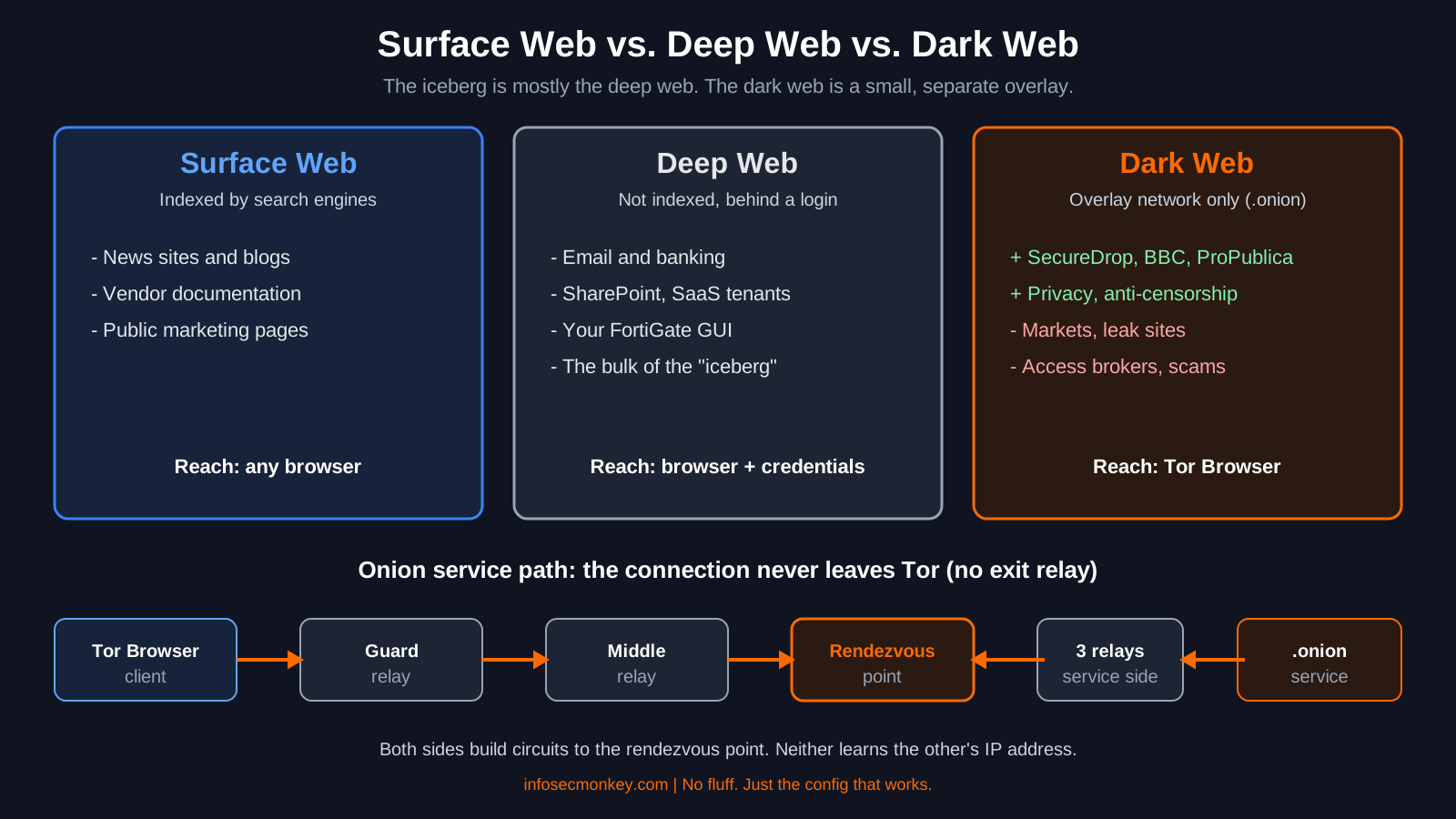
Most confusion starts here, because people use these three terms as if they mean the same thing. They do not.
| Layer | What it is | Examples | How you reach it |
|---|---|---|---|
| Surface web | Pages search engines index | News sites, blogs, vendor docs | Any browser |
| Deep web | Content not indexed, usually behind a login | Email, banking, your FortiGate GUI, SharePoint | Any browser plus credentials |
| Dark web | Services that only exist on an overlay network | .onion sites, SecureDrop, criminal markets | Tor Browser (or I2P and similar) |
The famous iceberg graphic, with a tiny tip above the water and a giant dark mass below, is describing the deep web. Your inbox and your bank portal are the bulk of that iceberg. The dark web is a small slice of it.
Figure 1: Surface, deep and dark web, plus the onion service path
How the Dark Web Actually Works
When people say dark web, they almost always mean Tor onion services. According to the Tor Project’s onion services documentation, onion services (formerly called hidden services) are services, like websites, that are only reachable through the Tor network. Three properties matter for practitioners:
- No exit relay. A normal Tor connection leaves the network through an exit relay that can see unencrypted traffic. An onion connection never leaves Tor. The Intercept’s explainer puts it well: all communication between Tor Browser and the server happens inside the network.
- The address is the key. A v3 onion address is 56 characters long and encodes the service’s public key, so the client verifies it is talking to the right service. The Tor Project’s protocol overview also notes onion services only make outgoing connections and punch through NAT, so no open inbound ports are needed.
- It is small. In a 2022 Tor Project training deck, onion services were about 1.2 percent of Tor traffic (Introduction to Onion Services, PDF). Most Tor use is ordinary people browsing the regular web privately.
# The address IS the identity: 56 characters for v3
$ echo -n p53lf57qovyuvwsc6xnrppyply3vtqm7l6pcobkmyqsiofyeznfu5uqd | wc -c
56
That address belongs to ProPublica, which is our first example of the good side.
The Good
Tor and onion services were built for privacy and censorship resistance, and plenty of legitimate organizations depend on them.
- Whistleblowing. SecureDrop, used by many major newsrooms, lets sources send documents to journalists over Tor. The SecureDrop documentation describes the source interface as a public-facing onion service running on dedicated on-premises servers.
- Censorship resistance. The BBC launched an onion mirror of its news site because countries like China, Iran and Vietnam had tried to block it (NPR coverage). ProPublica runs its full site as an onion service as well (ProPublica’s write-up).
- Privacy for at-risk people. Journalists, activists, abuse survivors and people under hostile governments use Tor to research and communicate without exposing their location.
- Defensive threat intelligence. Ransomware leak sites, access brokers and credential dumps live there. Watching them, legally and through the right channels, gives defenders early warning.
The Bad
The criminal economy is real, and it keeps adapting. Europol’s IOCTA 2026 report (PDF) calls the dark web a central enabler of cybercrime. The eucrim summary of IOCTA 2026 highlights two trends worth knowing:
- Fragmentation. Instead of one giant bazaar, markets now specialize in specific crimes and pop back up quickly after takedowns.
- Blurring lines. Encrypted messaging apps and anonymous services now connect surface and dark web channels, so a lot of the action has moved to Telegram-style channels and invite-only forums.
What is for sale that a defender should care about:
- Stolen credentials, session cookies and infostealer logs (the fastest path into your SaaS tenants).
- Initial access: VPN accounts, RDP and firewall admin access sold by brokers to ransomware affiliates.
- Ransomware leak sites that publish victims’ data to pressure them into paying.
- Jailbroken or purpose-built malicious LLMs, which IOCTA 2026 says circulate there to help write malware and phishing.
- Drugs, weapons and counterfeit documents, which drive most of the law enforcement attention.
The Ugly
Some of it is worse than the hype, and it is where people get hurt or arrested.
- Child sexual abuse material (CSAM). It exists, it is a serious crime to view, download or possess almost everywhere, and law enforcement prioritizes it above everything else. Accidental exposure is a real risk if you click through random link directories.
- Deadly counterfeit pills. In Operation RapTor, the U.S. Department of Justice reported that pills sold as oxycodone tested as fentanyl. Buyers do not know what they are getting.
- Scams everywhere. Exit scams, fake markets, phishing clones of real onion sites, and “hitman” or “red room” listings that are fraud or fiction. Criminals are happy to rob other criminals, and you cannot call anyone for a refund.
- Malware. Files and “tools” downloaded from dark web forums are a reliable way to infect your own machine.
Dark Web Myths vs. Reality
| Myth | Reality |
|---|---|
| The dark web is 90 percent of the internet | That is the deep web (logins, inboxes, portals). Onion services are a small fraction of Tor traffic. |
| Just visiting the dark web is illegal | Using Tor is legal in most countries. Conduct is what gets people charged. A few governments restrict or block Tor. |
| Tor makes you untraceable | Tor hides your IP address, not your mistakes. Unpatched browsers, logins, reused handles and crypto trails have unmasked people. |
| Everything there is criminal | The BBC, ProPublica and newsroom SecureDrop instances all run onion services. |
| Buyers never get caught | Operation TorNado arrested 354 vendors and buyers from markets that were already offline. |
| Police cannot touch it | Archetyp, the longest-running drug market, was taken down and its admin arrested in Spain. |
| If my data is on the dark web, I am hacked right now | Often it is old breach data being resold. Treat it as a signal: rotate credentials, kill sessions, enforce MFA. |
Myth check: anonymity
The best example is the 2015 Playpen case. The FBI took over a CSAM onion site and served visitors malware it called a Network Investigative Technique (NIT), which sent identifying information outside Tor back to the FBI (EFF Playpen FAQ). According to Motherboard’s reporting, Tor Browser did not get automatic updates until August 2015, months after the FBI had already collected over a thousand IP addresses. Patch discipline and opsec decide anonymity, not the logo on the browser.
Myth check: getting caught
Europol’s Operation TorNado announcement, via Help Net Security, describes 354 arrests across 14 countries between May 2025 and October 2026, targeting people who traded on Archetyp, Bohemia, Nemesis, Kingdom and Tor2Door. Those markets were already gone. Seized servers and databases kept generating cases for years. Eurojust’s Archetyp release notes the market ran for over five years before it fell. Operation RapTor in 2025 produced 270 arrests on four continents (DOJ). Silk Road founder Ross Ulbricht was arrested in 2013, sentenced to life, and pardoned in January 2025 (NPR); a pardon years later is not a business plan.
What to Be Careful With
If you have a legitimate reason to use Tor (research, privacy, reading a news mirror), treat it like handling a live sample:
- Get Tor Browser only from torproject.org and keep it updated. Playpen-style exploits target old builds.
- Set the security level to Safest (shield icon, Settings, Security Level). It disables JavaScript and other features that browser exploits rely on.
- Never download or open files from onion sites. Documents and binaries can phone home outside Tor or carry malware.
- Do not log in with your real accounts or reuse a username, email or password you use anywhere else.
- Verify onion addresses from the organization’s official clear-web site. Phishing clones of popular onions are common.
- Avoid link directories and “hidden wikis.” This is where accidental exposure to CSAM and scams happens.
- Use an isolated VM or dedicated device for research, not your daily driver or a corporate laptop without approval.
If you stumble onto CSAM: close the tab, do not screenshot, save or share it, and report what you saw (the address, not the content) to the NCMEC CyberTipline in the U.S. or your national hotline. Reporting the location is the right move; collecting evidence yourself is not.
How to Stay Out of Trouble with Both Sides of the Law
With law enforcement
- Do not buy anything. Not drugs, not “test” credit cards, not your own company’s leaked data. Purchase is participation.
- Do not download unknown content. Possession is the charge in many cases, and you cannot always tell what a file contains.
- Research only with written authorization. For work, get a signed scope from your employer, approval from legal, and a documented purpose. Log what you do.
- Do not pay ransoms or extortion on your own. Payments can create sanctions exposure and other legal problems. That decision belongs to the company, counsel and its insurer.
- Running a relay is different from browsing. The EFF Legal FAQ for Tor relay operators explains the risks, especially for exit relays. Do not run an exit relay from your home connection.
- Check local law when you travel. A few countries block or criminalize Tor or VPN use.
With the criminals
- Do not engage threat actors. Messaging a ransomware crew or a seller “to see what they have” puts you on their radar and can tip off an active investigation.
- Never reveal who you are or where you work. Doxxing and retaliation against researchers are real.
- Do not “buy back” your data. It funds crime, and there is no guarantee the data is deleted or not resold.
- Assume every offer is a scam or a honeypot. Some are run by criminals, some by police. Either way, you lose.
- Use a provider for monitoring. Commercial threat intelligence teams already have legal, operational and safety controls in place. Let them do the forum work.
Victim of a scam or extortion? In the U.S., file a report with the FBI Internet Crime Complaint Center (IC3). Keep the emails, wallet addresses and timestamps.
For Defenders: Monitor Exposure and Control Tor
Step 1: Check what is already out there
Goal: find out whether your users’ credentials show up in known breaches, without touching the dark web at all.
Action: search individual addresses on Have I Been Pwned, verify your domain for domain-wide alerts, and subscribe to notifications. Feed hits into your password reset and session-revocation process. For deeper coverage (infostealer logs, access-broker listings), use a threat intel provider.
Step 2: Block Tor egress with the Internet Service Database
Goal: stop users and malware inside your network from building Tor circuits. Ransomware and RATs use Tor for command and control, and an employee on Tor bypasses your web filter.
Action: create a deny policy that matches the FortiGuard ISDB Tor objects and place it above your general outbound allow policy. Confirm the object names on your FortiOS build first.
show firewall internet-service-name | grep -i torconfig firewall policy
edit 0
set name "block-tor-egress"
set srcintf "<lan-interface>"
set dstintf "<wan-interface>"
set srcaddr "all"
set internet-service enable
set internet-service-name "Tor-Relay.Node" "Tor-Exit.Node"
set action deny
set schedule "always"
set logtraffic all
next
end
config firewall policy
move <new-policy-id> before <outbound-allow-policy-id>
endGUI verification: Policy & Objects, Firewall Policy. The new deny policy sits above the outbound allow rule, and the Destination column shows the two Tor Internet Service objects.
Step 3: Catch bridges with Application Control
Goal: catch Tor bridges and obfuscated transports that are not in the public relay list, plus other anonymizers.
Action: block the Proxy category in an application sensor and attach it to the outbound allow policy. Some detections need deep inspection to be reliable.
config application list
    edit "block-anonymizers"
        set comment "Tor, bridges and other proxy apps"
        config entries
            edit 1
                set category 6
                set action block
            next
        end
    next
end
config firewall policy
    edit <outbound-allow-policy-id>
        set utm-status enable
        set ssl-ssh-profile "<inspection-profile>"
        set application-list "block-anonymizers"
    next
end
GUI verification: Security Profiles, Application Control. Open block-anonymizers and confirm the Proxy category is set to Block. Category 6 is Proxy in FortiGuard’s application categories; confirm in the GUI on your build.
Step 4 (optional): Decide on inbound Tor
Goal: cut automated scanning and credential stuffing that hides behind Tor exits, if your business does not need Tor users reaching your public services.
config firewall policy
    edit 0
        set name "block-tor-inbound"
        set srcintf "<wan-interface>"
        set dstintf "<dmz-interface>"
        set internet-service-src enable
        set internet-service-src-name "Tor-Exit.Node"
        set dstaddr "all"
        set action deny
        set schedule "always"
        set service "ALL"
        set match-vip enable
        set logtraffic all
    next
end
GUI verification: the policy appears above the VIP allow rule for that interface pair, with the Tor exit object as the Source.
Verification and Validation
From a lab host behind the FortiGate with Tor installed (and only with permission), try to bootstrap Tor, then check the traffic log for the deny policy.
execute log filter category 0
execute log filter field policyid <block-tor-egress-id>
execute log display
Expected success: deny entries for that policy ID, with the Tor Internet Service object as the destination, for example:
action="deny" policyid=<id> policyname="block-tor-egress"
srcip=10.0.10.25 dstip=198.18.40.7 dstport=9001
dstinetsvc="Tor-Relay.Node"
On the client, Tor Browser should stall during “Establishing a Tor circuit” or prompt you to configure a bridge. If a bridge then connects, Step 3 is not catching it; check the Application Control log under Log & Report, Security Events.
Troubleshooting and Gotchas
1. The deny policy never gets hits
Cause: the policy sits below a broader allow rule, so traffic matches first and never reaches it. Fix: move it up, then confirm the order and the counters.
show firewall policy <block-tor-egress-id>
diagnose firewall iprope show 100004 <block-tor-egress-id>
2. Users still get out through bridges
Cause: bridges are unlisted relays, so the ISDB list cannot know them, and obfuscated transports look like generic TLS. Fix: enable Application Control on the allow policy (Step 3), use deep inspection where policy allows, and pair it with an endpoint control that blocks Tor Browser installs.
3. The inbound block does not stop traffic to a VIP
Cause: in policy-based NAT mode, a deny policy with dstaddr all does not match VIP traffic unless match-vip is enabled. Under Central NAT, the equivalent setting is match-vip-only. Fix: set the right option for your NAT mode, and remember that blocking Tor exits also blocks legitimate privacy-minded visitors.
Bottom Line
The dark web is a tool, not a place full of movie villains. The good is real: whistleblowers, journalists and people under censorship rely on it. The bad is a resilient, fragmented criminal economy that sells access to your environment. The ugly is CSAM, deadly counterfeit pills and scams that can wreck your life with one click. Stay curious, stay authorized, do not buy, do not download, do not engage, and let your FortiGate and your threat intel provider do the heavy lifting.
Sources
- Tor Project: Understanding and using onion services in Tor Browser
- Tor Project: The Onion Service Protocol overview
- Tor Project: Introduction to Onion Services training deck (PDF)
- The Intercept: Tor Browser and onion services explained
- SecureDrop documentation: What is SecureDrop?
- ProPublica: A more secure and anonymous ProPublica using Tor hidden services
- NPR: BBC launches Tor mirror site to thwart media censorship
- Europol: Internet Organised Crime Threat Assessment (IOCTA) 2026 (PDF)
- eucrim: IOCTA 2026 summary
- Help Net Security: 354 dark web vendors and buyers arrested in Operation TorNado
- U.S. Department of Justice: Operation RapTor results
- Eurojust: Largest illegal trading platform for drugs (Archetyp) taken down
- EFF: Playpen cases frequently asked questions
- Motherboard: The FBI’s unprecedented hacking campaign targeted over a thousand computers
- NPR: Trump pardons Ross Ulbricht, creator of the Silk Road dark web marketplace
- EFF: Legal FAQ for Tor relay operators
- Have I Been Pwned
- NCMEC: CyberTipline
- FBI Internet Crime Complaint Center (IC3)
InfoSecMonkey | No fluff. Just the config that works.