
If you've spent any time configuring user authentication on... Full Story
By Manny Fernandez
November 10, 2026
Chrome CVE-2026-11660: New Tab Page Sandbox Escape, Verify and Enforce the Patch
NO FLUFF. JUST THE CONFIG THAT WORKS.
Chrome CVE-2026-11660 is a sandbox escape in the New Tab Page, rated 8.3 High, and it was patched back in June. That sounds like old news until you run a version inventory and find the laptop that never relaunched, the per-user install in AppData nobody scans, and the Edge build that lags a week behind Chrome. This post covers what the bug is, why it matters even though it needs a second bug to work, and exactly how to verify and enforce the fix across Windows, macOS and Linux.
Executive Summary
| Item | Detail |
|---|---|
| Objective | Confirm every Chrome and Edge install is past the fixed build, force stragglers to relaunch, and add network-side friction for drive-by delivery. |
| Target audience | Endpoint, desktop and security engineers who own browser patching, plus FortiGate and FortiClient EMS admins. |
| CVE | CVE-2026-11660 |
| Component | Chrome New Tab Page (Chromium, so Microsoft Edge inherits it) |
| Weakness | CWE-20, Improper Input Validation |
| CVSS 3.1 | 8.3 High, AV:N/AC:H/PR:N/UI:R/S:C/C:H/I:H/A:H |
| Fixed in | Chrome 149.0.7827.102 (Linux), 149.0.7827.102/.103 (Windows, macOS); Edge 149.0.4022.69 |
| Exploitation | No public report of in-the-wild exploitation of this CVE at the time of writing |
What Chrome CVE-2026-11660 Actually Is
Per the CVE record, Chrome before 149.0.7827.103 did not properly validate untrusted input in the New Tab Page. An attacker who had already compromised the renderer process could use a crafted HTML page to potentially escape the sandbox. Chromium rated it High, and the CVE was assigned to the Chrome CNA (CWE-20). Ubuntu Security: CVE-2026-11660, OpenCVE record for CVE-2026-11660 (CVE JSON, CWE-20, references).
Read that carefully: this is a stage two bug. Chrome splits work into a low-privilege renderer (where web content runs, inside a sandbox) and a higher-privilege browser process. A renderer bug alone gives an attacker code execution inside a box. A sandbox escape like CVE-2026-11660 is the key that gets them out of the box and onto the operating system with the user’s rights. That is why the CVSS scope is Changed (S:C) and confidentiality, integrity and availability are all High.
Figure 1: CVE-2026-11660 attack chain
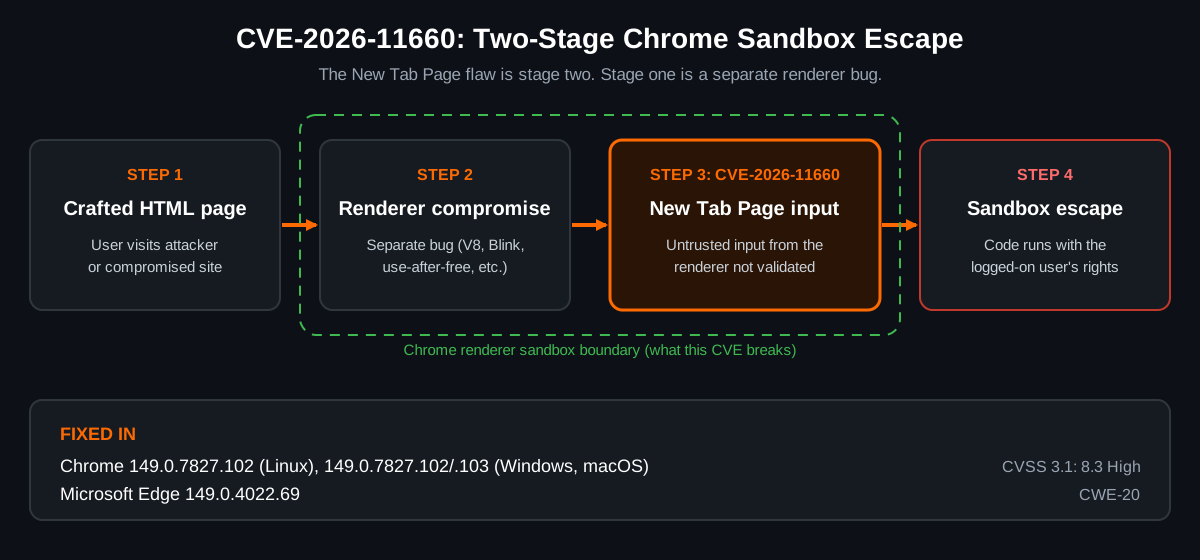
The attack complexity is rated High (AC:H) because it needs that first renderer compromise and user interaction (UI:R, someone has to load the page). Do not let AC:H lull you. Chrome stable releases routinely ship renderer bugs, and the same June release batch for Edge included CVE-2026-11645, which HKCERT flagged as exploited in the wild for code execution inside the sandbox. HKCERT bulletin: Microsoft Edge Multiple Vulnerabilities (16 Jun 2026). There is no public evidence the two were chained, but an exploited renderer bug plus an unpatched sandbox escape in the same version range is exactly the pairing attackers look for.
Risk scoring at a glance
| Signal | Value | What it means for you |
|---|---|---|
| CVSS 3.1 base | 8.3 High | Full compromise of the user context if chained |
| Attack vector | Network, user interaction required | Delivery is a link, an ad, or a compromised site |
| Privileges required | None | No account or prior foothold on the host needed |
| EPSS | 0.26% (17th percentile) | Low predicted exploitation, so patch on cadence, not panic |
| CISA KEV | Not listed as of this writing | No federal deadline, but recheck before closing the ticket |
EPSS and vector figures: CyberStrike CVE detail for CVE-2026-11660 (CVSS vector, EPSS).
Why care five months later?
Chrome has shipped several major versions since June, so most auto-updating machines are long past 149. The risk lives in the exceptions: kiosks, VDI golden images, frozen builds, offline laptops, and per-user installs. Those are the machines this post helps you find.
Prerequisites and Architecture
Assumed knowledge: basic PowerShell or Bash, how your org deploys browser policy (GPO, Intune, MDM profiles), and FortiGate web filter profiles if you use the network section.
| Component | Role in this guide | Notes |
|---|---|---|
| Google Chrome | Affected browser | System install in Program Files or per-user install in AppData on Windows |
| Microsoft Edge | Chromium-based, inherits the bug | Fixed build line is 149.0.4022.69, not the Chrome number |
| Admin workstation | Runs the version checks | PowerShell 5.1+ on Windows, Bash on macOS and Linux |
| GPO, Intune or MDM | Enforces update and relaunch policy | Registry examples below map to ADMX settings |
| FortiClient EMS (optional) | Finds vulnerable browsers on managed endpoints | Uses the endpoint Vulnerability Scan |
| FortiGate (optional) | Adds friction for drive-by delivery | Web filter on 10.0.0.0/16 user LANs |
Step-by-Step: Verify and Enforce the CVE-2026-11660 Fix
Step 1: Check the installed version on Windows
Goal: Get the real installed build for both system and per-user Chrome, plus Edge.
Action: Run this PowerShell as the user or as admin. It checks both install locations so per-user installs are not missed.
$targets = @(
  "$env:ProgramFiles\Google\Chrome\Application\chrome.exe",
  "${env:ProgramFiles(x86)}\Google\Chrome\Application\chrome.exe",
  "$env:LOCALAPPDATA\Google\Chrome\Application\chrome.exe",
  "${env:ProgramFiles(x86)}\Microsoft\Edge\Application\msedge.exe"
)
foreach ($t in $targets) {
  if (Test-Path $t) {
    $v = (Get-Item $t).VersionInfo.ProductVersion
    "{0,-80} {1}" -f $t, $v
  }
}
Verification: In the browser, open chrome://settings/help or edge://settings/help. The version shown must match or beat the fixed build.
Step 2: Compare against the fixed build in a script
Goal: Turn version strings into a pass or fail you can run from RMM or Intune remediation.
Action: PowerShell [version] objects compare numerically, so 149.0.7827.99 correctly sorts below 149.0.7827.103.
$fixedChrome = [version]"149.0.7827.102"
$fixedEdge   = [version]"149.0.4022.69"
$chrome = "$env:ProgramFiles\Google\Chrome\Application\chrome.exe"
$edge   = "${env:ProgramFiles(x86)}\Microsoft\Edge\Application\msedge.exe"

if (Test-Path $chrome) {
  $v = [version](Get-Item $chrome).VersionInfo.ProductVersion
  if ($v -lt $fixedChrome) { "VULNERABLE Chrome $v" } else { "OK Chrome $v" }
}
if (Test-Path $edge) {
  $v = [version](Get-Item $edge).VersionInfo.ProductVersion
  if ($v -lt $fixedEdge) { "VULNERABLE Edge $v" } else { "OK Edge $v" }
}
Verification: Every line should start with OK. For Intune Proactive Remediations, exit 1 on any VULNERABLE line so the remediation script fires.
Step 3: Check macOS and Linux
Goal: Same answer on the non-Windows fleet.
Action (macOS): Read the bundle version straight from the app’s Info.plist.
CHROME="/Applications/Google Chrome.app/Contents/Info.plist"
EDGE="/Applications/Microsoft Edge.app/Contents/Info.plist"
defaults read "$CHROME" CFBundleShortVersionString
defaults read "$EDGE" CFBundleShortVersionString
Action (Linux): Use the binary or the package manager. sort -V gives a quick version comparison.
google-chrome --version
dpkg -s google-chrome-stable 2>/dev/null | grep '^Version'
rpm -q google-chrome-stable 2>/dev/null

FIXED="149.0.7827.102"
CUR=$(google-chrome --version | awk '{print $3}')
if [ "$(printf '%s\n' "$FIXED" "$CUR" | sort -V | head -n1)" = "$FIXED" ]; then
  echo "OK $CUR"
else
  echo "VULNERABLE $CUR"
fi
Verification: Ubuntu’s tracker lists the chromium-browser package as not affected because on Ubuntu 19.10 and later that package is only a shim that installs the Chromium snap. Check the snap itself with snap list chromium. Ubuntu Security: CVE-2026-11660.
Step 4: Force relaunch so the patch actually runs
Goal: Close the gap between downloaded and running. Chrome and Edge stage updates silently, but the old build keeps running until the browser restarts.
Action: Set the relaunch policies. These registry values map to the Chrome and Edge ADMX settings of the same name; push them with GPO or Intune rather than by hand in production. RelaunchNotification = 2 makes the relaunch required, and the period is in milliseconds (86400000 is 24 hours).
:: Google Chrome
set K=HKLM\SOFTWARE\Policies\Google\Chrome
reg add "%K%" /v RelaunchNotification /t REG_DWORD /d 2 /f
reg add "%K%" /v RelaunchNotificationPeriod /t REG_DWORD /d 86400000 /f
set K=HKLM\SOFTWARE\Policies\Google\Update
reg add "%K%" /v UpdateDefault /t REG_DWORD /d 1 /f

:: Microsoft Edge
set K=HKLM\SOFTWARE\Policies\Microsoft\Edge
reg add "%K%" /v RelaunchNotification /t REG_DWORD /d 2 /f
reg add "%K%" /v RelaunchNotificationPeriod /t REG_DWORD /d 86400000 /f
set K=HKLM\SOFTWARE\Policies\Microsoft\EdgeUpdate
reg add "%K%" /v UpdateDefault /t REG_DWORD /d 1 /f
On macOS, deliver the same RelaunchNotification and RelaunchNotificationPeriod keys in a configuration profile for the com.google.Chrome and com.microsoft.Edge domains.
Verification: Open chrome://policy (or edge://policy), click Reload policies, and confirm both keys show Status OK with Source Platform or Machine.
Step 5: Let FortiClient EMS find the stragglers
Goal: Get a fleet-wide list of endpoints still running a vulnerable browser without writing your own inventory.
Action: In FortiClient EMS, make sure the endpoint profile has Vulnerability Scan enabled, then search the vulnerability views for CVE-2026-11660 or filter on Google Chrome and Microsoft Edge. If you use ZTNA, a Zero Trust Tagging rule based on vulnerable devices at High severity can tag those hosts so FortiGate policies can treat them differently until they are patched.
Verification: After users relaunch, rerun the scan from EMS and confirm the host count for this CVE drops to zero.
Step 6: Add network-side friction on FortiGate
Goal: Make the first stage (getting a user onto a malicious page) harder. This does not fix the bug; it buys time for stragglers.
Action: On the web filter profile applied to your user LANs (10.0.0.0/16 in the lab), block or warn on the FortiGuard categories that drive-by delivery lives in: Newly Observed Domain, Newly Registered Domain, Malicious Websites and Phishing. Apply the profile to the outbound user policy with SSL inspection so HTTPS sites are categorized correctly.
config firewall policy
    edit <policy-id>
        set name "LAN-to-Internet"
        set srcintf "<lan-interface>"
        set dstintf "<wan-interface>"
        set srcaddr "LAN_10.0.0.0_16"
        set dstaddr "all"
        set action accept
        set schedule "always"
        set service "ALL"
        set utm-status enable
        set ssl-ssh-profile "<inspection-profile>"
        set webfilter-profile "<webfilter-profile>"
        set logtraffic all
        set nat enable
    next
end
Verification: In the GUI, go to Log and Report, Security Events, Web Filter, and confirm blocked hits in those categories from LAN sources.
Verification and Validation
Run these after the relaunch window closes. All of them should agree.
| Check | Command or place | Expected success |
|---|---|---|
| Running Chrome build | chrome://settings/help |
Chrome is up to date, version 149.0.7827.102 or later |
| Running Edge build | edge://settings/help |
Microsoft Edge is up to date, 149.0.4022.69 or later |
| Scripted check | Step 2 PowerShell | Only OK lines |
| Policy applied | chrome://policy, edge://policy |
RelaunchNotification = 2, Status OK |
| Fleet view | FortiClient EMS vulnerability views | Zero endpoints listed for CVE-2026-11660 |
Expected output from the Step 2 script on a patched machine (your build numbers will be newer than the fixed ones):
OK Chrome <installed-chrome-version>
OK Edge <installed-edge-version>
Troubleshooting and Gotchas
Gotcha 1: Updated on disk, still vulnerable in memory
Chrome on Windows stages the new build next to the old one and swaps on relaunch. A machine can report the new version in file inventory while the user is still running the old one for days.
Get-ChildItem "$env:ProgramFiles\Google\Chrome\Application" -Directory |
  Where-Object Name -match '^\d+\.' | Select-Object Name
Test-Path "$env:ProgramFiles\Google\Chrome\Application\new_chrome.exe"
Fix: Two version folders, or a new_chrome.exe that exists, means an update is waiting on a relaunch. Enforce Step 4 so the browser relaunches inside your window.
Gotcha 2: Per-user installs dodge your inventory
Users without admin rights can install Chrome into %LOCALAPPDATA%. Scans that only look in Program Files miss them, and those installs update on their own schedule.
$p = "C:\Users\*\AppData\Local\Google\Chrome\Application\chrome.exe"
Get-ChildItem $p -ErrorAction SilentlyContinue |
  ForEach-Object { "{0}  {1}" -f $_.FullName, $_.VersionInfo.ProductVersion }
Fix: Deploy the enterprise system-level installer, which takes precedence over per-user copies, and block per-user installs with your app control policy.
Gotcha 3: Edge is not Chrome, and Chromium is not everything
Edge carries its own version line, so matching Edge against the Chrome build number gives wrong answers. Edge’s fixed build for this batch is 149.0.4022.69, which shipped about a week after Chrome. HKCERT bulletin: Microsoft Edge Multiple Vulnerabilities (16 Jun 2026). Electron apps and other products that embed Chromium also follow their own vendors’ release schedules, so a Chrome patch does not cover them.
Fix: Track Edge separately in your compliance rules, and check embedded-Chromium apps against their own vendor advisories.
Key Takeaways
- CVE-2026-11660 is a sandbox escape that needs a separate renderer compromise first, which is why it scores AC:H but still lands at 8.3.
- Fixed builds: Chrome 149.0.7827.102 (Linux), 149.0.7827.102/.103 (Windows and macOS), Edge 149.0.4022.69. HKCERT bulletin: Google Chrome Multiple Vulnerabilities (9 Jun 2026).
- Downloaded is not patched. Enforce RelaunchNotification so the new build actually runs.
- Hunt the exceptions: per-user installs, VDI images, kiosks, and offline machines.
- Use FortiClient EMS to find vulnerable endpoints and FortiGate web filtering to make drive-by delivery harder while you clean up.
Sources
Recent posts
-

-

DNS is one of those technologies that quietly underpins... Full Story
-

BGP issues on FortiGate firewalls usually trace back to... Full Story
-

Every time your laptop talks to your router, a... Full Story
-

If you've spent any time configuring NAT on a... Full Story
-

If you have spent any time configuring firewall policies... Full Story
-

High availability on FortiGate is one of those features... Full Story
-

If you've configured SD-WAN on a FortiGate, you've almost... Full Story
-

FortiLink is the management protocol that turns a FortiSwitch... Full Story
-

FortiSwitches are pretty rock solid from Mean Time Between... Full Story
-

This is a quicky tip. Have you ever gone... Full Story
-

DNS is one of those quiet pieces of internet... Full Story
-

This article is an updated version of the previous... Full Story
-

You will add ns2 as a secondary (slave) BIND9... Full Story
-

In the process of deploying my lab, I needed... Full Story
-

RFC 8805, used to be known as Self-Correcting IP... Full Story
-

Years back, I wrote an article about certificate pinning. ... Full Story
-

FortiGates have the ability to send alerts to Microsoft... Full Story
-

In this post, I am going to walk through... Full Story
-

Troubleshooting VoIP on a FortiGate can feel like trying... Full Story
-

Prior to FortiOS 7.0, there were three commands to... Full Story
-

In this post, I am going to go over... Full Story
-

What we are going to do: We are going... Full Story
-

Choosing between FGCP (FortiGate Clustering Protocol) and FGSP (FortiGate... Full Story
-

Creating a VLAN on macOS (The "Pro" Move) A... Full Story
-

This blog post explores the logic behind how macOS... Full Story
-

Pretty Fly for a Wi-Fi Tell My Wi-Fi Love... Full Story
-

Part of my daily gig is creating BoMs (Bill-of-Materials)... Full Story
-

ICMP introduces several security risks, but careful filtering, rate... Full Story
-

The command diag debug application dhcps -1 enables full... Full Story
-

In the world of FortiOS, execute tac report is... Full Story
-

LLDP; What is it The Link Layer Discovery Protocol... Full Story
-

What it actually does When you run diagnose fdsm... Full Story
-

Monkey Bites are bite-sized, high-impact security insights designed for... Full Story
-

I have run macOS in macOS with Parallels but... Full Story
-

Don't be confused with my other FortiNAC posts where... Full Story
-

This is the third session in a multi-part article... Full Story
-

Today I was configuring key-based authentication on a FortiGate... Full Story
-

Netcat, often called the "Swiss Army knife" of networking,... Full Story
-

At its core, IEEE 802.1X is a network layer... Full Story
-

In case you did not see the previous FortiNAC... Full Story
-

This is our 5th session where we are going... Full Story
-

Now that we have Wireshark installed and somewhat configured,... Full Story
-

The Philosophy of Packet Analysis Troubleshooting isn't about looking... Full Story
-

Cisco Meraki Security Hardening Release, October 2026: the access... Full Story
-

nmap Companion Tools: The Command-Line Ecosystem That Reads Your... Full Story
-

CVE-2026-19868: SonicWall SAML MFA Bypass on SSLVPN, Patch and... Full Story