
If you've spent any time configuring user authentication on... Full Story
By Manny Fernandez
November 10, 2026

eMudhra Certificate Compromise: What Broke and How to Clean Up Your Trust Stores
INFOSECMONKEY | NO FLUFF. JUST THE CONFIG THAT WORKS.
eMudhra Certificate Compromise: What Broke and How to Clean Up Your Trust Stores
Eight intermediate CA keys, a botched key ceremony, and the non-browser clients that are still exposed
Executive Summary
The eMudhra certificate compromise is the biggest WebPKI incident of 2026 so far. On October 17, a researcher proved he held the private keys for eight eMudhra intermediate CA certificates by signing a message with each one. The keys were generated so badly during an April 2025 key ceremony that anyone could recover them from the public certificates. Those intermediates chained to roots trusted by Apple, Google, Microsoft, and Mozilla, which means a forged certificate for any domain was possible.
The browsers closed the door within hours. The real work is everywhere else: curl, Python, Java, Go, Node, Electron apps, container base images, appliances, and every TLS-inspecting proxy that validates certificates on behalf of your users. That last one matters to anyone running SSL deep inspection on a FortiGate, because once the firewall re-signs a connection, the browser never sees the original chain and its built-in protection does not apply.
| Item | Detail |
|---|---|
| Objective | Understand what happened, find every client in your environment that still trusts the compromised intermediates, patch them, and verify |
| Target audience | Network and security engineers, SysAdmins, DevOps and platform teams, FortiGate administrators running SSL deep inspection |
| Time to complete | 30 minutes to triage a lab, longer for a full fleet inventory |
| Risk if ignored | Any client that trusts the intermediates and does not enforce Certificate Transparency can be handed a forged certificate for any domain |
What Happened in the eMudhra Certificate Compromise
On April 30, 2025, eMudhra ran a key generation ceremony for 24 subordinate CAs under emSign Root TLS CA – G3. A flaw in the scripting around a key wrap and unwrap step produced a second set of P-384 keys with almost no entropy. Instead of 384 bits of randomness, some keys had single-digit security; one of the private keys was reported to be the literal number 4. Sectigo cross-signed all eight affected intermediates in May 2025 under its legacy AAA Certificate Services root, which widened the trust footprint even further.
A researcher known as Wayne spotted the problem on October 17, 2026 while running checks against the Common CA Database (CCADB). He signed a short proof message with every affected key and reported it to Apple, Google, Microsoft, Mozilla, and eMudhra. Several other people independently recovered the keys within days, which is why the root programs treated this as a full compromise rather than a theoretical weakness.
Timeline
| Date (2026 unless noted) | Event |
|---|---|
| Apr 30, 2025 | Key ceremony for 24 subordinate CAs; flawed script produces weak P-384 keys |
| May 2025 | Sectigo cross-signs the eight intermediates under AAA Certificate Services |
| Oct 17, 18:05 UTC | Chrome Root Program receives the report (Mozilla logs it at 20:06 UTC) |
| Oct 17, 19:45 UTC | Chrome pushes a CRLSet blocking the intermediates; Firefox OneCRL block follows the same day |
| Oct 18 | eMudhra revokes all eight intermediates with reason cACompromise |
| Oct 19 to 22 | Apple ships blocks (sources differ on the exact date); downstream trust stores are notified |
| Oct 20 | Microsoft blocks; Mozilla removes emSign ECC Root CA – G3 in NSS 3.131.1 and Firefox 158.0.1; public disclosure |
| Oct 22 | eMudhra announces it is leaving the global SSL/TLS certificate business |
| Oct 27 | Chrome removal of emSign ECC Root CA – G3 (Root Store v43) expected to reach all devices |
What was compromised
| Intermediate | Purpose | Notes |
|---|---|---|
| EM DV TLS CA – G3B | TLS, domain validated | eMudhra BV (Netherlands) |
| EM DV TLS CA – G3C | TLS, domain validated | eMudhra Inc (United States) |
| Four additional TLS intermediates | TLS | Listed in impacted-intermediates.json on the disclosure site |
| EM OV CS CA – G3B | Code signing | Blocked by Microsoft |
| EM OV CS CA – G3C | Code signing | Blocked by Microsoft |
The six TLS intermediates were issued by emSign Root TLS CA – G3 and chain up to emSign ECC Root CA – G3. Each also has a Sectigo cross-sign that chains to AAA Certificate Services. The vulnerabilities are tracked as CVE-2026-111943 and CVE-2026-111944, and Mozilla issued CVE-2026-113470 for the Firefox fix.
Why browsers were safe and your other clients may not be
No TLS certificate chaining to the six intermediates ever appeared in the Certificate Transparency (CT) logs before Chrome blocked them. Chrome, Safari, Edge, and Firefox all require CT for publicly trusted certificates, so a forged certificate that an attacker never logged would have been rejected anyway. The browsers also have fast push channels (CRLSets, OneCRL, CRLite) that do not wait for a software release.
Most non-browser clients have neither safety net. They ship a static CA bundle, they do not check revocation, and they do not enforce CT. That means an attacker who had recovered a key at any point since April 2025 could have targeted API clients, update agents, scripts, and backend services without leaving a trace in the CT logs. Nobody has reported exploitation, but nobody can rule it out either.
The SSL inspection blind spot
When a FortiGate (or any proxy) performs deep inspection, it validates the real server chain and then re-signs the session with your enterprise CA. The browser only sees your local CA, which is exempt from CT and never matches a CRLSet entry. If the proxy still trusts the compromised intermediates, every user behind it inherits that trust, no matter how patched their browser is.
Where eMudhra stands now
eMudhra says its root keys and other intermediates were not affected, that only one of the eight was ever deployed in production, and that none of them issued an end-entity certificate. It has stopped issuing from the G3 ECC hierarchy and estimates roughly 30,000 customer certificates need replacement. Its Indian digital signature certificate and eSign services are regulated separately and are not part of this incident. Chrome has also said it is evaluating eMudhra’s remaining root in its store, emSign Root CA – G1, so plan for that hierarchy to go away too.
Prerequisites and Architecture
Assumed knowledge
- How X.509 chains work: root, intermediate, leaf
- What a trust store is and where your OS, runtimes, and apps keep theirs
- Basic
openssl,curl, and FortiOS CLI usage
Lab used in this post
| Component | Role | Address |
|---|---|---|
| FortiGate (FortiOS 7.4 or later) | Internet edge, SSL deep inspection | WAN 198.18.0.2, LAN 10.0.10.1 |
| Ubuntu 24.04 client | Linux trust store, Python, Node, Java tests | 10.0.10.50 |
| Windows 11 client | Windows CTL and PowerShell tests | 10.0.10.51 |
| macOS client | Built-in curl and /etc/ssl/cert.pem tests | 10.0.10.52 |
| Test hosts | Live chains signed by the compromised intermediates | dv-g3b-emudhra.we-have-a-problem.com and siblings |
The disclosure site publishes test hostnames that serve certificates issued by the compromised intermediates. A connection that succeeds means the client still trusts them. A certificate error means you are protected on that verification path.
Figure 1: Where the compromised intermediates sit, and which clients are protected
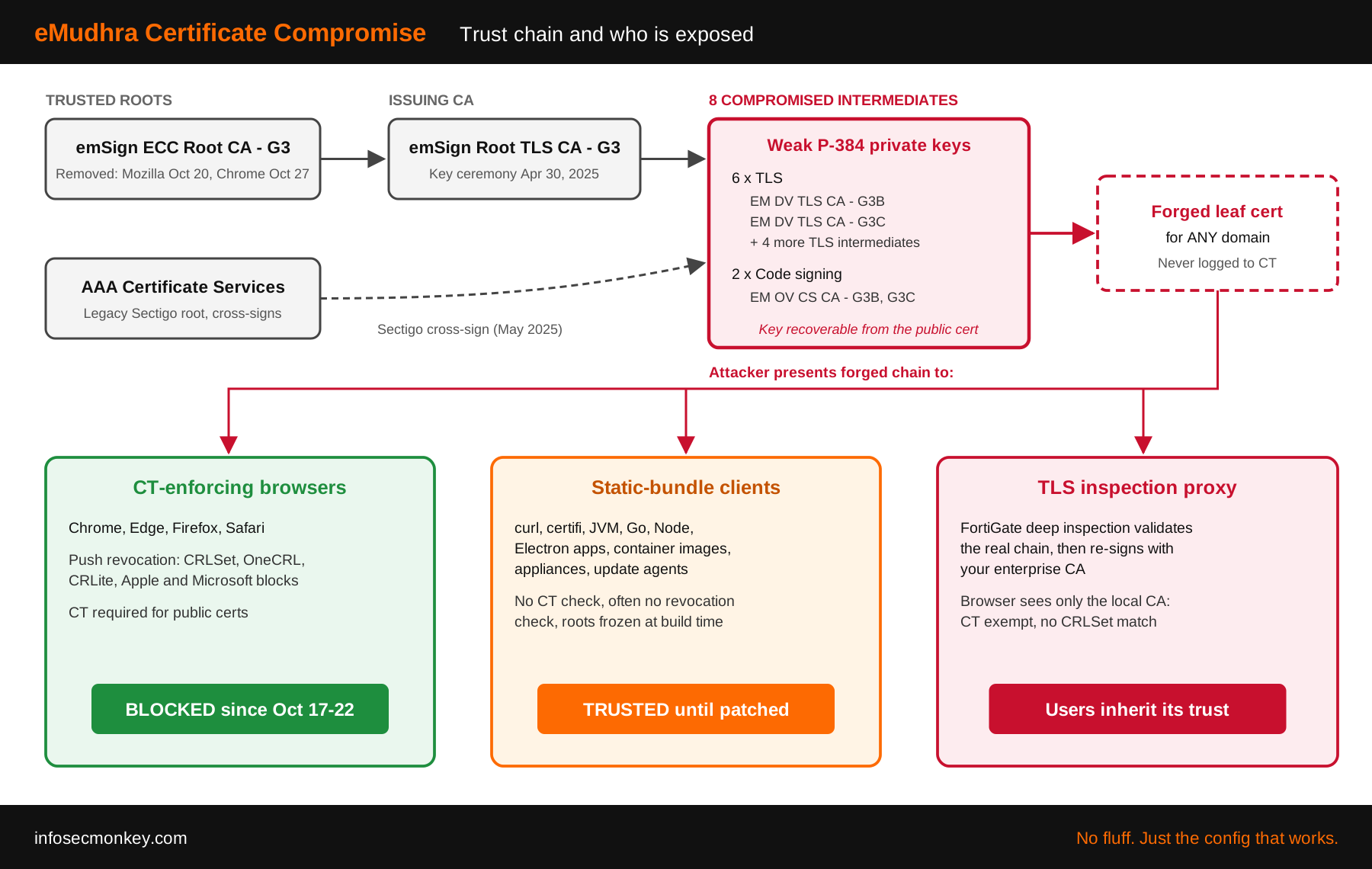
eMudhra trust chain from emSign and Sectigo roots to eight weak intermediates, and which client types block or trust forged certificates
Step-by-Step Remediation
Step 1: Test every verification path you care about
Goal: Find out which clients still trust the compromised intermediates before you change anything.
Action: Run the checker hosts from each client type. The noct variants serve a leaf that was never logged to CT, so a success there means the client trusts the intermediates and does not enforce CT, which is the exploitable case.
# Chain via emSign ECC Root CA - G3
curl -sS -o /dev/null https://dv-g3b-emudhra.we-have-a-problem.com/
# Chain via the Sectigo cross-sign (AAA Certificate Services)
curl -sS -o /dev/null https://dv-g3b-aaa-emudhra.we-have-a-problem.com/
# Same chains with a leaf that was never logged to CT
curl -sS -o /dev/null https://dv-g3b-noct-emudhra.we-have-a-problem.com/
curl -sS -o /dev/null https://dv-g3b-aaa-noct-emudhra.we-have-a-problem.com/
Verification: Any line that returns silently with exit code 0 is a vulnerable path. A curl: (60) certificate error is what you want. In a browser, open the disclosure site and click Run check; if a test link loads without a warning page, that browser is still trusting the chain.
Step 2: Patch the Linux system trust store
Goal: Remove emSign ECC Root CA – G3 (and the compromised cross-signs) from the OS bundle that most Linux tools use.
Action: Update the ca-certificates package. Patched builds include Ubuntu 20260816ubuntu0.24.04.1, Debian 20250419+deb13u1 and 20250419~deb12u2, RHEL 9 2026.2.92_v9.0.319-90.3.el9_8, and Alpine 20261020-r0.
# Debian / Ubuntu
sudo apt update && sudo apt install --only-upgrade ca-certificates
apt policy ca-certificates

# RHEL / Rocky / Alma / Fedora
sudo dnf upgrade -y ca-certificates
rpm -q ca-certificates

# Alpine
apk upgrade ca-certificates
If your distribution has not shipped yet, expert users can distrust the roots by hand on Debian and Ubuntu. Expect some unaffected sites that still chain to AAA Certificate Services to break.
sudo sed -i \
  -e 's|^mozilla/emSign_ECC_Root_CA_-_G3.crt|!&|' \
  -e 's|^mozilla/Comodo_AAA_Services_root.crt|!&|' \
  /etc/ca-certificates.conf && sudo update-ca-certificates
Verification: Confirm the root is gone from the compiled bundle. No output means it was removed.
awk -v cmd='openssl x509 -noout -subject' \
  '/BEGIN/{close(cmd)};{print | cmd}' \
  < /etc/ssl/certs/ca-certificates.crt | grep -i "emSign ECC Root CA - G3"

# RHEL family
trust list | grep -i "emSign ECC Root CA - G3"
Step 3: Patch runtimes and anything that ships its own CA bundle
Goal: Close the gaps the OS update does not reach. This is where most environments stay exposed.
Action: Check and upgrade each runtime and bundle you use. Minimum patched versions from the community tracker:
| Component | Patched version | Check |
|---|---|---|
| Python certifi | 2026.10.19 | python3 -c “import certifi; print(certifi.__version__)” |
| Python | 3.15.1, 3.14.9, 3.13.17 | python3 –version |
| pip | 26.2.2 | pip –version |
| Node.js | 26.12.1, 24.22.1, 22.23.4 | node -v |
| Go | 1.27.3, 1.26.10 | go version |
| Java | Vendor builds (see OpenJDK and Oracle notices) | keytool -cacerts -list |
| Electron | 44.9.1, 43.8.1, 42.11.16 | Update each Electron app (Slack, Discord, etc.) |
| Docker Engine / CLI | 29.9.2 | docker version |
| Docker Desktop | 4.96.2 | About dialog |
| curl CA bundle | 2026-10-20 extract | Check bundle date |
| rustls-webpki | 0.103.16 | cargo tree | grep webpki |
| Git for Windows | 2.56.0.3 | git –version |
# Python environments
python3 -m pip install --upgrade certifi pip

# Java: look for emSign entries in the JVM store (no output is good)
keytool -cacerts -list -storepass changeit | grep -i emsign

# Containers: rebuild on a fresh, patched base image
docker build --pull --no-cache -t <image>:<tag> .
Verification: Test from inside the runtime, not from the shell next to it. A runtime can verify against a different store than the curl on the same box.
export U=https://dv-g3b-emudhra.we-have-a-problem.com/
python3 -c "import os, requests; requests.get(os.environ['U'])"
# Expect: requests.exceptions.SSLError ... CERTIFICATE_VERIFY_FAILED

node -e "fetch(process.env.U).then(()=>console.log('TRUSTED'))
  .catch(e=>console.log('BLOCKED:', e.cause?.code))"

docker run --rm <image>:<tag> curl -sS https://dv-g3b-emudhra.we-have-a-problem.com/
Step 4: Windows and macOS endpoints
Goal: Confirm the vendor blocks landed, and patch the macOS command-line trust file that Apple has not updated yet.
Action (Windows): Microsoft distributes the block through automatic certificate trust list updates, so connected machines should already be covered. Test from PowerShell. For offline machines or hosts with automatic root updates disabled, the disclosure site publishes Block-EmudhraCompromisedCA.ps1, which adds the 16 intermediates and cross-signs to LocalMachine\Disallowed. Coordinate with your endpoint team before running it on managed devices.
$u = "https://dv-g3b-emudhra.we-have-a-problem.com/"
try {
  Invoke-WebRequest $u -UseBasicParsing | Out-Null
  "TRUSTED - not protected"
} catch { "BLOCKED - " + $_.Exception.Message }
Action (macOS): Apps built on Apple frameworks are protected, but the built-in curl, git, and python3 verify against /etc/ssl/cert.pem without revocation checks. Apple has said a future update will fix that file. Until then, back it up and remove emSign ECC Root CA – G3.
[ -e /etc/ssl/cert.pem.orig ] || sudo cp -p /etc/ssl/cert.pem /etc/ssl/cert.pem.orig

R='/C=IN/OU=emSign PKI/O=eMudhra Technologies Limited'
R="=== $R/CN=emSign ECC Root CA - G3"
t=$(mktemp) &&
awk -v s="$R" '/^(===|###) /{skip=0} $0==s{skip=1} !skip' \
  /etc/ssl/cert.pem > "$t" &&
[ -s "$t" ] && sudo install -m 0644 -o root -g wheel "$t" /etc/ssl/cert.pem
rm -f "$t"
Verification: This prints nothing once the root is gone. A macOS update can restore the old file, so re-run the check after every update until Apple ships its fix.
openssl crl2pkcs7 -nocrl -certfile /etc/ssl/cert.pem \
  | openssl pkcs7 -print_certs -noout | grep "emSign ECC Root CA - G3"
Step 5: FortiGate SSL deep inspection
Goal: Make sure the FortiGate does not validate a compromised chain and then hand your users a trusted re-signed certificate.
Action: FortiGate validates server certificates against the FortiGuard Certificate Bundle. Check the version, force an update, and then test through the inspection path. At the time of writing I have not seen a public Fortinet statement on this incident, so verify the result yourself rather than assuming the bundle changed.
diagnose autoupdate versions | grep -A6 "Certificate Bundle"
execute update-now

# Offline units: get the bundle .pkg from TAC and import over TFTP
execute vpn certificate ca import bundle <bundle-file.pkg> <tftp-server-ip>
Next, harden the deep inspection profile so an untrusted or revoked server certificate is blocked instead of re-signed. The built-in deep-inspection profile is read-only, so clone it or use your own custom profile. eMudhra revoked all eight intermediates, so revoked-server-cert block adds a second layer when OCSP or CRL data is reachable.
config firewall ssl-ssh-profile
    edit "deep-inspection-strict"
        config https
            set ports 443
            set status deep-inspection
            set untrusted-server-cert block
            set revoked-server-cert block
            set cert-validation-failure block
        end
    next
end
Change control
Switching untrusted-server-cert from allow to block will surface every site on the internet with a broken chain. Roll it out to a pilot policy first and watch the SSL logs before applying it broadly.
GUI Verification: Go to Security Profiles > SSL/SSH Inspection, edit the profile on your outbound policy, and select View Trusted CA List. Search for emSign and confirm whether the G3 ECC root is still present. Then run the definitive test from a client behind the FortiGate:
# From 10.0.10.50, through a policy with deep inspection
openssl s_client -connect dv-g3b-emudhra.we-have-a-problem.com:443 \
  -servername dv-g3b-emudhra.we-have-a-problem.com </dev/null 2>/dev/null \
| openssl x509 -noout -issuer| Issuer you see | Meaning |
|---|---|
| Your trusted re-signing CA (default Fortinet_CA_SSL) | FortiGate trusted the compromised chain. Users behind it are exposed. |
| Fortinet_CA_Untrusted | FortiGate rejected the chain and re-signed with the untrusted CA. Clients will show an error. |
| No certificate, connection reset or replacement page | Blocked by the profile. This is the target state. |
Step 6: Inventory your own eMudhra certificates
Goal: If you bought certificates from eMudhra (emSign), find them before Chrome removes the root on October 27 and they start failing.
Action: Scan the hosts you own and check CT for anything issued to your domains by eMudhra. Replace hits with certificates from another CA. This includes FortiGate admin, SSL VPN, and ZTNA certificates, load balancer VIPs, and mail servers.
# hosts.txt: one FQDN per line
while read -r h; do
  printf "%s: " "$h"
  openssl s_client -connect "$h:443" -servername "$h" -showcerts \
    </dev/null 2>/dev/null | grep -E "^ *i:" \
    | grep -qiE "emSign|eMudhra" && echo "eMudhra chain" || echo "ok"
done < hosts.txt

# CT lookup for your domain
curl -s "https://crt.sh/?q=<your-domain>&output=json" \
  | jq -r '.[].issuer_name' | sort -u | grep -i emsign
Verification: Every host reports ok and the CT query returns nothing, or you have a replacement ticket open for each hit.
Verification and Validation
Run the full check from each client class after patching. Results only apply to the verification path you test, so test through the application itself wherever you can.
for h in dv-g3b dv-g3b-aaa dv-g3b-noct dv-g3b-aaa-noct; do
  printf "%-16s " "$h"
  if curl -sS -o /dev/null "https://$h-emudhra.we-have-a-problem.com/" \
       2>/dev/null; then
    echo "TRUSTED (fix me)"
  else
    echo "BLOCKED (exit $?)"
  fi
done
Expected success output on a patched client is a block for all four hosts. Exit code 60 is curl’s certificate verification failure:
dv-g3b           BLOCKED (exit 60)
dv-g3b-aaa       BLOCKED (exit 60)
dv-g3b-noct      BLOCKED (exit 60)
dv-g3b-aaa-noct  BLOCKED (exit 60)
Run a single host without the redirect to see the full message, typically curl: (60) SSL certificate problem: unable to get local issuer certificate. The exact error text varies by client and by which root you removed (revoked, unknown issuer, or untrusted). What matters is that no host connects cleanly. For an offline check of a trust store, download chains.zip from the disclosure site and verify each chain with openssl verify -CAfile <your-bundle>.
Troubleshooting and Gotchas
1. The OS is patched but an app still connects
Cause: The app ships its own CA store. Electron apps, Python virtual environments with an old certifi, JVMs, and container images all carry their own roots, and they only pick up the fix when they are rebuilt or updated.
Fix: Find out which store the app uses and test from inside it. For Python, print the bundle path, then upgrade certifi in that environment.
python3 -c "import certifi; print(certifi.where(), certifi.__version__)"
python3 -c "import ssl; print(ssl.get_default_verify_paths())"
2. Java on Debian or Ubuntu still trusts the root
Cause: The Java keystore generated by ca-certificates-java can fall out of sync with the system store after a manual change.
Fix: Force a rebuild of the Java store, then re-run the keytool check from Step 3.
sudo touch /var/lib/ca-certificates-java/fresh
sudo dpkg-reconfigure ca-certificates-java
3. Legitimate sites start failing
Cause: You removed AAA Certificate Services by hand, or a site you depend on still uses an eMudhra certificate and Chrome dropped the root on October 27.
Fix: Do not “fix” it by turning off certificate verification or setting untrusted-server-cert allow globally; that removes the protection you just added. Prefer vendor packages over manual root removal, and for third-party sites, notify the owner that their eMudhra certificate needs replacing. A narrow, documented SSL exemption for one known-good destination is acceptable as a short-term bridge.
4. The FortiGate still re-signs with the trusted CA
Cause: The Certificate Bundle has not updated, FortiGuard is unreachable, or the bundle has not removed the root yet.
Fix: Check the update status and FortiGuard reachability, force an update, and if the root is still trusted, rely on the hardened profile from Step 5 and open a TAC case referencing CVE-2026-111943.
diagnose autoupdate status
diagnose debug rating
execute update-now
diagnose autoupdate versions | grep -A6 "Certificate Bundle"
Key Takeaways
- Browsers were protected within hours because of CT enforcement and push-based revocation. Almost nothing else has those controls.
- Patching the OS is necessary but not sufficient. Runtimes, app bundles, and container images need their own updates and rebuilds.
- TLS inspection moves the trust decision from the browser to the proxy. Your FortiGate is a non-browser client and needs to be tested like one.
- If you are an eMudhra customer, replace those certificates now. The G3 ECC root is leaving Chrome and Firefox, and the G1 root is under review.
Sources
- eMudhra Intermediate CA Compromise disclosure and patch tracker
- Google: Protecting Chrome and Android users from compromised eMudhra intermediates
- Cloudflare: 8 eMudhra certificates are compromised
- eMudhra statement on the certificate security incident
- Cisco Talos: Compromised eMudhra intermediate certificates
- Help Net Security coverage
- The Hacker News: eMudhra to exit global SSL/TLS business
- Fortinet Community: Importing the public CA certificate bundle in FortiGate
InfoSecMonkey | No fluff. Just the config that works.
Recent posts
-

-

DNS is one of those technologies that quietly underpins... Full Story
-

BGP issues on FortiGate firewalls usually trace back to... Full Story
-

Every time your laptop talks to your router, a... Full Story
-

If you've spent any time configuring NAT on a... Full Story
-

If you have spent any time configuring firewall policies... Full Story
-

High availability on FortiGate is one of those features... Full Story
-

If you've configured SD-WAN on a FortiGate, you've almost... Full Story
-

FortiLink is the management protocol that turns a FortiSwitch... Full Story
-

FortiSwitches are pretty rock solid from Mean Time Between... Full Story
-

This is a quicky tip. Have you ever gone... Full Story
-

DNS is one of those quiet pieces of internet... Full Story
-

This article is an updated version of the previous... Full Story
-

You will add ns2 as a secondary (slave) BIND9... Full Story
-

In the process of deploying my lab, I needed... Full Story
-

RFC 8805, used to be known as Self-Correcting IP... Full Story
-

Years back, I wrote an article about certificate pinning. ... Full Story
-

FortiGates have the ability to send alerts to Microsoft... Full Story
-

In this post, I am going to walk through... Full Story
-

Troubleshooting VoIP on a FortiGate can feel like trying... Full Story
-

Prior to FortiOS 7.0, there were three commands to... Full Story
-

In this post, I am going to go over... Full Story
-

What we are going to do: We are going... Full Story
-

Choosing between FGCP (FortiGate Clustering Protocol) and FGSP (FortiGate... Full Story
-

Creating a VLAN on macOS (The "Pro" Move) A... Full Story
-

This blog post explores the logic behind how macOS... Full Story
-

Pretty Fly for a Wi-Fi Tell My Wi-Fi Love... Full Story
-

Part of my daily gig is creating BoMs (Bill-of-Materials)... Full Story
-

ICMP introduces several security risks, but careful filtering, rate... Full Story
-

The command diag debug application dhcps -1 enables full... Full Story
-

In the world of FortiOS, execute tac report is... Full Story
-

LLDP; What is it The Link Layer Discovery Protocol... Full Story
-

What it actually does When you run diagnose fdsm... Full Story
-

Monkey Bites are bite-sized, high-impact security insights designed for... Full Story
-

I have run macOS in macOS with Parallels but... Full Story
-

Don't be confused with my other FortiNAC posts where... Full Story
-

This is the third session in a multi-part article... Full Story
-

Today I was configuring key-based authentication on a FortiGate... Full Story
-

Netcat, often called the "Swiss Army knife" of networking,... Full Story
-

At its core, IEEE 802.1X is a network layer... Full Story
-

In case you did not see the previous FortiNAC... Full Story
-

This is our 5th session where we are going... Full Story
-

Now that we have Wireshark installed and somewhat configured,... Full Story
-

The Philosophy of Packet Analysis Troubleshooting isn't about looking... Full Story
-

nmap Companion Tools: The Command-Line Ecosystem That Reads Your... Full Story
-

CVE-2026-19868: SonicWall SAML MFA Bypass on SSLVPN, Patch and... Full Story
-

No fluff. Just the config that works. Objective: The... Full Story