
If you've spent any time configuring user authentication on... Full Story
By Manny Fernandez
November 10, 2026
FortiGate IKEv2 Certificate Pinning: Machine Certificate Plus EAP-MSCHAPv2 Remote Access VPN
Pin a device certificate to your IKEv2 dial-up tunnel, then make the user prove who they are with EAP-MSCHAPv2. PKI built from scratch in OpenSSL.
No fluff. Just the config that works.
Executive Summary
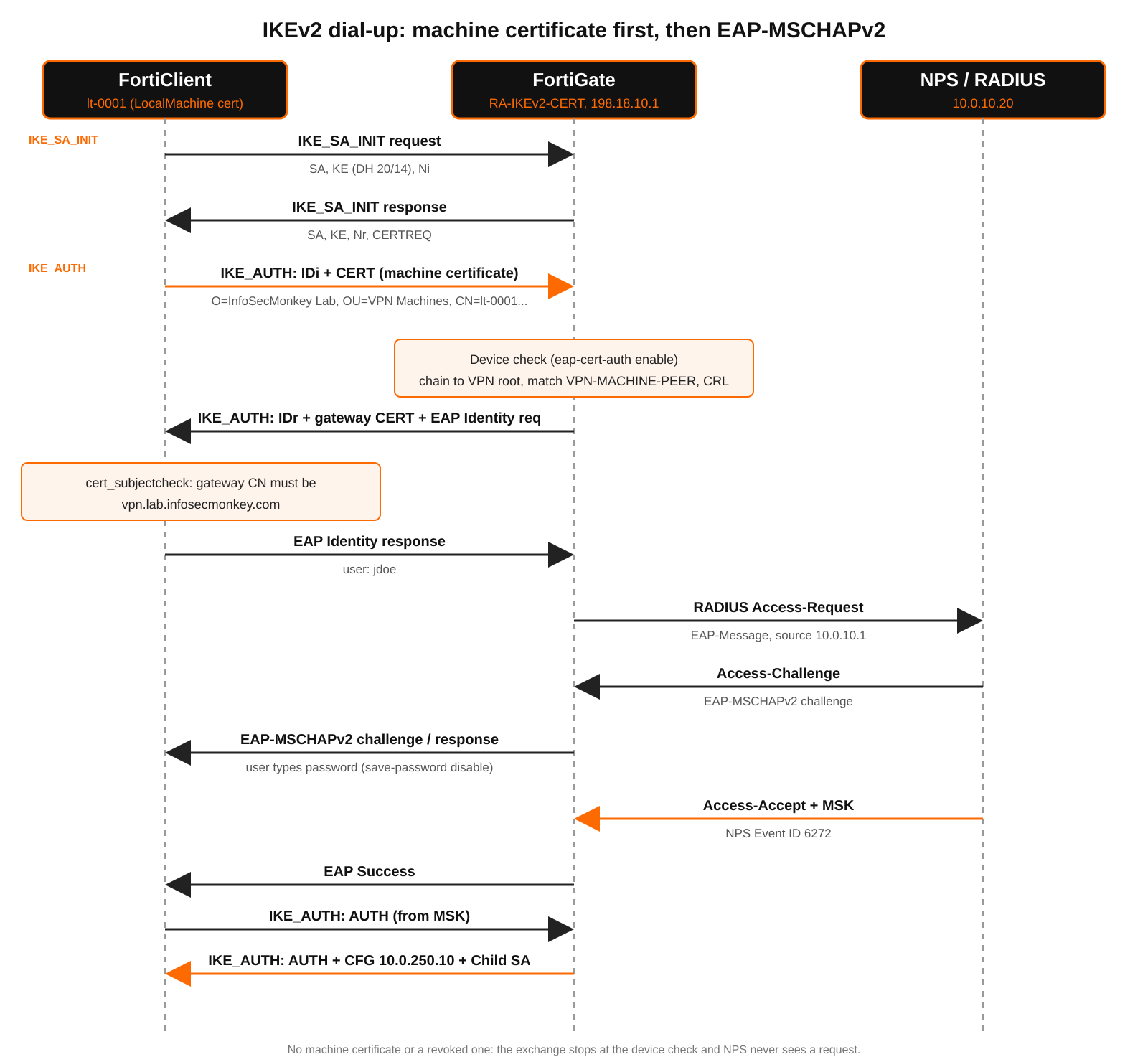
A username and password prove who the person is. They say nothing about the device. If a contractor copies their FortiClient profile onto a personal laptop, a password-only IKEv2 tunnel happily lets that laptop in. FortiGate IKEv2 certificate pinning fixes that: the tunnel only negotiates when the endpoint presents a machine certificate issued by a CA you control and that matches a peer object you define. Only after the device passes does the FortiGate ask the user for credentials over EAP-MSCHAPv2.
Objective: build a dedicated VPN PKI in OpenSSL, issue a gateway certificate and per-device machine certificates, install the machine certificate in the Windows Local Machine store, and configure a FortiGate IKEv2 dial-up tunnel that requires that certificate (via eap-cert-auth and a user peer object) before EAP-MSCHAPv2 user authentication against Microsoft NPS (RADIUS).
Target audience: FortiGate administrators and SEs replacing SSL VPN or PSK-based IPsec remote access with IKEv2, who need device trust plus user identity without a full EMS/ZTNA rollout.
Note: What “pinning” means here: the FortiGate does not just accept any certificate that chains to a trusted CA. The user peer object pins acceptance to one specific issuing CA (dedicated to VPN machines) and a subject constraint, and the CRL lets you un-pin a single lost laptop in seconds. On the client side, cert_subjectcheck pins FortiClient to the gateway certificate name so a rogue gateway with some other trusted certificate is refused.
Prerequisites and Architecture
Assumed knowledge
- FortiGate IPsec phase1-interface and phase2-interface basics, firewall policies, and address objects.
- IKEv2 exchange flow (IKE_SA_INIT, IKE_AUTH, EAP inside IKE_AUTH). If you want the packet-by-packet version, read the companion post on what happens in the background of a FortiGate IKEv2 EAP connection first.
- OpenSSL on Linux or macOS, and basic Windows PowerShell.
- Microsoft NPS (or any RADIUS server that supports EAP-MSCHAPv2).
Version requirements
| Component | Minimum | Why |
|---|---|---|
| FortiOS | 7.4.2 or later (7.6.x and 8.0 also covered) | Certificate plus RADIUS EAP on the same IKEv2 dial-up tunnel via eap-cert-auth |
| FortiClient (Windows) | 7.2 or later (VPN-only or EMS-managed) | Sends the machine certificate during IKE_AUTH and then runs EAP-MSCHAPv2 |
| RADIUS | NPS on Windows Server 2016+ | Must accept EAP-MSCHAPv2 (“Microsoft: Secured password”) |
| OpenSSL | 3.0 or later | PKI creation; PKCS#12 defaults changed in 3.0 (see Gotchas) |
Watch out: FortiOS only checks the certificate as an additional factor for FortiClient endpoints. The native Windows, macOS and iOS IKEv2 clients cannot send a machine certificate and then run EAP in the same negotiation, so this design is FortiClient-only.
Lab topology
| Role | Name | Address |
|---|---|---|
| FortiGate WAN (port1) | vpn.lab.infosecmonkey.com | 198.18.10.1 |
| FortiGate LAN (port2) | Internal | 10.0.10.1/24 |
| NPS / RADIUS | nps01.corp.lab.infosecmonkey.com | 10.0.10.20 |
| Internal app subnet | LAN-SERVERS | 10.0.20.0/24 |
| VPN client pool | RA-POOL | 10.0.250.10 to 10.0.250.200 |
| Remote laptop (public) | lt-0001.corp.lab.infosecmonkey.com | 198.18.50.25 (behind NAT) |
Certificate plan
| Certificate | Subject | Key / EKU | Lives on |
|---|---|---|---|
| VPN Root CA | O=InfoSecMonkey Lab, OU=VPN PKI, CN=InfoSecMonkey VPN Root CA | RSA 4096, CA:true pathlen:0 | Offline box; public cert on FortiGate and every client |
| Gateway | OU=VPN Gateways, CN=vpn.lab.infosecmonkey.com | RSA 3072, serverAuth + IKE intermediate | FortiGate (local certificate) |
| Machine (one per device) | OU=VPN Machines, CN=<device FQDN> | RSA 3072, clientAuth | Windows LocalMachine\My on the device |
Note: Use a CA that signs nothing but VPN certificates. If you point the peer object at your enterprise issuing CA, every domain-joined machine with any client certificate from that CA is “pinned”. A dedicated CA (or a dedicated intermediate) is what makes the pin meaningful.
Figure 1: Where the machine certificate and EAP-MSCHAPv2 happen inside IKE_AUTH
Part 1: Build the VPN PKI in OpenSSL
Every command below was run on OpenSSL 3.0. Run it on a hardened, ideally offline, admin workstation. The root CA private key never touches the FortiGate.
Step 1: Create the CA directory and config
Goal: Give openssl ca a database so you can track serials and revoke individual machines later.
Action: Create the folder layout, the index and serial files, and a config file that defines the root CA, the gateway profile and the CA policy.
bash
mkdir -p vpn-pki/{certs,crl,newcerts,private,csr,ext}
cd vpn-pki
chmod 700 private
touch index.txt
echo 1000 > serial
echo 1000 > crlnumber
Save this as openssl-vpn.cnf inside vpn-pki:
openssl-vpn.cnf
[ ca ]
default_ca = vpn_ca

[ vpn_ca ]
dir               = .
certs             = $dir/certs
crl_dir           = $dir/crl
new_certs_dir     = $dir/newcerts
database          = $dir/index.txt
serial            = $dir/serial
crlnumber         = $dir/crlnumber
private_key       = $dir/private/vpn-root-ca.key
certificate       = $dir/certs/vpn-root-ca.crt
default_md        = sha256
default_days      = 397
default_crl_days  = 30
policy            = policy_vpn
copy_extensions   = none
unique_subject    = no

[ policy_vpn ]
organizationName        = match
organizationalUnitName  = supplied
commonName              = supplied

[ req ]
default_md          = sha256
prompt              = no
distinguished_name  = req_dn

[ req_dn ]
O  = InfoSecMonkey Lab
CN = placeholder

[ v3_root_ca ]
basicConstraints        = critical, CA:true, pathlen:0
keyUsage                = critical, keyCertSign, cRLSign
subjectKeyIdentifier    = hash
authorityKeyIdentifier  = keyid:always

[ v3_vpn_gateway ]
basicConstraints        = critical, CA:false
keyUsage                = critical, digitalSignature, keyEncipherment
extendedKeyUsage        = serverAuth, 1.3.6.1.5.5.8.2.2
subjectAltName          = DNS:vpn.lab.infosecmonkey.com, IP:198.18.10.1
subjectKeyIdentifier    = hash
authorityKeyIdentifier  = keyid
crlDistributionPoints   = URI:http://pki.lab.infosecmonkey.com/vpn-root-ca.crl
Then save the per-machine extension template as ext/machine-template.cnf. The __FQDN__ token is replaced for each device in Step 4.
ext/machine-template.cnf
[ v3_vpn_machine ]
basicConstraints        = critical, CA:false
keyUsage                = critical, digitalSignature, keyEncipherment
extendedKeyUsage        = clientAuth
subjectAltName          = DNS:__FQDN__
subjectKeyIdentifier    = hash
authorityKeyIdentifier  = keyid
crlDistributionPoints   = URI:http://pki.lab.infosecmonkey.com/vpn-root-ca.crl
Note: copy_extensions = none is deliberate. The CA ignores whatever extensions a CSR asks for and only applies the profile you choose. policy_vpn forces every issued certificate to carry the same O as the root and a supplied OU, which is what the FortiGate peer object keys on later. 1.3.6.1.5.5.8.2.2 is the IKE intermediate EKU some IPsec stacks look for on gateway certificates.
GUI Verification: ls vpn-pki shows certs crl csr ext index.txt newcerts private serial crlnumber openssl-vpn.cnf.
Step 2: Create the VPN root CA
Goal: Generate an encrypted 4096-bit root key and a 10-year self-signed root certificate.
Action: Use a strong passphrase in place of <CA-PASSPHRASE>. pathlen:0 means this CA can sign leaf certificates but cannot create subordinate CAs.
bash
openssl genpkey -algorithm RSA -pkeyopt rsa_keygen_bits:4096 \
  -aes-256-cbc -pass pass:<CA-PASSPHRASE> \
  -out private/vpn-root-ca.key

openssl req -config openssl-vpn.cnf -new -x509 \
  -key private/vpn-root-ca.key -passin pass:<CA-PASSPHRASE> \
  -days 3650 -extensions v3_root_ca \
  -subj "/O=InfoSecMonkey Lab/OU=VPN PKI/CN=InfoSecMonkey VPN Root CA" \
  -out certs/vpn-root-ca.crt
GUI Verification: openssl x509 -in certs/vpn-root-ca.crt -noout -subject -dates -ext basicConstraints shows CA:TRUE, pathlen:0 and a 10-year validity.
Step 3: Issue the FortiGate gateway certificate
Goal: Give the FortiGate a certificate whose CN and SAN match the FQDN users connect to, so FortiClient can pin the gateway name.
Action: Generate the key and CSR, then sign it with the v3_vpn_gateway profile. Validity of 397 days keeps you inside current public-CA norms and forces an annual review.
bash
openssl genpkey -algorithm RSA -pkeyopt rsa_keygen_bits:3072 \
  -out private/vpn-gw.key

openssl req -config openssl-vpn.cnf -new -key private/vpn-gw.key \
  -subj "/O=InfoSecMonkey Lab/OU=VPN Gateways/CN=vpn.lab.infosecmonkey.com" \
  -out csr/vpn-gw.csr

openssl ca -batch -config openssl-vpn.cnf -extensions v3_vpn_gateway \
  -passin pass:<CA-PASSPHRASE> \
  -in csr/vpn-gw.csr -out certs/vpn-gw.crt
Note: Prefer the FortiGate to hold a key that never left it? Generate the CSR on the FortiGate instead (System > Certificates > Create/Import > Generate CSR, CN vpn.lab.infosecmonkey.com, key RSA 3072), copy the CSR into csr/vpn-gw.csr, sign it with the same openssl ca command, and import only the signed certificate back.
GUI Verification: openssl verify -CAfile certs/vpn-root-ca.crt -purpose sslserver certs/vpn-gw.crt returns certs/vpn-gw.crt: OK.
Step 4: Issue a machine certificate for each device
Goal: Mint one certificate per laptop, with the device FQDN as CN and SAN and OU fixed to VPN Machines.
Action: Set HOST and FQDN for the device, render its extension file from the template, then generate, request and sign. Repeat per device or wrap it in a loop.
bash
HOST=lt-0001
FQDN=lt-0001.corp.lab.infosecmonkey.com

sed "s/__FQDN__/${FQDN}/" ext/machine-template.cnf > ext/${HOST}.cnf

openssl genpkey -algorithm RSA -pkeyopt rsa_keygen_bits:3072 \
  -out private/${HOST}.key

openssl req -config openssl-vpn.cnf -new -key private/${HOST}.key \
  -subj "/O=InfoSecMonkey Lab/OU=VPN Machines/CN=${FQDN}" \
  -out csr/${HOST}.csr

openssl ca -batch -config openssl-vpn.cnf \
  -extfile ext/${HOST}.cnf -extensions v3_vpn_machine \
  -passin pass:<CA-PASSPHRASE> \
  -in csr/${HOST}.csr -out certs/${HOST}.crt
Batch version for a list of hostnames in machines.txt (one short hostname per line):
bash
while read HOST; do
  FQDN="${HOST}.corp.lab.infosecmonkey.com"
  sed "s/__FQDN__/${FQDN}/" ext/machine-template.cnf > ext/${HOST}.cnf
  openssl genpkey -quiet -algorithm RSA -pkeyopt rsa_keygen_bits:3072 \
    -out private/${HOST}.key
  openssl req -config openssl-vpn.cnf -new -key private/${HOST}.key \
    -subj "/O=InfoSecMonkey Lab/OU=VPN Machines/CN=${FQDN}" -out csr/${HOST}.csr
  openssl ca -batch -config openssl-vpn.cnf -extfile ext/${HOST}.cnf \
    -extensions v3_vpn_machine -passin pass:<CA-PASSPHRASE> \
    -in csr/${HOST}.csr -out certs/${HOST}.crt
done < machines.txt
GUI Verification: openssl x509 -in certs/lt-0001.crt -noout -subject -issuer -ext subjectAltName,extendedKeyUsage shows the subject O = InfoSecMonkey Lab, OU = VPN Machines, CN = lt-0001.corp.lab.infosecmonkey.com, EKU TLS Web Client Authentication, and the matching DNS SAN. cat index.txt now has one V (valid) line per issued certificate with its serial.
Step 5: Package the certificates for import
Goal: Produce a PKCS#12 bundle for each device and for the FortiGate gateway certificate.
Action: Bundle the key, the leaf and the root CA. Use a one-time transport password per bundle and send it out of band.
bash
# Machine bundle (modern AES-256 PBES2, Windows 10 1709+ / Windows 11)
openssl pkcs12 -export -inkey private/${HOST}.key -in certs/${HOST}.crt \
  -certfile certs/vpn-root-ca.crt -name "${HOST} VPN machine" \
  -passout pass:<PFX-PASSWORD> -out ${HOST}.pfx

# Legacy 3DES/SHA1 bundle only if an older Windows build refuses the modern one
openssl pkcs12 -export -legacy -inkey private/${HOST}.key -in certs/${HOST}.crt \
  -certfile certs/vpn-root-ca.crt -name "${HOST} VPN machine" \
  -passout pass:<PFX-PASSWORD> -out ${HOST}-legacy.pfx

# FortiGate gateway bundle
openssl pkcs12 -export -inkey private/vpn-gw.key -in certs/vpn-gw.crt \
  -certfile certs/vpn-root-ca.crt -name vpn-gw \
  -passout pass:<PFX-PASSWORD> -out vpn-gw.pfx
GUI Verification: openssl pkcs12 -in lt-0001.pfx -info -noout -passin pass:<PFX-PASSWORD> reports MAC: sha256 and PBES2, PBKDF2, AES-256-CBC. Delete the device private key from private/ after the device is enrolled if your process does not require escrow.
Step 6: Publish the first CRL
Goal: Give the FortiGate a revocation list now, so revoking a lost laptop later is a one-command job.
Action: Generate the CRL in PEM and DER. Host the DER copy at the URL in crlDistributionPoints or upload it to the FortiGate.
bash
openssl ca -config openssl-vpn.cnf -gencrl \
  -passin pass:<CA-PASSPHRASE> -out crl/vpn-root-ca.crl

openssl crl -in crl/vpn-root-ca.crl -outform DER -out crl/vpn-root-ca.der.crl

# Later, when lt-0001 is lost or retired:
openssl ca -config openssl-vpn.cnf -revoke certs/lt-0001.crt \
  -crl_reason keyCompromise -passin pass:<CA-PASSPHRASE>
openssl ca -config openssl-vpn.cnf -gencrl \
  -passin pass:<CA-PASSPHRASE> -out crl/vpn-root-ca.crl
GUI Verification: After a revocation, openssl verify -crl_check -CAfile certs/vpn-root-ca.crt -CRLfile crl/vpn-root-ca.crl certs/lt-0001.crt returns error 23 at 0 depth lookup: certificate revoked, and the line in index.txt flips from V to R. default_crl_days = 30 means you must re-run -gencrl at least monthly, even with no revocations.
Part 2: Configure the FortiGate
Step 7: Import the root CA and gateway certificate
Goal: Teach the FortiGate to trust the VPN root and give it the gateway identity.
Action: In the GUI go to System > Certificates > Create/Import. Import vpn-root-ca.crt as a CA Certificate, then import vpn-gw.pfx as a Certificate (type PKCS #12), naming it VPN-GW-CERT. The CLI equivalent pulls from a TFTP server on the LAN:
FortiOS CLI
execute vpn certificate ca import tftp vpn-root-ca.crt 10.0.10.50
execute vpn certificate local import tftp vpn-gw.pfx 10.0.10.50 p12 <PFX-PASSWORD>

show vpn certificate ca
show vpn certificate local
Watch out: Imported CA certificates get an auto-generated name such as CA_Cert_1. Use the exact name show vpn certificate ca reports everywhere this guide says <VPN-ROOT-CA>.
GUI Verification: System > Certificates lists the root under Remote CA Certificates and VPN-GW-CERT under Local Certificates with status OK and the correct expiry.
Step 8: Load the CRL and enforce it
Goal: Make a revoked machine certificate fail the tunnel instead of being ignored.
Action: Import vpn-root-ca.der.crl (System > Certificates > Create/Import > CRL) or point the FortiGate at the HTTP distribution point so it refreshes on its own. Then enable strict CRL checking.
FortiOS CLI
config vpn certificate crl
    edit "VPN-ROOT-CRL"
        set http-url "http://pki.lab.infosecmonkey.com/vpn-root-ca.crl"
        set update-interval 3600
    next
end

config vpn certificate setting
    set strict-crl-check enable
end
Watch out: With strict-crl-check enable, an expired or unreachable CRL can block every client, not just revoked ones. Automate the monthly -gencrl and publish, and alert on CRL age.
GUI Verification: System > Certificates shows VPN-ROOT-CRL in the CRL section with a recent Last Updated time and the revoked serials listed in its details.
Step 9: Create the peer object that pins the machine certificate
Goal: Define exactly which certificates count as a valid VPN machine.
Action: The peer object ties acceptance to the VPN root CA and to a subject constraint on the VPN Machines OU. Option B pins a single device by its CN for high-value endpoints or for testing.
FortiOS CLI
# Option A: any device certificate issued by the VPN CA into the VPN Machines OU
config user peer
    edit "VPN-MACHINE-PEER"
        set ca "<VPN-ROOT-CA>"
        set mandatory-ca-verify enable
        set subject "VPN Machines"
    next
end

# Option B: pin one specific device by CN
config user peer
    edit "PEER-LT-0001"
        set ca "<VPN-ROOT-CA>"
        set mandatory-ca-verify enable
        set cn "lt-0001.corp.lab.infosecmonkey.com"
        set cn-type FQDN
    next
end
Note: The tunnel references one peer object, so Option A is the scalable pattern: the dedicated CA plus the OU constraint pins the population, and the CRL removes individual devices. Confirm your subject string matches with the fnbamd debug in the Verification section; the debug prints the exact certificate subject the FortiGate evaluated.
GUI Verification: User & Authentication > PKI shows VPN-MACHINE-PEER with the VPN root as its CA.
Step 10: Point user authentication at NPS (EAP-MSCHAPv2)
Goal: Give the tunnel a user group that can complete EAP-MSCHAPv2.
Action: On NPS, add the FortiGate (source 10.0.10.1) as a RADIUS client and create a Network Policy for the VPN-Users AD group whose only EAP type is Microsoft: Secured password (EAP-MSCHAP v2). On the FortiGate, create the RADIUS server and a group that contains it. Raise the remote auth timeout if NPS chains to an MFA extension.
FortiOS CLI
config user radius
    edit "NPS-RADIUS"
        set server "10.0.10.20"
        set secret <RADIUS-SHARED-SECRET>
        set auth-type ms_chap_v2
        set source-ip "10.0.10.1"
    next
end

config user group
    edit "VPN-USERS"
        set member "NPS-RADIUS"
    next
end

config system global
    set remoteauthtimeout 30
end
No NPS in the lab yet? Local FortiGate users also work with EAP-MSCHAPv2. Do not mix local users and RADIUS in the same group on an IKEv2 dial-up tunnel.
FortiOS CLI (lab alternative)
config user local
    edit "jdoe"
        set type password
        set passwd <USER-PASSWORD>
    next
end
config user group
    edit "VPN-USERS"
        set member "jdoe"
    next
end
GUI Verification: User & Authentication > RADIUS Servers > NPS-RADIUS > Test User Credentials with a VPN-Users account returns Successful. NPS Event Viewer logs Event ID 6272 (access granted).
Step 11: Build the IKEv2 dial-up tunnel
Goal: Require the machine certificate first, then EAP-MSCHAPv2, on one IKEv2 phase1.
Action: The four lines that make this design work are authmethod signature with the gateway certificate, peertype peer with the peer object, eap enable with eap-identity send-request, and eap-cert-auth enable.
FortiOS CLI
config vpn ipsec phase1-interface
    edit "RA-IKEv2-CERT"
        set type dynamic
        set interface "port1"
        set ike-version 2
        set authmethod signature
        set certificate "VPN-GW-CERT"
        set peertype peer
        set peer "VPN-MACHINE-PEER"
        set eap enable
        set eap-identity send-request
        set eap-cert-auth enable
        set authusrgrp "VPN-USERS"
        set net-device disable
        set mode-cfg enable
        set ipv4-start-ip 10.0.250.10
        set ipv4-end-ip 10.0.250.200
        set ipv4-netmask 255.255.255.0
        set dns-mode auto
        set ipv4-split-include "LAN-SERVERS"
        set proposal aes256-sha256 aes256-sha384
        set dhgrp 20 14
        set nattraversal enable
        set fragmentation enable
        set dpd on-idle
        set client-auto-negotiate enable
        set client-keep-alive enable
        set save-password disable
    next
end

config vpn ipsec phase2-interface
    edit "RA-IKEv2-CERT-P2"
        set phase1name "RA-IKEv2-CERT"
        set proposal aes256-sha256 aes256-sha384
        set dhgrp 20 14
        set keylifeseconds 3600
    next
end| Setting | What it does in this design |
|---|---|
authmethod signature + certificate |
FortiGate proves itself with VPN-GW-CERT; the client pins this name |
peertype peer + peer |
Only certificates matching VPN-MACHINE-PEER are acceptable |
eap enable + eap-identity send-request |
After the certificate, the FortiGate asks the client for an EAP identity and relays EAP to RADIUS |
eap-cert-auth enable |
Validates the FortiClient machine certificate against the peer object in addition to EAP. Disabled means the certificate is not checked even if peer is set |
authusrgrp |
Group used for the EAP stage |
fragmentation enable |
Certificate payloads make IKE_AUTH large; fragmentation keeps it from dying on small-MTU paths |
save-password disable |
Users type the password each time; the device factor is the certificate, not a cached secret |
GUI Verification: VPN > IPsec Tunnels shows RA-IKEv2-CERT as a Dial Up tunnel. Editing it shows IKE Version 2, Authentication Method Signature, Certificate VPN-GW-CERT, Peer Options Accept this peer certificate only.
Step 12: Address objects and firewall policy
Goal: Allow tunnel users to reach only the internal app subnet.
Action: Create the split-tunnel and pool objects, then a policy from the tunnel interface to LAN. Do not add VPN-USERS to the policy: the group is already enforced on phase1 with authusrgrp, and Fortinet says to pick one place, not both. The EAP user still shows up in the VPN and traffic logs.
FortiOS CLI
config firewall address
    edit "LAN-SERVERS"
        set subnet 10.0.20.0 255.255.255.0
    next
    edit "RA-POOL"
        set type iprange
        set start-ip 10.0.250.10
        set end-ip 10.0.250.200
    next
end

config firewall policy
    edit 0
        set name "RA-IKEv2-to-LAN"
        set srcintf "RA-IKEv2-CERT"
        set dstintf "port2"
        set srcaddr "RA-POOL"
        set dstaddr "LAN-SERVERS"
        set action accept
        set schedule "always"
        set service "ALL"
        set utm-status enable
        set ssl-ssh-profile "certificate-inspection"
        set ips-sensor "default"
        set logtraffic all
    next
end
GUI Verification: Policy & Objects > Firewall Policy shows the rule with source RA-POOL and destination LAN-SERVERS.
Part 3: Enroll the Windows Endpoint
Step 13: Install the root CA and machine certificate
Goal: Put the device identity in the computer store, not the user store, so it belongs to the machine.
Action: From an elevated PowerShell on the laptop (or push the same with Intune or GPO):
PowerShell (Administrator)
$pfxPass = Read-Host -AsSecureString -Prompt "PFX password"

Import-Certificate -FilePath .\vpn-root-ca.crt `
  -CertStoreLocation Cert:\LocalMachine\Root

Import-PfxCertificate -FilePath .\lt-0001.pfx `
  -CertStoreLocation Cert:\LocalMachine\My `
  -Password $pfxPass

Get-ChildItem Cert:\LocalMachine\My |
  Where-Object { $_.Subject -like "*OU=VPN Machines*" } |
  Format-List Subject, Issuer, NotAfter, HasPrivateKey, Thumbprint
Note: Leave the private key non-exportable (the default without -Exportable). That is what stops the certificate from being copied to another laptop, which is the whole point of pinning a device. On TPM-equipped fleets, enroll through a CA that supports the Microsoft Platform Crypto Provider to bind the key to the TPM.
GUI Verification: certlm.msc > Personal > Certificates shows the lt-0001.corp.lab.infosecmonkey.com certificate with a key icon and “You have a private key that corresponds to this certificate”. certutil -verify -urlfetch against the exported certificate shows the chain to InfoSecMonkey VPN Root CA and a reachable CRL.
Step 14: Create the FortiClient IKEv2 connection
Goal: Make FortiClient present the machine certificate, pin the gateway name, and prompt for EAP credentials.
Action: In FortiClient go to Remote Access > Add a new connection > IPsec VPN, then set the fields below. Use the XML snippet for EMS profiles or Backup/Restore.
| FortiClient field | Value |
|---|---|
| Remote Gateway | vpn.lab.infosecmonkey.com (must match the gateway certificate CN/SAN) |
| Authentication Method | X.509 Certificate, selecting the machine certificate from the system store |
| IKE | Version 2 |
| EAP / Authentication | Prompt on login (EAP-MSCHAPv2) |
| Phase 1 / Phase 2 proposals | AES256 with SHA256 or SHA384, DH group 20 and 14 (must overlap the FortiGate) |
| Mode Config / NAT Traversal / IKE fragmentation | Enabled |
FortiClient XML (fragment)
<ipsecvpn>
  <connections>
    <connection>
      <name>InfoSecMonkey Lab IKEv2</name>
      <type>manual</type>
      <ike_settings>
        <version>2</version>
        <server>vpn.lab.infosecmonkey.com</server>
        <authentication_method>System Store X509 Certificate</authentication_method>
        <cert_subjectcheck>1</cert_subjectcheck>
        <run_fcauth_system>1</run_fcauth_system>
        <prompt_certificate>0</prompt_certificate>
        <eap_method>1</eap_method>
        <auth_data>
          <certificate>
            <common_name>
              <match_type><![CDATA[wildcard]]></match_type>
              <pattern><![CDATA[*.corp.lab.infosecmonkey.com]]></pattern>
            </common_name>
            <issuer>
              <match_type><![CDATA[simple]]></match_type>
              <pattern><![CDATA[InfoSecMonkey VPN Root CA]]></pattern>
            </issuer>
          </certificate>
        </auth_data>
        <xauth>
          <enabled>1</enabled>
          <prompt_username>1</prompt_username>
        </xauth>
        <mode_config>1</mode_config>
        <nat_traversal>1</nat_traversal>
        <enable_ike_fragmentation>1</enable_ike_fragmentation>
        <dhgroup>20;14</dhgroup>
        <proposals>
          <proposal>AES256|SHA256</proposal>
          <proposal>AES256|SHA384</proposal>
        </proposals>
      </ike_settings>
    </connection>
  </connections>
</ipsecvpn>| XML element | Why it matters |
|---|---|
authentication_method = System Store X509 Certificate |
Use a certificate from the Windows certificate store instead of a file |
auth_data/certificate common_name + issuer |
Picks the right certificate when a device holds several; issuer pins it to the VPN root |
run_fcauth_system = 1 |
Lets non-administrator users use the LocalMachine certificate. Without it, standard users cannot reach the machine key |
cert_subjectcheck = 1 |
Client-side pin: FortiClient refuses a gateway whose certificate CN does not match the Remote Gateway FQDN |
eap_method = 1 |
EAP-MSCHAPv2 (2 is EAP-TTLS/PAP, needed only for LDAP back ends) |
xauth/enabled + prompt_username |
FortiClient reuses these fields to prompt for the EAP username and password on IKEv2 |
GUI Verification: The connection tile shows the gateway and a username/password prompt. Connecting as a standard user succeeds without an elevation prompt.
Verification and Validation
1. Good device, good user
Set up a filtered IKE debug on the FortiGate, then connect from the enrolled laptop as jdoe.
FortiOS CLI
diagnose debug reset
diagnose vpn ike log filter clear
diagnose vpn ike log filter rem-addr4 198.18.50.25
diagnose debug application ike -1
diagnose debug application fnbamd -1
diagnose debug console timestamp enable
diagnose debug enable

# reproduce, then stop:
diagnose debug disable
diagnose debug reset
On FortiOS builds before 7.4 the filter keyword is dst-addr4 instead of rem-addr4. Representative fnbamd lines (trimmed and wrapped for width, line numbers vary by build) when the certificate matches the peer object:
Expected fnbamd output (representative)
__check_add_peer-check 'VPN-MACHINE-PEER'
peer_subject_cn_check-Cert subject 'O = InfoSecMonkey Lab, OU = VPN Machines,
    CN = lt-0001.corp.lab.infosecmonkey.com'
fnbamd_cert_auth_copy_cert_status-Matched peer user 'VPN-MACHINE-PEER'
Then confirm the tunnel carries both identities:
FortiOS CLI
diagnose vpn ike gateway list name RA-IKEv2-CERT_0
get vpn ipsec tunnel summary
diagnose firewall auth list
Expected gateway list output (trimmed)
name: RA-IKEv2-CERT_0
version: 2
interface: port1 5
addr: 198.18.10.1:4500 -> 198.18.50.25:64916
...
  eap-user: jdoe
  peer-id: O = InfoSecMonkey Lab, OU = VPN Machines,
           CN = lt-0001.corp.lab.infosecmonkey.com
  peer-id-auth: yes
  assigned IPv4 address: 10.0.250.10/255.255.255.0
Success criteria: peer-id is the machine certificate subject, peer-id-auth: yes, eap-user is the person, and Log & Report > Events > VPN shows negotiate success followed by a tunnel-up event with the user name.
2. Negative tests (the ones that prove the pin)
| Test | How | Expected result |
|---|---|---|
| No machine certificate | Remove the certificate from LocalMachine\My or use a second laptop with the same profile | Tunnel fails in IKE_AUTH; no EAP prompt ever reaches NPS |
| Certificate from another CA | Issue a client cert from a different CA into the same store | fnbamd shows no peer match; IKE logs an authentication failure |
| Revoked device | Revoke lt-0001, publish the CRL, wait for the FortiGate refresh (or re-import) |
Certificate check fails as revoked; good password does not help |
| Right device, wrong password | Enroll correctly, mistype password | Certificate matches, EAP fails; NPS logs Event ID 6273 |
| Rogue gateway | Point the profile at another FQDN whose cert chains to a trusted CA | With cert_subjectcheck = 1, FortiClient refuses to connect |
Watch out: Run the “no machine certificate” test after every FortiOS upgrade. If it ever connects, the pin is gone and you are back to password-only.
Troubleshooting and Gotchas
Gotcha 1: Certificate never checked (silent fail-open)
Symptom: a laptop with no machine certificate, or a certificate from any trusted CA, still gets the EAP prompt and connects.
Cause: eap-cert-auth is disabled, or peer is not set. FortiOS only validates the FortiClient certificate when eap-cert-auth is enabled and a user peer is configured on the phase1. Either one missing and EAP alone decides.
FortiOS CLI
show vpn ipsec phase1-interface RA-IKEv2-CERT | grep -E "eap|peer|auth|cert"
# Expect: authmethod signature, peertype peer, peer "VPN-MACHINE-PEER",
#         eap enable, eap-cert-auth enable
Fix: set both, then repeat negative test 1.
Gotcha 2: EAP fails with “gw validation failed” or “EAP response is empty”
Symptom: the certificate matches in fnbamd but the user stage fails; NPS shows nothing or a reason code 22 (EAP type not configured).
Cause: the NPS Network Policy does not allow EAP-MSCHAPv2, the FortiGate is not a RADIUS client from the right source IP, the group mixes local and RADIUS members, or the back end is LDAP (EAP-MSCHAPv2 cannot be translated to an LDAP bind).
FortiOS CLI
diagnose test authserver radius NPS-RADIUS mschap2 jdoe <USER-PASSWORD>
diagnose debug application fnbamd -1
diagnose debug enable
Fix: on NPS, make “Microsoft: Secured password (EAP-MSCHAP v2)” the only EAP type in the policy, match the RADIUS client to source-ip 10.0.10.1, and keep the group RADIUS-only. For LDAP-backed users, switch both sides to EAP-TTLS (eap_method 2 on FortiClient 7.4.3+).
Gotcha 3: FortiClient cannot use the certificate as a standard user
Symptom: works when the user is a local admin, fails for everyone else with a certificate or private-key error on the client.
Cause: the key is in LocalMachine\My and run_fcauth_system is 0, or the certificate was imported into the Current User store by mistake.
Command Prompt
certutil -store My | findstr /i "Subject Key Container"
certutil -store -user My | findstr /i "VPN Machines"
Fix: keep the certificate in LocalMachine\My, push run_fcauth_system = 1 in the profile, and remove any stray copy from the user store so FortiClient does not pick the wrong one.
Gotcha 4: PFX import fails on older Windows, or IKE_AUTH times out
Symptom: “The password you entered is incorrect” on a correct password, or the tunnel hangs at IKE_AUTH from hotel and LTE networks.
Cause: OpenSSL 3 exports PKCS#12 with AES-256 PBES2, which pre-1709 Windows builds cannot read. Separately, two RSA 3072 certificates in IKE_AUTH exceed common path MTUs and get dropped as IP fragments.
Fix: re-export with -legacy for old builds only. Keep set fragmentation enable on phase1 and enable_ike_fragmentation = 1 on FortiClient, and if UDP is filtered entirely, look at IKE over TCP on FortiOS 7.4.2+.
FortiGate IKEv2 Certificate Pinning: Wrap-Up
You now have a tunnel that asks two separate questions: is this one of our devices (machine certificate from a dedicated CA, matched by a peer object, checked against a CRL), and is this one of our people (EAP-MSCHAPv2 against NPS). Lose a laptop, revoke one serial. Lose a password, the attacker still needs the device. That is device pinning on FortiGate IKEv2 without buying anything new.
Next steps worth doing: move the machine key into the TPM, add an NPS MFA extension behind EAP-MSCHAPv2, and when you are ready for posture checks on top of identity, layer EMS and ZTNA tags over this same tunnel.
Sources
- Fortinet admin guide: IPsec IKEv2 VPN 2FA with EAP and certificate authentication
- Fortinet admin guide: EAP user authentication for IKEv2 dial-up
- Fortinet admin guide: Configuring a PKI user (config user peer)
- FortiClient XML reference guide: IKE settings
- Fortinet Community: Certificate authentication for IKEv2 VPN with RADIUS or LDAP user authentication
- Fortinet Community: FortiOS IKEv2 EAP user authentication operation
- Fortinet Community: Certificate authentication for FortiClient remote access dial-up IPsec
- Fortinet Community: IKEv2 dial-up VPN with LDAP and certificate authentication
Recent posts
-

-

DNS is one of those technologies that quietly underpins... Full Story
-

BGP issues on FortiGate firewalls usually trace back to... Full Story
-

Every time your laptop talks to your router, a... Full Story
-

If you've spent any time configuring NAT on a... Full Story
-

If you have spent any time configuring firewall policies... Full Story
-

High availability on FortiGate is one of those features... Full Story
-

If you've configured SD-WAN on a FortiGate, you've almost... Full Story
-

FortiLink is the management protocol that turns a FortiSwitch... Full Story
-

FortiSwitches are pretty rock solid from Mean Time Between... Full Story
-

This is a quicky tip. Have you ever gone... Full Story
-

DNS is one of those quiet pieces of internet... Full Story
-

This article is an updated version of the previous... Full Story
-

You will add ns2 as a secondary (slave) BIND9... Full Story
-

In the process of deploying my lab, I needed... Full Story
-

RFC 8805, used to be known as Self-Correcting IP... Full Story
-

Years back, I wrote an article about certificate pinning. ... Full Story
-

FortiGates have the ability to send alerts to Microsoft... Full Story
-

In this post, I am going to walk through... Full Story
-

Troubleshooting VoIP on a FortiGate can feel like trying... Full Story
-

Prior to FortiOS 7.0, there were three commands to... Full Story
-

In this post, I am going to go over... Full Story
-

What we are going to do: We are going... Full Story
-

Choosing between FGCP (FortiGate Clustering Protocol) and FGSP (FortiGate... Full Story
-

Creating a VLAN on macOS (The "Pro" Move) A... Full Story
-

This blog post explores the logic behind how macOS... Full Story
-

Pretty Fly for a Wi-Fi Tell My Wi-Fi Love... Full Story
-

Part of my daily gig is creating BoMs (Bill-of-Materials)... Full Story
-

ICMP introduces several security risks, but careful filtering, rate... Full Story
-

The command diag debug application dhcps -1 enables full... Full Story
-

In the world of FortiOS, execute tac report is... Full Story
-

LLDP; What is it The Link Layer Discovery Protocol... Full Story
-

What it actually does When you run diagnose fdsm... Full Story
-

Monkey Bites are bite-sized, high-impact security insights designed for... Full Story
-

I have run macOS in macOS with Parallels but... Full Story
-

Don't be confused with my other FortiNAC posts where... Full Story
-

This is the third session in a multi-part article... Full Story
-

Today I was configuring key-based authentication on a FortiGate... Full Story
-

Netcat, often called the "Swiss Army knife" of networking,... Full Story
-

At its core, IEEE 802.1X is a network layer... Full Story
-

In case you did not see the previous FortiNAC... Full Story
-

This is our 5th session where we are going... Full Story
-

Now that we have Wireshark installed and somewhat configured,... Full Story
-

The Philosophy of Packet Analysis Troubleshooting isn't about looking... Full Story
-

No fluff. Just the config that works. Fortinet's November... Full Story
-

Cisco Meraki Security Hardening Release, October 2026: the access... Full Story
-

nmap Companion Tools: The Command-Line Ecosystem That Reads Your... Full Story