
If you've spent any time configuring user authentication on... Full Story
By Manny Fernandez
February 13, 2026
Deploying FortiNAC in EVE-NG
First things first, you will need to download the KVM version of the FortiNAC-F. You will also need a license for it & in this case, EVE-NG.
SSH to your EVE-NG server. Once there, you will need to create a directory for FortiNAC
mkdir /opt/unetlab/addons/qemu/fortinet-NAC
Download the FortiNAC KVM image from support.fortinet.com and unzip it.
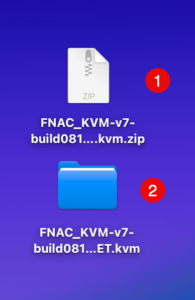
You can see the .zip file I downloaded and the folder it created when I unzipped it on macOS.
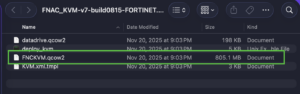
Here, you can see the FNCKVM.qcow2 (The name caught me by suprise for a quick second 😀)
Next you will need to get your files on to the EVE-NG server.
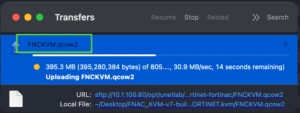
Let’s go back to the SSH session.
cd /opt/unetlab/addons/qemu/fortinet-NAC – Change to the addons/qemu directory.
mv <your-uploaded-filename>.qcow2 virtioa.qcow2 Now we are going to rename the file we uploaded from the FNCKVM.qcow2 to virtioa.qcow2 using the mv command.
Now we are going to create a log disk
/opt/qemu/bin/qemu-img create -f qcow2 virtiob.qcow2 40G
NOTE: The virtioA and virtioB names.
Now we are going to run the fixpermissions script.
/opt/unetlab/wrappers/unl_wrapper -a fixpermissions
I next downloaded the FortiNAC logo from the stencil site.

You need to upload it to /opt/unetlab/html/images/icons . You will want to use the 50 px format.
Now we log into the EVE-NG portal and deploy a Node. It will show up under fortigate and you can swap the image.
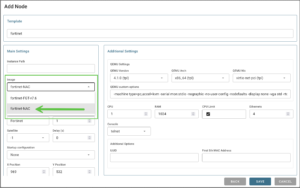
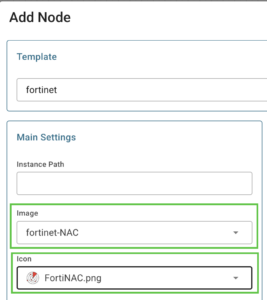
Choose the fortinet-NAC image and the .png you uploaded.
Note: Ensure you have at least 4 CPUs and 8GB or RAM.
Boom 💥 you are done. Hope this helps.
Recent posts
-

-

DNS is one of those technologies that quietly underpins... Full Story
-

BGP issues on FortiGate firewalls usually trace back to... Full Story
-

Every time your laptop talks to your router, a... Full Story
-

If you've spent any time configuring NAT on a... Full Story
-

If you have spent any time configuring firewall policies... Full Story
-

High availability on FortiGate is one of those features... Full Story
-

If you've configured SD-WAN on a FortiGate, you've almost... Full Story
-

FortiLink is the management protocol that turns a FortiSwitch... Full Story
-

FortiSwitches are pretty rock solid from Mean Time Between... Full Story
-

This is a quicky tip. Have you ever gone... Full Story
-

DNS is one of those quiet pieces of internet... Full Story
-

This article is an updated version of the previous... Full Story
-

You will add ns2 as a secondary (slave) BIND9... Full Story
-

In the process of deploying my lab, I needed... Full Story
-

RFC 8805, used to be known as Self-Correcting IP... Full Story
-

Years back, I wrote an article about certificate pinning. ... Full Story
-

FortiGates have the ability to send alerts to Microsoft... Full Story
-

In this post, I am going to walk through... Full Story
-

Troubleshooting VoIP on a FortiGate can feel like trying... Full Story
-

Prior to FortiOS 7.0, there were three commands to... Full Story
-

In this post, I am going to go over... Full Story
-

What we are going to do: We are going... Full Story
-

Choosing between FGCP (FortiGate Clustering Protocol) and FGSP (FortiGate... Full Story
-

Creating a VLAN on macOS (The "Pro" Move) A... Full Story
-

This blog post explores the logic behind how macOS... Full Story
-

Pretty Fly for a Wi-Fi Tell My Wi-Fi Love... Full Story
-

Part of my daily gig is creating BoMs (Bill-of-Materials)... Full Story
-

ICMP introduces several security risks, but careful filtering, rate... Full Story
-

The command diag debug application dhcps -1 enables full... Full Story
-

In the world of FortiOS, execute tac report is... Full Story
-

LLDP; What is it The Link Layer Discovery Protocol... Full Story
-

What it actually does When you run diagnose fdsm... Full Story
-

Monkey Bites are bite-sized, high-impact security insights designed for... Full Story
-

I have run macOS in macOS with Parallels but... Full Story
-

Don't be confused with my other FortiNAC posts where... Full Story
-

This is the third session in a multi-part article... Full Story
-

Today I was configuring key-based authentication on a FortiGate... Full Story
-

Netcat, often called the "Swiss Army knife" of networking,... Full Story
-

At its core, IEEE 802.1X is a network layer... Full Story
-

In case you did not see the previous FortiNAC... Full Story
-

This is our 5th session where we are going... Full Story
-

Now that we have Wireshark installed and somewhat configured,... Full Story
-

The Philosophy of Packet Analysis Troubleshooting isn't about looking... Full Story
-

InfoSecMonkey Threat Response October 24, 2026 | No fluff.... Full Story
-

InfoSecMonkey Threat Response October 24, 2026 | No fluff.... Full Story
-

Plus what you actually get with FortiCare Essential, Premium... Full Story