InfoSecMonkey | No fluff. Just the config that works.
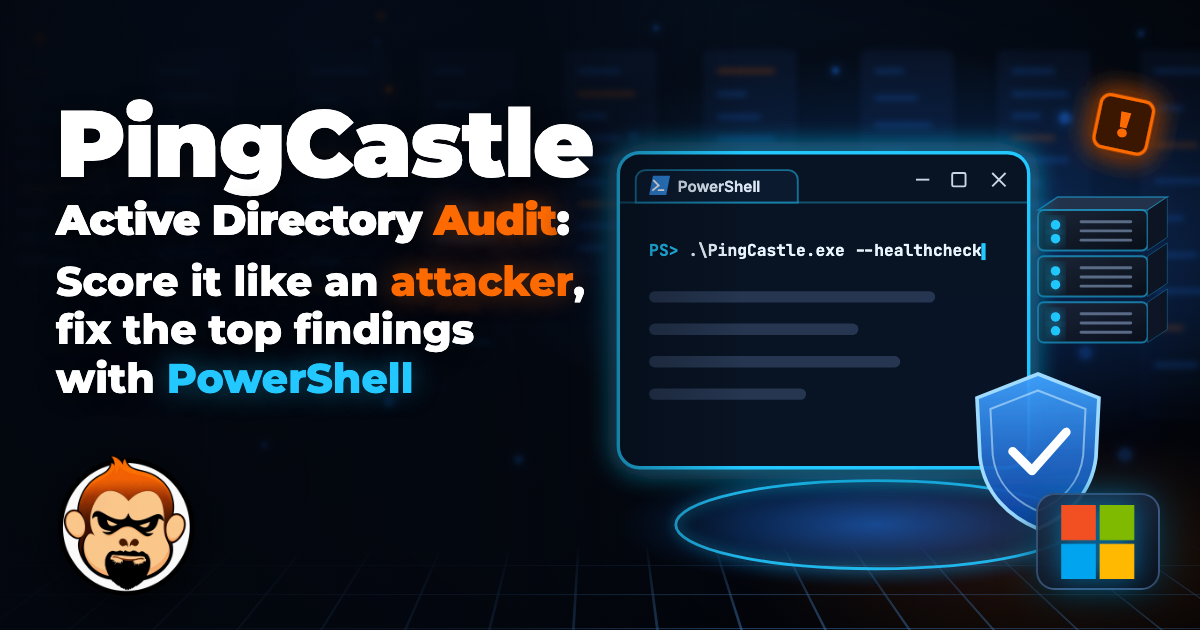
Objective: run a PingCastle Active Directory audit from a normal domain account, read the risk score the way an attacker would, and close the findings that matter first with copy-paste PowerShell. Then schedule it so the score trends down instead of drifting back up.
Target audience: sysadmins, security engineers and SEs who own or assess Active Directory and want a defensible baseline without buying a platform first.
PingCastle reads AD with an ordinary user account. Anything it can see, every phished laptop in your domain can see too. That is the whole point of running it.
Why a PingCastle Active Directory Audit
PingCastle is a standalone Windows executable that collects the most important security data from Active Directory and turns it into a scored HTML report. It was built by Vincent Le Toux, is now part of Netwrix, and the free Community edition can be used by any organization to audit its own environment as long as you are not reselling it as a service. The source is published under the Non-Profit OSL 3.0 on GitHub.
The value is the scoring model. Every finding maps to a rule ID such as A-Krbtgt or P-UnconstrainedDelegation, each rule adds points to one of four categories, and each category caps at 100. The domain score is the highest of the four, not the sum. One terrible category means a terrible domain, which is exactly how an attacker sees it.
| Category | What it measures | Example rules |
|---|---|---|
| Stale Objects | Old accounts, old OSes, weak legacy settings | S-C-Inactive, S-PwdNeverExpires, S-SMB-v1, S-ADRegistration |
| Privileged Accounts | Who can become Domain Admin, and how easily | P-Kerberoasting, P-UnconstrainedDelegation, P-AdminNum, P-ProtectedUsers |
| Trusts | Domain and forest trusts that widen the blast radius | SID filtering, inactive trusts, trusts to old domains |
| Anomalies | Specific weaknesses attackers chain together | A-Krbtgt, A-LAPS-Not-Installed, A-DC-Spooler, A-DCLdapSign, A-CertTempCustomSubject |
Lower is better. 0 is the goal, and the higher the number, the shorter the path from a regular domain user to Domain Admin.
Version note: PingCastle 4.0 went GA in August 2026. The new 4.0 features (102 Entra ID risk indicators, built-in scan scheduling, SCIM) land in the paid Enterprise edition, while Community and Standard get bug fixes and maintenance. Everything in this post works on the free edition, and the interactive menu also includes an entraid option for a basic Entra ID score.
Prerequisites and Architecture
Assumed knowledge
- Active Directory basics: domains, DCs, groups, GPOs, Kerberos at a high level
- Running PowerShell with the ActiveDirectory module (RSAT)
- Change control for anything you remediate on domain controllers
Lab requirements
| Component | Lab value | Notes |
|---|---|---|
| Domain | corp.lab |
Single forest, single domain |
| Domain controllers | DC01 10.0.10.10, DC02 10.0.10.11 |
Windows Server 2022, ADWS running (default since 2008 R2) |
| Audit host | WS-AUDIT01 10.0.20.50 |
Domain-joined Windows 11, not a DC |
| Audit account | CORP\svc-pingcastle |
Normal domain user, no admin rights needed for the healthcheck |
| PingCastle | Community edition 3.5 or later | Runs on .NET 8 and bundles the runtime since 3.5, no install |
| Ports to DCs | TCP 9389 (ADWS), 389 (LDAP), 636 (LDAPS), 88 (Kerberos), 445 (SMB), 53 (DNS) | ADWS first, LDAP is the slower fallback |
Figure 1: PingCastle healthcheck data flow in the lab
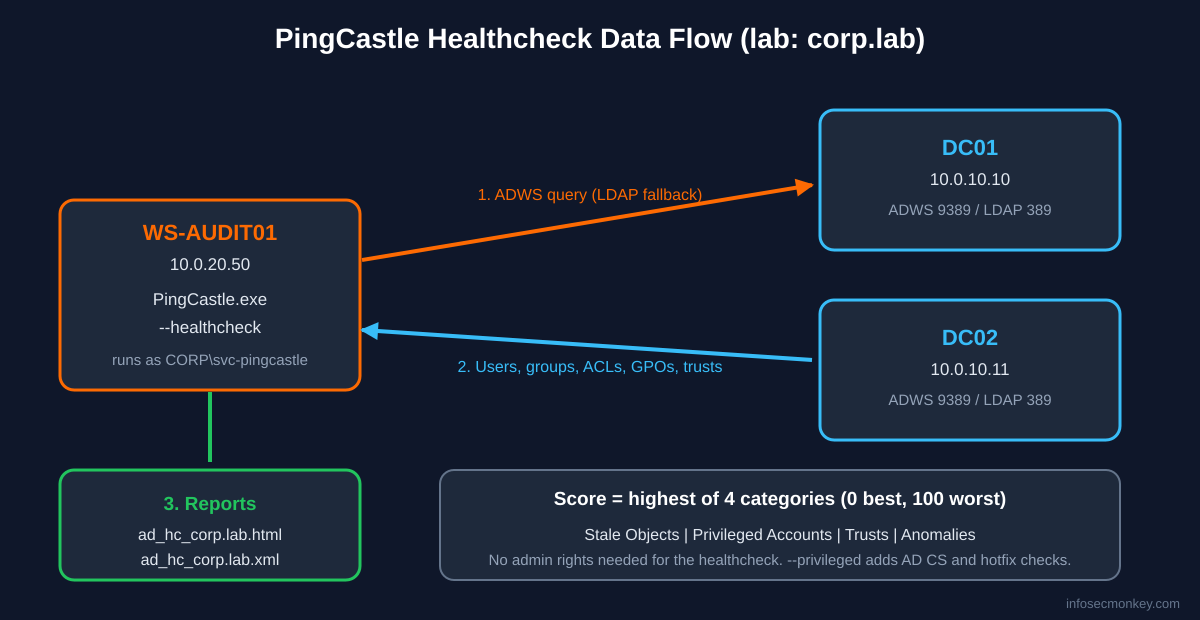
If a FortiGate or any other firewall sits between the audit host and the DCs, allow TCP 9389 from the audit host only. Without ADWS, PingCastle falls back to LDAP and a large domain scan can go from minutes to hours.
Step-by-Step Implementation
Step 1: Download and verify PingCastle
Goal: get a genuine, signed binary onto the audit host.
Action: download the free Community edition from the PingCastle download page (it redirects to Netwrix), extract it to a working folder, then check the Authenticode signature before you run anything that touches AD.
New-Item -ItemType Directory C:\Tools\PingCastle -Force
Expand-Archive .\PingCastle_<version>.zip -DestinationPath C:\Tools\PingCastle
Set-Location C:\Tools\PingCastle
Get-AuthenticodeSignature .\PingCastle.exe | Format-List Status, SignerCertificate
Verification: Status must read Valid and the signer should be Netwrix or PingCastle. Anything else, stop and re-download.
The binary has a built-in expiry, which the tool shows as its End of Support date. When it passes, PingCastle stops running. Use PingCastleAutoUpdater.exe in the same folder, or grab a fresh build.
Step 2: Preflight connectivity to the DCs
Goal: confirm ADWS is reachable so the scan is fast and complete.
Action: test the ports from the audit host.
Resolve-DnsName corp.lab -Type SRV -Name _ldap._tcp.dc._msdcs.corp.lab
Test-NetConnection DC01.corp.lab -Port 9389
Test-NetConnection DC01.corp.lab -Port 389
Verification: TcpTestSucceeded : True on 9389. If only 389 answers, PingCastle still works, just slower.
Step 3: Run the healthcheck
Goal: produce the scored report.
Action: run as the normal audit account. Running PingCastle.exe with no arguments opens the interactive menu where option 1 is healthcheck. For repeatable runs, use the command line.
.\PingCastle.exe --healthcheck --server corp.labStarting the task: Perform analysis for corp.lab
[06:41:02] Gathering general data
[06:41:03] Gathering user data
[06:41:05] Gathering computer data
[06:41:09] Gathering trust data
[06:41:12] Gathering anomaly data
Task Perform analysis for corp.lab completed
Starting the task: Generate html report for corp.lab
Task Generate html report for corp.lab completed
Starting the task: Generate xml report for corp.lab
Task Generate xml report for corp.lab completedOutput above is trimmed. Two files land in the folder: ad_hc_corp.lab.html for humans and ad_hc_corp.lab.xml for consolidation and automation.
Useful switches on the same command:
| Switch | What it does |
|---|---|
--level Full |
XML detail level Full, Normal (default) or Light. Full keeps every finding for trending |
--no-enum-limit |
Removes the 100-user cap on lists in the HTML report |
--datefile |
Adds the date to the report file name, needed for history |
--protocol LDAPOnly |
Skip ADWS. Options: ADWSThenLDAP (default), ADWSOnly, LDAPOnly, LDAPThenADWS |
--server * |
Scan every reachable domain. Pair with --reachable |
--encrypt |
Encrypt the XML report with the RSA key in appsettings.console.json |
GUI Verification: open ad_hc_corp.lab.html in a browser. The top of the report shows the domain risk level and the four category gauges.
Step 4: Read the report like an attacker
Goal: turn 40 findings into a short, ordered fix list.
Action: ignore the overall number for a minute and open the category with the highest score, because that one is the domain score. Inside it, sort by points. Each rule expands to show the technical explanation, the affected objects, and the remediation. Pull the numbers straight from the XML when you want them in a ticket or a QBR slide:
$hc = ([xml](Get-Content .\ad_hc_corp.lab.xml)).HealthcheckData
$hc | Select-Object GlobalScore, StaleObjectsScore, PrivilegiedGroupScore, `
  TrustScore, AnomalyScore
GlobalScore StaleObjectsScore PrivilegiedGroupScore TrustScore AnomalyScore
----------- ----------------- --------------------- ---------- ------------
75 40 75 0 60Yes, PrivilegiedGroupScore is spelled that way in the XML. In this lab, Privileged Accounts drives the whole score, so that is where the first fixes go.
The findings that show up in almost every first scan, and why they matter:
| Rule ID | Finding | Why an attacker cares |
|---|---|---|
P-Kerberoasting |
Admin account with an SPN | Any user can request its ticket and crack the password offline |
P-UnconstrainedDelegation |
Non-DC with unconstrained delegation | Coerce a DC to authenticate to it, steal the DC TGT |
A-Krbtgt |
krbtgt password not changed in a long time | A stolen krbtgt hash keeps golden tickets valid |
S-ADRegistration |
Users can join computers (MachineAccountQuota 10) | Free machine accounts fuel RBCD and relay attacks |
A-DC-Spooler |
Print Spooler running on DCs | Classic coercion path to grab DC credentials |
A-LAPS-Not-Installed |
No LAPS | Same local admin password everywhere means lateral movement |
A-DCLdapSign |
LDAP signing not required | LDAP relay to DCs |
P-ProtectedUsers |
Admins not in Protected Users | NTLM and delegation still usable against admin accounts |
Step 5: Run privileged mode for the checks a user cannot see
Goal: cover AD CS template enrollment rights (ESC1, ESC2) and DC hotfix checks (MS14-068, MS17-010), which need more than read access.
Action: from an administrative session, add --privileged.
.\PingCastle.exe --healthcheck --privileged --server corp.lab --level FullVerification: rules A-CertTempCustomSubject and A-CertTempAnyPurpose now evaluate CA enrollment ACLs instead of being skipped.
Step 6: Use the scanners for endpoint-level checks
Goal: go past the directory and test the machines themselves.
Action: the scanner module runs one targeted check across computers. Start with DCs only so you do not light up the SOC.
.\PingCastle.exe --scanner spooler --server corp.lab --scmode-dc
.\PingCastle.exe --scanner laps_bitlocker --server corp.lab
.\PingCastle.exe --scanner smb --server corp.lab --scmode-server
Other scanners include localadmin, share, nullsession, zerologon, antivirus and aclcheck. Each writes a text report to the working folder.
Scanners open many connections fast. EDR and IDS will flag that, including FortiEDR and FortiGate IPS. Tell the SOC first, or treat it as a free detection test.
Step 7: Fix the quick wins
Goal: knock the highest category down without breaking production.
Action: these are the fixes with the best points-to-risk ratio. Test each in your change window.
Find admin accounts that can be Kerberoasted (P-Kerberoasting). Remove the SPN, or move the service to a gMSA:
Get-ADUser -Filter 'ServicePrincipalName -like "*" -and AdminCount -eq 1' `
  -Properties ServicePrincipalName |
  Select-Object SamAccountName, ServicePrincipalName
Find unconstrained delegation outside the DCs (P-UnconstrainedDelegation). Primary group 516 is Domain Controllers:
Get-ADComputer -Filter 'TrustedForDelegation -eq $true -and PrimaryGroupID -ne 516' |
  Select-Object Name, DistinguishedName
Stop users from joining computers (S-ADRegistration). Check, then set the quota to 0 and delegate domain joins to a specific group:
Get-ADObject (Get-ADDomain).DistinguishedName -Properties ms-DS-MachineAccountQuota
Set-ADDomain -Identity corp.lab -Replace @{"ms-DS-MachineAccountQuota"="0"}
Turn off Print Spooler on DCs (A-DC-Spooler). Quick fix below, permanent fix is a GPO on the Domain Controllers OU:
Invoke-Command -ComputerName DC01, DC02 -ScriptBlock {
  Stop-Service -Name Spooler -Force
  Set-Service -Name Spooler -StartupType Disabled
}
Check krbtgt password age (A-Krbtgt):
Get-ADUser krbtgt -Properties PasswordLastSet | Select-Object Name, PasswordLastSetReset it twice, with full replication between resets, because the account keeps a password history of two. Use Microsoft’s reset script in simulation mode first, per Microsoft’s krbtgt reset FAQ and CISA countermeasure CM0050.
Turn on the AD Recycle Bin (P-RecycleBin). One-way change, zero downside:
Enable-ADOptionalFeature 'Recycle Bin Feature' `
  -Scope ForestOrConfigurationSet -Target corp.lab
Step 8: Schedule it and trend the score
Goal: make the score a metric, not a one-time PDF.
Action: create a weekly scheduled task on the audit host (not a DC), running as the service account with “Run whether user is logged on or not”. The account needs read access to AD, write access to the PingCastle folder, and the Log on as a batch job right.
$a = New-ScheduledTaskAction -Execute 'C:\Tools\PingCastle\PingCastle.exe' `
  -Argument '--healthcheck --server corp.lab --level Full --datefile' `
  -WorkingDirectory 'C:\Tools\PingCastle'
$t = New-ScheduledTaskTrigger -Weekly -DaysOfWeek Monday -At 5am
Register-ScheduledTask -TaskName 'PingCastle Weekly' -Action $a -Trigger $t `
  -User 'CORP\svc-pingcastle' -Password '<password>'
Roll multiple domains or weeks into one overview with the consolidation mode, run from a folder that holds the XML files:
.\PingCastle.exe --hc-consoVerification: ad_hc_summary.html appears with every domain and its score side by side.
Verification and Validation
Rerun the healthcheck after each change window and compare the category scores.
.\PingCastle.exe --healthcheck --server corp.lab --datefile
$latest = Get-ChildItem .\ad_hc_corp.lab*.xml |
  Sort-Object LastWriteTime | Select-Object -Last 1
$hc = ([xml](Get-Content $latest.FullName)).HealthcheckData
$hc | Select-Object GlobalScore, PrivilegiedGroupScore, AnomalyScore
Expected success output: the rules you fixed are gone from the report and the category that was driving the score has dropped.
GlobalScore PrivilegiedGroupScore AnomalyScore
----------- --------------------- ------------
         40                    20           40
Spot-check the individual fixes too. Get-Service -ComputerName works in Windows PowerShell 5.1; in PowerShell 7 wrap it in Invoke-Command.
Get-Service -ComputerName DC01 -Name Spooler | Select-Object Status, StartType
$dn = (Get-ADDomain).DistinguishedName
(Get-ADObject $dn -Properties ms-DS-MachineAccountQuota).'ms-DS-MachineAccountQuota'
Status StartType
------ ---------
Stopped Disabled
0Troubleshooting and Gotchas
1. Scan crawls or fails with ADWS errors
Symptom: the healthcheck hangs on “Gathering” steps or reports it cannot reach ADWS.
Test-NetConnection DC01.corp.lab -Port 9389
Get-Service -ComputerName DC01 -Name ADWS
.\PingCastle.exe --healthcheck --server DC01.corp.lab --protocol LDAPOnly
Fix: open TCP 9389 from the audit host to the DCs, or start the ADWS service. Point --server at a specific writable DC (never an RODC) to rule out a bad DC locator result. Use --log to write a debug log for anything stranger.
2. Antivirus or EDR quarantines PingCastle
Symptom: the exe disappears, or scanners die mid-run. Some users have reported AV hits on GitHub builds that did not occur on the Netwrix download.
Fix: download from the official site, verify the signature (Step 1), and add a scoped exclusion for the audit host and folder. Do not exclude it globally. If the scanner triggered a SOC alert, that is a detection that works.
3. A fix breaks something
Symptom: after a remediation, an app or appliance stops authenticating.
Fix: the usual suspects are krbtgt resets done back to back without replication, LDAP signing enforcement before legacy LDAP clients were found, and SPN removal from an account a service still used. Before enforcing LDAP signing, look for unsigned binds in Directory Service event 2889 on each DC. Change one thing per window and rerun PingCastle after each.
Get-WinEvent -ComputerName DC01 -MaxEvents 20 `
  -FilterHashtable @{LogName='Directory Service'; Id=2889} |
  Select-Object TimeCreated, Message
Sources
- PingCastle download page and license FAQ
- Netwrix PingCastle user guide (commands, scoring, scanners, scheduling)
- Rules evaluated during PingCastle Healthcheck
- PingCastle source code on GitHub (netwrix/pingcastle)
- Netwrix Community: PingCastle 4.0 release announcement
- Microsoft Tech Community: FAQs from the Field on KRBTGT Reset
- CISA Eviction Strategies Tool: Reset KRBTGT Password Twice (CM0050)
No fluff. Just the config that works.