No fluff. Just the config that works.
Executive Summary
A new Cacti zero-day, tracked as 4HTTP2SHELL and 4HTTP2ROOT, lets an unauthenticated visitor run operating system commands on a Cacti server in four HTTP requests. It affects Cacti Core 1.2.31, the current release, when the guest account is enabled. There is no CVE and no vendor patch yet, and the proof of concept is public (The Hacker News, watchTowr).
Objective: confirm whether your Cacti server is exposed, close the entry point today, restrict the web UI, and hunt for signs the chain already ran.
Target audience: network and security engineers who run Cacti for SNMP graphing, and the SOC teams that watch those servers.
| Field | Detail |
|---|---|
| Names | 4HTTP2SHELL, 4HTTP2ROOT |
| Affected | Cacti Core 1.2.31 with guest access enabled (full version range not published) |
| CVE | None assigned yet |
| Patch | None yet |
| Authentication | None, when the guest account is on (it is off by default) |
| Impact | Commands run as the account that runs the Cacti web server and poller |
| Disclosed | November 26, 2026, by researcher ek0ms savi0r, PoC on GitHub |
| Exploited in the wild | None reported as of November 27, 2026, not in CISA KEV |
Is This the Same as PHP2Shell or the N-able X2Shell Bugs?
No. The name follows this season’s “X2Shell” trend, but the bug is unrelated. Able2Shell, 4EverAble2Shell and Agent2Shell are N-able N-central chains released by researcher Sean Bales, and 4EverAble2Shell was exploited within hours of its PoC (BleepingComputer). PHP2Shell is a flaw in the PHP interpreter itself, patched in October 2026.
4HTTP2SHELL is a Cacti application bug: a guest-writable setting turns into SQL, and the SQL turns into a shell command. Cacti runs on PHP, so patch PHP for PHP2Shell anyway, but that does not close this chain.
Prerequisites and Architecture
- Linux shell with sudo on the Cacti server
- Access to the Cacti database (MySQL or MariaDB, database name
cactiin this lab) - Admin login to the Cacti console
- Optional: FortiGate admin access if a firewall sits in front of the server VLAN
| Component | Role | Lab address |
|---|---|---|
| Cacti 1.2.31 on Ubuntu with Apache | Monitoring server (the target) | 10.0.20.10 |
| MariaDB | Cacti database cacti |
Local socket on 10.0.20.10 |
| Admin workstations | Management subnet | 10.0.10.0/24 |
| FortiGate | Segments user, management and server VLANs | 10.0.20.1 (server VLAN gateway) |
| Untrusted networks | Where an attacker would sit | 198.18.0.0/15 |
How the Cacti Zero-Day Chain Works
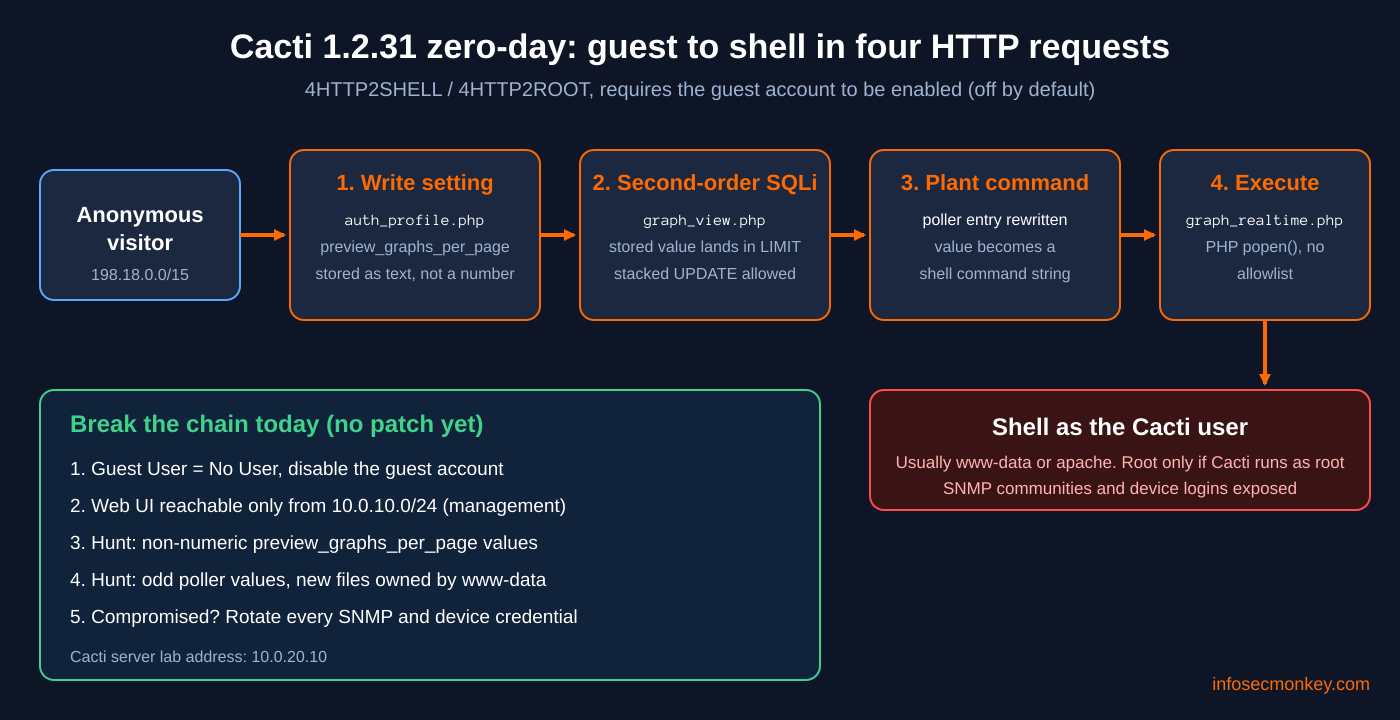
Four requests, all from one guest session. No login, no API key, no phishing. This is the defensive summary, no payloads.
- Write a bad setting. The guest saves the per-user display setting
preview_graphs_per_page(graphs per page in Preview Mode) throughauth_profile.php?action=update_data. Cacti stores a non-numeric string instead of rejecting it. - Trigger second-order SQL injection. Loading
graph_view.phpwith default filters drops that stored string into the query’s LIMIT clause. The database driver accepts stacked statements, so an extra UPDATE runs. - Plant the command. That UPDATE rewrites a poller value into a shell command.
- Execute.
graph_realtime.php, also reachable by the guest, reads the poller value and hands it to PHPpopen()with no allowlist.
Four failures line up: a numeric setting accepts text, stored values skip request validation, stacked queries are allowed, and the poller trusts a command string from the database.
About the ROOT in 4HTTP2ROOT: commands run as whatever account runs Cacti. The lab demo ran Cacti as root; there is no separate privilege escalation (Mallory). Typical installs run as www-data or apache, which is still enough to read every SNMP community and device login Cacti stores.
Step-by-Step: Mitigate the Cacti Zero-Day
Step 1: Confirm Your Version and Guest Status
Goal: know in two minutes whether you are exposed.
Action: check the version file, the guest account, and the global Guest User setting. Adjust the Cacti path for your install (/var/www/html/cacti or /usr/share/cacti).
# Cacti version
cat /var/www/html/cacti/include/cacti_version

# Is a guest account enabled? (enabled = on means active)
sudo mysql cacti -e "SELECT id, username, enabled FROM user_auth WHERE username='guest';"

# Which account is mapped as the global guest? (0 or empty = none)
sudo mysql cacti -e "SELECT name, value FROM settings WHERE name='guest_user';"
GUI Verification: Console > Configuration > Settings > Authentication. If Guest User shows anything other than No User, anonymous visitors get that account’s view rights. Version 1.2.31 plus an active guest means you are exposed. Treat older 1.2.x builds with guest enabled as suspect until the full version range is published.
Step 2: Disable Guest Access
Goal: remove the entry point. Every published mitigation starts here.
Action: set Guest User to No User, then disable the guest account itself. In the GUI: Console > Configuration > Settings > Authentication > Guest User = No User > Save. Then Console > Configuration > Users, tick guest, choose Disable, Go. If the GUI is unavailable:
sudo mysql cacti -e "UPDATE user_auth SET enabled='' WHERE username='guest';"
sudo mysql cacti -e "SELECT username, enabled FROM user_auth WHERE username='guest';"
GUI Verification: open https://10.0.20.10/cacti/graph_view.php in a private browser window. You should land on the Cacti login page, not graphs.
Step 3: Restrict the Web UI to the Management Subnet
Goal: only admins can reach Cacti, so the next bug in the web UI is not internet-facing either.
Action (Apache): edit the existing Cacti block rather than adding a second one.
# /etc/apache2/conf-available/cacti.conf  (RHEL: /etc/httpd/conf.d/cacti.conf)
<Directory /var/www/html/cacti>
    Require ip 10.0.10.0/24
</Directory>
sudo apachectl -t
sudo systemctl reload apache2Action (FortiGate in front of the server VLAN): allow HTTPS to Cacti only from the management subnet. Outbound SNMP polling from Cacti is a separate policy and stays as is.
config firewall address
    edit "MGMT-NET"
        set subnet 10.0.10.0 255.255.255.0
    next
    edit "CACTI-SRV"
        set subnet 10.0.20.10 255.255.255.255
    next
end
config firewall policy
    edit 0
        set name "MGMT-to-Cacti-HTTPS"
        set srcintf "<MGMT_VLAN_INTERFACE>"
        set dstintf "<SERVER_VLAN_INTERFACE>"
        set srcaddr "MGMT-NET"
        set dstaddr "CACTI-SRV"
        set action accept
        set schedule "always"
        set service "HTTPS"
        set logtraffic all
    next
end
Move the policy above any broad user-to-server rule, and confirm no other policy or VIP publishes Cacti to user VLANs or the internet.
GUI Verification: Policy & Objects > Firewall Policy. The hit count on MGMT-to-Cacti-HTTPS climbs when you browse to Cacti, and Log & Report > Forward Traffic shows denies for any other source hitting 10.0.20.10 on 443.
Step 4: Hunt for Signs the Chain Already Ran
Goal: decide whether this is mitigation or incident response.
Action: look for the request sequence, text where a number belongs, and poller values that do not look like normal polling config (watchTowr lists the same three indicators).
# 1. Request sequence in Apache logs (RHEL: /var/log/httpd/access_log*)
sudo zgrep -E "auth_profile.php\?action=update_data|graph_realtime.php" /var/log/apache2/access.log*

# 2. Non-numeric graphs-per-page values (expect 0)
sudo mysql cacti -e "SELECT COUNT(*) FROM settings_user WHERE name='preview_graphs_per_page' AND value NOT REGEXP '^[0-9]+$';"

# 3. Cacti log warnings about non-numeric display values
sudo grep -i "non-numeric" /var/www/html/cacti/log/cacti.log

# 4. Poller-related values: plain binary paths and hostnames only
sudo mysql cacti -e "SELECT name, value FROM settings WHERE name LIKE 'path_%';"
sudo mysql cacti -e "SELECT id, name, hostname FROM poller;"

# 5. Recent files owned by the web or poller user
sudo find /var/www/html/cacti /tmp /var/tmp -user www-data -type f -mtime -3 -ls
A non-zero count in check 2, shell characters such as ;, | or $( in check 4, or unexpected new files in check 5 means you treat the server as compromised. A guest hitting graph_realtime.php right after auth_profile.php in check 1 is the pattern to chase.
Step 5: If You Find a Hit
- Isolate the server from the network but keep it powered on for forensics.
- Rotate every SNMP community, SNMPv3 credential and device login stored in Cacti. The attacker could read all of them.
- Rebuild from a clean image. Restore RRD files and a reviewed database export only.
- Review FortiGate or firewall logs for outbound sessions from 10.0.20.10 to anything other than polled devices.
Verification and Validation
# From a management workstation: login page, not graphs (expect 1)
curl -sk https://10.0.20.10/cacti/graph_view.php | grep -c login_username

# From any other subnet: blocked (expect 403 from Apache, or 000 if the FortiGate drops it)
curl -sk -o /dev/null -w "%{http_code}\n" --max-time 5 https://10.0.20.10/cacti/
# On the FortiGate: only 10.0.10.x sources should appear
diagnose sniffer packet any "host 10.0.20.10 and port 443" 4 10Expected success: 1 from the management subnet, 403 or 000 everywhere else, the guest query returns an empty enabled value, and hunt check 2 returns 0.
Troubleshooting and Gotchas
1. “We upgraded to 1.2.31, so we are patched.” Version 1.2.31 fixed a batch of earlier bugs, including a guest-reachable SQL injection (CVE-2026-39893), but it is exactly the version this chain targets. Keep guest disabled until a Cacti release names this chain as fixed.
cat /var/www/html/cacti/include/cacti_version2. Guest comes back. A settings import, a restored backup or another admin can quietly re-enable it. Monitor the value and alert on anything other than 0 or empty.
sudo mysql -N cacti -e "SELECT value FROM settings WHERE name='guest_user';"3. The Apache rule is ignored. Distro packages ship their own Cacti config with Require all granted, and if both blocks load, the wrong one can win. Find every Require line for Cacti and fix that block in place.
sudo grep -rn "Require" /etc/apache2/conf-enabled/ /etc/apache2/sites-enabled/ | grep -i cactiSources
- The Hacker News: Unpatched Cacti Zero-Day Enables RCE in Just Four HTTP Requests via Guest Access
- watchTowr: 4HTTP2ROOT FAQ, Cacti Zero-Day Exposure and Fix
- Mallory: Cacti Zero-Day Enables Unauthenticated RCE Through Guest Access
- Mondoo: CVE-2026-39893, guest-reachable Cacti SQL injection fixed in 1.2.31
- BleepingComputer: N-able 4EverAble2Shell zero-day exploited hours after PoC released
- Wikipedia: PHP2Shell
- InfoSecMonkey: Deploying Cacti and NetFlow