
If you've spent any time configuring user authentication on... Full Story
By Manny Fernandez
September 9, 2019
Using Active Directory Groups to Control Web Content Policies
This is another question I get asked a lot. When customers first deploy a Fortigate firewall and they have migrated from another platform, they are unaware of the Active Directory (AD) integration with the Fortigate. When you create Web Content Filter profiles, you may want to assign them to a particular AD group. Fortinet has different ways of using AD groups in the IPv4 / v6 Policies.
- Direct Pole – Using the Fabric Connector section, you can have the Fortigate poll the AD server(s). This does not require agents on Active Directory Server.
- FSSO Agent – The Fortinet Single Sign-On agent. This agent is installed on a server that is part of the domain. Not necessarily a Domain Controller but COULD be.
- FortiAuthenticator – With the mobility agent, which is a small foot-print agent installed on the PC, there is no need to poll the AD since the agents will contact the FortiAuthenticator (FAC) with the logged on user. The Fortigate will query the FAC and gather the information.
- FortiNAC – With FortiNAC, you can integrate with the FortiGate to populate the user based on the NAC Authentication.
In this post, I will cover the Direct Poll as well as a bit on FSSO . Either way, once you can identify the user, you will be able to use that user to match inside a policy.
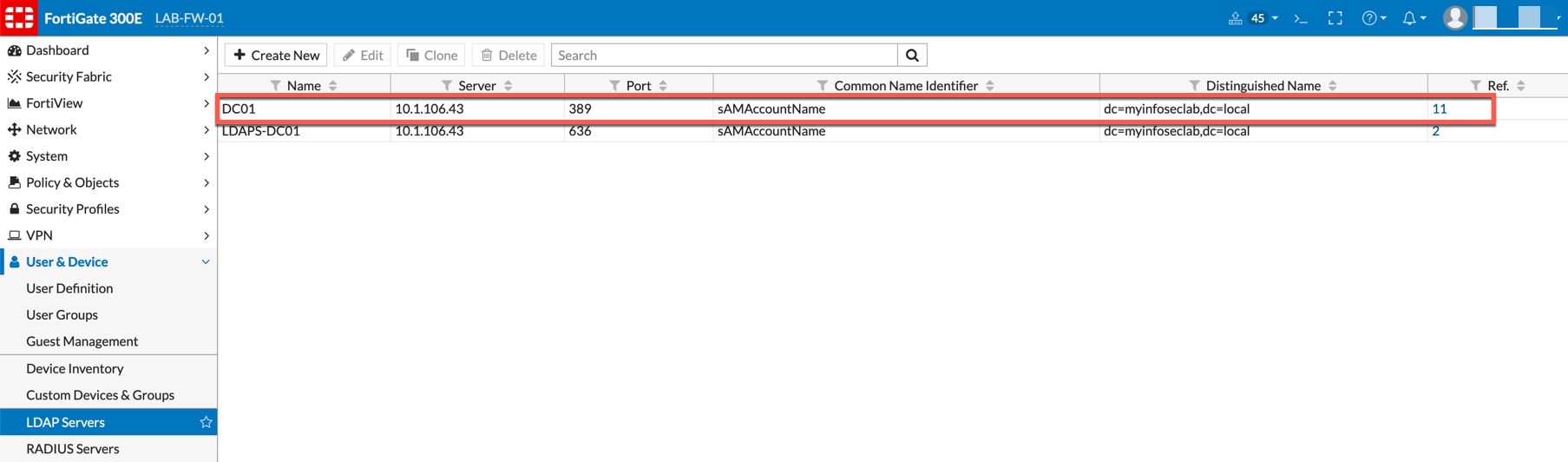
Connecting to an LDAP Server
With the Fortigate, we can add multiple domains from multiple forests and poll them for users based on User Groups and IPv4 Policies.
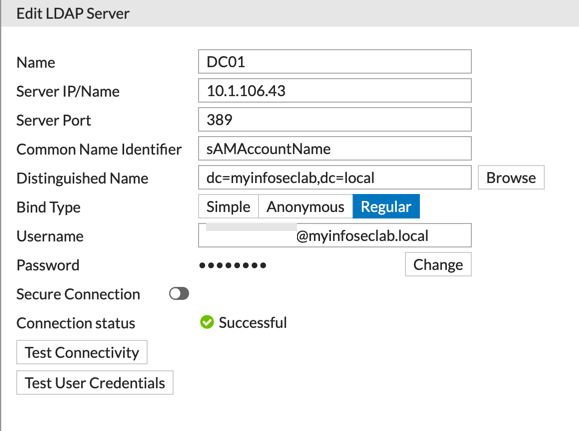
Above you can see the screenshot from my lab DC. Key thing to remember here is to use the sAMAccountName on the Common Name Identifier . It is absolutely case sensitive. You can add a user, set the Bind Type to Regular. The username can use the @domain-name.c . You can Test Connectivity to test the connection to the LDAP server. Finally, you can Test User Credentials .
Active Directory Groups
I normally set up groups that match the names I use in the Fortigate Configuration

As you can see, I created Web-Content Active Directory Security Groups. I will use these groups to create the policies.
Fortigate User Groups
Once you have the LDAP communication and the Active Directory Groups, you will need to create corresponding Fortigate Groups. These groups will be used in the policies.
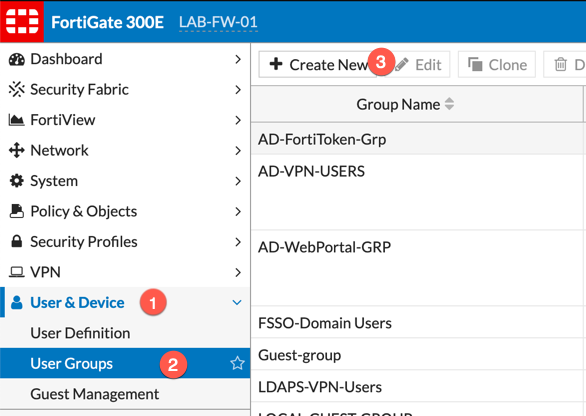
You will need to browse to (1) Users and Devices, (2) User Groups, (3) Create New
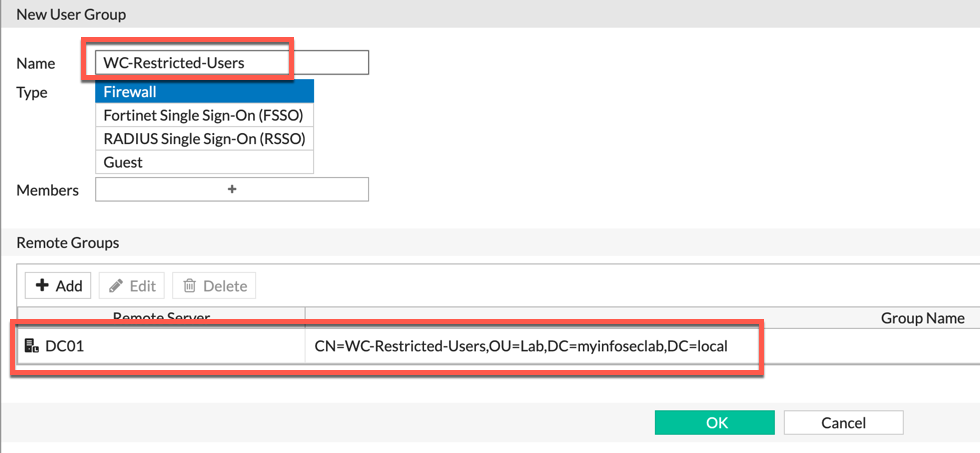
You can give the User Group a name (preferably descriptive) and choose the Remote Groups section. There you will be promoted to use the LDAP server of your choice, and Select the Security Group from Active Directory.
Setting up Direct Polling
In this section, you will need to create a polling
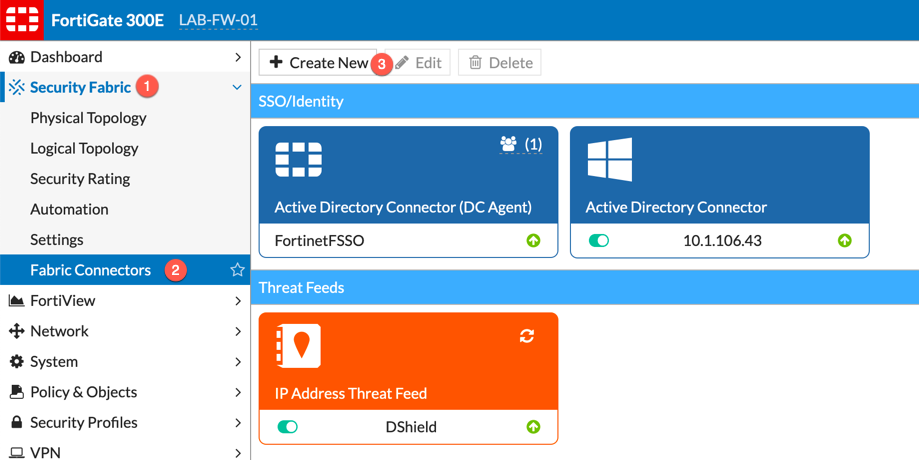
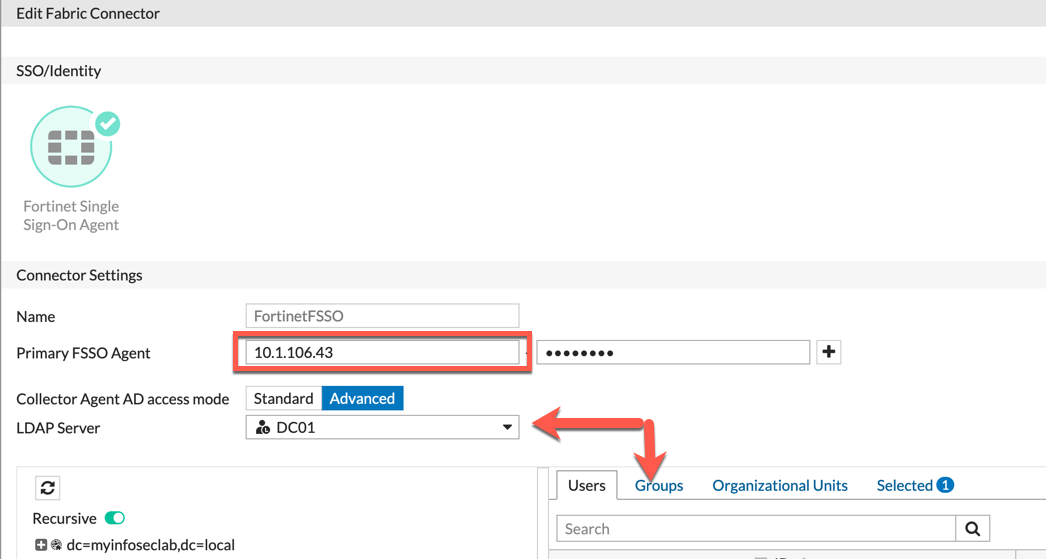
Go to Security Fabric, then choose Fabric Connectors and the Create New
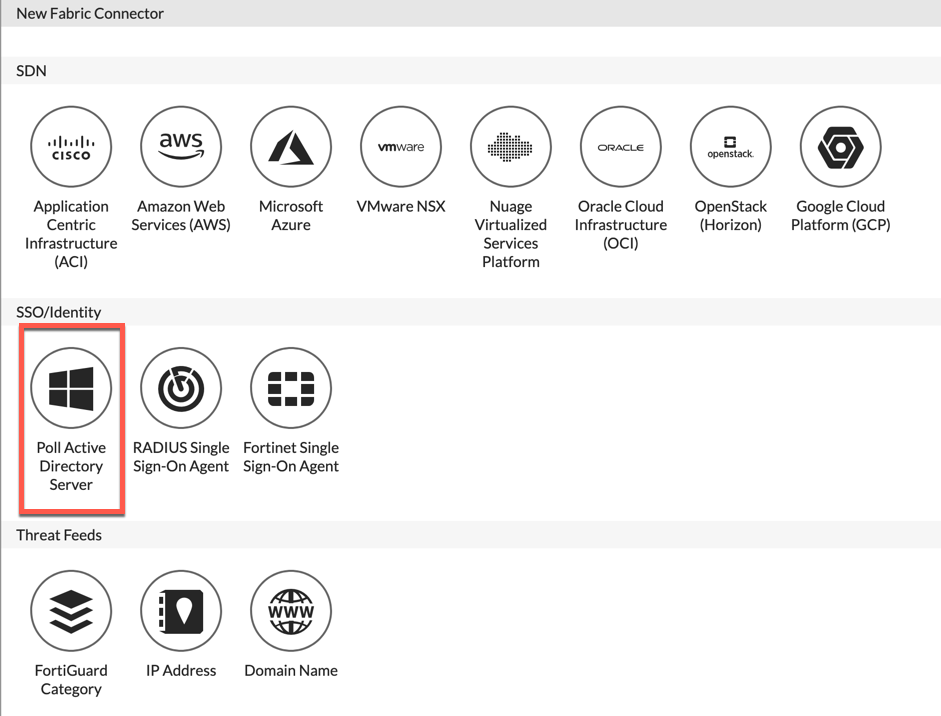
You will either want to choose the Poll Active Directory Server from smaller environments or Fortinet Single Sign-on Agent
Option 1 – Direct Poll
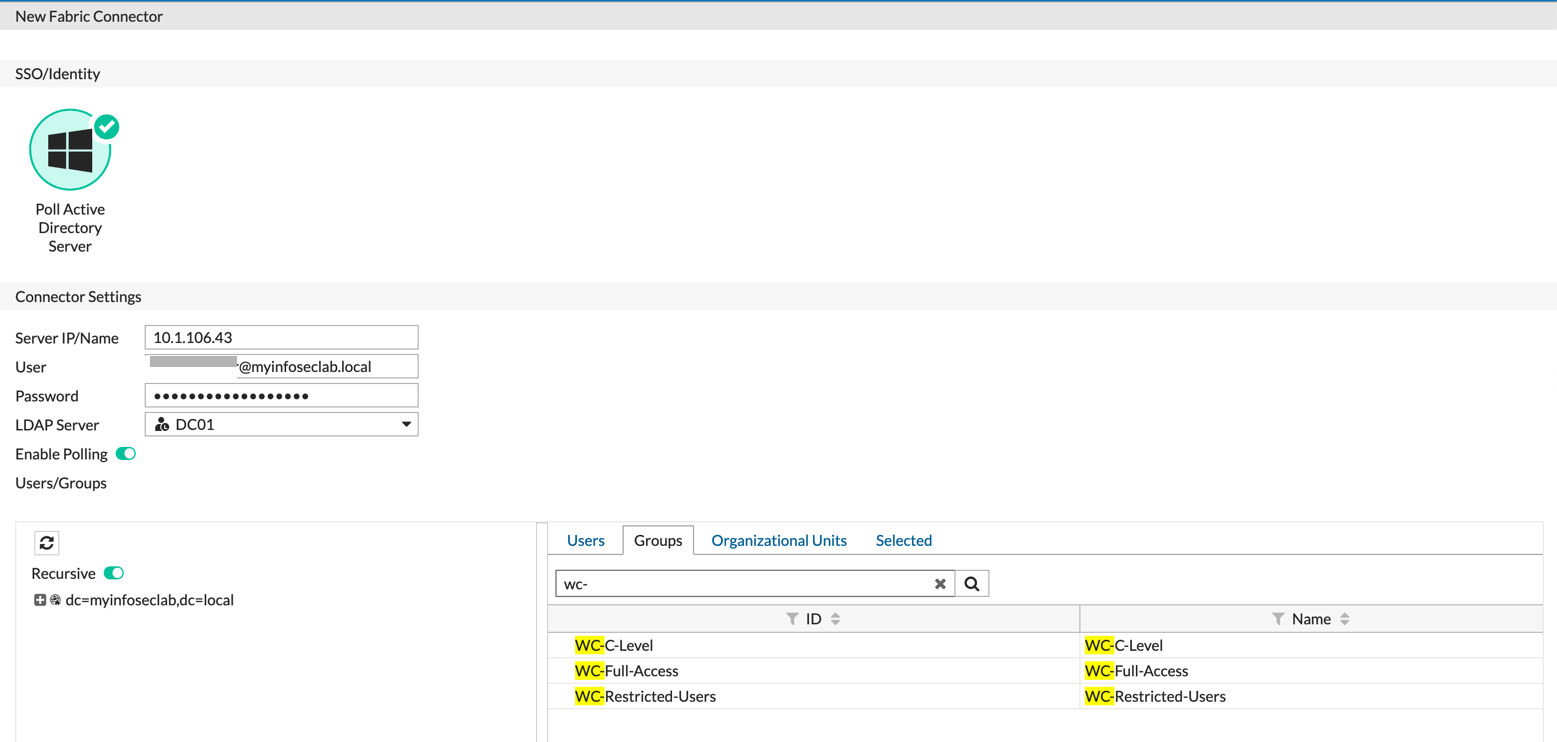
Option 2 – FSSO
Creating the Security Profile
Once you have add the groups you created, you can now go to the Web-Filter profile.
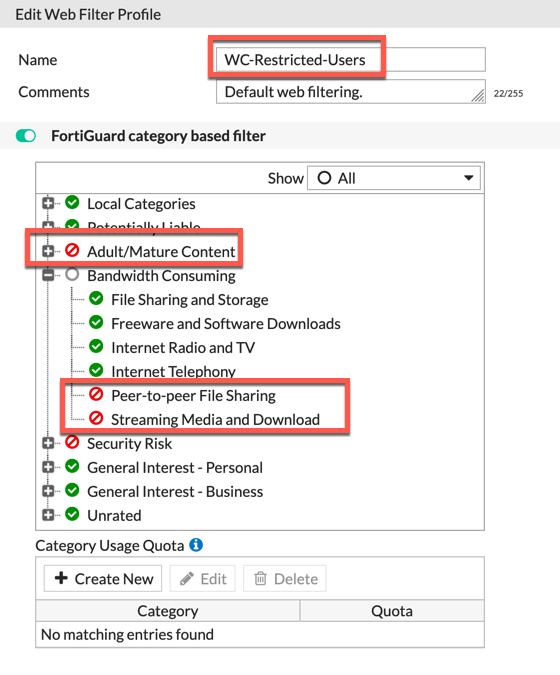
In the example above, I am blocking Adult/Mature Content as well as Security Risk and some categories of the Bandwidth Consuming group.
Using the Profile in a Policy
Now we have all the pieces in place to create the policy. Note that you can create an `Application Control, AV, IPS, DLP, etc. profile as well and add to the policy. These will match those users in the AD group as well.
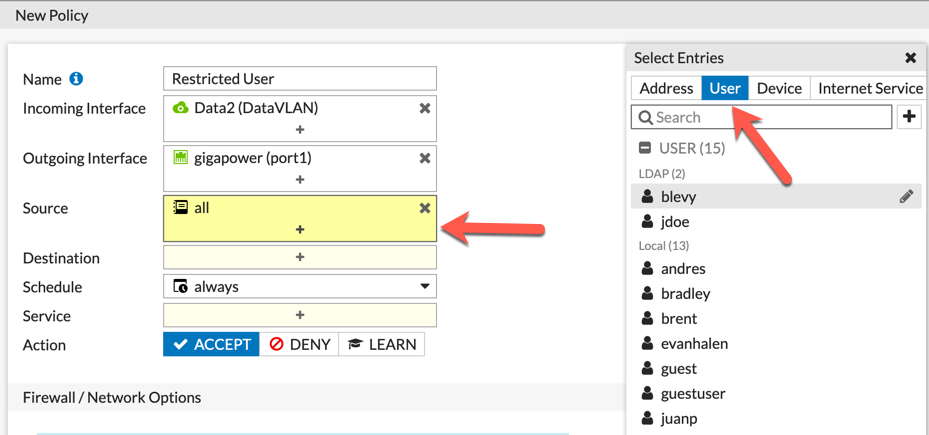
Above, we can see the creation of the policy. We can see that we chose the Data2 VLAN as the source and the destination as Gigapower . Then on the source, we chose all and then we are going to choose User-Group.
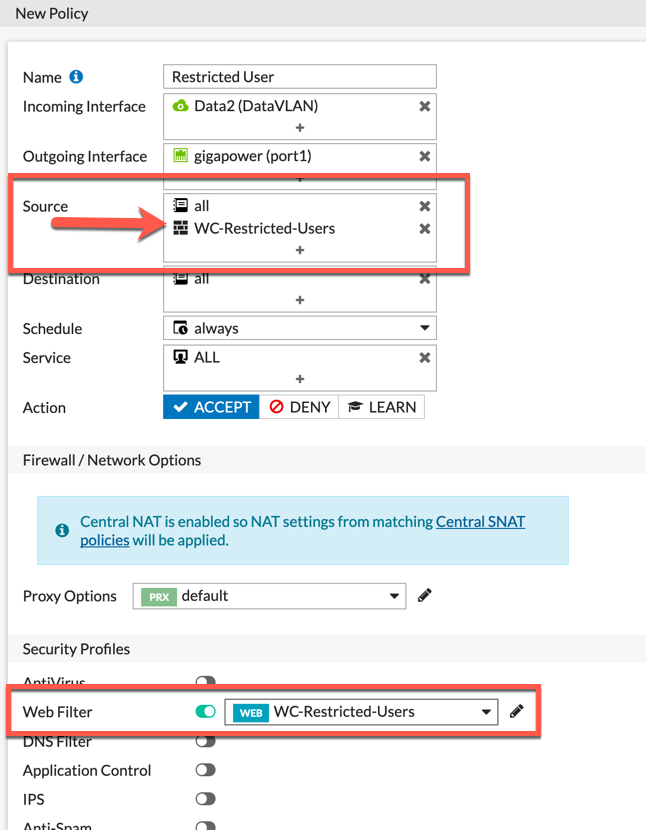
You can see the WC-Restricted-Users listed in the Source section.
Logging
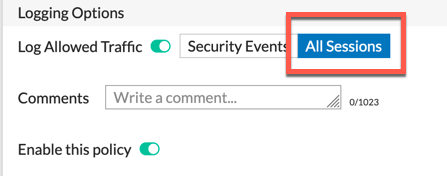
Also noteworthy is the logging section of the policy. If you want to capture and report on allowed traffic as well as the blocked, you will need to log All Session
Recent posts
-

-

DNS is one of those technologies that quietly underpins... Full Story
-

BGP issues on FortiGate firewalls usually trace back to... Full Story
-

Every time your laptop talks to your router, a... Full Story
-

If you've spent any time configuring NAT on a... Full Story
-

If you have spent any time configuring firewall policies... Full Story
-

High availability on FortiGate is one of those features... Full Story
-

If you've configured SD-WAN on a FortiGate, you've almost... Full Story
-

FortiLink is the management protocol that turns a FortiSwitch... Full Story
-

FortiSwitches are pretty rock solid from Mean Time Between... Full Story
-

This is a quicky tip. Have you ever gone... Full Story
-

DNS is one of those quiet pieces of internet... Full Story
-

This article is an updated version of the previous... Full Story
-

You will add ns2 as a secondary (slave) BIND9... Full Story
-

In the process of deploying my lab, I needed... Full Story
-

RFC 8805, used to be known as Self-Correcting IP... Full Story
-

Years back, I wrote an article about certificate pinning. ... Full Story
-

FortiGates have the ability to send alerts to Microsoft... Full Story
-

In this post, I am going to walk through... Full Story
-

Troubleshooting VoIP on a FortiGate can feel like trying... Full Story
-

Prior to FortiOS 7.0, there were three commands to... Full Story
-

In this post, I am going to go over... Full Story
-

What we are going to do: We are going... Full Story
-

Choosing between FGCP (FortiGate Clustering Protocol) and FGSP (FortiGate... Full Story
-

Creating a VLAN on macOS (The "Pro" Move) A... Full Story
-

This blog post explores the logic behind how macOS... Full Story
-

Pretty Fly for a Wi-Fi Tell My Wi-Fi Love... Full Story
-

Part of my daily gig is creating BoMs (Bill-of-Materials)... Full Story
-

ICMP introduces several security risks, but careful filtering, rate... Full Story
-

The command diag debug application dhcps -1 enables full... Full Story
-

In the world of FortiOS, execute tac report is... Full Story
-

LLDP; What is it The Link Layer Discovery Protocol... Full Story
-

What it actually does When you run diagnose fdsm... Full Story
-

Monkey Bites are bite-sized, high-impact security insights designed for... Full Story
-

I have run macOS in macOS with Parallels but... Full Story
-

Don't be confused with my other FortiNAC posts where... Full Story
-

This is the third session in a multi-part article... Full Story
-

Today I was configuring key-based authentication on a FortiGate... Full Story
-

Netcat, often called the "Swiss Army knife" of networking,... Full Story
-

At its core, IEEE 802.1X is a network layer... Full Story
-

In case you did not see the previous FortiNAC... Full Story
-

This is our 5th session where we are going... Full Story
-

Now that we have Wireshark installed and somewhat configured,... Full Story
-

The Philosophy of Packet Analysis Troubleshooting isn't about looking... Full Story
-

The 20-byte tunnel nobody talks about: config system ipip-tunnel... Full Story
-

In this guide Executive Summary Prerequisites: Which vi Do... Full Story
-

Objective: Strip blank and whitespace-only lines out of config... Full Story