
Status as of Friday, November 13, 2026, afternoon ET: recovery is ongoing and Microsoft has not published a root cause. This post separates what is confirmed from what is inferred, and it will be updated when Microsoft releases its Post-Incident Report (PIR).
Executive Summary
The Microsoft 365 outage that started on Thursday, November 12, 2026 knocked out Outlook and disrupted Teams, Copilot, SharePoint and Defender XDR for users in at least 74 countries. Nobody hacked anything. Exchange Online mailbox servers stopped answering, the safety systems that pull sick servers out of rotation pushed their load onto the survivors, and when engineers restarted servers they came back healthy and then fell over again as soon as traffic hit them.
That pattern has a name: a cascading failure, made worse by a thundering herd of retrying clients. It is not unique to Microsoft. It lives inside almost every load-balanced service you run, including your own.
- Objective: explain what is known about the Microsoft 365 outage, label each claim as confirmed, reported or inferred, walk through the cascade mechanics with real numbers, and give admins a post-recovery checklist with the exact commands.
- Target audience: network and security engineers, Microsoft 365 administrators, and IT leaders who have to explain this to the business on Monday.
How to read this post
| Label | Meaning |
|---|---|
| Confirmed | Microsoft said it in a public update, as reported by the outlets in Sources. |
| Reported | Said by a news outlet or the video, not stated directly by Microsoft in what I could verify. |
| Inferred | Engineering analysis built from Microsoft’s updates. Plausible, not proven until the PIR lands. |
Prerequisites and Architecture
Assumed knowledge: load balancing and health checks, the TLS handshake, and basic SMTP delivery and retry behavior.
Tools for the checklist later in this post: the Exchange Online PowerShell module version 3.7.0 or later (for Get-MessageTraceV2), the Microsoft Graph PowerShell SDK (Microsoft.Graph.Devices.ServiceAnnouncement), and dig for DNS checks.
The moving parts
Your Outlook app does not hold your email. It is a window onto a mailbox that lives on Exchange Online servers in Microsoft’s data centers, and every time it opens it reaches out and asks for updates. That one design fact explains most of what happened.
| Component | Normal job | What happened on November 12 and 13 |
|---|---|---|
| Outlook clients (desktop, mobile, web) | Connect to the mailbox and sync | Kept retrying when connections failed (inferred from client design, described in the video) |
| Load balancer | Spreads connections across a large fleet of identical mailbox servers | Had far fewer healthy targets to send traffic to (confirmed: traffic redistributed worldwide) |
| Automated health checks | Pull servers that stop responding out of rotation | Pulled large numbers of servers (confirmed: servers failing health checks and removed from service) |
| Exchange Online mailbox servers | Store and serve mailboxes | Became unexpectedly unavailable, then failed again after restarts (confirmed) |
| Connection setup process | Handles the per-connection handshake | A core process on affected servers was overwhelmed (confirmed); the video identifies it as the secure connection setup (reported) |
| Teams calendar, Copilot, Defender XDR, admin tools | Read mailbox data or depend on Exchange Online | Degraded along with mail (confirmed in advisory MO1550821) |
Timeline of the Microsoft 365 Outage
All times are Eastern. Built from BleepingComputer’s running coverage of Microsoft’s updates and Al Jazeera’s reporting.
| When (ET) | What happened | Label |
|---|---|---|
| Thu 9:45 to 10:53 AM | A separate Teams incident (TM1550488) hits North and South America. Microsoft blames resource contention and resolves it. No link to the main outage has been stated. | Confirmed |
| Thu about 11:00 AM | Users start reporting they cannot reach Outlook (about 16:00 GMT). Within roughly an hour Downdetector has reports from 74 countries and territories. | Reported |
| Thu 1:26 PM | Microsoft’s stated start time for the Microsoft 365 incident. | Confirmed |
| Thu afternoon | Advisory MO1550821: Exchange Online, Teams, SharePoint Online, Microsoft 365 Copilot and Defender XDR affected. Microsoft first cites elevated load, then says servers became unexpectedly unavailable. It pauses all deployments, redistributes traffic, restarts servers, and says any region can be affected. | Confirmed |
| Thu 6:57 PM | Limited recovery. A core process on affected servers is overwhelmed. Microsoft evaluates reverting a small number of recent configuration updates and shifts traffic to alternate routes. | Confirmed |
| Overnight into Friday | Restored servers crash again once traffic returns. Microsoft reports only marginal success by Friday morning in Europe. | Confirmed |
| Friday | Microsoft rolls back a network change without saying whether it caused the problem. | Reported |
| Fri 8:05 AM | Mail access and delivery improving. Microsoft extends its email timeout window to 48 hours so queued messages are not dropped. | Confirmed |
| Fri 12:06 PM | Mail queues approaching normal. No indication of malicious or cyber activity. Underlying cause still not disclosed. | Confirmed |
Who felt it
Al Jazeera reported impact on government systems in Singapore and Japan, communications at the Supreme Court of the Philippines, and Australian federal police and intelligence agencies, with at least 43,000 Outlook problem reports from 72 countries on Downdetector by early Friday GMT. The video adds German rail timetables, New Zealand visa processing, a Toronto hospital declaring a Code Grey, and an Australian court that could not open its own case files. None of these organizations were connected to each other. They were all connected to the same provider.
How the Microsoft 365 Outage Cascaded
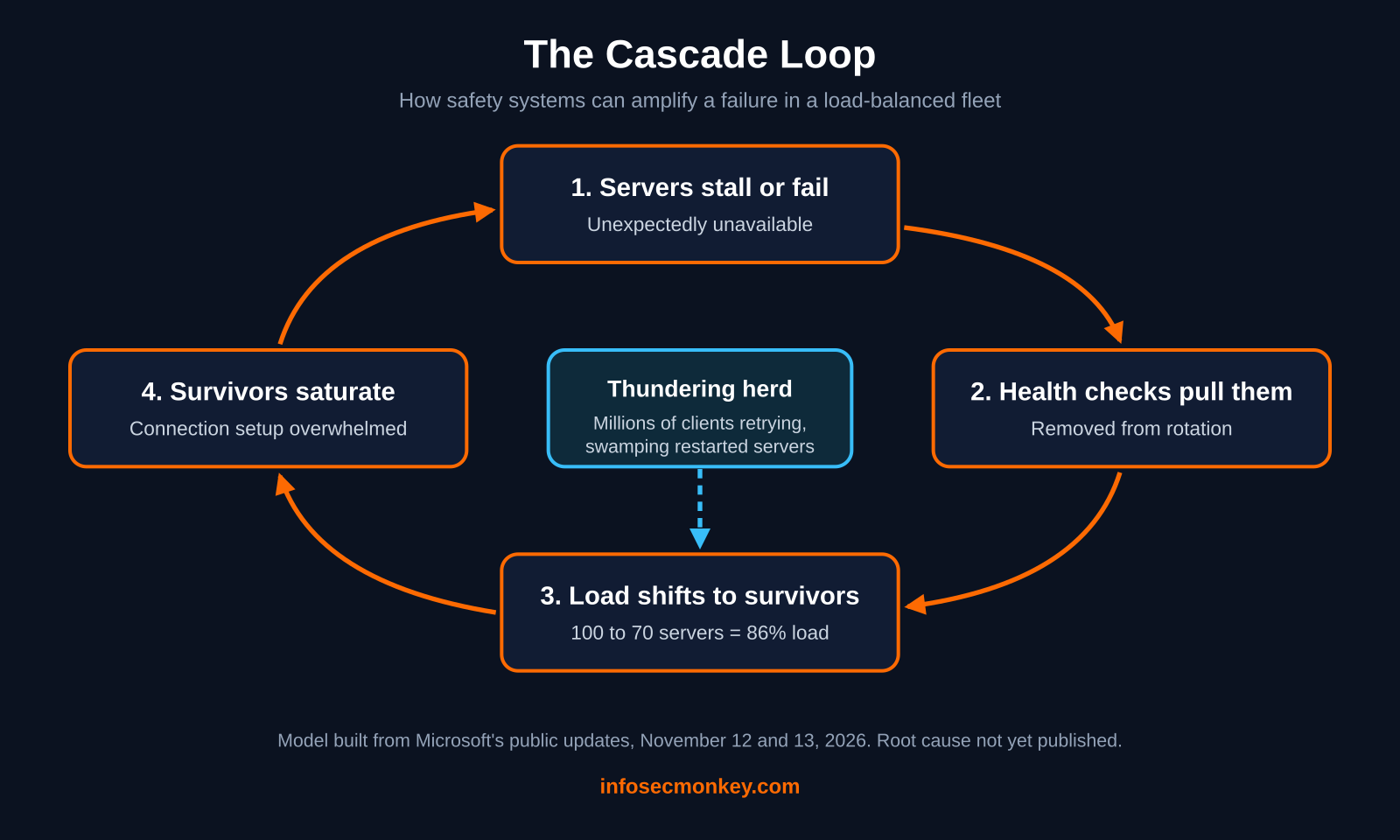
Microsoft’s own wording is the key clue. It said the extra load was not caused by more people using email. It was caused by servers being unexpectedly unavailable, which strained the infrastructure that was left. Read that next to the health check updates and the shape of the failure is clear (inferred).
Figure 1
Run the numbers
Here is why a health check, which exists to protect users, can make things worse. Take a pool of 100 identical servers, each running at 60 percent of capacity. Total work: 6,000 units.
| Servers still in rotation | Load per server | State |
|---|---|---|
| 100 | 60 percent | Healthy, lots of headroom |
| 70 (30 pulled by health checks) | 85.7 percent | Hot, latency climbing |
| 60 | 100 percent | At the edge, handshakes queue up |
| 50 | 120 percent | Over capacity: more servers fail checks and get pulled |
Every server pulled raises the load on everyone left. Past a certain point, the survivors start failing the same health checks, and the safety system removes them too. Each step in the loop is the system working as designed. The loop itself is the failure.
Why the handshake is the choke point
Microsoft said a core process on the affected servers was being overwhelmed. The video reads that as the process that sets up secure connections, and it fits: every client connection starts with a TLS handshake that costs real CPU (key exchange, certificate validation), while an established session is cheap. When millions of clients all need new connections at once, the server spends its time shaking hands instead of serving mail (inferred).
Why Restarting the Servers Did Not Fix It
Microsoft said restarted servers initially came back healthy but could go unresponsive again as soon as they received traffic. That is a thundering herd. For hours, millions of Outlook clients, Teams calendars, phones and automated mail systems had been failing and retrying. The moment a server reappeared in rotation, a huge backlog of reconnects landed on it at once, and it fell back out.
Well-behaved clients back off exponentially and add random jitter so retries spread out. When the population is large enough, even polite retries add up to a roar. This is the pattern your own scripts and integrations should follow so they never become part of the herd:
import random, time

def call_with_backoff(fn, max_tries=8, base=1.0, cap=60.0):
    # Exponential backoff with full jitter; honor Retry-After when sent
    for attempt in range(max_tries):
        resp = fn()
        if resp.status_code not in (429, 503):
            return resp
        retry_after = resp.headers.get("Retry-After")
        if retry_after:
            delay = float(retry_after)
        else:
            delay = random.uniform(0, min(cap, base * (2 ** attempt)))
        time.sleep(delay)
    raise RuntimeError("Service still unavailable, giving up cleanly")
Recovering from a cascade means bringing capacity back slowly while keeping the crowd out. The confirmed moves from Microsoft were pausing deployments, shifting traffic to alternate routes, restarting servers in a controlled way, and reverting recent configuration and network changes. The video also describes Microsoft limiting which kinds of traffic could reach the struggling servers, isolating part of the infrastructure to test a fix, and rebuilding some servers on a previous known-good configuration (reported). Open capacity too fast and the herd knocks it over again. Open it too slowly and the outage drags on.
Redundancy Is Not the Same as Independence
Your mailbox is copied across several machines in different buildings, and Microsoft is very good at surviving a dead disk, a dead server or a dead data center. That is redundancy, and it protects you from independent failures.
It does not protect you from correlated failures. Every copy runs the same software and follows the same traffic rules, pushed out by the same automation. If the rules themselves are wrong, every replica inherits the problem at once. The video’s analogy is a restaurant chain with a thousand kitchens: one fire is survivable, but one bad recipe sent from head office ruins every meal.
Cloud providers shrink the blast radius of a change with staged rollouts, but some faults only show up under real load or hours later, after the change is everywhere. Whether a change triggered this outage is not confirmed. What is confirmed is that Microsoft paused deployments early and was rolling back recent configuration and network changes, which tells you where the engineers were looking.
Pattern worth noticing: the video lines this outage up with the July 2024 CrowdStrike update, a 2025 AWS outage in Virginia caused by internal DNS automation, and an Azure Front Door configuration change days later. Different companies, different systems, same shape: a small change by trusted people, pushed through automation to huge numbers of machines that depend on the same thing. An outage is not a cyberattack, and most of the biggest ones are self-inflicted.
About the Video
Credit where it is due: this explainer from The World Backstage is one of the better plain-language walkthroughs of this outage. It clearly labels its analogies as analogies, it says up front that Microsoft has not published a root cause, and its reception-desk model of health checks is a great way to explain the cascade to non-engineers.
Two cautions if you share it. First, a few specifics come from the video’s reading of Microsoft’s live updates and I could not confirm them in the published reporting I checked: that the overwhelmed process was the secure connection setup, and that servers were rebuilt on a previous configuration. They are marked as reported above. Second, its cloud market share numbers and the earlier outage details are the video’s own figures. Treat the PIR as the final word.
Verification and Validation: Post-Outage Checklist
Once Microsoft declares recovery, do not assume your tenant is clean. Run these checks.
Step 1: Pull the incident record from Microsoft Graph
Goal: track MO1550821 from a script instead of refreshing the admin center. Action: connect with the ServiceHealth.Read.All scope and read the issue.
Connect-MgGraph -Scopes "ServiceHealth.Read.All"
$issue = Get-MgServiceAnnouncementIssue -ServiceHealthIssueId "MO1550821"
$issue | Select-Object Title, Status, StartDateTime, EndDateTime, LastModifiedDateTime
$issue.Posts | Select-Object -Last 1 -ExpandProperty Description
Expected success output: Status reads serviceRestored, and later postIncidentReviewPublished once the PIR is out. GUI verification: Microsoft 365 admin center, Health, Service health, open MO1550821.
Step 2: Find mail that is still stuck or failed
Goal: confirm nothing important was lost while queues drained. Action: trace the outage window for Pending and Failed messages. Each query can cover up to 10 days and return up to 5,000 rows.
Connect-ExchangeOnline -UserPrincipalName <admin>@<tenant>.onmicrosoft.com
Get-MessageTraceV2 -StartDate "2026-11-12T16:00:00Z" -EndDate "2026-11-14T00:00:00Z" `
  -Status Pending,Failed -ResultSize 5000 |
  Select-Object Received, SenderAddress, RecipientAddress, Subject, Status |
  Export-Csv .\outage-mail-check.csv -NoTypeInformation
Expected success output: the Pending count falls toward zero as queues clear. Any Failed rows to or from key partners or customers need follow-up. GUI verification: Exchange admin center, Mail flow, Message trace.
Step 3: Drill into a single message
Get-MessageTraceV2 -MessageTraceId <message-trace-id> -RecipientAddress <user>@<yourdomain> |
  Get-MessageTraceDetailV2 | Select-Object Date, Event, Detail
Expected success output: the event list ends in Deliver. A trail of deferrals followed by a delivery is normal for this window.
Step 4: Confirm nobody changed DNS in a panic
dig +short MX <yourdomain>
dig +short TXT <yourdomain> | grep -i spf
Expected success output: the MX still points at your tenant’s Exchange Online Protection host, and SPF is unchanged. DNS was not the cause here, but emergency MX changes made mid-outage are a classic way to lose mail after the provider recovers.
Step 5: Close the security visibility gap
Defender XDR was listed in the advisory. Action: review the Defender incident and alert queue for the outage window once ingestion catches up, and look for alerts that arrived late or were never actioned. GUI verification: Microsoft Defender portal, Incidents and alerts, filtered to November 12 and 13.
Troubleshooting and Gotchas
1. Your status tools can go down with the service
Symptom: the admin center, dashboards or Defender portal are slow or empty exactly when you need them, and you cannot email your own staff to tell them what is going on. Fix: follow Microsoft’s public status channels (the Microsoft 365 Status account on X posted updates throughout), and keep an out-of-band communication path that does not depend on Microsoft 365: an SMS or phone tree, or a chat tool on another provider. Keep important phone numbers somewhere that is not your mailbox.
2. Delayed mail is not lost mail, until it is
Symptom: users swear a message never arrived, and external senders report bounces. Diagnosis: a temporary 4.x.x deferral means the sending server will retry; a permanent 5.x.x NDR means it gave up. Microsoft extended its own queue timeout to 48 hours, but inbound mail from outside depends on each sender’s retry window. Fix: run the Step 2 trace, and ask critical partners who received a 5.x.x bounce during the window to resend.
3. Outage-themed phishing
Symptom: emails or texts claiming you must sign in again to restore your mailbox, or fake Microsoft support numbers. Euronews flagged scam messages exploiting the outage as one of the real indirect risks. Fix: send a short user advisory now, remind people that Microsoft will not ask them to re-enter credentials through a link to recover a mailbox, and route reports to your security team.
4. Do not be part of the herd
Symptom: your own scripts, connectors or line-of-business apps hammer Graph or Exchange Online in tight loops during an incident. Fix: exponential backoff with jitter, honor Retry-After on 429 and 503 responses, and cap total retries. See the code sample above.
Planning for the Next Bad Day
Leaving the cloud is not the lesson. Most days a large provider is far more reliable than the server in the closet ever was, and splitting everything across several clouds means building, paying for and syncing the same system two or three times. The cloud trades many small failures nobody hears about for rare, huge ones everybody hears about at once. Plan for those:
- Out-of-band comms: a way to reach staff and customers that does not run on the same provider.
- Offline essentials: critical contact lists, runbooks and the files you cannot work without, synced locally and kept available offline.
- A SaaS outage runbook: who declares it, who communicates, what manual workarounds exist, and the Step 1 to 5 checks for recovery.
- Mail continuity: decide ahead of time whether your organization needs an email continuity service, and test it before you need it.
- Watch for the PIR: look for the trigger, why health checks removed so many servers, whether a configuration change was involved, and which defense-in-depth items Microsoft commits to.
Sources
- BleepingComputer: Massive Microsoft 365 outage disrupts Outlook, Teams, Copilot worldwide
- Al Jazeera: Microsoft hit by global outages: What happened and why?
- Euronews: Microsoft outage explained: what went wrong and is your data at risk?
- The World Backstage on YouTube: behind the Microsoft outage (video explainer)
- Microsoft Learn: Get-MessageTraceV2 cmdlet reference
- Microsoft Learn: New Message trace in Exchange admin center in Exchange Online
- Microsoft Learn: Microsoft Graph Service Announcement cmdlets (ServiceHealth.Read.All)
No fluff. Just the config that works.