No fluff. Just the config that works.
Executive Summary
Objective: Use snmp-check SNMP enumeration to pull a full, human-readable inventory from any SNMP v1 or v2c agent, then use what it shows you to lock down your own devices.
Target audience: Network engineers, pentesters, and blue teamers who want to see exactly what an exposed community string gives away.
snmp-check is a small open source enumerator written by Matteo Cantoni (nothink.org) and shipped in Kali Linux. Think of it as snmpwalk with a translator: instead of thousands of raw OID lines, you get labeled sections for system info, interfaces, routes, listening ports, processes, storage and installed software. The current release is v1.9, a Ruby rewrite from 2015 of the older Perl script. It is GPL licensed, and the author is clear that it should only be pointed at machines you own or administer.
Why SNMP Leaks So Much
SNMP v1 and v2c authenticate with a community string that crosses the wire in cleartext. Many devices still ship with public (read-only) and private (read-write) as defaults. Once you have a valid string, the standard MIBs answer questions an attacker would otherwise need a shell for:
| MIB area | What it reveals | Why it matters |
|---|---|---|
| system (MIB-II) | Hostname, OS and kernel string, contact, location, uptime | OS fingerprint and patch level from one packet |
| interfaces / ip | Interface names, MACs, IPs, netmasks, routes | Internal addressing and adjacent networks |
| tcp / udp | Listening ports and live TCP sessions | A port scan without sending a port scan |
| HOST-RESOURCES | Processes with arguments, storage, installed software | Running services, versions, sometimes secrets in arguments |
| LanManager (Windows) | Local user accounts, shares, services | Username list for password attacks |
Prerequisites and Architecture
Assumed knowledge: basic Linux CLI, what UDP 161 is, and the difference between SNMP v1, v2c and v3.
Lab requirements:
| Component | Role | Address |
|---|---|---|
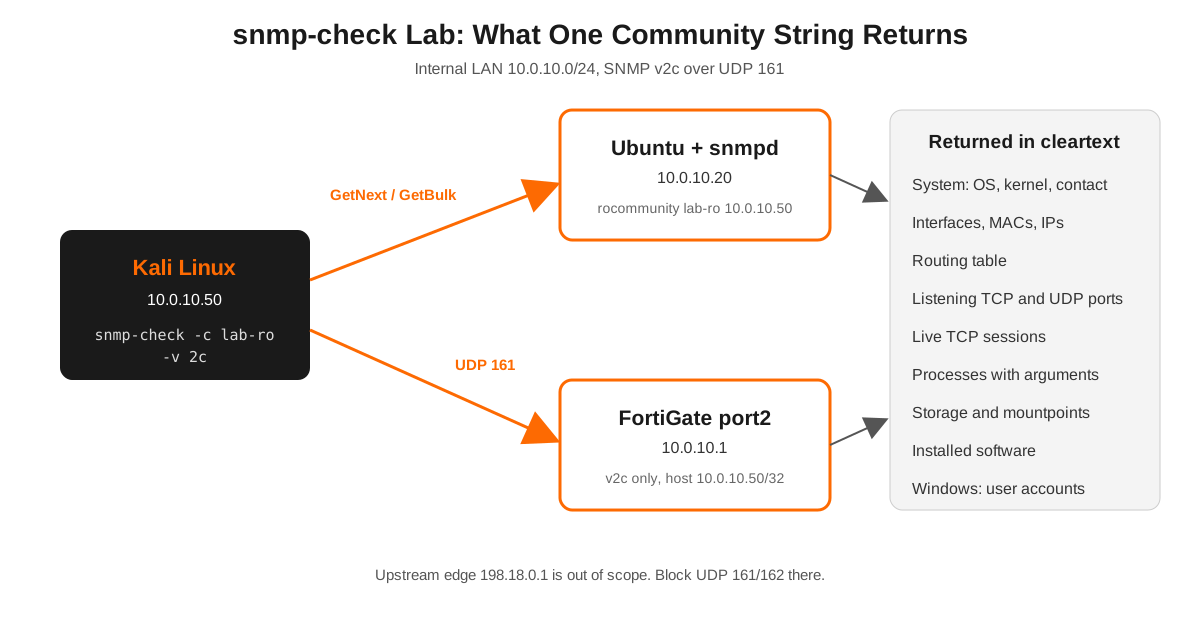
| Kali Linux | Scanner running snmp-check | 10.0.10.50 |
| Ubuntu Server 24.04 with snmpd | Linux target | 10.0.10.20 |
| FortiGate (internal port) | Network device target | 10.0.10.1 |
| Upstream edge | Simulated internet, out of scope | 198.18.0.1 |
Figure 1: snmp-check lab topology
Step-by-Step Implementation
Step 1: Install and verify snmp-check
Goal: Confirm the tool is present and see the options.
Action: The Kali package is named snmpcheck, but the command is snmp-check. Install it if your image is trimmed, along with the net-snmp client tools and onesixtyone used later.
sudo apt update
sudo apt install snmpcheck snmp onesixtyone
snmp-check -h
The options you will actually use:
| Flag | Meaning | Default |
|---|---|---|
-c |
Community string | public |
-v |
SNMP version, 1 or 2c | 1 |
-p |
UDP port | 161 |
-t |
Timeout in seconds | 5 |
-r |
Retries | 1 |
-d |
Skip TCP connection enumeration | off |
-w |
Detect write access | off |
Verification: The help banner prints snmp-check v1.9 - SNMP enumerator. Note what is missing: there is no SNMPv3 option. That fact drives the defensive section at the end.
Step 2: Build a lab target with snmpd
Goal: Give snmp-check something rich to enumerate.
Action: On the Ubuntu target, install the agent and allow a read-only community from the Kali host only.
sudo apt install snmpd
sudo cp /etc/snmp/snmpd.conf /etc/snmp/snmpd.conf.bak
sudo nano /etc/snmp/snmpd.conf
Replace the default listener and community lines with:
agentaddress udp:10.0.10.20:161
# Default Ubuntu line limits answers to the system subtree, comment it out
#rocommunity public default -V systemonly
rocommunity lab-ro 10.0.10.50
sysLocation Lab rack 2
sysContact netops@lab.local
sudo systemctl restart snmpd
sudo ss -ulnp | grep 161Verification: ss shows snmpd listening on 10.0.10.20:161.
Step 3: Find SNMP agents before you enumerate
Goal: Know which hosts answer on UDP 161 and which strings they accept.
Action: Sweep the subnet with nmap, then test a short list of community strings with onesixtyone.
sudo nmap -sU -p 161 --open 10.0.10.0/24 -oG - | awk '/161\/open/{print $2}' > snmp-hosts.txt
printf "public\nprivate\nlab-ro\nmanager\n" > communities.txt
onesixtyone -c communities.txt -i snmp-hosts.txt
Verification: onesixtyone prints each host, the matching community in brackets, and the sysDescr string.
Step 4: Run snmp-check
Goal: Pull the full inventory.
Action: Use v2c (it handles 64-bit counters and bulk requests better) and the community you confirmed.
snmp-check 10.0.10.20 -c lab-ro -v 2cFor slow devices or big routing tables, raise the timeout and skip the TCP table, which is often the slowest section:
snmp-check 10.0.10.20 -c lab-ro -v 2c -t 10 -r 2 -dSave every run with a timestamp so findings are reproducible:
snmp-check 10.0.10.20 -c lab-ro -v 2c | tee snmpcheck-10.0.10.20-$(date +%F).txtStep 5: Read the output like an attacker
Goal: Turn sections into findings.
| Section | What to look for |
|---|---|
| System information | OS and kernel version in Description, real names in Contact |
| Network information | IP forwarding enabled means the box routes, look for other subnets |
| Network interfaces and Network IP | Extra interfaces and addresses that are not in your diagrams |
| Routing information | Paths into networks you did not know existed |
| TCP connections and listening ports | Services bound to all interfaces, admin ports, database ports |
| Listening UDP ports | TFTP, syslog, NTP, other management daemons |
| Processes | Command lines that include config paths, tokens, or passwords |
| Software components | Installed packages and versions to match against CVEs |
| User accounts (Windows) | Local usernames for spraying |
Step 6: Check for write access (lab only)
Goal: Find read-write communities, the real high-severity finding.
Action: The -w flag tests whether the community accepts writes. A write test means sending SET requests to the agent, so only run it where you have explicit permission.
snmp-check 10.0.10.20 -c private -v 2c -wVerification: Output includes Write access permitted! when the string is read-write. A read-write string on a network device can mean config changes or config extraction, so this goes to the top of the report.
Step 7: Point it at your own FortiGate
Goal: See what your firewall exposes, then shrink it.
Action: A typical v2c setup on FortiOS, already scoped to a single manager host with v1 turned off:
config system snmp sysinfo
    set status enable
    set description "fgt-lab-01"
    set location "Lab rack 2"
end
config system snmp community
    edit 1
        set name "lab-ro"
        config hosts
            edit 1
                set ip 10.0.10.50 255.255.255.255
            next
        end
        set query-v1-status disable
        set trap-v1-status disable
    next
end
config system interface
    edit "port2"
        append allowaccess snmp
    next
end
snmp-check 10.0.10.1 -c lab-ro -v 2c -dGUI verification: In System, then SNMP, the community shows the single host entry and only v2c enabled. Because v1 queries are disabled, running snmp-check with its default -v 1 gets no answer, which is a handy proof that the v1 lockdown works.
Verification and Validation
A good run against the Ubuntu target looks like this (sample values, yours will differ):
snmp-check v1.9 - SNMP enumerator
Copyright (c) 2005-2015 by Matteo Cantoni (www.nothink.org)

[+] Try to connect to 10.0.10.20:161 using SNMPv2c and community 'lab-ro'

[*] System information:

  Host IP address               : 10.0.10.20
  Hostname                      : ubuntu-lab
  Description                   : Linux ubuntu-lab 6.8.0-45-generic x86_64
  Contact                       : netops@lab.local
  Location                      : Lab rack 2
  Uptime system                 : 3 days, 00:13:51.05

[*] Network information:
[*] Network interfaces:
[*] Network IP:
[*] Routing information:
[*] TCP connections and listening ports:
[*] Listening UDP ports:
[*] Processes:
Cross-check one value with net-snmp so you know the tool is reading correctly:
snmpget -v2c -c lab-ro 10.0.10.20 1.3.6.1.2.1.1.5.0Success is the same hostname snmp-check reported.
Troubleshooting and Gotchas
1. It times out with no error
SNMP v1 and v2c do not reject a bad community. The agent stays silent, so a wrong string, a version mismatch, a host ACL, or a firewall all look identical.
sudo tcpdump -ni eth0 udp port 161
snmpget -v2c -c lab-ro 10.0.10.20 1.3.6.1.2.1.1.1.0
Requests leaving with no reply: check the community, the -v value (snmp-check defaults to v1), the agent’s allowed source host, and any firewall in the path.
2. Only system information comes back
The agent is answering through a restricted view. On Ubuntu that is the default -V systemonly line. On network gear it is usually a MIB view tied to the community. This is good hardening on production devices, so note it as a positive finding rather than a tool failure.
3. The scan hangs on TCP connections
Busy servers and firewalls have huge TCP tables. Add -d to skip that section and raise -t for slow agents.
snmp-check 10.0.10.20 -c lab-ro -v 2c -d -t 15Defend Against snmp-check SNMP Enumeration
- Turn SNMP off on anything that does not need monitoring.
- Move to SNMPv3 with authPriv. snmp-check only speaks v1 and v2c, so a v3-only agent gives it nothing.
- Kill default strings. No
public, noprivate, no vendor defaults. - Restrict queries to your monitoring hosts on the agent itself, not only on the firewall.
- Never use read-write communities unless a tool truly needs SET, and scope those even tighter.
- Block UDP 161 and 162 at the perimeter and between user and management segments.
- Run snmp-check against your own estate on a schedule. If it returns more than the system section, you have work to do.
Related: Metasploit snmp_enum
If you live in Metasploit, auxiliary/scanner/snmp/snmp_enum produces similar output and is listed by the author as the Metasploit counterpart. auxiliary/scanner/snmp/snmp_login handles community guessing across ranges.
msf6 > use auxiliary/scanner/snmp/snmp_enum
msf6 auxiliary(scanner/snmp/snmp_enum) > set RHOSTS 10.0.10.20
msf6 auxiliary(scanner/snmp/snmp_enum) > set COMMUNITY lab-ro
msf6 auxiliary(scanner/snmp/snmp_enum) > run
Sources
- Kali Linux tools: snmpcheck package and snmp-check usage
- nothink.org: snmpcheck project page by Matteo Cantoni
- nothink.org: sample snmpcheck report against Ubuntu Linux
- ManKier: snmpcheck package and supported enumerations
- snmpcheck(1) Linux man page
- OffSec Metasploit Unleashed: Scanner SNMP Auxiliary Modules
- Infosec Institute: Vulnerability assessment of SNMP service with snmp-check
- Ansible fortinet.fortios: system snmp community options