
If you've spent any time configuring user authentication on... Full Story
By Manny Fernandez
October 27, 2026
The /31 Subnet: Myth or Standard? Network and Broadcast Addresses on Point-to-Point Links
No fluff. Just the config that works.
The /31 Subnet: Myth or Standard? Network and Broadcast Addresses on Point-to-Point Links
Objective: Settle whether a /31 subnet is real, explain what happens to the network and broadcast addresses, and show exactly when to use it and when to walk away.
Target audience: Network and security engineers who number router, firewall and ISP handoff links, and anyone who was taught that a /31 has zero usable hosts.
Applies to: FortiOS 6.0 and later, Cisco IOS and IOS XE, Linux, and any stack that implements RFC 3021.
Short answer: the /31 subnet is not a myth. It is a standards-track IETF specification, RFC 3021, published in December 2000. On a point-to-point link, a /31 has no network address and no subnet broadcast address. Both addresses are host addresses, one for each end of the wire. That is the whole trick, and it halves the address space you burn on every routed link.
The catch is the phrase “point-to-point.” The moment a third device can show up on that segment, or a feature needs a third address, the /31 stops being clever and starts being an outage.
Prerequisites and Lab Architecture
- Comfort with CIDR notation and binary subnet masks.
- A FortiGate (hardware or VM) on FortiOS 6.0 or later.
- A peer router: Cisco IOS or IOS XE, or a Linux box with iproute2 (FRR optional for routing protocols).
- Console or out-of-band access. You are renumbering transit links, so do not do this over the link you are changing.
| Component | Interface | Address | Role |
|---|---|---|---|
| FortiGate | port1 | 198.18.0.0/31 | Edge firewall, ISP handoff |
| ISP-R1 (Cisco IOS) | Gi0/0/0 | 198.18.0.1/31 | Upstream router, default gateway |
| FortiGate | port2 | 198.18.0.2/31 | Transit link to core |
| CORE-LNX (Ubuntu + FRR) | eth1 | 198.18.0.3/31 | Core router, BGP peer |
| FortiGate | port3 | 10.0.10.1/24 | Internal LAN (not a /31, it has more than two hosts) |
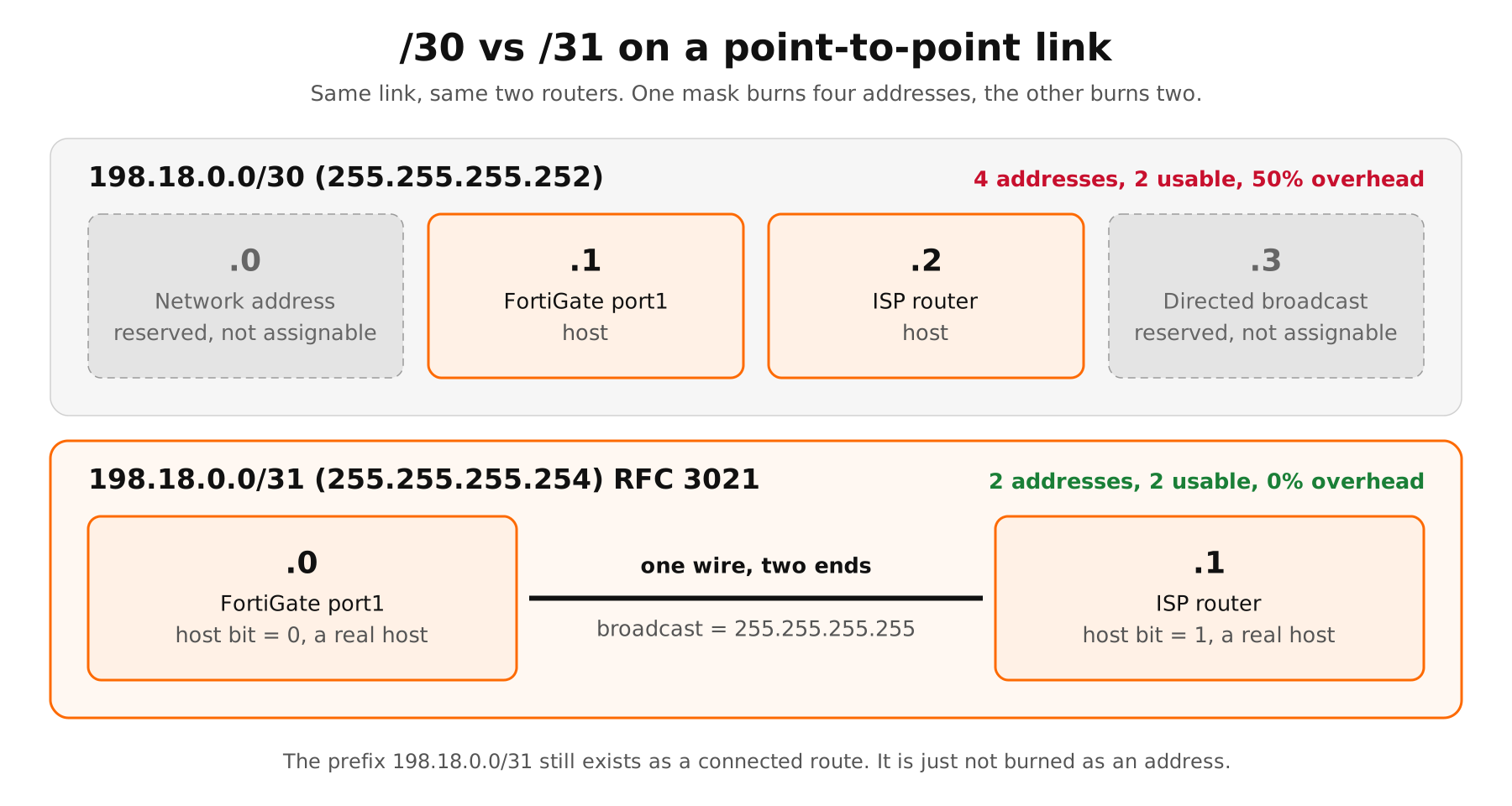
Figure 1: /30 vs /31 address layout on the same point-to-point link
The /31 Subnet Math: Where Did the Network and Broadcast Go?
A /31 mask is 255.255.255.254. That leaves exactly one host bit, so the block holds two addresses: host bit 0 and host bit 1.
198.18.0.0/31

11000110.00010010.00000000.0000000 | 0   -> 198.18.0.0
11000110.00010010.00000000.0000000 | 1   -> 198.18.0.1
<---------- 31 network bits ----------> host bit
Under classic subnetting rules, all-zeros in the host field is the network address and all-ones is the directed broadcast. Apply those rules to a single host bit and you get one network address, one broadcast address and zero hosts. That is where the “/31 is useless” belief comes from.
RFC 3021 rewrites those rules for this one case. Section 2.1 states that on a point-to-point link with a 31-bit mask, both addresses MUST be interpreted as host addresses. Section 3 updates the host and router requirement RFCs (1122, 1700 and 1812) so that a packet sent to either address is treated as a packet for the router that owns it, not as a broadcast.
| Property | /30 | /31 |
|---|---|---|
| Mask | 255.255.255.252 | 255.255.255.254 |
| Total addresses | 4 | 2 |
| Network address | .0, reserved | None. .0 is a host |
| Subnet broadcast | .3, reserved | None. .1 is a host |
| Usable hosts | 2 | 2 |
| Links per /24 | 64 | 128 |
| Overhead | 50% | 0% |
So is there a network address or not?
There is no network address, meaning nothing in the block is reserved and unassignable. There is still a network prefix. 198.18.0.0/31 shows up in the routing table as a connected route, gets redistributed, gets summarized and gets matched by prefix lists exactly like any other prefix. The prefix identifies the link. It just does not burn an address to do it.
And the broadcast address?
The subnet-directed broadcast is gone. RFC 3021 says that operation is not possible on a /31 point-to-point link and that the limited broadcast, 255.255.255.255, MUST be used for any broadcast traffic on that link. Layer 2 broadcast is untouched, so ARP still floods to ff:ff:ff:ff:ff:ff and resolves normally. The RFC even counts losing directed broadcast as a small security win, because it removes a target for Smurf-style amplification.
Myth vs. Reality
| Myth | Reality |
|---|---|
| A /31 has zero usable hosts. | On a point-to-point link it has two. RFC 3021 makes both addresses hosts. |
| It is a vendor hack. | It is an IETF Proposed Standard from December 2000, co-authored by two Cisco engineers. |
| It breaks routing protocols. | The RFC states it has no impact on routing protocols. OSPF, IS-IS, BGP and EIGRP were tested in service provider networks. |
| It only works on serial or PPP links. | It works on routed Ethernet. Cisco IOS prints a warning on Ethernet interfaces, but the link comes up and passes traffic. |
| No broadcast means ARP breaks. | Only directed broadcast goes away. Limited broadcast and Layer 2 broadcast still work, so ARP is fine. |
When to Use a /31 Subnet
- Router-to-router and firewall-to-router transit links. Two devices, one cable, no hosts. This is the textbook case.
- ISP handoffs. Many carriers hand out a /31 for the WAN link and route your public block behind it. Fortinet documents this exact pattern for FortiGate WAN interfaces.
- Data center underlays. Spine-leaf fabrics with hundreds of routed links are where the 2x savings adds up fastest.
- BGP and OSPF peering links. Peers talk over unicast, multicast or limited broadcast, none of which care that the network and broadcast addresses are gone.
- Public IPv4 conservation. RFC 3021 frames it plainly: 500 point-to-point links on /31s save 1,000 addresses compared to /30s.
When NOT to Use a /31 Subnet
- Any segment with more than two devices. A LAN, a DMZ, a switch with a monitoring host hanging off it, or a link you might later tap with a third router. There is nowhere to put the third address.
- First-hop redundancy (VRRP, HSRP). You need one real address per router plus a virtual IP. That is three addresses minimum, which means a /29, not a /30 and certainly not a /31.
- Firewall HA designs that require a standby IP per interface. Cisco Secure Firewall Threat Defense rejects a standby IP on a /31 interface outright, and Cisco’s fix is to renumber to /30. FortiGate FGCP clusters share the interface IP, so they do not hit this, but check any platform that does active and standby addressing.
- A peer that does not support RFC 3021. The RFC itself warns that a link where only one end supports /31 may not operate correctly. Legacy appliances, cheap CPE and some embedded stacks still treat .0 as a network address.
- Anything that relies on subnet-directed broadcast. Directed broadcast to the link is impossible by design on a /31.
- Your tooling cannot handle it. IPAM, monitoring templates, scripts and ACLs that assume .0 and .255 are never hosts will misreport or drop traffic. A /31 at the top of a /24 (for example x.x.x.254/31) makes .255 a perfectly valid host address.
Field note: Rule of thumb: if you can say “exactly two devices, forever, and no virtual IP,” use a /31. If you hesitate on any of those words, use a /30 or larger.
Step-by-Step Implementation
Step 1: Plan the pairs correctly
Goal: Allocate /31 pairs from a transit block without overlapping or splitting a pair.
Action: Every /31 starts on an even address. Valid pairs are .0/.1, .2/.3, .4/.5 and so on. The pair .1/.2 is not a /31: .1 belongs to 198.18.0.0/31 and .2 belongs to 198.18.0.2/31. This is the single most common /31 mistake.
# Generate and sanity-check /31 pairs from a transit block
python3 - <<'EOF'
import ipaddress
for net in list(ipaddress.ip_network("198.18.0.0/29").subnets(new_prefix=31)):
    a, b = list(net)
    print(f"{net}  side-A {a}  side-B {b}")
EOF
Verification: Each output line shows one link. Side A always ends in an even number, side B in the next odd number.
Step 2: Configure the FortiGate interfaces
Goal: Number port1 and port2 as /31 transit links and point the default route at the ISP side of the pair.
Action: No special command is needed. Fortinet states FortiOS supports RFC 3021 and accepts a /31 mask like any other. Use the other address in the pair as the static route gateway.
config system interface
    edit "port1"
        set vdom "root"
        set alias "TO-ISP-R1"
        set ip 198.18.0.0 255.255.255.254
        set allowaccess ping
        set role wan
    next
    edit "port2"
        set vdom "root"
        set alias "TO-CORE-LNX"
        set ip 198.18.0.2 255.255.255.254
        set allowaccess ping
    next
end

config router static
    edit 1
        set dst 0.0.0.0 0.0.0.0
        set gateway 198.18.0.1
        set device "port1"
    next
end
GUI Verification: Network > Interfaces > port1 shows IP/Netmask 198.18.0.0/255.255.255.254. The GUI accepts the .0 address without complaint on a /31. FortiOS 7.6.7 and 8.0.0 added a check that rejects subnet broadcast addresses on interfaces, and Fortinet explicitly exempts /31 and /32 from it.
Step 3: Configure the Cisco IOS peer
Goal: Bring up the other end of Link A.
Action: Set the mask on the routed interface. On Ethernet, IOS warns you and then accepts it.
ISP-R1(config)# interface GigabitEthernet0/0/0
ISP-R1(config-if)# ip address 198.18.0.1 255.255.255.254
% Warning: use /31 mask on non point-to-point interface cautiously
ISP-R1(config-if)# no shutdown
ISP-R1(config-if)# end
Verification: The warning is informational. It exists because Ethernet is a multi-access medium, and IOS cannot know you only plugged in two devices. show ip interface brief should show the interface up/up with 198.18.0.1.
Step 4: Configure the Linux peer
Goal: Bring up Link B on the core router.
sudo ip addr add 198.18.0.3/31 dev eth1
sudo ip link set eth1 up
ip -br addr show eth1
Verification: ip -br addr show eth1 returns eth1 UP 198.18.0.3/31. To persist it on Ubuntu, put 198.18.0.3/31 in the interface’s addresses list in Netplan.
Step 5 (optional): Run routing protocols over the /31
Goal: Prove the RFC’s claim that routing protocols do not care.
Action: For OSPF, set the interface network type to point-to-point. A /31 has no room for a DR/BDR election to make sense, and point-to-point skips it and speeds up adjacency. BGP needs nothing special.
config router ospf
    set router-id 10.0.255.1
    config area
        edit 0.0.0.0
        next
    end
    config ospf-interface
        edit "P2P-CORE"
            set interface "port2"
            set network-type point-to-point
        next
    end
    config network
        edit 1
            set prefix 198.18.0.2 255.255.255.254
        next
    end
end
! Matching side on an IOS router
interface GigabitEthernet0/0/1
ip address 198.18.0.3 255.255.255.254
ip ospf network point-to-point
ip ospf 1 area 0Verification and Validation
Run these from the FortiGate. The output below is what success looks like in the lab; your MAC addresses will differ.
execute ping 198.18.0.1
execute ping 198.18.0.3
get system arp
get router info routing-table all
FGT # get system arp
Address Age(min) Hardware Addr Interface
198.18.0.1 0 00:1a:2b:3c:4d:01 port1
198.18.0.3 0 00:1a:2b:3c:4d:03 port2
FGT # get router info routing-table all
S* 0.0.0.0/0 [10/0] via 198.18.0.1, port1, [1/0]
C 198.18.0.0/31 is directly connected, port1
C 198.18.0.2/31 is directly connected, port2
C 10.0.10.0/24 is directly connected, port3What to look for: a resolved ARP entry for each peer, and connected /31 routes. The connected route is the “network” that still exists: a prefix, not a reserved address.
From the Cisco side, confirm ARP and reachability to the .0 address. This is the one that proves the peer is not treating .0 as a network address:
ISP-R1# ping 198.18.0.0
ISP-R1# show ip arp GigabitEthernet0/0/0
Troubleshooting and Gotchas
1. The pair is split (.1 and .2 on the same link)
Symptom: Interfaces are up, but ARP never resolves and ping fails both ways. Each side has a connected route for a different /31.
get router info routing-table all | grep port2
diagnose sniffer packet port2 'arp' 4 10
Fix: Renumber to a valid even/odd pair. If the FortiGate shows 198.18.0.2/31 and the peer is at 198.18.0.1, they are on different subnets by definition.
2. Mask mismatch (/31 on one side, /30 on the other)
Symptom: The FortiGate at 198.18.0.0/31 sends ARP requests for .1, but the peer configured as 198.18.0.1/30 treats .0 as its network address and will not reply or will not send to it. Sometimes one direction works and the other does not, which is worse.
diagnose sniffer packet port1 'arp or icmp' 4 20
get system arp
Fix: Both ends must use 255.255.255.254, and both must support RFC 3021. The RFC’s deployment section calls this out directly: a link where only one end supports /31 may not work correctly.
3. Filters and tools that hate .0 and .255
Symptom: The link pings fine but traffic sourced from the .0 or .255 host is dropped somewhere upstream, or monitoring flags the interface as misconfigured.
diagnose debug flow filter addr 198.18.0.0
diagnose debug flow show function-name enable
diagnose debug flow trace start 20
diagnose debug enable
# reproduce, then:
diagnose debug disable
diagnose debug reset
Fix: Look for anti-spoof ACLs, bogon lists or legacy firewall rules that block any address ending in .0 or .255, and IPAM or monitoring templates that assume those are never hosts. Update the tool, or move the link to a /31 that does not land on .0 or .255 if you cannot.
Bottom Line
The /31 is real, standardized and supported on FortiOS, Cisco IOS and Linux. On a point-to-point link there is no network address and no subnet broadcast address, only two hosts and a prefix in the routing table. Use it on routed links between exactly two devices. Skip it anywhere a third address, a virtual IP or a standby IP might ever be needed. For IPv6 links, the equivalent conversation is the /127.
Sources
- RFC 3021: Using 31-Bit Prefixes on IPv4 Point-to-Point Links
- Fortinet Technical Tip: /31 subnet mask on FortiGate interface for point-to-point connection specially ISP connections
- Fortinet Technical Tip: Restriction on configuring broadcast IP addresses to FortiGate interfaces via CLI
- Cisco TechNote 225621: Deployment Fails with /31 Subnet on Standby FTD Interface IP
- Cisco Community: /31 on Catalyst 3750 routed port
InfoSecMonkey | No fluff. Just the config that works.
Recent posts
-

-

DNS is one of those technologies that quietly underpins... Full Story
-

BGP issues on FortiGate firewalls usually trace back to... Full Story
-

Every time your laptop talks to your router, a... Full Story
-

If you've spent any time configuring NAT on a... Full Story
-

If you have spent any time configuring firewall policies... Full Story
-

High availability on FortiGate is one of those features... Full Story
-

If you've configured SD-WAN on a FortiGate, you've almost... Full Story
-

FortiLink is the management protocol that turns a FortiSwitch... Full Story
-

FortiSwitches are pretty rock solid from Mean Time Between... Full Story
-

This is a quicky tip. Have you ever gone... Full Story
-

DNS is one of those quiet pieces of internet... Full Story
-

This article is an updated version of the previous... Full Story
-

You will add ns2 as a secondary (slave) BIND9... Full Story
-

In the process of deploying my lab, I needed... Full Story
-

RFC 8805, used to be known as Self-Correcting IP... Full Story
-

Years back, I wrote an article about certificate pinning. ... Full Story
-

FortiGates have the ability to send alerts to Microsoft... Full Story
-

In this post, I am going to walk through... Full Story
-

Troubleshooting VoIP on a FortiGate can feel like trying... Full Story
-

Prior to FortiOS 7.0, there were three commands to... Full Story
-

In this post, I am going to go over... Full Story
-

What we are going to do: We are going... Full Story
-

Choosing between FGCP (FortiGate Clustering Protocol) and FGSP (FortiGate... Full Story
-

Creating a VLAN on macOS (The "Pro" Move) A... Full Story
-

This blog post explores the logic behind how macOS... Full Story
-

Pretty Fly for a Wi-Fi Tell My Wi-Fi Love... Full Story
-

Part of my daily gig is creating BoMs (Bill-of-Materials)... Full Story
-

ICMP introduces several security risks, but careful filtering, rate... Full Story
-

The command diag debug application dhcps -1 enables full... Full Story
-

In the world of FortiOS, execute tac report is... Full Story
-

LLDP; What is it The Link Layer Discovery Protocol... Full Story
-

What it actually does When you run diagnose fdsm... Full Story
-

Monkey Bites are bite-sized, high-impact security insights designed for... Full Story
-

I have run macOS in macOS with Parallels but... Full Story
-

Don't be confused with my other FortiNAC posts where... Full Story
-

This is the third session in a multi-part article... Full Story
-

Today I was configuring key-based authentication on a FortiGate... Full Story
-

Netcat, often called the "Swiss Army knife" of networking,... Full Story
-

At its core, IEEE 802.1X is a network layer... Full Story
-

In case you did not see the previous FortiNAC... Full Story
-

This is our 5th session where we are going... Full Story
-

Now that we have Wireshark installed and somewhat configured,... Full Story
-

The Philosophy of Packet Analysis Troubleshooting isn't about looking... Full Story
-

No fluff. Just the config that works. The /31... Full Story
-

A practitioner guide to arp-scan network discovery on Linux... Full Story
-

CVE-2026-0322 PAN-OS Management Interface RCE: Patch, Lock Down, Hunt... Full Story