Published 2026-11-18 | CVE | Puppet Enterprise, OpenVox | No fluff. Just the config that works.
Puppet Enterprise CVE-2026-115731 is the kind of bug that turns your configuration management server into a launch pad. Any client holding a CA-signed agent certificate can send one crafted run report to Puppet Server and execute code as the Puppet Server service user. If your CA autosigns certificate requests, “holding a signed certificate” is not much of a bar: an unauthenticated attacker on the network can request one and walk right in.
Perforce published it on November 3, 2026 with a CVSS 4.0 score of 9.4, and the OpenVox project shipped a public advisory with a working sample report the same day. Puppet Server holds your CA key and pushes catalogs to every managed node, so treat this as a whole-fleet problem, not a single-server one.
Executive Summary
| Item | Detail |
|---|---|
| Objective | Find out if you are exposed, close the unauthenticated path today, patch, and hunt for abuse |
| Audience | Linux and platform engineers who run Puppet Enterprise or OpenVox, plus the network and SecOps folks who own the path to TCP 8140 |
| CVE | CVE-2026-115731, CWE-502 (deserialization of untrusted data) and CWE-94 (code injection) |
| Severity | CVSS 4.0 9.4, Critical |
| Affected PE | 2023.8.0 to before 2023.8.13, 2025.0.0 to before 2025.12.1, 2026.0.0 to before 2026.0.1 |
| Fixed PE | 2023.8.13, 2025.12.1, 2026.0.1 (bundle puppet-agent 8.22.2 or 9.1.3) |
| Fixed OpenVox | openvox-server 9.2.0 / 8.18.0, openvox-agent 9.3.0 / 8.32.0, openvoxdb 9.2.0 / 8.18.0 |
| Exploit status | Public sample exploit in the OpenVox advisory; no confirmed in-the-wild exploitation of this CVE at the time of writing |
How Puppet Enterprise CVE-2026-115731 Works
After every run, the agent sends a JSON report to the server with PUT /puppet/v3/report/<certname>. It lists the resources that changed, warnings, and failures. Most report events are plain JSON, but some custom resource types put a serialized Ruby object (a Puppet “rich data” value) inside an event. The server converts those back into live objects while it processes the report.
That conversion is the bug. Per the Red Hat CVE page, the server trusts an attacker-controlled __ptype type name in the rich data converter, and per the SecurityOnline write-up that type name ends up in a Ruby class_eval call. A crafted event is all it takes for code to run on the server. The fix limits report events to the small set of types a report should ever contain.
Figure 1: CVE-2026-115731 attack chain and where to break it
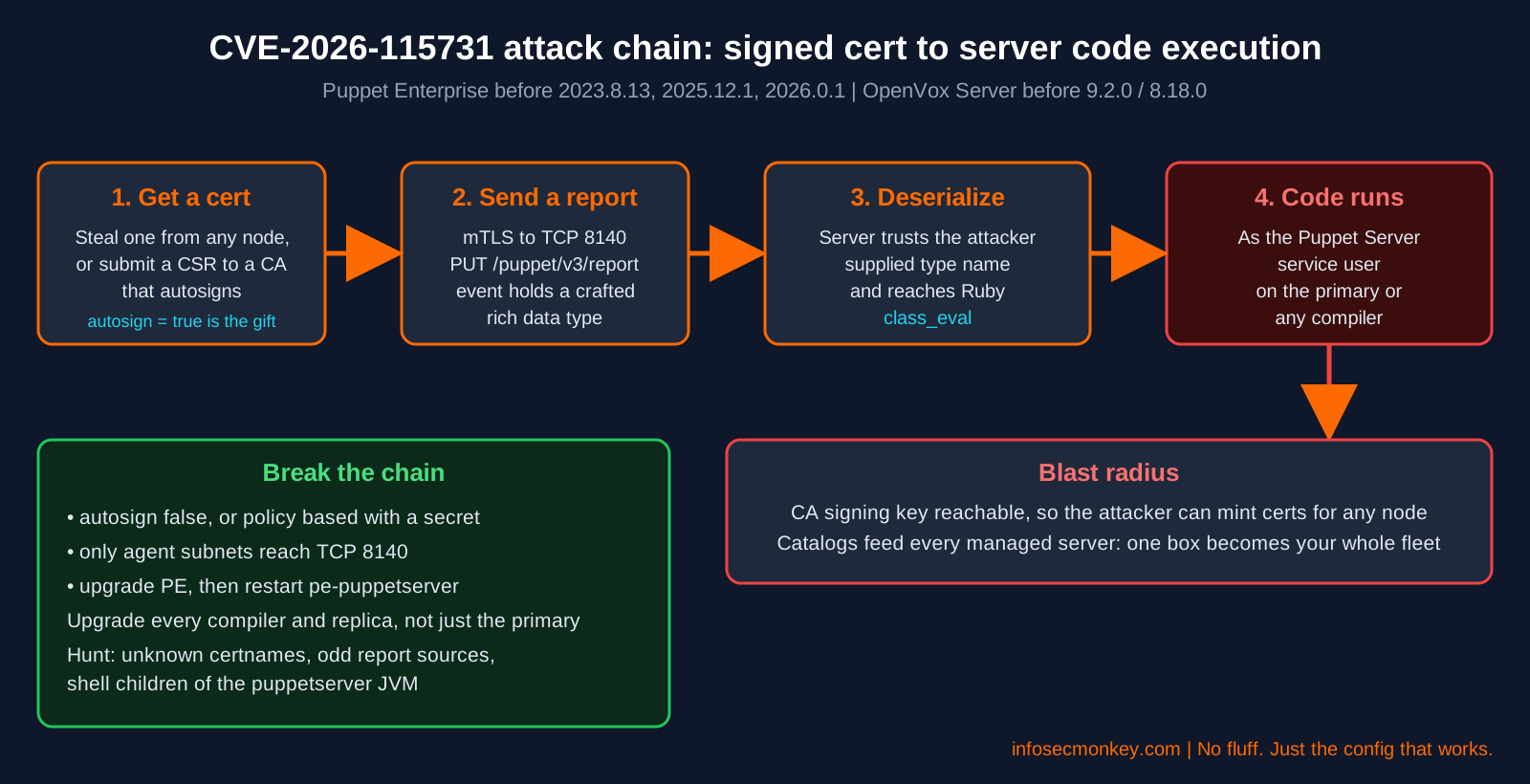
Why autosign matters: the CVE record says that where the CA autosigns requests without strong verification, an unauthenticated network attacker can obtain a certificate. Lab and cloud builds turn on autosign = true for convenience all the time. That one setting turns an authenticated bug into an unauthenticated one.
The companion bug: CVE-2026-115732
Shipped in the same fixed releases is CVE-2026-115732 (CVSS 9.0), a certificate name authorization bypass in trapperkeeper-authorization, the library that parses auth.conf. Plain hostname rules were matched like wildcards, so a certificate for evil.target.example.com could act as target.example.com. Per Perforce, in Puppet Enterprise this can lead to remote command execution on managed nodes. The same upgrade fixes both, but it can break custom auth.conf rules that quietly depended on the buggy matching (see Gotcha 2).
Open source Puppet users
The OpenVox oss-security announcement says the issues affect all known OpenVox and Puppet versions and implementations, and that open source Puppet will not be receiving security updates. If you run unpatched OSS Puppet, the fix is moving to OpenVox at the versions above. Debian shipped its own patched puppet-agent builds (bookworm 7.23.0-1+deb12u1, trixie 8.10.0-5+deb13u1) per the Debian security tracker.
Prerequisites and Architecture
- Root or sudo on the PE primary server, every compiler, and any replica
- The PE installer tarball for your fixed release, from the Perforce download portal
- A current backup of the primary (
puppet-backup create) before you upgrade - Rights to change the firewall in front of TCP 8140 (FortiGate examples below)
| Component | Lab value | Role |
|---|---|---|
| PE primary | puppet.lab.local, 10.0.10.10 | Puppet Server, CA, console, PuppetDB |
| Compiler | compiler01.lab.local, 10.0.10.11 | Puppet Server, processes reports too |
| Linux agents | 10.0.20.0/24 | Managed nodes |
| Windows agents | 10.0.30.0/24 | Managed nodes |
| FortiGate | port2 = agents, port3 = server VLAN | Enforces who can reach TCP 8140 |
| Untrusted | 198.18.0.0/15 | Anything that is not a managed node |
Step-by-Step Remediation
Step 1: Confirm your version and exposure
Goal: know in under a minute whether you are on an affected release.
Action: check the PE release and the bundled agent package on the primary and on each compiler.
cat /opt/puppetlabs/server/pe_version
rpm -q pe-puppetserver puppet-agent        # RHEL family
dpkg -l pe-puppetserver puppet-agent | tail -2   # Ubuntu
Verification: anything below 2023.8.13, 2025.12.1 or 2026.0.1 is affected. A puppet-agent package below 8.22.2 (or 9.1.3 on the 9.x line) on a server node means the vulnerable report code is still installed.
Step 2: Close the unauthenticated path (autosign)
Goal: make sure nobody can mint themselves an agent certificate.
Action: print the effective autosign setting on the primary (the CA).
sudo puppet config print autosign --section server
sudo cat /etc/puppetlabs/puppet/autosign.conf 2>/dev/null| Result | Meaning | Action |
|---|---|---|
| false | Manual signing only | Good, move on |
| true | Every CSR gets signed | Fix today |
| A path to autosign.conf | Basic autosign by name or glob | Fix if it holds globs like *.lab.local (names are attacker chosen) |
| A path to an executable | Policy based autosign | Fine if it checks a pre-shared secret, review it |
To switch to manual signing, then restart the service:
sudo puppet config set autosign false --section server
sudo systemctl restart pe-puppetserver
If you need zero-touch enrollment, use policy based autosigning: provisioning drops a challengePassword in csr_attributes.yaml, and your autosign script only signs CSRs that carry the right secret. A hostname is never proof of identity.
Verification: puppetserver ca list shows new requests waiting instead of being signed automatically.
Step 3: Restrict TCP 8140 to managed nodes
Goal: shrink the set of hosts that can even attempt a report while you schedule the upgrade.
Action (FortiGate): allow agent subnets to the Puppet servers on TCP 8140, log and deny everything else.
config firewall address
    edit "PE-Servers"
        set subnet 10.0.10.10 255.255.255.254
    next
    edit "Agents-Linux"
        set subnet 10.0.20.0 255.255.255.0
    next
    edit "Agents-Windows"
        set subnet 10.0.30.0 255.255.255.0
    next
end
config firewall addrgrp
    edit "PE-Agents"
        set member "Agents-Linux" "Agents-Windows"
    next
end
config firewall service custom
    edit "Puppet-8140"
        set tcp-portrange 8140
    next
end
config firewall policy
    edit 0
        set name "PE-Agents-to-Puppet"
        set srcintf "port2"
        set dstintf "port3"
        set srcaddr "PE-Agents"
        set dstaddr "PE-Servers"
        set action accept
        set schedule "always"
        set service "Puppet-8140"
        set logtraffic all
    next
    edit 0
        set name "Deny-Other-to-Puppet"
        set srcintf "any"
        set dstintf "port3"
        set srcaddr "all"
        set dstaddr "PE-Servers"
        set action deny
        set schedule "always"
        set service "Puppet-8140"
        set logtraffic all
    next
end
10.0.10.10 255.255.255.254 covers the primary and the compiler (10.0.10.10 and .11). Both policies must sit above any broader rule that already allows traffic into the server VLAN, so move them up with move <id> before <id>. PE uses other ports too (8142 for orchestrator agents, 8081 PuppetDB, 443 console), but 8140 is the one that takes reports.
Action (host firewall, firewalld): same idea on the box itself, as defense in depth.
sudo firewall-cmd --permanent --new-zone=puppet-agents
sudo firewall-cmd --permanent --zone=puppet-agents --add-source=10.0.20.0/24
sudo firewall-cmd --permanent --zone=puppet-agents --add-source=10.0.30.0/24
sudo firewall-cmd --permanent --zone=puppet-agents --add-port=8140/tcp
sudo firewall-cmd --permanent --zone=public --remove-port=8140/tcp
sudo firewall-cmd --reload
GUI verification: in FortiOS go to Log and Report, Forward Traffic, filter on destination port 8140 and policy Deny-Other-to-Puppet. Hits from addresses outside your agent subnets are worth a look on their own.
Reality check: this is a compensating control. A real but compromised agent sits inside the allowed subnets and still has a valid cert. Only the upgrade removes the bug.
Step 4: Upgrade Puppet Enterprise
Goal: get every Puppet Server node onto 2023.8.13, 2025.12.1 or 2026.0.1 and load the fixed code.
Action: back up, run the installer on the primary, then upgrade compilers and replicas.
sudo puppet-backup create --dir=/var/puppetlabs/backups
tar -xf puppet-enterprise-<VERSION>-<PLATFORM>.tar.gz
cd puppet-enterprise-<VERSION>-<PLATFORM>
sudo ./puppet-enterprise-installer
sudo puppet agent -t

# then, from the primary, for each compiler and replica
sudo puppet infrastructure upgrade compiler compiler01.lab.local
sudo puppet infrastructure upgrade replica <REPLICA_FQDN>
Pick the line you are already on: 2023.8.x LTS goes to 2023.8.13, 2025.x goes to 2025.12.1, 2026.0.x goes to 2026.0.1. The CVE record says to restart Puppet Server so the fixed code is loaded, so finish with a restart on every server node:
sudo systemctl restart pe-puppetserver
sudo puppet infrastructure status
Verification: pe_version shows the fixed release, puppet-agent is 8.22.2 or 9.1.3 or later, and puppet infrastructure status reports every service as running.
Step 5: Audit signed certificates
Goal: find certificates nobody can explain, especially look-alike names that pair with CVE-2026-115732.
sudo puppetserver ca list --all
sudo puppetserver ca revoke --certname <UNKNOWN_CERTNAME>
Compare the signed list against your CMDB or puppet query 'nodes[certname] {}'. Red flags: names you do not own, names that extend a real hostname (evil.web01.lab.local), and anything signed while autosign was on that never checked in again.
Step 6: Hunt for exploitation
Goal: spot report abuse before you call this done.
Action 1: who has been sending reports, and from where?
sudo grep 'PUT /puppet/v3/report' \
  /var/log/puppetlabs/puppetserver/puppetserver-access.log* \
  | awk '{print $1}' | sort | uniq -c | sort -rn | head -20
Any source IP outside your agent subnets, or a certname reporting from an IP it never used before, needs an explanation.
Action 2: look for processes spawned by the Puppet Server JVM. A healthy server rarely forks shells.
PID=$(systemctl show -p MainPID --value pe-puppetserver)
ps --ppid "$PID" -o pid,user,etime,cmd
Action 3: keep watching with auditd so the next attempt leaves a trail.
echo '-a always,exit -F arch=b64 -S execve -F uid=pe-puppet -k pe_exec' \
  | sudo tee /etc/audit/rules.d/pe-exec.rules
sudo augenrules --load
sudo ausearch -k pe_exec -i | tail -20
If you find evidence: code ran as the service user that can read the CA signing key. Assume the CA is burned. Rebuild the CA, re-issue every agent certificate, review recent catalogs and code deploys, and follow Perforce incident guidance. Patching after the fact does not undo stolen keys.
Verification and Validation
| Check | Command | Expected success |
|---|---|---|
| PE release | cat /opt/puppetlabs/server/pe_version |
2023.8.13, 2025.12.1, 2026.0.1 or later |
| Agent package on servers | rpm -q puppet-agent |
8.22.2 or 9.1.3 or later |
| Services up | puppet infrastructure status |
All services running |
| Autosign | puppet config print autosign --section server |
false, or a reviewed policy executable |
| Agents healthy | puppet agent -t on a test node |
Run completes, report accepted |
| Edge filter | FortiOS Forward Traffic log, port 8140 | Only agent subnets accepted |
Troubleshooting and Gotchas
Gotcha 1: “We patched” but compilers did not
Every compiler runs Puppet Server and processes reports. Upgrading only the primary leaves the hole open on every compiler behind your load balancer. Check each one:
sudo puppet infrastructure status
ssh compiler01.lab.local "rpm -q pe-puppetserver puppet-agent"
Fix: run puppet infrastructure upgrade compiler <fqdn> for each one, then restart pe-puppetserver on it.
Gotcha 2: Agents get 403 after the upgrade
The CVE-2026-115732 fix stops plain hostname rules in auth.conf from matching like wildcards. A custom rule that relied on that behavior now denies requests it used to allow.
sudo grep ' 403 ' /var/log/puppetlabs/puppetserver/puppetserver-access.log | tail
sudo grep -n 'allow' /etc/puppetlabs/puppetserver/conf.d/auth.conf
Fix: rewrite the rule to say what you mean: an exact certname, a list, or an anchored regex such as allow: "/^web[0-9]+\.lab\.local$/". Then restart pe-puppetserver.
Gotcha 3: Autosign hiding in autosign.conf
Teams that “turned autosign off” often only removed autosign = true while autosign.conf still holds *.lab.local. Attackers pick their own certname, so a glob is the same as signing everything in that domain.
Fix: empty or remove autosign.conf, set autosign = false, or point it at a policy executable that checks a secret. Recheck with puppet config print autosign --section server.
Sources
- OpenCVE record for CVE-2026-115731 (description, affected and fixed releases)
- Red Hat CVE page for CVE-2026-115731
- Red Hat Bugzilla 2566451: report event deserialization RCE
- Debian security tracker for CVE-2026-115731
- oss-security: OpenVox Server RCE and client impersonation vulnerabilities
- SmartScope summary of the Puppet Server and OpenVox advisories
- SecurityOnline: Puppet Server RCE CVE-2026-115731 PoC
- SecurityOnline CVE Watchtower entry for CVE-2026-115732
No fluff. Just the config that works.