No fluff. Just the config that works.
Executive Summary
Objective: This AI primer explains the building blocks behind today’s AI tools in plain language, so you can follow the conversation when someone says “we put a RAG pipeline behind an agent with MCP tools in a custom harness” and actually know what each word means.
Target audience: Semi-technical readers. IT generalists, managers, sales engineers, help desk staff, and anyone who uses ChatGPT, Claude, Gemini or Copilot every day but has never had the pieces explained. No math, no code required (there are two tiny snippets for the curious).
How to read it: Every concept gets a short description and an analogy. If you remember nothing else, remember the analogy table near the end.
Prerequisites and Architecture
Assumed knowledge: You have used an AI chat app at least once. That is it.
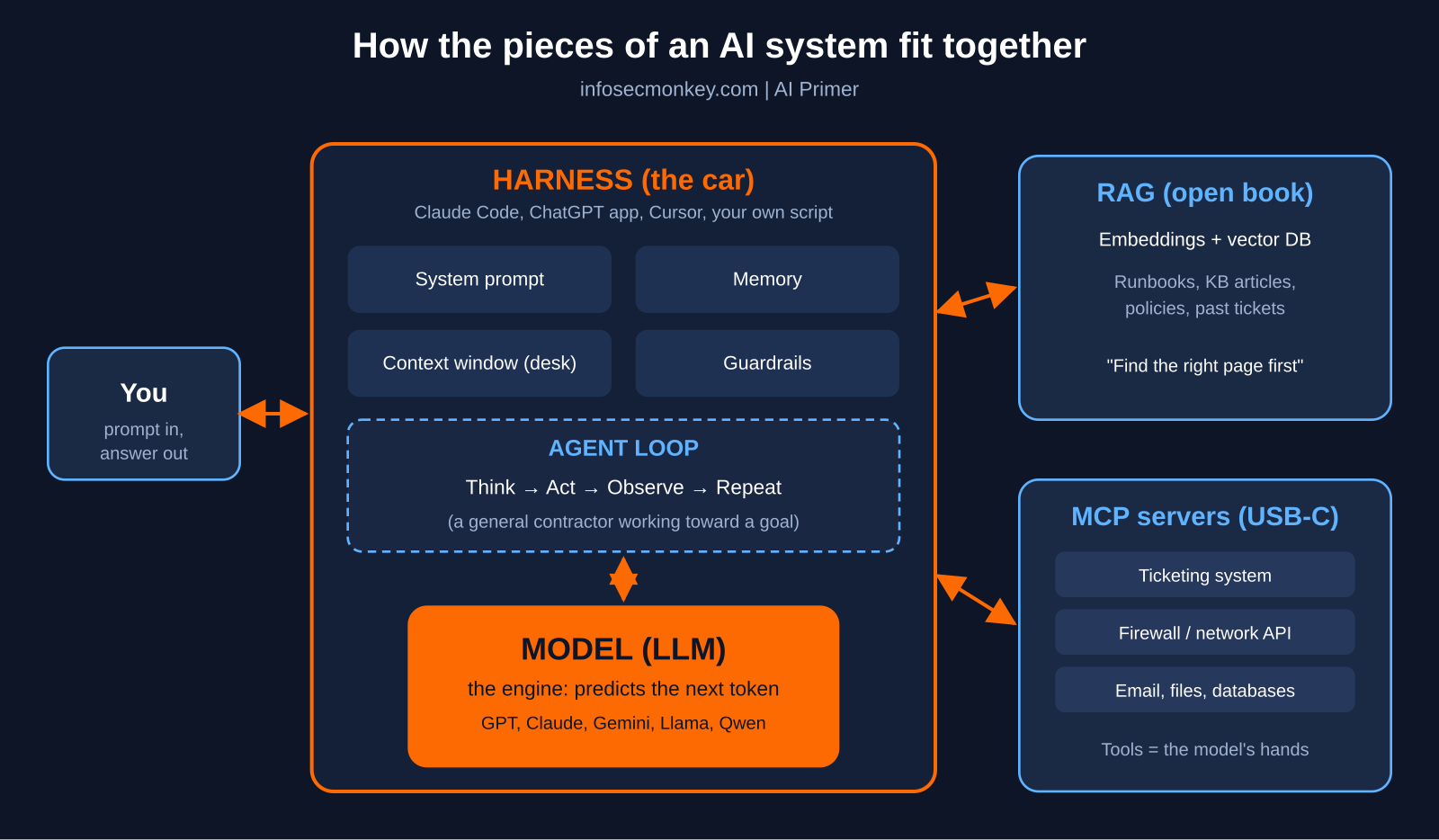
The big picture: Modern AI products are not one thing. They are a stack of parts, the same way a car is not “an engine.” The diagram below shows how the pieces in this post fit together. Do not worry if it looks busy now; by the end, every box will make sense.
Figure 1: How the components of a modern AI system fit together: user, harness, model, RAG knowledge base, and MCP tool servers
| Component | One-line job | Analogy |
|---|---|---|
| Model (LLM) | Predicts the next word, very well | The engine |
| Tokens | The units the model reads and writes | Lego bricks |
| Context window | Everything the model can “see” right now | The desk it works on |
| Prompt and system prompt | Instructions for the task | The work order |
| RAG | Looks up relevant documents before answering | An open-book exam |
| Tools | Lets the model take actions | Giving the brain hands |
| MCP | Standard plug for connecting tools and data | USB-C for AI |
| Harness | The software wrapped around the model | The car built around the engine |
| Agent | A model that loops: plan, act, check, repeat | A general contractor |
| Guardrails | Rules that limit what it can do | A firewall policy |
Layer 1: AI, Machine Learning and Generative AI
These three terms get used interchangeably, but they nest inside each other like Russian dolls.
- Artificial Intelligence (AI) is the biggest doll: any technique that makes a computer do something we would call “smart.” A spam filter counts. So does a chess engine.
- Machine Learning (ML) is the next doll in: instead of a programmer writing every rule, the system learns patterns from examples. Show it a million spam emails and it figures out what spam looks like.
- Generative AI is the smallest doll: ML that creates new content (text, images, audio, code) instead of just sorting or scoring existing content.
Analogy: AI is “vehicles.” Machine learning is “cars.” Generative AI is “electric cars.” Every electric car is a car and every car is a vehicle, but not the other way around.
Layer 2: The Model (the Engine)
A model, usually called a Large Language Model (LLM) when it works with text, is the core brain. Names you have heard: GPT, Claude, Gemini, Llama, Mistral, Qwen.
At its heart, an LLM does one thing: given some text, it predicts what text should come next. It does this by having read an enormous amount of writing during training and learning the statistical patterns of language, facts, code and reasoning. The patterns are stored as billions of numbers called parameters (or weights). When you hear “a 70B model,” that means roughly 70 billion of those numbers.
Most modern LLMs are built on an architecture called the Transformer, introduced by Google researchers in the 2017 paper “Attention Is All You Need.” The key trick, called attention, lets the model weigh which earlier words matter most when choosing the next one.
Two phases matter:
- Training is school. It happens once, costs a fortune, and takes weeks or months on huge GPU clusters.
- Inference is the job. Every time you send a message, the trained model is “running inference” to produce an answer. This is what you pay for per message or per token.
Models come in a few flavors:
- Frontier models (the biggest, most capable, usually cloud only, paid per use).
- Open-weight models you can download and run yourself (Llama, Mistral, Qwen, Gemma).
- Small or local models that run on a laptop or a Mac Studio with tools like Ollama, trading some smarts for privacy and zero per-use cost.
# Run a small open-weight model locally with Ollama (macOS, Linux, Windows)
ollama run llama3.2
Analogy: The model is a brilliant new hire who has read every book in the library but has been locked in a room since graduation day. Extremely knowledgeable, very articulate, but knows nothing about your company, your network, or anything that happened after they walked into that room.
Knowledge cutoff
Because training happens once, a model’s built-in knowledge stops at a knowledge cutoff date. Ask a model about last week’s CVE and, on its own, it cannot know about it.
Analogy: A printed encyclopedia. Great on history, useless on yesterday’s news.
Hallucinations
Since the model is predicting plausible text, it will sometimes produce something that sounds right but is false: a made-up CLI command, a fake citation, a wrong version number. This is called a hallucination.
Analogy: The confident guy at the bar who never says “I don’t know.” Usually entertaining, often right, occasionally inventing things on the spot with total conviction.
Layer 3: Tokens and the Context Window
Tokens
Models do not read words; they read tokens, which are chunks of text. A token is often a whole short word, part of a longer word, or a punctuation mark. As a rough rule, 100 tokens is about 75 English words. Pricing, speed limits and memory limits are all measured in tokens.
Analogy: Lego bricks. The model does not see the finished castle; it sees and snaps together individual bricks, one at a time, very fast.
Context window
The context window is the maximum number of tokens the model can consider at once: your question, the conversation so far, any documents you pasted, instructions, and its own answer. Modern windows range from tens of thousands to over a million tokens. Anything outside the window simply does not exist to the model.
Analogy: The model’s desk. It can only work with the papers currently on the desk. A bigger desk holds more papers, but if a page falls off the edge, it is gone, and a cluttered desk makes it harder to find the important page.
Layer 4: Prompts and System Prompts
A prompt is what you type. A system prompt is a hidden set of instructions the application gives the model before your message even arrives, such as “You are a helpful IT support assistant. Never share passwords. Answer in short bullet points.”
Prompt engineering is simply the skill of writing clear instructions: give context, give examples, say what format you want.
Analogy: A work order. The system prompt is the standing company policy printed at the top of every ticket. Your prompt is the specific job written underneath. Vague work orders get vague work.
Layer 5: Fine-Tuning
Fine-tuning means taking an already-trained model and training it a little more on a narrower set of examples, so it adopts a specific style, format or specialty. It changes the model itself.
Analogy: A general practitioner doing a residency in cardiology. Same doctor, same medical school education, now with a specialty. Expensive and slow, and you have to redo it whenever the specialty changes.
That last point is why most companies reach for RAG first.
Layer 6: Embeddings, Vector Databases and RAG
This is where AI starts knowing your stuff.
Embeddings
An embedding turns a piece of text into a long list of numbers that represents its meaning. Texts that mean similar things end up with similar numbers, even if they share no words. “My VPN keeps dropping” and “remote access tunnel disconnects” land close together.
Analogy: GPS coordinates for meaning. Every sentence gets a pin on a giant map, and sentences about the same idea are neighbors.
Vector database
A vector database stores those embeddings so you can quickly ask “what are the closest pins to this question?” Examples include pgvector (a PostgreSQL extension), Pinecone, Qdrant, Chroma and Weaviate.
Analogy: A library card catalog organized by topic and meaning instead of alphabetically by title.
RAG (Retrieval-Augmented Generation)
RAG combines the two ideas. Before the model answers, the system:
- Turns your question into an embedding.
- Searches the vector database for the most relevant chunks of your documents (runbooks, KB articles, policies, past tickets).
- Pastes those chunks into the context window alongside your question.
- Lets the model write an answer grounded in that material, ideally with citations.
The term comes from a 2020 research paper by Patrick Lewis and colleagues at Facebook AI Research, University College London and New York University, which combined a language model with a searchable index of Wikipedia.
RAG fixes two big problems at once: the knowledge cutoff (just update the documents) and hallucinations (the model has real source material to quote). It does not retrain anything.
Analogy: An open-book exam. Fine-tuning is making the student memorize the textbook. RAG is letting the student bring the textbook into the exam room and look up the right page before answering. Cheaper, more current, and you can check which page they used.
Layer 7: Tools and Function Calling
On its own, a model can only produce text. Tools (also called function calling) let the model ask the surrounding software to do something: search the web, run a calculation, query a database, open a ticket, pull a FortiGate config.
The model never actually runs the tool. It outputs a structured request, the software runs it, and the result is handed back to the model. A tool request looks something like this:
{
  "tool": "get_interface_status",
  "arguments": { "device": "fgt-hq-01", "interface": "port1" }
}
Analogy: Giving the brain hands. The brilliant new hire in the locked room can now slide a note under the door saying “please check port1 on the HQ firewall,” and someone outside does it and slides the answer back.
Layer 8: MCP (Model Context Protocol)
Before MCP, every AI app had to build its own custom connector to every tool: one way for Slack in App A, a different way for Slack in App B, and so on. That does not scale.
MCP (Model Context Protocol) is an open standard, introduced by Anthropic in November 2024, that defines one common way for AI applications to connect to tools and data sources. It uses a simple client and server model:
- An MCP server wraps a system (GitHub, Google Drive, a database, a ticketing system, a firewall API) and advertises what it can do.
- An MCP client lives inside the AI application and talks to those servers.
- The host is the AI app you use (Claude Desktop, an IDE, a custom agent).
Build an MCP server for your system once, and any MCP-compatible AI app can use it.
Analogy: USB-C for AI. Before USB, every device had its own weird cable. Now one port works with keyboards, drives, monitors and chargers. MCP is that port: plug a tool in once, and every compatible AI app can use it.
A second way to picture it, for the networking crowd: MCP is to AI tools what SNMP is to network devices. One agreed-upon protocol so the manager does not need a custom driver for every box.
Layer 9: The Harness
This is the term that confuses people most, because it is the part you never see named in marketing.
The harness is all the software wrapped around the model that turns a raw text predictor into a useful product. It typically handles:
- Building the system prompt and managing the context window (what to keep, what to summarize, what to drop).
- Connecting tools and MCP servers, and actually executing the tool calls.
- Running the RAG lookups.
- Memory between conversations.
- Permissions, approvals (“Allow this command?”) and guardrails.
- The loop that lets an agent keep working (more on that next).
- The user interface: chat window, terminal, IDE panel.
Claude Code, Cursor, the ChatGPT app, GitHub Copilot and a homegrown Python script that calls an API are all harnesses. Two products using the exact same model can feel completely different because their harnesses differ.
Analogy: The model is the engine. The harness is the rest of the car: chassis, steering wheel, brakes, dashboard, GPS and seat belts. A Formula 1 engine bolted to a shopping cart is not going to win races. Most of the difference you feel between AI products is the car, not the engine.
Layer 10: Agents
An agent is a model, inside a harness, that works in a loop toward a goal instead of answering once and stopping:
- Think: Decide the next step.
- Act: Call a tool.
- Observe: Look at the result.
- Repeat until the goal is met, or ask the human for help.
Ask a chatbot “why is the branch VPN down?” and it gives you a list of generic causes. Ask an agent with the right tools, and it checks the tunnel status, pulls the IKE debug, notices the peer IP changed, and tells you exactly that.
Anthropic draws a helpful line between workflows (the steps are fixed in code, and the model fills in each step) and agents (the model decides its own steps). Workflows are more predictable; agents are more flexible. Many good systems are mostly workflow with a little agent sprinkled in.
Analogy: A workflow is following a recipe card exactly. An agent is a general contractor: you say “remodel the kitchen,” and they figure out the order, hire the electrician, check the work, and call you only when a decision is needed. Great when they are good. Expensive when they wander.
Multi-agent systems
Some systems use several agents with different jobs: a planner that breaks the work down, specialist workers that each handle a piece, and a reviewer that checks the result.
Analogy: A project team with a project manager, specialists, and QA, instead of one person doing everything.
Layer 11: Memory and Guardrails
Memory
Models do not remember you between conversations by default. Every chat starts with an empty desk. Memory is a harness feature that saves useful facts (your name, your preferences, the project you are working on) and slips them back into the context window next time.
Analogy: A notebook the new hire keeps in their pocket. They do not actually remember yesterday; they read their notes every morning.
Guardrails
Guardrails are the rules and filters that limit what the system can say or do: blocking sensitive data from leaving, requiring human approval before a destructive command, restricting which tools an agent can touch.
Analogy: A firewall policy for AI. Implicit deny, explicit allow, and logging on everything. If you would not give a new intern domain admin on day one, do not give it to an agent either.
Putting It All Together: One Request, End to End
Here is what actually happens when a help desk tech types “Why can’t the Tampa branch reach the file server?” into an internal AI assistant:
- Harness receives the message, adds the system prompt (“You are the NetOps assistant, read-only access, cite sources”) and any saved memory.
- RAG searches the runbook and past-ticket vector database and drops the three most relevant articles into the context window.
- The model reads everything (as tokens) and decides it needs live data, so it requests a tool call.
- The harness routes that call through an MCP server for the firewall’s API and returns the routing table and policy hit counts.
- Acting as an agent, the model loops: checks the route, then the policy, then the SD-WAN health check, and spots the failed link.
- Guardrails block it from changing anything, because this assistant is read-only.
- The model writes the answer with the evidence and a link to the runbook. The tech makes the fix.
Every term in this post showed up in one sentence of work.
AI Primer Analogy Cheat Sheet
| Term | Analogy |
|---|---|
| AI / ML / Generative AI | Vehicles / cars / electric cars |
| Model (LLM) | A brilliant new hire who has read every book but is locked in a room |
| Training vs inference | School vs the job |
| Knowledge cutoff | A printed encyclopedia |
| Hallucination | The confident guy at the bar |
| Tokens | Lego bricks |
| Context window | The desk |
| System prompt | Standing company policy on the work order |
| Fine-tuning | A residency for a specialty |
| Embeddings | GPS coordinates for meaning |
| Vector database | A card catalog sorted by meaning |
| RAG | An open-book exam |
| Tools | Giving the brain hands |
| MCP | USB-C for AI |
| Harness | The car around the engine |
| Agent | A general contractor |
| Workflow | A recipe card |
| Memory | A pocket notebook |
| Guardrails | A firewall policy |
Common Misconceptions and Gotchas
1. “The AI knows what is happening right now.”
Not on its own. The model only knows its training data up to the cutoff. If it is giving you current information, the harness is feeding it in with web search, RAG or a tool. Check whether those are turned on before you trust a “latest version” answer.
2. “MCP is an AI model” or “MCP makes the AI smarter.”
MCP is plumbing. It is a protocol for connecting tools and data, not a brain. It also widens the attack surface: every MCP server is a new integration with credentials. Treat third-party MCP servers like any other software you install, and watch for prompt injection, where text inside a document, email or web page tries to give the agent new instructions.
3. “A bigger context window means it remembers everything.”
A bigger desk is not the same as a better memory. Models can lose track of details buried in the middle of a huge context, and every extra token costs money and time. Good harnesses and good RAG put the right information on the desk, not all of it.
4. “Agents can be left alone.”
Agents are powerful and occasionally wrong with confidence. Apply least privilege, require approval for anything destructive, log every tool call, and start with read-only access.
Sources
- Attention Is All You Need (Vaswani et al., arXiv 1706.03762)
- Retrieval-Augmented Generation for Knowledge-Intensive NLP Tasks (Lewis et al., arXiv 2005.11401)
- Anthropic: Introducing the Model Context Protocol
- Anthropic Engineering: Building effective agents
- Hugging Face MCP Course: Introduction to Model Context Protocol
- InfoSecMonkey – Beyond the Prompt. The engineering behind modern AI