Published November 2026 | InfoSecMonkey | No fluff. Just the config that works.
Executive Summary
DNS was built on trust: a resolver asks a question and believes the first answer that looks right. DNSSEC fixes that by signing DNS data so a validating resolver can prove an answer is authentic and unmodified. This post covers the basics, walks through a working DNSSEC configuration on BIND 9 (signing) and Unbound or BIND (validation), looks at who actually uses it, explains where it is headed after the October 2026 root key rollover, and finishes with the tests that prove your setup works.
Objective: sign a zone, publish the DS record, validate on a resolver, and test every link in the chain.
Target audience: network and security engineers who run their own DNS, admins who manage domains at a registrar, and anyone who has seen a SERVFAIL and wondered if DNSSEC did it.
What DNSSEC Does (and What It Does Not)
DNSSEC adds origin authentication and data integrity to DNS. It is the IETF best current practice for this, and per RFC 9364 no Standards Track RFC offers any other method for origin authentication of DNS data.
- Stops cache poisoning: a forged answer injected into a resolver cache fails signature validation and gets thrown away.
- Stops on-path tampering: a modified A, MX or TXT record no longer matches its RRSIG.
- Proves a name does not exist: NSEC and NSEC3 records give a signed “nothing here”, so an attacker cannot forge NXDOMAIN.
- Anchors other security: DANE (TLSA records) and some email security rely on signed zones.
What it does not do:
- No encryption. Queries and answers are still readable. That is the job of DNS over TLS or DNS over HTTPS.
- No protection for the last hop unless the stub resolver on the client validates or talks to the validating resolver over a trusted path.
- No help if your registrar account is hijacked. Whoever controls the DS record at the registrar controls your chain of trust.
DoT and DoH protect the pipe. DNSSEC protects the data. FortiOS, for example, defaults to DNS over TLS when it uses the FortiGuard DNS servers (Fortinet docs), which secures the transport but is not the same thing as validating signatures. You want both.
DNSSEC Basics: Records, Keys and the Chain of Trust
The record types
| Record | What it holds | Where it lives |
|---|---|---|
| DNSKEY | The zone public keys. Flags 257 = KSK or CSK, 256 = ZSK | Your zone apex |
| RRSIG | A signature over one RRset, with inception and expiration times | Next to every signed RRset |
| DS | A hash of your KSK, the link from parent to child | The parent zone (.com for example.com) |
| NSEC / NSEC3 | Signed proof that a name or record type does not exist | Your zone |
| NSEC3PARAM | Hash parameters for NSEC3 (iterations, salt) | Your zone apex |
| CDS / CDNSKEY | Your request to the parent to add or change the DS | Your zone apex |
KSK, ZSK and CSK
- KSK (Key Signing Key): signs only the DNSKEY set. Its hash is the DS record at the parent, so rolling it means a registrar update.
- ZSK (Zone Signing Key): signs everything else. It can roll often with no parent involvement.
- CSK (Combined Signing Key): one key doing both jobs. This is what the BIND default policy uses, and with ECDSA it is the simplest setup to run.
The chain of trust
A validating resolver ships with one public key it trusts unconditionally: the root zone KSK. From there it walks down. The root DNSKEY set is signed by the root KSK, the root signs a DS for .com, that DS matches the .com KSK, .com signs a DS for your domain, that DS matches your KSK, and your keys sign your records.
Figure 1: The DNSSEC chain of trust
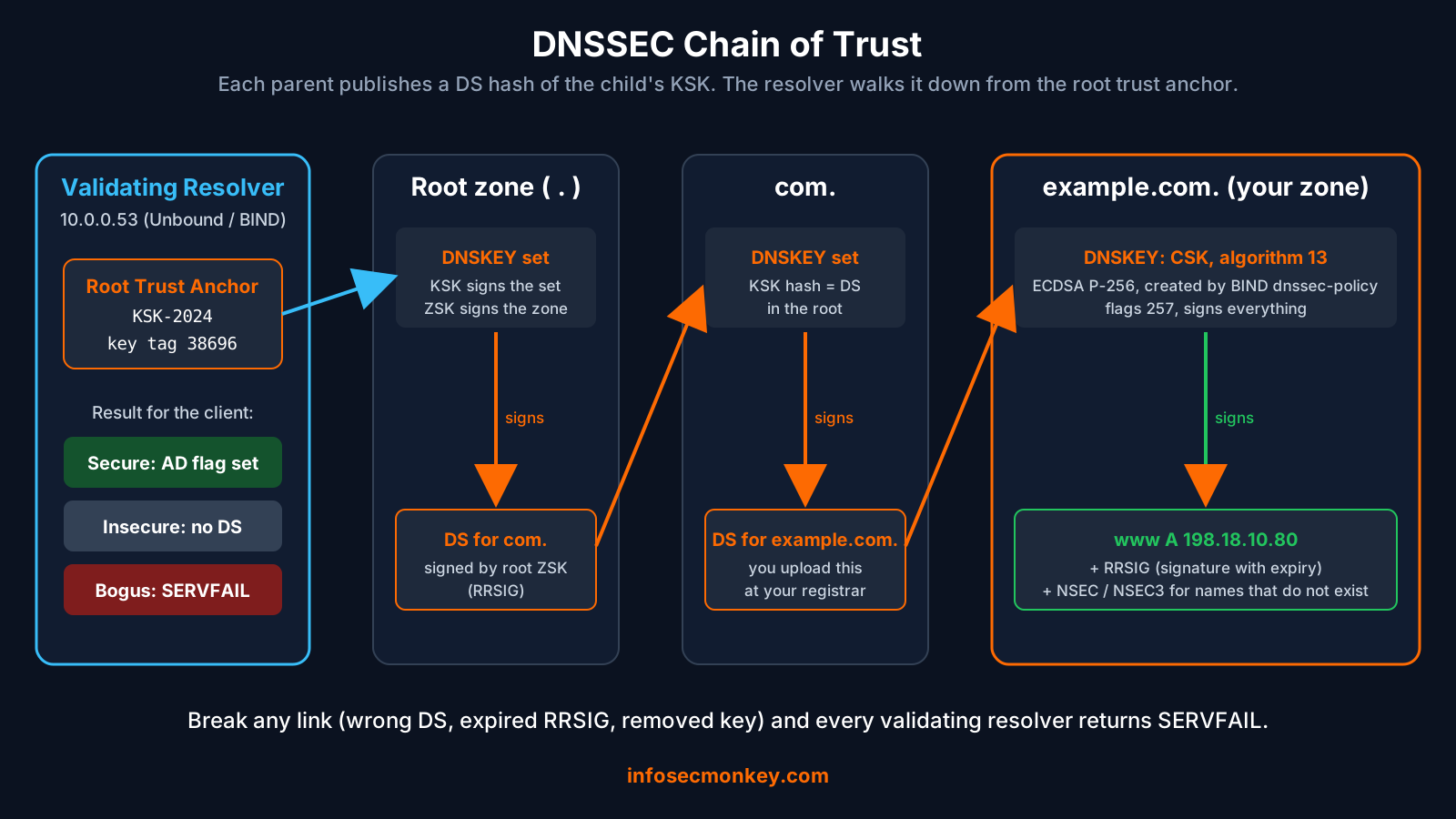
Since October 11, 2026 the root trust anchor is KSK-2024, key tag 38696, replacing KSK-2017, key tag 20326. Both use RSA/SHA-256 (Cloudflare). If you ever see 20326 as the only anchor on a resolver, that resolver is broken.
The four validation outcomes
| Result | Meaning | What the client sees |
|---|---|---|
| Secure | Full chain validated from the trust anchor | Answer with the AD flag set |
| Insecure | Zone is unsigned or the parent has no DS | Normal answer, no AD flag |
| Bogus | Chain exists but a signature or hash fails | SERVFAIL |
| Indeterminate | Resolver could not get the data to decide | Usually SERVFAIL |
Which algorithm to use
| Number | Algorithm | Status in 2026 |
|---|---|---|
| 13 | ECDSAP256SHA256 | The practical default. 64-byte signatures and the BIND default policy |
| 8 | RSASHA256 | Still fine and still common. The root uses it. 256-byte signatures with RSA-2048 |
| 15 | ED25519 | Good choice, confirm your registrar accepts it first |
| 5 and 7 | RSASHA1, RSASHA1-NSEC3-SHA1 | MUST NOT be used for signing (RFC 9905, November 2025) |
| 18 | ML-DSA-44 | Post-quantum, experimental. 2,420-byte signatures |
Sources for the table: RFC 9905 for the SHA-1 deprecation and Cloudflare for the ML-DSA-44 sizes and the algorithm 18 assignment.
Prerequisites and Architecture
Assumed knowledge: DNS record types, editing BIND or Unbound config files, basic dig usage, and access to your registrar control panel.
Lab requirements: two Ubuntu 24.04 LTS servers (BIND 9.18 or later on the authoritative box), a domain you control at a registrar that supports DNSSEC, and outbound TCP and UDP 53 on both servers. Replace example.com with your domain throughout.
| Component | Role | Address |
|---|---|---|
| ns1 | Authoritative BIND 9, signs example.com | 198.18.10.53 (public) |
| res1 | Validating resolver (Unbound or BIND) for the LAN | 10.0.0.53 |
| client1 | Test box with dig and delv | 10.0.10.25 |
| Registrar | Publishes your DS record into .com | Web portal |
Step-by-Step DNSSEC Configuration
Step 1: Serve the zone unsigned first
Goal: prove plain DNS works before adding signatures, so you are only ever debugging one thing.
Action: install BIND, create the zone file in /var/lib/bind (not /etc/bind, see the gotchas), and load it.
sudo apt update
sudo apt install -y bind9 bind9-utils bind9-dnsutils
Zone file /var/lib/bind/db.example.com:
$TTL 3600
@   IN SOA ns1.example.com. hostmaster.example.com. (
        2026111401 ; serial
        3600       ; refresh
        900        ; retry
        1209600    ; expire
        300 )      ; negative TTL
    IN NS  ns1.example.com.
ns1 IN A   198.18.10.53
www IN A   198.18.10.80
Zone stanza in /etc/bind/named.conf.local:
zone "example.com" {
    type primary;
    file "/var/lib/bind/db.example.com";
};
sudo chown bind:bind /var/lib/bind/db.example.com
sudo named-checkzone example.com /var/lib/bind/db.example.com
sudo named-checkconf
sudo systemctl restart named
dig @127.0.0.1 www.example.com A +short
Verification: the last command returns 198.18.10.80. There is no GUI for BIND; the CLI answer is your verification.
Step 2: Turn on signing with dnssec-policy
Goal: let BIND generate keys, sign the zone and handle re-signing on its own. Since BIND 9.16 the recommended way is a Key and Signing Policy (KASP), and auto-dnssec is removed as of 9.20 (ISC KB).
Action: add one line (two on 9.18) to the zone.
zone "example.com" {
    type primary;
    file "/var/lib/bind/db.example.com";
    dnssec-policy default;
    inline-signing yes;   # needed on 9.18, built in on 9.20+
};
The built-in default policy creates a single CSK using ECDSA P-256 (algorithm 13) with an unlimited lifetime and uses NSEC (ISC KB). Newer BIND builds also publish CDS and CDNSKEY and turn on inline signing inside the policy itself (BIND defaultconfig.h).
Want a split KSK and ZSK, or NSEC3 to make zone walking harder? Define your own policy. Per RFC 9276, if you use NSEC3 the iteration count MUST be 0 and you SHOULD NOT use a salt.
# /etc/bind/named.conf.local, above the zone stanza
dnssec-policy "monkey" {
    keys {
        ksk lifetime unlimited algorithm ecdsap256sha256;
        zsk lifetime P90D algorithm ecdsap256sha256;
    };
    nsec3param iterations 0 optout no salt-length 0;
    signatures-validity P14D;
    signatures-refresh P5D;
};
Then reference it with dnssec-policy monkey; in the zone instead of default. Apply and check:
sudo named-checkconf
sudo rndc reconfig
sudo rndc dnssec -status example.com
dig @127.0.0.1 www.example.com A +dnssec +multi
Verification: rndc dnssec -status lists the key and its states (trimmed output below), and the dig answer now carries an RRSIG next to the A record.
dnssec-policy: default
key: 41870 (ECDSAP256SHA256), CSK
  published:      yes - since Sat Nov 14 12:25:44 2026
  key signing:    yes - since Sat Nov 14 12:25:44 2026
  zone signing:   yes - since Sat Nov 14 12:25:44 2026
  - goal:           omnipresent
  - dnskey:         rumoured
  - ds:             hidden
  - zone rrsig:     rumoured
  - key rrsig:      rumoured
ds: hidden is expected at this point. The parent does not know about your key yet, so the zone is signed but still insecure to the world.
Step 3: Generate the DS record
Goal: produce the hash your registrar will publish in .com.
Action: BIND stores keys in its working directory, /var/cache/bind on Ubuntu. Build the DS from the published DNSKEY, or read the CDS record BIND already publishes.
dig @127.0.0.1 example.com DNSKEY | dnssec-dsfromkey -a SHA-256 -f - example.com
dig @127.0.0.1 example.com CDS +short
example.com. IN DS 41870 13 2 (
    9A3C5F0E7B21D4C86E1F0A7B3D92C4E5F61A8B7C0D9E2F3A4B5C6D7E8F901A2B )
Verification: read the fields left to right: key tag 41870, algorithm 13 (ECDSA P-256), digest type 2 (SHA-256), then the digest. Your tag and digest will differ. Never use digest type 1 (SHA-1); RFC 9905 sets it to MUST NOT for delegation.
Step 4: Publish the DS at your registrar
Goal: connect your zone to the global chain of trust. This is the step that makes the zone secure, and the one that can take it offline if it is wrong.
Action: in the registrar portal, open the domain DNSSEC settings and add a DS record with the key tag, algorithm 13, digest type 2 and the digest. Some registrars ask for the DNSKEY instead and compute the DS themselves. Then confirm the parent is serving it and tell BIND.
dig @a.gtld-servers.net example.com DS +norec +short
sudo rndc dnssec -checkds published example.com
sudo rndc dnssec -status example.com | grep "ds:"
GUI Verification: the registrar shows DNSSEC as active or signed with your key tag listed. On the BIND side, ds: moves from hidden to rumoured and then omnipresent. To automate this step on future rollovers, configure parental-agents with checkds explicit so BIND checks the parent itself (BIND 9 ARM).
Automation is where the industry is going. CDS and CDNSKEY let a parent pick up DS changes from your zone, RFC 9615 covers bootstrapping it from an existing chain of trust, and the guidance was published as RFC 10026 (BCP 246). Parent-side support today is mostly European ccTLDs such as .ch, .cz and .se (APNIC).
Step 5: Validate on your resolver
Goal: make sure your own users actually benefit. Signing protects people who use validating resolvers; validation protects your users from everyone else.
Action (Unbound): Unbound validates once it has a root trust anchor file, and unbound-anchor creates it (NLnet Labs). Ubuntu’s package already enables auto-trust-anchor-file in a drop-in, so check before adding a second copy.
sudo apt install -y unbound
sudo -u unbound unbound-anchor -a /var/lib/unbound/root.key
grep -r auto-trust-anchor-file /etc/unbound/
# /etc/unbound/unbound.conf.d/lan.conf
server:
    interface: 10.0.0.53
    access-control: 10.0.0.0/16 allow
    harden-algo-downgrade: yes
    val-log-level: 2
    # only if the grep above found nothing:
    # auto-trust-anchor-file: "/var/lib/unbound/root.key"
sudo unbound-checkconf
sudo systemctl restart unbound
grep -o "id = [0-9]*" /var/lib/unbound/root.key
Action (BIND as resolver): set dnssec-validation auto; in named.conf.options, then confirm the managed root key.
sudo rndc managed-keys status | grep -E "keyid|trust"
Verification: key id 38696 (KSK-2024) is present and trusted. Then point your FortiGate DHCP scopes or client DNS at 10.0.0.53 so the LAN actually uses the validating resolver.
Who Is Using DNSSEC
The short answer: resolvers moved, domain owners did not.
- TLDs: 92.94% of TLDs and 65.32% of ccTLDs were signed as of January 2025 (ICANN ITHI M7).
- Validation: about four in ten users sit behind a validating resolver. APNIC measured the global rate at 39.7% before the October 2026 root rollover and 40.6% after (APNIC).
- Signed domains: only about 7% of domains had a secure delegation in 2025, against 36% validation that year (APNIC).
- Public resolvers: Google Public DNS (8.8.8.8) and Cloudflare (1.1.1.1) both validate, and they drive a large share of global validation (APNIC Labs).
- US federal government: OMB memo M-08-23 required the .gov TLD to be signed by January 2009 and federal agency zones by December 2009 (OMB M-08-23).
- Country contrasts: about 99% of measured users in Ghana use validating resolvers, yet .gh itself is unsigned (CircleID). High validation does not mean signed domains.
Longevity: Is DNSSEC Here to Stay?
Yes. It is slow, it is unforgiving, and it is the only standardized answer to “is this DNS answer real”. Here is how the timeline has played out.
| When | What happened |
|---|---|
| 2005 | Current DNSSEC defined in RFC 4033, 4034 and 4035 |
| 2008 | OMB M-08-23 mandates DNSSEC for US federal .gov zones |
| 2010 | Root zone signed |
| 2018 | First root KSK rollover (KSK-2017) |
| Jan 2025 | KSK-2024 published in the root DNSKEY set |
| Nov 2025 | RFC 9905: RSASHA1 algorithms MUST NOT be used for signing |
| May 2026 | .de rollover publishes bad signatures, German domains fail on validating resolvers |
| Sep 2026 | Cloudflare 1.1.1.1 starts validating post-quantum ML-DSA-44 signatures |
| Oct 11, 2026 | Root DNSKEY set signed only by KSK-2024 |
| 2027 | KSK-2017 revoked, removed from the root and its private key deleted |
Timeline sources: Verisign, ICANN, Cloudflare, CircleID and Cloudflare PQ.
The 2026 root rollover went fine
ICANN warned that a validating resolver without KSK-2024 by the deadline would see total resolution failure (ICANN). In practice the roll was successful with no major outage, though APNIC found 58 networks whose validation rate fell by half or more (APNIC). The lesson: RFC 5011 automatic trust anchor updates work, but only on resolvers that can write to their anchor file.
Post-quantum is the next big change
The risk for DNSSEC is not “harvest now, decrypt later” but “trust now, forge later” (draft-sheth-pqc-dnssec-strategy). The hard part is size: an ML-DSA-44 signature is 2,420 bytes against 64 bytes for ECDSA P-256, almost 38 times larger, and a post-quantum chain only works once every level up to the root adopts it (Cloudflare). APNIC’s take is that bigger signatures push DNS onto TCP and fragmentation paths that are not fully reliable today (APNIC). For now, do not sign production zones with algorithm 18.
The real risk is operations, not cryptography
On May 5, 2026 a scheduled .de rollover published signatures that did not validate. A growing share of .de domains became unreachable for users behind validating resolvers over the next few hours, and Cloudflare disabled validation for .de on 1.1.1.1 to restore service (CircleID). DNSSEC fails closed, which is the point, and also why automation and monitoring matter more than the algorithm you pick.
Verification and Validation: Testing DNSSEC
Run these from client1. Each one tests a different link.
1. Does the resolver validate your zone? Look for ad in the flags.
dig @10.0.0.53 www.example.com A +dnssec
;; flags: qr rd ra ad; QUERY: 1, ANSWER: 2, AUTHORITY: 0, ADDITIONAL: 1
www.example.com.  3600 IN A     198.18.10.80
www.example.com.  3600 IN RRSIG A 13 3 3600 (
    20261128122544 20261114112544 41870 example.com. ... )
2. Full chain walk with delv. delv does its own validation and tells you exactly where it fails.
delv @10.0.0.53 www.example.com A
delv @10.0.0.53 www.example.com A +vtrace
; fully validated
www.example.com.  3600 IN A 198.18.10.80
3. Does the resolver reject bad data? dnssec-failed.org is deliberately broken (Norid). A validating resolver must return SERVFAIL, and the same query with +cd (checking disabled) must return an answer. That pair proves validation is what blocked it.
dig @10.0.0.53 dnssec-failed.org A | grep status
dig @10.0.0.53 dnssec-failed.org A +cd | grep status
;; ->>HEADER<<- opcode: QUERY, status: SERVFAIL, id: 40311
;; ->>HEADER<<- opcode: QUERY, status: NOERROR, id: 18802
4. Is the parent serving your DS, and does it match?
dig @a.gtld-servers.net example.com DS +norec +short
dig @198.18.10.53 example.com DNSKEY | dnssec-dsfromkey -a SHA-256 -f - example.com
5. When do your signatures expire? The first timestamp after the TTL fields in an RRSIG is the expiration. Alert well before it.
dig @198.18.10.53 example.com SOA +dnssec | grep RRSIG
6. Visual check. DNSViz draws the whole authentication chain and lists the errors it finds, and the Verisign Labs DNSSEC Analyzer gives a quick pass or fail (DNSimple tool list). DNSViz also runs locally:
pip install dnsviz
dnsviz probe example.com | dnsviz print
7. Bonus: is your resolver post-quantum ready? Cloudflare publishes test zones under dnstest.dev (Control D). A resolver that validates ML-DSA-44 returns SERVFAIL for the invalid name; most resolvers today simply treat it as insecure.
dig @1.1.1.1 invalid.mldsa44.dnstest.dev +dnssec | grep status
dig @10.0.0.53 invalid.mldsa44.dnstest.dev +dnssec | grep status
Troubleshooting and Gotchas
Gotcha 1: The whole domain goes SERVFAIL after the DS change
Symptom: everything works with +cd and fails without it. The DS at the parent does not match any DNSKEY you publish, usually a typo, the wrong key tag, or a key removed before its DS was gone.
delv @10.0.0.53 example.com SOA +vtrace 2>&1 | grep -iE "no valid|bogus|DS"
dig @a.gtld-servers.net example.com DS +norec +short
dig @198.18.10.53 example.com DNSKEY +multi | grep "key id"
Fix: correct the DS at the registrar, or remove it entirely to fall back to insecure, then wait out the DS TTL. Rule of thumb: the DS goes in after the key is published, and the key comes out only after the DS is gone. Let dnssec-policy manage the order instead of deleting key files by hand.
Gotcha 2: BIND signs once, then stops (or never starts)
Symptom: named logs permission errors writing .signed or .jnl files, or signatures quietly expire. On Ubuntu, AppArmor lets BIND write to /var/lib/bind but not /etc/bind, which is why the zone file lives there. A wrong system clock also makes valid signatures look expired or not yet valid.
sudo journalctl -u named --since "1 hour ago" | grep -iE "denied|permission|dnssec"
ls -l /var/lib/bind/
timedatectl | grep -i synchronized
Fix: move the zone file to /var/lib/bind, chown bind:bind, and make sure NTP is synchronized on both the signer and the resolver.
Gotcha 3: Big DNSSEC answers get dropped
Symptom: small queries work, DNSKEY queries time out or SERVFAIL intermittently. A firewall is dropping fragmented UDP or blocking TCP 53, which DNS needs when a signed answer does not fit in UDP. Post-quantum signatures will make this much worse.
dig @198.18.10.53 example.com DNSKEY +dnssec +bufsize=1232
dig @198.18.10.53 example.com DNSKEY +dnssec +tcp
Fix: allow TCP 53 inbound to the authoritative server and outbound from the resolver, and stop blocking fragments on DNS paths. If someone else’s domain is broken and your users need it today, add a temporary negative trust anchor rather than turning off validation:
sudo rndc nta -lifetime 1h broken-domain.example
sudo rndc nta -dump
Negative Trust Anchors are defined in RFC 7646 and listed in RFC 9364. In Unbound the equivalent is a domain-insecure: line, which you should remove once the domain is fixed.
Wrap-Up
Sign with dnssec-policy and ECDSA, publish the DS carefully, validate on every resolver you run, and monitor signature expiry and the DS-to-DNSKEY match. DNSSEC is not glamorous, but after a successful second root rollover and with post-quantum work under way, it is clearly not going anywhere.
Sources
- RFC 9364: DNS Security Extensions (DNSSEC), BCP 237
- RFC 9276: Guidance for NSEC3 Parameter Settings
- RFC 9905: Deprecating the Use of SHA-1 in DNSSEC Signature Algorithms
- ISC Knowledgebase: DNSSEC Key and Signing Policy
- BIND 9 Administrator Reference Manual: DNSSEC chapter
- BIND 9.21 source: built-in default dnssec-policy (defaultconfig.h)
- NLnet Labs: Howto enable DNSSEC in Unbound
- Cloudflare: The keys to the Internet change on October 11
- ICANN: Preparing for the Root Zone KSK Rollover
- Verisign: The 2024-2026 Root Zone KSK Rollover, Updates and Observations
- APNIC Blog: Rolling the root key, what happened?
- APNIC Blog: Towards an industry best practice for DNSSEC automation
- APNIC Labs: Measuring DNSSEC adoption
- ICANN ITHI: M7 DNSSEC deployment metrics
- CircleID: The case for longitudinal DNSSEC data (.de incident)
- CircleID: DNSSEC in Ghana, 99% can validate but .gh remains unsigned
- OMB Memorandum M-08-23: Securing the Federal Government DNS Infrastructure
- Cloudflare: 1.1.1.1 now supports post-quantum DNSSEC
- APNIC Blog: The DOs and don’ts of post-quantum DNSSEC
- IETF draft: Post-Quantum Cryptography Strategy for DNSSEC
- Control D: Post-Quantum DNSSEC can’t protect you yet
- Fortinet: DNS over TLS for default FortiGuard DNS servers
- DNSViz: A DNS visualization tool
- DNSimple: External DNSSEC diagnostic tools
- Norid: DNS tools and DNSSEC test domains
InfoSecMonkey: No fluff. Just the config that works.