Objective: Explain the three FortiClient flavors (EMS-managed, Standalone, and free VPN-only), where each one stops, and what actually runs behind EMS and FortiIdentity Cloud (FIC).
Audience: FortiGate admins, SEs, and MSPs choosing a remote access client after the SSL VPN tunnel-mode removal, or sizing an EMS deployment.
Tested on: FortiOS 8.0 remote access IPsec (IKEv2) with FortiClient Standalone, plus a second FortiGate in a different FortiCloud account.
Fortinet now ships three different FortiClient experiences, and they are not three skins on the same product. FortiClient Standalone is the new middle tier: a licensed, supported VPN client with no EMS. FortiClient EMS is the full managed endpoint platform. FortiClient VPN-only is the free client most of us have been handing out for a decade. This post breaks down FortiClient Standalone vs EMS vs VPN-only, the limitations of each, the backend systems behind EMS and FIC, and one undocumented behavior I confirmed in the lab.
The Three FortiClients at a Glance
| VPN-only (free) | Standalone | EMS-managed | |
|---|---|---|---|
| Cost | Free | Low-cost commercial tier | Enterprise per-endpoint (ZTNA or EPP/APT edition) |
| Management | None | None (unmanaged client) | Central, via EMS or FortiClient Cloud |
| Identity / MFA | FortiToken MFA, cert or PSK auth | FIC Basic included: SAML SSO plus MFA | Your IdP, SAML, FortiToken, user verification |
| Support | Community forums only | Email technical support | Full TAC with license |
| Posture / ZTNA | No | No | Yes: ZTNA tags, posture, compliance |
| EPP features | No | No | EPP/APT edition: AV, anti-ransomware, app firewall, sandbox |
| Platforms | Windows x64/arm64, macOS, iOS, Android, Linux | Windows 64-bit, macOS, Linux (x64, arm64) | Windows (incl. arm64), macOS, Linux, iOS, Android |
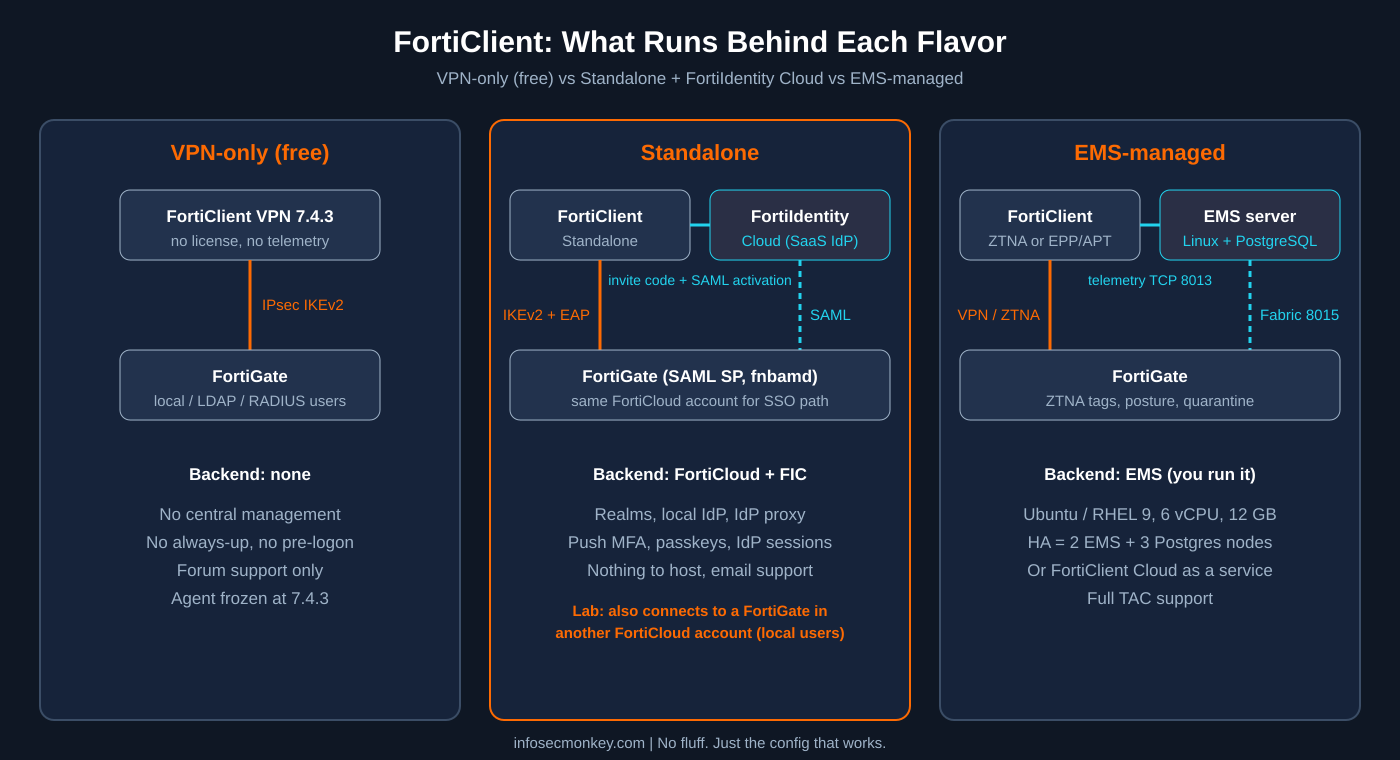
| Backend | Nothing | FortiCloud license plus FortiIdentity Cloud | EMS server (Linux plus PostgreSQL) or FortiClient Cloud |
Positioning and platform lists come from the Fortinet product downloads page, which describes Standalone as an entry-level commercial tier for deployments that do not need EMS, bundling remote access VPN with MFA, a FortiIdentity Cloud Basic subscription, and email support.
Figure 1: What sits behind each FortiClient flavor
FortiClient VPN-only: Free, Frozen, and Shrinking
The free client still does the basics: IPsec VPN with pre-shared key or certificate authentication, split tunnel, and FortiToken two-factor. Fortinet’s limitations and features article lists what it does not do:
- No VPN auto-connect or always-up.
- No on-net / off-net detection.
- No VPN before logon.
- No central management, no telemetry, no posture.
- No TAC support. Per Fortinet’s licensing and support tip, free users go to the community forums. A ticket opened against the FortiGate serial is fine, but if the problem isolates to the free client, you are on your own.
Two changes make the free client a weaker long-term bet:
- The free agent stopped moving at 7.4.3. FortiClient 7.4.4 did not ship a new free VPN-only agent, and users are told to keep running 7.4.3. The 7.4.4 feature comparison also states that IKEv1 is not supported in 7.4.4, so IKEv2 is the only forward path.
- SSL VPN tunnel mode is gone from FortiOS 7.6.3. Fortinet staff confirmed in the community forum that 7.6 has no SSL VPN tunnel capability regardless of model, while IPsec with the free client remains unlimited in user count for as long as the free client is available and supported.
Practitioner read: the free client is fine for a small shop that just needs IPsec to one FortiGate and can live without support. It is not where Fortinet is investing, so do not build a 3-year plan on it.
FortiClient Standalone: The Supported VPN Client Without EMS
FortiClient Standalone is licensed through FortiCloud with a FortiClient Standalone license and runs as an unmanaged VPN client. End users are provisioned in FortiIdentity Cloud, which provides SAML SSO and MFA. The FortiOS 8.0 VPN with FortiClient Standalone and FortiIdentity Cloud page documents the full flow:
- The admin creates the user in FIC and sends a FortiClient invitation.
- The user installs FortiClient Standalone, enters the invitation code, and completes a browser-based SAML login to FIC. That activates the client.
- The user adds a VPN profile pointing at the FortiGate, with SSO enabled (SSO port
1001in the doc example). - On connect, FortiClient starts IKEv2
SA_INIT. Peer authentication is PSK or signature. User authentication is EAP withEAP identity request. - The FortiGate authentication daemon (
fnbamd) hands the user identity to FIC as the SAML IdP. The FortiGate maps the SAML username andgroupattribute to a local user group. - EAP succeeds, mode-config assigns the tunnel IP, routes, and DNS, and the IPsec SA comes up.
FortiOS 8.0 bakes this into the VPN Wizard: Remote Access template, VPN client type FortiClient, management type Standalone, then Setup SSO, which pulls the FIC realm (default), user source (LocalIDP_default), and IdP certificate (FIC_Default_Cert). The SAML settings the wizard builds sync to FIC automatically, and FIC creates an SSO application named FortiIdentity Cloud on its side.
The documented prerequisites:
- FortiClient Standalone license registered on the FortiCloud account.
- FIC licensed, with a realm and user group (the default realm works).
- User activated and invitation sent.
- The FortiGate registered to the same FortiCloud account as FIC.
- FortiClient Standalone installed. No EMS.
Fortinet’s own FortiClient Standalone demo frames it as the option for organizations running free FortiClient or open-source IPsec agents against a FortiGate that want a supported, integrated client without moving to EMS. That is exactly the gap the free client leaves.
Lab Finding: Standalone Works on a FortiGate Outside the FIC Account
The documentation lists “FortiGate registered to the same FortiCloud account as FIC” as a prerequisite. I tested FortiClient Standalone against a FortiGate that is not in the same FortiCloud account as the FIC tenant, using local users on that FortiGate. It connects. An activated FortiClient Standalone client brings up a tunnel to any FortiGate remote access IPsec gateway that can authenticate the user itself.
Why this makes sense once you look at the moving parts:
- Licensing and activation live between the client and FortiCloud/FIC. The invitation code and SAML activation prove the seat. That handshake does not involve the VPN gateway.
- The FortiGate is just an IKEv2 responder. It negotiates IKE, authenticates the peer (PSK or cert), and runs EAP against whatever
authusrgrppoints to. Nothing in that exchange asks the gateway to validate a FortiClient license. - The same-account requirement belongs to the SSO path. The wizard’s SAML auto-sync, the
LocalIDP_defaultuser source, and the FIC certificate all assume the FortiGate and FIC share an account. Drop SAML, use local (or LDAP/RADIUS) users, and that dependency disappears.
Practical uses: an MSP whose techs connect to customer FortiGates that live in customer-owned FortiCloud accounts, or a consultant who needs one supported client for several unrelated gateways. Below is a minimal FortiGate config for the non-FIC gateway, using the house lab addressing (198.18.10.1 public, 10.0.10.0/24 LAN, 10.0.250.0/24 client pool).
config user local
    edit "vpnuser1"
        set type password
        set passwd <USER_PASSWORD>
    next
end
config user group
    edit "grp-ra-vpn"
        set member "vpnuser1"
    next
end
config firewall address
    edit "LAN-10.0.10.0"
        set subnet 10.0.10.0 255.255.255.0
    next
    edit "RA-POOL"
        set type iprange
        set start-ip 10.0.250.1
        set end-ip 10.0.250.254
    next
end
config vpn ipsec phase1-interface
edit "RA-IKEv2"
set type dynamic
set interface "wan1"
set ike-version 2
set peertype any
set net-device disable
set mode-cfg enable
set proposal aes256-sha256 aes128-sha256
set dhgrp 20 21 14
set eap enable
set eap-identity send-request
set authusrgrp "grp-ra-vpn"
set assign-ip-from range
set ipv4-start-ip 10.0.250.1
set ipv4-end-ip 10.0.250.254
set ipv4-netmask 255.255.255.0
set dns-mode auto
set ipv4-split-include "LAN-10.0.10.0"
set dpd on-idle
set psksecret <PRE_SHARED_KEY>
next
end
config vpn ipsec phase2-interface
edit "RA-IKEv2"
set phase1name "RA-IKEv2"
set proposal aes256-sha256 aes128-sha256
set dhgrp 20 21 14
next
endconfig firewall policy
edit 0
set name "RA-IKEv2-to-LAN"
set srcintf "RA-IKEv2"
set dstintf "internal"
set srcaddr "RA-POOL"
set dstaddr "LAN-10.0.10.0"
set action accept
set schedule "always"
set service "ALL"
set groups "grp-ra-vpn"
set nat disable
next
endOn the client, add a new IPsec VPN with remote gateway 198.18.10.1, IKE version 2, the pre-shared key, and SSO left off so FortiClient prompts for the local username and password. Field labels shift a little between FortiClient releases, so match the IKE proposal and DH groups to the FortiGate if the defaults do not line up.
Caveat: this is tested behavior, not documented behavior. It is outside the published prerequisites, Fortinet could tighten it in a future release, and TAC may push back if you open a case on this design. You also lose what FIC brings (SAML SSO, push MFA, IdP session visibility) on the foreign gateway unless you add MFA there yourself, for example FortiToken on the local user.
FortiClient EMS: The Managed Platform
EMS is where FortiClient becomes an endpoint agent instead of a VPN dialer. The product page splits it into two editions:
- ZTNA Edition: zero trust application access, real-time posture checks, VPN with continuous assessment, vulnerability agent and remediation, FortiGuard web and video filtering, inline and API CASB, central management, optional central logging.
- EPP/APT Edition: everything in ZTNA plus AI-based AV and malware protection, anti-ransomware, anti-exploit, application firewall, sandbox integration, removable media control, software inventory, and outbreak detection.
EMS-managed clients get the VPN features the free and Standalone tiers lack: always-up, auto-connect, VPN before logon, on-net detection, profiles pushed centrally, and ZTNA tags shared with FortiGate through the Security Fabric. You can run EMS yourself or consume it as FortiClient Cloud (EMS as a service). Per the FortiClient Cloud licensing page, FortiCare Premium or Elite contracts registered to your devices entitle you to three complimentary FortiClient Cloud seats per device, excluding FortiFlex/FortiPoints, EA, and FortiSASE contracts.
Backend Deep Dive: EMS vs FortiIdentity Cloud
This is the part that drives operations cost. EMS is infrastructure you own. FIC is a SaaS tenant you configure.
FortiClient EMS backend
- Linux, not Windows, since 7.4. EMS 7.4 moved from the Windows Server model to Linux. Current builds support Ubuntu 22.04 and 24.04 (Server or Desktop), RHEL 9, and CentOS Stream 9, and Fortinet ships OVA and QCOW2 images. See the EMS 7.4 install and migration guide.
- PostgreSQL replaced SQL Server. EMS can run Postgres locally, remotely, or in Docker on the same or a separate host. See EMS installation with Postgres in Docker.
- Sizing. Minimum 6 vCPU at 2.0 GHz, 12 GB RAM, 80 GB free on ext4, gigabit NIC, and nothing else installed on the box. Running EMS on a domain controller is not supported. See EMS system requirements.
- HA means real infrastructure. The documented single-region HA design with the EMS Postgres HA container uses five Linux machines: two EMS nodes, two Postgres data nodes, and a witness. See the EMS HA deployment guide.
- It is a server endpoints must reach. Remote endpoints need TCP 8013 to EMS whether they are on-net or not, so EMS usually gets a public-facing FQDN or a reverse path through the FortiGate.
Key EMS 7.4 ports from the required services and ports page:
| Port | Direction | Purpose |
|---|---|---|
| TCP 8013 | Inbound | FortiClient telemetry and endpoint management |
| TCP 443 | Inbound | EMS web GUI (also ACME) |
| TCP 8015 | Inbound | FortiOS Fabric connector (FortiGate connects to EMS) |
| TCP 10443 | Inbound | Deployment package, AV allowlist, and custom web filter page downloads |
| TCP 4001, 4002 | Inbound | SCEP for ZTNA certificates |
| TCP 8871 | Inbound | AD connector sync |
| TCP 389 / 636 | Outbound | Active Directory LDAP / LDAPS |
| TCP 443 | Outbound | FortiCloud, license sync (support.fortinet.com), FortiGuard Anycast updates |
FortiIdentity Cloud backend
- It used to be FortiToken Cloud. Fortinet renamed FortiToken Cloud to FortiIdentity Cloud in August 2025 and grew it from a 2FA service into an IDaaS platform with SAML and OIDC SSO and passwordless options. See the FIC licensing page and Fortinet’s rename blog.
- Nothing to install. FIC is hosted in FortiCloud. FortiOS treats it as an Identity and Access Management as a Service offering. See FortiIdentity Cloud in the FortiOS admin guide.
- Tenant model is realms. A default realm exists. Sub-admins only see the realms delegated to them through admin groups.
- Identity sources. A local IdP (users authenticate with FIC-local credentials) and an IdP proxy that fronts external IdPs. FIC 26.2.a added support for FortiClient Standalone using FIC as the IdP. See FIC what’s new.
- MFA and visibility. FortiToken Mobile push, passkeys, and Monitor > IdP Sessions for real-time session management. See the FIC GUI reference.
- Licensing is per user, annual. Time-based, stackable licenses based on end-user count. A FortiCloud free trial covers up to five end users for 30 days. FortiGates with a valid support contract can also enable a three-seat FIC trial that stays active as long as the contract does. See FIC free trial from the FortiGate.
| Backend trait | FortiClient EMS (on-prem) | FortiIdentity Cloud (with Standalone) |
|---|---|---|
| What it manages | Endpoints: profiles, posture, ZTNA tags, software, telemetry | Identities: users, realms, MFA, SSO apps |
| Where it runs | Your Linux VM(s) plus PostgreSQL | Fortinet SaaS in FortiCloud |
| HA | You build it (five-node reference design) | Fortinet’s problem |
| Inbound exposure | 8013, 443, 8015, 10443 and more | None on your side |
| Patching | EMS builds, Ubuntu/RHEL, Postgres | Handled by Fortinet |
| Licensing unit | Per endpoint (ZTNA or EPP/APT) | Per user (FIC) plus Standalone seats |
| FortiGate tie-in | Fabric connector: tags, quarantine, ZTNA | SAML SP to FIC IdP, same FortiCloud account for the wizard path |
Limitations: Where Each One Stops
| Capability | VPN-only | Standalone | EMS-managed |
|---|---|---|---|
| IPsec IKEv2 remote access | Yes (7.4.3 agent) | Yes | Yes |
| SSL VPN tunnel | Only to FortiOS older than 7.6.3 | Only to FortiOS older than 7.6.3 | Only to FortiOS older than 7.6.3 |
| SAML SSO | No | Yes, through FIC (documented) | Yes, with your IdP |
| Push MFA | FortiToken (FortiGate-side) | Yes, through FIC | Yes |
| Always-up / auto-connect | No | Not documented for Standalone, test before promising | Yes |
| VPN before logon | No | Not documented for Standalone, test before promising | Yes |
| Central profile push | No | No | Yes |
| ZTNA tags / posture | No (FortiGate host check only) | No | Yes |
| EPP (AV, ransomware, app FW) | No | No | EPP/APT edition |
| Vendor support | Forums | TAC |
FortiGate-powered host check is still available to free VPN clients, per the licensing and support tip. That is a gateway-side check, not EMS posture.
Which One Should You Deploy?
- Pick VPN-only when it is a handful of users, one FortiGate, IPsec is fine, and nobody needs a support case on the client.
- Pick Standalone when you want a supported client, SAML SSO and push MFA without standing up a server, and a small user count. It is the natural landing spot for SSL VPN refugees who were on the free client.
- Pick EMS (or FortiClient Cloud) when you need always-up or pre-logon VPN, ZTNA, posture-based policy, or endpoint protection. If you do not want to run Linux, Postgres, and HA, FortiClient Cloud gets you the same agent features as a service.
Verification and Validation
On the FortiGate, list the IKE gateway and confirm the client got an address from the pool:
diagnose vpn ike gateway list
get vpn ipsec tunnel summary
diagnose firewall auth list
Success looks like an established IKE SA, an IPsec SA with non-zero counters, an assigned IPv4 inside 10.0.250.0/24, and the user listed in the auth table against grp-ra-vpn. In the GUI, check Dashboard > Network Monitor > VPN. For the FIC path, also check Monitor > IdP Sessions in FIC.
Fortinet’s FortiOS 8.0 page uses these debugs for the Standalone flow. Run them, then connect:
diagnose debug reset
diagnose debug console timestamp enable
diagnose vpn ike log filter rem-addr4 <CLIENT_PUBLIC_IP>
diagnose debug application ike -1
diagnose debug application fnbamd -1
diagnose debug application samld -1
diagnose debug enable
Stop with diagnose debug disable and diagnose debug reset when done. On a local-user gateway, samld stays quiet; look for fnbamd returning success for the local user.
Troubleshooting and Gotchas
1. Free client installed, but the license screen nags after 30 days
Someone downloaded the full FortiClient installer instead of the VPN-only or Standalone build. The full build expects EMS and stops working unlicensed. Uninstall and use the right package from the product downloads page. Check which build is installed in About before chasing the FortiGate.
2. Standalone SSO fails with a SAML or group mismatch
The FortiGate and FIC are in different FortiCloud accounts, or the group attribute is not group. The wizard path requires the same account. Debug with fnbamd and samld and confirm the SAML username and group map to the user group. If the gateway genuinely lives in another account, switch that gateway to local, LDAP, or RADIUS users as shown above.
3. IKEv2 negotiation fails with no proposal chosen
FortiClient’s default proposals or DH groups do not overlap the FortiGate. Watch diagnose debug application ike -1 for the received proposal, then align encryption, integrity, and DH group on both sides. Remember IKEv1 is not an option from FortiClient 7.4.4 onward.
Sources
- FortiOS 8.0: VPN with FortiClient Standalone and FortiIdentity Cloud
- Fortinet product downloads: FortiClient Standalone, VPN-only and EMS editions
- Fortinet video: FortiClient Standalone demo
- Fortinet community: FortiClient licensing and support
- Fortinet community: FortiClient limitations and features
- FortiClient 7.4.4 feature comparison
- FortiClient 7.2.6 standalone and licensed feature comparison
- Fortinet community: SSL VPN removal in FortiOS 7.6 and free client IPsec
- FortiClient EMS 7.4 install and migration guide
- FortiClient EMS 7.4.5 system requirements
- FortiClient EMS 7.4.5 required services and ports
- FortiClient EMS HA with Postgres HA cluster
- FortiClient EMS installation with Postgres in Docker
- FortiClient Cloud licensing
- FortiIdentity Cloud licensing and rename
- FortiIdentity Cloud what’s new
- FortiIdentity Cloud GUI reference
- FortiOS admin guide: FortiIdentity Cloud
- FortiOS 7.6.6: FortiIdentity Cloud free trial from the FortiGate
- Fortinet blog: From FortiToken Cloud to FortiIdentity Cloud
No fluff. Just the config that works.