No fluff. Just the config that works.
Objective: understand what Chrome CVE-2026-106378 is, confirm which Macs are exposed, and close it fleet-wide with version checks, a forced-relaunch policy and FortiClient EMS gating.
Target audience: macOS admins, endpoint and SecOps engineers, and Fortinet shops running FortiClient EMS.
Chrome CVE-2026-106378 is a sandbox escape in Google Chrome on macOS. Google fixed it on October 6, 2026 in Chrome 155.0.8059.39/.40. On its own it does nothing, it is the second stage of a chain: an attacker who already owns the renderer process can use it to run code outside Chrome’s sandbox. That is exactly the bug a real exploit chain needs, which is why it is worth ten minutes of your time even though it is not on CISA KEV.
Executive Summary
| Field | Value |
|---|---|
| CVE | CVE-2026-106378 |
| Component | Sandbox (privilege elevation) |
| Platform | Google Chrome on macOS only |
| Affected | Chrome on Mac prior to 155.0.8059.39 |
| Fixed in | 155.0.8059.39/.40 (Stable, October 6, 2026) |
| Chromium severity | Medium |
| CVSS 3.1 (CISA-ADP) | 8.3 High, AV:N/AC:H/PR:N/UI:R/S:C/C:H/I:H/A:H |
| CWE | CWE-250, Execution with Unnecessary Privileges |
| CISA KEV | Not listed |
| EPSS | 0.32% (30-day exploitation probability) |
| Chromium issue | 507596239 (restricted) |
Bottom line: if every Mac is on Chrome 155.0.8059.39 or later and has actually relaunched, you are done. The rest of this post is how to prove that, and how to stop the stragglers from reaching anything important while you chase them.
What Chrome CVE-2026-106378 Is
Google’s description: privilege elevation in Sandbox in Chrome on Mac prior to 155.0.8059.39 allowed a remote attacker who had compromised the renderer process to execute arbitrary code outside the sandbox via a crafted HTML page. Source: the CVE record on TheHackerWire.
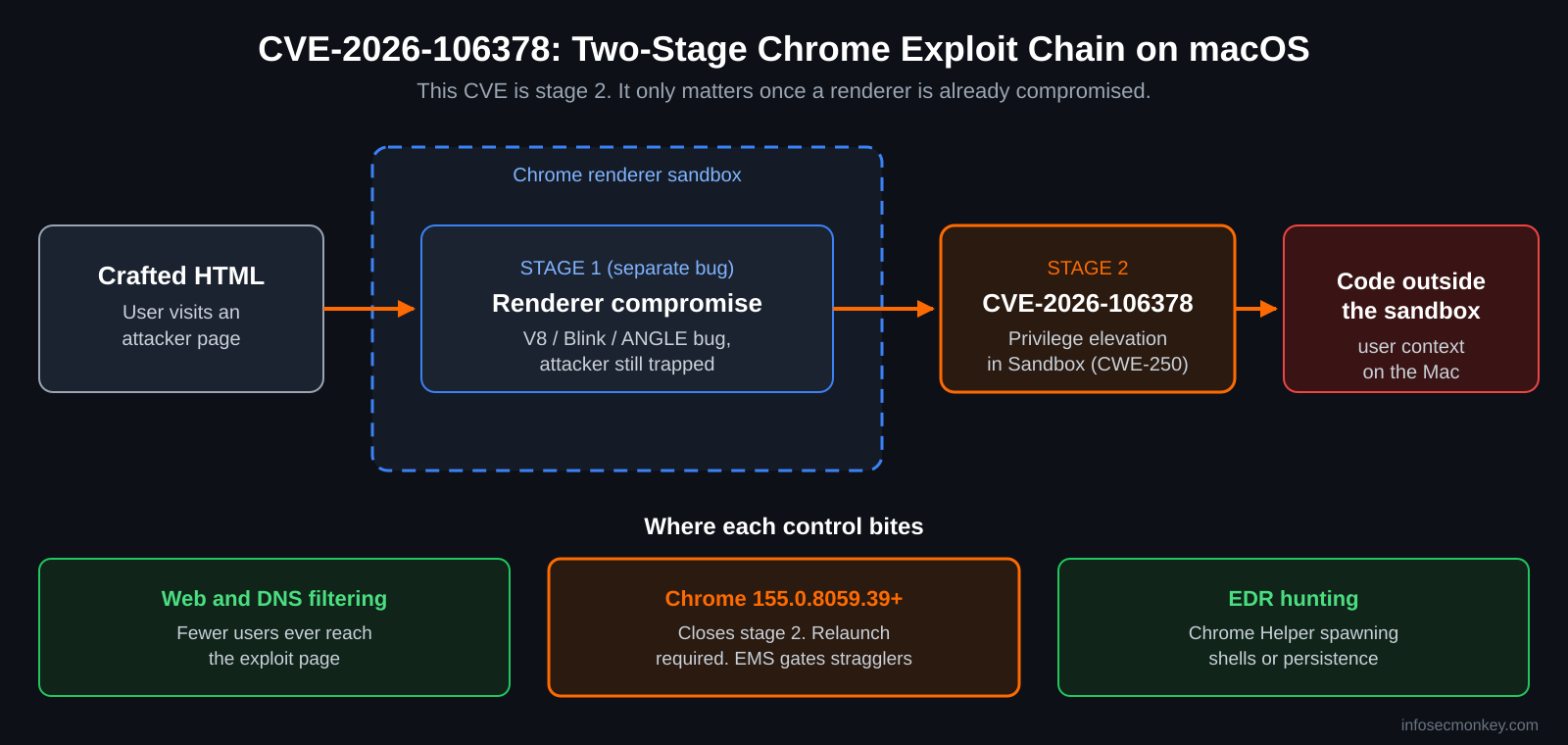
Chrome splits every tab into a renderer process that runs untrusted web content inside a tightly restricted macOS sandbox. Renderer bugs (V8, Blink, ANGLE and friends) are common; on their own they leave the attacker trapped in a process that cannot read your files or launch programs. A sandbox escape is the key that turns a trapped renderer compromise into code running with the logged-in user’s rights.
Figure 1: Where CVE-2026-106378 sits in a Chrome exploit chain, and where each control bites
Why the scores disagree
- Chromium says Medium. Google rates the bug on its own, and on its own it requires a separate renderer compromise first.
- CISA-ADP says 8.3 High. The CVSS vector scores the full outcome: network-delivered, user has to visit a page, scope changes from sandbox to host, total confidentiality, integrity and availability impact. OpenCVE shows the CISA-ADP vector.
- Red Hat drafted 6.5. Same bug, different assumptions. Treat the spread as a signal to patch, not a reason to argue.
CWE-250 (Execution with Unnecessary Privileges) tells you the class: a component on the privileged side of the sandbox boundary did more than it should for a request coming from the renderer. Technical details stay restricted in the Chromium tracker until most users are patched, which is standard Google practice.
Exposure and Exploitation Status
- Mac only. The description names Chrome on Mac. Windows and Linux builds are not listed as affected.
- Fixed build: 155.0.8059.39/.40 for Windows and Mac, shipped with 247 security fixes (4 Critical, 53 High, 122 Medium, 68 Low). See Google’s release post and the BleepingComputer summary.
- Current stable is well past that. Chrome 155.0.8059.79/.80 followed on October 13, and Chrome 156 is in early stable. Anything on 155.0.8059.39 or later is covered for this CVE.
- Linux distros patched anyway. Debian shipped chromium 155.0.8059.39 in DSA-6553-1 and DLA-4833-1 because the release fixed hundreds of other bugs. See the Debian tracker.
- No known exploitation. Not in CISA KEV, SSVC lists exploitation as none, EPSS is 0.32%.
Prerequisites and Architecture
Assumed knowledge
- Comfortable in Terminal on macOS and with basic shell scripting.
- Familiar with your MDM (Jamf Pro, Kandji, Intune, Mosyle or similar) and configuration profiles.
- Optional: FortiClient EMS and FortiGate with the EMS connector already working.
Lab and environment
| Component | Role | Example |
|---|---|---|
| Mac endpoint | Runs Google Chrome | macOS 14 or later, Chrome installed in /Applications |
| MDM | Pushes the check script and Chrome policy | Jamf Pro, Kandji, Intune |
| FortiClient EMS | Vulnerability scan and Zero Trust tagging | 10.0.10.20 |
| FortiGate | Enforces policy on EMS tags | LAN 10.0.1.1/24, WAN 198.18.0.2/30 |
Step-by-Step Remediation
Step 1: Check the Chrome version on one Mac
Goal: confirm the running build is 155.0.8059.39 or later.
Action: read the version from the app bundle, then ask the binary directly.
defaults read "/Applications/Google Chrome.app/Contents/Info.plist" \
  CFBundleShortVersionString

"/Applications/Google Chrome.app/Contents/MacOS/Google Chrome" --version
GUI verification: in Chrome, open chrome://settings/help. You want a version of 155.0.8059.39 or higher and the text “Chrome is up to date”. If you see a Relaunch button, the patch is downloaded but not running yet.
Step 2: Sweep the fleet with a check script
Goal: get a VULNERABLE or OK answer from every Mac without touching them one by one.
Action: push this script through your MDM. The <result> wrapper makes it drop straight into a Jamf Pro extension attribute; other MDMs just read stdout. It runs on the stock macOS bash 3.2.
#!/bin/bash
# chrome-106378-check.sh : flag Google Chrome builds below the fixed version
FIXED="155.0.8059.39"
APP="/Applications/Google Chrome.app"

if [ ! -d "$APP" ]; then
  echo "<result>Not installed</result>"
  exit 0
fi

PLIST="$APP/Contents/Info.plist"
VER=$(/usr/bin/defaults read "$PLIST" CFBundleShortVersionString 2>/dev/null)

ver_lt() {
  IFS=. read -r a1 a2 a3 a4 <<< "$1"
  IFS=. read -r b1 b2 b3 b4 <<< "$2"
  for p in "$a1:$b1" "$a2:$b2" "$a3:$b3" "$a4:$b4"; do
    x=${p%%:*}; y=${p##*:}
    if [ "${x:-0}" -lt "${y:-0}" ]; then return 0; fi
    if [ "${x:-0}" -gt "${y:-0}" ]; then return 1; fi
  done
  return 1
}

if ver_lt "$VER" "$FIXED"; then
  echo "<result>VULNERABLE $VER</result>"
else
  echo "<result>OK $VER</result>"
fi
GUI verification: in Jamf Pro, build a Smart Computer Group where the extension attribute is like VULNERABLE. That group is your to-do list. In other MDMs, filter the script results for the same string.
Step 3: Force a relaunch with Chrome policy
Goal: stop the classic failure where Chrome downloads the update but the old binary keeps running for weeks because nobody quits the browser.
Action: deploy a configuration profile for the com.google.Chrome domain that sets RelaunchNotification to 2 (required) and gives users a grace period with RelaunchNotificationPeriod. Replace the placeholders before upload.
<?xml version="1.0" encoding="UTF-8"?>
<!DOCTYPE plist PUBLIC "-//Apple//DTD PLIST 1.0//EN"
  "http://www.apple.com/DTDs/PropertyList-1.0.dtd">
<plist version="1.0">
<dict>
  <key>PayloadContent</key>
  <array>
    <dict>
      <key>PayloadType</key>
      <string>com.google.Chrome</string>
      <key>PayloadIdentifier</key>
      <string>com.<YOUR-ORG>.chrome.relaunch</string>
      <key>PayloadUUID</key>
      <string><GENERATE-UUID-1></string>
      <key>PayloadVersion</key>
      <integer>1</integer>
      <!-- 2 = relaunch required, 1 = recommended -->
      <key>RelaunchNotification</key>
      <integer>2</integer>
      <!-- Grace period in milliseconds (86400000 = 24 hours) -->
      <key>RelaunchNotificationPeriod</key>
      <integer>86400000</integer>
    </dict>
  </array>
  <key>PayloadDisplayName</key>
  <string>Chrome: Force Relaunch After Update</string>
  <key>PayloadIdentifier</key>
  <string>com.<YOUR-ORG>.chrome.relaunch.profile</string>
  <key>PayloadType</key>
  <string>Configuration</string>
  <key>PayloadUUID</key>
  <string><GENERATE-UUID-2></string>
  <key>PayloadVersion</key>
  <integer>1</integer>
</dict>
</plist>
GUI verification: on a test Mac, open chrome://policy and click Reload policies. Both RelaunchNotification and RelaunchNotificationPeriod should show Status OK with source Platform. If they show Recommended or are missing, the profile is not installed at the device level.
Step 4: Find hidden copies of Chrome
Goal: catch installs your script misses, such as a user copy in ~/Applications or a Beta or Canary build.
Action: query Spotlight for every Chrome bundle ID, then check each version.
mdfind "kMDItemCFBundleIdentifier == 'com.google.Chrome*'"

# Then for each path returned:
defaults read "<PATH-TO-APP>/Contents/Info.plist" CFBundleShortVersionString
GUI verification: each path should report 155.0.8059.39 or later, or be removed. Beta, Dev and Canary channels were already ahead of stable, so they are normally fine, but confirm rather than assume.
Step 5: Gate stragglers with FortiClient EMS and FortiGate
Goal: while you chase the last few Macs, make sure an unpatched browser cannot reach sensitive segments.
Action: in FortiClient EMS, make sure Vulnerability Scan is enabled in the endpoint profile so EMS reports outdated third-party apps, including Chrome. Then create a Zero Trust Tagging Rule for macOS that tags endpoints with vulnerabilities at your chosen severity, for example VULN-HIGH. EMS pushes that tag to the FortiGate as a dynamic address you can use as a source in a firewall policy that denies or restricts access to your crown-jewel subnets.
# Confirm the EMS connector config on the FortiGate
show endpoint-control fctems

# See which endpoint IPs are currently in each EMS dynamic address
diagnose firewall dynamic list
GUI verification: in EMS, open Vulnerability Scan and filter for Google Chrome; the count should drop as Macs patch. On the FortiGate, the tagged address under Policy and Objects > Addresses should list only the Macs that are still behind.
Where the Fortinet Stack Fits
No network control fixes a local sandbox escape. Patching is the fix. What the stack does is make the whole chain harder to complete:
- Stage 1 delivery: the attack starts with a crafted page. FortiGuard Web Filtering and DNS Filtering on the FortiGate or FortiClient cut off newly registered, malicious and uncategorized domains where exploit pages tend to live.
- Stage 2 closure: Chrome 155.0.8059.39 or later removes this escape. EMS tagging (Step 5) limits blast radius for Macs that are not there yet.
- Post-escape behavior: an escape that works ends with Chrome helper processes doing things they never do: spawning shells, writing LaunchAgents, opening odd outbound connections. That is EDR territory. In FortiEDR or any macOS EDR, hunt for child processes of Google Chrome Helper that are shells, interpreters or persistence tools.
Verification and Validation
| Check | Command or place | Expected success output |
|---|---|---|
| Bundle version | defaults read … CFBundleShortVersionString | 155.0.8059.39 or higher |
| Running binary | chrome://settings/help | Chrome is up to date, no Relaunch button |
| Fleet script | MDM extension attribute | <result>OK 155.0.8059.xx</result> or newer |
| Relaunch policy | chrome://policy | RelaunchNotification = 2, Status OK, source Platform |
| Stragglers | EMS Vulnerability Scan | No Macs listed for outdated Google Chrome |
| Gate | diagnose firewall dynamic list | VULN tag address empty or shrinking |
$ bash chrome-106378-check.sh
<result>OK 155.0.8059.79</result>
Troubleshooting and Gotchas
1. Patched on disk, vulnerable in memory
Symptom: the script says OK but chrome://settings/help shows a Relaunch button, or users have not quit Chrome in weeks. The bundle on disk is new; the processes running are old.
# How long has the main Chrome process been running?
ps -o etime=,command= -p "$(pgrep -x 'Google Chrome')"
Fix: deploy the Step 3 profile. A multi-day elapsed time on a Mac that “is patched” is your tell.
2. The script reports Not installed but Chrome is clearly there
Symptom: a user dragged Chrome to ~/Applications or renamed the app. The script only looks in /Applications.
Fix: run the Step 4 mdfind query, then either remove the stray copy or point the script at it. Standardize on the Google-signed package deployed by MDM.
3. Other Chromium-based browsers
Symptom: Chrome is clean, but users also run Edge, Brave, Arc, Opera or Vivaldi. They share Chromium code but ship on their own release schedules.
Fix: check each vendor’s release notes for the Chromium 155 security merge rather than assuming. Add each bundle ID to your inventory query so the same sweep covers them.
Sources
- Google Chrome Releases: Stable Channel Update for Desktop, October 6, 2026
- TheHackerWire record for CVE-2026-106378 (CVSS vector, CWE, EPSS, references)
- OpenCVE entry for CVE-2026-106378 (CISA-ADP score, SSVC, Red Hat score)
- Debian security tracker for CVE-2026-106378 (DSA-6553-1, DLA-4833-1)
- BleepingComputer forum: Chrome 155 ships with 247 security fixes
InfoSecMonkey | No fluff. Just the config that works.