
If you've spent any time configuring user authentication on... Full Story
By Manny Fernandez
November 1, 2026

PAC Files Explained: How Proxy Auto-Config Really Works
PAC Files Explained: How Proxy Auto-Config Really Works
No fluff. Just the config that works.
Executive Summary
A PAC file (Proxy Auto-Config) is a tiny JavaScript program that tells a browser or operating system, one request at a time, whether to go DIRECT or through a proxy. It is one of the oldest pieces of JavaScript still running in enterprise networks, it has no RFC, and it quietly decides the path for a huge share of corporate web traffic. This post covers what a PAC file does, the de facto standard format, the built-in functions, how clients discover the file, how to host one on a web server or a FortiGate, and the security history that every network engineer should know.
Objective: understand the PAC file format well enough to write, host, test and troubleshoot one in production, and to know when WPAD is a liability.
Target audience: network and security engineers, proxy and SWG admins, desktop and MDM teams, and anyone who has ever been asked why one site skips the proxy.
What a PAC File Actually Does
Without a PAC file, a client has two choices: no proxy, or one static proxy for everything (plus a bypass list). A PAC file replaces that with logic. For every URL the client is about to fetch, it calls one function, FindProxyForURL(url, host), and the string that function returns decides the path.
- Per-request routing: internal apps go
DIRECT, internet traffic goes to the proxy, a broken SaaS app gets a bypass. - Built-in failover: return several proxies separated by semicolons and the client walks the list when one stops answering.
- Location awareness: branch users can be steered to a local proxy based on their source subnet.
- One file, every client: change routing for thousands of endpoints by editing a single text file instead of touching each machine.
The important mental model: the PAC file does not proxy anything. It only answers the question “which way should this request go?” The proxy, the firewall and DNS still have to do their jobs.
Figure 1: How a client finds and uses a PAC file
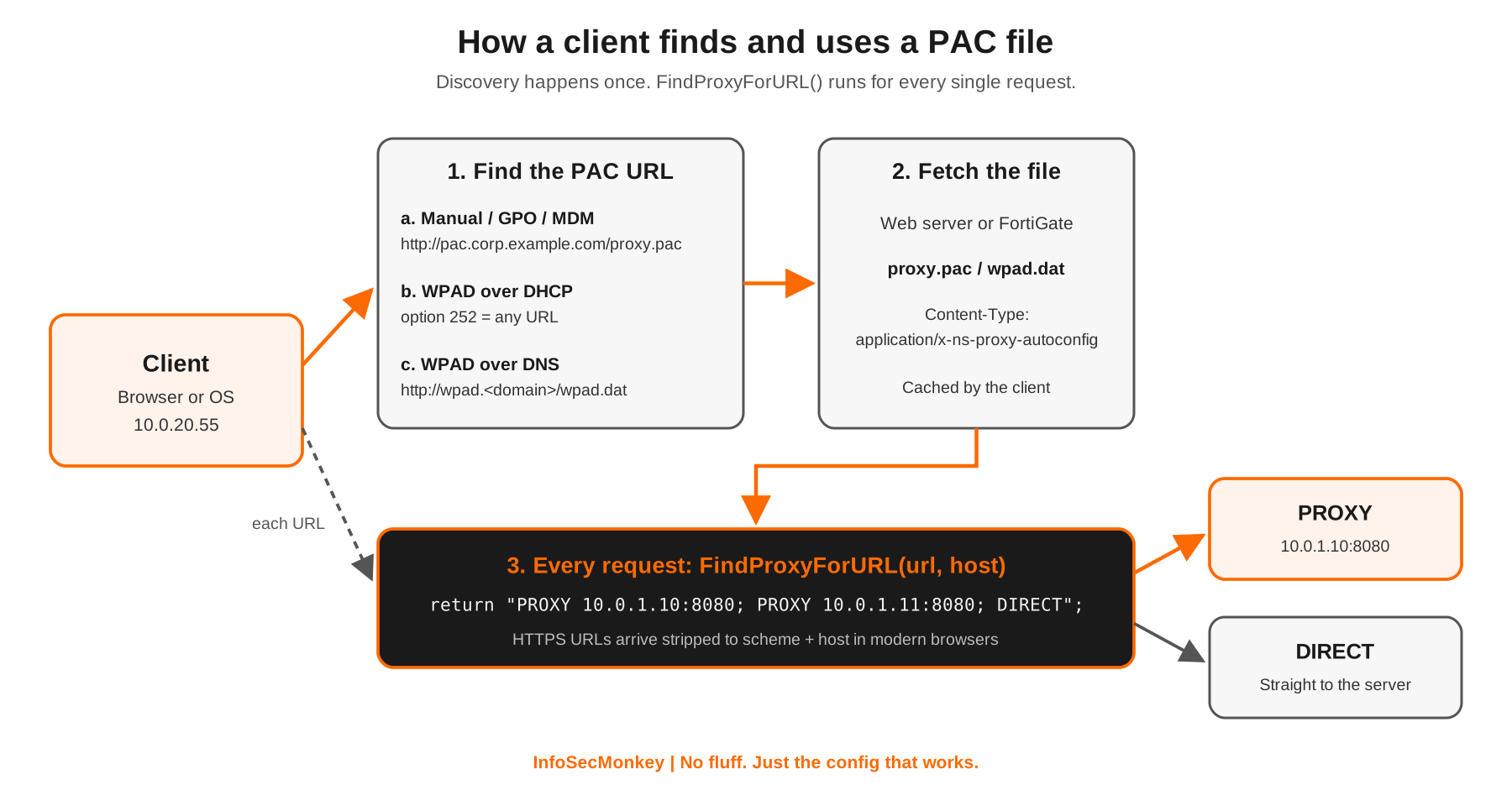
Prerequisites and Architecture
Assumed knowledge: basic JavaScript syntax, DNS, DHCP, and how an explicit (non-transparent) web proxy works.
Lab requirements: one Linux web server (nginx), a proxy (FortiGate explicit proxy, Squid or a cloud SWG), a test client, and the pactester utility from the pacparser project.
| Component | Lab value | Role |
|---|---|---|
| Client | 10.0.20.55 | Downloads the PAC file and runs FindProxyForURL() per request |
| PAC host | pac.corp.example.com (10.0.1.20) | Serves proxy.pac and wpad.dat over HTTP or HTTPS |
| Primary proxy | 10.0.1.10:8080 | Explicit web proxy (FortiGate or Squid) |
| Backup proxy | 10.0.1.11:8080 | Second entry in the failover list |
| DHCP server | 10.0.1.1 | Optional WPAD option 252 |
| DNS | corp.example.com zone | Optional wpad A record for DNS discovery |
| Internet edge | 198.18.0.1 | Where proxied and direct traffic exit |
The “Standard” PAC File Format
There is no IETF RFC for PAC files. The format was created by Netscape for Navigator 2.0 in the mid 1990s, at the same time JavaScript itself appeared, and every browser since has copied that behavior. Today the closest thing to a specification is the MDN PAC file reference, which documents what Firefox, Chromium and others actually implement. In practice, “standard” means these rules:
- The file is plain JavaScript that defines one function:
FindProxyForURL(url, host). Helper functions and variables are allowed, but that entry point is mandatory and case-sensitive. urlis the full URL being requested,hostis just the hostname (no port). Forhttps://URLs, modern browsers strip the path and query before calling your function.- The function returns a single string. Multiple options are separated by semicolons and tried left to right.
- Save it with a
.pacextension (commonlyproxy.pac) and serve it with the MIME typeapplication/x-ns-proxy-autoconfig. - For WPAD over DNS the file must be named
wpad.datand live at the web root. Same content, different name. - The file should contain only the JavaScript. Do not wrap it in HTML.
Return value directives
| Directive | Meaning | Support |
|---|---|---|
| DIRECT | Connect straight to the destination, no proxy | Universal |
| PROXY host:port | Use this HTTP proxy | Universal |
| SOCKS host:port | Use this SOCKS server | Universal |
| HTTP host:port | Explicit HTTP proxy (alias of PROXY) | Firefox and Chromium |
| HTTPS host:port | Talk TLS to the proxy itself | Firefox and Chromium |
| SOCKS4 / SOCKS5 host:port | SOCKS with an explicit version | Firefox and Chromium |
When every entry in the list fails and there is no DIRECT at the end, the browser stops and either asks the user or fails the request. Per MDN, a proxy that stops answering is retried after 30 minutes, then with an extra 30 minutes added between each later attempt. That is why one dead proxy at the front of the list can make the web feel slow for a long time.
"PROXY 10.0.1.10:8080" // one proxy, no fallback
"PROXY 10.0.1.10:8080; PROXY 10.0.1.11:8080" // primary, then backup
"PROXY 10.0.1.10:8080; DIRECT" // fail open to direct
"HTTPS proxy.corp.example.com:443; DIRECT" // TLS to the proxy itselfBuilt-in helper functions
PAC files run in a stripped-down JavaScript sandbox with no DOM, no network calls of your own and no file access. In exchange you get a fixed set of helpers. The column that matters most in production is the last one: anything that touches DNS runs for every request and blocks while it waits.
| Function | What it does | Hits DNS? |
|---|---|---|
| isPlainHostName(host) | True if the hostname has no dots (intranet, wiki) | No |
| dnsDomainIs(host, domain) | True if host ends with the domain (use a leading dot) | No |
| localHostOrDomainIs(host, fqdn) | Exact FQDN match, or unqualified name matches | No |
| shExpMatch(str, pattern) | Shell glob match with * and ? | No |
| dnsDomainLevels(host) | Number of dots in the hostname | No |
| weekdayRange / dateRange / timeRange | True during the given days, dates or hours | No |
| convert_addr(ip) | Converts a dotted IP to a 32-bit integer | No |
| alert(msg) | Writes a debug line to the client log or console | No |
| isInNet(host, net, mask) | True if host’s IP is in the subnet (resolves names) | Yes, for names |
| isResolvable(host) | True if the name resolves | Yes |
| dnsResolve(host) | Returns the IP as a string | Yes |
| myIpAddress() | Returns the client’s own IP (often wrongly, see gotchas) | Sometimes |
Microsoft added IPv6-aware “Ex” variants such as FindProxyForURLEx, isInNetEx and myIpAddressEx. MDN notes that Chromium supports them while Firefox does not, so keep an IPv4 FindProxyForURL in every file even if you add the Ex version.
Step-by-Step Implementation
Step 1: Write a production-grade PAC file
Goal: Build a PAC file that is fast, predictable and fails safe.
Action: Order the rules cheapest first: string matches before anything that resolves DNS, internal destinations before the catch-all, and always end with a sensible fallback. Replace the domains and proxy IPs with your own.
// proxy.pac - InfoSecMonkey lab template
// Proxies: 10.0.1.10 and 10.0.1.11 on 8080. Internal LANs: 10.0.0.0/16
function FindProxyForURL(url, host) {
host = host.toLowerCase();
var PROXIES = "PROXY 10.0.1.10:8080; PROXY 10.0.1.11:8080; DIRECT";
// 1. Single-label names (intranet, wiki) never need the proxy
if (isPlainHostName(host)) {
return "DIRECT";
}
// 2. Internal DNS zones: pure string checks, zero DNS cost
if (dnsDomainIs(host, ".corp.example.com") ||
dnsDomainIs(host, ".lab.example.com") ||
host === "localhost") {
return "DIRECT";
}
// 3. Literal private IPs: isInNet on an IP string does not hit DNS
if (/^\d{1,3}(\.\d{1,3}){3}$/.test(host)) {
if (isInNet(host, "10.0.0.0", "255.0.0.0") ||
isInNet(host, "172.16.0.0", "255.240.0.0") ||
isInNet(host, "192.168.0.0", "255.255.0.0") ||
isInNet(host, "127.0.0.0", "255.0.0.0")) {
return "DIRECT";
}
}
// 4. Apps that break behind inspection or need a direct path
if (dnsDomainIs(host, ".windowsupdate.com") ||
shExpMatch(host, "*.zoom.us")) {
return "DIRECT";
}
// 5. Everything else: primary, backup, then fail open
return PROXIES;
}Verification: run the file through pactester (covered in the validation section) before it goes anywhere near a client. A single syntax error breaks the whole file, not just one rule.
Note: Fail open or fail closed? Ending with DIRECT keeps users working if both proxies die, but it also means traffic can leave without inspection. If your firewall policy only permits web egress from the proxies, drop DIRECT and let the firewall enforce it.
Step 2: Host the file with the correct MIME type
Goal: Serve proxy.pac and wpad.dat from a highly available web server with the right Content-Type.
Action: Create the web root, copy the file in, link wpad.dat to the same content, and force the MIME type in nginx. Some clients ignore a PAC file served as text/plain.
sudo mkdir -p /var/www/pac
sudo cp proxy.pac /var/www/pac/proxy.pac
sudo ln -sf /var/www/pac/proxy.pac /var/www/pac/wpad.dat# /etc/nginx/conf.d/pac.conf
server {
listen 80;
server_name pac.corp.example.com wpad.corp.example.com;
root /var/www/pac;
location ~* \.(pac|dat)$ {
types { }
default_type application/x-ns-proxy-autoconfig;
add_header Cache-Control "max-age=300";
}
}sudo nginx -t
sudo systemctl reload nginxVerification: curl -sI http://pac.corp.example.com/proxy.pac returns 200 OK and Content-Type: application/x-ns-proxy-autoconfig.
Step 3: Point clients at the file
Goal: Get every client to load the PAC URL, preferably with an explicit setting rather than discovery.
Action: Pick one distribution method. Explicit configuration through GPO, Intune or an MDM profile is the most reliable and the safest. WPAD discovery is convenient but comes with real risk (see the security section).
| Method | How the client learns the URL | Notes |
|---|---|---|
| Manual / GPO / MDM | Admin sets the PAC URL directly | Most predictable; works on any network |
| WPAD via DHCP | DHCP option 252 carries any URL | DHCPv4 only; checked before DNS |
| WPAD via DNS | Client tries http://wpad.<domain>/wpad.dat | File must be wpad.dat at the web root |
To publish WPAD over DHCP from a FortiGate DHCP server, add option 252 as a string:
config system dhcp server
edit 1
config options
edit 1
set code 252
set type string
set value "http://pac.corp.example.com/proxy.pac"
next
end
next
endFor ISC dhcpd, declare the option and set it in the scope:
option wpad-url code 252 = text;
subnet 10.0.20.0 netmask 255.255.255.0 {
option routers 10.0.20.1;
option wpad-url "http://pac.corp.example.com/proxy.pac";
}For WPAD over DNS, create an A record wpad.corp.example.com pointing at the PAC host. Note that Windows DNS Server ships with wpad on its global query block list, so the record will not resolve until you remove it from that list.
Verification: on macOS run scutil --proxy and look for ProxyAutoConfigURLString. On Windows check Settings, Network and Internet, Proxy. Remember that netsh winhttp show proxy shows the separate WinHTTP stack, not what the browser uses.
Step 4: Host the PAC file on a FortiGate (optional)
Goal: Let the FortiGate explicit web proxy serve the PAC file itself, with no separate web server.
Action: Enable the explicit proxy, enable the built-in PAC server, and paste the file contents into pac-file-data. Escape every double quote inside the file with a backslash. Per Fortinet, the FortiGate does not parse or validate the PAC file, the maximum size is 256 KB, and each VDOM has its own file.
config system interface
edit "port2"
set explicit-web-proxy enable
next
end
config web-proxy explicit
set status enable
set http-incoming-port 8080
set pac-file-server-status enable
set pac-file-name "proxy.pac"
set pac-file-data "function FindProxyForURL(url, host) {
if (isPlainHostName(host)) { return \"DIRECT\"; }
if (dnsDomainIs(host, \".corp.example.com\")) { return \"DIRECT\"; }
return \"PROXY 10.0.1.1:8080; DIRECT\";
}"
endThe default PAC URL format is http://<interface-ip>:<pac-port>/<pac-file-name>, so with the PAC port left at the HTTP proxy port this lab uses http://10.0.1.1:8080/proxy.pac. Run get web-proxy explicit to see the URLs the FortiGate is publishing. On FortiOS 7.4 and later, set pac-file-through-https enable lets clients pull the file over HTTPS through a captive portal listener.
Different user groups can get different PAC files with PAC policies, matched on source and destination address objects:
config web-proxy explicit
config pac-policy
edit 1
set srcaddr "BRANCH-USERS"
set dstaddr "all"
set pac-file-name "branch.pac"
set pac-file-data "function FindProxyForURL(url, host) {
return \"PROXY 10.0.30.1:8080; DIRECT\";
}"
next
end
endGUI Verification: Network, Explicit Proxy shows the PAC file as enabled with its name and URL. Browse to the PAC URL from a client and confirm the file downloads.
Verification and Validation
Never test a PAC file by pushing it to users. Test it offline with pactester, which runs the file in a real JavaScript engine with the same helper functions a browser has. Build it from the pacparser source:
git clone https://github.com/manugarg/pacparser.git
cd pacparser
make -C src
sudo make -C src installThen feed it URLs and compare the answers with what you expect:
pactester -p proxy.pac -u https://www.example.com
# PROXY 10.0.1.10:8080; PROXY 10.0.1.11:8080; DIRECT
pactester -p proxy.pac -u http://intranet/
# DIRECT
pactester -p proxy.pac -u http://10.0.5.20/
# DIRECT
# Pretend to be a specific client (affects myIpAddress)
pactester -p proxy.pac -c 10.0.20.55 -u https://app.corp.example.com
# DIRECT
# Test the live file exactly as clients receive it
curl -s http://pac.corp.example.com/proxy.pac \
| pactester -p - -u https://www.example.comConfirm the server is sending the right headers:
curl -sI http://pac.corp.example.com/proxy.pac | grep -i content-type
# Content-Type: application/x-ns-proxy-autoconfigSuccess looks like: every test URL returns the expected string, the Content-Type header is correct, and on a client the browser’s proxy diagnostics (for example chrome://net-internals/#proxy in Chromium browsers) show the PAC URL as the effective configuration.
Interesting Things About PAC Files
It is 1990s JavaScript running in your network stack
PAC arrived with Netscape Navigator 2.0, the same release that introduced JavaScript. The original helper library lives on almost unchanged inside Firefox and Chromium today. That is why PAC still has odd functions like convert_addr() and glob matching instead of modern APIs.
WPAD never became a standard either
The discovery protocol, WPAD, only ever reached an IETF draft (draft-ietf-wrec-wpad-01) that expired in December 1999. Everything clients do with DHCP option 252 and wpad.dat is convention built on that expired draft. Option 252 itself sits in the DHCP site-local range rather than being a formally assigned option, and there is no WPAD option at all for DHCPv6.
Browsers deliberately hide HTTPS paths from your PAC file
In 2016 researchers showed that a malicious PAC file could read the full HTTPS URL of every request, including paths and query strings that carry tokens, even though that data is encrypted on the wire. Chromium responded by stripping the path and query from https:// URLs before calling FindProxyForURL. According to MDN, from Chrome 75 onward there is no way to turn that off, and Firefox added a matching preference (network.proxy.autoconfig_url.include_path). Mozilla tracked the Firefox side as CVE-2017-5384. The practical result: any PAC rule that matches on an HTTPS path silently never fires.
WPAD has a long and ugly security record
- DNS devolution: a client in
pc01.branch.example.comtrieswpad.branch.example.com, thenwpad.example.com. Badly behaved clients kept going and asked for names likewpad.com, which anyone could register. - Rogue responders: on an untrusted Wi-Fi network, whoever answers the WPAD lookup first gets to hand your browser a PAC file and route your traffic through their proxy.
- New gTLDs: internal names that collide with newly delegated public TLDs can leak WPAD lookups to the internet when laptops leave the office.
- aPAColypse (2017): Google Project Zero showed that the Windows WPAD service evaluated PAC JavaScript in a way that let a malicious PAC file fully compromise a Windows 10 machine. Chrome evaluates PAC inside a sandbox, which is why the attack targeted the Windows service.
You cannot simply turn WPAD off on modern Windows
Since Windows 10 1709, the WinHTTP Web Proxy Auto-Discovery Service is wired into all proxy handling. The CIS benchmark audit notes that disabling it can break manual proxy settings, some VPN clients and tools like Fiddler. Turn off “Automatically detect settings” by policy instead of killing the service.
PAC files can route by time and date
weekdayRange(), dateRange() and timeRange() let you send traffic to a different proxy after hours or during a maintenance window. Order matters: since Firefox 49, weekdayRange("FRI", "MON") means Friday and Monday only, not a wrap-around range, so test these with care.
Troubleshooting and Gotchas
1. myIpAddress() returns the wrong address
Symptom: location-based rules send VPN or docked users to the wrong proxy. Cause: on hosts with several interfaces (VPN adapter, Docker, Wi-Fi plus Ethernet) myIpAddress() may return any of them, or fall back to 127.0.0.1. Fix: avoid source-IP logic where you can, or use myIpAddressEx() on clients that support it. Reproduce with a forced client IP:
pactester -p proxy.pac -c 10.0.20.55 -u https://www.example.com
pactester -p proxy.pac -c 127.0.0.1 -u https://www.example.com2. Browsing is slow even though the proxy is fine
Symptom: every page load stalls for a beat before it starts. Cause: isInNet(), isResolvable() or dnsResolve() on a hostname forces a blocking DNS lookup for every request, and the proxy then resolves the same name again, doubling the load on DNS. A dead first proxy in the list adds its own delay until the 30 minute retry logic kicks in. Fix: move string checks (dnsDomainIs, shExpMatch) above anything that resolves, only call isInNet() on literal IPs, and check that every listed proxy actually answers:
curl -x http://10.0.1.10:8080 -sI https://www.example.com | head -1
curl -x http://10.0.1.11:8080 -sI https://www.example.com | head -13. A change to the PAC file does nothing
Symptom: you edited the rule but clients still follow the old one. Causes: clients cache the PAC file (and some only refetch on restart or network change); the rule matches an HTTPS path that the browser now strips; or a syntax error made the client discard the new file entirely. Fix: validate with pactester first, match on host rather than paths for HTTPS, keep Cache-Control short on the PAC host, and confirm what the server is really serving:
curl -s http://pac.corp.example.com/proxy.pac | head -20
curl -s http://pac.corp.example.com/proxy.pac \
| pactester -p - -u https://changed.example.comSecurity Hardening Checklist
- Prefer an explicit PAC URL pushed by GPO or MDM over WPAD discovery.
- If you do not use WPAD, disable “Automatically detect settings” by policy and keep
wpadblocked in internal DNS. - If you do use WPAD, own the
wpadname in every internal zone so nobody else can answer for it. - Serve the PAC file over HTTPS where your clients support it (FortiGate:
pac-file-through-https). - Treat the PAC file as code: version control, peer review, and
pactesterin a pre-deploy check. - Watch for unexpected
wpadlookups in DNS logs; they reveal clients still trying discovery.
Sources
- MDN Web Docs: Proxy Auto-Configuration (PAC) file
- Wikipedia: Web Proxy Auto-Discovery Protocol
- IETF draft-ietf-wrec-wpad-01: Web Proxy Auto-Discovery Protocol (mirror)
- Microsoft Learn: Create a WPAD entry in DHCP (option 252)
- Chromium commit: Sanitize https:// URLs before sending them to PAC scripts
- Mozilla Bugzilla 1255474: PAC SSL/TLS URL disclosure
- CVE-2017-5384 record: PAC full URL path exposure in Firefox
- Auth0: Web-Proxy Auto Discovery (WPAD) Considered Harmful
- Google Project Zero: aPAColypse now, exploiting Windows 10 via WPAD
- Tenable CIS audit: WinHTTP Web Proxy Auto-Discovery Service
- Fortinet Docs: FortiGate 7.4 explicit web proxy (PAC over HTTPS)
- Fortinet Docs: FortiOS 6.0 CLI reference, web-proxy explicit
- Fortinet Docs: Multiple web proxy PAC files in one VDOM
- Fortinet Community: Technical Tip, Proxy auto-config (PAC) configuration
- pacparser on GitHub: INSTALL instructions
- Arch Linux man page: pactester(1)
- ThousandEyes: Writing and Testing PAC Files
InfoSecMonkey | No fluff. Just the config that works.
Recent posts
-

-

DNS is one of those technologies that quietly underpins... Full Story
-

BGP issues on FortiGate firewalls usually trace back to... Full Story
-

Every time your laptop talks to your router, a... Full Story
-

If you've spent any time configuring NAT on a... Full Story
-

If you have spent any time configuring firewall policies... Full Story
-

High availability on FortiGate is one of those features... Full Story
-

If you've configured SD-WAN on a FortiGate, you've almost... Full Story
-

FortiLink is the management protocol that turns a FortiSwitch... Full Story
-

FortiSwitches are pretty rock solid from Mean Time Between... Full Story
-

This is a quicky tip. Have you ever gone... Full Story
-

DNS is one of those quiet pieces of internet... Full Story
-

This article is an updated version of the previous... Full Story
-

You will add ns2 as a secondary (slave) BIND9... Full Story
-

In the process of deploying my lab, I needed... Full Story
-

RFC 8805, used to be known as Self-Correcting IP... Full Story
-

Years back, I wrote an article about certificate pinning. ... Full Story
-

FortiGates have the ability to send alerts to Microsoft... Full Story
-

In this post, I am going to walk through... Full Story
-

Troubleshooting VoIP on a FortiGate can feel like trying... Full Story
-

Prior to FortiOS 7.0, there were three commands to... Full Story
-

In this post, I am going to go over... Full Story
-

What we are going to do: We are going... Full Story
-

Choosing between FGCP (FortiGate Clustering Protocol) and FGSP (FortiGate... Full Story
-

Creating a VLAN on macOS (The "Pro" Move) A... Full Story
-

This blog post explores the logic behind how macOS... Full Story
-

Pretty Fly for a Wi-Fi Tell My Wi-Fi Love... Full Story
-

Part of my daily gig is creating BoMs (Bill-of-Materials)... Full Story
-

ICMP introduces several security risks, but careful filtering, rate... Full Story
-

The command diag debug application dhcps -1 enables full... Full Story
-

In the world of FortiOS, execute tac report is... Full Story
-

LLDP; What is it The Link Layer Discovery Protocol... Full Story
-

What it actually does When you run diagnose fdsm... Full Story
-

Monkey Bites are bite-sized, high-impact security insights designed for... Full Story
-

I have run macOS in macOS with Parallels but... Full Story
-

Don't be confused with my other FortiNAC posts where... Full Story
-

This is the third session in a multi-part article... Full Story
-

Today I was configuring key-based authentication on a FortiGate... Full Story
-

Netcat, often called the "Swiss Army knife" of networking,... Full Story
-

At its core, IEEE 802.1X is a network layer... Full Story
-

In case you did not see the previous FortiNAC... Full Story
-

This is our 5th session where we are going... Full Story
-

Now that we have Wireshark installed and somewhat configured,... Full Story
-

The Philosophy of Packet Analysis Troubleshooting isn't about looking... Full Story
-

PAC Files Explained: How Proxy Auto-Config Really Works No... Full Story
-

CVE-2026-41709: The VMware ESXi Logging Bypass Zero-Day Warp Panda... Full Story
-

Introducing Net3PO: A Free, Open-Source Network Engineer Toolkit for... Full Story