
If you've spent any time configuring user authentication on... Full Story
By Manny Fernandez
October 30, 2026
CVE-2026-41709: The VMware ESXi Logging Bypass Zero-Day Warp Panda Used to Go Dark – Now on KEV
CVE-2026-41709: The VMware ESXi Logging Bypass Zero-Day Warp Panda Used to Go Dark
InfoSecMonkey | No fluff. Just the config that works.
Objective: Explain what CVE-2026-41709 is, why a CVSS 2.7 VMware ESXi logging bypass landed in the CISA KEV catalog as a zero-day, and walk through patching, log forwarding, host hardening and FortiGate network visibility so the next intrusion cannot erase its own tracks.
Target audience: vSphere admins, SOC analysts and network/security engineers who own or defend ESXi hosts.
Executive Summary: The ESXi Logging Bypass in One Minute
CVE-2026-41709 is an ESXi logging bypass: an insufficient-logging flaw (CWE-778) that lets someone who already holds ESXi administrator access run certain operations without them being written to the host’s logs. Broadcom fixed it on July 29, 2026 in VMSA-2026-0006 and rates it Low, CVSSv3.1 2.7 (Broadcom VMSA-2026-0006 Q&A).
Three months later the story changed. On October 28, 2026 CISA added it to the Known Exploited Vulnerabilities catalog after CrowdStrike reported that the China-nexus actor Warp Panda had used it as a zero-day in early 2026 to cut audit trail visibility during espionage intrusions against U.S. organizations, including law firms (The Hacker News). Federal civilian agencies have until November 11, 2026 to patch.
Heads up: It is not RCE and it is not an entry point. It is an anti-forensics primitive. Its job is to make the host you would investigate look clean. Treat it like a critical when your threat model includes anyone who already reached vCenter.
At a Glance
| Field | Value |
|---|---|
| CVE | CVE-2026-41709 |
| Product | VMware ESX / ESXi (also inside VCF, vSphere Foundation, Telco Cloud Platform) |
| Weakness | CWE-778, insufficient logging |
| CVSSv3.1 | 2.7 Low, AV:N/AC:L/PR:H/UI:N/S:U/C:N/I:L/A:N |
| Privileges needed | ESXi administrator |
| Exploited | Yes, as a zero-day by Warp Panda (CrowdStrike), as late as early 2026 |
| Fix released | July 29, 2026 (VMSA-2026-0006) |
| CISA KEV | Added October 28, 2026, federal due date November 11, 2026 |
| Workaround | None. Patch. |
Why a 2.7 Became a Zero-Day Worth Burning
CVSS scores the flaw on its own: an attacker who is already admin gains nothing new except less visibility for you. The problem is that ESXi is exactly where a mature actor wants to be invisible. Hypervisors do not run EDR, and after a compromise the host’s own logs are often all an investigator has to reconstruct what happened (Rescana analysis).
CrowdStrike’s description of Warp Panda’s chain, as reported by The Hacker News, is a textbook case: zero-days on internet-facing edge devices for initial access, a pivot into VMware vCenter to plant custom backdoors such as BRICKSTORM and SharpStorm, then theft of cloud session tokens to reach Microsoft 365 without tripping credential alerts, plus a rogue MFA device registered for persistence (The Hacker News). The actor is also tracked as Armory Castle (formerly UNC5221), Clay Typhoon and VerdantBamboo.
Figure 1. Where CVE-2026-41709 sits in the Warp Panda intrusion chain
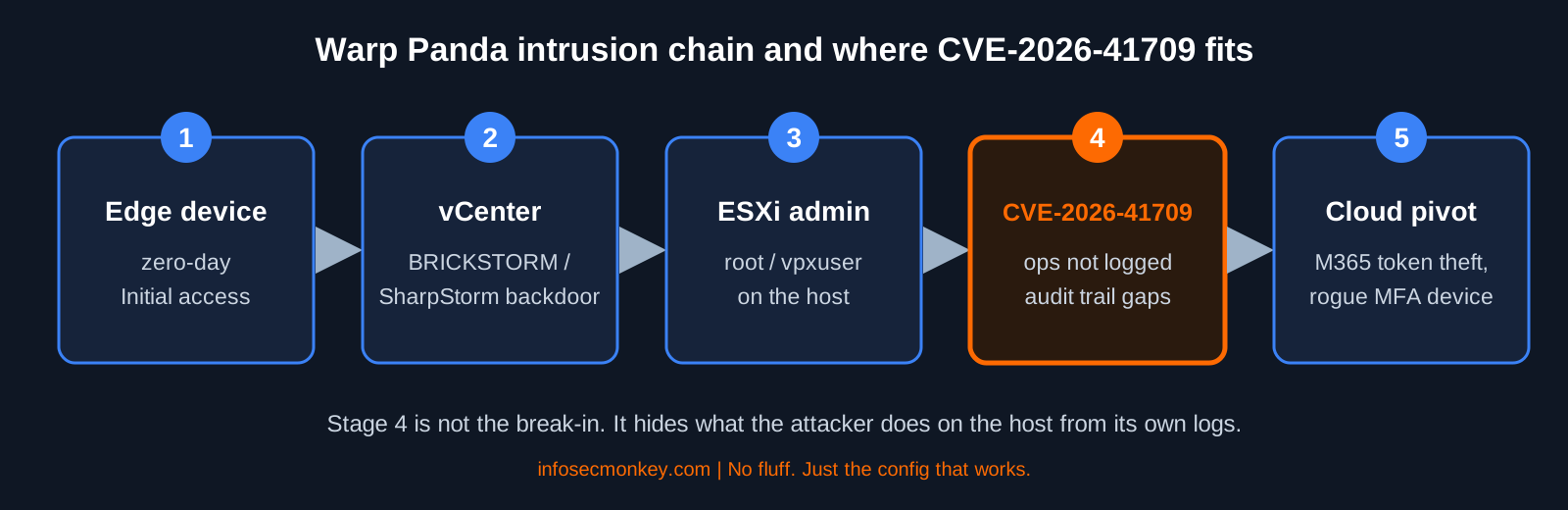
Notice where the bug sits. It is not the break-in. It is the cleanup crew. By the time CVE-2026-41709 is used, the attacker owns vCenter and has admin on the host. That means the patch alone does not save you: any ESXi host that ran an unpatched build through early 2026 has local logs you should not trust on their own.
Affected and Fixed Versions
From Broadcom’s response matrix as summarized by Rescana and The Hacker News. Patches are cumulative, so anything newer than these builds is also fixed (Broadcom Q&A).
| Product | Branch | Fixed build |
|---|---|---|
| VCF / vSphere Foundation (ESX) | 9.1.x | ESXi-9.1.0.0-25370933 |
| VCF / vSphere Foundation (ESX) | 9.0.x | ESXi-9.0.2.0100-25595025 |
| VMware ESX | 8.0 | ESXi80U3j-25429389 |
| VMware Cloud Foundation (ESX) | 5.x | 5.2.4 (async patching, KB 88287) |
| Telco Cloud Platform | 5.0.x / 5.1.x | ESXi80U3j-25429389 (see KB 449886) |
Heads up: ESX 7.0 is not listed in the matrix for this CVE. vSphere 7 hit End of General Support on October 2, 2025, and Broadcom says to presume out-of-support versions are affected and to use extended support to request patches (Broadcom Q&A).
The same advisory also fixes four other bugs: two vCenter issues (an authentication bypass and a syslog directory traversal) and two ESX issues, including CVE-2026-47876, a VMXNET3 out-of-bounds write that is a true VM escape for an attacker with admin inside a guest (Broadcom Q&A). If you have not applied VMSA-2026-0006 yet, CVE-2026-41709 is only one reason to move.
Prerequisites and Architecture
Assumed knowledge: vSphere Client, ESXi Shell/SSH and esxcli, PowerCLI basics, FortiGate CLI.
| Component | Lab value | Role |
|---|---|---|
| ESXi hosts | 10.0.20.11 to 10.0.20.14 (VLAN 20) | Hosts to patch and harden |
| vCenter | 10.0.20.5 | vLCM depot, inventory |
| Admin jump host | 10.0.10.25 | Only source allowed to manage ESXi |
| Syslog collector (FortiSIEM or SIEM) | 10.0.30.50, TLS 6514 | Off-host, tamper-resistant log copy |
| FortiGate | port3 = VLAN 20 mgmt, port4 = VLAN 30 SecOps, port1 = WAN 198.18.0.2 | Segmentation, session logging, egress control |
Step-by-Step: Patch, Ship Logs, Harden, Watch the Wire
Step 1: Inventory every ESXi build
Goal: Find every host below the fixed build, including the forgotten lab cluster.
Action: Pull builds from vCenter with PowerCLI, then confirm on any standalone host.
# PowerCLI, from the jump host
Connect-VIServer -Server <VCENTER_FQDN>
Get-VMHost | Select-Object Name,Version,Build | Sort-Object Build | Format-Table
# ESXi Shell / SSH on a single host
esxcli system version get
vmware -vlGUI verification: vSphere Client, select the host, Summary tab, compare the build number to the table above.
Step 2: Patch the hosts
Goal: Land every host on a fixed (or newer) build without dropping workloads.
Action: The clean path is vSphere Lifecycle Manager. If the new build does not appear, run a depot sync in vCenter instead of waiting for the scheduled one. ESXi updates require a reboot, so vMotion workloads off and patch in a rolling fashion. Broadcom notes these ESX updates are compatible with Live Patch on supported 8.0.3 and later environments that are already at N-1 (Broadcom Q&A).
For a standalone host using an offline depot:
# Enter maintenance mode first (evacuate or power off VMs)
esxcli system maintenanceMode set --enable true

# Point at the offline depot zip
DEPOT=/vmfs/volumes/<DATASTORE>/<DEPOT_ZIP>

# Find the image profile name inside the depot
esxcli software sources profile list -d $DEPOT

# Apply it, then reboot
esxcli software profile update -d $DEPOT -p <PROFILE_NAME>
reboot
GUI verification: vSphere Client, Updates tab on the cluster, image compliance shows Compliant, and each host build matches the fixed build.
Step 3: Get the logs off the host
Goal: Keep a copy of ESXi and vCenter logs somewhere an ESXi admin cannot touch. A patch closes the gap; it does not make local logs on an already compromised host trustworthy.
Action: Forward syslog over TLS to your collector and open the outbound syslog ruleset.
esxcli system syslog config set --loghost='ssl://10.0.30.50:6514'
esxcli network firewall ruleset set --ruleset-id=syslog --enabled=true
esxcli network firewall refresh
esxcli system syslog reload

# Send a marker so you can find it on the collector
esxcli system syslog mark --message="ISM-SYSLOG-TEST <HOSTNAME>"
Forward vCenter’s own syslog to the same collector from the VAMI (Syslog section). FortiSIEM is a natural fit here because it can correlate ESXi, vCenter, FortiGate and identity events in one place, which is exactly the cross-check this CVE demands.
GUI verification: vSphere Client, host, Configure > System > Advanced System Settings, filter on Syslog.global.logHost and confirm the value.
Step 4: Shrink the admin surface the bug depends on
Goal: Make it harder to become ESXi admin in the first place. These controls come from CrowdStrike’s earlier Warp Panda guidance as summarized by Rescana: watch SSH logins as root and vpxuser, disable SSH, enforce execInstalledOnly, restrict ESXi and vCenter egress, and front vCenter with MFA.
# Stop and disable SSH (re-enable only for a change window)
vim-cmd hostsvc/stop_ssh
vim-cmd hostsvc/disable_ssh

# Only allow binaries delivered in signed VIBs to execute
esxcli system settings kernel set -s execInstalledOnly -v TRUE

# Optional: lock the setting on TPM hosts so it cannot be flipped back
esxcli system settings encryption set --require-exec-installed-only=T
Heads up:
execInstalledOnly takes effect after a reboot. Fold it into the same maintenance window as the patch. Test first if you run third-party agents that drop unsigned binaries.Then put the hosts in Normal lockdown mode from vCenter so direct host logins are refused except for the Exception Users list.
GUI verification: host, Configure > System > Security Profile, Lockdown Mode shows Normal, and the SSH service shows Stopped with policy Start and stop manually.
Step 5: Make the network the witness with FortiGate
Goal: Build a record of who talked to ESXi that the hypervisor cannot edit. Organizations that relied only on VMware-native logging had no compensating record once the logs were suppressed, so the wire has to testify.
Action: Put ESXi management behind the FortiGate, allow only the jump host, log every session, ship the syslog stream, and deny internet egress from the management VLAN.
config firewall address
    edit "ESXI-MGMT-NET"
        set subnet 10.0.20.0 255.255.255.0
    next
    edit "ADMIN-JUMP-HOST"
        set subnet 10.0.10.25 255.255.255.255
    next
    edit "SYSLOG-COLLECTOR"
        set subnet 10.0.30.50 255.255.255.255
    next
end

config firewall service custom
    edit "ESXI-MGMT"
        set tcp-portrange 443 902 22
    next
    edit "SYSLOG-TLS"
        set tcp-portrange 6514
    next
end

config firewall policy
    edit 0
        set name "JUMP-to-ESXI-MGMT"
        set srcintf "port2"
        set dstintf "port3"
        set srcaddr "ADMIN-JUMP-HOST"
        set dstaddr "ESXI-MGMT-NET"
        set action accept
        set schedule "always"
        set service "ESXI-MGMT"
        set logtraffic all
        set logtraffic-start enable
    next
    edit 0
        set name "ESXI-to-SYSLOG"
        set srcintf "port3"
        set dstintf "port4"
        set srcaddr "ESXI-MGMT-NET"
        set dstaddr "SYSLOG-COLLECTOR"
        set action accept
        set schedule "always"
        set service "SYSLOG-TLS"
        set logtraffic all
    next
    edit 0
        set name "ESXI-MGMT-NO-INTERNET"
        set srcintf "port3"
        set dstintf "port1"
        set srcaddr "ESXI-MGMT-NET"
        set dstaddr "all"
        set action deny
        set schedule "always"
        set service "ALL"
        set logtraffic all
    next
end
Allow outbound only to your update depot or vCenter if hosts need it, and place that rule above the deny. logtraffic-start gives you a log line when a session opens, not just when it closes, which matters when someone kills a session mid-operation.
GUI verification: Policy & Objects > Firewall Policy, confirm the three policies and that Log Allowed Traffic is set to All Sessions. Then Log & Report > Forward Traffic, filter destination 10.0.20.0/24.
Verification and Validation
| Check | Command | Expected success output |
|---|---|---|
| Build is fixed | esxcli system version get |
Build at or above the fixed build for the branch, for example 25429389 on 8.0 |
| Syslog target set | esxcli system syslog config get |
Remote Host: ssl://10.0.30.50:6514 |
| Marker arrived | Search collector for ISM-SYSLOG-TEST | One event per host with the correct hostname |
| execInstalledOnly on | esxcli system settings kernel list -o execInstalledOnly |
Configured TRUE, Runtime TRUE (after reboot) |
| SSH off | vim-cmd hostsvc/runtimeinfo | grep -i ssh or Security Profile |
SSH service stopped |
| Syslog on the wire | diagnose sniffer packet any 'host 10.0.30.50 and port 6514' 4 10 |
TLS packets from 10.0.20.x to 10.0.30.50 |
| Egress denied | execute log filter category 0 then execute log display after a test from a host |
Deny entries from 10.0.20.x on policy ESXI-MGMT-NO-INTERNET |
Hunt the gap, not just the event
Because this bug removes evidence, look for mismatches between sources instead of a single smoking gun:
- vCenter shows a task or session against a host, but the host’s forwarded logs show nothing in that window.
- FortiGate session logs show SSH or 443 from an unexpected source to 10.0.20.0/24 with no matching ESXi auth event.
- Interactive logins as
rootorvpxuseroutside a change window. - New MFA device registrations or token-based Microsoft 365 sign-ins shortly after vCenter activity.
Troubleshooting and Gotchas
1. The patch blocks your VCF 9 upgrade
Symptom: After patching 8.0 or 9.0 hosts, an upgrade to VCF 9.x fails with a back-in-time error. Cause: The patched builds are newer than the planned upgrade target. Fix: Expected behavior; Broadcom says compatibility returns in later releases. Check KB 67077 and decide whether to patch now or finish the upgrade first (Broadcom Q&A). With a KEV listing, patching now is usually the right call.
2. Syslog configured but nothing arrives
esxcli network firewall ruleset list | grep -i syslog
esxcli system syslog config get
tail -n 50 /var/log/vmsyslogd.log
nc -z 10.0.30.50 6514
Common causes: the syslog firewall ruleset is still disabled, the collector certificate is not trusted by the host (TLS fails silently, check vmsyslogd.log), or the FortiGate is missing the ESXI-to-SYSLOG policy. Run the sniffer from the Verification table to see which side drops it.
3. execInstalledOnly breaks an agent
Symptom: A backup or monitoring agent stops after the reboot. Cause: It executes a binary that was not installed from a signed VIB. Fix: Get a signed VIB from the vendor. Do not turn the setting off on production hosts to make an agent happy; it is one of the controls that makes post-exploitation tooling harder to run.
4. You are still on ESXi 7.0
7.0 is not in the fixed-version matrix for this CVE. Presume you are exposed, use extended support to request patches, and plan the move to a supported branch (Broadcom Q&A).
Bottom Line
CVE-2026-41709 is the clearest reminder in a while that severity scores measure a bug, not a campaign. A 2.7 logging bypass in the right attacker’s hands is the difference between finding an intrusion and never knowing it happened. Patch to the fixed build before November 11, move your logs off the host, close SSH and enforce execInstalledOnly, and let the FortiGate keep the record the hypervisor cannot rewrite.
Sources
Recent posts
-

-

DNS is one of those technologies that quietly underpins... Full Story
-

BGP issues on FortiGate firewalls usually trace back to... Full Story
-

Every time your laptop talks to your router, a... Full Story
-

If you've spent any time configuring NAT on a... Full Story
-

If you have spent any time configuring firewall policies... Full Story
-

High availability on FortiGate is one of those features... Full Story
-

If you've configured SD-WAN on a FortiGate, you've almost... Full Story
-

FortiLink is the management protocol that turns a FortiSwitch... Full Story
-

FortiSwitches are pretty rock solid from Mean Time Between... Full Story
-

This is a quicky tip. Have you ever gone... Full Story
-

DNS is one of those quiet pieces of internet... Full Story
-

This article is an updated version of the previous... Full Story
-

You will add ns2 as a secondary (slave) BIND9... Full Story
-

In the process of deploying my lab, I needed... Full Story
-

RFC 8805, used to be known as Self-Correcting IP... Full Story
-

Years back, I wrote an article about certificate pinning. ... Full Story
-

FortiGates have the ability to send alerts to Microsoft... Full Story
-

In this post, I am going to walk through... Full Story
-

Troubleshooting VoIP on a FortiGate can feel like trying... Full Story
-

Prior to FortiOS 7.0, there were three commands to... Full Story
-

In this post, I am going to go over... Full Story
-

What we are going to do: We are going... Full Story
-

Choosing between FGCP (FortiGate Clustering Protocol) and FGSP (FortiGate... Full Story
-

Creating a VLAN on macOS (The "Pro" Move) A... Full Story
-

This blog post explores the logic behind how macOS... Full Story
-

Pretty Fly for a Wi-Fi Tell My Wi-Fi Love... Full Story
-

Part of my daily gig is creating BoMs (Bill-of-Materials)... Full Story
-

ICMP introduces several security risks, but careful filtering, rate... Full Story
-

The command diag debug application dhcps -1 enables full... Full Story
-

In the world of FortiOS, execute tac report is... Full Story
-

LLDP; What is it The Link Layer Discovery Protocol... Full Story
-

What it actually does When you run diagnose fdsm... Full Story
-

Monkey Bites are bite-sized, high-impact security insights designed for... Full Story
-

I have run macOS in macOS with Parallels but... Full Story
-

Don't be confused with my other FortiNAC posts where... Full Story
-

This is the third session in a multi-part article... Full Story
-

Today I was configuring key-based authentication on a FortiGate... Full Story
-

Netcat, often called the "Swiss Army knife" of networking,... Full Story
-

At its core, IEEE 802.1X is a network layer... Full Story
-

In case you did not see the previous FortiNAC... Full Story
-

This is our 5th session where we are going... Full Story
-

Now that we have Wireshark installed and somewhat configured,... Full Story
-

The Philosophy of Packet Analysis Troubleshooting isn't about looking... Full Story
-

CVE-2026-41709: The VMware ESXi Logging Bypass Zero-Day Warp Panda... Full Story
-

Introducing Net3PO: A Free, Open-Source Network Engineer Toolkit for... Full Story
-

No fluff. Just the config that works. PHP2Shell CVE-2026-109618... Full Story