
If you've spent any time configuring user authentication on... Full Story
By Manny Fernandez
November 9, 2026
FortiClient ZTNA Connection Refused on macOS: When pf Answers for the Server
No fluff. Just the config that works.
Executive Summary
SecureCRT said Connection refused. Terminal ssh to the exact same host worked fine. Same Mac, same IP, same port. This post walks through the session that found the cause: a ZTNA connection refused that never touched the server, because FortiClient’s macOS packet filter rules redirected the SYN to loopback and the kernel answered with a reset.
| Item | Detail |
|---|---|
| Objective | Find why one SSH client gets a TCP reset while another reaches the same host, and fix it at the source |
| Root cause | FortiClient ZTNA loaded pf rules that route-to lo0 every TCP SYN headed to a ZTNA destination table holding 198.19.0.0/17 |
| Fix | Correct the ZTNA destination in EMS (add the port, or narrow the subnet), then let the endpoint resync |
| Target audience | Network and security engineers running FortiClient with EMS-managed ZTNA on macOS, and the help desk that gets the ticket |
Prerequisites and Architecture
Assumed knowledge: TCP handshake flags (SYN, SYN-ACK, RST), basic tcpdump reading, and what FortiClient EMS ZTNA destinations are. You need admin (sudo) on the Mac to read pf and capture packets.
| Component | Role in this case | Value |
|---|---|---|
| macOS endpoint | Source of every connection | 10.0.105.11 |
| FortiClient (EMS managed) | ZTNA agent, pf interception mode | Tunnel interface utun40 |
| SecureCRT 9.7.3 (ARM64) | The client that failed | Session to port 22 |
| OpenSSH client (Terminal) | The client that worked | ssh admin@198.19.31.2 |
| Target host | Ubuntu server, OpenSSH 9.6p1 | 198.19.31.2:22 |
pf table <ztnahosts> |
ZTNA destinations pushed by EMS | 198.19.0.0/17 |
Figure 1
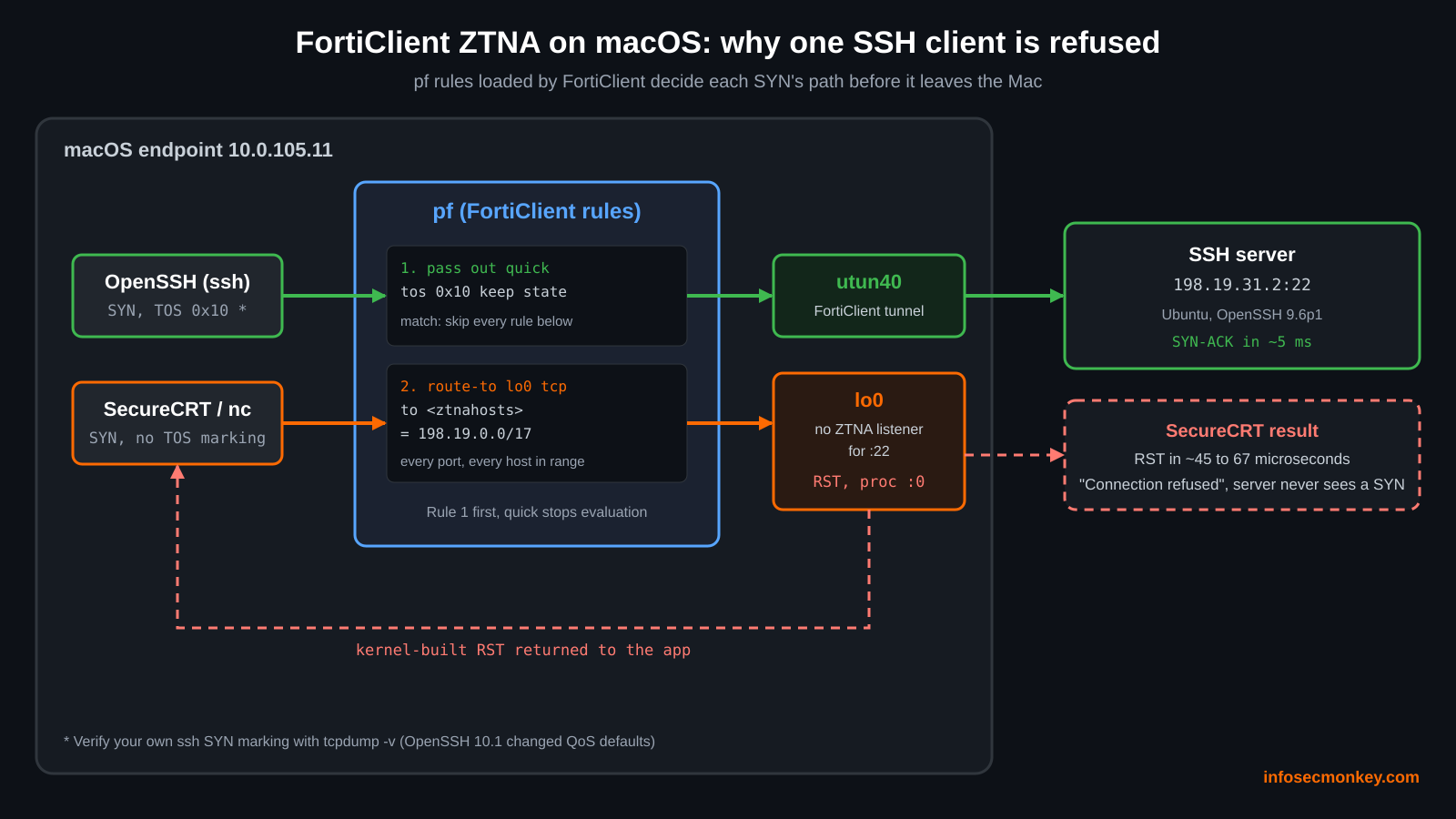
Two packets, two paths. The redirect to lo0 is where the reset comes from.
Step-by-Step: Tracing the ZTNA Connection Refused
Step 1: Read what the client is really telling you
Goal: Turn a vague error into a fact about the TCP handshake.
Action: Enable SecureCRT’s trace (View, Trace Options) and reconnect.
[LOCAL] : Connecting to 198.19.31.2:22 ...
[LOCAL] : Changing state from STATE_NOT_CONNECTED to STATE_CLOSED
[LOCAL] : Connected for 0 seconds, 0 bytes sent, 0 bytes received
[LOCAL] : Stream has closed [CLOSE_TYPE_NONSPECIFIC] : Connection refused
Verification: 0 seconds and 0 bytes means the handshake never completed. “Connection refused” is the operating system reporting a TCP RST in answer to the SYN. Something said no instantly. The question is who.
Step 2: Make sure both clients are attempting the same thing
Goal: Rule out an ssh config trick such as a different port, a ProxyJump, or a ProxyCommand that SecureCRT does not know about.
Action: Ask OpenSSH for its fully resolved settings for that host.
ssh -G 198.19.31.2 | egrep -i '^(hostname|port|proxyjump|proxycommand|bindaddress)'hostname 198.19.31.2
port 22Verification: Plain port 22, no jump host. Both clients should be making an identical TCP connection.
Step 3: Reproduce with a neutral tool
Goal: Take both SSH clients out of the picture.
Action: Test raw TCP to port 22 with netcat.
nc -vz 198.19.31.2 22198.19.31.2 22 (ssh): Connection refusedVerification: netcat is refused too. So this is not a SecureCRT bug. Plain TCP to port 22 is being reset, and the OpenSSH client is the odd one out because it gets through.
Step 4: Capture the handshake and time the reset
Goal: See the RST on the wire and measure how fast it arrives.
Action: Capture on all interfaces while connecting.
sudo tcpdump -ni any host 198.19.31.2 and port 2206:21:49.009697 IP 10.0.105.11.61062 > 198.19.31.2.22: Flags [S], ...
06:21:49.009724 IP 10.0.105.11.61062 > 198.19.31.2.22: Flags [S], ...
06:21:49.009791 IP 198.19.31.2.22 > 10.0.105.11.61062: Flags [R.], ...
06:21:49.009798 IP 198.19.31.2.22 > 10.0.105.11.61062: Flags [R.], ...Verification: The RST lands about 67 microseconds after the second SYN. No server answers that fast, not even one on the same switch. The reset was generated on the Mac. Note the SYN appears twice: the packet crossed two interfaces, which is a sign something is rerouting it.
Step 5: Ask macOS which process owns each packet
Goal: Prove the reset is local and compare against the working client.
Action: macOS tcpdump can tag every packet with process metadata through PKTAP. Use -k with N (process name), P (PID), and I (interface).
sudo tcpdump -ni any -k INP host 198.19.31.2 and port 22SecureCRT attempt:
06:35:24.046874 (proc SecureCRT:32780) 10.0.105.11.61631 > 198.19.31.2.22: [S]
06:35:24.046891 () 10.0.105.11.61631 > 198.19.31.2.22: [S]
06:35:24.046935 (proc :0, eproc :0) 198.19.31.2.22 > 10.0.105.11.61631: [R.]
06:35:24.046941 (proc SecureCRT:32780) 198.19.31.2.22 > 10.0.105.11.61631: [R.]
OpenSSH attempt:
06:24:16.465813 (proc ssh:64858) 10.0.105.11.61142 > 198.19.31.2.22: [S]
06:24:16.471067 (proc ssh:64858) 198.19.31.2.22 > 10.0.105.11.61142: [S.] mss 1332
06:24:16.471249 (proc ssh:64858) 10.0.105.11.61142 > 198.19.31.2.22: [.]
06:24:16.484916 (proc ssh:64858) 198.19.31.2.22 > ...: SSH-2.0-OpenSSH_9.6p1 Ubuntu| Signal | OpenSSH (works) | SecureCRT and nc (refused) |
|---|---|---|
| SYN | Sent once, tagged ssh |
Sent, then an untagged copy () |
| Reply | Real SYN-ACK about 5 ms later | RST about 45 microseconds later |
| Reply owner | ssh process |
proc :0, built inside the kernel |
| Server | Answers with its OpenSSH banner | Never reached |
Verification: proc :0 on the RST is the giveaway: the kernel created it. The server’s SYN-ACK to ssh carries MSS 1332, which tells you the real path runs through a tunnel and works. The network and the server are fine.
Step 6: Read the packet filter rules
Goal: Find what is redirecting SYNs and resetting them.
Action: Dump the pf state and the full ruleset, including anchors.
sudo pfctl -s info | head -3
sudo pfctl -sr
sudo pfctl -a '*' -sr 2>/dev/null
Status: Enabled for 9 days 13:24:30 Debug: Urgent
pass out quick on ! lo0 all flags S/SA tos 0x10 keep state
pass out on ! lo0 route-to lo0 inet proto tcp from any to <ztnahosts>
flags S/SA keep state
pass out on ! lo0 route-to utun40 inet proto tcp from any to <dohhosts> no state
pass out on ! lo0 route-to utun40 inet proto udp from any to any port = 53 no state
pass out on ! lo0 route-to utun40 inet proto udp from any to <ztnahosts> no state
pass in quick on lo0 reply-to lo0 inet proto tcp from ! 127.0.0.0/8 to any
flags S/SA keep state
block drop out inet from any to <vpnhosts>pf is enabled and loaded with FortiClient’s ZTNA rules. FortiClient on macOS uses pf for ZTNA interception by default; the proxy_mode setting in the FortiClient XML switches it to the macOS proxy extension instead. Here is what the rules do:
| Rule | What it does |
|---|---|
pass out quick ... tos 0x10 |
Any SYN marked TOS 0x10 (low delay) skips every rule below it. Lets FortiClient’s own proxy traffic out without looping |
route-to lo0 ... to <ztnahosts> |
Every TCP SYN to a ZTNA destination is pulled onto loopback, where FortiClient’s local listener should pick it up |
route-to utun40 ... <dohhosts> and port 53 |
DNS and DNS over HTTPS are forced into the FortiClient tunnel |
pass in quick on lo0 reply-to lo0 |
Lets the redirected SYN arrive on loopback for the local ZTNA proxy |
block drop out ... <vpnhosts> |
Destinations that must only be reached inside the tunnel |
Verification: The route-to lo0 rule explains the untagged duplicate SYN. If FortiClient has no listener for that address and port on loopback, nothing accepts the SYN and the stack answers with a RST. That is your instant “refused”.
Step 7: Dump the ZTNA destination table
Goal: Confirm the target is inside <ztnahosts> and see how wide the net is.
Action: List the tables, show the ZTNA one, and test the exact address.
sudo pfctl -sT
sudo pfctl -t ztnahosts -T show
sudo pfctl -t ztnahosts -T test 198.19.31.2 198.19.0.0/17Verification: The table holds a whole /17, 32,768 addresses from 198.19.0.0 to 198.19.127.255. Every TCP port to every host in that range is redirected to loopback, whether or not a ZTNA rule exists for that port. 198.19.31.2 sits right in the middle. Add -v to -T show for per-entry hit counters.
Note: FortiClient does not allocate a special range here. The table carries the destination you defined in EMS. A /17 in the table means someone defined a /17 ZTNA destination.
Step 8: Explain why OpenSSH slipped past
Goal: Account for the one client that worked, so the fix is not built on a guess.
Action: Look at the first rule again: pass out quick ... tos 0x10. A SYN carrying TOS 0x10 matches it and never reaches the ZTNA redirect. Check what your ssh client marks, and prove the theory with netcat.
sudo tcpdump -v -ni any 'host 198.19.31.2 and port 22 and tcp[13] == 2'
nc -vz -T lowdelay 198.19.31.2 22
Verification: If the -v output for the ssh SYN shows tos 0x10, and nc -T lowdelay now connects where plain nc was refused, the mechanism is confirmed: the marking alone decides who bypasses ZTNA. Check your own build, because OpenSSH changed its QoS defaults in 10.1 (interactive traffic now defaults to DSCP EF, and the old ToS keywords are deprecated). If your ssh SYN carries a different value, the bypass is coming from somewhere else and the capture will show it.
The Fix: Correct the ZTNA Destination in EMS
Do not fight pf on the endpoint. FortiClient owns those rules and will put them back. Fix the profile so the endpoint receives the intended destinations.
| Option | When to use it | Result |
|---|---|---|
| Add a TCP forwarding rule for port 22 | SSH to these hosts is supposed to go through ZTNA | FortiClient listens on loopback for :22 and proxies it to the ZTNA gateway |
| Narrow the destination | The /17 was broader than intended | Hosts outside ZTNA go straight out the tunnel again |
| Use an FQDN destination | SSH to an IP on port 22 fails on macOS 26.3.1 in pf mode | Fortinet’s documented workaround for that known issue |
Switch proxy_mode to 4 |
You want the macOS proxy extension instead of pf | Interception moves off pf, which Apple recommends |
A ZTNA destination rule in the FortiClient XML looks like this. The destination field takes an IP or FQDN with a port:
<rules>
  <rule>
    <name>ssh-lab</name>
    <destination>198.19.31.2:22</destination>
    <gateway>198.18.10.1:443</gateway>
    <mode>transparent</mode>
    <encryption>1</encryption>
  </rule>
</rules>
After you change the profile in EMS, let the endpoint sync. If the new destination does not appear on the ZTNA Destinations tab, toggling ZTNA off and on there has fixed stale rule sets for other macOS users.
Workaround until the profile is fixed
The redirect rule only matches traffic leaving on interfaces other than lo0, so a local tunnel through the working ssh client gets SecureCRT in today:
ssh -N -L 2222:127.0.0.1:22 admin@198.19.31.2Point the SecureCRT session at 127.0.0.1 port 2222. This needs AllowTcpForwarding on the server, which is the Ubuntu default.
Verification and Validation
Run these after the endpoint picks up the corrected profile.
sudo pfctl -t ztnahosts -T show
sudo pfctl -t ztnahosts -T test 198.19.31.2
nc -vz 198.19.31.2 22
sudo tcpdump -ni any -k INP host 198.19.31.2 and port 22| Check | Expected success output |
|---|---|
| Table contents | The narrowed destination, or the host with ZTNA rules you intended |
-T test |
No match if you narrowed the range, or a match only for hosts with a port 22 rule |
nc -vz |
Connection to 198.19.31.2 port 22 [tcp/ssh] succeeded! |
| tcpdump | SYN tagged with the app, SYN-ACK from the server a few milliseconds later, no proc :0 RST |
| SecureCRT | Host key prompt or login banner instead of “Connection refused” |
Troubleshooting and Gotchas
1. Do not flush or disable pf
pfctl -d or pfctl -F all will make SecureCRT work for a minute and break ZTNA, the DNS steering into utun40, and the <vpnhosts> protection. FortiClient reloads its rules anyway. Fix the source in EMS.
sudo pfctl -s info | head -3     # confirm pf state without touching it
sudo pfctl -sT                   # list tables FortiClient manages
2. Duplicate packets in a PKTAP capture are not retransmissions
Capturing on any shows a packet once per interface it crosses. A SYN and an identical untagged SYN microseconds apart is one packet being rerouted, not a retry. Use -k I to print the interface and read the pair correctly.
3. Port 22 by IP on macOS 26.3.1
Fortinet documents a separate known issue where ZTNA SSH to a destination defined by IP on port 22 fails in non-proxy mode on macOS 26.3.1 (FortiClient 7.4.5 to 7.4.7 and 8.0, bug 1269678). If you added the port 22 rule and it still fails on that release, define the destination by FQDN.
sw_vers -productVersion
sudo pfctl -t ztnahosts -T show -v
Sources
- Fortinet Community: ZTNA SSH using IP address may fail in non-proxy mode on macOS 26.3.1
- FortiClient 7.4.5 XML Reference Guide: ZTNA (proxy_mode and rule elements)
- FortiOS 8.0 Administration Guide: ZTNA traffic forwarding proxy with FQDN example
- Fortinet Community forum: ZTNA TCP forwarding not working on macOS
- OpenSSH 10.1 release notes (IPQoS default changes)
- pfctl(8) manual page (tables, -T show and -T test)
Recent posts
-

-

DNS is one of those technologies that quietly underpins... Full Story
-

BGP issues on FortiGate firewalls usually trace back to... Full Story
-

Every time your laptop talks to your router, a... Full Story
-

If you've spent any time configuring NAT on a... Full Story
-

If you have spent any time configuring firewall policies... Full Story
-

High availability on FortiGate is one of those features... Full Story
-

If you've configured SD-WAN on a FortiGate, you've almost... Full Story
-

FortiLink is the management protocol that turns a FortiSwitch... Full Story
-

FortiSwitches are pretty rock solid from Mean Time Between... Full Story
-

This is a quicky tip. Have you ever gone... Full Story
-

DNS is one of those quiet pieces of internet... Full Story
-

This article is an updated version of the previous... Full Story
-

You will add ns2 as a secondary (slave) BIND9... Full Story
-

In the process of deploying my lab, I needed... Full Story
-

RFC 8805, used to be known as Self-Correcting IP... Full Story
-

Years back, I wrote an article about certificate pinning. ... Full Story
-

FortiGates have the ability to send alerts to Microsoft... Full Story
-

In this post, I am going to walk through... Full Story
-

Troubleshooting VoIP on a FortiGate can feel like trying... Full Story
-

Prior to FortiOS 7.0, there were three commands to... Full Story
-

In this post, I am going to go over... Full Story
-

What we are going to do: We are going... Full Story
-

Choosing between FGCP (FortiGate Clustering Protocol) and FGSP (FortiGate... Full Story
-

Creating a VLAN on macOS (The "Pro" Move) A... Full Story
-

This blog post explores the logic behind how macOS... Full Story
-

Pretty Fly for a Wi-Fi Tell My Wi-Fi Love... Full Story
-

Part of my daily gig is creating BoMs (Bill-of-Materials)... Full Story
-

ICMP introduces several security risks, but careful filtering, rate... Full Story
-

The command diag debug application dhcps -1 enables full... Full Story
-

In the world of FortiOS, execute tac report is... Full Story
-

LLDP; What is it The Link Layer Discovery Protocol... Full Story
-

What it actually does When you run diagnose fdsm... Full Story
-

Monkey Bites are bite-sized, high-impact security insights designed for... Full Story
-

I have run macOS in macOS with Parallels but... Full Story
-

Don't be confused with my other FortiNAC posts where... Full Story
-

This is the third session in a multi-part article... Full Story
-

Today I was configuring key-based authentication on a FortiGate... Full Story
-

Netcat, often called the "Swiss Army knife" of networking,... Full Story
-

At its core, IEEE 802.1X is a network layer... Full Story
-

In case you did not see the previous FortiNAC... Full Story
-

This is our 5th session where we are going... Full Story
-

Now that we have Wireshark installed and somewhat configured,... Full Story
-

The Philosophy of Packet Analysis Troubleshooting isn't about looking... Full Story
-

No fluff. Just the config that works. Executive Summary... Full Story
-

No fluff. Just the config that works. FortiGate can... Full Story
-

Executive Summary A routine external scan of a customer's... Full Story