
If you've spent any time configuring user authentication on... Full Story
By Manny Fernandez
November 9, 2026
FortiGate Incomplete Certificate Chain: Fixing the Missing GoDaddy Intermediate
Executive Summary
A routine external scan of a customer’s public IPs came back with one finding: an incomplete FortiGate certificate chain. The firewall was serving a valid GoDaddy certificate on its SSL VPN and admin portal, but it was sending only the leaf. The GoDaddy intermediate that links the leaf to the trusted root never went out on the wire.
Nobody had noticed, because desktop browsers quietly fixed it. That is the trap with a broken FortiGate certificate chain: the clients you test with paper over it, and the clients you do not test with (VPN clients, embedded login windows, scripts, mail relays, monitoring tools) fail or warn.
The scan finding, verbatim
Import the issuer’s intermediate under System > Certificates as a CA certificate (or re-import the certificate as a PKCS#12 that includes the chain); FortiOS then sends the full chain. Clients that do not fetch missing intermediates, including some VPN clients and embedded login windows, otherwise fail or warn.
Import the issuer’s intermediate under System > Certificates as a CA certificate (or re-import the certificate as a PKCS#12 that includes the chain); FortiOS then sends the full chain. Clients that do not fetch missing intermediates, including some VPN clients and embedded login windows, otherwise fail or warn.
Objective: Prove what your FortiGate is actually sending, identify the missing intermediate, fix it one of two ways, and verify the fix from the wire instead of the GUI.
Target audience: FortiGate administrators and consultants running SSL VPN, the admin GUI, or SSL offload VIPs on a certificate from a public CA such as GoDaddy.
Why the browser lied
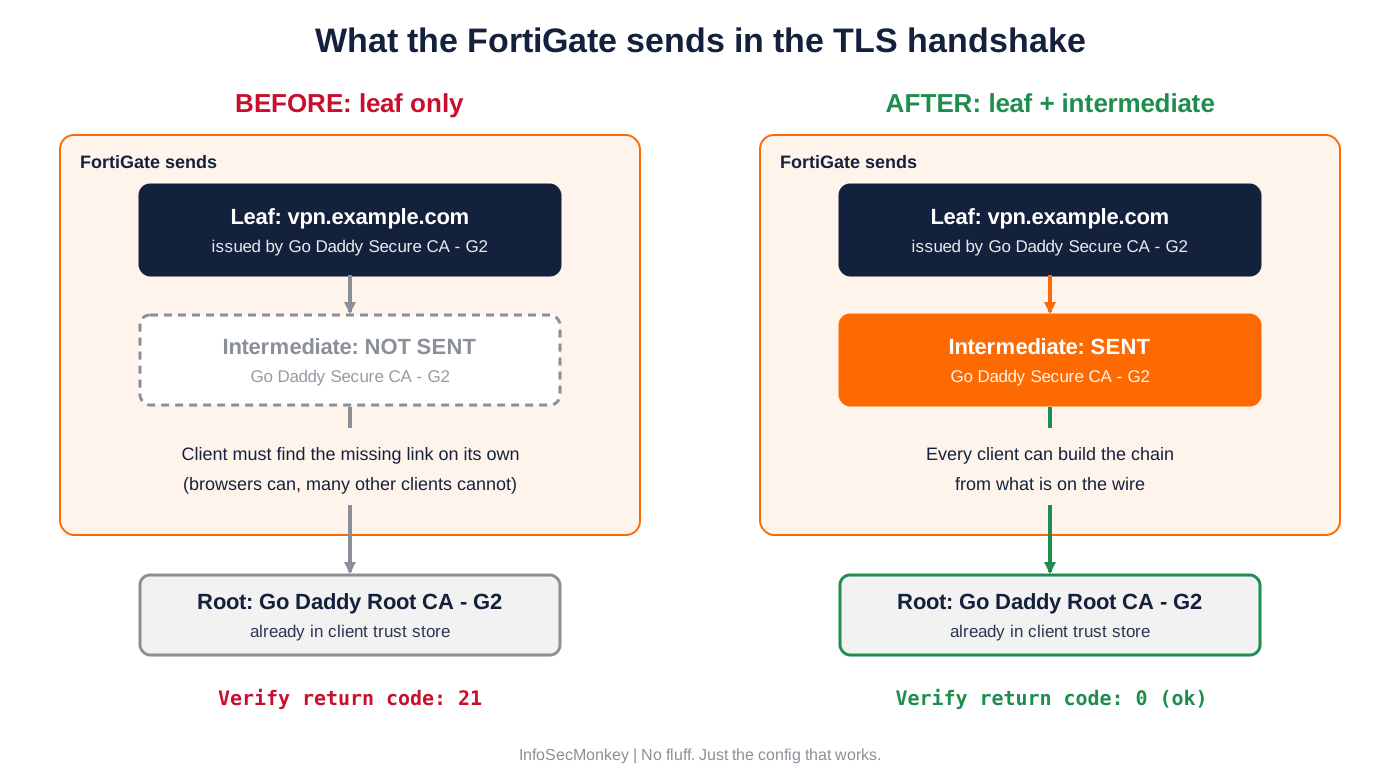
A certificate chain has three layers: the leaf (your hostname), one or more intermediates, and a root that already lives in the client’s trust store. The server is supposed to send the leaf plus every intermediate. The root stays on the client. (The handshake itself is covered step by step in How HTTPS Works: From ClientHello to Encrypted GET.)
When the intermediate is missing, what happens next depends entirely on the client:
| Client | Missing intermediate | Result |
|---|---|---|
| Chrome, Edge, Safari | Often already cached, or fetched from the leaf’s AIA URL | Works, looks fine |
| Firefox | Ships a preloaded list of known intermediates | Usually works |
| curl, wget, Python, Java, Go | No AIA fetching | Hard failure |
| VPN clients, embedded login windows | Depends on the OS library underneath | Fails or warns |
| Scanners, mail relays, API clients | Strict validation | Flags or rejects |
So the browser was not proof of anything. It was proof that one client knew a workaround.
Prerequisites and Architecture
Assumed knowledge
- How a TLS chain works: leaf, intermediate, root
- Basic OpenSSL CLI usage
- Where your FortiGate uses certificates (admin GUI, SSL VPN, VIPs with SSL offload, inspection profiles)
Lab / environment requirements
| Component | Role | Example |
|---|---|---|
| Admin workstation | Runs OpenSSL checks from outside the FortiGate | macOS or Linux, OpenSSL 3.x |
| FortiGate | Serves SSL VPN and admin GUI on a public IP | vpn.example.com, 198.18.10.1, port 10443 |
| Internal LAN | Users behind the firewall | 10.0.10.0/24 |
| GoDaddy certificate zip | Leaf plus chain bundle | <hex>.crt, gd_bundle-g2-g1.crt |
| GoDaddy repository | Clean copies of each intermediate | certs.godaddy.com/repository |
Figure 1: Leaf only (left) breaks strict clients. Leaf plus intermediate (right) builds to the trusted root.
The GoDaddy chain you are matching
For a certificate on GoDaddy’s SHA-256 hierarchy, the chain looks like this. Always confirm against your own leaf’s issuer in Step 2: reissued or newer certificates can chain to a different intermediate.
| Layer | Subject (CN) | Where it lives |
|---|---|---|
| Leaf | vpn.example.com | FortiGate local certificate |
| Intermediate | Go Daddy Secure Certificate Authority – G2 | Must be sent by the FortiGate (gdig2.crt.pem) |
| Root | Go Daddy Root Certificate Authority – G2 | Client trust store (gdroot-g2.crt) |
Step-by-Step: Fix the FortiGate Certificate Chain
Step 1: Prove what the FortiGate is sending
Goal: See the chain from the client side, exactly as a strict client sees it.
Action: Connect with OpenSSL from outside the firewall. Use the real hostname so SNI matches, and the real port (SSL VPN often is not 443).
H=vpn.example.com; P=10443 echo | openssl s_client -connect $H:$P -servername $H -showcerts 2>&1 \ | grep -E "depth=|^ *[0-9] s:|^ *i:|Verify return"
This is what the broken state looks like (captured from a lab server sending only its leaf):
Leaf only: one certificate, error 21
depth=0 CN = vpn.example.com verify error:num=20:unable to get local issuer certificate depth=0 CN = vpn.example.com verify error:num=21:unable to verify the first certificate 0 s:CN = vpn.example.com i:O = Lab Root Co, CN = Lab Secure Certificate Authority - G2 Verify return code: 21 (unable to verify the first certificate)
Verification: Count the numbered s: lines. One line means leaf only. Error 20 or 21 at depth=0 means the client could not build past your certificate. That is the scan finding, reproduced.
Step 2: Identify the exact intermediate you are missing
Goal: Get the one certificate whose Subject matches your leaf’s Issuer. Not a bundle, not a guess.
Action: Read the leaf’s Issuer and its AIA CA Issuers URL. The AIA URL is where the CA publishes the intermediate that signed it.
echo | openssl s_client -connect $H:$P -servername $H 2>/dev/null \ | openssl x509 -out leaf.pem openssl x509 -in leaf.pem -noout -issuer openssl x509 -in leaf.pem -noout -ext authorityInfoAccess
For a GoDaddy SHA-256 leaf the Issuer reads Go Daddy Secure Certificate Authority - G2. Download that intermediate from the GoDaddy repository (or pull the file named in the AIA URL), convert it to PEM if it arrives as DER, and prove it is the right one before it goes anywhere near the firewall:
# AIA files are often DER: try PEM first, fall back to DER openssl x509 -in intermediate.crt -out intermediate.pem 2>/dev/null \ || openssl x509 -inform der -in intermediate.crt -out intermediate.pem # Subject of the intermediate must equal Issuer of the leaf openssl x509 -in intermediate.pem -noout -subject # Build the chain offline: root from the trust store, intermediate untrusted openssl verify -CAfile gdroot-g2.pem -untrusted intermediate.pem leaf.pem # leaf.pem: OK
Format conversions are covered in more depth in Converting Certificates using OpenSSL.
Verification: openssl verify returns leaf.pem: OK. If it fails, you have the wrong intermediate, usually a cross-signed certificate from the bundle (see Gotcha 1).
Step 3: Pick a fix
The scan offered two fixes. Both work. They differ in blast radius and in how they behave at renewal time.
| Option A: import intermediate as CA | Option B: re-import as PKCS#12 with chain | |
|---|---|---|
| What changes | Adds one CA certificate to the FortiGate | Replaces the local certificate |
| Repointing | None. Existing references keep working | Admin GUI, SSL VPN and VIPs must be repointed |
| Scope | Every local cert from that issuer benefits | Only this certificate |
| At renewal | Keeps working if the issuer is unchanged | Repeat the bundle build |
| Best for | Fast fix on a live box | Clean, self-contained cert you can move between units |
Step 3a: Option A, import the intermediate as a CA certificate
Goal: Put the intermediate in the FortiGate’s CA store so FortiOS can attach it to the leaf.
Action: GUI: System > Certificates > Create/Import > CA Certificate, choose File, upload intermediate.pem. It appears under Remote CA Certificates with a generated name such as CA_Cert_1. Or paste it from the CLI:
config vpn certificate ca edit "GoDaddy-Secure-CA-G2" set ca "-----BEGIN CERTIFICATE----- <paste the PEM body of intermediate.pem> -----END CERTIFICATE-----" next end
Maintenance window
Fortinet’s own guidance warns that importing a CA certificate used by SSL VPN disconnects connected users, and that the SSL VPN daemon does not reload CA certificates on its own. Plan the import and the daemon restart in Step 4 together, after hours.
Fortinet’s own guidance warns that importing a CA certificate used by SSL VPN disconnects connected users, and that the SSL VPN daemon does not reload CA certificates on its own. Plan the import and the daemon restart in Step 4 together, after hours.
GUI verification: The intermediate is listed under Remote CA Certificates with the Subject Go Daddy Secure Certificate Authority - G2. The root does not need importing if it is already in the FortiGate’s factory CA list.
Step 3b: Option B, re-import as PKCS#12 with the chain
Goal: Make the local certificate carry its own chain.
Action: Bundle the leaf, its key and the intermediate into one PKCS#12 file. Add only the intermediate with -certfile, not the whole gd_bundle.
openssl pkcs12 -export -inkey server.key -in leaf.pem \ -certfile intermediate.pem -name vpn-example-2026 -out vpn-example-2026.p12 # Older FortiOS builds may reject OpenSSL 3's default AES PKCS#12. # If the import fails, rebuild with legacy algorithms: openssl pkcs12 -export -legacy -inkey server.key -in leaf.pem \ -certfile intermediate.pem -name vpn-example-2026 -out vpn-example-2026.p12
Import under System > Certificates > Create/Import > Certificate > Import Certificate, type PKCS#12. (The same flow is shown for a wildcard in Using OpenSSL to Provision Wildcard Certificate.) Then repoint every reference to the new name:
config system global set admin-server-cert "vpn-example-2026" end config vpn ssl settings set servercert "vpn-example-2026" end config firewall vip edit "<vip-name>" set ssl-certificate "vpn-example-2026" next end
GUI verification: The new local certificate shows a reference count above zero, and the old one drops to zero.
Step 4: Reload what serves the certificate
Goal: Make the running daemons pick up the change.
Action: Restart the SSL VPN daemon. This drops active SSL VPN sessions, so do it in the window.
fnsysctl killall sslvpnd
GUI verification: SSL VPN monitor shows users reconnecting normally. If the admin GUI still sends a single certificate after Step 5, schedule a reboot in the same window rather than chasing it live.
Verification and Validation
Rerun the exact command from Step 1. The fixed state, from the same lab server now sending its chain:
Leaf plus intermediate: two certificates, return code 0
depth=2 O = Lab Root Co, CN = Lab Root Certificate Authority - G2 verify return:1 depth=1 O = Lab Root Co, CN = Lab Secure Certificate Authority - G2 verify return:1 depth=0 CN = vpn.example.com verify return:1 0 s:CN = vpn.example.com i:O = Lab Root Co, CN = Lab Secure Certificate Authority - G2 1 s:O = Lab Root Co, CN = Lab Secure Certificate Authority - G2 i:O = Lab Root Co, CN = Lab Root Certificate Authority - G2 Verify return code: 0 (ok)
Then test with a client that never fetches missing intermediates. curl is the honest one:
curl -sS -o /dev/null https://vpn.example.com:10443/ && echo CHAIN-OK # Broken state prints: # curl: (60) SSL certificate problem: unable to get local issuer certificate
If you look after more than one FortiGate, check them all at once. This script reports how many certificates each endpoint sends and whether the chain verifies. It needs only Bash and OpenSSL:
chain-check.sh
#!/usr/bin/env bash
# chain-check.sh: report how many certificates each TLS endpoint sends
# and whether the chain verifies without help from the client.
# Usage: ./chain-check.sh hosts.txt (one host or host:port per line)
IN="${1:-hosts.txt}"
printf '%-24s %-5s %-6s %-10s %s\n' "ENDPOINT" "CERTS" "VERIFY" "STATUS" "ISSUER"
while read -r line; do
line="${line%%#*}"; line="${line//[[:space:]]/}"
[[ -z "$line" ]] && continue
host="${line%%:*}"; port="${line##*:}"
[[ "$port" == "$host" ]] && port=443
out=$(echo | timeout 10 openssl s_client -connect "$host:$port" \
-servername "$host" -showcerts 2>&1)
n=$(grep -c "BEGIN CERTIFICATE" <<<"$out")
if [[ "$n" -eq 0 ]]; then
printf '%-24s %-5s %-6s %-10s\n' "$host:$port" "-" "-" "NO-TLS"
continue
fi
code=$(awk -F'[:(]' '/Verify return code/{gsub(/ /,"",$2); print $2}' \
<<<"$out" | tail -1)
iss=$(openssl x509 -noout -issuer <<<"$out" 2>/dev/null \
| sed -e 's/.*CN *= *//' -e 's/Certificate Authority/CA/')
st="ok"; [[ "$n" -eq 1 ]] && st="LEAF-ONLY"
[[ "$code" != "0" ]] && [[ "$n" -gt 1 ]] && st="CHECK"
printf '%-24s %-5s %-6s %-10s %s\n' "$host:$port" "$n" "$code" "$st" "$iss"
done <"$IN"
chmod +x chain-check.sh ./chain-check.sh hosts.txt
Expected output: one bad endpoint, one good
ENDPOINT CERTS VERIFY STATUS ISSUER vpn.example.com:10443 1 21 LEAF-ONLY Go Daddy Secure CA - G2 fw02.example.com:443 2 0 ok Go Daddy Secure CA - G2
Success criteria: Two or more certificates, verify code 0, curl prints CHAIN-OK, and the external scan no longer reports an incomplete chain on rescan.
Troubleshooting and Gotchas
Gotcha 1: The bundle has the wrong certificate in it
GoDaddy’s gd_bundle-g2-g1.crt contains more than the intermediate. It also carries a cross-signed copy of the G2 root, issued by the older Go Daddy Class 2 root, for very old clients. Import the whole bundle and the FortiGate can end up sending a longer chain that leads to a legacy root some strict clients no longer trust.
# List every certificate inside the bundle, subject and issuer openssl crl2pkcs7 -nocrl -certfile gd_bundle-g2-g1.crt \ | openssl pkcs7 -print_certs -noout
Fix: Import only the certificate whose Subject equals your leaf’s Issuer. Remove any cross-signed root you imported from the bundle.
Gotcha 2: Imported the CA, still one certificate on the wire
Three usual causes: the SSL VPN daemon was not restarted, the CA was imported into a different VDOM than the local certificate, or you checked a cached session.
show vpn certificate ca fnsysctl killall sslvpnd
Fix: Confirm the CA shows in the same scope as the local certificate, restart the daemon, and retest from a fresh OpenSSL connection, not a browser tab.
Gotcha 3: It breaks again at renewal
Every reissue, rekey or renewal is a chance for the issuing intermediate to change. Option A only covers the intermediate you imported, and Option B only covers the file you built. With public certificate lifetimes shrinking toward 47 days (The 47-Day Certificate), this check has to be part of every swap.
Fix: Add chain-check.sh to the renewal runbook and run it after every certificate change. While you are in there, review the rest of the box with The Certificates Your FortiGate Ships With, and if the symptom is broken HTTPS through the FortiGate rather than to it, start with FortiGate SNI Troubleshooting.
Sources
- Fortinet: Verify and resolve issues when FortiGate does not send the full certificate chain
- Fortinet: Fix a certificate chain shown as Incomplete on a Qualys SSL scan
- Fortinet: Force a specific certificate chain on SSL VPN and SSL/SSH inspection
- Fortinet: Avoid certificate errors by chaining Root CA and Intermediate CA certificates
- GoDaddy Help: Fix an untrusted root or certificate chain error
InfoSecMonkey | No fluff. Just the config that works.
Recent posts
-

-

DNS is one of those technologies that quietly underpins... Full Story
-

BGP issues on FortiGate firewalls usually trace back to... Full Story
-

Every time your laptop talks to your router, a... Full Story
-

If you've spent any time configuring NAT on a... Full Story
-

If you have spent any time configuring firewall policies... Full Story
-

High availability on FortiGate is one of those features... Full Story
-

If you've configured SD-WAN on a FortiGate, you've almost... Full Story
-

FortiLink is the management protocol that turns a FortiSwitch... Full Story
-

FortiSwitches are pretty rock solid from Mean Time Between... Full Story
-

This is a quicky tip. Have you ever gone... Full Story
-

DNS is one of those quiet pieces of internet... Full Story
-

This article is an updated version of the previous... Full Story
-

You will add ns2 as a secondary (slave) BIND9... Full Story
-

In the process of deploying my lab, I needed... Full Story
-

RFC 8805, used to be known as Self-Correcting IP... Full Story
-

Years back, I wrote an article about certificate pinning. ... Full Story
-

FortiGates have the ability to send alerts to Microsoft... Full Story
-

In this post, I am going to walk through... Full Story
-

Troubleshooting VoIP on a FortiGate can feel like trying... Full Story
-

Prior to FortiOS 7.0, there were three commands to... Full Story
-

In this post, I am going to go over... Full Story
-

What we are going to do: We are going... Full Story
-

Choosing between FGCP (FortiGate Clustering Protocol) and FGSP (FortiGate... Full Story
-

Creating a VLAN on macOS (The "Pro" Move) A... Full Story
-

This blog post explores the logic behind how macOS... Full Story
-

Pretty Fly for a Wi-Fi Tell My Wi-Fi Love... Full Story
-

Part of my daily gig is creating BoMs (Bill-of-Materials)... Full Story
-

ICMP introduces several security risks, but careful filtering, rate... Full Story
-

The command diag debug application dhcps -1 enables full... Full Story
-

In the world of FortiOS, execute tac report is... Full Story
-

LLDP; What is it The Link Layer Discovery Protocol... Full Story
-

What it actually does When you run diagnose fdsm... Full Story
-

Monkey Bites are bite-sized, high-impact security insights designed for... Full Story
-

I have run macOS in macOS with Parallels but... Full Story
-

Don't be confused with my other FortiNAC posts where... Full Story
-

This is the third session in a multi-part article... Full Story
-

Today I was configuring key-based authentication on a FortiGate... Full Story
-

Netcat, often called the "Swiss Army knife" of networking,... Full Story
-

At its core, IEEE 802.1X is a network layer... Full Story
-

In case you did not see the previous FortiNAC... Full Story
-

This is our 5th session where we are going... Full Story
-

Now that we have Wireshark installed and somewhat configured,... Full Story
-

The Philosophy of Packet Analysis Troubleshooting isn't about looking... Full Story
-

No fluff. Just the config that works. Executive Summary... Full Story
-

No fluff. Just the config that works. FortiGate can... Full Story
-

Executive Summary A routine external scan of a customer's... Full Story