
If you've spent any time configuring user authentication on... Full Story
By Manny Fernandez
October 22, 2026
Fortinet ZTNA Explained: What It Is and How It Works
No fluff. Just the config that works. This one is the concept and the plumbing. The configuration walkthrough is the next post.
Executive Summary
Fortinet ZTNA (Zero Trust Network Access) replaces the old “connect to the network, then you are trusted” model with a per-application, per-session decision: who is the device, who is the user, is the device healthy right now, and is this exact app allowed. This post breaks down how Fortinet ZTNA works conceptually and technically, which components do what, and what actually happens on the wire when a user opens an app.
Objective: Understand the Fortinet ZTNA architecture end to end (components, trust model, request flow, access methods, deployment models, and what changed in FortiOS 8.0) before touching a single line of config.
Target audience: FortiGate administrators, network and security engineers planning a move off SSL VPN, and architects who need to explain ZTNA to the rest of the room.
Versions referenced: FortiOS 7.0 (where ZTNA landed in FortiOS), 7.4 and 7.6 (where most production deployments live today), and 8.0 (the current train). FortiClient and FortiClient EMS 7.4.x and later.
Prerequisites and Architecture
Assumed knowledge
- FortiGate firewall policies, VIPs, and security profiles
- TLS basics: certificate authorities, CSRs, server certificates, and mutual TLS (client certificates)
- An identity source: Active Directory or LDAP, RADIUS, or a SAML identity provider
Lab addressing used in this post
| Item | Address | Purpose |
|---|---|---|
| ZTNA access proxy (FortiGate WAN) | 198.18.10.10:443 | The only thing exposed to users |
| FortiClient EMS | 10.0.10.5 | Device CA, posture tagging, telemetry |
| Internal web app (wiki) | 10.0.20.10:443 | HTTPS access proxy target |
| RDP host | 10.0.20.20:3389 | TCP forwarding target |
| File server | 10.0.20.30:445 | TCP forwarding target |
The components
| Component | Role in Fortinet ZTNA | What it actually does |
|---|---|---|
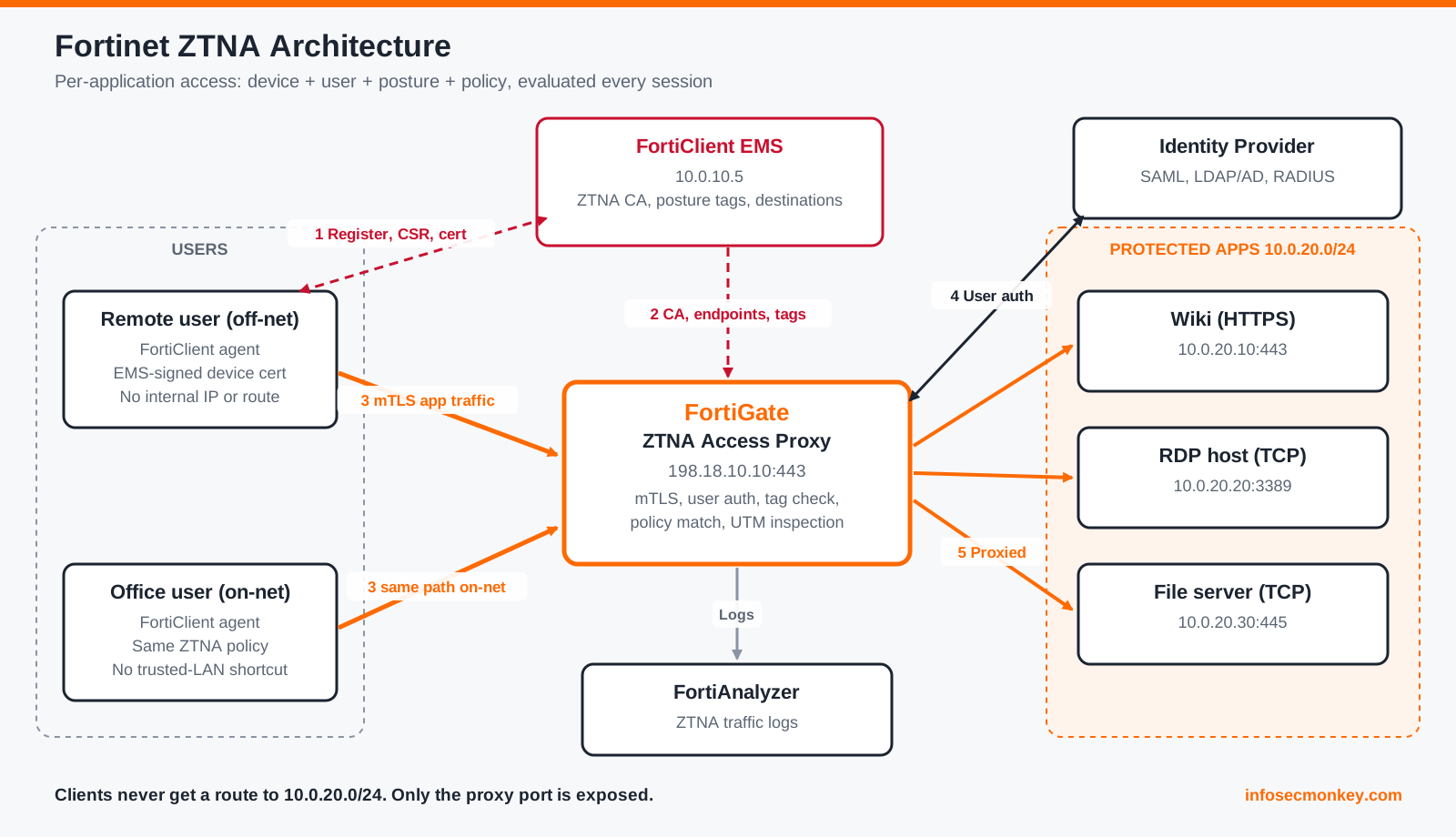
| FortiGate | Enforcement point (ZTNA access proxy, also called the ZTNA application gateway) | Terminates the client TLS session, validates the device certificate, authenticates the user, checks posture tags, matches policy, runs security profiles, and proxies the session to the real app |
| FortiClient | ZTNA agent on the endpoint | Registers to EMS, reports telemetry, holds the device certificate, and intercepts traffic for protected destinations so it can be tunneled to the proxy |
| FortiClient EMS | The brain and the certificate authority | Signs device certificates, evaluates posture rules into tags, pushes ZTNA destinations to clients, and syncs tags and certificate data to FortiGates |
| Identity provider | Answers “who is the user” | LDAP or AD, RADIUS, or SAML (Entra ID, Okta, FortiAuthenticator), wired into FortiGate authentication schemes and rules |
| FortiAnalyzer | Visibility | Collects ZTNA traffic logs with user, device, and tag context for reporting and investigations |
| FortiSASE, FortiProxy, FortiPAM | Alternate enforcement points | Same trust model delivered from cloud PoPs or dedicated proxy platforms |
Why ZTNA Exists: The Problem With “Connect, Then Trust”
A traditional remote access VPN does one big check at the door and then hands the user a routed path into the network. After that:
- Access is network-scoped, not app-scoped. Policies usually allow whole subnets because writing per-app rules for every VPN group is painful.
- Trust is evaluated once. Posture, if it is checked at all, is checked at connect time. A laptop that drops its EDR agent an hour later still has a tunnel.
- Lateral movement is easy. A compromised endpoint with a VPN IP can scan and reach anything the policy allows, which is usually a lot.
- The gateway is a big internet-facing target. SSL VPN portals have been one of the most attacked surfaces on the internet for years, across every vendor.
Zero trust flips the defaults: no implicit trust based on network location, verify every session, grant the least privilege needed for one application, and keep re-evaluating the device as its state changes.
The one-line mental model: a VPN gives you access to a network. ZTNA gives you access to an application.
The Four Questions Behind Every Fortinet ZTNA Decision
Every ZTNA session through a FortiGate has to answer four questions. Fail any one of them and the request is denied.
1. Who is the device?
Device identity comes from a client certificate. When FortiClient registers to FortiClient EMS, it submits a certificate signing request and EMS, acting as the ZTNA certificate authority, signs a certificate that carries the FortiClient UID. EMS tracks the certificate serial number and its own EMS serial number alongside it. The FortiGate receives the EMS CA certificate and the endpoint records over the EMS fabric connector, so when a client presents its certificate, the FortiGate can verify the signature and map the certificate back to a specific, managed endpoint.
This is the part a stolen password cannot fake. Valid credentials on an unmanaged laptop do not produce an EMS-signed certificate.
2. Who is the user?
User identity is handled by FortiGate authentication rules and schemes, the same building blocks used by explicit proxy. Options include basic or form-based authentication against LDAP or RADIUS, SAML against an external IdP, and Kerberos-based transparent methods. FortiOS 7.6.3 added an entra-sso authentication method so a domain-joined Windows user can be authenticated against their existing Microsoft Entra ID session without a second prompt.
3. Is the device healthy right now?
Posture is expressed as ZTNA tags (called security posture tags in newer EMS releases). EMS tagging rules evaluate what FortiClient reports: OS and patch level, antivirus and EDR state, domain membership, presence of certificates, files or registry keys, vulnerability counts, the logged-in user’s AD group, on-net or off-net status, and more. The result is a set of named tags per endpoint, such as Corp-Compliant or Critical-Vulns-Present.
Tags are synced from EMS to the FortiGate, where they become objects you reference in policy. They work both ways: require a good tag to allow, or match a bad tag (for example, a malicious file detection) to block. When an endpoint’s state changes, EMS updates its tag membership and pushes the change to the FortiGate, so the next access decision is made on the current state, not on what was true at login.
4. Is this user, on this device, allowed to this app?
Finally, the FortiGate matches the request against ZTNA policy: source user or group, required and forbidden tags, the ZTNA destination or server, and the action. Accepted traffic then runs through whatever security profiles you attach.
How Fortinet ZTNA Works: The Lifecycle of a Session
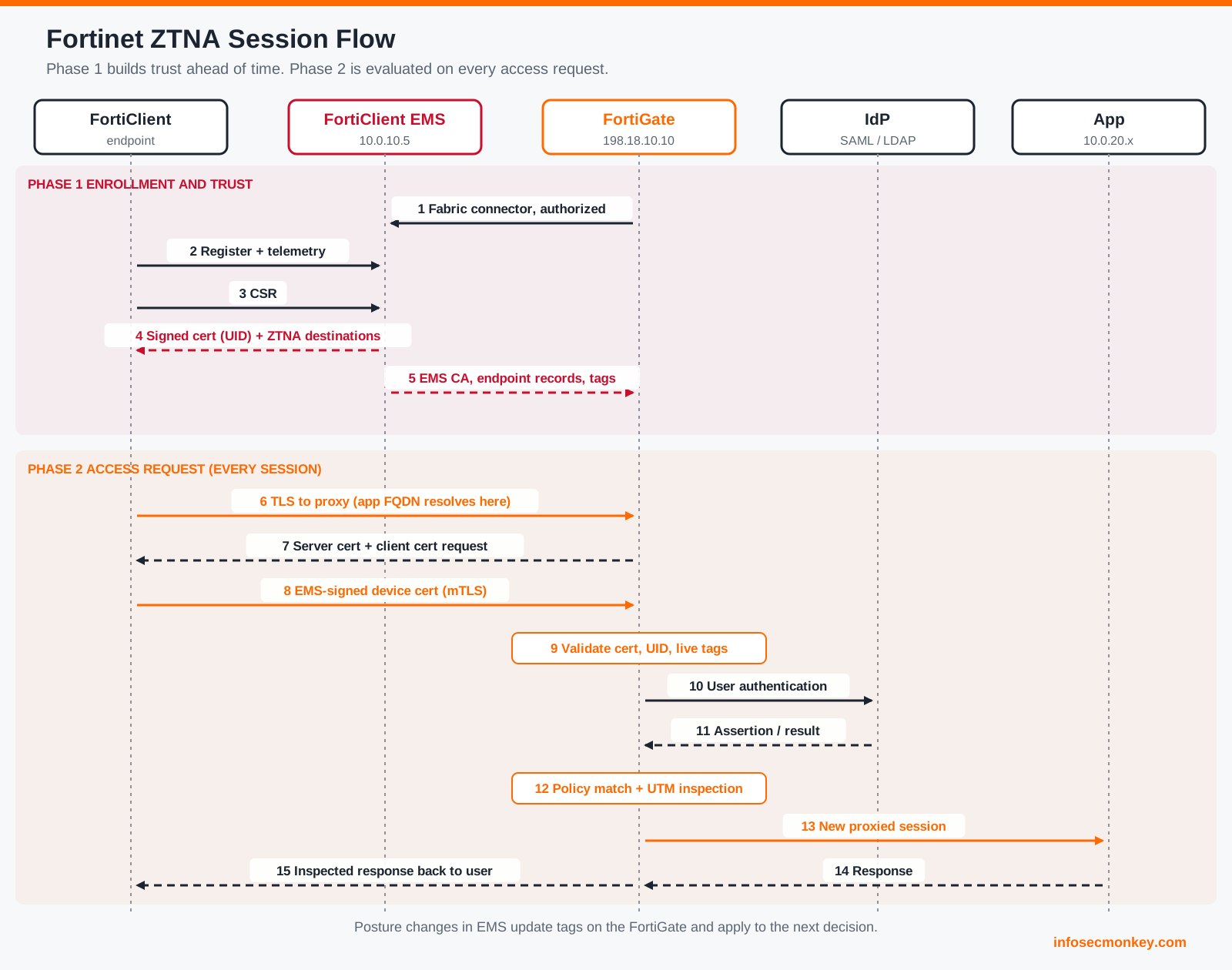
It helps to split the flow into two phases. Phase 1 happens long before a user clicks anything. Phase 2 is the actual access request.
Phase 1: Enrollment and trust establishment
- FortiGate joins EMS. The FortiGate connects to EMS through the FortiClient EMS fabric connector. The FortiGate must trust the EMS server certificate, and an EMS admin must authorize the FortiGate as a fabric device. Until both happen, no tags or certificates flow.
- FortiClient registers to EMS. The endpoint sends telemetry: device details, the logged-in user, and its posture data.
- EMS issues the device certificate. FortiClient generates a CSR. EMS signs a client certificate containing the FortiClient UID and records the certificate serial number.
- EMS evaluates tagging rules. The endpoint lands in zero or more tags.
- EMS syncs to the FortiGate. The EMS CA certificate, endpoint records (UID, certificate serial, user, IP and MAC), and tag membership are shared with every authorized FortiGate. Which tag types get shared is controlled per fabric device in EMS.
- EMS pushes ZTNA destinations to FortiClient. These tell the agent which hostnames or IP and port combinations are protected, and which proxy gateway (198.18.10.10:443 in our lab) to send them through.
Phase 2: The access request
Scenario A: an internal web app through the HTTPS access proxy
- The user browses to
https://wiki.lab.example. DNS resolves the name to the ZTNA access proxy, 198.18.10.10, not to the real server. - The TLS handshake terminates on the FortiGate. The FortiGate presents its own server certificate for the app name and requests a client certificate. The endpoint presents the EMS-signed certificate. This is mutual TLS.
- The FortiGate validates the certificate against the synced EMS CA, extracts the UID, and looks up that endpoint’s record and current tags.
- If the policy requires user authentication, the FortiGate runs the matching authentication rule, for example a SAML redirect to the IdP.
- The FortiGate matches ZTNA policy: user or group, required and blocked tags, destination.
- Because the FortiGate is the TLS terminator, the traffic is already decrypted, so antivirus, IPS, web filter, application control, and DLP can inspect it without a separate SSL inspection step.
- The FortiGate opens its own connection to the real server at 10.0.20.10, optionally re-encrypted, with load balancing and health checks across multiple real servers if configured.
- The session is logged as ZTNA traffic with the user, device UID, matched tags, and policy.
Scenario B: RDP through the TCP forwarding access proxy
- The user opens an RDP client to 10.0.20.20 (or its hostname).
- FortiClient sees that the destination matches a ZTNA destination pushed from EMS. It intercepts the connection locally, acting as a local proxy, and opens an HTTPS session with its device certificate to 198.18.10.10.
- The RDP stream is carried inside that HTTPS session. FortiClient can be set to skip its own extra encryption layer for protocols that are already encrypted, trading a bit of defense in depth for less overhead.
- The FortiGate runs the same device, user, posture, and policy checks, then forwards the TCP stream to 10.0.20.20:3389.
The user never gets an IP address on the internal network and never gets a route to 10.0.20.0/24. FortiClient only forwards the specific destinations EMS told it about.
Scenario C: UDP applications over QUIC
ZTNA was TCP-only for its first few releases. With FortiClient and EMS 7.4.1 or later, UDP can be enabled per ZTNA application: FortiClient detects UDP traffic to a protected destination and carries it over a QUIC connection to the access proxy, which needs HTTP/3 and QUIC support enabled. After the same authentication, posture, and authorization checks, the proxy forwards the UDP flow to the destination.
Fortinet ZTNA Access Methods
| Method | Client needed | Device cert and posture | Typical apps | Notes |
|---|---|---|---|---|
| HTTPS access proxy | Browser plus FortiClient (for the certificate and tags) | Yes | Internal web apps and portals | Reverse proxy, path-based mapping, load balancing across real servers |
| TCP forwarding access proxy | FortiClient | Yes | RDP, SSH, SMB, databases, LDAP | TCP tunneled inside HTTPS to the proxy |
| UDP over QUIC | FortiClient 7.4.1 or later | Yes | UDP-based internal services | Proxy must have HTTP/3 and QUIC enabled |
| SaaS access control (inline CASB) | FortiClient | Yes | Microsoft 365, other SaaS | Steer SaaS through the proxy to apply tenant and activity controls |
| Agentless web portal | Browser only | No | Contractors, BYOD, unmanaged devices | FortiOS 7.6.1 and later; bookmark portal with user authentication only |
| IP/MAC-based access control | FortiClient registered to EMS | Tags only, no certificate check | On-net segmentation | Tags resolve to endpoint IP and MAC addresses inside regular firewall policies; no proxy in the path |
Full ZTNA versus IP/MAC-based access control
Fortinet documents two modes. Full ZTNA is the proxy model described above: an SSL-encrypted access proxy, a device certificate, user authentication, posture, and per-app policy. IP/MAC-based access control reuses the same tags inside normal firewall policies. EMS knows each endpoint’s IP and MAC, so a tag like Corp-Compliant effectively becomes a dynamic address group the firewall can enforce on-net, for example to keep non-compliant laptops off a server VLAN. It is useful for internal segmentation, but it is not proxy-based ZTNA: there is no device certificate check and no per-session application gateway.
In the FortiOS 7.2 and 7.4 GUI you will also see this split described as simple ZTNA policies (regular firewall policies with ZTNA tags) versus full ZTNA policies (proxy policies). Same idea, different labels.
Where agentless fits
The ZTNA agentless web portal (FortiOS 7.6.1 and later) gives browser-only users a bookmark portal after they authenticate, much like the old SSL VPN web mode. It is a good answer for contractors and unmanaged devices, but be clear about what it is not: there is no FortiClient, no EMS certificate, and no posture tags. You get user identity and per-app proxying, not device trust.
Universal ZTNA: Same Policy On-Net and Off-Net
A common misconception is that ZTNA is only for remote users. In the Fortinet model, the same proxy and the same policy can serve a user at home and a user at their desk. EMS on-fabric detection rules tell FortiClient whether it is on the corporate network, and that state can itself be a tag. As long as DNS for the protected app resolves to the access proxy in both places, office users get the same device, user, and posture checks as remote users. There is no “trusted LAN” shortcut.
What Fortinet ZTNA Gives You
- Per-application, least-privilege access. Users reach specific apps, never routed subnets.
- Less lateral movement. A compromised laptop sees a handful of proxied applications, not the network behind them.
- Hidden applications. Only the access proxy port is exposed. The real servers are not reachable from the client side at all.
- Posture-aware decisions that track the device. Tag changes in EMS reach the FortiGate and affect the next decision.
- Full inspection without extra SSL inspection setup. The proxy terminates TLS, so the same NGFW security profiles apply.
- Uses the FortiGates you already own. The access proxy is part of FortiOS (since 7.0). The endpoint side is licensed through FortiClient EMS.
- Consistent policy everywhere. One policy for on-net and off-net users, and the same model extends to FortiSASE.
- Better logs. Every ZTNA log line carries user, device UID, and tag context, which is far more useful in an investigation than a VPN pool IP.
- A clear exit from SSL VPN. Starting in FortiOS 7.6.3, IPsec replaced SSL VPN tunnel mode as the default remote access method, and agentless (web mode) VPN was dropped on several desktop models. Fortinet positions ZTNA, including the agentless web portal, as the forward path.
Fortinet ZTNA vs SSL VPN vs IPsec Remote Access
| SSL VPN / IPsec remote access | Fortinet ZTNA | |
|---|---|---|
| Access scope | Network (subnets) | Application (host and port, or URL) |
| When trust is evaluated | Once, at connect | Every session, with live posture |
| Device identity | Optional, often skipped | Required (EMS-signed certificate) in full ZTNA |
| Client gets an internal IP | Yes | No |
| Lateral movement risk | High if policy is broad | Low; only proxied destinations exist |
| Inspection | Firewall policy on tunnel traffic | Proxy terminates TLS, full profiles |
| Unmanaged devices | Web mode portal (being retired) | Agentless web portal (7.6.1 and later) |
| Best for | Full network access for admins, legacy apps that need it | Day-to-day user access to defined apps |
ZTNA does not have to replace every tunnel on day one. Many shops keep an IPsec profile for IT staff who genuinely need network-level access and move everyone else to ZTNA.
Deployment Models
- FortiGate as the access proxy. The most common model: an existing perimeter or data center FortiGate (hardware, VM, or cloud) becomes the ZTNA gateway. FortiOS 7.2.5 added an ESXi OVF template that bootstraps a FortiGate-VM as a dedicated zero trust application gateway.
- FortiSASE. Enforcement moves to Fortinet cloud PoPs, with the same FortiClient and EMS model, plus agentless ZTNA for browser-only users.
- FortiProxy. A dedicated proxy platform supporting the same HTTPS, TCP, and UDP access proxy types.
- ZTNA service connector (FortiOS 8.0). New in 8.0, a FortiGate can act as a service connector that builds outbound connections to an upstream ZTNA edge, such as FortiPAM or FortiProxy. The edge does the ZTNA checks and enforces policy, and the FortiGate reverse-proxies the session to the local app. The site hosting the app needs no inbound exposure at all.
What Changed in FortiOS 8.0
If your ZTNA screenshots are from 7.2 or 7.4, the 8.0 GUI and CLI will look different. Fortinet modularized the configuration so objects can be mixed and matched:
- New dedicated objects:
config ztna web-proxy,config ztna traffic-forward-proxy, andconfig ztna web-portal, plusconfig ztna destinationfor TCP forwarding targets. This work started in 7.6 and is completed in 8.0. - The ZTNA VIP is now a ZTNA Port object, configured on its own Ports page. Previously a ZTNA VIP was bound to one ZTNA server definition and its real servers.
firewall proxy-policyreferences a newztna-proxytype that points at those objects, and ZTNA policies reference the ZTNA destination directly for TCP forwarding.- The agentless web portal is supported in the new model.
- The ZTNA service connector (described above) arrives.
The concepts in this post are unchanged across versions. Only the object model and menu locations moved. The configuration post covers both 7.6 and 8.0 syntax.
Verification and Validation: Peeking Under the Hood
No configuration here, but these read-only commands show the moving parts described above on a FortiGate that already has ZTNA running. Replace the placeholders with your values.
Check that the FortiGate can reach EMS and trusts it:
diagnose endpoint fctems test-connectivity <ems-connector-name>List the endpoint records the FortiGate learned from EMS (UID, user, IP, MAC, and status):
diagnose endpoint record listLook up a single endpoint by FortiClient UID and see its certificate serial and current tags:
diagnose endpoint lls-comm send ztna find-uid <FortiClient-UID>What success looks like (illustrative, values are placeholders):
UID: 3C1F0A9E7B2D4E61A8F05C77D2B9E410
 -uid 3C1F0A9E7B2D4E61A8F05C77D2B9E410: {
    "user_name": "jdoe",
    "client_cert_sn": "5E0A...91C4",
    "ems_sn": "FCTEMS0000000001",
    "tags": [ "all_registered_clients", "Corp-Compliant" ] }
If the tag you expect is missing here, the FortiGate will not match the policy, no matter how the policy is written.
See how tags have been resolved into dynamic addresses (useful for IP/MAC-based access control):
diagnose firewall dynamic listPull ZTNA traffic logs from the CLI:
execute log filter reset
execute log filter category 0
execute log filter field subtype ztna
execute log display
Watch the proxy daemon (WAD) make its decision in real time, then turn it off:
diagnose wad debug enable category all
diagnose wad debug enable level verbose
diagnose debug enable
# reproduce the access attempt, then:
diagnose debug disable
diagnose debug reset
Troubleshooting and Gotchas
1. DNS is the steering wheel
ZTNA only works if the client sends traffic to the access proxy. For the HTTPS access proxy, the app FQDN must resolve to the ZTNA port (198.18.10.10 in the lab), both off-net and on-net if you want universal ZTNA. If internal DNS still points wiki.lab.example at 10.0.20.10, on-net users bypass ZTNA entirely and you will see nothing in the ZTNA logs.
Diagnose: nslookup <app-fqdn> on the client from each location, then check whether any ZTNA traffic log exists for that user. Fix: make the protected name resolve to the proxy in every view of your DNS, and remove direct paths in firewall policy.
2. Certificate trust has three links, and any one can break
The FortiGate must trust the EMS server certificate (connector), the FortiGate must hold the EMS CA (to validate device certificates), and the client must trust the certificate on the ZTNA port (for the app name). Symptoms range from a disconnected EMS connector to repeated client certificate prompts or ERR_SSL_PROTOCOL_ERROR in the browser.
Diagnose: diagnose endpoint fctems test-connectivity <ems-connector-name> and diagnose endpoint record list to confirm the endpoint and certificate serial are known. Fix: import the CA that signed the EMS server certificate if it is private, re-authorize the FortiGate in EMS, and use a ZTNA port certificate (often a wildcard) that clients already trust.
3. Tags are data, not decisions
A policy that requires a tag can only match endpoints that EMS has put in that tag and shared with this FortiGate. Unregistered FortiClients have no tags. Tag types (for example, classification tags) must be explicitly shared to the fabric device in EMS. Tag names on the FortiGate are prefixed by the EMS connector, so Corp-Compliant in EMS shows up with a prefix in FortiOS.
Diagnose: diagnose endpoint lls-comm send ztna find-uid <FortiClient-UID> and compare its tags to the policy. Fix: correct the tagging rule or the sharing settings in EMS, not the firewall policy.
4. Agentless is not ZTNA with posture
The agentless web portal is valuable, but there is no device certificate and no posture. Treat it as identity-based app proxying for unmanaged devices and scope it to low-risk apps. Keep sensitive apps behind full ZTNA so a managed, compliant device is mandatory.
What’s Next
The follow-up post is the hands-on build: connecting the FortiGate to EMS, writing tagging rules, building a ZTNA server or ZTNA Port, HTTPS and TCP forwarding rules, SAML authentication, and the ZTNA policy itself, with both FortiOS 7.6 and 8.0 syntax.
References
- Fortinet Docs: Zero Trust Network Access introduction (FortiOS)
- Fortinet Docs: ZTNA HTTPS access proxy example
- Fortinet Docs: FortiOS 8.0 ZTNA configuration simplification
- Fortinet Docs: FortiOS 8.0 ZTNA service connector
- Fortinet Docs: ZTNA for UDP traffic
- Fortinet Community: Alternatives to SSL VPN web mode
- Fortinet Community: ZTNA resource access through Microsoft Entra ID
Recent posts
-

-

DNS is one of those technologies that quietly underpins... Full Story
-

BGP issues on FortiGate firewalls usually trace back to... Full Story
-

Every time your laptop talks to your router, a... Full Story
-

If you've spent any time configuring NAT on a... Full Story
-

If you have spent any time configuring firewall policies... Full Story
-

High availability on FortiGate is one of those features... Full Story
-

If you've configured SD-WAN on a FortiGate, you've almost... Full Story
-

FortiLink is the management protocol that turns a FortiSwitch... Full Story
-

FortiSwitches are pretty rock solid from Mean Time Between... Full Story
-

This is a quicky tip. Have you ever gone... Full Story
-

DNS is one of those quiet pieces of internet... Full Story
-

This article is an updated version of the previous... Full Story
-

You will add ns2 as a secondary (slave) BIND9... Full Story
-

In the process of deploying my lab, I needed... Full Story
-

RFC 8805, used to be known as Self-Correcting IP... Full Story
-

Years back, I wrote an article about certificate pinning. ... Full Story
-

FortiGates have the ability to send alerts to Microsoft... Full Story
-

In this post, I am going to walk through... Full Story
-

Troubleshooting VoIP on a FortiGate can feel like trying... Full Story
-

Prior to FortiOS 7.0, there were three commands to... Full Story
-

In this post, I am going to go over... Full Story
-

What we are going to do: We are going... Full Story
-

Choosing between FGCP (FortiGate Clustering Protocol) and FGSP (FortiGate... Full Story
-

Creating a VLAN on macOS (The "Pro" Move) A... Full Story
-

This blog post explores the logic behind how macOS... Full Story
-

Pretty Fly for a Wi-Fi Tell My Wi-Fi Love... Full Story
-

Part of my daily gig is creating BoMs (Bill-of-Materials)... Full Story
-

ICMP introduces several security risks, but careful filtering, rate... Full Story
-

The command diag debug application dhcps -1 enables full... Full Story
-

In the world of FortiOS, execute tac report is... Full Story
-

LLDP; What is it The Link Layer Discovery Protocol... Full Story
-

What it actually does When you run diagnose fdsm... Full Story
-

Monkey Bites are bite-sized, high-impact security insights designed for... Full Story
-

I have run macOS in macOS with Parallels but... Full Story
-

Don't be confused with my other FortiNAC posts where... Full Story
-

This is the third session in a multi-part article... Full Story
-

Today I was configuring key-based authentication on a FortiGate... Full Story
-

Netcat, often called the "Swiss Army knife" of networking,... Full Story
-

At its core, IEEE 802.1X is a network layer... Full Story
-

In case you did not see the previous FortiNAC... Full Story
-

This is our 5th session where we are going... Full Story
-

Now that we have Wireshark installed and somewhat configured,... Full Story
-

The Philosophy of Packet Analysis Troubleshooting isn't about looking... Full Story
-

Plus what you actually get with FortiCare Essential, Premium... Full Story
-

No fluff. Just the config that works. This one... Full Story
-

No fluff. Just the config that works. Executive Summary... Full Story