
If you've spent any time configuring user authentication on... Full Story
By Manny Fernandez
October 29, 2026
ICAP Configuration on FortiGate, Palo Alto and Cisco: How Content Redirection Really Works
ICAP Configuration on FortiGate, Palo Alto and Cisco: How Content Redirection Really Works
No fluff. Just the config that works.
Objective: Explain how ICAP (RFC 3507) hands HTTP traffic from a firewall or proxy to an external content engine, then walk through the exact ICAP configuration on FortiGate, Palo Alto Networks and Cisco, verify it end to end, and fix the failures you will actually hit.
Target audience: Network and security engineers wiring a third-party DLP, antivirus or sandbox engine into an NGFW or secure web gateway, and SEs who keep getting asked “do you support ICAP?” in competitive deals.
ICAP configuration looks trivial on a whiteboard: point the firewall at a server on port 1344 and move on. In production the three big vendors implement it in very different ways. FortiGate is a true inline ICAP client that holds the session until the ICAP server returns a verdict. Cisco puts its inline ICAP client in the Secure Web Appliance, and only for upload requests. Palo Alto Networks never made the PAN-OS firewall an ICAP client at all; it forwards copies of inspected files from its Enterprise DLP cloud service. Knowing which model you are buying decides whether your DLP can actually block anything.
What ICAP Actually Does
ICAP, the Internet Content Adaptation Protocol, is a lightweight remote procedure call for HTTP messages. The device in the traffic path (proxy or firewall) is the ICAP client. The specialist engine (DLP, AV, sandbox, URL filter, ad insertion) is the ICAP server. The client wraps a live HTTP request or response inside an ICAP message, sends it to an ICAP URI such as icap://10.0.50.10:1344/reqmod, and waits. The server sends back one of three things: “no changes” (204), a modified message, or a full HTTP response such as a 403 block page that the client relays to the user. That is the “content redirection” people talk about: the content takes a detour through a second box before it is allowed to continue. (RFC 3507)
ICAP borrows HTTP syntax and status codes but it is not HTTP and does not run over HTTP, which is why an ordinary web proxy cannot forward it. It runs over TCP, default port 1344. There is no TLS by default; the RFC only allows negotiating it with the Upgrade header. In practice vendors ship “Secure ICAP” or ICAPS as TLS on port 11344 (Fortinet secure ICAP clients, Palo Alto ICAP forwarding).
How ICAP Works: REQMOD, RESPMOD and OPTIONS
| Method | What the client sends | Typical use | What comes back |
|---|---|---|---|
| REQMOD | The outbound HTTP request: headers plus body (for example a POST upload) | DLP on uploads, URL filtering, header rewriting | Modified request, an HTTP error response (block page), or 204 |
| RESPMOD | The origin server response, plus the original request headers when available | AV and sandbox on downloads, content rewriting | Modified response or 204 |
| OPTIONS | A capability query for one ICAP service URI | Client learns Methods, Preview size, Allow: 204, ISTag, Max-Connections | Service parameters, no body |
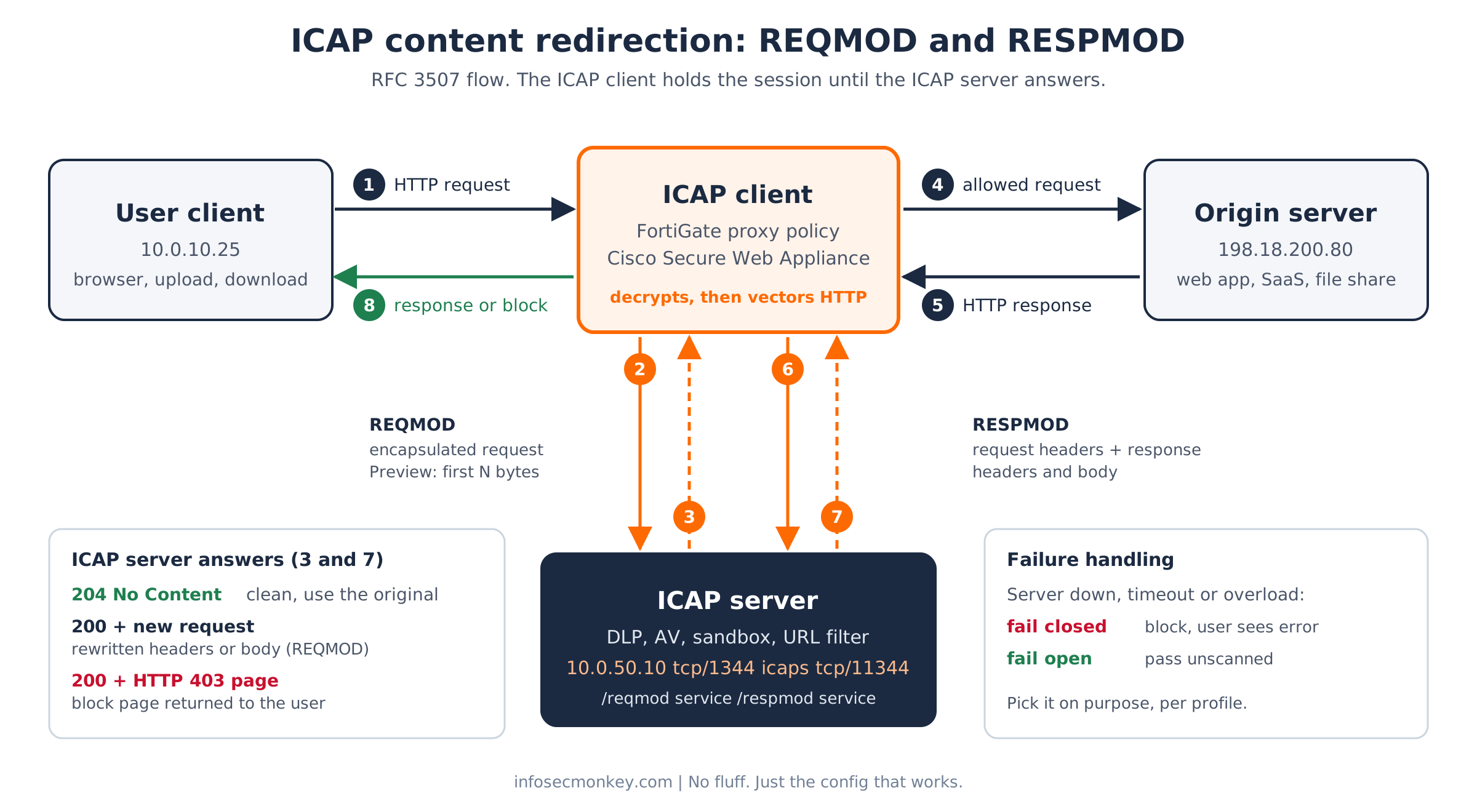
Figure 1. REQMOD (steps 2 and 3) and RESPMOD (steps 6 and 7) between the ICAP client and the ICAP server.
Anatomy of a REQMOD transaction
Here is a user upload being vectored to a DLP service. The ICAP headers sit on top; the original HTTP request is encapsulated below them. Byte offsets are illustrative.
REQMOD icap://10.0.50.10:1344/reqmod ICAP/1.0
Host: 10.0.50.10
Allow: 204
Preview: 1024
Encapsulated: req-hdr=0, req-body=172

POST /upload HTTP/1.1
Host: files.example.com
Content-Type: application/pdf
Content-Length: 48211

400
<first 1024 bytes of the PDF>
0
Two possible answers. A clean file:
ICAP/1.0 204 No Content
ISTag: "dlp-2026.10-r4"
Encapsulated: null-body=0
A policy violation, where the ICAP server returns a full HTTP response that the client hands to the user instead of contacting the origin:
ICAP/1.0 200 OK
ISTag: "dlp-2026.10-r4"
Encapsulated: res-hdr=0, res-body=96

HTTP/1.1 403 Forbidden
Content-Type: text/html

<html>Upload blocked by DLP policy</html>
The four headers that matter
- Encapsulated: byte offsets of each embedded section (
req-hdr,req-body,res-hdr,res-body, ornull-bodywhen there is no body). Required in every ICAP message. Bodies are always chunked; headers never are. - Preview: the client sends the headers plus the first N bytes, then stops. The server answers
100 Continue(send the rest),204(I do not care about this one) or a final verdict. A chunk markedieoftells the server the whole body already fit in the preview. This is the single biggest performance lever in ICAP. - Allow: 204: the client promises it buffered the message, so the server may reply “no changes” without echoing the whole body back. Without it, the server must return the entire message even when nothing changed (preview is the one exception).
- ISTag: a version stamp for the service, for example AV engine plus signature set. When it changes, verdicts cached under the old tag are stale.
| ICAP status | Meaning on the wire |
|---|---|
| 100 | Continue after preview, send the rest of the body |
| 200 | Here is the adapted message (or an encapsulated HTTP error such as a 403 page) |
| 204 | No modification needed, use the original |
| 404 / 405 | ICAP service path not found / method not allowed for that service |
| 500 / 503 | Server error / service overloaded, back off connections |
| 505 | ICAP version not supported |
Inline verdict versus one-way copy
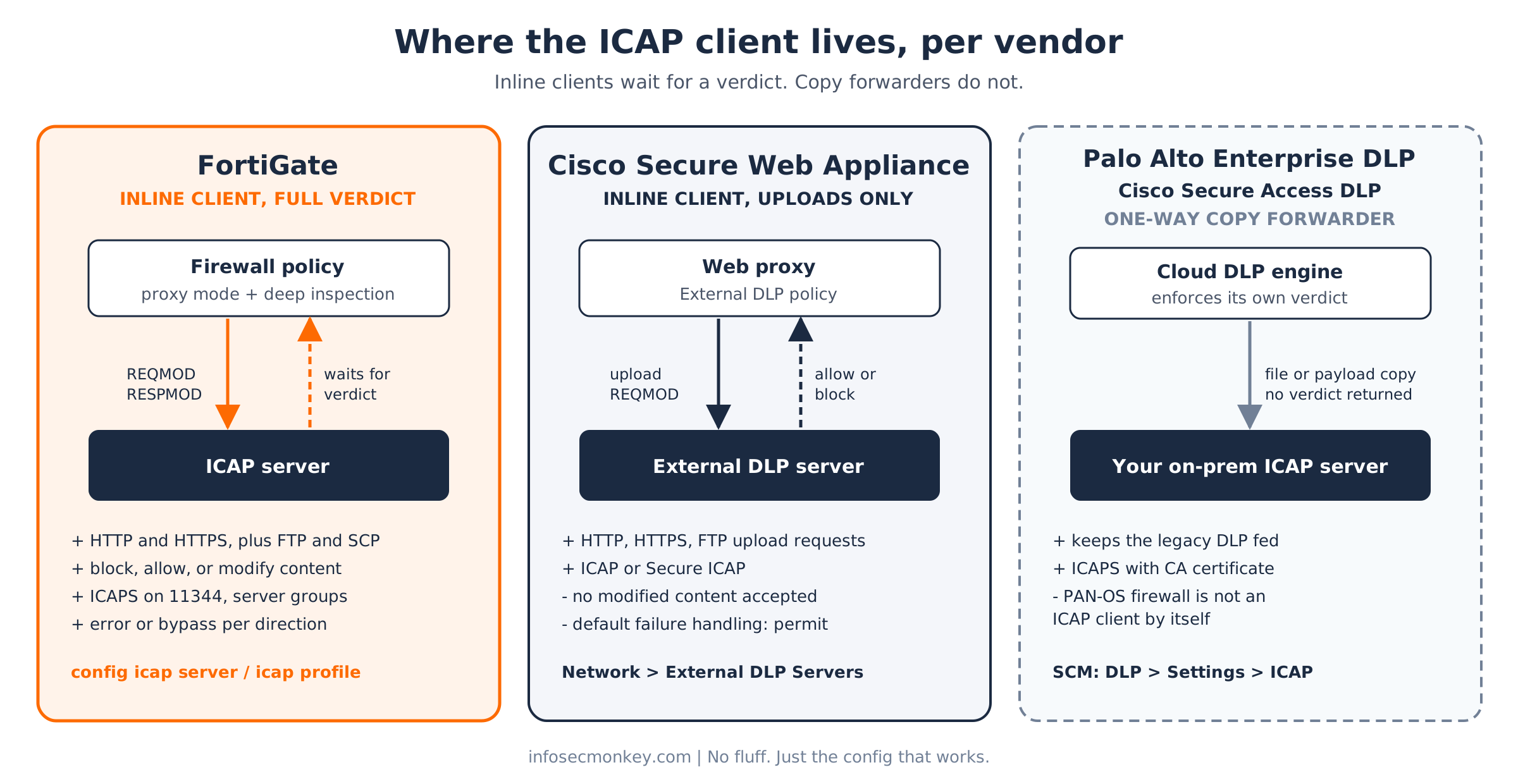
This is the part datasheets blur. An inline ICAP client holds the user session until the ICAP server answers, so the ICAP server can block. A copy forwarder sends the content to the ICAP server for visibility while some other engine makes the enforcement decision. Same protocol, completely different security outcome.
Figure 2. Where the ICAP client lives on each platform, and whether it waits for a verdict.
| Platform | ICAP client lives in | Direction | ICAP server can block? | Secure ICAP | If the server fails |
|---|---|---|---|---|---|
| FortiGate | Firewall policy, proxy inspection | REQMOD and RESPMOD; HTTP, HTTPS, FTP, SCP | Yes, and can modify content | Yes, set secure enable, port 11344 |
Your choice per direction: error or bypass |
| Cisco Secure Web Appliance | Web proxy, External DLP policies | REQMOD on upload requests (HTTP, HTTPS, FTP) | Allow or block only, no modified content | Yes, Secure ICAP option | Default is permit (fail open) |
| Cisco Secure Access | Cloud DLP Realtime rules | Forwards the payload of DLP violations | No, one-way copy | ICAPS only | Not in the data path |
| Palo Alto Networks | Enterprise DLP cloud service (NGFW, Prisma Access) | Forwards inspected files to a REQMOD URL | No, one-way copy; Enterprise DLP enforces | ICAP or ICAPS (CA cert required for ICAPS) | Not in the data path |
Prerequisites and Architecture
Assumed knowledge: HTTP request and response structure, TLS deep inspection and its certificate trust requirements, proxy versus flow inspection on FortiGate, and basic policy building on each platform.
Lab requirements: one ICAP server (any DLP or AV product with an ICAP listener, or c-icap for the lab), at least one of the three platforms, a test client, and a test file your DLP policy is guaranteed to flag.
| Component | Role | Addressing |
|---|---|---|
| FGT-EDGE | FortiGate on FortiOS 7.4 or 7.6, inline ICAP client | WAN port1 198.18.10.1/24, LAN port2 10.0.10.1/24, ICAP segment port5 10.0.50.1/24 |
| icap01 | ICAP server (DLP engine), services /reqmod and /respmod |
10.0.50.10, tcp/1344 and tcp/11344; published as icap01.example.com on 198.18.10.50 for cloud forwarders |
| SWA-01 | Cisco Secure Web Appliance, AsyncOS 15.x | 10.0.20.5, proxy port 3128 |
| PAN tenant | NGFW or Prisma Access with an Enterprise DLP license, managed in Strata Cloud Manager | Cloud; reaches icap01 over the internet |
| Client | Test workstation | 10.0.10.25 |
FortiGate ICAP Configuration
FortiGate is the most complete ICAP client of the three: both directions, inline verdicts, response rules, secure ICAP, and FTP and SCP forwarding in recent builds (Fortinet ICAP scanning with SCP and FTP). Two hard rules: the ICAP profile only works on proxy-based policies, and it is not available in policy-based NGFW mode (Fortinet ICAP overview).
Step 1: Make ICAP visible
Goal: ICAP is hidden in the GUI by default. Turn it on so the menus and the policy toggle appear.
Action: enable the feature in the VDOM you are working in.
config system settings
    set gui-icap enable
end
GUI verification: System > Feature Visibility shows ICAP enabled, and Security Profiles now lists ICAP Servers and ICAP.
Step 2: Define the ICAP server
Goal: tell the FortiGate where the ICAP service lives and how many parallel connections it may open.
config icap server
    edit "icap01"
        set ip-version 4
        set ip-address 10.0.50.10
        set port 1344
        set max-connections 200
    next
end
The default is 100 concurrent connections. Size max-connections to the Max-Connections value your ICAP server advertises in its OPTIONS response, not higher (Fortinet ICAP configuration example).
GUI verification: Security Profiles > ICAP Servers lists icap01 with port 1344.
Step 3: Build the ICAP profile
Goal: decide which directions go to the server, which service paths to call, and what happens when the server is unreachable.
config icap profile
    edit "DLP-ICAP"
        set request enable
        set response enable
        set request-server "icap01"
        set response-server "icap01"
        set request-path "/reqmod"
        set response-path "/respmod"
        set request-failure error
        set response-failure error
        set streaming-content-bypass enable
        set preview enable
        set preview-data-length 4096
        set methods delete get head options post put trace other
    next
endrequest-pathandresponse-pathmust match the service URIs your vendor publishes. RFC 3507 recommends a distinct URI per service, so do not point both directions at the same path unless the vendor says so.request-failure erroris fail closed: if the server is down, the request is blocked.bypassis fail open. Decide this with the compliance owner, not at 2 AM during an outage.streaming-content-bypass enablekeeps video and audio streams away from the ICAP server, where they only burn connections.previewandpreview-data-lengthturn on RFC 3507 preview; recent builds also expose a 204 toggle and a timeout (Ansible fortios_icap_profile reference). Checkset ?on your build.
GUI verification: Security Profiles > ICAP > DLP-ICAP shows Request Processing and Response Processing enabled, On Failure set to Error, and Streaming Media Bypass on.
Step 4 (optional): Only send responses that matter
Goal: RESPMOD on every response is expensive. Bypass by default and forward only the content types and status codes your engine cares about (Fortinet ICAP response filtering).
config icap profile
    edit "DLP-ICAP"
        set respmod-default-action bypass
        config respmod-forward-rules
            edit "office-and-pdf"
                set host "all"
                set action forward
                set http-resp-status-code 200
                config header-group
                    edit 1
                        set header-name "content-type"
                        set header "application/pdf"
                    next
                end
            next
        end
    next
end
If a rule sets both status codes and header groups, the response must match at least one of each to be forwarded.
Step 5: Attach the profile to a proxy-mode policy
Goal: put user traffic through the ICAP profile. For HTTPS, the FortiGate must decrypt first, so use a deep inspection profile; with certificate inspection only, the body the ICAP server needs is still encrypted.
config firewall policy
    edit 10
        set name "LAN-to-Internet-ICAP"
        set srcintf "port2"
        set dstintf "port1"
        set srcaddr "all"
        set dstaddr "all"
        set action accept
        set schedule "always"
        set service "ALL"
        set utm-status enable
        set inspection-mode proxy
        set ssl-ssh-profile "deep-inspection"
        set icap-profile "DLP-ICAP"
        set logtraffic all
        set nat enable
    next
end
GUI verification: Policy & Objects > Firewall Policy, policy 10 shows Inspection Mode Proxy-based and the ICAP toggle on with DLP-ICAP selected.
Step 6: Move to Secure ICAP (ICAPS)
Goal: the ICAP leg carries decrypted user data in clear text. Encrypt it. Import the CA that signed the ICAP server certificate first (System > Certificates).
config icap server
    edit "icap01-tls"
        set ip-version 4
        set ip-address 10.0.50.10
        set port 11344
        set secure enable
        set ssl-cert "ICAP-Lab-CA"
        set max-connections 200
    next
end
config icap profile
    edit "DLP-ICAP"
        set request-server "icap01-tls"
        set response-server "icap01-tls"
    next
end
Enabling secure does not change the port for you. Port 11344 is the convention for secure ICAP and has to be set by hand (Fortinet secure ICAP clients).
Palo Alto Networks ICAP Configuration
Step 7: Know what you are configuring
Goal: set expectations before the customer meeting. The PAN-OS firewall has never been an inline ICAP client; the long-running LIVEcommunity thread on the subject sums it up: the firewall is not a proxy, so no ICAP (LIVEcommunity: PA and ICAP). What exists today is ICAP forwarding in Enterprise DLP: the cloud DLP service sends copies of the files it inspects for NGFW and Prisma Access traffic to your on-prem ICAP server, while Enterprise DLP makes and enforces its own verdict (Palo Alto: Configure ICAP Forwarding).
- One-way only. Your legacy DLP sees the file and raises its own incident, but its verdict never reaches the firewall.
- For NGFW and Prisma Access tenants, a file is forwarded once per unique hash; files answered from cache are not forwarded again.
- Email DLP and Endpoint DLP traffic is not forwarded.
- The requests come from Palo Alto cloud addresses, so the ICAP server must be reachable from the internet and allow-listed to the region IPs (Enterprise DLP ICAP forwarding prerequisites).
Step 8: Publish the ICAP server for the cloud
Goal: expose icap01 on tcp/11344 only, only to the Enterprise DLP region addresses. On a FortiGate edge that is a VIP for 198.18.10.50:11344 to 10.0.50.10:11344 with a policy whose source is an address group of the published Palo Alto IPs. Always use ICAPS here: this leg crosses the internet.
Step 9: Enable ICAP forwarding in Strata Cloud Manager
Action: this is configured in Strata Cloud Manager even when the firewalls are managed by Panorama.
- Log in to Strata Cloud Manager and go to Configuration > Data Loss Prevention > Settings > ICAP. Toggle it from Disabled to enabled.
- Type: choose ICAPS.
- Server REQMOD URL:
icaps://icap01.example.com:11344/reqmod. Without a port, Enterprise DLP assumes 1344 for ICAP and 11344 for ICAPS. - Server Certificate: upload the CA certificate (PEM) that signed the ICAP server certificate. It is mandatory for ICAPS.
- Click Test. The configuration cannot be saved until the result is Success.
- Save. An audit log records the change; the connectivity test itself is not logged.
The forwarded ICAP requests carry identity context your DLP can use for incident attribution:
| ICAP header | Value sent by Enterprise DLP |
|---|---|
| X-Client-IP / X-Server-IP | 0.0.0.0 by default |
| X-Subscriber-ID | Username of the traffic source |
| X-Authenticated-User | PANW-DLP-API://<username> |
| User-Agent | toolarium ICAP-Client with the client version |
| requestSource / resourceName | file / the file name or URL (may be empty) |
GUI verification: the ICAP settings page shows the server URL saved and enabled; your ICAP server log shows REQMOD requests whose X-Authenticated-User starts with PANW-DLP-API://.
Need an inline ICAP verdict with Palo Alto in the path? You need an ICAP-capable proxy (a secure web gateway or an SSL orchestrator in front of or behind the firewall) to act as the client. The firewall alone will not do it.
Cisco ICAP Configuration
Cisco has two ICAP stories. The Secure Web Appliance (formerly WSA) is an inline ICAP client for upload requests through its External DLP feature. Cisco Secure Access (SSE) forwards DLP violation payloads to an on-prem DLP over Secure ICAP. Either way, the ICAP client is the proxy, so traffic has to reach the proxy first: explicit proxy settings or a PAC file, or transparent redirection from your router or firewall.
Step 10: Define the external DLP server on the Secure Web Appliance
Goal: register the ICAP server. Action: Network > External DLP Servers > Edit Settings (Cisco SWA: Prevent Loss of Sensitive Data, SWA 15.2 user guide).
| Setting | Lab value | Notes |
|---|---|---|
| Protocol for External DLP Servers | Secure ICAP | ICAP is clear text; Secure ICAP adds certificate fields |
| Server address and Port | 10.0.50.10 / 11344 | Use 1344 for plain ICAP |
| Reconnection attempts | 2 | Tries before the server is treated as failed |
| Service URL | icap://10.0.50.10/reqmod |
Must start with icap://; vendor specific path |
| Certificate | Client cert plus key (unencrypted, one file) | Or tick “use this certificate for all DLP servers” |
| Load Balancing | None (failover) | Also fewest connections, hash based, round robin |
| Service Request Timeout | 60 seconds (default) | Exceeding it triggers Failure Handling |
| Maximum Simultaneous Connections | 25 (default) | Requests above the limit also fall to Failure Handling |
| Failure Handling | Block | Default is permit, which is fail open |
Click Start Test, then Submit and Commit. The minimum upload body size scanned defaults to 4 KB and is changed with the externaldlpconfig CLI command (1 to 64 KB).
Step 11: Create the External DLP policy
- Web Security Manager > External Data Loss Prevention > Add Policy. Name it, place it, and pick the Identification Profiles (and optional URL categories, subnets, user agents) it applies to. Submit.
- Click the link under the Destinations column for that policy.
- Choose “Define Destinations Scanning Custom Settings”, then Scan all uploads or “Scan uploads except to specified custom and external URL categories”.
- Submit and Commit Changes.
Two behaviors to plan for: the appliance only accepts allow or block from the DLP server and does not support uploading content the DLP server modified, and zero-byte uploads are never evaluated. HTTPS uploads are only visible if a Decryption Policy decrypts them first.
GUI verification: the policy table shows the new group with Destinations set to scan uploads; Network > External DLP Servers shows the server and a passing test.
Step 12: Cisco Secure Access secure ICAP forwarding
- Admin > Authentication, expand ICAP, click Add Secure ICAP Endpoint.
- ICAP Server Endpoint URI:
icaps://icap01.example.com:11344/reqmod. - Upload the ICAP server certificate and Save; the page reports when the connection is established.
- By default every active Realtime DLP rule shares its violation payloads over ICAP; disable it per rule where you do not want it.
This is a copy feed like Palo Alto: both monitored and blocked violations are sent, and the on-prem DLP does not enforce. If the DLP product only speaks plain ICAP, Cisco suggests putting a TLS terminator such as stunnel in front of it (Cisco Secure Access: Manage Secure ICAP, Cisco community: on-prem DLP via ICAP).
Verification and Validation
Test the ICAP server before blaming the firewall
Send a raw OPTIONS request from a host on the ICAP segment. Any compliant server must answer it.
printf 'OPTIONS icap://10.0.50.10/reqmod ICAP/1.0\r\nHost: 10.0.50.10\r\n\r\n' \
  | nc 10.0.50.10 1344
Expected success output (values vary by vendor):
ICAP/1.0 200 OK
Methods: REQMOD
ISTag: "dlp-2026.10-r4"
Max-Connections: 400
Allow: 204
Preview: 4096
Encapsulated: null-body=0
For ICAPS, confirm the certificate chain and name the clients will validate:
openssl s_client -connect 10.0.50.10:11344 -servername icap01.example.com </dev/nullFortiGate
Watch the ICAP leg while the test client uploads the flagged file:
diagnose sniffer packet any 'host 10.0.50.10 and port 1344' 42.104512 port5 out 10.0.50.1.41562 -> 10.0.50.10.1344: syn 3925611048
2.105033 port5 in 10.0.50.10.1344 -> 10.0.50.1.41562: syn 2215871104 ack 3925611049
2.105101 port5 out 10.0.50.1.41562 -> 10.0.50.10.1344: ack 2215871105
2.105390 port5 out 10.0.50.1.41562 -> 10.0.50.10.1344: psh 3925611049 ack 2215871105Success looks like this: the client gets the DLP block page, the traffic log for the session shows counticap=1, and a clean upload completes normally. ICAP failures (no service, unreachable, error code, timeout) are written to the UTM ICAP log category (Fortinet ICAP response filtering):
execute log filter category 20
execute log display
Cisco Secure Web Appliance
Use Start Test on the External DLP Servers page, then read the access log. The External DLP scan verdict field is 0 for allow, 1 for block and - when nothing was scanned (Cisco: Understand SWA access logs). In a custom access log subscription the field is %Xp, and the packet capture under Support and Help can be filtered on the ICAP server IP (Cisco TAC 118141).
Palo Alto Enterprise DLP
The Test button must return Success before the configuration saves. After that, upload a matching file through the NGFW or Prisma Access and confirm a REQMOD request with X-Authenticated-User: PANW-DLP-API:// arrives at icap01. Re-uploading the same file will not trigger a second forward, so use a fresh file per test.
Troubleshooting and Gotchas
1. HTTPS uploads never reach the ICAP server
Symptom: HTTP tests work, HTTPS tests sail through, the sniffer on 1344 stays quiet. Cause: the policy is in flow mode, the VDOM is in policy-based NGFW mode, or the SSL profile is certificate inspection only. On the SWA, the equivalent is no Decryption Policy for that traffic.
show firewall policy 10
get system settings | grep -i ngfw-mode
Fix: set inspection-mode proxy with a deep inspection profile, keep the VDOM in profile-based mode, and exempt certificate-pinned apps explicitly instead of weakening the whole policy.
2. Users get 502 errors, or nothing is scanned, when the ICAP server hiccups
Cause: failure handling doing exactly what it was told. On FortiGate, request-failure error blocks the session: the user sees 502 Bad Gateway and a UTM ICAP log says the request was blocked due to an ICAP server error. On the SWA, the default is the opposite: uploads pass unscanned when the DLP server times out or the connection limit is hit.
execute log filter category 20
execute log display
show icap server icap01
Fix: choose fail closed or fail open per direction on purpose and document it. Add capacity rather than flipping to bypass: raise max-connections to what the server advertises, add a second server (recent FortiOS builds accept an ICAP server group as the request or response server), and use RESPMOD forward rules so only relevant responses consume connections.
3. Secure ICAP never connects
Cause: the port is still 1344 after enabling secure mode, the CA is missing or wrong, or the certificate name does not match the URL. Palo Alto additionally refuses to save without a PEM CA certificate, and some DLP products have no TLS listener at all.
diagnose sniffer packet any 'host 10.0.50.10 and port 11344' 4Fix: set port 11344 explicitly, import the issuing CA and reference it with ssl-cert, make the certificate SAN match the hostname in every icaps:// URL, and front plain-ICAP servers with a TLS terminator such as stunnel.
4. “Our DLP redacts, why does the proxy only block?”
The Secure Web Appliance only supports allow or block from an external DLP server, and the Palo Alto and Secure Access integrations are one-way. If content modification (redaction, watermarking, header rewriting) is a requirement, the ICAP client has to be one that accepts a modified message back, such as a FortiGate ICAP profile.
Sources
- RFC 3507: Internet Content Adaptation Protocol (ICAP)
- Fortinet: ICAP configuration example (FortiOS 7.6.6)
- Fortinet: ICAP response filtering (FortiOS 7.6.5)
- Fortinet: Secure ICAP clients (FortiOS 7.4.5)
- Fortinet: ICAP overview and proxy-mode requirement (FortiOS 6.4.8)
- Fortinet: ICAP scanning with SCP and FTP (FortiOS 7.6.3)
- Ansible fortinet.fortios: fortios_icap_profile module reference
- Palo Alto Networks: Configure ICAP Forwarding (Enterprise DLP)
- Palo Alto Networks: Enterprise DLP Evidence Storage, Syslog and ICAP Forwarding prerequisites
- Palo Alto LIVEcommunity: PA and ICAP
- Cisco: Prevent Loss of Sensitive Data (Web Security Appliance AsyncOS 11.0 user guide)
- Cisco: Network Security chapter (Secure Web Appliance AsyncOS 15.2 user guide)
- Cisco TAC 118141: Configure the Web Security Appliance with an ICAP DLP server
- Cisco: Understand Secure Web Appliance access logs
- Cisco Secure Access: Manage Secure ICAP
- Cisco Community: On-premises DLP server integration via ICAP
InfoSecMonkey | No fluff. Just the config that works.
Recent posts
-

-

DNS is one of those technologies that quietly underpins... Full Story
-

BGP issues on FortiGate firewalls usually trace back to... Full Story
-

Every time your laptop talks to your router, a... Full Story
-

If you've spent any time configuring NAT on a... Full Story
-

If you have spent any time configuring firewall policies... Full Story
-

High availability on FortiGate is one of those features... Full Story
-

If you've configured SD-WAN on a FortiGate, you've almost... Full Story
-

FortiLink is the management protocol that turns a FortiSwitch... Full Story
-

FortiSwitches are pretty rock solid from Mean Time Between... Full Story
-

This is a quicky tip. Have you ever gone... Full Story
-

DNS is one of those quiet pieces of internet... Full Story
-

This article is an updated version of the previous... Full Story
-

You will add ns2 as a secondary (slave) BIND9... Full Story
-

In the process of deploying my lab, I needed... Full Story
-

RFC 8805, used to be known as Self-Correcting IP... Full Story
-

Years back, I wrote an article about certificate pinning. ... Full Story
-

FortiGates have the ability to send alerts to Microsoft... Full Story
-

In this post, I am going to walk through... Full Story
-

Troubleshooting VoIP on a FortiGate can feel like trying... Full Story
-

Prior to FortiOS 7.0, there were three commands to... Full Story
-

In this post, I am going to go over... Full Story
-

What we are going to do: We are going... Full Story
-

Choosing between FGCP (FortiGate Clustering Protocol) and FGSP (FortiGate... Full Story
-

Creating a VLAN on macOS (The "Pro" Move) A... Full Story
-

This blog post explores the logic behind how macOS... Full Story
-

Pretty Fly for a Wi-Fi Tell My Wi-Fi Love... Full Story
-

Part of my daily gig is creating BoMs (Bill-of-Materials)... Full Story
-

ICMP introduces several security risks, but careful filtering, rate... Full Story
-

The command diag debug application dhcps -1 enables full... Full Story
-

In the world of FortiOS, execute tac report is... Full Story
-

LLDP; What is it The Link Layer Discovery Protocol... Full Story
-

What it actually does When you run diagnose fdsm... Full Story
-

Monkey Bites are bite-sized, high-impact security insights designed for... Full Story
-

I have run macOS in macOS with Parallels but... Full Story
-

Don't be confused with my other FortiNAC posts where... Full Story
-

This is the third session in a multi-part article... Full Story
-

Today I was configuring key-based authentication on a FortiGate... Full Story
-

Netcat, often called the "Swiss Army knife" of networking,... Full Story
-

At its core, IEEE 802.1X is a network layer... Full Story
-

In case you did not see the previous FortiNAC... Full Story
-

This is our 5th session where we are going... Full Story
-

Now that we have Wireshark installed and somewhat configured,... Full Story
-

The Philosophy of Packet Analysis Troubleshooting isn't about looking... Full Story
-

ICAP Configuration on FortiGate, Palo Alto and Cisco: How... Full Story
-

Blockchain Explained for Beginners: How It Works, Minus the... Full Story
-

No fluff. Just the config that works. The /31... Full Story