
If you've spent any time configuring user authentication on... Full Story
By Manny Fernandez
October 28, 2026
LACP (802.3ad) Link Aggregation: How It Works and How to Configure It
FortiGate, FortiSwitch, Cisco Catalyst, and Linux bonding, with the verification commands that prove it is actually working
Executive Summary
LACP link aggregation bundles two or more physical Ethernet links into one logical interface so you get more aggregate bandwidth and survive a cable, optic, or port failure without a routing or spanning tree event. The Link Aggregation Control Protocol (LACP) is the negotiation layer that makes the bundle safe: both ends exchange LACPDUs, agree on which ports belong together, and pull a member out of service the moment its partner stops talking.
LACP was defined in IEEE 802.3ad (2000) and moved to IEEE 802.1AX in 2008, which is the current home of the standard. Every vendor CLI still says “802.3ad”, so that is the name you will search for and the name this post uses.
| Item | Detail |
|---|---|
| Objective | Understand how LACP negotiates and fails over, then build and verify a working LACP bundle between a FortiGate and a switch |
| Target audience | Network and security engineers who configure FortiGate, FortiSwitch, Cisco, or Linux uplinks |
| Outcome | A two-member LACP aggregate carrying VLAN-tagged traffic, verified on both ends, with a tested failover |
How LACP Link Aggregation Works
Without LACP you can still build a “static” bundle (sometimes called mode on). The problem is that a static bundle trusts the cabling blindly. If one cable lands on the wrong switch, or one side is not configured yet, the static side forwards frames into a port that is not part of a bundle, and you get black-holed traffic or a loop. LACP fixes that by requiring both sides to agree before a port carries data.
The LACPDU
LACP runs as a Slow Protocol. Each member port sends LACPDUs to the multicast MAC 01:80:C2:00:00:02 with EtherType 0x8809 (subtype 1). Switches never forward these frames, so LACP is strictly link-local. Each LACPDU carries two blocks of information: the Actor (who I am) and the Partner (who I think you are).
| Field | What it does |
|---|---|
| System priority + System ID (MAC) | Identifies the device. The lower priority (then lower MAC) wins and becomes the side that decides which ports are active when there are more candidates than allowed members. |
| Key | A number that groups ports which can aggregate together. Ports with different keys, usually because of different speed or duplex, never bundle with each other. |
| Port priority + Port number | Breaks ties when a device has more eligible ports than active slots. Lower wins. |
| State byte | Eight flags that describe this port’s LACP status. This is the field you read when troubleshooting. |
Active, Passive, and Static
| Side A | Side B | Result |
|---|---|---|
| Active | Active | Bundle forms. Recommended. |
| Active | Passive | Bundle forms. Passive only answers, it never initiates. |
| Passive | Passive | Never forms. Nobody speaks first. |
| Active or Passive | Static (mode on) | Broken. The LACP side never bundles, the static side forwards anyway. Expect loops or black holes. |
Fast vs Slow Rate
The LACP rate controls how often the partner sends LACPDUs to you, and how long you wait before declaring a member dead. Slow rate sends every 30 seconds with a 90 second timeout. Fast rate sends every 1 second with a 3 second timeout. Physical link loss is detected immediately in either mode; the rate matters for the failures where the light stays on but the far end has stopped processing, such as a hung line card, a media converter, or a provider handoff.
| Rate | LACPDU interval | Timeout (3 missed) | Use it when |
|---|---|---|---|
| Slow | 30 s | 90 s | Default on most platforms. Fine for direct fiber or copper between two healthy devices. |
| Fast | 1 s | 3 s | Anything with a device in the middle, or any link where 90 seconds of black-holing is unacceptable. |
Reading the Actor State Byte
Wireshark, tcpdump -v, and most vendor debug outputs show the state byte as hex. Learn these eight bits and you can diagnose almost any LACP problem from a single capture.
| Bit | Flag | Set (1) means |
|---|---|---|
| 0 | Activity | Port is in active mode (initiates LACPDUs) |
| 1 | Timeout | Port wants fast rate (1 s) from its partner |
| 2 | Aggregation | Port can be bundled (not Individual) |
| 3 | Synchronization | Port is in sync with the partner and attached to the right aggregator |
| 4 | Collecting | Port is accepting frames from the bundle |
| 5 | Distributing | Port is sending frames into the bundle |
| 6 | Defaulted | Port has not heard from a partner and is using default values |
| 7 | Expired | Partner LACPDUs have timed out |
Healthy values to memorize: 0x3D is active, slow, fully up. 0x3F is active, fast, fully up. 0x3C is passive, slow, fully up. If you see bit 6 (Defaulted, 0x40) or bit 7 (Expired, 0x80) set, the port is not hearing its partner. If Synchronization is set but Collecting and Distributing are clear, the two sides disagree about which aggregator the port belongs to, which almost always means mismatched keys or a cable on the wrong switch.
Load Balancing Is Per Flow, Not Per Packet
LACP itself does not decide which member a frame uses. Each side runs its own hash over header fields (MAC, IP, and optionally L4 ports) and pins every flow to one member. That keeps packets in order, but it has two consequences people forget: a single TCP session can never go faster than one member link, and the two directions of the same conversation may use different members because each side hashes independently. A 2 x 10G bundle is 20G of aggregate capacity, not a 20G pipe for one file transfer.
Pro tip: Hash on L3 plus L4 wherever you can
A pure MAC hash between a firewall and a switch is nearly useless, because almost every frame has the same source and destination MAC (the firewall and its next hop). Use an L3 or L3+L4 hash on both ends so different flows spread across members.
Prerequisites and Architecture
- Comfort with FortiOS CLI and VLAN subinterfaces
- Console or out-of-band access to both ends (you will bounce the member ports)
- Two or more members of the same speed and duplex on each side
- FortiOS 7.2 or later for the CLI shown (7.0 and later uses the
lacp-ha-secondarykeyword)
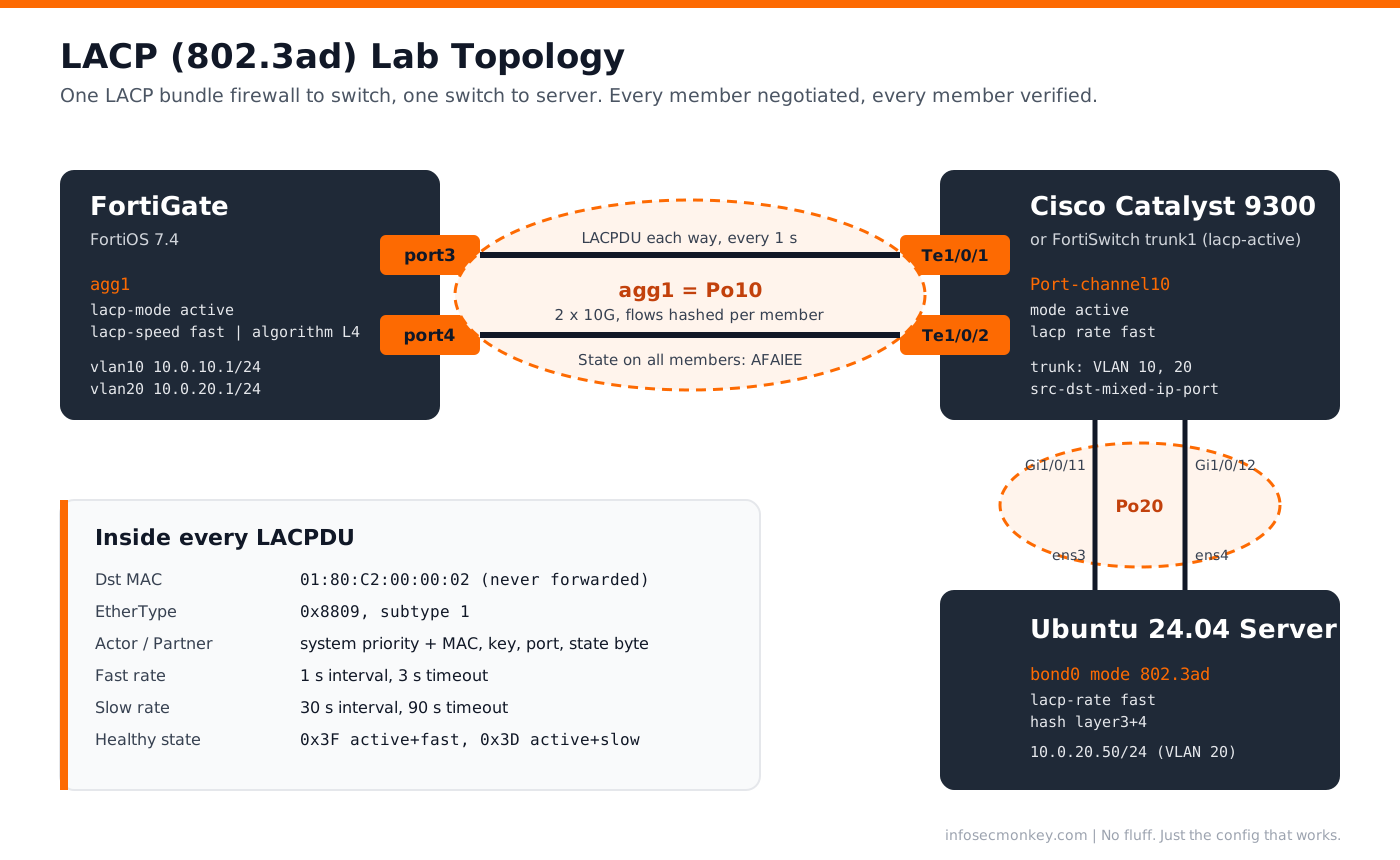
| Component | Role | Interfaces | Addressing |
|---|---|---|---|
| FortiGate (FortiOS 7.4) | Firewall and inter-VLAN gateway | port3 + port4 into agg1 |
VLAN 10: 10.0.10.1/24, VLAN 20: 10.0.20.1/24 |
| Cisco Catalyst 9300 | Access/distribution switch | Te1/0/1 + Te1/0/2 into Po10 (to FortiGate), Gi1/0/11 + Gi1/0/12 into Po20 (to server) | Management in VLAN 10 |
| FortiSwitch (alternate) | Same role as the Catalyst, standalone mode | port49 + port50 into trunk1 |
Management in VLAN 10 |
| Ubuntu 24.04 server | Bonded host | ens3 + ens4 into bond0 |
10.0.20.50/24, gateway 10.0.20.1 |
Step-by-Step Implementation
Step 1Clear the Member Ports on the FortiGate
Goal: A FortiGate refuses to add a port to an aggregate if anything still references it.
Action: Remove any IP address, DHCP server, firewall policy, address object, zone membership, or SD-WAN membership tied to port3 and port4. Then confirm nothing references them.
diagnose sys checkused system.interface.name port3
diagnose sys checkused system.interface.name port4

config system interface
    edit "port3"
        set mode static
        set ip 0.0.0.0 0.0.0.0
        set allowaccess ""
    next
    edit "port4"
        set mode static
        set ip 0.0.0.0 0.0.0.0
        set allowaccess ""
    next
end
GUI verification: Network > Interfaces. port3 and port4 show a reference count of 0 in the Ref column.
Step 2Create the LACP Aggregate
Goal: Build agg1 in active mode with fast rate and an L4 hash.
Action: Create the aggregate interface. Leave the IP off the parent; the Layer 3 interfaces live on VLAN subinterfaces in the next step.
config system interface
    edit "agg1"
        set vdom "root"
        set type aggregate
        set member "port3" "port4"
        set lacp-mode active
        set lacp-speed fast
        set algorithm L4
        set min-links 1
        set description "LACP to core switch Po10"
    next
end| Option | Values | What to set |
|---|---|---|
lacp-mode |
static | passive | active | active. Use static only if the partner cannot speak LACP. |
lacp-speed |
slow | fast | fast for 3 second failure detection. Must match intent on the partner. |
algorithm |
L2 | L3 | L4 (model dependent extras, check with set algorithm ?) |
L4 to hash on IPs and ports. Only affects traffic the FortiGate sends. |
min-links |
1 to member count | Minimum members up before the aggregate is up. Set to 2 on a 2 member bundle if you would rather fail over than run on half capacity. |
min-links-down |
operational | administrative | What happens to the aggregate when it drops below min-links. |
lacp-ha-secondary |
enable | disable | HA clusters only. See the gotchas section. |
GUI verification: Network > Interfaces > agg1. Type shows 802.3ad Aggregate, and both members are listed with a green status once the switch side is up.
Step 3Add VLAN Subinterfaces on the Aggregate
Goal: Carry VLAN 10 and VLAN 20 tagged over the bundle.
Action: Create one VLAN interface per network with agg1 as the parent.
config system interface
    edit "vlan10"
        set vdom "root"
        set interface "agg1"
        set vlanid 10
        set ip 10.0.10.1 255.255.255.0
        set allowaccess ping https ssh
        set role lan
    next
    edit "vlan20"
        set vdom "root"
        set interface "agg1"
        set vlanid 20
        set ip 10.0.20.1 255.255.255.0
        set allowaccess ping
        set role lan
    next
end
GUI verification: Network > Interfaces. Expand agg1; vlan10 and vlan20 appear nested under it.
Step 4Configure the Partner Switch (Cisco Catalyst)
Goal: Bring up Port-channel10 as an LACP trunk that matches the FortiGate.
Action: Configure the members first with identical settings, then the port-channel. Use mode active and lacp rate fast on the members.
vlan 10
 name USERS
vlan 20
 name SERVERS
!
port-channel load-balance src-dst-mixed-ip-port
!
interface range TenGigabitEthernet1/0/1 - 2
 description To FortiGate agg1
 switchport mode trunk
 switchport trunk allowed vlan 10,20
 lacp rate fast
 channel-group 10 mode active
 no shutdown
!
interface Port-channel10
 description To FortiGate agg1
 switchport mode trunk
 switchport trunk allowed vlan 10,20
Warning: Never use mode on toward an LACP peer
channel-group 10 mode on is a static bundle. Pair it with an LACP FortiGate and the FortiGate never brings its members up while the switch forwards into them anyway.
Alternate partner, FortiSwitch in standalone mode: the equivalent is a trunk with lacp-active.
config switch trunk
    edit "trunk1"
        set mode lacp-active
        set lacp-speed fast
        set members "port49" "port50"
        set description "To FortiGate agg1"
    next
end
config switch interface
    edit "trunk1"
        set native-vlan 1
        set allowed-vlans 10,20
    next
end
If the FortiSwitch is managed over FortiLink instead, build the trunk from the FortiGate under config switch-controller managed-switch, config ports, with set type trunk, set mode lacp-active, and set members. The FortiLink uplink itself is already an auto-built LACP aggregate, so leave that one alone.
Step 5Bond the Server (Ubuntu 24.04, Optional)
Goal: Show the same protocol on a host, so the server survives a NIC or cable failure.
Action: Create a netplan bond in mode 802.3ad. On the Catalyst, Gi1/0/11 and Gi1/0/12 go into channel-group 20 mode active as access ports in VLAN 20.
/etc/netplan/60-bond0.yaml
network:
  version: 2
  ethernets:
    ens3: {}
    ens4: {}
  bonds:
    bond0:
      interfaces: [ens3, ens4]
      addresses: [10.0.20.50/24]
      routes:
        - to: default
          via: 10.0.20.1
      nameservers:
        addresses: [10.0.20.1]
      parameters:
        mode: 802.3ad
        lacp-rate: fast
        transmit-hash-policy: layer3+4
        mii-monitor-interval: 100
sudo chmod 600 /etc/netplan/60-bond0.yaml
sudo netplan trynetplan try rolls back automatically after 120 seconds unless you confirm, which saves you a trip to the console if the bond does not come up.
Verification and Validation
FortiGate: diagnose netlink aggregate
diagnose netlink aggregate name agg1Expected success output (trimmed):
LACP flags: (A|P)(S|F)(A|I)(I|O)(E|D)(E|D)
status: up
ports: 2
distribution algorithm: L4
LACP mode: active
LACP speed: fast

slave: port3
link status: up
LACP state: established
actor state: AFAIEE
partner state: AFAIEE

slave: port4
link status: up
LACP state: established
actor state: AFAIEE
partner state: AFAIEE
Read the six state letters left to right: Active or Passive, Slow or Fast, Aggregatable or Individual, In sync or Out of sync, collection Enabled or Disabled, distribution Enabled or Disabled. AFAIEE on both actor and partner for every member is the goal. Anything with an O, a D, or an I in the third position is a member that is not carrying traffic.
Cisco: show etherchannel summary
show etherchannel 10 summary
show lacp 10 neighbor detail
Group Port-channel Protocol Ports
------+-------------+-----------+--------------------------------
10 Po10(SU) LACP Te1/0/1(P) Te1/0/2(P)SU means Layer 2 and in use, P means bundled. Watch for s (suspended), I (stand-alone, LACP partner not heard), or D (down).
Linux: /proc/net/bonding
cat /proc/net/bonding/bond0 | \
  grep -E "Mode|Aggregator ID|MII Status|Partner Mac|Slave Interface"
Success: Bonding Mode: IEEE 802.3ad Dynamic link aggregation, every slave shows the same Aggregator ID as the active aggregator, and the Partner Mac is the switch, not 00:00:00:00:00:00.
Failover Test
- From a host in VLAN 20, start a continuous ping to 10.0.10.1 (
ping -D 10.0.10.1on Linux prints timestamps). - Pull the port3 cable, or
shutdownTe1/0/1 on the switch. - Expect at most one or two lost pings. Run
diagnose netlink aggregate name agg1and confirm port3 is down and port4 is stillAFAIEE. - Restore the link and confirm port3 returns to
AFAIEEwithin a few seconds.
Capture the LACPDUs
diagnose sniffer packet port3 'ether proto 0x8809' 6 10 lWith fast rate you should see one LACPDU per second in each direction. In Wireshark, the display filter is lacp.
Troubleshooting and Gotchas
1. One Member Stuck as Individual or Suspended
Symptom: One port shows I or O in its FortiGate state string, or s or I on the Cisco side, while the other member is fine.
Cause: The member ports do not match. Different speed, duplex, or (on the switch) a different trunk, VLAN, or native VLAN setting on one member. Different speed means a different LACP key, so the port can never join.
diagnose netlink aggregate name agg1
diagnose hardware deviceinfo nic port3 | grep -i -E "speed|duplex|link"
diagnose hardware deviceinfo nic port4 | grep -i -E "speed|duplex|link"
show interfaces TenGigabitEthernet1/0/1 status
show interfaces TenGigabitEthernet1/0/2 status
show run interface TenGigabitEthernet1/0/2Fix: Configure members through interface range so they cannot drift, and hard-set speed only if you hard-set it on both ends.
2. Bundle Up, But Some Traffic Disappears
Symptom: Some flows work and some time out, or traffic dies only when one specific cable carries it.
Cause: Usually one end is static (mode on) and the other is LACP, or the two members are cabled to two different switches that are not an MCLAG or vPC pair. Each member then talks to a different partner System ID, and the side that is not checking keeps hashing flows into the wrong box.
diagnose netlink aggregate name agg1 | grep -i -E "slave|partner"Fix: Both ends LACP active. If the partner MAC differs between members, the cabling crosses two switches; either cable both members to the same switch or configure MCLAG (FortiSwitch) or vPC or StackWise (Cisco) so the pair presents one System ID.
3. FortiGate HA Cluster Behaves Strangely After Failover
Symptom: After an FGCP failover, traffic keeps arriving at the unit that just became secondary, or the cluster flaps.
Cause: By default lacp-ha-secondary is enabled, so the secondary unit also negotiates LACP. Both units share the virtual cluster MAC, and depending on how the switch is cabled, the secondary’s links can end up bundled and receiving traffic.
config system interface
    edit "agg1"
        set lacp-ha-secondary disable
    next
end
Fix: Give each HA unit its own port-channel on the switch side. Disable lacp-ha-secondary when the secondary should be completely silent on the bundle. The tradeoff is slower failover, because the new primary has to complete LACP negotiation before it passes traffic, so pair it with lacp-speed fast.
Pro tip: Bonus gotcha: the single-flow speed test
Someone will run iperf with one stream across a 2 x 10G bundle, see about 9.4 Gbps, and call the LAG broken. That is per-flow hashing doing its job. Test with iperf3 -P 8 to see the aggregate.
Quick Reference
| Platform | Mode keyword | Rate | Verify |
|---|---|---|---|
| FortiGate | set lacp-mode active |
set lacp-speed fast |
diagnose netlink aggregate name agg1 |
| FortiSwitch (standalone) | set mode lacp-active |
set lacp-speed fast |
diagnose switch trunk list |
| Cisco IOS-XE | channel-group 10 mode active |
lacp rate fast |
show etherchannel summary |
| Linux (netplan) | mode: 802.3ad |
lacp-rate: fast |
cat /proc/net/bonding/bond0 |
Recent posts
-

-

DNS is one of those technologies that quietly underpins... Full Story
-

BGP issues on FortiGate firewalls usually trace back to... Full Story
-

Every time your laptop talks to your router, a... Full Story
-

If you've spent any time configuring NAT on a... Full Story
-

If you have spent any time configuring firewall policies... Full Story
-

High availability on FortiGate is one of those features... Full Story
-

If you've configured SD-WAN on a FortiGate, you've almost... Full Story
-

FortiLink is the management protocol that turns a FortiSwitch... Full Story
-

FortiSwitches are pretty rock solid from Mean Time Between... Full Story
-

This is a quicky tip. Have you ever gone... Full Story
-

DNS is one of those quiet pieces of internet... Full Story
-

This article is an updated version of the previous... Full Story
-

You will add ns2 as a secondary (slave) BIND9... Full Story
-

In the process of deploying my lab, I needed... Full Story
-

RFC 8805, used to be known as Self-Correcting IP... Full Story
-

Years back, I wrote an article about certificate pinning. ... Full Story
-

FortiGates have the ability to send alerts to Microsoft... Full Story
-

In this post, I am going to walk through... Full Story
-

Troubleshooting VoIP on a FortiGate can feel like trying... Full Story
-

Prior to FortiOS 7.0, there were three commands to... Full Story
-

In this post, I am going to go over... Full Story
-

What we are going to do: We are going... Full Story
-

Choosing between FGCP (FortiGate Clustering Protocol) and FGSP (FortiGate... Full Story
-

Creating a VLAN on macOS (The "Pro" Move) A... Full Story
-

This blog post explores the logic behind how macOS... Full Story
-

Pretty Fly for a Wi-Fi Tell My Wi-Fi Love... Full Story
-

Part of my daily gig is creating BoMs (Bill-of-Materials)... Full Story
-

ICMP introduces several security risks, but careful filtering, rate... Full Story
-

The command diag debug application dhcps -1 enables full... Full Story
-

In the world of FortiOS, execute tac report is... Full Story
-

LLDP; What is it The Link Layer Discovery Protocol... Full Story
-

What it actually does When you run diagnose fdsm... Full Story
-

Monkey Bites are bite-sized, high-impact security insights designed for... Full Story
-

I have run macOS in macOS with Parallels but... Full Story
-

Don't be confused with my other FortiNAC posts where... Full Story
-

This is the third session in a multi-part article... Full Story
-

Today I was configuring key-based authentication on a FortiGate... Full Story
-

Netcat, often called the "Swiss Army knife" of networking,... Full Story
-

At its core, IEEE 802.1X is a network layer... Full Story
-

In case you did not see the previous FortiNAC... Full Story
-

This is our 5th session where we are going... Full Story
-

Now that we have Wireshark installed and somewhat configured,... Full Story
-

The Philosophy of Packet Analysis Troubleshooting isn't about looking... Full Story
-

Blockchain Explained for Beginners: How It Works, Minus the... Full Story
-

No fluff. Just the config that works. The /31... Full Story
-

A practitioner guide to arp-scan network discovery on Linux... Full Story