
No fluff. Just the config that works.
Executive Summary
An RDAP lookup is how you get domain, IP and ASN registration data now. On 28 January 2025, ICANN made the Registration Data Access Protocol (RDAP) the definitive source for generic TLD registration data and sunset the WHOIS obligations for gTLD registries and registrars (ICANN announcement). If your scripts, SOAR playbooks or phishing triage still shell out to whois on port 43, some of them are already getting thin answers or nothing at all.
RDAP is not a new database. It is the same registration data served over HTTPS as structured JSON, with a standard way to find the right server for any domain, IP block or AS number. If you missed the background on why WHOIS had to go, read our WHOIS history and limitations post first.
Objective: Run RDAP lookups for domains, IPs and ASNs from the command line with curl and jq, understand how RDAP finds the authoritative server, and turn the JSON into answers you can use in triage.
Target audience: SOC analysts, network and security engineers, threat intel and OSINT practitioners, and anyone maintaining scripts that still parse WHOIS text.
Time to complete: About 20 minutes.
Prerequisites and Architecture
Assumed knowledge
- Comfort with a Linux or macOS shell and basic HTTP (status codes, redirects, headers).
- Basic JSON. You do not need to be a jq expert; every filter here is copy and paste.
- What a registry, a registrar and a Regional Internet Registry (RIR) are.
Lab requirements
- Any Linux or macOS host with outbound HTTPS (TCP 443). Port 43 is not required for anything in this guide.
curlandjq. Optional: Go, for the OpenRDAP command line client.- If your egress goes through a FortiGate or another proxy with SSL inspection, allow
data.iana.org,rdap.organd the registry RDAP hosts, or your bulk lookups will die on certificate errors.
How RDAP finds the right server
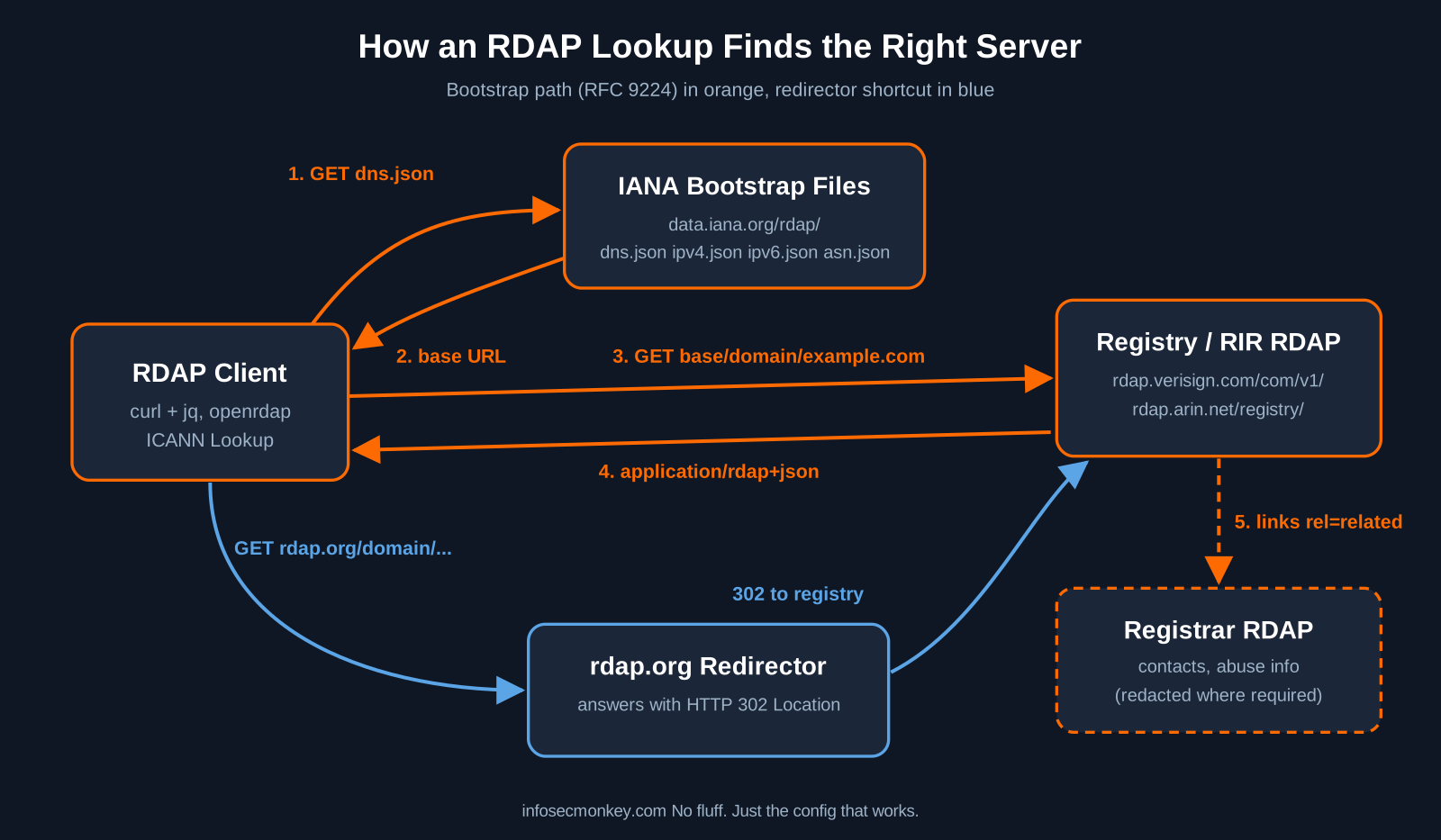
WHOIS made you know which server to ask. RDAP fixes that with bootstrap files that IANA publishes as JSON: one each for domains, IPv4, IPv6 and AS numbers (RFC 9224). A client downloads the file, matches the query (longest match on the domain labels, longest prefix for IPs), and gets back a base URL. It then appends a standard path such as domain/example.com or ip/8.8.8.8 (RFC 9082) and receives JSON with the media type application/rdap+json (RFC 9083).
If you do not want to handle bootstrap yourself, the community redirector at rdap.org reads the same IANA data and answers with an HTTP 302 pointing to the authoritative server, or a 404 when no RDAP service is registered for that resource (about rdap.org).
Figure 1: RDAP bootstrap and redirect flow
Component reference
| Component | What it does | Where it lives |
|---|---|---|
| IANA bootstrap registries | Map TLDs, IP prefixes and ASN ranges to base RDAP URLs | data.iana.org/rdap/dns.json, ipv4.json, ipv6.json, asn.json |
| Registry RDAP server | Authoritative data for a TLD (domain, status, dates, nameservers, registrar) | Example: rdap.verisign.com/com/v1/ for .com |
| Registrar RDAP server | Registrar level data, abuse contacts, redacted registrant fields | Linked from the registry response (rel related) |
| RIR RDAP server | IP blocks and AS numbers | ARIN, RIPE NCC, APNIC, LACNIC, AFRINIC |
| rdap.org | Redirector that does bootstrap for you | https://rdap.org/domain/…, /ip/…, /autnum/… |
| RDAP clients | Send queries and format results | curl plus jq, OpenRDAP, ICANN Lookup on the web |
The standards in one table
| RFC | Covers |
|---|---|
| RFC 7480 | HTTP usage: methods, status codes, content negotiation |
| RFC 7481 | Security services: HTTPS, authentication, differentiated access |
| RFC 9082 | Query format (path segments). Obsoletes RFC 7482 |
| RFC 9083 | JSON response format. Obsoletes RFC 7483 |
| RFC 9224 | Finding the authoritative server (bootstrap). Obsoletes RFC 7484 |
Step-by-Step RDAP Lookup Implementation
Step 1: Install the tooling
Goal: get curl and jq on the box, plus an optional dedicated RDAP client.
Action: install with your package manager. OpenRDAP is a Go binary, so it installs with go install.
# Ubuntu / Debian
sudo apt update
sudo apt install -y curl jq

# macOS (Homebrew)
brew install jq

# Optional: OpenRDAP command line client (needs Go)
go install github.com/openrdap/rdap/cmd/rdap@master
~/go/bin/rdap --help
Verification: jq --version prints a version string and ~/go/bin/rdap --help prints the usage banner.
Step 2: Find the authoritative server with the IANA bootstrap file
Goal: see bootstrap work by hand once, so the rest of RDAP stops being magic.
Action: pull dns.json and ask it which base URL serves a TLD. Each entry in services is a pair: a list of TLDs, then a list of base URLs.
# Which RDAP server is authoritative for .com?
curl -s https://data.iana.org/rdap/dns.json \
  | jq -r --arg tld com '.services[] | select(.[0] | index($tld)) | .[1][0]'

# Swap the TLD to check coverage, e.g. org, io, de
curl -s https://data.iana.org/rdap/dns.json \
  | jq -r --arg tld de '.services[] | select(.[0] | index($tld)) | .[1][0]'
Expected output: https://rdap.verisign.com/com/v1/ for com. An empty result means that TLD has no RDAP service registered with IANA, which is still true for a number of country code TLDs.
Step 3: Run your first RDAP domain lookup
Goal: query the registry directly and pull the fields you actually care about.
Action: append domain/<name> to the base URL. Send the RDAP media type in the Accept header; most servers do not require it, but it is the correct request.
BASE=https://rdap.verisign.com/com/v1
DOMAIN=example.com

curl -s -H "Accept: application/rdap+json" "$BASE/domain/$DOMAIN" | jq '{
  domain: .ldhName,
  status: .status,
  events: ([.events[] | {(.eventAction): .eventDate}] | add),
  nameservers: [.nameservers[].ldhName],
  registrar: ([.entities[] | select(.roles | index("registrar"))
              | .vcardArray[1][] | select(.[0] == "fn") | .[3]][0])
}'
Example output (trimmed; dates move when the domain renews):
{
  "domain": "EXAMPLE.COM",
  "status": [
    "client delete prohibited",
    "client transfer prohibited",
    "client update prohibited"
  ],
  "events": {
    "registration": "1995-08-14T04:00:00Z",
    "expiration": "2027-08-13T04:00:00Z",
    "last update of RDAP database": "2026-11-07T21:00:00Z"
  },
  "nameservers": [
    "A.IANA-SERVERS.NET",
    "B.IANA-SERVERS.NET"
  ],
  "registrar": "RESERVED-Internet Assigned Numbers Authority"
}
Compare that to WHOIS: the field names are the same on every RDAP server, dates are ISO 8601, and status values come from a registry, so client transfer prohibited means the same thing for every gTLD.
Step 4: Let rdap.org do the bootstrap
Goal: one URL pattern for any domain, IP or ASN, without maintaining bootstrap logic.
Action: call rdap.org and let curl follow the redirect with -L. Use -I first if you want to see where it sends you.
# See the redirect target
curl -sI https://rdap.org/domain/example.com | grep -i '^location'

# Follow it and get the JSON
curl -sL https://rdap.org/domain/example.com | jq '.ldhName, .status'
Expected output: a location: header pointing at the Verisign RDAP server, then the domain name and its status list. A 404 here means no RDAP server is registered for that TLD, not that the domain is free.
Step 5: Check if a domain exists with HEAD
Goal: a fast yes or no without downloading the JSON, handy for typo squatting sweeps.
Action: RDAP supports HTTP HEAD for exact match lookups. A 200 means the object exists, a 404 means the registry has no record.
BASE=https://rdap.verisign.com/com/v1
for d in example.com examp1e.com exarnple.com; do
  code=$(curl -s -o /dev/null -I -w '%{http_code}' "$BASE/domain/$d")
  echo "$d $code"
  sleep 1
done
Expected output: one line per domain with 200 or 404. Any 200 on a lookalike of your brand deserves a closer look.
Step 6: Follow the registrar link for abuse contacts
Goal: get the registrar abuse email and phone for a takedown or abuse report.
Action: for thin registries like .com, the registry response links to the registrar’s own RDAP record with rel set to related. Abuse contacts are nested entities with the abuse role.
DOMAIN=yourdomain.com   # placeholder, use a real registered domain

# 1. Registrar RDAP URL from the registry response
REG=$(curl -sL "https://rdap.org/domain/$DOMAIN" \
  | jq -r '[.links[]? | select(.rel == "related") | .href][0]')
echo "$REG"

# 2. Abuse email and phone from the registry record
curl -sL "https://rdap.org/domain/$DOMAIN" | jq -r '
  .entities[]? | select(.roles | index("registrar"))
  | .entities[]? | select(.roles | index("abuse"))
  | .vcardArray[1][] | select(.[0] == "email" or .[0] == "tel") | .[3]'
Expected output: the registrar RDAP URL, then an abuse mailbox and phone number. Registrant name and email are usually redacted for privacy; that is expected, not a bug (see Troubleshooting).
Step 7: RDAP lookups for IP addresses and ASNs
Goal: replace whois 8.8.8.8 and whois AS15169 with structured answers from the RIRs.
Action: same pattern, different path segment: ip/ for addresses or CIDR prefixes, autnum/ for AS numbers.
# Who holds this address block?
curl -sL https://rdap.org/ip/8.8.8.8 | jq '{
  handle, startAddress, endAddress, port43,
  cidr: (.cidr0_cidrs[0] | "\(.v4prefix)/\(.length)")
}'

# Who is this AS?
curl -sL https://rdap.org/autnum/15169 | jq '{handle, name, startAutnum, endAutnum}'
Example output (from ARIN, trimmed):
{
  "handle": "NET-8-8-8-0-1",
  "startAddress": "8.8.8.0",
  "endAddress": "8.8.8.255",
  "port43": "whois.arin.net",
  "cidr": "8.8.8.0/24"
}
{
  "handle": "AS15169",
  "name": "GOOGLE",
  "startAutnum": 15169,
  "endAutnum": 15169
}
The cidr0_cidrs member is an RIR extension, so wrap it in ? or a default if you script against all five RIRs.
Step 8: Use a real RDAP client (OpenRDAP)
Goal: human readable output and built-in bootstrap with caching, without writing jq.
Action: OpenRDAP figures out the server for domains, IPs and ASNs, caches the bootstrap files, and can print text, JSON or WHOIS style output (OpenRDAP on GitHub).
~/go/bin/rdap -v example.com       # verbose text output
~/go/bin/rdap 8.8.8.8
~/go/bin/rdap --json AS15169        # raw JSON for piping
~/go/bin/rdap -w example.com       # WHOIS style, for old parsers
For a quick check in a browser, ICANN Lookup at lookup.icann.org queries RDAP for you.
Step 9: Script it for triage (domain age and expiry)
Goal: two things every SOC asks during phishing triage: how old is this domain, and who sold it.
Action: save the script, feed it a file with one domain per line. It pauses between queries to stay under rate limits.
#!/usr/bin/env bash
# rdap-triage.sh: domain, age in days, expiry, registrar
# usage: ./rdap-triage.sh domains.txt
while read -r d; do
  [ -z "$d" ] && continue
  json=$(curl -sfL --max-time 15 -H 'Accept: application/rdap+json' \
         "https://rdap.org/domain/$d")
  if [ -z "$json" ]; then
    printf '%s\tno RDAP answer\n' "$d"; continue
  fi
  echo "$json" | jq -r --arg d "$d" '
    def ev(a): ([.events[]? | select(.eventAction == a) | .eventDate][0]);
    def age: try (ev("registration") | sub("\\.[0-9]+"; "")
              | fromdateiso8601 | (now - .) / 86400 | floor) catch empty;
    [$d, ((age | tostring) // "n/a"), (ev("expiration") // "n/a"),
     ([.entities[]? | select(.roles | index("registrar"))
       | .vcardArray[1][]? | select(.[0] == "fn") | .[3]][0] // "n/a")]
    | @tsv'
  sleep 1
done < "${1:-domains.txt}"
chmod +x rdap-triage.sh
printf 'example.com\nexample.org\n' > domains.txt
./rdap-triage.sh domains.txtExpected output: one tab separated line per domain. Anything under 30 days old that is sending you mail is worth a hard look.
fromdateiso8601 only accepts the UTC form ending in Z. Registries that publish dates with an offset such as -04:00 will print n/a for age. Normalize those with date -d (GNU) or Python if you need every TLD.Verification and Validation
Run these four checks. If all four pass, your host, your proxy and your jq filters are good.
| Test | Command | Success looks like |
|---|---|---|
| Bootstrap reachable | curl -s -o /dev/null -w '%{http_code}' https://data.iana.org/rdap/dns.json |
200 |
| Redirector works | curl -sI https://rdap.org/domain/example.com | grep -i location |
A location header to the registry server |
| Domain JSON parses | curl -sL https://rdap.org/domain/example.com | jq -r .ldhName |
EXAMPLE.COM |
| IP and ASN lookups | curl -sL https://rdap.org/autnum/15169 | jq -r .name |
WHOIS vs RDAP at a glance
| WHOIS | RDAP | |
|---|---|---|
| Transport | TCP 43, plain text | HTTPS |
| Response | Free text, layout varies by server | JSON with standard members (RFC 9083) |
| Finding the server | Hard coded lists and referrals | IANA bootstrap files (RFC 9224) |
| Internationalization | None defined | UTF-8 and IDN support |
| Access control | None | Differentiated access possible (RFC 7481) |
| gTLD status | Obligations sunset 28 January 2025 | Required source of gTLD data |
Troubleshooting and Gotchas
1. 404 from rdap.org, or empty bootstrap result
Symptom: curl -sL https://rdap.org/domain/something.de returns 404. Cause: the TLD has no RDAP service in the IANA registry. RDAP is mandatory for gTLDs, but country code TLDs follow their own rules, and some large ones still do not run RDAP (CaptainDNS RDAP vs WHOIS guide).
# Confirm the TLD is missing from bootstrap
curl -s https://data.iana.org/rdap/dns.json \
  | jq -r --arg tld de '[.services[] | select(.[0] | index($tld))] | length'
# 0 means no RDAP: fall back to classic whois for that ccTLD
whois something.de
Fix: keep a WHOIS fallback in your scripts for ccTLDs, and do not treat a 404 as “domain available”.
2. HTTP 429 or slow responses in bulk runs
Symptom: the first few hundred lookups work, then you get 429 Too Many Requests or timeouts. Cause: registries and rdap.org rate limit per source IP.
curl -s -o /dev/null -w '%{http_code}\n' https://rdap.org/domain/example.com
curl -sI https://rdap.verisign.com/com/v1/domain/example.com \
  | grep -i -E 'retry-after|^http'
Fix: add a delay (the triage script sleeps 1 second), honor Retry-After, cache the bootstrap file locally for 24 hours and query registries directly instead of sending every request through the redirector.
3. Registrant data shows REDACTED, or the record is thin
Symptom: the .com response has dates, status and nameservers but no registrant, or every contact field says redacted. Cause: .com and .net are thin at the registry level, and personal data is redacted under privacy law. RDAP was designed for differentiated access, but anonymous queries get the public view.
Fix: follow the registrar link from Step 6 for the fuller record and abuse contacts. For a legitimate need for nonpublic data, ICANN runs the Registration Data Request Service, which passes requests to participating registrars and does not guarantee disclosure (ICANN RDRS).
4. Internationalized domain names return 404 or 400
Symptom: a lookup with a Unicode name fails. Cause: pass the A-label (Punycode) form; servers differ in how they handle raw Unicode in the path.
python3 -c "print('bücher.com'.encode('idna').decode())"
# xn--bcher-kva.com
curl -sL https://rdap.org/domain/xn--bcher-kva.com | jq -r .ldhName
Sources
- ICANN Update: Launching RDAP; Sunsetting WHOIS (27 January 2025)
- RFC 9082: Registration Data Access Protocol (RDAP) Query Format
- RFC 9083: JSON Responses for RDAP (ICANN annotated copy)
- RFC 9224: Finding the Authoritative RDAP Service
- IANA Bootstrap Service Registry for Domain Name Space
- About RDAP.org: redirector usage and status codes
- OpenRDAP command line client on GitHub
- ICANN Registration Data Request Service (RDRS)
- CaptainDNS: RDAP vs WHOIS complete guide (ccTLD coverage)
InfoSecMonkey | No fluff. Just the config that works.