Objective: use pdfid for fast malicious PDF triage: run it against a suspect file, read every line of its output, and decide in under a minute whether the file goes back to the user, into a deeper pdf-parser session, or straight into the sandbox.
Target audience: SOC analysts, incident responders, and network engineers who get handed “is this attachment safe?” and want a fast, repeatable answer without opening the file.
Executive Summary
pdfid is Didier Stevens’ Python tool for malicious PDF triage. It scans a file for the PDF keywords that make a document do something (run JavaScript, act automatically when opened, launch a program, carry an attached file) and prints a count for each. It never renders the PDF, so it is safe to run on live samples inside an analysis VM.
The one thing to understand before you trust it: pdfid is a keyword counter, not a parser. Didier describes it as essentially a string search tool that does not parse the PDF structure. That makes it fast and hard to crash, but it also means compressed or encrypted content is invisible to it, and short keywords like /JS can show up by accident inside binary data. This post covers what each counter means, which combinations matter, the options most people never use, and the blind spots that bite.
Every output block in this post is real pdfid 0.2.10 output from lab samples built for this guide. The “malicious” samples only run app.alert(), and any lab link points at 198.18.10.50.
Prerequisites and Architecture
Assumed knowledge: basic shell use and a rough idea that a PDF is a set of numbered objects (5 0 obj ... endobj) tied together by a cross-reference table.
Lab requirements: a Linux or macOS analysis VM with Python 3, no PDF reader set as a default handler, and no shared clipboard or shared folders back to your workstation. Treat every sample as live.
| Component | Version used | Role |
|---|---|---|
| pdfid.py | 0.2.10 (2025-03-05) | Keyword counter and triage front end |
| pdfid.ini | ships with pdfid | Extra keywords to count (default adds /URI) |
| plugin_triage.py | DidierStevensSuite | Scores each file 0.0 to 1.0 for bulk triage |
| pdf-parser.py | DidierStevensSuite | Next step: inspect the objects pdfid flagged |
| Python | 3.x | Runtime, no extra modules needed |
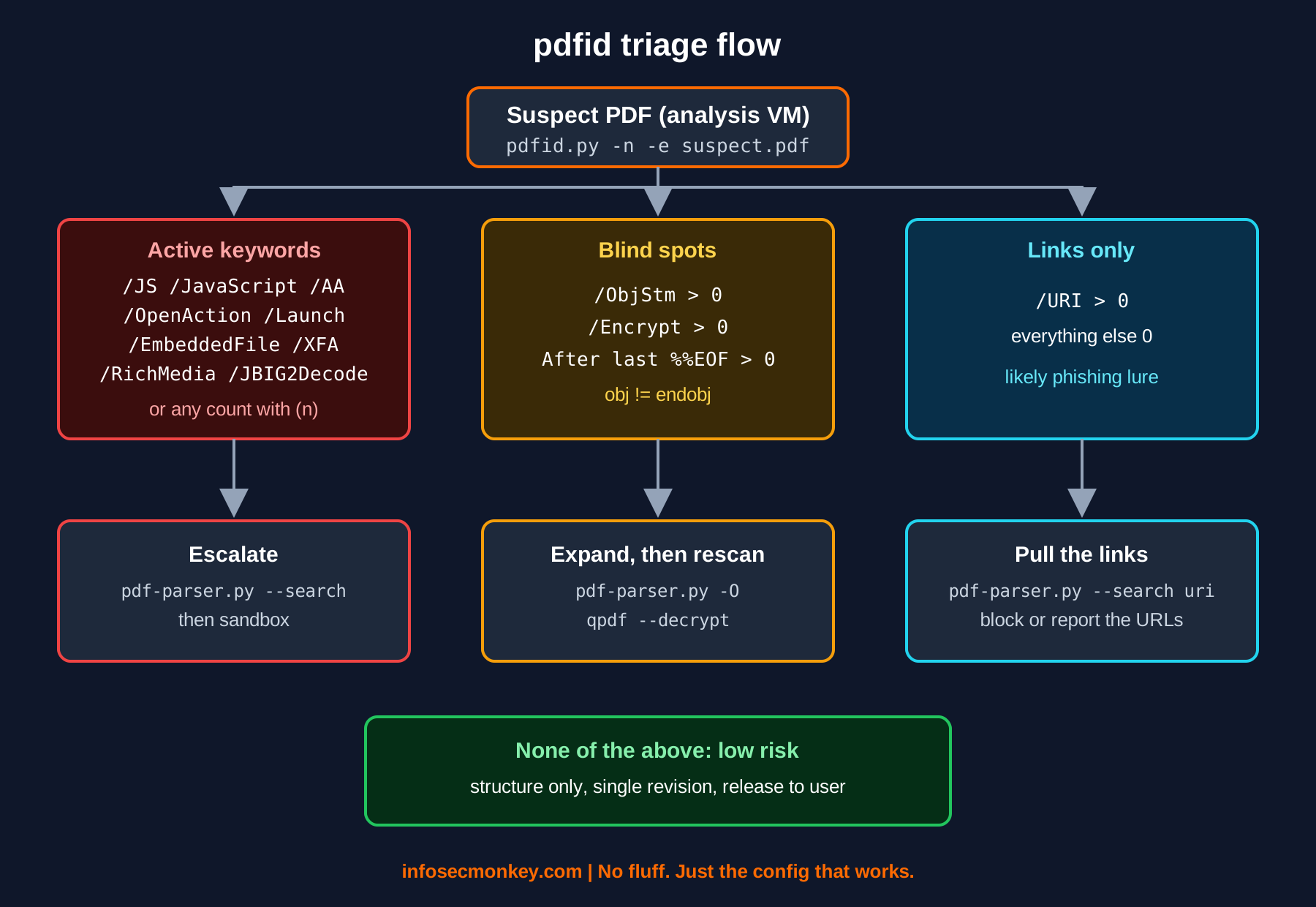
Figure 1. pdfid triage decision flow
Step-by-Step: Running pdfid
Step 1: Install pdfid
Goal: get Didier’s current script, not a fork.
Action: on Kali it is packaged as pdfid. Anywhere else, pull the script and its config straight from the DidierStevensSuite repository on GitHub.
# Kali Linux
sudo apt install pdfid

# Any Linux or macOS box
mkdir -p ~/tools/pdftools && cd ~/tools/pdftools
BASE=https://raw.githubusercontent.com/DidierStevens/DidierStevensSuite/master
for f in pdfid.py pdfid.ini plugin_triage.py pdf-parser.py; do
  curl -sSO "$BASE/$f"
done
chmod +x pdfid.py pdf-parser.py
Verify:
$ python3 pdfid.py --version
pdfid.py 0.2.10
Heads up: pip install pdfid gives you a library clone packaged for import into Python code, not the script you get from Didier. Use it if you are building a pipeline; use Didier’s script for hands-on triage.
Step 2: Baseline a known clean PDF
Goal: know what boring looks like before you hunt for interesting.
$ python3 pdfid.py clean-invoice.pdf
PDFiD 0.2.10 clean-invoice.pdf
 PDF Header: %PDF-1.7
 obj                    4
 endobj                 4
 stream                 1
 endstream              1
 xref                   1
 trailer                1
 startxref              1
 /Page                  1
 /Encrypt               0
 /ObjStm                0
 /JS                    0
 /JavaScript            0
 /AA                    0
 /OpenAction            0
 /AcroForm              0
 /JBIG2Decode           0
 /RichMedia             0
 /Launch                0
 /EmbeddedFile          0
 /XFA                   0
 /URI                   0
 /Colors > 2^24         0
Verify: obj equals endobj, stream equals endstream, one each of xref, trailer and startxref, and zeros everywhere below /Page. That is a single-revision PDF with no active content.
Step 3: Run it on the suspect
Goal: cut the noise and see only what is present.
Action: add -n to hide zero counts. On a real sample this is the first command you type.
$ python3 pdfid.py -n openaction-js.pdf
PDFiD 0.2.10 openaction-js.pdf
 PDF Header: %PDF-1.7
 obj                    5
 endobj                 5
 stream                 1
 endstream              1
 xref                   1
 trailer                1
 startxref              1
 /Page                  1
 /JS                    1
 /JavaScript            1
 /OpenAction            1
Verify: /OpenAction plus /JS and /JavaScript is the classic pattern: JavaScript that runs the moment the document opens, no click required. Didier notes that every malicious JavaScript PDF he had seen in the wild used an automatic action to launch it. This one goes to Step 9 and pdf-parser.
Interpreting pdfid output for malicious PDF triage
Read the output top to bottom in three bands: structure (header through /Page), blind spots (/Encrypt, /ObjStm), and active content (everything from /JS down).
| Line | What it counts | How to read it |
|---|---|---|
| PDF Header | %PDF-x.y in the first 1024 bytes | Missing means “Not a PDF document”. Junk before the header still parses. |
| obj / endobj | Object open and close | Should match. A mismatch means a malformed or hand-crafted file. |
| stream / endstream | Stream open and close | Should match. Streams hold page content, images, fonts, and scripts. |
| xref / trailer / startxref | Cross-reference sections | More than one means incremental updates: edits, form saves, signatures. |
| /Page | Page objects | 0 pages with active content is a lure that exists only to run code. |
| /Encrypt | Encryption dictionary | Over 0 means strings and streams are encrypted and keywords may be hidden. |
| /ObjStm | Object streams | Objects compressed inside a stream. Keywords inside are invisible to pdfid. |
| /JS, /JavaScript | JavaScript | High risk, especially with /OpenAction or /AA. |
| /AA | Additional actions | Actions fired on events like page open, close, or field focus. |
| /OpenAction | Action on document open | Runs automatically. Common in benign files to set the zoom or first page. |
| /AcroForm | Interactive form | Normal on fillable forms. Worth a look combined with /JS or /XFA. |
| /JBIG2Decode | JBIG2 image filter | Historic exploit vector. Rare in normal office documents. |
| /RichMedia | Embedded Flash or media | Legacy attack surface. Almost never legitimate today. |
| /Launch | Launch action | Starts an external program or file. Treat as high risk. |
| /EmbeddedFile | Attached file | Could be a harmless spreadsheet or an EXE. Extract and identify it. |
| /XFA | XML Forms Architecture | Complex form engine, large attack surface. |
| /URI | Link actions (from pdfid.ini) | Phishing indicator. Counts about two per link. |
| /Colors > 2^24 | Absurd color counts | Used to trigger image parsing bugs. Should always be 0. |
Combinations that matter
- /OpenAction or /AA with /JS or /JavaScript: auto-executing script. Escalate.
- /OpenAction with /Launch and /EmbeddedFile: drop an attachment and try to run it on open. Escalate.
- /URI only, low page count: credential phishing lure. Pull the links, no sandbox needed.
- /AcroForm alone on a multi-page file: almost always a normal fillable form.
- Everything zero but /ObjStm or /Encrypt over 0: you have not seen the file yet. See the tips below.
Step 4: Spot name obfuscation
Goal: catch keywords written in hex to dodge naive scanners.
Action: PDF names may encode any character as #xx, so /J#61vaScript is still /JavaScript to a reader. pdfid decodes these and shows how many hits were obfuscated in parentheses.
$ python3 pdfid.py -n obfuscated-js.pdf
...
 /JS                    1(1)
 /JavaScript            1(1)
 /OpenAction            1
Verify: 1(1) reads as “one hit, and one of them was hex encoded”. Legitimate PDF producers have no reason to do this. Any number in parentheses is a strong malicious signal on its own.
Step 5: Pull the extra data with -e
Goal: find data hiding outside the document and spot packed content.
$ python3 pdfid.py -e -n appended.pdf
...
 %%EOF                  1
 After last %%EOF      38
 Total entropy:           4.997501 (       497 bytes)
 Entropy inside streams:  4.118454 (        40 bytes)
 Entropy outside streams: 4.937389 (       457 bytes)
Verify: After last %%EOF is the number of bytes after the final end-of-file marker. A few bytes (a trailing newline) is normal. Dozens or thousands means something was appended: a second payload, a ZIP, or a polyglot. Entropy near 8.0 inside streams is normal for compressed images; high entropy outside streams is not.
Step 6: Triage a whole folder
Goal: sort a pile of quarantined attachments by risk.
Action: the triage plugin scores each file. -c makes it CSV, so it pipes into a spreadsheet or your SIEM.
$ python3 pdfid.py -c -p plugin_triage *.pdf
Filename;Plugin-name;Score
clean-invoice.pdf;Triage plugin;0.00
embedded-file.pdf;Triage plugin;1.00
obfuscated-js.pdf;Triage plugin;1.00
openaction-js.pdf;Triage plugin;1.00
phish-link.pdf;Triage plugin;0.60
| Score | Meaning (from plugin_triage.py) |
|---|---|
| 1.00 | Any of /JS, /JavaScript, /AA, /OpenAction, /AcroForm, /JBIG2Decode, /RichMedia, /Launch, /EmbeddedFile, /XFA, /Colors > 2^24 |
| 0.75 | /ObjStm present: expand the object streams and rescan |
| 0.60 | /URI present: check the links |
| 0.50 | obj/endobj or stream/endstream mismatch: malformed |
| 0.00 | None of the above |
Note that a benign fillable form scores 1.00 because of /AcroForm. The plugin tells you what to look at first, not what is malicious.
Step 7: Select only what you care about with -S
Goal: print full reports only for files matching a condition.
python3 pdfid.py -S "pdf.javascript.count > 0" *.pdf
python3 pdfid.py -S "pdf.javascript.count > 0 or pdf.launch.count > 0" *.pdf
Verify: only the matching files print. Field names are lowercase keywords without the slash, with .count for the total and .hexcode for the obfuscated hits, so pdf.javascript.hexcode > 0 finds every hex-obfuscated JavaScript sample in a folder.
Step 8: Disarm a copy with -d
Goal: produce a copy that a reader will not auto-execute, for when someone insists on seeing the content.
$ python3 pdfid.py -d -n suspect.pdf
/OpenAction -> /oPENaCTION
/JavaScript -> /jAVAsCRIPT
/JS -> /js
...
$ ls
suspect.disarmed.pdf  suspect.pdf
Verify: rerun pdfid on the .disarmed.pdf file and the active keywords drop to zero. Disarm only flips the case of the trigger names, so readers ignore them. The script itself is still in the file, and nothing inside compressed or encrypted streams is touched. It is a convenience, not a sanitizer.
Step 9: Hand off to pdf-parser
Goal: confirm what pdfid counted and read the actual payload.
python3 pdf-parser.py --search openaction suspect.pdf
python3 pdf-parser.py --search javascript suspect.pdf
python3 pdf-parser.py -o 5 -f -d obj5.bin suspect.pdf
python3 pdf-parser.py -a suspect.pdf
Verify: the search shows the object holding /OpenAction and the object it references. -o 5 -f -d decompresses object 5 and dumps its stream to a file for reading. -a prints keyword statistics, which is how you prove a pdfid hit was a false positive.
Verification and Validation
Before you trust pdfid on real mail, prove your install catches what it should. Keep a small folder of known samples (a clean PDF, one with an auto-run alert, one with a link) and run the triage plugin over it after every update.
cd ~/samples/pdf-known
python3 ~/tools/pdftools/pdfid.py -c -p plugin_triage *.pdf
Expected success output: the clean file scores 0.00, the link-only file 0.60, and every file with an auto action or JavaScript 1.00. If a known-bad sample scores 0.00, check that you are running Didier’s pdfid.py and that pdfid.ini sits next to it.
Tips and Tricks
- Alias it. Add
alias pdfid='python3 ~/tools/pdftools/pdfid.py -n'to your shell profile so zero counts are hidden by default. - Scan ZIPs without extracting. pdfid opens ZIP files directly, including archives protected with the malware-sharing password
infected, so the PDF never touches the disk in the clear:pdfid.py -n sample.zip. - Scan from a list or a folder.
pdfid.py -n @todo.txtreads one path per line.pdfid.py -s -n /quarantinescans a directory, and--recursedirwalks subfolders. - Log it.
-o triage.logwrites the report to a file for the ticket. - /URI counts double. A single link annotation shows
/URI 2because the action type/S /URIand the/URIkey both match. Divide by two for a rough link count. - Watch the xref count. Two or more
xref,trailer, and%%EOFmarkers mean the file was saved incrementally. Normal for signed contracts and saved forms, but also how an attacker appends a malicious revision to a clean document. - Add your own keywords. pdfid counts anything listed under
[keywords]inpdfid.ini. Adding/GoToE,/GoToR,/SubmitFormand/ImportDatacatches remote go-to and form-submit actions, which have been used to leak NTLM credentials. - Zero is not clean when /ObjStm or /Encrypt is over 0. Run
pdf-parser.py -Oto expand object streams, orqpdf --decrypt in.pdf out.pdffor files encrypted with an empty user password, then rerun pdfid on the result. - Never double-click to check. pdfid exists so nobody has to open the file. If the answer is not clear from pdfid and pdf-parser, send it to a sandbox, not to a reader.
Troubleshooting and Gotchas
1. A /JS hit that pdf-parser cannot find
Short keywords such as /JS or /AA occasionally appear by chance inside compressed or binary data. pdfid counts the bytes, not the structure, so it reports them. Didier has written up this exact false positive twice.
python3 pdf-parser.py --search /JS suspect.pdf
python3 pdf-parser.py -a suspect.pdf
Fix: if no object dictionary holds the keyword and -a shows no JavaScript, it is a false positive. If /OpenAction or /AA is also present, assume it is real until proven otherwise.
2. “Not a PDF document” on a file that opens fine
pdfid looks for %PDF in the first 1024 bytes. Readers are more forgiving, and attackers know it. Polyglots and files with a large junk prefix fall through.
python3 pdfid.py -f -n weird.pdf
xxd weird.pdf | head -5
Fix: -f forces the scan without a valid header. A file that a reader opens but pdfid calls “Not a PDF” deserves extra suspicion.
3. “Error instantiating plugin”
With pdfid 0.2.10, the plugin_nameobfuscation and plugin_embeddedfile files currently in the repository fail with a constructor TypeError. plugin_triage works.
python3 pdfid.py -v -p plugin_nameobfuscation -n suspect.pdf
Fix: stick with plugin_triage. You do not lose anything: the parentheses in the counts already flag name obfuscation, and /EmbeddedFile is in the default report. Plugins load from pdfid’s own folder, so a bare name like -p plugin_triage works from any directory.
Sources
- Didier Stevens: PDF Tools (pdfid and pdf-parser home page)
- pdfid.py 0.2.10 source in the DidierStevensSuite repository
- Didier Stevens: Update pdfid.py Version 0.2.2, /URI counter and pdfid.ini
- Didier Stevens: Update PDFiD With Plugins, Parts 1 and 2 (triage plugin and selection)
- Didier Stevens: PDFiD False Positives (2013)
- SANS ISC diary: PDFiD False Positives Revisited
- Didier Stevens PDF archive: PDFiD GoToE and GoToR detection
- Kali Linux tools: pdfid package
- PyPI: pdfid library clone by Matteo Lodi
- Access Now Helpline: Analysing suspicious PDF files
No fluff. Just the config that works.