
If you've spent any time configuring user authentication on... Full Story
By Manny Fernandez
January 1, 2026

Sublime Text Cheat Sheet
I used to use UltraEdit for many years. They moved to a subscription model, which I am fine with, IF I am using the software and if the features they are developing align with my use of it. UltraEdit is very focussed on the developers which I am not. I found that it was not really worth the sixty dollars a year price tag. I had used Sublime Text in the past but didn’t give it too much effort. Then, I figured I would give it a chance….. and here I am now, 100% on the Sublime Text bandwagon.
Here is my Cheat Sheet for Sublime Text
Searching and Replacing
⌘ + F – Find
⌘ + G – Find Next
⌘ + ⇧ + G – Find Previous
⌘ + I – Incremental Find
⌘ + ⌥ + F – Replace
⌘ + ⌥ + E – Replace Next
⌘ + ⌥ + G – Quick Find (Selects the word under the cursor)
⌘ + ^ + G – Quick Find ALL occurrences of selected word
⌘ + E – Use Selected to Find
⌘ + ⇧ + E – Use Selected to Replace
⌘ + ⇧ + F – Find in all open files
Searching and Replacing
F6 – Toggle Spell Check on/off
^ + F6 – Next Misspelled Work
^ + ⇧ + F6 – Previous Misspelled Work
⌘ + B – Build
^ + ␣ – Show Completions
⌘ + K + U – Convert to CAPS
⌘ + K + L – Convert to Lower Case
Bookmarking
F2 – New Bookmark
⇧ + F2 – Previous Bookmark
⌘ + F2 – Switch Bookmark
⌘ + ⇧ + F2 – Clear Bookmarks
Line Manipulation
⌘ + ↩ – Insert Lines After
⌘ + ⇧ + ↩ – Insert Line Before
⌘ + ^ + ↑ – Move line up
⌘ + ^ + ↓ – Move line down
⌘ + L – Select Entire Lines and move to next line
⌘ + ^ + G – Select ALL occurrences of the selected text
⌘ + ⇧ + ↑ – Select everything above the cursor
⌘ + ⇧ + ↓ – Select everything below the cursor
⌘ + X – Cut Line
⌘ + ⇧ + K – Delete Line
⇧ + ⌘ +J – Joining Lines, Select the files and hit keys
Deleting Blank Lines
⌘ + ⌥ + F
Make sure Regular Expression is enabled (.* button should be selected on bottom left)
In the Find: field enter ^\n
Then Replace or Replace ALL
Creating a snippet
By default, Sublime Text will save your snippets in the following locations.
~/Library/Application Support/Sublime Text/Packages/User/The naming convention for the snippets is
whatever-you-want then . then sublime-snippet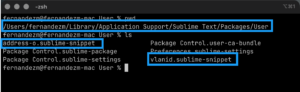
The following snippet is to allow me to make an address object for FortiOS. When invoked, it will add the the text and it will allow me to tab through the dynamic portions of it such as Name, Subnet, Interface. These tab selection area and their order are based on the ${X} where X is the “variable” that you define. I say that because you could set the
${1:NAME} and reference it elsewhere.<snippet>
<content><![CDATA[
edit ${1:NAME}
set subnet ${2:subnet with CIDR}
set interface ${3:any}
next
]]></content>
<!-- Optional: Set a tabTrigger to define how to trigger the snippet -->
<tabTrigger>addo</tabTrigger>
<!-- Optional: Set a scope to limit where the snippet will trigger -->
<!-- <scope>text.plain</scope> -->
</snippet>
In my snippet, I am creating an address object for FortiGate firewalls by starting to type addo and then `⇥` (TAB). Once invoked, the entire section will appear.
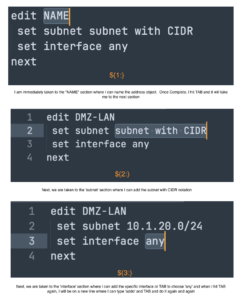
Below there is a similar one for creating a VLAN
<snippet>
       <content><![CDATA[
                 edit ${1:NAME}
                    set ip ${2:SUBNET}
                    set allowaccess ${3:ping https ssh}
                    set device-identification enable
                    set interface ${4:TRUNK}
                    set vlanid ${5:VLANID}
                next
]]></content>
      <!-- Optional: Set a tabTrigger to define how to trigger the snippet -->
      <tabTrigger>vlanint</tabTrigger>
      <!-- Optional: Set a scope to limit where the snippet will trigger -->
      <!-- <scope>text.plain</scope> -->
</snippet>
In this example, the trigger is
vlanint followed by the TAB key.Collapsing FortiOS sections
Another nice thing with FortiOS configs if you are using the Junos Format Selector on the bottom right…
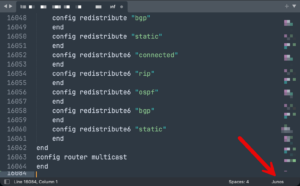
You can collapse and expand certain sections of the config you do not want to see…..
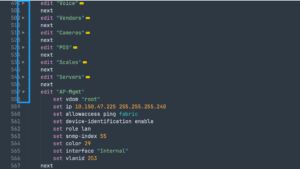
You can see the triangles on the left side highlighted in the blue box. You can see that the VLAN interfaces are collapsed with the AP-Mgmt is expanded.
Hope this helps
Recent posts
-

-

DNS is one of those technologies that quietly underpins... Full Story
-

BGP issues on FortiGate firewalls usually trace back to... Full Story
-

Every time your laptop talks to your router, a... Full Story
-

If you've spent any time configuring NAT on a... Full Story
-

If you have spent any time configuring firewall policies... Full Story
-

High availability on FortiGate is one of those features... Full Story
-

If you've configured SD-WAN on a FortiGate, you've almost... Full Story
-

FortiLink is the management protocol that turns a FortiSwitch... Full Story
-

FortiSwitches are pretty rock solid from Mean Time Between... Full Story
-

This is a quicky tip. Have you ever gone... Full Story
-

DNS is one of those quiet pieces of internet... Full Story
-

This article is an updated version of the previous... Full Story
-

You will add ns2 as a secondary (slave) BIND9... Full Story
-

In the process of deploying my lab, I needed... Full Story
-

RFC 8805, used to be known as Self-Correcting IP... Full Story
-

Years back, I wrote an article about certificate pinning. ... Full Story
-

FortiGates have the ability to send alerts to Microsoft... Full Story
-

In this post, I am going to walk through... Full Story
-

Troubleshooting VoIP on a FortiGate can feel like trying... Full Story
-

Prior to FortiOS 7.0, there were three commands to... Full Story
-

In this post, I am going to go over... Full Story
-

What we are going to do: We are going... Full Story
-

Choosing between FGCP (FortiGate Clustering Protocol) and FGSP (FortiGate... Full Story
-

Creating a VLAN on macOS (The "Pro" Move) A... Full Story
-

This blog post explores the logic behind how macOS... Full Story
-

Pretty Fly for a Wi-Fi Tell My Wi-Fi Love... Full Story
-

Part of my daily gig is creating BoMs (Bill-of-Materials)... Full Story
-

ICMP introduces several security risks, but careful filtering, rate... Full Story
-

The command diag debug application dhcps -1 enables full... Full Story
-

In the world of FortiOS, execute tac report is... Full Story
-

LLDP; What is it The Link Layer Discovery Protocol... Full Story
-

What it actually does When you run diagnose fdsm... Full Story
-

Monkey Bites are bite-sized, high-impact security insights designed for... Full Story
-

I have run macOS in macOS with Parallels but... Full Story
-

Don't be confused with my other FortiNAC posts where... Full Story
-

This is the third session in a multi-part article... Full Story
-

Today I was configuring key-based authentication on a FortiGate... Full Story
-

Netcat, often called the "Swiss Army knife" of networking,... Full Story
-

At its core, IEEE 802.1X is a network layer... Full Story
-

In case you did not see the previous FortiNAC... Full Story
-

This is our 5th session where we are going... Full Story
-

Now that we have Wireshark installed and somewhat configured,... Full Story
-

The Philosophy of Packet Analysis Troubleshooting isn't about looking... Full Story
-

InfoSecMonkey Threat Response October 24, 2026 | No fluff.... Full Story
-

InfoSecMonkey Threat Response October 24, 2026 | No fluff.... Full Story
-

Plus what you actually get with FortiCare Essential, Premium... Full Story