
If you've spent any time configuring user authentication on... Full Story
By Manny Fernandez
October 16, 2026
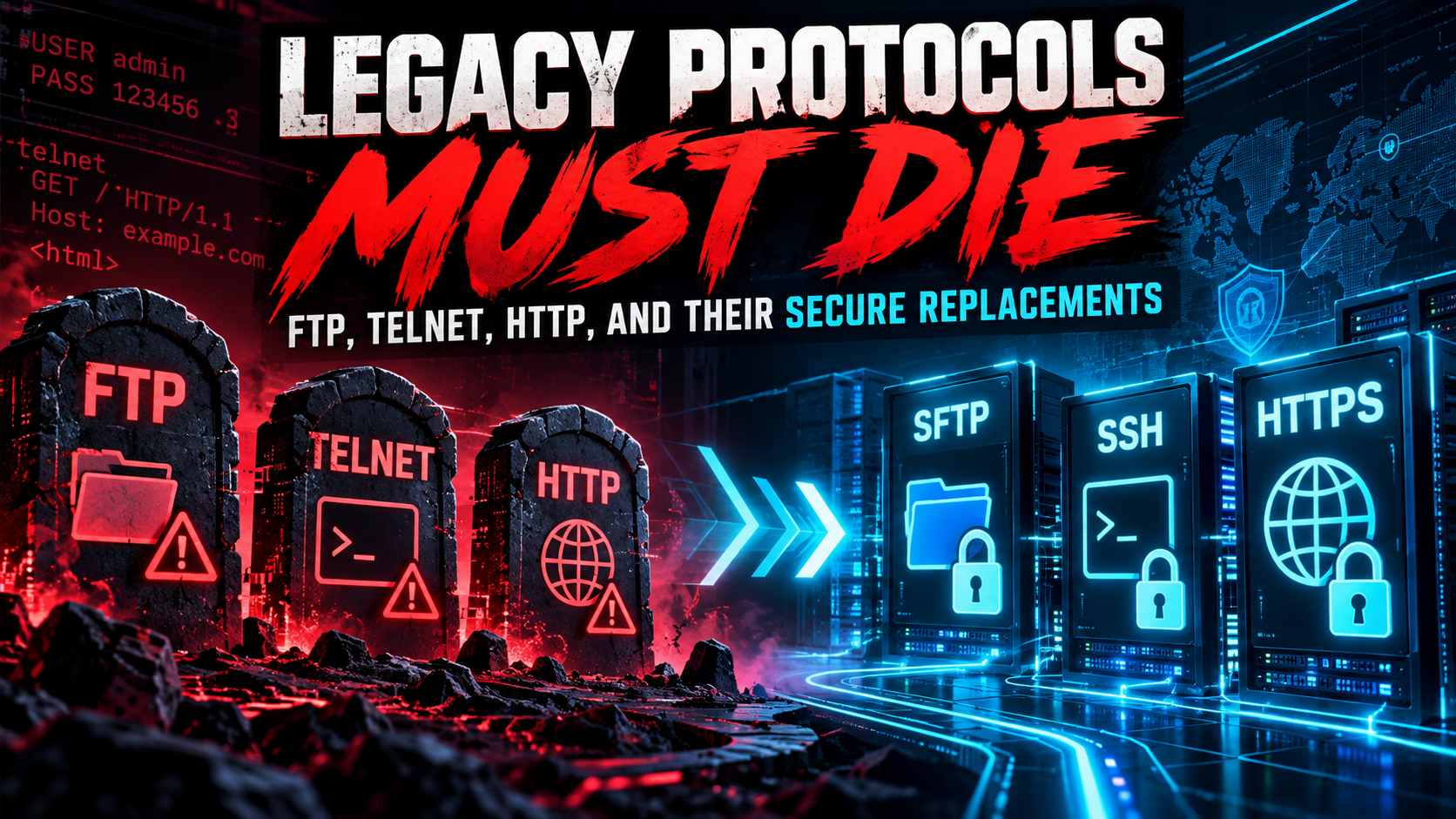
Legacy Protocols Must Die: FTP, Telnet, HTTP, and Their Secure Replacements
Executive Summary
Objective: Identify every cleartext and unauthenticated legacy protocol still running in your environment, replace each one with its secure counterpart, and prove the change with repeatable tests.
Target audience: Network and security engineers, sysadmins, and SEs who own a FortiGate plus a mixed fleet of Linux, Windows, and network gear.
Protocols like FTP, Telnet, and HTTP were designed for a trusted campus network in the 1970s and 1980s. They assume nobody is listening on the wire, nobody is tampering with packets, and the server you reached is the server you wanted. None of those assumptions survived contact with the modern internet, yet these protocols are still sitting on switches, printers, OT gear, lab boxes, and “temporary” file servers that turned permanent years ago.
Why this is not a history lesson
In January 2026, CVE-2026-24061 hit GNU InetUtils telnetd versions 1.9.3 through 2.7. A client sets the Telnet USER environment variable to -f root, telnetd passes it straight to login, and the attacker gets a root shell with no password. CVSS 9.8, fixed in 2.8, and on the CISA KEV list because it was exploited in the wild. A protocol most people consider dead handed out root shells in 2026.
The Three Ways Legacy Protocols Fail
Every protocol in this post fails in at least one of three ways. Knowing which one tells you what the replacement must fix.
- Confidentiality: Credentials and data cross the wire in cleartext. Anyone with a SPAN port, a compromised switch, or an ARP-poisoning tool reads them directly.
- Integrity: Nothing detects modification in transit. An attacker in the path can inject content, rewrite downloads, or alter commands.
- Authentication: The client cannot prove it reached the real server, and often the server barely authenticates the client. That is the opening for spoofing and man-in-the-middle attacks.
A fourth issue applies to several UDP protocols (SNMP, NTP, DNS, TFTP): they make excellent reflection and amplification sources when exposed to the internet.
Legacy to Secure: The Cheat Sheet
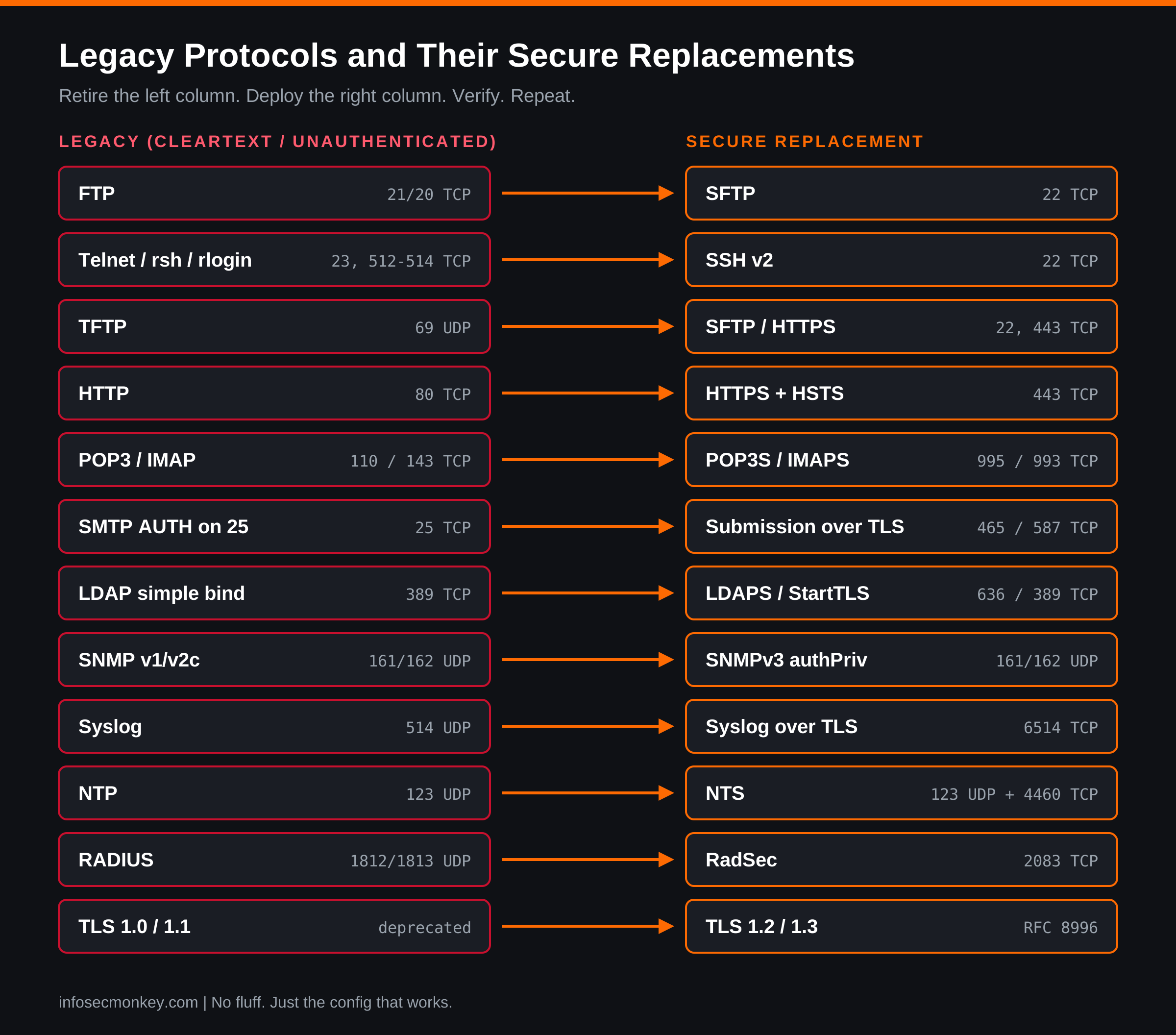
| Legacy | Port(s) | Core problem | Secure replacement | Port(s) |
|---|---|---|---|---|
| FTP | 21, 20 TCP | Cleartext credentials and data | SFTP (preferred) or FTPS | 22 / 21 explicit, 990 implicit |
| Telnet | 23 TCP | Cleartext session, CVE-2026-24061 | SSH v2 | 22 |
| rsh, rlogin, rexec | 512-514 TCP | Host-based trust, no encryption | SSH v2 | 22 |
| TFTP | 69 UDP | No authentication at all | SFTP, SCP, or HTTPS | 22, 443 |
| HTTP | 80 TCP | Cleartext and tamperable | HTTPS (TLS 1.2/1.3) plus HSTS | 443 |
| SMTP submission | 25 TCP | Cleartext AUTH | Submission over implicit TLS or STARTTLS | 465, 587 |
| SMTP relay | 25 TCP | Opportunistic encryption only | STARTTLS plus MTA-STS or DANE | 25 |
| POP3 | 110 TCP | Cleartext mailbox login | POP3S | 995 |
| IMAP | 143 TCP | Cleartext mailbox login | IMAPS | 993 |
| LDAP | 389 TCP | Simple bind sends password in clear | LDAPS, or StartTLS with signing and channel binding | 636 / 389 |
| SNMP v1/v2c | 161, 162 UDP | Community string in clear | SNMPv3 authPriv | 161, 162 |
| Syslog | 514 UDP | Cleartext, spoofable, lossy | Syslog over TLS (RFC 5425) | 6514 TCP |
| NTP | 123 UDP | Unauthenticated time | NTS (RFC 8915) | 123 UDP, 4460 TCP |
| DNS | 53 UDP/TCP | Cleartext, spoofable | DoT or DoH, DNSSEC for integrity | 853, 443 |
| RADIUS | 1812, 1813 UDP | MD5-based, BlastRADIUS (CVE-2024-3596) | RadSec (RADIUS over TLS) | 2083 TCP |
| SMBv1 | 445 TCP | No encryption, EternalBlue era | SMB 3.1.1 with encryption | 445 |
| NFSv3 | 2049 | AUTH_SYS trusts the client’s UID | NFSv4 with Kerberos (krb5p) | 2049 |
| VNC | 5900 TCP | Weak or no encryption | VNC inside SSH, or ZTNA access | 22 |
| PPTP | 1723 TCP + GRE | MS-CHAPv2 is broken | IKEv2/IPsec or WireGuard | 500/4500, 51820 UDP |
| SSL 3.0, TLS 1.0/1.1 | n/a | Deprecated by RFC 8996 | TLS 1.2 minimum, TLS 1.3 preferred | n/a |
Protocol by Protocol
FTP: Use SFTP, Accept FTPS Only When You Must
FTP sends the USER and PASS commands in cleartext on port 21, then opens a second connection for data. Capture one login and you own the account. The replacements are often confused, so here is the short version:
- SFTP is not FTP at all. It is a subsystem of SSH, runs over a single TCP 22 connection, and inherits SSH key authentication. It is firewall friendly and the default answer.
- FTPS is classic FTP wrapped in TLS, either explicit (
AUTH TLSon port 21) or implicit (port 990). Use it only when a partner or appliance cannot speak SFTP. It keeps FTP’s two-channel design, which causes the firewall pain covered in the gotchas below. - SCP is fine for ad-hoc copies, but modern OpenSSH runs
scpover the SFTP protocol under the hood anyway.
A chrooted, SFTP-only drop box with OpenSSH. Add this to the end of /etc/ssh/sshd_config:
Match Group sftponly
    ChrootDirectory /srv/sftp/%u
    ForceCommand internal-sftp
    AllowTcpForwarding no
    X11Forwarding no
    PermitTunnel no
sudo groupadd sftponly
sudo useradd -m -d /srv/sftp/partner1 -s /usr/sbin/nologin -G sftponly partner1
sudo chown root:root /srv/sftp/partner1 && sudo chmod 755 /srv/sftp/partner1
sudo mkdir /srv/sftp/partner1/upload
sudo chown partner1:sftponly /srv/sftp/partner1/upload
sudo sshd -t && sudo systemctl reload sshThe chroot directory must be owned by root and not group or world writable, which is why uploads go into a subfolder the user owns.
Telnet and the r-commands: Replace With SSH, No Exceptions
Telnet carries every keystroke, including the password, in cleartext. The Berkeley r-commands (rsh, rlogin, rexec) are worse: they can trust a remote host based on its IP address and a .rhosts file. SSH v2 replaces all of them with encrypted transport, host key verification, and public key authentication.
Find and remove Telnet servers on Debian and Ubuntu hosts:
dpkg -l | grep -Ei 'telnetd|inetutils|rsh-server'
sudo ss -tlnp | grep -E ':(23|512|513|514)\b'
sudo apt purge -y inetutils-telnetd telnetd rsh-server
sudo ss -tlnp | grep -E ':23\b' || echo "telnet listener gone"
While you are in the SSH config, close the doors that make SSH almost as bad as Telnet:
PermitRootLogin no
PasswordAuthentication no
KbdInteractiveAuthentication no
PubkeyAuthentication yes
Static SSH keys sprawl over time. If you manage more than a handful of servers, look at short-lived SSH certificates from an SSH CA, which we covered in the SSH key fallacy guide.
TFTP: Isolate It or Retire It
TFTP has no authentication, no encryption, and no directory listing. Anyone who can reach UDP 69 and guess a file name can read it, and often write it. It survives because PXE boot, IP phones, and older network gear still pull configs and firmware over it. Where the device supports it, switch to SCP, SFTP, or HTTPS for firmware and config transfers. Where it does not, keep the TFTP server on an isolated provisioning VLAN, make it read-only, and only run it during maintenance windows.
HTTP: HTTPS Everywhere, Then Lock It In With HSTS
Plain HTTP lets anyone in the path read session cookies, inject JavaScript, or swap a download. HTTPS with TLS 1.2 or 1.3 fixes confidentiality, integrity, and server authentication in one move. Two details matter: redirect port 80 to 443, and send an HSTS header so the browser refuses to downgrade on the next visit.
server {
    listen 80;
    server_name app.example.com;
    return 301 https://$host$request_uri;
}

server {
    listen 443 ssl;
    http2 on;
    server_name app.example.com;
    ssl_certificate     /etc/ssl/certs/app.example.com.fullchain.pem;
    ssl_certificate_key /etc/ssl/private/app.example.com.key;
    ssl_protocols       TLSv1.2 TLSv1.3;
    add_header Strict-Transport-Security
        "max-age=31536000; includeSubDomains" always;
}
Start HSTS with a short max-age (300 seconds) while you confirm every subdomain serves HTTPS, then raise it. The http2 on; directive needs nginx 1.25.1 or later; on older builds put http2 on the listen line instead.
Email: SMTP, POP3, and IMAP
Email has two different problems. Client to server (submission and mailbox access) should always be encrypted, because that is where user passwords travel. Server to server (relay on port 25) uses opportunistic STARTTLS, which an attacker can strip unless the receiving domain publishes MTA-STS or DANE.
- Mailbox access: Disable POP3 on 110 and IMAP on 143. Offer only POP3S on 995 and IMAPS on 993.
- Submission: RFC 8314 prefers implicit TLS on 465. Port 587 with mandatory STARTTLS is also acceptable. Never accept AUTH on port 25.
- Relay: Keep STARTTLS on 25 and publish MTA-STS so senders refuse to deliver to you in cleartext.
Postfix submission service that refuses to authenticate without TLS, in /etc/postfix/master.cf:
submission inet n       -       y       -       -       smtpd
  -o syslog_name=postfix/submission
  -o smtpd_tls_security_level=encrypt
  -o smtpd_sasl_auth_enable=yes
  -o smtpd_client_restrictions=permit_sasl_authenticated,reject
LDAP: LDAPS or StartTLS, Plus Signing and Channel Binding
An LDAP simple bind on port 389 sends the bind DN and password in cleartext. That is usually a service account with read access to your entire directory, and it is often the account your firewall, VPN, and Wi-Fi use for authentication. Move to LDAPS on 636 (or StartTLS on 389), and on Active Directory enforce LDAP signing and LDAP channel binding through Group Policy so unsigned binds are rejected.
Before you enforce on the domain controllers, check the Directory Service event log for events 2887 and 2889. They tell you how many unsigned binds are still happening and which client IPs are making them.
SNMP v1/v2c: Move to SNMPv3 authPriv
SNMP v1 and v2c authenticate with a community string sent in cleartext in every packet. public and private are still the most common values on the internet, and a read-write community is effectively an admin password. SNMPv3 adds user-based authentication (SHA-2 family) and privacy (AES). Use security level authPriv, which means both, every time.
Syslog, NTP, and DNS: The Quiet Infrastructure Protocols
- Syslog on UDP 514 is cleartext, trivially spoofed, and silently drops messages under load. Syslog over TLS on TCP 6514 (RFC 5425) fixes all three. Your logs are evidence; protect them in transit.
- NTP on UDP 123 is unauthenticated by default. An attacker who shifts your clock can break certificate validation, Kerberos, MFA tokens, and log correlation. NTS (Network Time Security, RFC 8915) adds a TLS-based key exchange on TCP 4460 and authenticates every time packet.
- DNS on port 53 is cleartext and spoofable. DNS over TLS (853) and DNS over HTTPS (443) encrypt the client to resolver hop, and DNSSEC provides integrity for the records themselves. They solve different problems and work together.
NTS with chrony on Linux is one line in /etc/chrony/chrony.conf (path varies by distro):
# /etc/chrony/chrony.conf
server time.cloudflare.com iburst nts

sudo systemctl restart chrony
chronyc -N authdata
In the authdata output, a Mode of NTS and a non-zero KeyID count mean the server is authenticated.
File Sharing and Remote Access: SMBv1, NFSv3, VNC, PPTP
- SMBv1 is the protocol behind EternalBlue and WannaCry. Remove it entirely and require SMB 3.x encryption on sensitive shares.
- NFSv3 with AUTH_SYS trusts whatever UID the client claims. NFSv4 with Kerberos security
krb5padds real authentication and encryption. - VNC implementations vary wildly in encryption. Bind VNC to localhost and reach it through an SSH tunnel, or put it behind ZTNA.
- PPTP relies on MS-CHAPv2, which has been broken for over a decade. Replace it with IKEv2/IPsec or WireGuard.
Windows cleanup in an elevated PowerShell session:
Get-WindowsOptionalFeature -Online -FeatureName SMB1Protocol
Disable-WindowsOptionalFeature -Online -FeatureName SMB1Protocol -NoRestart
Set-SmbServerConfiguration -EncryptData $true -Force
Disable-WindowsOptionalFeature -Online -FeatureName TelnetClient -NoRestart
Disable-WindowsOptionalFeature -Online -FeatureName TFTP -NoRestart
Old TLS Is a Legacy Protocol Too
Wrapping a service in SSL 3.0, TLS 1.0, or TLS 1.1 is not a secure replacement. RFC 8996 formally deprecated TLS 1.0 and 1.1 in 2021. Set TLS 1.2 as the floor everywhere and prefer TLS 1.3. The same applies to SSH: SSH v1 must be gone, and weak key exchange and cipher algorithms should be disabled.
Prerequisites and Lab
The examples use the InfoSecMonkey lab convention: 10.0.0.0/16 for internal LANs and 198.18.0.0/15 for public and transit addressing.
| Component | Role in this guide | Example address |
|---|---|---|
| FortiGate (FortiOS 7.4 or 7.6) | Perimeter and internal segmentation firewall | 10.0.0.1 (mgmt) |
| Linux scanner (Kali or Ubuntu) | Runs nmap, testssl.sh, ssh-audit, snmpwalk | 10.0.10.20 |
| NMS / SNMP poller | SNMPv3 target for the FortiGate | 10.0.10.50 |
| Syslog collector (TLS) | Receives syslog on TCP 6514 | 10.0.10.60 |
| Domain controller | LDAPS on 636 | dc01.corp.example.com |
| Linux and Windows servers | Services being remediated | 10.0.20.0/24 |
Step-by-Step Implementation Workflow
Step 1: Find Every Legacy Listener
Goal: Build an inventory of hosts still offering cleartext services before you change anything.
Action: Sweep TCP and UDP separately. UDP scans are slow, so keep the port list tight.
sudo nmap -sS -sV -Pn --open \
  -p 21,23,80,110,143,389,512-514,2049,5900 \
  10.0.0.0/16 -oA legacy-tcp

sudo nmap -sU -Pn --open -p 69,123,161,514 10.0.0.0/16 -oA legacy-udp

grep -h "open" legacy-tcp.gnmap legacy-udp.gnmap | sort -u > legacy-hosts.txt
Then check how the encrypted services you already have are configured. An HTTPS server that still accepts TLS 1.0 belongs on the same list.
nmap --script ssl-enum-ciphers -p 443,636,993,995 10.0.20.15
testssl.sh --protocols https://app.example.com
ssh-audit 10.0.20.15
GUI verification: On the FortiGate, open Log & Report > Forward Traffic and filter by Service for FTP, TELNET, TFTP, POP3, IMAP, and SNMP. That shows which legacy protocols are actually in use, not just listening.
To catch live sessions on the FortiGate CLI:
diagnose sys session filter clear
diagnose sys session filter dport 23
diagnose sys session list
diagnose sys session filter clear

diagnose sniffer packet any 'tcp port 21 or tcp port 23 or udp port 69' 4 0 l
Step 2: Harden the FortiGate Management Plane
Goal: Make sure the firewall itself does not offer Telnet, HTTP, or weak TLS for administration.
Action: Restrict allowaccess to HTTPS and SSH (and only on management interfaces), redirect HTTP to HTTPS, disable Telnet admin, and set a TLS 1.2 floor.
config system interface
    edit "port1"
        set allowaccess ping https ssh
    next
end

config system global
    set admin-https-redirect enable
    set admin-telnet disable
    set strong-crypto enable
    set admin-https-ssl-versions tlsv1-2 tlsv1-3
    set ssl-min-proto-version TLSv1-2
end
Repeat the allowaccess change on every interface, and remove management access from WAN-facing interfaces entirely. Pair this with trusted hosts on every administrator account.
GUI verification: Network > Interfaces, edit each interface, and confirm only HTTPS, SSH, and PING are checked under Administrative Access. System > Settings should show HTTP redirected to HTTPS.
Step 3: Replace SNMP v2c With SNMPv3 on the FortiGate
Goal: Remove community strings and poll the firewall with an authenticated, encrypted SNMPv3 user.
config system snmp sysinfo
    set status enable
end

config system snmp user
    edit "nms-v3"
        set security-level auth-priv
        set auth-proto sha256
        set auth-pwd <AUTH_PASSPHRASE>
        set priv-proto aes256
        set priv-pwd <PRIV_PASSPHRASE>
        set notify-hosts 10.0.10.50
        set queries enable
    next
end

config system snmp community
    delete 1
end
Check show system snmp community first and delete every community ID it lists. Enable snmp in allowaccess only on the interface facing your NMS.
GUI verification: System > SNMP. The SNMP v1/v2c table should be empty and the v3 user should show Authentication and Encryption enabled.
Step 4: Send Logs Over TLS and Bind LDAP Over TLS
Goal: Encrypt the two management-plane flows that most often leak: syslog and LDAP authentication.
config log syslogd setting
    set status enable
    set server "10.0.10.60"
    set mode reliable
    set port 6514
    set enc-algorithm high
end

config user ldap
    edit "AD-LDAPS"
        set server "dc01.corp.example.com"
        set cnid "sAMAccountName"
        set dn "DC=corp,DC=example,DC=com"
        set type regular
        set username "CN=svc-fgt-ldap,OU=Service,DC=corp,DC=example,DC=com"
        set password <BIND_PASSWORD>
        set secure ldaps
        set port 636
        set ca-cert "CA_Cert_1"
    next
end
enc-algorithm only applies with mode reliable (TCP). Import the issuing CA under System > Certificates first and reference it with ca-cert. Logging to FortiAnalyzer is already encrypted by default; confirm enc-algorithm high under config log fortianalyzer setting.
GUI verification: User & Authentication > LDAP Servers, edit the server, and click Test Connectivity. The Secure Connection toggle should show LDAPS.
Step 5: Block Cleartext Protocols Through the Firewall
Goal: Stop legacy protocols from crossing segments even if someone re-enables a service on a host.
Action: Build a service group and a deny policy above your allow rules. Start in a monitoring posture (accept and log) for a week if you are not sure what will break.
config firewall service custom
    edit "LEGACY-RCMDS"
        set tcp-portrange 512-514
    next
end

config firewall service group
    edit "LEGACY-CLEARTEXT"
        set member "FTP" "TELNET" "TFTP" "POP3" "IMAP" "LEGACY-RCMDS"
    next
end

config firewall policy
    edit 0
        set name "DENY-LEGACY-CLEARTEXT"
        set srcintf "port2"
        set dstintf "port3"
        set srcaddr "all"
        set dstaddr "all"
        set action deny
        set service "LEGACY-CLEARTEXT"
        set schedule "always"
        set logtraffic all
    next
end
Move the new policy above the broader allow rules with move <new-id> before <first-allow-id> inside config firewall policy. Do not blanket-block HTTP outbound to the internet; handle HTTP on your own servers with redirects and HSTS, and use web filtering and SSL inspection for outbound browsing.
GUI verification: Policy & Objects > Firewall Policy. The deny rule should sit above the allow rules and its hit counter should climb as legacy attempts are blocked.
Step 6: Fix the Servers
Goal: Remediate each host on the Step 1 inventory using the protocol sections above.
- Purge Telnet, rsh, and FTP daemons; stand up SFTP where file transfer is needed.
- Redirect HTTP to HTTPS, set TLS 1.2 as the floor, and add HSTS.
- Disable POP3 and IMAP on 110 and 143; keep only 993 and 995; require TLS on submission.
- Point clients at LDAPS, then enforce LDAP signing and channel binding on the DCs.
- Move NMS polling to SNMPv3 and delete v1/v2c communities on every device.
- Remove SMBv1, enable SMB encryption, and turn on NTS for time sync.
Verification and Validation
Run these from the scanner host. Every “expected” result is a success condition.
| Test | Command | Expected success result |
|---|---|---|
| FortiGate Telnet closed | telnet 10.0.0.1 |
Connection refused or timeout |
| FortiGate admin access | show system interface port1 | grep allowaccess |
set allowaccess ping https ssh |
| HTTP redirects | curl -sI http://app.example.com |
301 with Location: https://... |
| HSTS present | curl -sI https://app.example.com | grep -i strict |
strict-transport-security: max-age=... |
| TLS 1.1 refused | openssl s_client -connect app.example.com:443 -tls1_1 |
Handshake failure, no cipher negotiated |
| LDAPS works | diagnose test authserver ldap AD-LDAPS <user> <pass> |
authenticate ... against 'AD-LDAPS' succeeded! |
| SNMP v2c dead | snmpwalk -v2c -c public 10.0.0.1 system |
Timeout: No Response |
| SNMPv3 works | See command below | sysDescr and sysName returned |
| No legacy listeners | Re-run the Step 1 nmap sweeps | No hosts in legacy-hosts.txt |
snmpwalk -v3 -l authPriv -u nms-v3 \
  -a SHA-256 -A '<AUTH_PASSPHRASE>' \
  -x AES-256 -X '<PRIV_PASSPHRASE>' \
  10.0.0.1 system
Troubleshooting and Gotchas
Gotcha 1: FTPS Breaks Through Firewalls
Symptom: Login over FTPS succeeds, but directory listings and transfers hang.
Cause: FTP negotiates its data channel ports inside the control channel. Plain FTP lets the FortiGate FTP session helper read the PASV reply and open a pinhole. With FTPS the control channel is encrypted, so the helper is blind.
Resolution: Pin the server to a fixed passive port range (for example pasv_min_port=50000 and pasv_max_port=50100 in vsftpd), allow that range in policy explicitly, and set the passive address to the public IP if the server sits behind a VIP. Better still, use SFTP on a single TCP 22 connection.
Gotcha 2: SNMPv3 Polls Fail With Correct Passwords
Symptom: snmpwalk returns Authentication failure or Decryption error even though the passphrases match.
Cause: Auth or privacy algorithm mismatch. AES-256 is the classic trap: FortiOS offers aes256 (Blumenthal draft) and aes256cisco (Reeder draft), and they are not interchangeable. Net-SNMP labels these AES-256 and AES-256-C, and only supports them when built with the strong AES options.
Resolution: Match algorithms exactly on both sides. To isolate, temporarily test with aes (AES-128). Watch the agent side with:
diagnose debug application snmpd -1
diagnose debug enable
# run the snmpwalk, then:
diagnose debug disable
diagnose debug reset
Gotcha 3: LDAPS Fails After the Switch
Symptom: LDAP auth worked on 389 but fails on 636.
Cause: Either the issuing CA is not trusted by the FortiGate, or the server value is an IP address that does not appear in the DC certificate’s subject alternative names.
Resolution: Use the DC’s FQDN, import the full CA chain, and verify the certificate from the scanner. Then debug the authentication daemon:
openssl s_client -connect dc01.corp.example.com:636 -showcerts </dev/nulldiagnose debug application fnbamd -1
diagnose debug enable
diagnose test authserver ldap AD-LDAPS jdoe '<password>'
diagnose debug disable
diagnose debug resetGotcha 4: HSTS Locks Out an Internal Subdomain
Symptom: After enabling HSTS with includeSubDomains, an internal HTTP-only tool under the same domain stops loading in browsers.
Cause: The browser cached the policy and now refuses plain HTTP for every subdomain until max-age expires.
Resolution: Put HTTPS on the internal tool (that was the point), or roll out HSTS with a short max-age before adding includeSubDomains. Never submit a domain to the HSTS preload list until every subdomain is HTTPS ready.
Gotcha 5: The Device That Only Speaks Telnet
Symptom: An old switch, PLC, or appliance has no SSH option and no firmware upgrade path.
Resolution: Contain it. Put its management interface on a dedicated management VLAN, allow Telnet only from a single SSH jump host or console server with a FortiGate policy, log every session, and put the device on the replacement budget. The cleartext hop then only exists on a short, controlled segment.
Wrap-Up
Legacy protocols do not disappear on their own. They hide on printers, lab servers, OT networks, and the one appliance nobody wants to touch. The fix is a loop, not a project: scan, replace, block at the firewall, verify, and scan again next quarter. Start with the protocols that carry credentials (Telnet, FTP, POP3, IMAP, LDAP simple bind, SNMP communities), because a single captured password there is a foothold.
No fluff. Just the config that works.
References
Recent posts
-

-

DNS is one of those technologies that quietly underpins... Full Story
-

BGP issues on FortiGate firewalls usually trace back to... Full Story
-

Every time your laptop talks to your router, a... Full Story
-

If you've spent any time configuring NAT on a... Full Story
-

If you have spent any time configuring firewall policies... Full Story
-

High availability on FortiGate is one of those features... Full Story
-

If you've configured SD-WAN on a FortiGate, you've almost... Full Story
-

FortiLink is the management protocol that turns a FortiSwitch... Full Story
-

FortiSwitches are pretty rock solid from Mean Time Between... Full Story
-

This is a quicky tip. Have you ever gone... Full Story
-

DNS is one of those quiet pieces of internet... Full Story
-

This article is an updated version of the previous... Full Story
-

You will add ns2 as a secondary (slave) BIND9... Full Story
-

In the process of deploying my lab, I needed... Full Story
-

RFC 8805, used to be known as Self-Correcting IP... Full Story
-

Years back, I wrote an article about certificate pinning. ... Full Story
-

FortiGates have the ability to send alerts to Microsoft... Full Story
-

In this post, I am going to walk through... Full Story
-

Troubleshooting VoIP on a FortiGate can feel like trying... Full Story
-

Prior to FortiOS 7.0, there were three commands to... Full Story
-

In this post, I am going to go over... Full Story
-

What we are going to do: We are going... Full Story
-

Choosing between FGCP (FortiGate Clustering Protocol) and FGSP (FortiGate... Full Story
-

Creating a VLAN on macOS (The "Pro" Move) A... Full Story
-

This blog post explores the logic behind how macOS... Full Story
-

Pretty Fly for a Wi-Fi Tell My Wi-Fi Love... Full Story
-

Part of my daily gig is creating BoMs (Bill-of-Materials)... Full Story
-

ICMP introduces several security risks, but careful filtering, rate... Full Story
-

The command diag debug application dhcps -1 enables full... Full Story
-

In the world of FortiOS, execute tac report is... Full Story
-

LLDP; What is it The Link Layer Discovery Protocol... Full Story
-

What it actually does When you run diagnose fdsm... Full Story
-

Monkey Bites are bite-sized, high-impact security insights designed for... Full Story
-

I have run macOS in macOS with Parallels but... Full Story
-

Don't be confused with my other FortiNAC posts where... Full Story
-

This is the third session in a multi-part article... Full Story
-

Today I was configuring key-based authentication on a FortiGate... Full Story
-

Netcat, often called the "Swiss Army knife" of networking,... Full Story
-

At its core, IEEE 802.1X is a network layer... Full Story
-

In case you did not see the previous FortiNAC... Full Story
-

This is our 5th session where we are going... Full Story
-

Now that we have Wireshark installed and somewhat configured,... Full Story
-

The Philosophy of Packet Analysis Troubleshooting isn't about looking... Full Story
-

1. Executive Summary Objective: Get a working, persistent nftables... Full Story
-

Executive Summary Objective: Identify every cleartext and unauthenticated legacy... Full Story
-

Executive Summary Objective: Roll an expiring SAML signing certificate... Full Story