Where SCEP still fits, what replaces it (EST, ACME device attestation, CMPv2), and how to retire it without breaking Wi-Fi, VPN and MDM on a Monday morning.
Executive Summary
Short answer: SCEP is viable as a legacy bridge, not as a long-term enrollment strategy. It still issues a huge share of Wi-Fi, VPN and MDM certificates today, but its trust model is a shared secret, its spec is Informational, not Standards Track, and the platforms that made it popular are now steering new deployments toward EST and ACME. This post walks through the real SCEP alternatives, the RFCs behind each one, and a migration plan you can actually run.
| Item | Detail |
|---|---|
| Objective | Decide where SCEP stays, where it goes, and what replaces it in your environment |
| Verdict | Keep SCEP only where nothing better is supported, harden it, and set a retirement date |
| Replace with | EST (RFC 7030) for network gear and IoT, ACME with device attestation for managed endpoints, CMPv2 (RFC 9810) for telco and industrial |
| Target audience | Network, PKI, MDM and firewall engineers who own certificate enrollment |
Prerequisites and Architecture
Assumed knowledge: X.509 basics (CSR, issuing CA, EKU), how your MDM pushes certificate profiles, and FortiOS CLI. Lab addressing follows the usual InfoSecMonkey convention.
| Component | Role | Lab address |
|---|---|---|
| Issuing CA | Signs device and firewall certificates | 10.0.10.10 |
| SCEP RA (NDES or cloud SCEP) | Legacy enrollment endpoint being retired | 10.0.10.20 |
| EST server | RFC 7030 enrollment for FortiGate and network gear | 10.0.10.30:8443 |
| ACME server with device-attest-01 | Hardware-attested enrollment for Apple, Android and ChromeOS | 10.0.10.40 |
| FortiGate (FortiOS 7.4.1 or later) | EST client for VPN and admin certificates | 10.0.1.1 inside, 198.18.0.1 outside |
| MDM (Intune, Jamf, Workspace ONE, etc.) | Pushes SCEP or ACME payloads | Cloud |
What SCEP Is, and Which RFC Defines It
SCEP started life in the late 1990s as a Cisco and VeriSign protocol so routers could enroll without a human pasting CSRs. It was only formally published in September 2020 as RFC 8894, authored by Peter Gutmann, and it is explicitly an Informational document, not an Internet Standards Track specification. The RFC itself describes SCEP as the evolution of the Cisco-sponsored enrolment protocol that enjoys wide client and server support.
Under the hood SCEP wraps a PKCS #10 CSR (RFC 2986) inside CMS (RFC 5652) signed and enveloped data, then ships it over plain HTTP. The operations are small: enrol, renew, certificate query and CRL query. There is no revoke operation.
| RFC | Title | Status | Why it matters here |
|---|---|---|---|
| RFC 8894 (2020) | Simple Certificate Enrolment Protocol | Informational | The only formal SCEP spec, published two decades after deployment |
| RFC 2986 | PKCS #10 Certification Request Syntax | Informational | The CSR SCEP carries inside its envelope |
| RFC 5652 | Cryptographic Message Syntax (CMS) | Internet Standard | The signing and encryption wrapper SCEP uses instead of TLS |
| RFC 7030 (2013) | Enrollment over Secure Transport (EST) | Proposed Standard | Direct SCEP successor, TLS based |
| RFC 8555 (2019) | Automatic Certificate Management Environment (ACME) | Proposed Standard | Web PKI default, now extending into device identity |
| draft-ietf-acme-device-attest-08 (2026) | ACME Device Attestation Extension | Internet-Draft, Standards Track intended | Adds device-attest-01 and hardware identifiers, updates RFC 8555 if approved |
| RFC 4210, consolidated in RFC 9810 (2025) | Certificate Management Protocol (CMPv2) | Proposed Standard | Mandated by 3GPP, strong in telco and industrial PKI |
| RFC 5272 | Certificate Management over CMS (CMC) | Proposed Standard | Rarely used enterprise option, mostly a footnote now |
Why SCEP Struggles Long Term
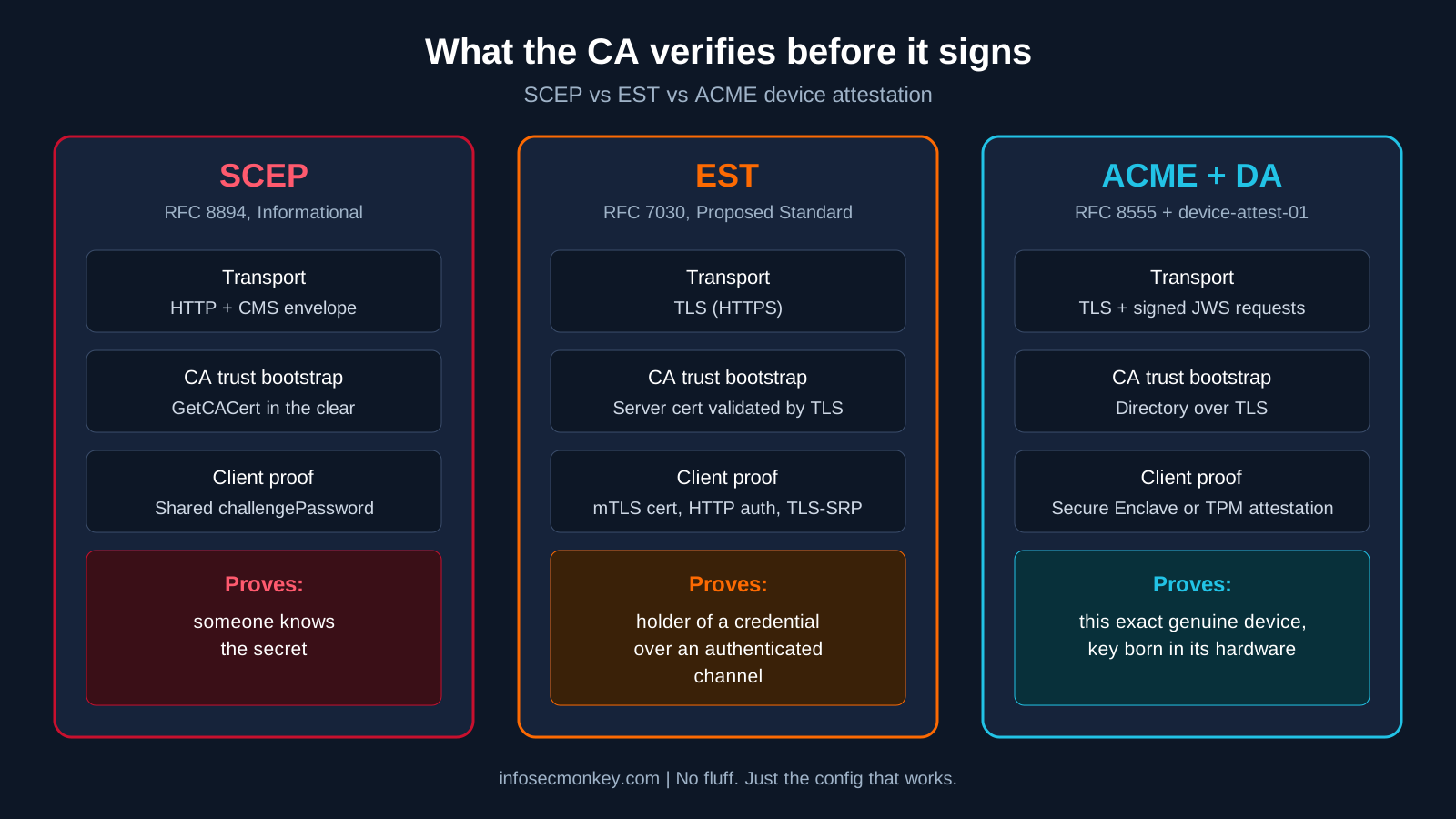
Figure 1: What the CA actually verifies before it signs, by protocol
1. It authenticates a secret, not a device
SCEP’s authorization is the challengePassword attribute. RFC 8894 only RECOMMENDS including it, and omitting it allows unauthenticated enrolment unless something else gates issuance. Whoever holds a valid challenge can submit a request. Keyfactor’s SCEP white paper makes the sharper point: the challenge entitles the bearer to submit a request with content entirely of their choosing, so a leaked challenge can become a certificate for someone else’s identity unless the RA validates the subject.
2. Its security lives inside the message, not the transport
Because SCEP predates ubiquitous TLS, it encrypts its own payload with CMS and runs over HTTP. The very first step, GetCACert, happens in the clear because no keys have been exchanged yet, so clients are supposed to verify the CA by fingerprint. RFC 8894 still notes some implementations use SHA-1 for that fingerprint for legacy reasons.
3. Issuance is stateless
A device that was healthy when it enrolled keeps a trusted certificate even if it is compromised later. SecureW2 summarizes the gap well in its write-up on SCEP without attestation: nothing in plain SCEP proves the key lives in a TPM or Secure Enclave, and renewal does not re-prove anything.
4. The RA tier is attack surface
On Microsoft stacks the SCEP RA is NDES on IIS, often published to the internet through an app proxy. That tier keeps generating CVEs: CVE-2024-49019 abused version 1 certificate templates, the same template schema NDES uses by default, and in October 2026 CVE-2026-85323 was published as a weak-authentication flaw in NDES itself. Open source RAs are not immune either: smallstep patched an improper authentication issue in its SCEP API as CVE-2026-30836 in March 2026.
5. The platforms are moving
- Google is retiring its legacy SCEP API for ChromeOS certificate enrollment at the end of 2026 in favor of the ChromeOS Certificate Provisioning API (details).
- Apple calls ACME the modern alternative to SCEP, and ACME is required for Managed Device Attestation (Apple deployment guide).
- Cisco, the company that created SCEP, recommends EST as the preferred alternative, as discussed in the Bouncy Castle KEYMASTER session.
- Shorter certificate lifetimes for public TLS (200 days from March 2026, 100 days from March 2027, 47 days by March 2029 under CA/Browser Forum ballot SC-081v3) are pushing every team toward protocols built for constant, automated renewal and crypto agility.
The counterpoint: it is not going away this year
SCEP is still the default in a lot of places that matter. Microsoft Cloud PKI for Intune ships a built-in SCEP registration authority for every issuing CA (Cloud PKI overview), Intune’s on-prem path still means NDES plus the Certificate Connector (SCEP infrastructure), and nearly every router, switch, printer and older phone speaks SCEP and nothing else. So the realistic question is not whether to rip it out, it is how to shrink it.
SCEP Alternatives: What Replaces It
EST (RFC 7030): the direct successor
EST moves security to TLS. The server is authenticated by its certificate, the client authenticates with mutual TLS, HTTP auth or TLS-SRP, and the protocol defines clean endpoints under /.well-known/est/ for cacerts, simpleenroll, simplereenroll, csrattrs and server-side key generation. Renewal is native: the client presents its current certificate. Like SCEP, EST has no revocation message. Best fit: network gear, appliances and constrained IoT.
ACME (RFC 8555) with device attestation: the endpoint future
ACME is the protocol behind Let’s Encrypt and most public certificates. For enterprise endpoints the important piece is the device-attest-01 challenge in draft-ietf-acme-device-attest, which adds permanent-identifier and hardware-module identifiers. The device proves, with a hardware-rooted attestation, that it is a specific genuine device and that the key was generated in its secure hardware. There is no shared secret to leak.
- Apple Managed Device Attestation: iOS 16, iPadOS 16.1 and macOS 13.1 or later (smallstep explainer).
- Google: supported on managed Chrome and Android devices.
- Microsoft Intune: supports ACME for Apple device enrollment on iOS 16, iPadOS 16.1 and macOS 13.1 or later (update notes).
CMPv2 (RFC 4210, consolidated in RFC 9810)
CMP is heavier and older in design, but it supports the full lifecycle including revocation and key update, and 3GPP mandates it for telecom equipment. The 2025 consolidation in RFC 9810 plus the lightweight profile work make it a solid pick for telco, industrial and OT PKI. FortiOS supports it as cmpv2.
Platform-native enrollment
Domain-joined Windows machines can use AD CS autoenrollment, and ChromeOS has its own Certificate Provisioning API. These are not general protocols, but they remove SCEP from whole device classes.
Hardened SCEP as a bridge
Where you must keep SCEP, use dynamic, per-request challenges validated by the RA (the Intune policy module model), move from on-prem NDES to a cloud SCEP RA, and layer attestation on top where your vendor supports it.
| Protocol | RFC | Transport security | Client authentication | Revocation op | Best fit |
|---|---|---|---|---|---|
| SCEP | RFC 8894 | CMS over HTTP | Shared challenge password | No | Legacy network gear, older MDM profiles |
| EST | RFC 7030 | TLS | mTLS, HTTP auth, TLS-SRP | No | Firewalls, routers, switches, IoT |
| ACME + device-attest-01 | RFC 8555 + draft | TLS + JWS | Hardware attestation | Yes (ACME revokeCert) | Managed Apple, Android, ChromeOS endpoints |
| CMPv2 | RFC 9810 | Message protection, any transport | Signatures or MAC | Yes | Telco, industrial, OT |
| CMC | RFC 5272 | CMS | Signatures | Yes | Niche enterprise |
Recommendations by Device Class
| Device class | Use now | Keep SCEP until |
|---|---|---|
| Apple iOS 16+, iPadOS 16.1+, macOS 13.1+ | ACME with Managed Device Attestation | Never for new enrollments |
| ChromeOS | ChromeOS Certificate Provisioning API | End of 2026, Google’s deadline |
| Android Enterprise | ACME attestation where your MDM and CA support it, otherwise dynamic SCEP via cloud RA | Your MDM ships ACME support |
| Windows, domain joined | AD CS autoenrollment | Not needed |
| Windows, Intune only | Intune SCEP with TPM key storage via Cloud PKI or a cloud RA | Microsoft ships an attested alternative |
| FortiGate and other network appliances | EST (FortiOS 7.4.1 or later) | Firmware supports EST |
| Public-facing FortiGate services | ACME (acme2) with a public CA | Not needed |
| Printers, phones, legacy gear | Hardened SCEP, isolated RA, short validity | Hardware refresh |
| Telco, industrial, OT | CMPv2 | Not needed |
Step-by-Step SCEP Migration Plan
Step 1: Inventory every SCEP endpoint
Goal: know exactly what still enrolls over SCEP before you change anything.
Action: list MDM SCEP profiles, every NDES or cloud SCEP RA, and every device that has an scep-url configured. On FortiGate, find local certificates still using SCEP:
show vpn certificate local | grep -f scep
show vpn certificate local | grep -f enroll-protocol
On Windows, find servers running the NDES role:
Get-WindowsFeature ADCS-Device-Enrollment | Where-Object Installed
Get-CATemplate | Select-Object Name
GUI verification: in the MDM console, export every certificate profile and note its type (SCEP, PKCS, ACME) and target OS versions.
Step 2: Harden the SCEP you keep
Goal: shrink the blast radius while migration happens.
Action: confirm the RA advertises modern crypto, then lock it down.
curl -s "http://10.0.10.20/certsrv/mscep/mscep.dll/pkiclient.exe?operation=GetCACaps"
# Expect: AES, POSTPKIOperation, Renewal, SHA-256, SCEPStandard
# Red flags: DES3 only, SHA-1 only, no Renewal- Use dynamic, single-use challenges validated by the RA. Never a static challenge baked into a profile.
- Patch NDES for CVE-2024-49019 and CVE-2026-85323, and retire version 1 templates.
- Restrict who can reach the RA: MDM and device ranges only, never the whole internet.
- Pin the CA by SHA-256 fingerprint in every profile.
- Shorten validity on SCEP-issued certificates so a leaked one ages out fast.
GUI verification: FortiGate in front of the RA should show only expected sources hitting the SCEP URL in Log and Report, Forward Traffic.
Step 3: Move FortiGate certificates from SCEP to EST
Goal: stop enrolling firewall VPN and admin certificates over SCEP. FortiOS added EST in 7.4.1 (Fortinet EST guide).
Action: import the issuing CA into the FortiGate first, then point the local certificate at the EST server.
config vpn certificate local
    edit "fgt-vpn-cert"
        set enroll-protocol est
        set est-server "https://10.0.10.30:8443"
        set est-ca-id "<ca-label-if-required>"
        set est-http-username "<bootstrap-user>"
        set est-http-password <bootstrap-password>
        set est-server-cert "<CA_cert_that_verifies_EST_server>"
        set auto-regenerate-days 30
        set auto-regenerate-days-warning 45
    next
end
For a brand new certificate, generate the CSR straight to the EST responder. Positional order: name, key type, EST URL, subject, SAN, HTTP user, HTTP password, CA identifier, CA cert used to verify the server:
diagnose debug application est -1
diagnose debug enable
execute vpn certificate local generate est fgt-vpn-cert ec-secp384r1 https://10.0.10.30:8443 CN=fgt01.corp.lab DNS:fgt01.corp.lab,IP:198.18.0.1 estuser <password> "" LAB_ROOT_CA
GUI verification: System, Certificates, open the local certificate. The issuer is your CA and the details show the EST enrollment settings.
Step 4: Pilot ACME with device attestation for Apple
Goal: replace SCEP profiles for supported Apple devices with hardware-bound, attested certificates.
Action: stand up an ACME server that supports device-attest-01, then push an ACME Certificate payload. Key fields:
<key>PayloadType</key>          <string>com.apple.security.acme</string>
<key>DirectoryURL</key>         <string>https://10.0.10.40/acme/mda/directory</string>
<key>ClientIdentifier</key>     <string>$DEVICE_SERIAL_NUMBER-$CHALLENGE</string>
<key>KeyType</key>              <string>ECSECPrimeRandom</string>
<key>KeySize</key>              <integer>384</integer>
<key>HardwareBound</key>        <true/>
<key>Attest</key>               <true/>
<key>Subject</key>              <array><array><array><string>CN</string><string>$DEVICE_SERIAL_NUMBER</string></array></array></array>
Keep the existing SCEP profile scoped to devices below iOS 16, iPadOS 16.1 or macOS 13.1 so nothing loses Wi-Fi during the cutover.
GUI verification: in the MDM, the pilot group shows the ACME certificate installed, and your RADIUS server (FortiAuthenticator, NPS, ISE) logs EAP-TLS with the new issuer.
Step 5: Hit the ChromeOS deadline
Goal: move Chromebooks off Google’s legacy SCEP API before it is retired at the end of 2026. That is weeks away, so this one is urgent if you have a Chromebook fleet.
Action: move to the ChromeOS Certificate Provisioning API through your CA or NAC vendor’s connector and test 802.1X on a pilot OU first.
Step 6: Set the retirement date and document the risk
Goal: make SCEP a conscious, time-boxed exception. Write down which device classes still use it, why, what compensating controls exist, and the date each one moves. Put it in front of security leadership.
Verification and Validation
Confirm the FortiGate certificate came from EST and renews on its own:
config vpn certificate local
get fgt-vpn-certenroll-protocol : est
est-server : https://10.0.10.30:8443
auto-regenerate-days: 30
state : OKWatch an EST enrollment succeed in debug. The key lines are the cacerts fetch, csrattrs, simpleenroll and the save:
est_curl_req: URL: https://10.0.10.30:8443/.well-known/est/cacerts
est_curl_req: URL: https://10.0.10.30:8443/.well-known/est/csrattrs
est_curl_req: URL: https://10.0.10.30:8443/.well-known/est/simpleenroll
est_cmdb_update_cert: Cert fgt-vpn-cert updated in CMDB
Done.
On a Mac in the ACME pilot, confirm a hardware-bound identity exists:
security find-identity -v -p ssl-clientTroubleshooting and Gotchas
EST fails with a self-signed certificate error
If the CA that issued the EST server’s TLS certificate is not trusted on the FortiGate, enrollment dies before any CSR is sent.
est_curl_req: Error buf: SSL certificate problem: self-signed certificate in certificate chain
est_simple_enroll: Failed to get ca certs: -1.
Fix: import the root and issuing CA under System, Certificates, Import, CA Certificate, and pass it as the CA verification argument.
EST renewal ignores your username and password
By design, renewal authenticates with the current certificate over mutual TLS, not the bootstrap credentials. FortiOS warns if that certificate lacks the Client Authentication EKU.
est_simple_reenroll: Try to use fgt-vpn-cert as client cert to authenticate
__est_curl_set_auth: Warning: cert fgt-vpn-cert may not have the correct key usage for TLS client authentication
Fix: issue the certificate from a template that includes clientAuth, and make sure the EST server accepts certificates from that CA for reenroll.
ACME pilot devices still pick up the SCEP certificate
Two profiles, two certificates, and the Wi-Fi payload picks whichever it references.
Fix: scope SCEP to an exclusion group of older OS versions, point the Wi-Fi and VPN payloads at the ACME payload identifier for the pilot group, and remove the old identity once EAP-TLS logs show the new issuer.
Bottom Line
SCEP will be around for years in printers, phones and older network gear, and Microsoft’s cloud PKI still leans on it. But nothing new should be designed around it. Use EST for firewalls and infrastructure, ACME with device attestation for managed endpoints, CMPv2 where telco and industrial standards call for it, and treat every remaining SCEP profile as a dated exception with a hardened, unexposed RA.
Sources
- RFC 8894: Simple Certificate Enrolment Protocol (RFC Editor)
- RFC 8894 status and metadata (RFC Editor info page)
- RFC 7030: Enrollment over Secure Transport (RFC Editor)
- RFC 8555: Automatic Certificate Management Environment (RFC Editor)
- RFC 9810: Certificate Management Protocol (RFC Editor)
- draft-ietf-acme-device-attest-08 (IETF Datatracker)
- Fortinet: Enrollment over Secure Transport for automatic certificate management (FortiOS 7.4.3)
- Fortinet: config vpn certificate local CLI reference (FortiOS 7.4.1)
- Apple Platform Deployment: ACME Certificate payload
- SecureW2: Google SCEP deprecation 2026 for ChromeOS
- SecureW2: Why SCEP without attestation is a security gap
- SecureW2: Migrating from NDES to cloud SCEP for Intune admins
- Keyfactor: SCEP white paper
- Keyfactor: SCEP shortcomings
- Bouncy Castle KEYMASTER: Is SCEP still relevant in a post-quantum world
- Microsoft Learn: Microsoft Cloud PKI for Intune
- Microsoft Learn: Configure infrastructure to support SCEP with Intune
- SentinelOne: CVE-2026-85323 NDES authentication bypass
- Snyk: smallstep certificates SCEP API improper authentication (CVE-2026-30836)
- smallstep: Managed Device Attestation, ACME as the bottom turtle
- Devicebase: ACME protocol support for iOS, iPadOS and macOS enrollment in Intune
- Encryption Consulting: NDES and SCEP explained
- HashiCorp: SCEP, a bridge from legacy PKI to modern certificate management
- Axelspire: PKI enrollment protocols for enterprise and IoT
No fluff. Just the config that works.