
If you've spent any time configuring user authentication on... Full Story
By Manny Fernandez
October 12, 2026
FortiGate ACME Beyond Let’s Encrypt: ZeroSSL, Sectigo, and Internal step-ca
1. Title and Executive Summary
Objective: Configure a FortiGate to enroll and auto-renew its public-facing certificate from an ACME certificate authority other than Let’s Encrypt (ZeroSSL, Sectigo, Google Trust Services, or an internal step-ca), then bind that certificate to HTTPS admin, Agentless VPN, and IKEv2 dial-up IPsec.
Target audience: FortiGate administrators and SEs who already know their way around the FortiOS CLI and need certificate renewals to stop being a calendar reminder.
Version scope:
| FortiOS | What you get |
|---|---|
| 7.0.0 – 7.0.1 | ACME in the GUI with a “Let’s Encrypt” or “Other” choice |
| 7.0.2 and later | “Other” removed from the GUI. Custom CAs are CLI only via acme-ca-url |
| 7.6.3 and later | External Account Binding (EAB) via acme-eab-key-id / acme-eab-key-hmac (CLI only) |
| 7.6.3 and later | SSL VPN tunnel mode removed. Web mode continues as Agentless VPN on supported models |
Why this matters right now
Certificate lifetimes are on a fixed countdown. CA/Browser Forum Ballot SC-081v3 (passed April 2025) caps publicly trusted TLS certificates at:
| Effective date | Max validity | Renewals per year (approx.) |
|---|---|---|
| March 15, 2026 (in effect now) | 200 days | 2 |
| March 15, 2027 | 100 days | 4 |
| March 15, 2029 | 47 days | 8 |
If you are still buying a one-year certificate, generating a CSR on the FortiGate, and importing the signed result by hand, that workflow is already broken twice a year and will be broken eight times a year by 2029. ACME turns renewal into something the FortiGate does on its own.
Let’s Encrypt is the GUI default, but plenty of shops cannot or will not use it: procurement wants a commercial CA with a contract (Sectigo, DigiCert), security wants an issuer that is not the same one every bot uses, or the “public” interface is actually internal and the certificate must chain to a corporate root. That is what this guide covers.
2. Prerequisites and Architecture
Assumed knowledge
- FortiOS CLI navigation (
config,edit,set,show,get,diagnose) - Basic PKI: CA vs. leaf certificate, chain of trust, SAN/CN
- DNS A records and how to check them from outside your network
Environment requirements
- A FortiGate with a routable IP on a physical or VLAN interface. ACME does not support loopback interfaces, and Fortinet’s provisioning checklist also lists SD-WAN members as unsupported for the ACME interface.
- An FQDN whose A record resolves to that interface IP, as seen by the CA.
- TCP/443 or TCP/80 on that IP reachable from the CA and not consumed by a VIP, virtual server, or other daemon.
- Outbound HTTPS from the FortiGate to the CA’s ACME directory.
- If VDOMs are enabled: ACME only issues global certificates, and the ACME interface must sit in the management VDOM.
- For ZeroSSL, Sectigo, Google Trust Services, and most commercial CAs: EAB credentials and FortiOS 7.6.3 or later.
Lab topology
This guide uses the InfoSecMonkey lab convention: 198.18.0.0/15 stands in for public addressing and 10.0.0.0/16 for internal LANs.
| Component | Value |
|---|---|
| FortiGate WAN interface | wan1, 198.18.10.1/24 |
| Certificate FQDN | vpn.example.com -> A record 198.18.10.1 |
| Internal LAN | 10.0.10.0/24 |
| Internal step-ca (Path C only) | ca.corp.example.com, 10.0.20.10:9000 |
| Certificate object name | ACME_VPN_Cert |
ACME provider reference
| Provider | Directory URL | EAB | Notes |
|---|---|---|---|
| Let’s Encrypt (prod) | https://acme-v02.api.letsencrypt.org/directory |
No | FortiOS default. 90-day certs. |
| Let’s Encrypt (staging) | https://acme-staging-v02.api.letsencrypt.org/directory |
No | Use for testing. Issues untrusted certs, generous rate limits. |
| ZeroSSL | https://acme.zerossl.com/v2/DV90 |
Yes | Generate EAB in the ZeroSSL dashboard, Developer section. |
| Sectigo / commercial CAs | Account-specific URL from your CA portal | Yes | URL and EAB pair are issued per account. |
| Google Trust Services | https://dv.acme-v02.api.pki.goog/directory |
Yes | EAB from Google Cloud Public CA. |
| step-ca (internal) | https://<ca-host>:<port>/acme/<provisioner>/directory |
Optional | Chains to your private root. Not browser-trusted outside your fleet. |
Version gate: If a CA requires EAB and your FortiGate is older than 7.6.3, it will not work, no matter how correct the rest of the config is. Upgrade or pick a provider that does not require EAB.
How the exchange works
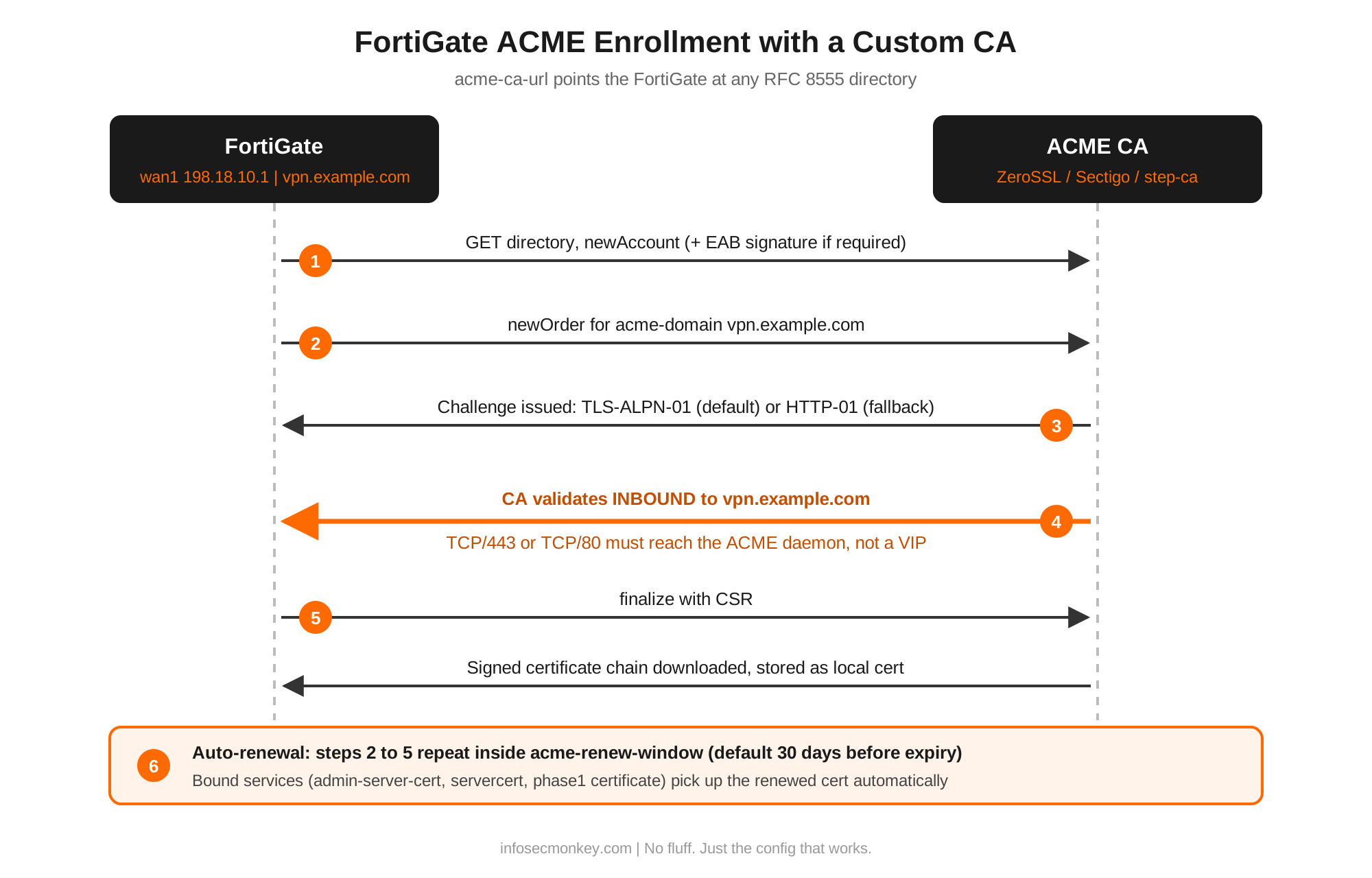
- The FortiGate fetches the CA’s directory and creates an account (with the EAB signature if required).
- It places an order for
vpn.example.com. - The CA issues a challenge. FortiOS answers with TLS-ALPN-01 on TCP/443 by default. If 443 is already held by a FortiGate daemon (HTTPS admin, Agentless VPN), it falls back to HTTP-01 on TCP/80.
- The CA connects inbound to the FQDN to validate the challenge.
- The FortiGate finalizes the order with a CSR, downloads the signed chain, and stores it as a local certificate.
- Renewal repeats steps 2 through 5 automatically inside the renewal window (30 days before expiry by default).
3. Step-by-Step Implementation Workflow
Step 1: Confirm DNS and outbound reachability
Goal: Prove the CA will find your FortiGate and the FortiGate can reach the CA before touching config.
Action: From a host outside your network, resolve the FQDN. From the FortiGate, reach the CA’s directory host.
# From an external host
dig +short vpn.example.com
198.18.10.1
# From the FortiGate CLI
execute ping acme.zerossl.comGUI verification: None. If dig returns the wrong IP or nothing, stop and fix DNS. Every other step depends on it.
Step 2: Clear port conflicts on the ACME interface
Goal: Make sure TCP/443 or TCP/80 on wan1 is answered by the ACME daemon, not something else.
Action: Look for VIPs or virtual servers on the WAN IP using 80 or 443, and see which daemons currently hold those ports.
show firewall vip | grep -f 198.18.10.1
show firewall vip | grep -f extport
diagnose sys tcpsock | grep 443
diagnose sys tcpsock | grep :80
Rules of thumb:
- A VIP on the WAN IP without port forwarding captures every port, including the ACME challenge.
- A port-forward VIP on 443 or 80 captures that port. The challenge is delivered to the server behind the VIP, not the FortiGate.
- If HTTPS admin or Agentless VPN holds 443, ACME falls back to 80. If something also holds 80, enrollment fails.
- Fortinet’s provisioning checklist expects HTTP and HTTPS in
allowaccesson the ACME interface. Treat that as an enrollment and renewal requirement and scope the exposure deliberately (see Troubleshooting).
GUI verification: Policy & Objects > Virtual IPs, filter by interface wan1 and check for external ports 80/443.
Step 3: Set the ACME listening interface
Goal: Tell FortiOS which interface answers challenges and sources ACME traffic. This is global, not per certificate.
Action:
config system acme
    set interface "wan1"
end
get system acmeGUI verification: When you create a Let’s Encrypt certificate in the GUI, the ACME interface field reflects this same setting.
Correction from common examples:
set interface does not exist under config vpn certificate local. It belongs under config system acme.Step 4 (Path C only): Import the internal root CA
Goal: For an internal step-ca, the issued leaf chains to a private root. Clients and the FortiGate need that root to validate the chain.
Action: Import the step-ca root certificate as a CA certificate.
execute vpn certificate ca import tftp <root_ca.crt> <tftp_server_ip>Then confirm the step-ca host can reach 198.18.10.1 (or whatever IP vpn.example.com resolves to internally) on 443 or 80. For an internal CA, “publicly reachable” really means “reachable from the CA”.
GUI verification: System > Certificates > Remote CA Certificate lists the imported root.
Step 5: Create the ACME certificate object
Goal: Point enrollment at your chosen CA directory.
Action, Path A (no EAB: Let’s Encrypt staging, step-ca without EAB):
config vpn certificate local
    edit "ACME_VPN_Cert"
        set enroll-protocol acme2
        set acme-ca-url "<directory_url>"
        set acme-domain "vpn.example.com"
        set acme-email "<admin@example.com>"
        set acme-renew-window 30
    next
end
Action, Path B (EAB required: ZeroSSL, Sectigo, Google Trust Services; FortiOS 7.6.3+):
config vpn certificate local
    edit "ACME_VPN_Cert"
        set enroll-protocol acme2
        set acme-ca-url "https://acme.zerossl.com/v2/DV90"
        set acme-domain "vpn.example.com"
        set acme-email "<admin@example.com>"
        set acme-eab-key-id "<EAB_KID>"
        set acme-eab-key-hmac "<EAB_HMAC_KEY>"
        set acme-renew-window 30
    next
end
Notes:
- FortiOS prompts you to accept the CA’s Terms of Service. Answer
yor the object is not saved. - One domain per certificate. No wildcards and no extra SANs. The SAN is filled from
acme-domain. acme-renew-windowis the number of days before expiry that renewal starts (default 30). Leave it at 30 for 90-day and 200-day certificates.acme-rsa-key-size(2048, 3072, 4096) is available on many builds if your policy mandates a key size.- There is no
acme-challenge-typesetting. Challenge selection is automatic (TLS-ALPN-01 first, HTTP-01 fallback).
GUI verification: System > Certificates > Local Certificate shows ACME_VPN_Cert with source ACME. In 7.0.2+ the GUI only creates Let’s Encrypt certificates, but it does display CLI-created custom CA certificates.
Step 6: Watch enrollment complete
Goal: Confirm the CA issued the certificate and the issuer is the one you intended.
Action:
get vpn certificate local details ACME_VPN_Certdiagnose sys acme status-full vpn.example.comget system acme statusExpected success output (abbreviated):
== [ ACME_VPN_Cert ]
        Name:        ACME_VPN_Cert
        Subject:     CN = vpn.example.com
        Issuer:      C = AT, O = ZeroSSL, CN = ZeroSSL RSA Domain Secure Site CA
        Valid from:  2026-10-12 19:52:10  GMT
        Valid to:    2027-01-10 23:59:59  GMT
ACME details:
        Status: The certificate for the managed domain has been
                renewed successfully and can be used ...
        Staging status: Nothing in staging
In status-full, look for "finished": true and "errors": 0.
GUI verification: System > Certificates, open ACME_VPN_Cert and check Issuer and Valid to.
Step 7: Bind the certificate to services
Goal: Present the new certificate wherever users hit the FQDN.
HTTPS admin GUI:
config system global
    set admin-server-cert "ACME_VPN_Cert"
end
Agentless VPN (formerly SSL VPN web mode):
config vpn ssl settings
    set servercert "ACME_VPN_Cert"
end
Correction from common examples:
config system settings / set ssl-vpn-cert is not a valid path. The SSL VPN / Agentless VPN certificate is servercert under config vpn ssl settings. SSL VPN tunnel mode was removed in 7.6.3 and replaced by IPsec, so the tunnel-mode use case moves to Step 7c.IKEv2 dial-up IPsec (certificate-authenticated gateway, e.g. IKEv2 + EAP):
config vpn ipsec phase1-interface
    edit "<dialup_tunnel>"
        set ike-version 2
        set authmethod signature
        set certificate "ACME_VPN_Cert"
    next
end
Clients validating the gateway by FQDN now see a CA they already trust, instead of a self-signed Fortinet factory certificate.
GUI verification: System > Settings > HTTPS server certificate, and VPN > Agentless VPN Settings > Server certificate.
4. Verification and Validation
Test from outside the network so you see what users see.
openssl s_client -connect vpn.example.com:443 \
  -servername vpn.example.com </dev/null 2>/dev/null \
  | openssl x509 -noout -subject -issuer -dates
Expected:
subject=CN = vpn.example.com
issuer=C = AT, O = ZeroSSL, CN = ZeroSSL RSA Domain Secure Site CA
notBefore=Oct 12 00:00:00 2026 GMT
notAfter=Jan 10 23:59:59 2027 GMT
Check that the full chain is served and validates:
openssl s_client -connect vpn.example.com:443 \
  -servername vpn.example.com </dev/null 2>/dev/null \
  | grep -E "Verify return code"
Expected: Verify return code: 0 (ok)
curl -sSvI https://vpn.example.com 2>&1 \
  | grep -E "subject|issuer|SSL certificate verify"
Expected: SSL certificate verify ok.
Finally, plan to check again after the first renewal. A certificate that issued once but cannot renew is the most common ACME failure, and it shows up 60 to 170 days after you stopped thinking about it. Let’s Encrypt stopped sending expiry reminder emails in 2025, so do not count on the CA to warn you. Put a FortiGate automation stitch or your monitoring platform on certificate expiry.
5. Troubleshooting and Gotchas
Gotcha 1: Enrollment never completes (port collision or VIP capture)
Symptom: status-full shows repeated errors. The CA reports a connection or authorization failure. HTTP-01 errors may read “The key authorization file from the server did not match this challenge.”
Diagnose:
diagnose sys acme status-full vpn.example.com
show firewall vip | grep -f extport
diagnose sys tcpsock | grep :80
Resolution: Remove or rescope the VIP that owns 80/443 on the ACME IP, move the conflicting service to another port, or move ACME to another interface with its own public IP. If probe-response is listening on port 80 on that interface, move it. Then force a retry:
diagnose sys acme regenerate-client-configGotcha 2: EAB errors (ZeroSSL, Sectigo, Google)
Symptom: Account creation fails with an externalAccountRequired or unauthorized error, or the CLI rejects the HMAC with “Invalid EAB HMAC string (Must be base64url encoded).”
Diagnose: get system status to confirm you are on 7.6.3 or later. Confirm the KID and HMAC are from the same EAB pair.
Resolution:
- Below 7.6.3: upgrade. There is no workaround.
- 7.6.4 and later known issue (Fortinet ref. 1251941): the CLI can reject valid base64url HMAC strings. Fortinet’s documented workaround is to back up the configuration, add
acme-eab-key-idandacme-eab-key-hmacto the certificate object in the file, and restore it. Check the release notes for your build before doing this in production.
Gotcha 3: First issuance works, renewal silently fails
Symptom: The certificate expires even though ACME was “working”. Usually something changed after enrollment: a new VIP, a moved admin port, a firewall rule upstream, or allowaccess tightened on the WAN.
Diagnose:
get system acme status
diagnose sys acme status-full vpn.example.com
Resolution: Fix the reachability change, then run diagnose sys acme regenerate-client-config. If the certificate is bound to Agentless VPN or admin access and renewal keeps colliding with that binding, temporarily point those services back at the built-in Fortinet certificate, regenerate, then rebind. Expect a brief interruption for active sessions when the bound certificate changes.
Gotcha 4: “Security scan flagged the FortiGate”
Symptom: A vulnerability scanner reports a self-signed certificate on 443 or cleartext HTTP on 80 on the ACME interface.
Resolution: This is expected ACME behavior. TLS-ALPN-01 presents a short-lived self-signed validation certificate (RFC 8737), and HTTP-01 is plain HTTP on port 80 by design. Document it as an accepted finding tied to the ACME interface, or move ACME to a dedicated IP so the finding does not land on your production admin or VPN address.
Gotcha 5: Internal step-ca issues, clients still warn
Symptom: Enrollment succeeds against step-ca, but browsers or FortiClient show an untrusted-issuer warning.
Resolution: The issued certificate is only trusted where your private root is trusted. Push the step-ca root to endpoints via GPO, MDM, or EMS. Internal ACME is a good fit for internal-only FQDNs. Anything reached from unmanaged devices needs a public CA.
Other limits worth knowing
- One FQDN per certificate. Need two names? Two certificate objects.
- No wildcard certificates. FortiOS does not do DNS-01.
- VDOM mode: global certificates only. ACME interface must be in the management VDOM.
- Rate limits: Hammering a production CA while debugging can lock you out (Let’s Encrypt returns “too many certificates already issued”). Debug against a staging directory first.
- FortiGate cannot ACME-enroll on behalf of a server behind it. A VIP can forward the challenge to a server running its own ACME client, but the certificate then lives on that server, not the FortiGate.
6. Quick Reference
| Task | Command |
|---|---|
| Set ACME interface | config system acme / set interface "wan1" |
| Show ACME settings | get system acme |
| ACME account and status | get system acme status |
| Full per-domain ACME log | diagnose sys acme status-full <fqdn> |
| Force regeneration and retry | diagnose sys acme regenerate-client-config |
| Certificate details | get vpn certificate local details <cert_name> |
| Custom CA URL | set acme-ca-url "<directory_url>" |
| EAB (7.6.3+) | set acme-eab-key-id / set acme-eab-key-hmac |
| Renewal window | set acme-renew-window <days> |
| Bind to admin GUI | config system global / set admin-server-cert |
| Bind to Agentless VPN | config vpn ssl settings / set servercert |
| Bind to IKEv2 gateway | config vpn ipsec phase1-interface / set certificate |
| Check ports in use | diagnose sys tcpsock |
References
- Fortinet Docs: Automatically provision a certificate (FortiOS Administration Guide)
- Fortinet Docs: ACME External Account Binding support (FortiOS 7.6.3 New Features)
- Fortinet Community: ACME certificate with certificate management services other than Let’s Encrypt on v7.0.2 and above
- Fortinet Community: Troubleshooting Tip: ACME certificate provisioning
- Fortinet Community: Troubleshooting Tip: Let’s Encrypt certificate did not automatically renew
- Fortinet Community: Let’s Encrypt failing to provision due to VIP configured on port 443
- ZeroSSL: ACME documentation (server URL and EAB credentials)
- CA/Browser Forum Ballot SC-081v3: Schedule of Reducing Validity and Data Reuse Periods
- RFC 8555 (ACME), RFC 8737 (TLS-ALPN-01)
Recent posts
-

-

DNS is one of those technologies that quietly underpins... Full Story
-

BGP issues on FortiGate firewalls usually trace back to... Full Story
-

Every time your laptop talks to your router, a... Full Story
-

If you've spent any time configuring NAT on a... Full Story
-

If you have spent any time configuring firewall policies... Full Story
-

High availability on FortiGate is one of those features... Full Story
-

If you've configured SD-WAN on a FortiGate, you've almost... Full Story
-

FortiLink is the management protocol that turns a FortiSwitch... Full Story
-

FortiSwitches are pretty rock solid from Mean Time Between... Full Story
-

This is a quicky tip. Have you ever gone... Full Story
-

DNS is one of those quiet pieces of internet... Full Story
-

This article is an updated version of the previous... Full Story
-

You will add ns2 as a secondary (slave) BIND9... Full Story
-

In the process of deploying my lab, I needed... Full Story
-

RFC 8805, used to be known as Self-Correcting IP... Full Story
-

Years back, I wrote an article about certificate pinning. ... Full Story
-

FortiGates have the ability to send alerts to Microsoft... Full Story
-

In this post, I am going to walk through... Full Story
-

Troubleshooting VoIP on a FortiGate can feel like trying... Full Story
-

Prior to FortiOS 7.0, there were three commands to... Full Story
-

In this post, I am going to go over... Full Story
-

What we are going to do: We are going... Full Story
-

Choosing between FGCP (FortiGate Clustering Protocol) and FGSP (FortiGate... Full Story
-

Creating a VLAN on macOS (The "Pro" Move) A... Full Story
-

This blog post explores the logic behind how macOS... Full Story
-

Pretty Fly for a Wi-Fi Tell My Wi-Fi Love... Full Story
-

Part of my daily gig is creating BoMs (Bill-of-Materials)... Full Story
-

ICMP introduces several security risks, but careful filtering, rate... Full Story
-

The command diag debug application dhcps -1 enables full... Full Story
-

In the world of FortiOS, execute tac report is... Full Story
-

LLDP; What is it The Link Layer Discovery Protocol... Full Story
-

What it actually does When you run diagnose fdsm... Full Story
-

Monkey Bites are bite-sized, high-impact security insights designed for... Full Story
-

I have run macOS in macOS with Parallels but... Full Story
-

Don't be confused with my other FortiNAC posts where... Full Story
-

This is the third session in a multi-part article... Full Story
-

Today I was configuring key-based authentication on a FortiGate... Full Story
-

Netcat, often called the "Swiss Army knife" of networking,... Full Story
-

At its core, IEEE 802.1X is a network layer... Full Story
-

In case you did not see the previous FortiNAC... Full Story
-

This is our 5th session where we are going... Full Story
-

Now that we have Wireshark installed and somewhat configured,... Full Story
-

The Philosophy of Packet Analysis Troubleshooting isn't about looking... Full Story
-

Managing Windows Firewall from the Command Line: netsh, PowerShell... Full Story
-

Chrome CVE-2026-106378: Patching the macOS Sandbox Escape No fluff.... Full Story
-

OpenLDAP Server on Ubuntu 24.04: Deploy, Configure and Use... Full Story