
At its core, IEEE 802.1X is a network layer... Full Story
By Manny Fernandez
March 5, 2026
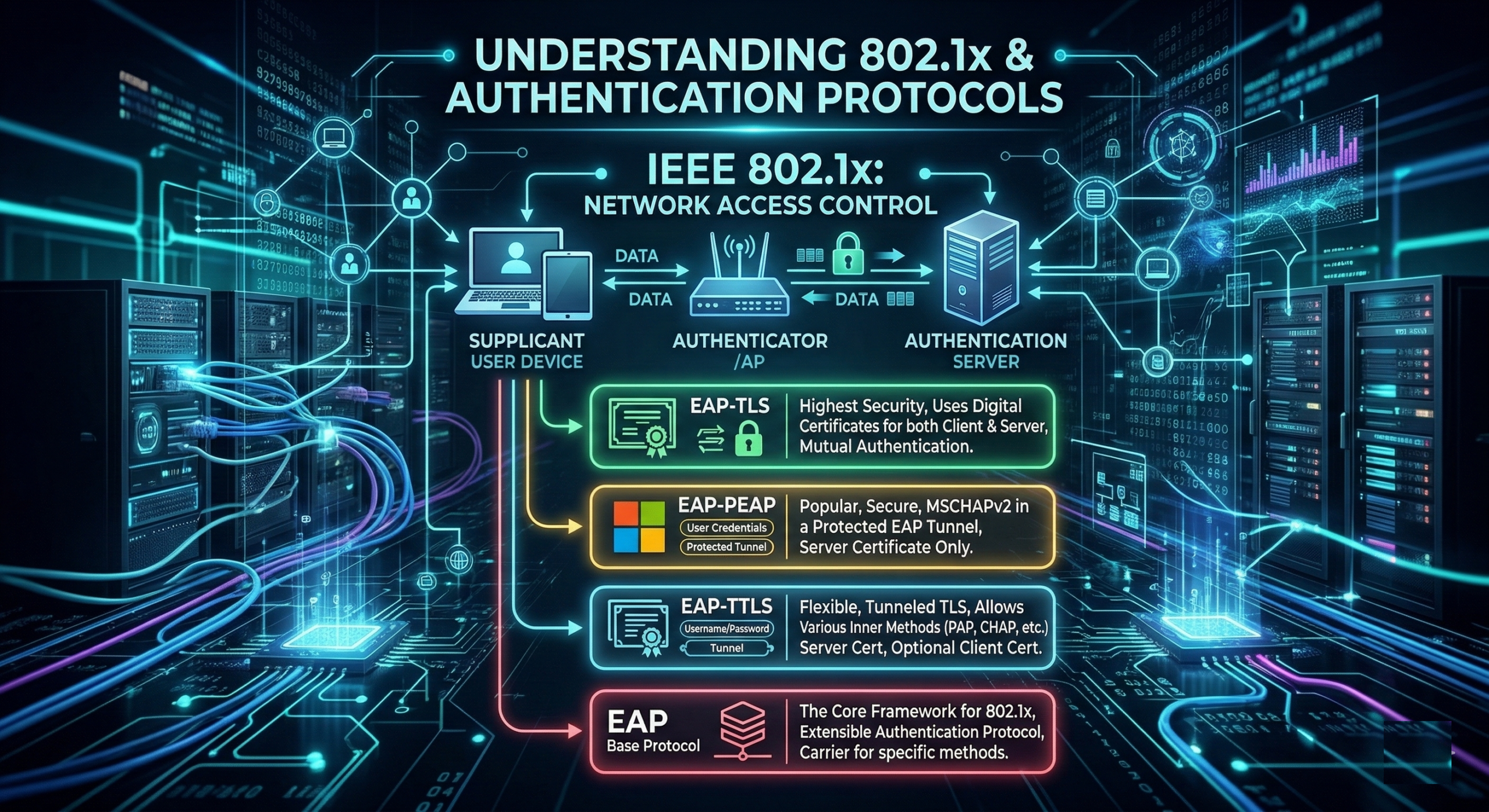
802.1X EAP Protocols Explained
At its core, IEEE 802.1X is a network layer protocol used for Port-based Network Access Control (PNAC). It provides an authentication mechanism for devices trying to attach to a LAN or WLAN. Think of it as a “bouncer” at the door of your network. Before a device is allowed to send any regular data (like web browsing or email), it must first prove its identity.
EAP (Extensible Authentication Protocol) and its various “flavors” are the heart of 802.1X, a standard for port-based network access control. Think of 802.1X as the “bouncer” at the door, while EAP is the conversation that determines if you’re on the guest list.
The 802.1X Roles
To understand the protocols, you first need to know the three players involved:
Supplicant: The device (laptop, phone, IoT) requesting access.
Authenticator: The network device (switch or wireless AP) that acts as an intermediary.
Authentication Server: The “brain” (usually a RADIUS server like FortiAuthenticator, Cisco ISE or FreeRADIUS) that verifies credentials.
EAP (Extensible Authentication Protocol)
EAP is not a single protocol but a framework. It provides a standard way for a supplicant and an authentication server to talk to each other without the switch/AP needing to understand the specific language of the credentials.
How it works with 802.1X
The Authenticator sends an EAP-Request/Identity to the Supplicant.
The Supplicant responds with an EAP-Response/Identity.
The Authenticator encapsulates this into a RADIUS packet and sends it to the Authentication Server.
The Server and Supplicant then negotiates which specific EAP method to use.
EAP-TLS (EAP-Transport Layer Security)
EAP-TLS is considered the “gold standard” for security. It relies on Digital Certificates on both the client and the server.
Key Features
Mutual Authentication – The server proves its identity to the client, and the client proves its identity to the server.
No Passwords – Since it uses certificates, there are no passwords to be cracked or stolen via phishing.
Complexity – Requires a Public Key Infrastructure (PKI) to manage and issue certificates to every device.
Process
A TLS tunnel is established between the client and server.
The client presents its certificate; the server validates it.
Because both trust the same Certificate Authority (CA), access is granted.
EAP-PEAP (Protected EAP)
PEAP was designed to be more “user-friendly” than TLS because it doesn’t require certificates on every client device—only on the server.
Key Features
Two-Phase Process – It first creates a secure TLS tunnel (Phase 1), then sends credentials through that tunnel (Phase 2).
Inner Method – Inside the tunnel, it usually uses MS-CHAPv2 (username/password).
Popularity – This is what most corporate Wi-Fi networks use (where you type in your AD username and password).
Process
The Server sends its certificate to the client.
The client validates the server (ensuring they aren’t talking to a “rogue” AP).
A secure tunnel is formed.
The user’s password/hash is sent safely through the tunnel.
EAP-TTLS (Tunneled TLS)
Similar to PEAP, EAP-TTLS creates a secure tunnel using a server-side certificate.
Key Features
Flexibility – While PEAP is largely tied to Microsoft standards (MS-CHAPv2), TTLS can support older or different authentication “inner methods” like PAP, CHAP, or MS-CHAP.
Legacy Support – It’s often used in environments that need to support non-Windows systems or specific legacy databases.
Recent posts
-

-

In case you did not see the previous FortiNAC... Full Story
-

This is our 5th session where we are going... Full Story
-

Now that we have Wireshark installed and somewhat configured,... Full Story
-

The Philosophy of Packet Analysis Troubleshooting isn't about looking... Full Story