
Don't be confused with my other FortiNAC posts where... Full Story
By Manny Fernandez
August 20, 2019
Conditional DNS Forwarding with FortiGate and FortiProxy
Today I was working with a customer that was running FortiProxy in a Proof-of-Concept. One of the requirements was to have certain domains use a particular DNS server while all other traffic destined for all other domains, go straight out to 4.2.2.2 and 8.8.8.8. This is called Conditional DNS Forwarding and it is supported by both the FortiGates and the FortiProxy. In this example, I will choose a fictitious name for a city and use .com, .net, and .org as the domains I want to forward to internal DNS.
There are two parts to this configuration.
- Enable recursive DNS on the particular interface users will see and query.
- Configure the domain-names and the DNS servers they should be going to resolve.
The fictitious name will be City1. In my fake environment, city1.com will go to 10.243.13.1, 10.243.13.10, 10.243.13.100 as the DNS Servers, city1.net will go to 10.243.16.1, 10.243.16.10, 10.243.16.100 and city1.org will go to 10.244.14.1, 10.244.14.10, 10.244.14.100
Here we go:
Enable Recursive DNS on Interface
First let’s enable the recursive DNS Services on the interface(s) where the DNS queries will come from.
Graphical User Interface Option
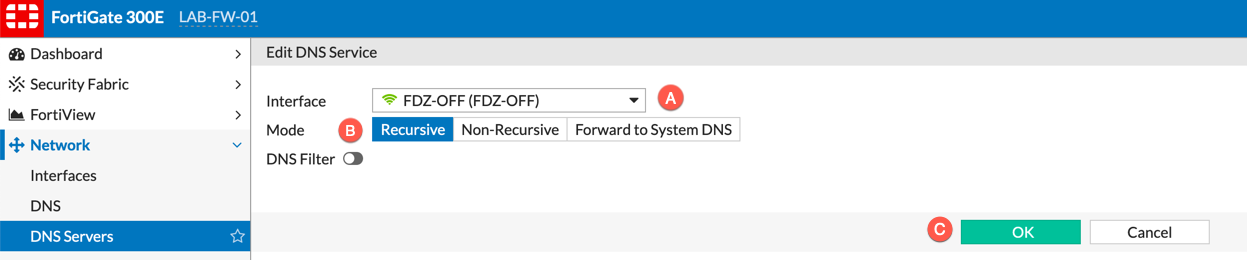
A. Interface the FortiProxy / FortiGate will listen to DNS queries on.
B. Turn on the `Recursive` mode.
C. Press OK.
Command Line Interface Option
config system dns-server
       edit "FDZ-OFF"
            set mode recursive
            set dnsfilter-profile ''
       next
end
#FDZ-OFF is the name of my interface
Configuring Conditional Queries
Since we are using three DNS servers, you cannot do this via the GUI so there will only be a CLI representation of this command.
config system dns-database
     edit "city1.com"
         set domain "city1.com"
         set authoritative disable
         set forwarder "10.243.13.1" "10.243.13.10" "10.243.13.100"
     next
     edit "city1.net"
         set domain "city1.net"
         set authoritative disable
         set forwarder "10.243.16.1" "10.243.16.10" "10.243.16.100"
     next
     edit "city1.org"
         set domain "city1.net"
         set authoritative disable
        set forwarder "10.244.14.1" "10.244.14.10" "10.244.14.100"
     next
end
DNS Flow
We can see above that the three domains for city1 (.com, .net and .org respectively). All DNS queries destined to any of the three domains (city1.com, city1.net, city1.org) will be sent to its three DNS servers. All other requests will be sent to the DNS Servers configured under Network , DNS.
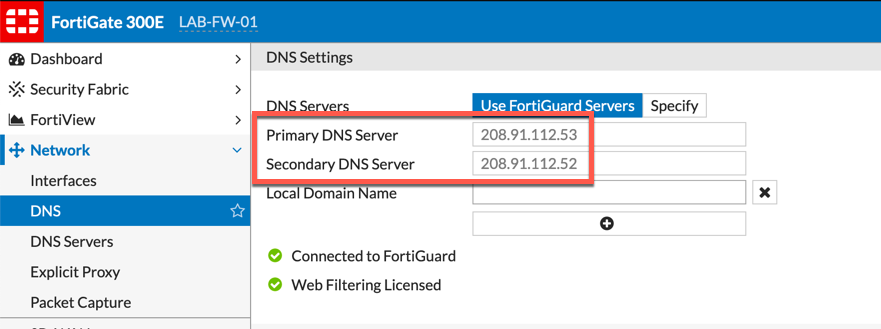
The current DNS servers are from a FortiGate, FortiProxy configuration is below.
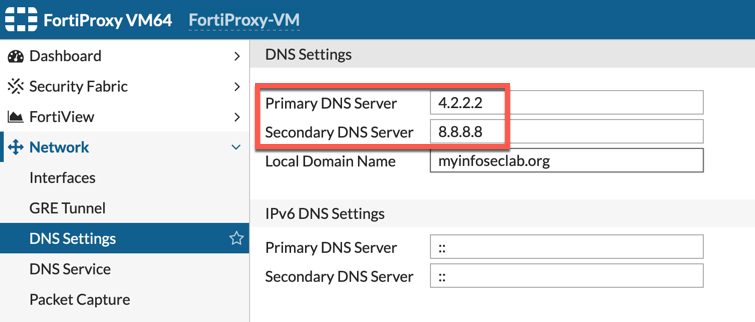
In FortiProxy, the section is labeled differently. In the Proxy model, is is labeled DNS Settings where the Fortigate is only DNS.
Hope this helps.
Recent posts
-

-

This is the third session in a multi-part article... Full Story
-

Today I was configuring key-based authentication on a FortiGate... Full Story
-

Netcat, often called the "Swiss Army knife" of networking,... Full Story
-

At its core, IEEE 802.1X is a network layer... Full Story
-

In case you did not see the previous FortiNAC... Full Story
-

This is our 5th session where we are going... Full Story
-

Now that we have Wireshark installed and somewhat configured,... Full Story
-

The Philosophy of Packet Analysis Troubleshooting isn't about looking... Full Story