
At its core, IEEE 802.1X is a network layer... Full Story
By Manny Fernandez
February 5, 2026

Maximum Transmission Unit (MTU)
In networking, MTU (Maximum Transmission Unit) is the largest size of a packet or frame, specified in octets (eight-bit bytes), that can be sent in a single network layer transaction.
Think of it like the height limit on a highway bridge: if a truck is too tall to fit under the bridge, it either has to find a different route or break the load into smaller pieces to pass through.
How MTU Works
Most networks, including the internet, primarily use Ethernet, which has a standard MTU of 1500 bytes. This means that any single packet sent from your computer cannot exceed this size without being modified.
A standard packet consists of:
-
The Payload – The actual data being sent (e.g., part of an image or a snippet of an email).
-
The Headers – The “envelope” information (IP and TCP headers) that tells the network where the data is going.
Fragmentation
When a packet encounters a network link with an MTU smaller than its current size, the router must perform fragmentation. The router breaks the packet into smaller pieces, each with its own header, so they can fit through the restricted “pipe.”
While this ensures the data arrives, it creates overhead:
-
Increased CPU Usage: Routers must work harder to slice the data.
-
Latency: The receiving device must wait for all fragments to arrive and reassemble them.
-
Risk of Loss: If just one fragment is lost, the entire original packet must be retransmitted.
Why MTU Should Matter To You
If you are managing network equipment, specifically firewalls or VPN tunnels, MTU mismatches are a common “silent killer” of connectivity.
-
The “
Black Hole” Effect – If a device has Path MTU Discovery (PMTUD) disabled or a firewall drops the necessary ICMP messages, a packet that is too large will simply be dropped without notifying the sender. To the user, this looks like a website that “hangs” halfway through loading. -
MSS Clamping – To avoid fragmentation in VPNs, engineers often use
MSS(Maximum Segment Size) Clamping. This tells the two talking devices to limit their data chunks right at the start of the connection so the final packet (data + headers) never exceeds the MTU of the tunnel.
To find the optimal MTU for your network, you can use a ping sweep method. This involves sending ping packets of varying sizes and telling the network not to fragment them. If the packet is too large, the network will return an error.
The Testing Process
You will use the ping command with two specific flags:
-
-D: Sets the “Don’t Fragment” (DF) bit. -
-s: Specifies the size of the packet payload.
-
Open Terminal.
-
Start with the standard size (
1472 bytes) by running:ping -D -s 1472 google.com(Note: We use 1472 because 28 bytes are reserved for the IP and ICMP headers. .) -
Analyze the result:
-
Success: If you get a reply, your MTU is at least 1500.
-
Failure: If you see
ping: sendto: Message too long, the packet is too big.
-
Finding the “sweet spot”
If 1472 failed, decrease the number by 10 or 20 until the pings pass, then slowly increase it by 1 until you find the highest number that works.
Example Calculation: If the highest successful payload size you found was 1464, your optimal MTU is:
1464 (payload) + 28 (headers) = 1492 MTUWhy this happens in Lab Environments
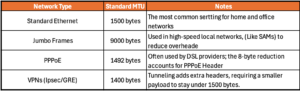
If you are working with specialized setups, like VPN tunnels, PPPoE, or SD-WAN, you will almost always find that you need a lower MTU (like 1492 or 1400). This is because those technologies “wrap” your data in their own headers, leaving less room for the actual payload.
Common MTU Value
Depending on the technology being used, MTU sizes can vary significantly.
What are Jumbo Frames?
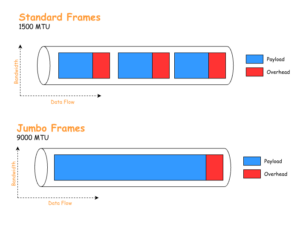
Jumbo Frames are Ethernet frames that have been configured to carry a payload larger than that limit, typically up to 9000 bytes.
The primary goal of using Jumbo Frames is to increase data transfer efficiency. By packing more data into a single “envelope,” the network spends less time processing headers and more time moving actual data.
Key Benefits
Reduced CPU Overhead: Every packet requires the CPU of the sending and receiving devices to process headers and check for errors. Sending one 9000-byte frame instead of six 1500-byte frames reduces the “interrupt” load on the CPU significantly.
Higher Throughput: Because there are fewer headers taking up space on the wire, the overall “goodput” (actual data speed) increases.
Improved Efficiency for Large Files: They are ideal for high-bandwidth tasks like iSCSI storage, server-to-server backups, and video editing over a network.
The “All or Nothing” Rule
The most critical thing to know about Jumbo Frames is that every device in the data path must support and be configured for them. This includes:
The sending server/NIC.
Every switch in between.
The receiving server/NIC.
Warning: If a 9000-byte frame hits a switch or a router that is only configured for 1500 bytes, that packet will typically be dropped immediately. This often leads to partial connectivity issues where small “heartbeat” packets pass through, but actual data transfers fail.
Common Use Cases
You will rarely see Jumbo Frames on the general internet or a standard office LAN. They are almost exclusively used in controlled environments:
Storage Area Networks (SANs): For connecting servers to high-speed storage arrays.
Data Center Interconnects: For moving massive amounts of data between virtualized hosts (like Proxmox or ESXi clusters).
High-Performance Computing: Scientific or research clusters requiring low-latency, high-volume data moves.
Recent posts
-

-

In case you did not see the previous FortiNAC... Full Story
-

This is our 5th session where we are going... Full Story
-

Now that we have Wireshark installed and somewhat configured,... Full Story
-

The Philosophy of Packet Analysis Troubleshooting isn't about looking... Full Story